
faisalthaheem/open-lpr
faisalthaheem/open-lpr has 236 GitHub stars and 33 forks. GitHot measured 0 stars in 24 hours. Last checked 2026-11-15 23:42 UTC. Last push 2026-11-11.
What you can do
- 🤖 In-Process Detection: YOLOX-tiny plate detector running on ONNX Runtime — ~60ms per image on CPU, no GPU and no external API call
- 🔍 On-Device OCR: PP-OCRv5 CTC recogniser reads plate text with confidence scores; CPU inference needs only onnxruntime
- 🔁 Configurable Backend: PIPELINE_BACKEND=llm switches to a Qwen3-VL vision-language model via any OpenAI-compatible endpoint. Rolling back is one environment variable — no migration, no data rewrite
- 📏 Latency Instrumented: Per-stage and end-to-end durations export as Prometheus histograms against a 0.5s budget
Measured star growth
- in 24h
- 0
- in 7 days
- Collecting history
- in 15 days
- Collecting history
- in 1 month
- Collecting history
Net star changes over overlapping periods, not daily totals. Missing measurements are left blank. Stars measure attention, not software quality.
About
Open Source and Free License Plate Recognition Software
Machine LearningREADME.md
Original🚗 OPEN LPR - License Plate Recognition System




A Django web application with a Next.js SPA frontend that detects and recognises licence plates in images. Plate detection and text recognition run in-process on ONNX models by default — no GPU, no external API. A vision-language-model backend remains available and is selected with one environment variable.
🚨 Important Stability Notice: For production deployments, we strongly recommend using tagged releases instead of the mainline branch. The mainline may contain experimental features and be under active development. See the Production Deployment section for guidance on using stable tagged versions.
📑 Table of Contents
🚀 Live Demo
Try the live demo of Open LPR at: https://openlpr.computedsynergy.com/
Experience the license plate recognition system in action without any installation required!
🌟 Visual Showcase
| Feature | Preview |
|---|---|
| Upload Interface | 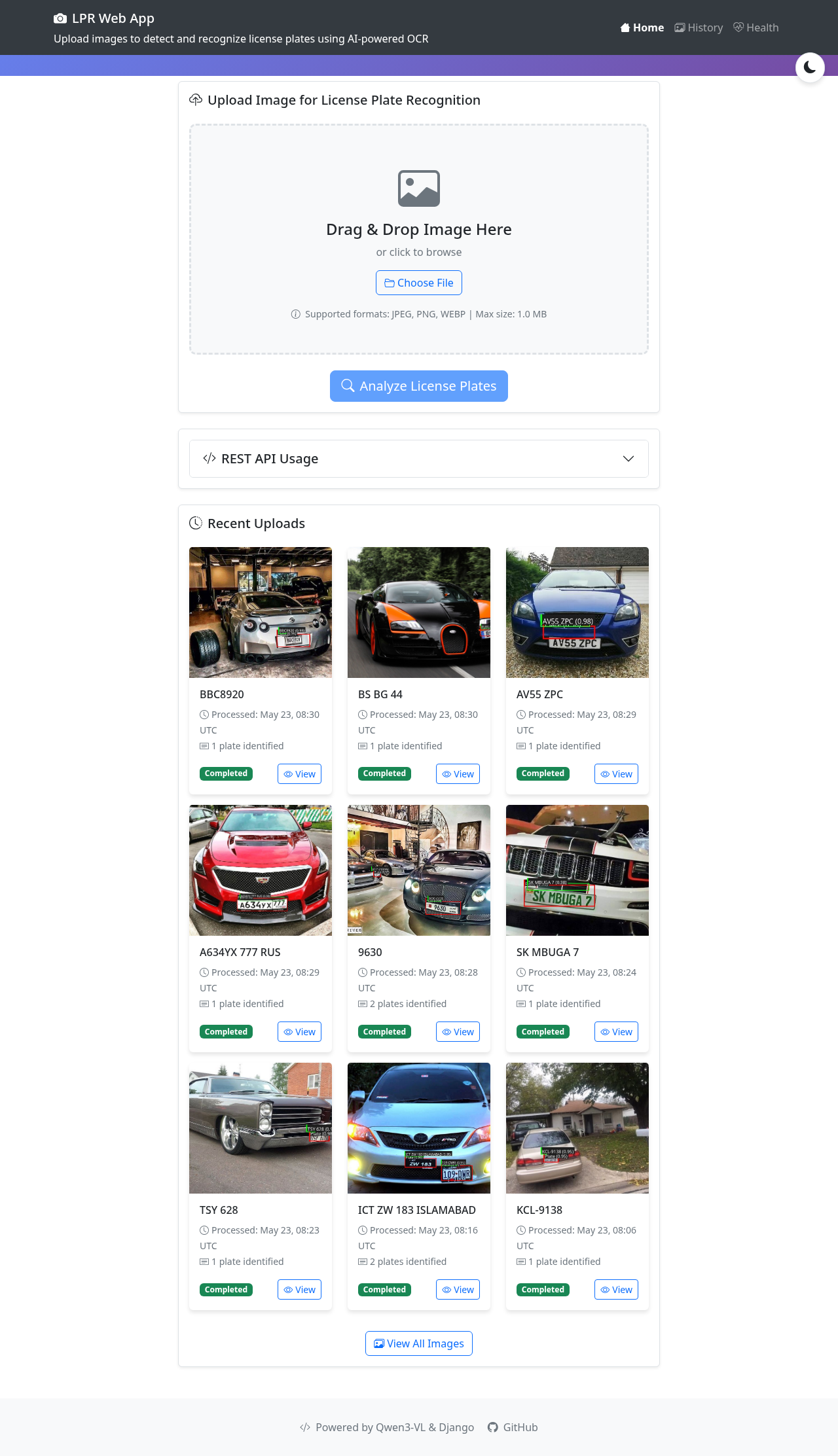 |
| Detection Results | 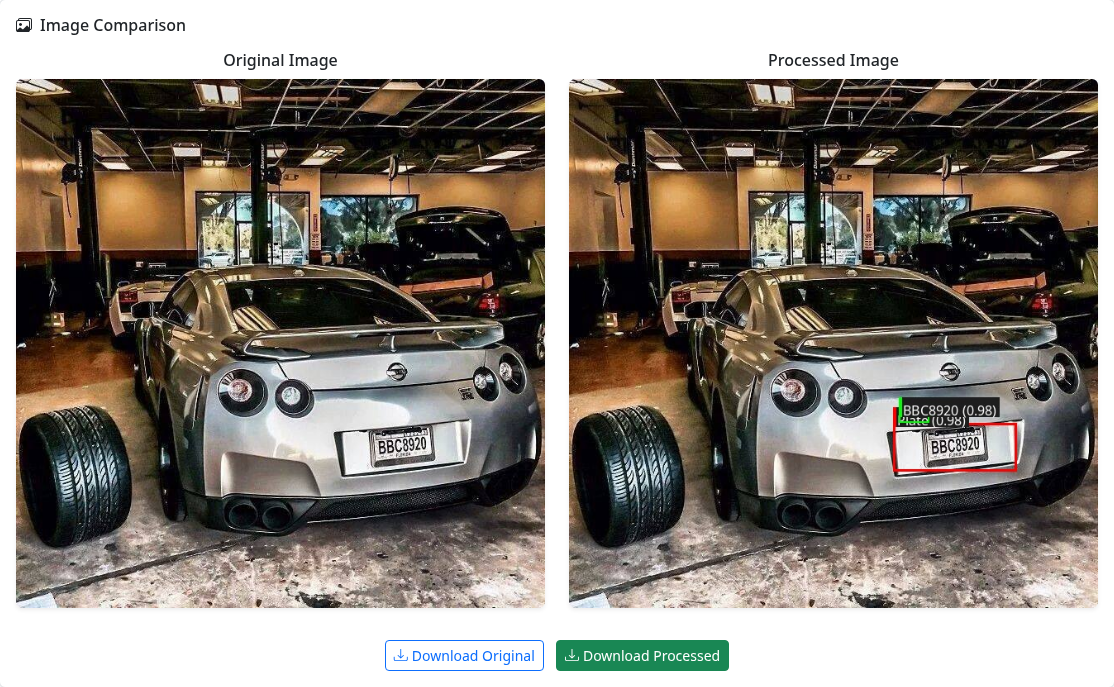 |
| Detection Details | 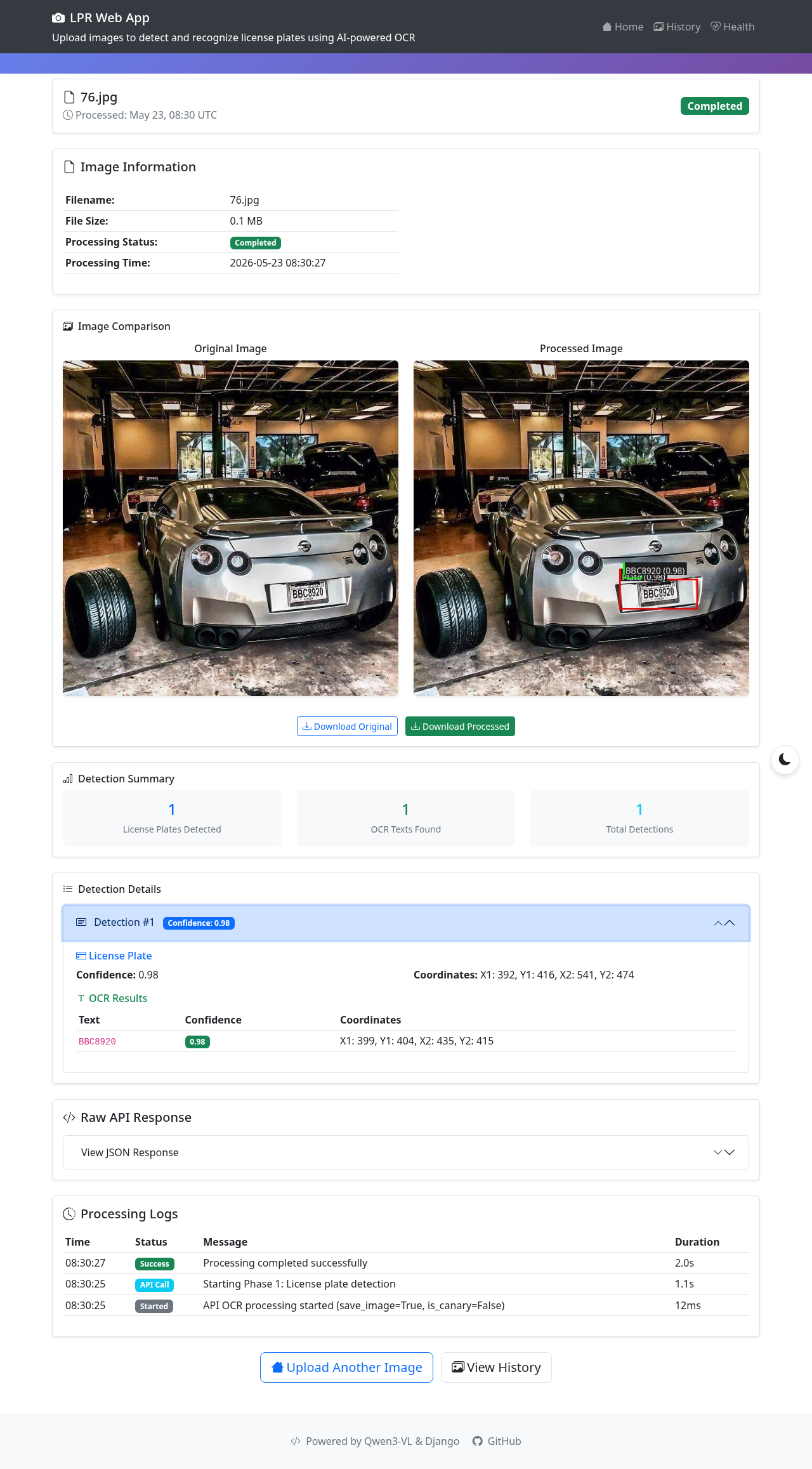 |
| Processed Image | 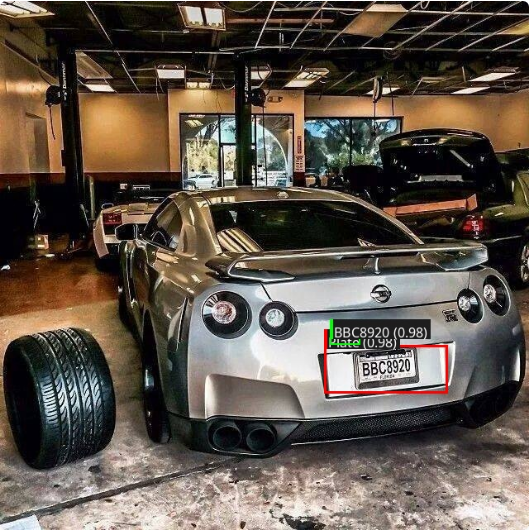 |
✨ Features
- 🤖 In-Process Detection: YOLOX-tiny plate detector running on ONNX Runtime — ~60ms per image on CPU, no GPU and no external API call
- 🔍 On-Device OCR: PP-OCRv5 CTC recogniser reads plate text with confidence scores; CPU inference needs only
onnxruntime - 🔁 Configurable Backend:
PIPELINE_BACKEND=llmswitches to a Qwen3-VL vision-language model via any OpenAI-compatible endpoint. Rolling back is one environment variable — no migration, no data rewrite - 📏 Latency Instrumented: Per-stage and end-to-end durations export as Prometheus histograms against a 0.5s budget
- 🎯 Bounding Box Visualization: Draws colored boxes around detected plates and OCR text
- 📤 Drag & Drop Upload: Modern, user-friendly file upload interface
- 💾 Permanent Storage: All uploaded and processed images are saved permanently
- 🔄 Side-by-Side Comparison: View original and processed images together
- 🔎 Search & Filter: Browse and search through processing history
- 📱 Responsive Design: Works on desktop, tablet, and mobile devices
- 🌙 Dark Mode: Full light/dark theme support with system preference detection
- 🐳 Docker Support: Easy deployment with Docker and Docker Compose
- 🔌 REST API: Full API for programmatic access
- ⚛️ Next.js SPA: Modern React-based single-page application with Tailwind CSS
- 📖 Storybook: Component development environment with stories for all UI components
🛠️ Technology Stack
| Backend | Inference | Frontend | Database | Deployment |
|---|---|---|---|---|
 |
 |
 |
 |
 |
 |
 |
 |
 |
 |
Inference runs locally by default. The vision-language-model path
(Qwen3-VL or any OpenAI-compatible endpoint) is still supported via
PIPELINE_BACKEND=llm.
🚀 Quick Start
Click to expand
Model Artifacts
PIPELINE_BACKEND defaults to local, which needs three ONNX artifacts
(~37MB total). Under Docker you do not fetch these yourself —
scripts/docker-entrypoint.sh downloads and checksum-verifies them on first boot:
INFO fetch_artifacts plate_yolox_tiny_640.onnx downloaded and verified (20183226 bytes)
INFO fetch_artifacts Local pipeline artifacts verified in /app/model/plate
Mount ./model/plate as a persistent volume. Without one the directory
lives in the container's writable layer, is discarded on every container
replacement, and the download repeats on each redeploy — which also means a
transient network failure at that moment fails an otherwise-healthy deploy.
Artifacts are pinned to a tag (PIPELINE_MODEL_REVISION, default
detector-2026.10.1), so a given deployment version resolves to the same bytes
on every future redeploy. Bumping the revision is an explicit act rather than a
side effect of someone re-uploading to the weights repository's main branch.
For a non-Docker run, or to pre-populate the directory:
mkdir -p model/plate
python lpr_app/pipeline/fetch_artifacts.py --model-dir model/plate
Set PIPELINE_MODEL_DOWNLOAD=false for airgapped installs that populate
PIPELINE_MODEL_DIR from elsewhere (a bake step, an internal mirror, a bind
mount). The presence check still runs, so a misconfigured deployment fails at
startup with a clear message rather than at inference time.
The recogniser and its dictionary are a set. Decoding assumes
len(dict) + 2output classes, so substituting one without the other yields silently wrong text rather than an error. Provenance and licences are documented in the weights repository.
Docker Deployment (Recommended)
The quickest way to get started is with Docker using the profile-based compose file.
🚨 Stability Notice: For production environments, we strongly recommend using tagged releases instead of the mainline branch. See the Production Deployment section for stable version instructions.
🚨 Important Notice: The individual
docker-compose-llamacpp-*.ymlfiles have been removed. Use the profile-based approach withdocker-compose.yaml.
Option 1: CPU Only (Default, No GPU Required)
The default backend needs no GPU profile at all — inference is on-CPU inside the
app container. The cpu/amd-vulkan/nvidia-cuda profiles below exist only for
the optional PIPELINE_BACKEND=llm path:
git clone https://github.com/faisalthaheem/open-lpr.git
cd open-lpr

mkdir -p container-data container-media staticfiles model/plate

docker compose --profile core up -d
docker compose logs -f
The artifacts (~37MB) download on first boot. model/plate is already mounted
by docker-compose.yaml, so keeping it on the host means subsequent redeploys
reuse them.
Option 2: LLM Backend on AMD Vulkan GPU
Rollback path only. Use this to serve inference from a VLM instead of the default
in-process ONNX models, which requires PIPELINE_BACKEND=llm. On-CPU local
inference needs no GPU profile and no LlamaCpp — see Option 1.
# Clone the repository
git clone https://github.com/faisalthaheem/open-lpr.git
cd open-lpr

# Create environment file from template
cp .env.llamacpp.example .env.llamacpp

# Edit the environment file with your settings
nano .env.llamacpp

# Create necessary directories
mkdir -p model_files model_files_cache container-data container-media staticfiles

# LLM backend on AMD Vulkan GPU
docker compose --profile core --profile amd-vulkan up -d

# Check the logs to ensure everything is running correctly
docker compose logs -f
Option 3: LLM Backend on CPU (Universal Compatibility)
Rollback path only. Use this to serve inference from a VLM instead of the default
in-process ONNX models, which requires PIPELINE_BACKEND=llm.
# Clone the repository
git clone https://github.com/faisalthaheem/open-lpr.git
cd open-lpr

# Create environment file from template
cp .env.llamacpp.example .env.llamacpp

# Edit the environment file with your settings
nano .env.llamacpp

# Create necessary directories
mkdir -p model_files model_files_cache container-data container-media staticfiles

# LLM backend on CPU
docker compose --profile core --profile cpu up -d

# Check the logs to ensure everything is running correctly
docker compose logs -f
Option 4: LLM Backend on NVIDIA CUDA GPU
Rollback path only. Use this to serve inference from a VLM instead of the default
in-process ONNX models, which requires PIPELINE_BACKEND=llm. On-CPU local
inference needs no GPU profile and no LlamaCpp — see Option 1.
# Clone the repository
git clone https://github.com/faisalthaheem/open-lpr.git
cd open-lpr

# Create environment file from template
cp .env.llamacpp.example .env.llamacpp

# Edit the environment file with your settings
nano .env.llamacpp

# Create necessary directories
mkdir -p model_files model_files_cache container-data container-media staticfiles

# LLM backend on NVIDIA CUDA GPU
docker compose --profile core --profile nvidia-cuda up -d

# Check the logs to ensure everything is running correctly
docker compose logs -f
Option 5: LLM Backend via External API
Rollback path only. Use PIPELINE_BACKEND=llm to serve inference from an external
OpenAI-compatible API endpoint rather than the default in-process ONNX models.
Uses the same core profile as Option 1 — no inference container either way, only
the backend differs.
# Clone the repository
git clone https://github.com/faisalthaheem/open-lpr.git
cd open-lpr

# Create environment file from template
cp .env.example .env

# Edit the environment file with your API settings
nano .env

# Create necessary directories
mkdir -p container-data container-media staticfiles

# Start the application (core services only)
docker compose --profile core up -d

# Check the logs to ensure everything is running correctly
docker compose logs -f
Docker Compose Files
🚨 Removal Notice: The individual
docker-compose-llamacpp-*.ymlfiles have been removed. Use the profile-based approach withdocker-compose.yaml.
🆕 Profile-Based Docker Compose (Recommended)
The main docker-compose.yml now uses the merge design pattern with profiles for flexible deployment:
Profiles Available:
- core: Core infrastructure (OpenLPR, SPA, Prometheus, Grafana, Blackbox Exporter, Canary). This alone is a complete deployment — the default backend runs inference inside the app container
- cpu: LLM inference on CPU via LlamaCpp (only for
PIPELINE_BACKEND=llm) - amd-vulkan: LLM inference on AMD Vulkan GPU via LlamaCpp (only for
PIPELINE_BACKEND=llm) - nvidia-cuda: LLM inference on NVIDIA GPU via LlamaCpp (only for
PIPELINE_BACKEND=llm)
Note that "CPU inference" is ambiguous here and worth being precise about: the
default backend already infers on CPU inside the app container and needs no
profile at all. The cpu profile means the LLM backend served by LlamaCpp.
Usage Examples:
# Default: local ONNX inference in-process, no GPU and no LlamaCpp
docker compose --profile core up -d

# Rollback: LLM backend on CPU
docker compose --profile core --profile cpu up -d

# Rollback: LLM backend on NVIDIA
docker compose --profile core --profile nvidia-cuda up -d

# Rollback: LLM backend on AMD Vulkan
docker compose --profile core --profile amd-vulkan up -d

# Stop all services
docker compose down
Access Points:
- OpenLPR App: http://lpr.localhost
- Traefik Dashboard: http://traefik.localhost
- Prometheus: http://prometheus.localhost
- Grafana: http://grafana.localhost (admin/admin)
- Blackbox Exporter: http://blackbox.localhost
- Canary Service: http://canary.localhost
For detailed profile documentation, see Docker Profiles Guide.
Removed Individual Compose Files
⚠️ Removed:
docker-compose-llamacpp-amd-vulcan.ymlanddocker-compose-llamacpp-cpu.ymlhave been deleted. Use the profile-based commands above.
| Removed file | Replacement command | Previous behaviour |
|---|---|---|
docker-compose-llamacpp-amd-vulcan.yml |
docker compose --profile core --profile amd-vulkan up -d |
LLM backend on AMD GPU acceleration via Vulkan |
docker-compose-llamacpp-cpu.yml |
docker compose --profile core --profile cpu up -d |
LLM backend using CPU for inference |
Manual Installation
For development or custom deployments:
Prerequisites
- Python 3.10+
- pip package manager
- Only for a non-Docker run: the ONNX artifacts (see Model Artifacts)
- Only for
PIPELINE_BACKEND=llm: access to a Qwen3-VL or other OpenAI-compatible endpoint
Clone the repository
For production/stable deployments, use a tagged release:
# List available releases
git ls-remote --tags https://github.com/faisalthaheem/open-lpr.git

# Clone a specific stable version (recommended for production)
git clone --branch v1.0.0 https://github.com/faisalthaheem/open-lpr.git
cd open-lpr

# Or clone the latest stable release
git clone --branch $(git ls-remote --tags https://github.com/faisalthaheem/open-lpr.git | grep -v 'rc\|beta\|alpha' | tail -n1 | sed 's/.*\///') https://github.com/faisalthaheem/open-lpr.git
cd open-lpr
For development/testing (may be unstable):
git clone https://github.com/faisalthaheem/open-lpr.git
cd open-lpr
Create virtual environment
python -m venv venv
source venv/bin/activate  # On Windows: venv\Scripts\activate
Install dependencies
pip install -r requirements.txtFetch the model artifacts (not needed when using Docker, which does this on first boot)
mkdir -p model/plate
python lpr_app/pipeline/fetch_artifacts.py --model-dir model/plate
Configure environment variables
cp .env.example .env
# Edit .env with your settings.
# The default backend needs no API key; QWEN_* is only read by PIPELINE_BACKEND=llm.
Set up database
python manage.py makemigrations
python manage.py migrate
Create superuser (optional)
python manage.py createsuperuserRun development server
python manage.py runserverAccess the application Open http://127.0.0.1:8000 in your browser
⚙️ Configuration
Click to expand
Development Environment
For local development (running Django directly):
Create a .env file based on .env.example:
# Django Settings
SECRET_KEY=your-secret-key-here
DEBUG=True
ALLOWED_HOSTS=localhost,127.0.0.1

# Inference backend: local (default, in-process ONNX) or llm (external API).
# 'local' requires the artifacts under PIPELINE_MODEL_DIR. Nothing else here is
# needed for the default path -- no API key, no GPU.
PIPELINE_BACKEND=local

# File Upload Settings
UPLOAD_FILE_MAX_SIZE=10485760  # 10MB
MAX_BATCH_SIZE=10
Pipeline Settings
The local backend is configured entirely by environment variables. The defaults
are tuned for this project; the full annotated list with rationale is in
.env.example and AGENTS.md.
| Variable | Default | Notes |
|---|---|---|
PIPELINE_BACKEND |
local |
local or llm. Artifacts are required when local; a missing one raises rather than silently returning zero plates |
PIPELINE_MODEL_DIR |
model/plate |
Where artifacts are resolved from |
PIPELINE_MODEL_DOWNLOAD |
true |
Docker only. Fetch artifacts on first boot. false for airgapped installs |
PIPELINE_MODEL_REVISION |
detector-2026.10.1 |
Pinned tag in the weights repo, so a deployment version resolves to the same bytes on every redeploy |
PIPELINE_MODEL_REPO |
faisalthaheem/open-lpr-models |
|
PIPELINE_DETECTOR_MODEL |
plate_yolox_tiny_640.onnx |
|
PIPELINE_DETECTOR_INPUT_SIZE |
640,640 |
Recall-critical, not a speed knob — the corpus 10th-percentile plate is 36px tall, which only stays resolvable at 640 |
PIPELINE_DETECTOR_CONF_THRESHOLD |
0.3 |
|
PIPELINE_DETECTOR_NMS_IOU |
0.45 |
|
PIPELINE_LAYOUT_THRESHOLD |
2.0 |
Aspect ratio separating stacked from single-line plates |
PIPELINE_OCR_MODEL |
plate_ocr_ppocrv5_mobile.onnx |
|
PIPELINE_OCR_DICT |
plate_ocr_dict.json |
Must match the recogniser export |
PIPELINE_OCR_BATCH_SIZE |
8 |
Crops per inference |
PIPELINE_OCR_CHARSET_PROFILE |
alphanumeric |
alphanumeric or no_io |
PIPELINE_OCR_SPLIT_STACKED |
False |
Off by default; see below |
PIPELINE_RECTIFY_ENABLED |
True |
When false, OCR_CROP_PADDING_PX applies instead |
PIPELINE_PROVIDER |
cpu |
cpu, cuda, rocm. An unavailable provider falls back to CPU with a logged warning. ROCm is never required |
PIPELINE_LATENCY_BUDGET_SECONDS |
0.5 |
The sub-500ms target |
PIPELINE_STAGE_BUDGETS |
empty | stage=seconds pairs, e.g. detect_plate=0.4 |
Upload Limits
| Variable | Default | Notes |
|---|---|---|
UPLOAD_FILE_MAX_SIZE |
1048576 |
Bytes on disk |
UPLOAD_IMAGE_MAX_PIXELS |
40000000 |
Decoded pixels, read from the header before decompression. 0 disables |
The two are not interchangeable. A flat-colour PNG compresses by roughly 3000:1, so a 0.4MB upload can declare 144 megapixels and cost 430MB of RAM once decoded — which is what makes the size limit insufficient on its own against a decompression bomb. Pillow's built-in guard warns below 178 megapixels rather than rejecting, so it does not cover this case.
40 megapixels accepts a 12MP phone photo with room to spare. The detector letterboxes to 640×640 regardless, so input resolution beyond this point costs memory without buying accuracy.
Switching backends. Both produce an identical detections structure, so no
API response, caller, visualizer, or metric branches on which one ran. Rolling
back is PIPELINE_BACKEND=llm and a redeploy — no migration, no data rewrite.
Two limitations worth knowing before tuning.
Stacked-plate row splitting is off by default, deliberately. Aspect ratio
cannot distinguish a two-line plate from a single-line plate carrying a caption:
both span ratios 1.4–2.4, both have an ink gap, both split unevenly. The split
read scores higher confidence while being wrong. Enable
PIPELINE_OCR_SPLIT_STACKED=true only for regions known to be uniformly
stacked.
Higher coverage is not higher accuracy. On a 20-plate hand-transcribed pilot
the local backend scores CER 0.367 / exact-match 0.35 — it reads nearly every
plate it detects and gets roughly a third exactly right. That pilot is small,
was not randomly ordered, and the LLM arm was not scored on the same plates, so
it is not a comparison. See
openspec/changes/measure-local-backend-accuracy/COMPARISON.md.
Vision-Language-Model Backend (optional)
Only used when PIPELINE_BACKEND=llm. Any OpenAI-compatible endpoint works —
a hosted API, vLLM, or the bundled LlamaCpp services.
For a plain external endpoint, set these in .env:
PIPELINE_BACKEND=llm
QWEN_API_KEY=your-api-key
QWEN_BASE_URL=https://your-open-api-compatible-endpoint.com/v1
QWEN_MODEL=your-model-name
To run the bundled LlamaCpp service instead, create a .env.llamacpp file based
on .env.llamacpp.example:
# HuggingFace Token
HF_TOKEN=hf_your_huggingface_token_here

# Model Configuration
MODEL_REPO=unsloth/Qwen3-VL-4B-Instruct-GGUF
MODEL_FILE=Qwen3-VL-4B-Instruct-Q5_K_M.gguf
MMPROJ_URL=https://huggingface.co/unsloth/Qwen3-VL-4B-Instruct-GGUF/resolve/main/mmproj-BF16.gguf

# Django Settings
SECRET_KEY=your-secret-key-here
DEBUG=False
ALLOWED_HOSTS=localhost,127.0.0.1,0.0.0.0

# File Upload Settings
UPLOAD_FILE_MAX_SIZE=10485760  # 10MB
MAX_BATCH_SIZE=10

# Database Configuration
DATABASE_PATH=/app/data/db.sqlite3

# Optional: Superuser creation
DJANGO_SUPERUSER_USERNAME=admin
[email protected]
DJANGO_SUPERUSER_PASSWORD=your-secure-password

# Qwen3-VL API Configuration
QWEN_API_KEY=sk-llamacpp-local
#when using a remote Open API compatible endpoint
# QWEN_BASE_URL=https://your-api-endpoint.io/v1
#When running bundled llamacpp using CPU (default)
QWEN_BASE_URL=http://llamacpp-cpu:8000/v1
#When running bundled llamacpp using AMD GPUs
# QWEN_BASE_URL=http://llamacpp-amd-vulkan:8000/v1
#When running bundled llamacpp using Nvidia GPUs
# QWEN_BASE_URL=http://llamacpp-nvidia-cuda:8000/v1
QWEN_MODEL=Qwen3-VL-4B-Instruct
For detailed LlamaCpp deployment instructions, see LlamaCpp Deployment Guide.
📖 Usage
Click to expand
Uploading Images
- Drag & Drop: Simply drag an image file onto the upload area
- Click to Browse: Click the upload area to select a file
- File Validation:
- Supported formats: JPEG, PNG, WEBP
- Maximum size: configurable (default 1MB dev / 10MB Docker)
- Processing: Click "Analyze License Plates" to start detection
Viewing Results
After processing, you'll see:
- Detection Summary: Number of plates and OCR texts found
- Image Comparison: Side-by-side view of original and processed images
- Detection Details:
- License plate coordinates and confidence
- OCR text results with confidence scores
- Bounding box coordinates for all detections
- Download Options: Download both original and processed images
Browsing History
Access the "History" page to:
- Search: Filter by filename
- Date Range: Filter by upload date
- Status Filter: View by processing status
- Pagination: Navigate through large numbers of uploads
🔌 API Endpoints
Click to expand
REST API Endpoints
POST /api/v1/ocr/- Upload an image and receive OCR results synchronouslyGET /api/v1/images/- List images with pagination and filteringGET /api/v1/images/<int:image_id>/- Get detailed information about a specific imageGET /api/v1/download/<int:image_id>/<str:image_type>/- Download original or processed imagesGET /api/v1/config/- Get application configuration (max upload size, timeout)GET /metrics/- Prometheus metrics endpoint
Response Format
REST API Response Format
The LPR REST API returns JSON in this format:
{
    "success": true,
    "image_id": 123,
    "filename": "example.jpg",
    "processing_time_ms": 2450,
    "results": {
        "detections": [
            {
                "plate_id": "plate1",
                "plate": {
                    "confidence": 0.85,
                    "coordinates": {
                        "x1": 100,
                        "y1": 200,
                        "x2": 250,
                        "y2": 250
                    }
                },
                "ocr": [
                    {
                        "text": "ABC123",
                        "confidence": 0.92,
                        "coordinates": {
                            "x1": 105,
                            "y1": 210,
                            "x2": 245,
                            "y2": 240
                        }
                    }
                ]
            }
        ]
    },
    "summary": {
        "total_plates": 1,
        "total_ocr_texts": 1
    },
    "processing_timestamp": "2023-12-07T15:30:45.123456"
}
Error Response Format
{
    "success": false,
    "error": "No image file provided",
    "error_code": "MISSING_IMAGE"
}
Usage Examples
Python Example
import requests

# API endpoint
url = "http://localhost:8000/api/v1/ocr/"

# Image file to upload
image_path = "license_plate.jpg"

# Read and upload the image
with open(image_path, 'rb') as f:
    files = {'image': f}
    response = requests.post(url, files=files)

# Check response
if response.status_code == 200:
    result = response.json()
    if result['success']:
        print(f"Found {result['summary']['total_plates']} license plates")
        for detection in result['results']['detections']:
            for ocr in detection['ocr']:
                print(f"License plate text: {ocr['text']} (confidence: {ocr['confidence']:.2f})")
    else:
        print(f"Processing failed: {result['error']}")
else:
    print(f"HTTP Error: {response.status_code}")
    print(response.text)
cURL Example
# Upload image and get OCR results
curl -X POST \
  -F "image=@license_plate.jpg" \
  http://localhost:8000/api/v1/ocr/
🐳 Docker Deployment
Click to expand
The project includes automated Docker image building and publishing to GitHub Container Registry (ghcr.io).
Using the Pre-built Docker Image
The Docker image is automatically built and published to GitHub Container Registry when code is pushed to the main branch or when tags are created.
🚨 Production Recommendation: For production deployments, always use versioned tags instead of
latest. Thelatesttag may contain unstable features from the mainline branch.
Production Deployment (Recommended)
# Pull a specific stable version (recommended for production)
docker pull ghcr.io/faisalthaheem/open-lpr:v1.0.0

# List available versions
curl -s "https://api.github.com/repos/faisalthaheem/open-lpr/releases" | grep -o '"tag_name": "v[^"]*"' | head -10

# Pull the latest stable release (excluding pre-releases)
LATEST_STABLE=$(curl -s "https://api.github.com/repos/faisalthaheem/open-lpr/releases" | grep -o '"tag_name": "v[^"]*"' | grep -v 'rc\|beta\|alpha' | head -1 | sed 's/"tag_name": "\(.*\)"/\1/')
docker pull ghcr.io/faisalthaheem/open-lpr:$LATEST_STABLE
Development/Testing (May be unstable)
# Pull the latest image (mainline, may be unstable)
docker pull ghcr.io/faisalthaheem/open-lpr:latest

# Pull a specific pre-release version
docker pull ghcr.io/faisalthaheem/open-lpr:v1.1.0-beta.1
Docker Compose Deployment
🚨 Important: Individual compose files are now deprecated. Please use the new profile-based approach with the main
docker-compose.ymlfile.
This project provides a unified Docker Compose file with profiles for different deployment scenarios. For detailed deployment instructions, see the Quick Start section and Docker Deployment Guide.
Quick Reference
# Default: local ONNX inference in-process, no GPU and no LlamaCpp
docker compose --profile core up -d

# Rollback: LLM backend on CPU
docker compose --profile core --profile cpu up -d

# Rollback: LLM backend on NVIDIA
docker compose --profile core --profile nvidia-cuda up -d

# Rollback: LLM backend on AMD Vulkan
docker compose --profile core --profile amd-vulkan up -d

# Rollback: LLM backend via external API
docker compose --profile core up -d

# Stop all services
docker compose down
Environment Configuration
For LLM-backend deployments via LlamaCpp, copy and configure the environment file:
# Copy the example environment file
cp .env.llamacpp.example .env.llamacpp

# Edit with your settings
nano .env.llamacpp
For external API deployments:
# Copy the example environment file
cp .env.example .env

# Edit with your API settings
nano .env
Access Points
After starting the services:
- OpenLPR Application: http://lpr.localhost
- Traefik Dashboard: http://traefik.localhost
- Prometheus: http://prometheus.localhost
- Grafana: http://grafana.localhost (admin/admin)
- Blackbox Exporter: http://blackbox.localhost
- Canary Service: http://canary.localhost
For comprehensive deployment instructions, including production configurations, see docs/DOCKER_DEPLOYMENT.md and Docker Profiles Guide.
CI/CD Workflow
The project includes a GitHub Actions workflow (.github/workflows/docker-publish.yml) that:
Triggers on:
- Push to main/master branch
- Creation of version tags (v*)
- Pull requests to main/master
Builds the Docker image for
linux/amd64Publishes to GitHub Container Registry with tags:
- Branch name (e.g.,
main) - Semantic version tags (e.g.,
v1.0.0,v1.0,v1) latesttag for the main branch
- Branch name (e.g.,
Generates SBOM (Software Bill of Materials) for security scanning
📁 File Structure
Click to expand
open-lpr/
├── manage.py                    # Django management script
├── requirements.txt              # Python dependencies
├── .env.example                # Environment variables template
├── .env                         # Environment variables (create from .env.example)
├── .env.llamacpp.example       # LlamaCpp environment variables template
├── .env.llamacpp               # LlamaCpp environment variables (create from .env.llamacpp.example)
├── .gitignore                   # Git ignore file
├── .dockerignore               # Docker ignore file
├── AGENTS.md                  # Contributor/agent working notes
├── LICENSE.md                 # License file
├── docker/                     # Monitoring image definitions (Prometheus, Grafana, Blackbox)
│   ├── Dockerfile.prometheus
│   ├── Dockerfile.grafana
│   └── Dockerfile.blackbox
├── docs/                       # Documentation
│   ├── API_DOCUMENTATION.md    # Detailed REST API documentation
│   ├── DOCKER_DEPLOYMENT.md    # Docker deployment guide
│   ├── RELEASE_GUIDE.md        # How to cut a release
│   └── CHANGELOG.md            # Project changelog
├── scripts/                    # Build, dev, and diagnostic scripts (not unit tests)
│   ├── docker-entrypoint.sh    # Docker entrypoint script
│   ├── build-docker-image.sh   # Docker image build script
│   ├── build-monitoring-images.sh # Monitoring image build script
│   ├── verify-monitoring-setup.sh # Monitoring setup verification script
│   ├── start-llamacpp-cpu.sh   # LlamaCpp CPU startup script
│   ├── spa-dev.py              # Backend + SPA development launcher
│   ├── test_api.py             # API testing script
│   ├── test_setup.py           # Test setup utilities
│   ├── test-llamacpp-integration.py # LlamaCpp integration test script
│   └── test_metrics.py         # Metrics testing script
├── docker-compose.yaml          # Profile-based Docker Compose configuration
├── Dockerfile                  # Docker image definition
├── lpr_project/               # Django project settings
│   ├── __init__.py
│   ├── settings.py             # Django configuration
│   ├── urls.py                 # Project URL patterns
│   └── wsgi.py                 # WSGI configuration
├── lpr_app/                   # Main application
│   ├── __init__.py
│   ├── admin.py                # Django admin configuration
│   ├── apps.py                 # Django app configuration
│   ├── models.py               # Database models
│   ├── urls.py                 # App URL patterns
│   ├── metrics.py              # Application metrics
│   ├── pipeline/               # Local ONNX pipeline (the default backend)
│   │   ├── graph.py            # Stage graph: construction, validation, concurrent execution
│   │   ├── local_backend.py    # The 'local' backend end to end
│   │   ├── fetch_artifacts.py  # Download + checksum-verify model artifacts
│   │   ├── stages/
│   │   │   ├── detect.py       # YOLOX plate detector
│   │   │   ├── rectify.py      # Perspective correction
│   │   │   └── ocr.py          # PP-OCR CTC recogniser
│   │   └── runtime/onnx.py     # ONNX Runtime session construction
│   ├── ml/                     # Training and evaluation ONLY. Never imported by the web app.
│   │   ├── datasets/           # Dataset conversion (Imanno -> COCO)
│   │   ├── training/           # Detector training config
│   │   ├── export_onnx.py      # Checkpoint -> ONNX
│   │   ├── benchmark.py        # Latency + recall benchmark
│   │   ├── compare_backends.py # Measure both backends on the same images
│   │   ├── label_teacher.py    # Pseudo-label a corpus with the VLM backend
│   │   └── evaluate.py         # Streamlit model comparison UI
│   ├── services/               # Business logic
│   │   ├── __init__.py
│   │   ├── qwen_client.py      # VLM API client (only used when PIPELINE_BACKEND=llm)
│   │   ├── image_processor.py  # Image processing utilities
│   │   ├── bbox_visualizer.py  # Bounding box visualization
│   │   ├── api_service.py      # API service layer
│   │   ├── file_service.py     # File handling service
│   │   └── image_processing_service.py # Image processing service
│   ├── utils/                  # Utility functions
│   │   ├── __init__.py
│   │   ├── metrics_helpers.py  # Metrics helper functions
│   │   ├── response_helpers.py # Response helper functions
│   │   └── validators.py      # Validation utilities
│   ├── views/                 # View modules (API-only; no templates, no web UI)
│   │   ├── __init__.py
│   │   ├── api_views.py       # API view functions
│   │   └── file_views.py      # File handling views
│   ├── management/             # Django management commands
│   │   ├── __init__.py
│   │   └── commands/
│   │       ├── __init__.py
│   │       ├── setup_project.py
│   │       └── inspect_image.py
│   ├── static/                # Static files
│   │   └── lpr_app/
│   │       └── images/
│   │           ├── favicon.ico
│   │           └── favicon.svg
│   └── migrations/            # Database migrations
│       ├── __init__.py
│       └── 0001_initial.py
├── single-page-ui/            # Next.js SPA frontend
│   ├── package.json           # Node.js dependencies
│   ├── next.config.ts         # Next.js configuration
│   ├── .storybook/            # Storybook configuration
│   ├── src/
│   │   ├── app/               # Next.js App Router pages
│   │   │   ├── layout.tsx     # Root layout with nav and footer
│   │   │   ├── page.tsx       # Home page with upload
│   │   │   ├── disclaimer-banner.tsx  # Disclaimer client component
│   │   │   ├── image/[id]/    # Image detail page
│   │   │   └── images/        # Image history page
│   │   ├── components/        # Reusable React components + stories
│   │   ├── hooks/             # Custom React hooks
│   │   └── lib/               # API client and mock data
│   └── vitest.config.ts       # Vitest/Storybook test configuration
├── media/                     # Uploaded images
│   ├── uploads/               # Original images
│   └── processed/             # Processed images
├── container-data/             # Docker container data persistence
├── container-media/            # Docker container media persistence
├── staticfiles/               # Collected static files
├── model/plate/              # ONNX artifacts (gitignored; fetch per Quick Start)
│   ├── plate_yolox_tiny_640.onnx
│   ├── plate_ocr_ppocrv5_mobile.onnx
│   └── plate_ocr_dict.json
├── docs/                     # Topic guides, screenshots, release notes
│   ├── DOCKER_PROFILES.md    # Docker profiles guide
│   ├── LLAMACPP.md           # LlamaCpp deployment guide
│   ├── LLAMACPP_RESOURCES.md # LlamaCpp and ROCm resources
│   ├── BUILD_SCRIPT.md       # Local image build script
│   ├── CANARY.md             # Canary monitoring service
│   ├── PROMETHEUS_METRICS.md # Prometheus metrics documentation
│   ├── open-lpr-index.png
│   ├── open-lpr-detection-result.png
│   ├── open-lpr-detection-details.png
│   └── open-lpr-processed-image.png
├── traefik/                   # Traefik reverse proxy configuration
│   ├── traefik.yml            # Traefik static configuration
│   ├── dynamic/               # Dynamic configuration directory
│   │   └── config.yml         # Dynamic routing configuration
│   └── ssl/                   # SSL certificates directory
├── prometheus/                # Prometheus monitoring configuration
│   └── prometheus.yml         # Prometheus configuration
├── grafana/                   # Grafana visualization configuration
│   └── provisioning/          # Auto-provisioning configuration
│       ├── datasources/       # Data source configuration
│       │   └── prometheus.yml
│       └── dashboards/        # Dashboard definitions
│           ├── dashboards.yml
│           ├── canary/
│           │   └── lpr-canary-dashboard.json
│           └── default/
│               └── lpr-app-dashboard.json
├── blackbox/                  # Blackbox exporter configuration
│   ├── blackbox.yml           # Blackbox probing configuration
│   └── jeep.jpg              # Test image for blackbox probing
├── canary/                    # Canary service for monitoring
│   ├── canary.py             # Canary service implementation
│   ├── Dockerfile            # Canary service Dockerfile
│   └── jeep.jpg             # Test image for canary service
├── logs/                      # Application logs
├── .github/                  # GitHub workflows
│   └── workflows/             # CI/CD configurations
├── plans/                     # Project planning documents
└── canary/                   # Canary monitoring service (own Dockerfile)
🧪 Testing
Click to expand
Unit Tests
The suite is run with Django's test runner and needs no running server:
pip install -r requirements-dev.txt   # ruff + coverage, dev only
python manage.py test
scripts/ holds manual integration and diagnostic harnesses. They are
deliberately outside Django's test discovery — they need a running server or a
live model, so they are not unit tests:
python scripts/test_api.py                          # against a default image location
python scripts/test_api.py /path/to/your/image.jpg  # against a specific image
Lint and Format
ruff check .
ruff format --check .
CI runs lint, format check, and tests with a coverage gate on every push and pull
request, and builds the Docker images on main and version tags.
Model Evaluation
Benchmarking latency and recall against a labelled dataset, and comparing the two backends on the same images:
pip install -r lpr_app/ml/requirements-train.txt

python -m lpr_app.ml.benchmark --data <dataset-root> --model model/plate/plate_yolox_tiny_640.onnx
python -m lpr_app.ml.compare_backends --data <dataset-root> --limit 40
benchmark.py exits non-zero when mean latency exceeds the budget, and reports
recall bucketed by plate height so a small-plate regression fails the check
instead of being discovered in production. lpr_app/ml/ is training-only and is
never imported by the web app — which is why torch is not in
requirements.txt.
🔧 Development
Click to expand
Running Tests
# Run Django tests
python manage.py test

# Run with coverage
pip install coverage
coverage run --source='.' manage.py test
coverage report
Database Migrations
# Create new migrations
python manage.py makemigrations lpr_app

# Apply migrations
python manage.py migrate
Static Files
# Collect static files for production
python manage.py collectstatic --noinput
🚀 Production Deployment
Click to expand
🚨 Critical Production Requirement: Always use tagged releases for production deployments. The mainline branch may contain experimental features and be unstable. Never use
latesttags or main branch in production environments.
Version Selection for Production
Option 1: Use Specific Stable Release (Recommended)
# Find the latest stable release
curl -s "https://api.github.com/repos/faisalthaheem/open-lpr/releases" | grep -o '"tag_name": "v[^"]*"' | grep -v 'rc\|beta\|alpha' | head -1

# Clone a specific stable version
git clone --branch v1.0.0 https://github.com/faisalthaheem/open-lpr.git
cd open-lpr

# Or checkout an existing repository to a stable version
git fetch --tags
git checkout v1.0.0
Option 2: Use Latest Stable Release
# Automatically get the latest stable release (excluding pre-releases)
LATEST_STABLE=$(curl -s "https://api.github.com/repos/faisalthaheem/open-lpr/releases" | grep -o '"tag_name": "v[^"]*"' | grep -v 'rc\|beta\|alpha' | head -1 | sed 's/"tag_name": "\(.*\)"/\1/')
git clone --branch $LATEST_STABLE https://github.com/faisalthaheem/open-lpr.git
cd open-lpr
Option 3: Docker Production Deployment with Versioned Images
# Use a specific versioned Docker image (recommended)
VERSION=v1.0.0
docker pull ghcr.io/faisalthaheem/open-lpr:$VERSION

# Update your docker-compose.yml to use the versioned image
sed -i "s|ghcr.io/faisalthaheem/open-lpr:latest|ghcr.io/faisalthaheem/open-lpr:$VERSION|g" docker-compose.yml

# Or automatically use the latest stable release
LATEST_STABLE=$(curl -s "https://api.github.com/repos/faisalthaheem/open-lpr/releases" | grep -o '"tag_name": "v[^"]*"' | grep -v 'rc\|beta\|alpha' | head -1 | sed 's/"tag_name": "\(.*\)"/\1/')
docker pull ghcr.io/faisalthaheem/open-lpr:$LATEST_STABLE
Production Settings
- Set DEBUG=False in
.env - Configure ALLOWED_HOSTS with your domain
- Set up production database (PostgreSQL recommended)
- Configure static file serving (Traefik/AWS S3)
- Set up media file serving (Traefik/AWS S3)
- Use HTTPS with SSL certificate
- Pin to specific versions (see version selection above)
- Set
PIPELINE_BACKENDexplicitly rather than relying on the default, so the deployment config states which backend is intended. - Ensure a persistent volume for
model/plateif using the default backend. Without one the artifacts are re-downloaded on every container replacement, and a transient network failure at that moment fails the deploy.
On a managed platform (Coolify, Compose UI) the entrypoint downloads the
artifacts itself, so no artifact upload is needed — only the persistent volume.
To bake them into an image instead, run fetch_artifacts.py in a build stage
and set PIPELINE_MODEL_DOWNLOAD=false.
Version Management Strategy
Recommended Production Workflow
- Select a stable version (not
latestor main branch) - Pin both source code and Docker images to that version
- Test thoroughly in staging environment
- Deploy to production with pinned versions
- Monitor for issues before considering upgrades
Version Pinning Examples
For Source Code:
# In your deployment script
VERSION=v1.0.0
git clone --branch $VERSION https://github.com/faisalthaheem/open-lpr.git
For Docker:
# In docker-compose.yml (production)
services:
  openlpr:
    image: ghcr.io/faisalthaheem/open-lpr:v1.0.0  # Pinned version, not latest
    # ... other configuration
Environment-Specific Settings
- Development: SQLite database, DEBUG=True, mainline branch acceptable
- Staging: PostgreSQL, DEBUG=False, use same version as production
- Production: PostgreSQL, DEBUG=False, HTTPS required, always use tagged releases
Upgrade Process
Check for new stable releases:
curl -s "https://api.github.com/repos/faisalthaheem/open-lpr/releases" | grep -o '"tag_name": "v[^"]*"' | grep -v 'rc\|beta\|alpha' | head -5Review release notes for breaking changes
Test upgrade in staging with the new version
Backup production data
Deploy with pinned versions following the version selection steps above
Monitor and rollback if needed
⚠️ Warning: Never upgrade production systems directly from latest tags or mainline branch. Always use specific version tags.
🐛 Troubleshooting
Click to expand
Common Issues
Container exits immediately, "could not fetch pipeline model artifacts"
- The download needs egress to
huggingface.co. On an airgapped host, setPIPELINE_MODEL_DOWNLOAD=falseand populatePIPELINE_MODEL_DIRfrom elsewhere — a bake step, an internal mirror, or a bind mount. - Confirm
./model/plateis a persistent volume. Without one the directory is discarded on every container replacement, so the download repeats each deploy and a transient network failure fails an otherwise healthy deploy. - The recogniser and dictionary are a set — a mismatched pair produces plausible but wrong text, not an error.
- To run without the weights at all, set
PIPELINE_BACKEND=llmand configureQWEN_*.
- The download needs egress to
"model artifacts are missing" despite
PIPELINE_MODEL_DOWNLOAD=false- The presence check still runs in that mode, deliberately: an airgapped deployment that was not populated fails at startup with a clear message
- rather than at inference time. Check the paths in the error — they name
exactly which files are absent from
PIPELINE_MODEL_DIR.
No plates detected, or every plate read wrong
- Verify checksums against the weights repository
manifest.jsonfirst — a truncated download is the usual cause. - Check
PIPELINE_DETECTOR_INPUT_SIZEis still640,640. Plates near 36px tall are not resolvable at lower resolutions.
- Verify checksums against the weights repository
API Connection Failed (
PIPELINE_BACKEND=llmonly)- Check
QWEN_API_KEYin.env - Verify
QWEN_BASE_URLis accessible - Check network connectivity
- Check
Image Upload Failed
- Verify file format (JPEG/PNG/WEBP only)
- Check file size (within
UPLOAD_FILE_MAX_SIZE) - "Image too large: WxH (N megapixels)" means
UPLOAD_IMAGE_MAX_PIXELSwas exceeded. The check reads the image header, so a file can be inside the size limit and still be rejected on dimensions — see Upload Limits - Ensure media directory permissions
Processing Errors
- Check Django logs:
tail -f django.log - Verify API response format
- Check image processing dependencies
- Check Django logs:
Static Files Not Loading
- Run
python manage.py collectstatic - Check STATIC_URL in settings
- Verify web server static file configuration
- Run
Logging
Application logs are written to:
- Development: Console and
django.log - Production: Configured logging destination
Log levels:
INFO: General application flowERROR: API failures and processing errorsDEBUG: Detailed debugging information
🤝 Contributing
Click to expand
We welcome contributions! Please follow these guidelines:
- Fork the repository
- Create a feature branch (
git checkout -b feature/amazing-feature) - Make your changes
- Add tests if applicable
- Ensure all tests pass (
python manage.py test) - Commit your changes (
git commit -m 'Add some amazing feature') - Push to the branch (
git push origin feature/amazing-feature) - Open a Pull Request
Code Style
- Follow PEP 8 for Python code
- Use meaningful variable and function names
- Add docstrings to functions and classes
- Keep commits small and focused
Issue Reporting
When reporting issues, please include:
- Detailed description of the problem
- Steps to reproduce
- Expected vs. actual behavior
- Environment details (OS, Python version, etc.)
- Relevant logs or error messages
📄 License
Click to expand
This project is licensed under the Apache License 2.0 - see the LICENSE file for details.
🆘 Support
Click to expand
For issues and questions:
- Check the troubleshooting section
- Review application logs
- Create an issue with detailed information
- Include error messages and steps to reproduce
🙏 Acknowledgments
Click to expand
- Qwen3-VL for the optional vision-language-model backend
- Django for the robust web framework
- Next.js for the React-based SPA frontend
- Tailwind CSS for the utility-first CSS framework
- Storybook for component development
- All contributors who help improve this project
📚 Additional Documentation
Click to expand
For specialized deployment scenarios and additional resources:
- Model Weights & Provenance - The ONNX artifacts, their checksums, licences, and training provenance
- Docker Profiles Guide - Profile-based Docker Compose setup (Recommended)
- Backend Accuracy Comparison - Measured CER and exact-match, and what the numbers do and do not support
- LlamaCpp and ROCm Resources - Important URLs for local LlamaCpp deployment
- LlamaCpp Deployment Guide - Local inference with LlamaCpp server (only for
PIPELINE_BACKEND=llm) - Docker Deployment Guide - Comprehensive Docker deployment instructions
- API Documentation - Complete REST API reference
- Prometheus Metrics - Including per-stage pipeline latency histograms
Made with ❤️ by Open LPR Team