
evoluteur/braille-tools
evoluteur/braille-tools has 43 GitHub stars and 4 forks. GitHot measured 0 stars in 24 hours. Last checked 2026-11-15 16:57 UTC. Last push 2026-10-22.
What you can do
- One CSS class per Braille character: letters, numbers and common punctuation, drawn from a single image sprite.
- Text to Braille in JavaScript: br.braille("Hello World") returns the HTML for the whole text, adding the capital and number signs where needed.
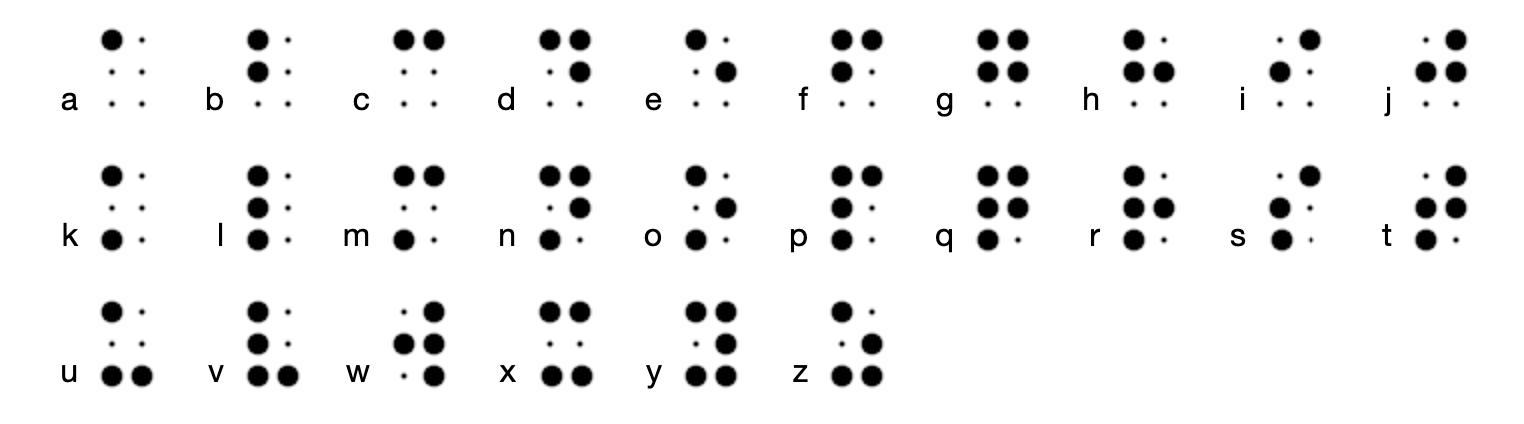
- The alphabet in one call: br.alphabet() returns a to z with each letter next to its Braille cell.
- 3 visual styles: big, small, and small-3d.
Measured star growth
- in 24h
- 0
- in 7 days
- Update delayed
- in 15 days
- Update delayed
- in 1 month
- Update delayed
Net star changes over overlapping periods, not daily totals. Missing measurements are left blank. Stars measure attention, not software quality.
About
A lightweight JavaScript and CSS solution for adding English Grade 1 Braille to websites, designed to help sighted readers view and learn how Braille is written.
LearningREADME.md
OriginalBraille-Tools
A lightweight CSS and JavaScript library for displaying English Grade 1 Braille in web pages, designed to introduce sighted people to the Braille system.

Features
- One CSS class per Braille character: letters, numbers and common punctuation, drawn from a single image sprite.
- Text to Braille in JavaScript:
br.braille("Hello World")returns the HTML for the whole text, adding the capital and number signs where needed. - The alphabet in one call:
br.alphabet()returns a to z with each letter next to its Braille cell. - 3 visual styles: big, small, and small-3d.
- No dependencies: one small JavaScript file and one CSS file.
Visual styles
| Style | CSS file | Look |
|---|---|---|
| Big | braille-big.css |
 |
| Small | braille-small.css |
 |
| Small 3D | braille-small-3d.css |
 |
Setup
Copy the css folder and braille-tools.js into your project, then include the stylesheet of the style you want and the script:
<link href="css/braille-big.css" rel="stylesheet" />
<script src="braille-tools.js"></script>
Usage
With CSS only
Each Braille character is an element with the class br and the class of that character:
<div class="br br-a"></div>
<div class="br br-b"></div>
<div class="br br-c"></div>
Besides br-a to br-z, there are classes for the signs and punctuation, such as br-cap (capital sign), br-num (number sign), br-sp (space), br-period, br-comma, br-qu (question mark), and br-ex (exclamation mark). The demo lists them all.
With JavaScript
br.braille(text) returns the Braille HTML for a text:
<div id="myBraille"></div>

<script>
  document.getElementById("myBraille").innerHTML = br.braille("Hello World");
</script>
It handles:
- letters (uppercase letters get the capital sign)
- numbers (with the number sign before each group of digits)
- spaces and line breaks
- common punctuation:
. , ? ! ' : ; ( ) * % [ ]
Each character has a tooltip with its print equivalent.
br.alphabet() returns the whole alphabet, each letter next to its Braille cell:
document.getElementById("alphabet").innerHTML = br.alphabet();
Limits
This library is intended to help sighted people explore the Braille system. It does not assist screen readers, and it is not a tool for professional Braille transcription: it only does Grade 1 (uncontracted) English Braille, one character at a time.
Related projects
- Braille Quiz (code): learn to read Braille.
- Braille-Text (code): displays the print characters when hovering over the Braille (with animation).
License
Braille-Tools is open source under the MIT license.
Had fun with it? Buy me a coffee by becoming a sponsor.
(c) 2016-2026 Olivier Giulieri