
evoleinik/fnkey
evoleinik/fnkey has 48 GitHub stars and 10 forks. GitHot measured 0 stars in 24 hours and 0 in 7 days. Last checked 2026-11-10 02:28 UTC. Last push 2026-10-24.
Hold Fn, speak, paste. Streaming Deepgram dictation for the macOS menu bar, with live paste and clipboard restore.
Measured star growth
- in 24h
- 0
- in 7 days
- 0
- in 15 days
- Update delayed
- in 1 month
- Update delayed
Net star changes over overlapping periods, not daily totals. Missing measurements are left blank. Stars measure attention, not software quality.
README.md
OriginalFnKey.app






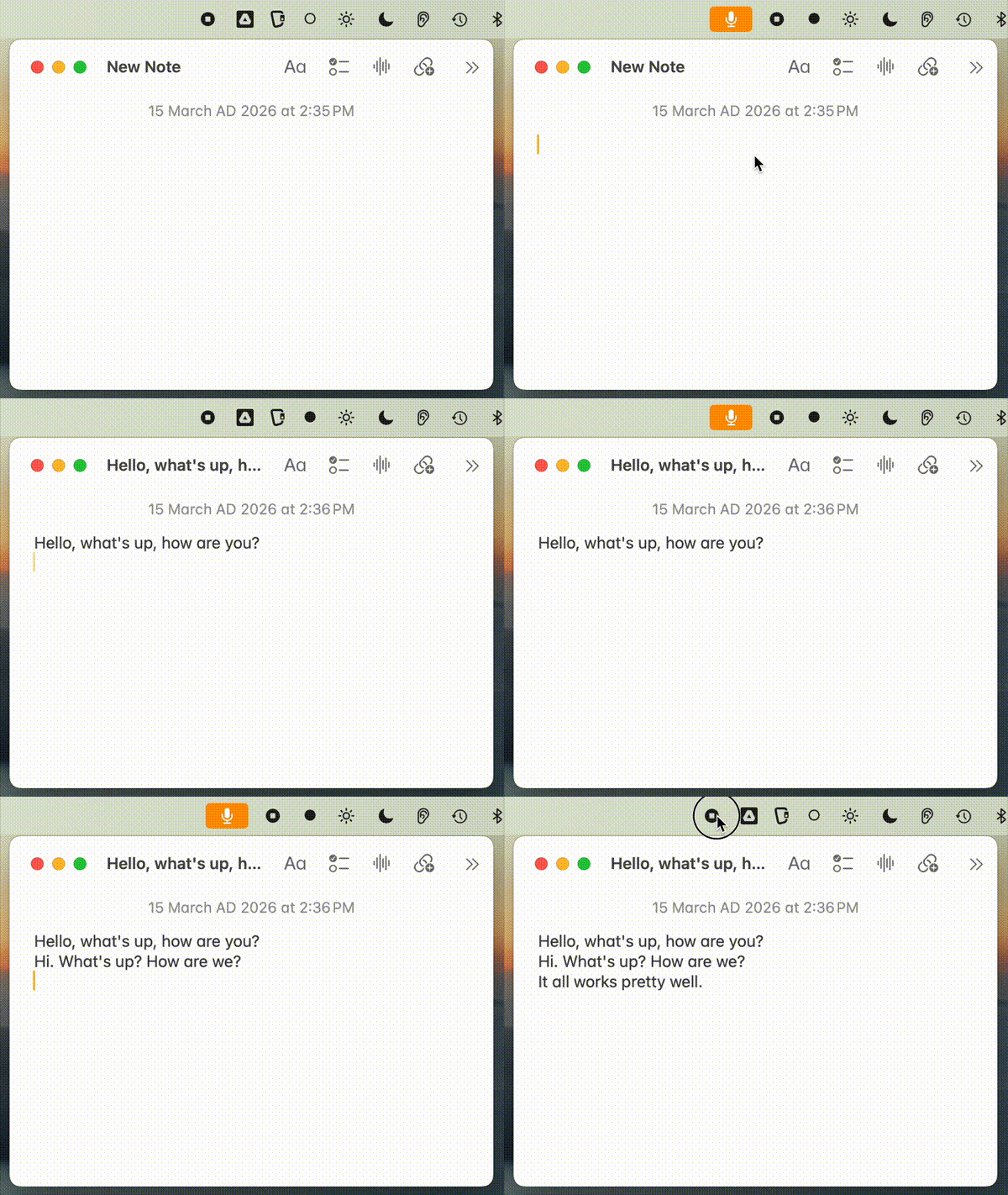
A tiny Rust menu bar app for macOS. Hold Fn, speak, release, and the text is pasted where your cursor is. The microphone is on only while you hold the key, and macOS shows its orange mic dot to confirm it.
If you find FnKey useful, please star the repo. It helps others find it.
Install
Download the latest release:
- Apple Silicon (M1 and later):
FnKey-arm64.zip - Intel:
FnKey-x64.zip
- Apple Silicon (M1 and later):
Unzip it and move the app to Applications:
unzip FnKey-arm64.zip
mv FnKey.app /Applications/
Add your API key or keys:
mkdir -p ~/.config/fnkey

# Deepgram: streaming, recommended. New accounts get $200 of free credit.
echo 'your-deepgram-key' > ~/.config/fnkey/deepgram_key

# Groq: used when Deepgram cannot answer, or on its own if you have no Deepgram key
echo 'your-groq-key' > ~/.config/fnkey/api_key

# Optional: the Deepgram region closest to you (see "Deepgram region" below)
echo 'api.eu.deepgram.com' > ~/.config/fnkey/deepgram_host
Get keys at console.deepgram.com and console.groq.com.
Launch it:
open /Applications/FnKey.appGrant permissions in System Settings → Privacy & Security:
Permission Why How Input Monitoring To see the Fn key Add FnKey.app with the + button Microphone To hear you Asked on first use, or add it by hand Accessibility To paste the text Add FnKey.app with the + button
Upgrading: release builds are signed without a developer certificate, so macOS treats each new version as a new app. After you replace FnKey.app, check the three permissions again and reopen FnKey.
Usage
Hold Fn and speak. Release, and the text is pasted. The menu bar icon shows ○ when idle and ● while recording.
| Menu item | What it does |
|---|---|
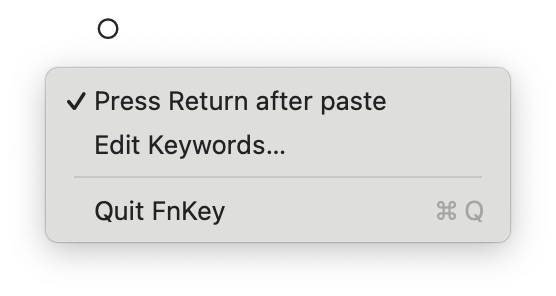
| Press Return after paste | Presses Return after the text, to send a chat message in one go |
| Paste while speaking | Pastes each finished phrase while you still hold Fn, instead of all at once on release |
| Edit Keywords… | Opens your custom vocabulary in a text editor |
| Quit FnKey | Quits the app |
Settings
Everything lives in ~/.config/fnkey/. Each setting is one small text file.
| File | Contents | Default |
|---|---|---|
deepgram_key |
Deepgram API key | none |
api_key |
Groq API key | none |
deepgram_host |
Deepgram server, such as api.eu.deepgram.com |
api.deepgram.com (US) |
keywords |
Custom vocabulary, one term per line | none |
auto_return |
1 turns on Press Return after paste |
off |
live_paste |
1 turns on Paste while speaking |
off |
error.log |
Problems FnKey ran into, written by the app |
The two menu toggles write their own files. Other files are read when FnKey starts, so reopen it after editing them.
How it works
| Backend | Mode | Key file | How it works |
|---|---|---|---|
| Deepgram Nova-3 | Streaming | deepgram_key |
Audio streams over a WebSocket while you speak. Fastest. |
| Groq Whisper | Batch | api_key |
The whole clip is sent after release. Used when Deepgram cannot answer. |
- Taps and shortcuts are ignored. A press shorter than 0.3s, or Fn used with another key (Fn+Delete, Fn+arrows), records nothing and pastes nothing.
- No invented text. When Deepgram hears no speech, nothing is pasted. Groq runs only when Deepgram errors or does not answer within 10s, because Whisper turns silence into phrases like "Thank you for watching!"
- Paste while speaking. Deepgram finishes a phrase after a short pause, or every 3 to 5 seconds of continuous speech. Each finished phrase is pasted right away, so a short dictation still pastes on release. Return, if on, is pressed once at the end, and text is never pasted twice.
- Your clipboard comes back. Whatever you had copied (text, images, files, rich text) is restored 0.5s after FnKey pastes. It is left alone if you copy something new in the meantime, and a password marked as concealed is never put back.
- Clipboard history stays clean. Clipboard managers such as Alfred get one entry per dictation. Single phrases and the restored item are marked transient (nspasteboard.org), so they are not recorded.
Deepgram region
Deepgram's default server is in the US. Far from it, every press waits longer, and slow replies can miss the 10s wait. Point FnKey at the closest region. Your key works on all of them.
echo 'api.in.deepgram.com' > ~/.config/fnkey/deepgram_host # or api.eu / api.au
Measured from Bangkok, four runs each: release to text took 0.16–0.18s on api.in, against 0.35–6.5s on the US default.
Custom keywords
Add words the transcription often gets wrong, such as names and technical terms:
# Edit from the menu bar (Edit Keywords…), or directly:
cat > ~/.config/fnkey/keywords << 'EOF'
# One term per line
Anthropic
Claude
cron job
Kubernetes
EOF
Keywords go to Deepgram as keyterm and to Groq as a prompt hint. They are read when FnKey starts.
Troubleshooting
FnKey writes problems to ~/.config/fnkey/error.log. Each Deepgram line names the server, the connect
time and how much audio was sent.
| Log line | What it means |
|---|---|
Deepgram heard no speech |
The audio was silent. Check the input device in System Settings → Sound. |
Deepgram: no result after waiting 10s |
The network was too slow. Try a closer deepgram_host. |
Deepgram text arrived after the 10s wait |
Deepgram answered, but too late. A closer region fixes this too. |
Clipboard restore failed |
FnKey could not put your clipboard back. The counts show what it tried to restore. |
Build from source
./build-app.sh   # builds, installs to /Applications/FnKey.app and signs it
cargo test       # unit tests; the clipboard tests use a private pasteboard
build-app.sh signs with a fixed local identity ("FnKey Dev"), so permissions survive rebuilds. If cargo
isn't found, run /bin/bash -l -c './build-app.sh'. Signing needs the login keychain, so over SSH it fails
with errSecInternalComponent. Run the script in Terminal on the Mac itself.
Roadmap
- Follow the current microphone when the default input changes, for example AirPods connecting
- A language setting: English only, or automatic detection
- Skip silent clips in Groq-only mode, using Whisper's
no_speech_prob - A menu option to switch between Deepgram and Groq
Notes and known limitations
- If no Fn key is detected within 5s of launch, FnKey uses the Option key instead.
- A short start-up delay. The microphone switches on when you press Fn, so the first instant of speech can be missed. Removing that would mean keeping the microphone on all the time, with the mic dot always showing. FnKey chooses privacy.
License
Explore related projects
n8n-io/n8n
Fair-code workflow automation platform with native AI capabilities. Combine visual building with custom code, self-host or cloud, 400+ integrations.
210,008 starslanggenius/dify
Build Agentic workflows, RAG pipelines, with rich AI model and tool support on one collaborative workspace. Deploy on cloud, VPC, or self-hosted, so teams move from prototype to production without rebuilding the stack.
160,773 starsmicrosoft/PowerToys
Microsoft PowerToys is a collection of utilities that supercharge productivity and customization on Windows
140,755 starsstablyai/orca
Orca is the place for working with a fleet of agents (e.g. Grok Bot, Claude Code). Run any coding agent with your own subscription. Available on desktop, mobile and remote runtime.
121,281 stars