
everydaycodings/Twitter-Sentimental-Analysis-WebApp
everydaycodings/Twitter-Sentimental-Analysis-WebApp has 45 GitHub stars and 17 forks. GitHot measured 0 in 7 days. Last checked 2026-11-09 12:23 UTC. Last push 2024-10-02.
Twitter Sentiment Analysis using #tag, words and username
What you can do
- Can Fetch upto 10000 Tweets.
- Gives a detailed Analysis of the tweets.
- Gives the most trending #tag, links and @mentions of the fetched tweets.
- Gives the Overall Sentiment Analysis of the Tweets in form of graph.
Measured star growth
- in 24h
- Update delayed
- in 7 days
- 0
- in 15 days
- Update delayed
- in 1 month
- Update delayed
Net star changes over overlapping periods, not daily totals. Missing measurements are left blank. Stars measure attention, not software quality.
README.md
OriginalTwitter Sentiment Analysis


Twitter Sentiment Analysis Web App using #tag, words and username to fetch data finds Insides of data and Tells Sentiment of the perticular #tag, words or username.
Features Of Data Analysis Web App
- Can Fetch upto 10000 Tweets.
- Gives a detailed Analysis of the tweets.
- Gives the most trending #tag, links and @mentions of the fetched tweets.
- Gives the Overall Sentiment Analysis of the Tweets in form of graph.
- You can download/export the tweets in form of csv file.
Check out the live demo: https://twitter--sentiment--analysiss.herokuapp.com/
Vedio demo:
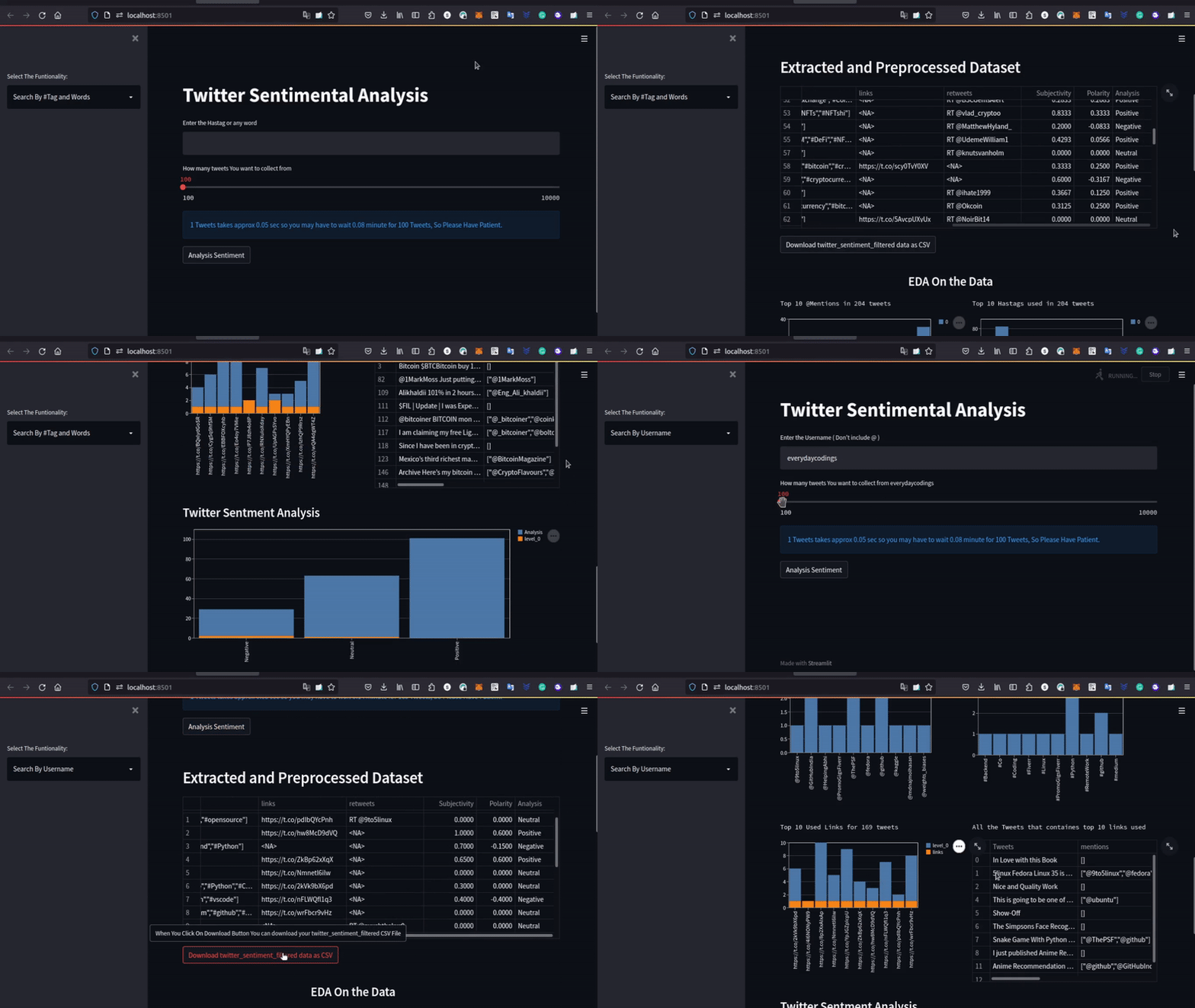
Note
Use this URL - Click Me - in case if you are faccing any problem with th WebApp or source code.
Source Code: github link
How to run the project?
- Clone or download this repository to your local machine.
- Install all the libraries mentioned in the requirements.txt file with the command
pip3 install -r requirements.txt - Create a file name
config.ini - Paste the code in
config.iniand insert key deatils which you will get keys here developer.twitter.com
[twitter]

api_key = Your Keys
api_key_secret = Your Keys

access_token = Your Keys
access_token_secret = Your Keys
- Open your terminal/command prompt from your project directory and run the file
app.pyby executing the commandstreamlit run app.py. - You will be automatically redirected the your localhost in brower where you can see you WebApp in live.
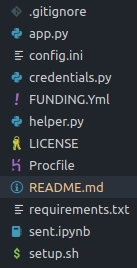
Architecture of your Project Home Directory
If you Use this Code for Any Commercial Purpose. Please Don't Forget To mention or give shoutout to everydaycodings.
Donate If you fell this Web App Makes your work a bit easy.
Binance (BNB)
0x846d778c4714830C8cdcB2Af85F76544CFf0d9A1
Cardano(ADA)
addr1q8fstx3ut2nfhrv9e324tyfdp2uwcvy0uree3junwll5y5p7lnnqpnq6ufjh4qfkul9tvx49udsnyq7vmst6huvngyss72e63v
Bitcoin(BTC)
bc1qutf2e707aglx8wqmf4x8e7rzxaunmxlcnpyxqr
Explore related projects
Asabeneh/30-Days-Of-Python
The 30 Days of Python programming challenge is a step-by-step guide to learn the Python programming language in 30 days. This challenge may take more than 100 days. Follow your own pace. These videos may help too: https://www.youtube.com/channel/UC7PNRuno1rzYPb1xLa4yktw
78,486 starsgrafana/grafana
The open and composable observability and data visualization platform. Visualize metrics, logs, and traces from multiple sources like Prometheus, Loki, Elasticsearch, InfluxDB, Postgres and many more.
77,790 starsredis/redis
For developers, who are building real-time data-driven applications, Redis is the preferred, fastest, and most feature-rich cache, data structure server, and document and vector query engine.
77,332 starsapache/superset
Apache Superset is a Data Visualization and Data Exploration Platform
75,455 stars