
evanl666/chiefofstaff
evanl666/chiefofstaff has 38 GitHub stars and 8 forks. GitHot measured +10 stars in 24 hours. Last checked 2026-11-15 20:21 UTC. Last push 2026-11-14.
Measured star growth
- in 24h
- +10
- in 7 days
- Update delayed
- in 15 days
- Update delayed
- in 1 month
- Update delayed
Net star changes over overlapping periods, not daily totals. Missing measurements are left blank. Stars measure attention, not software quality.
About
One home for all your GitHub Copilot sessions: each task gets its own session, you see every task's progress, and you are asked only when a decision is yours.
Developer ToolsREADME.md
OriginalChief of Staff
English · 简体中文



Your engineering chief of staff. It catches what comes to you (a question in Slack, a PR to review, a comment on your doc), gets it done with Copilot, and answers in your voice: with proof of what was done, and only once you say OK. The longer it works for you, the better it knows how you work.
It does the work. It drafts the words. You make the call.

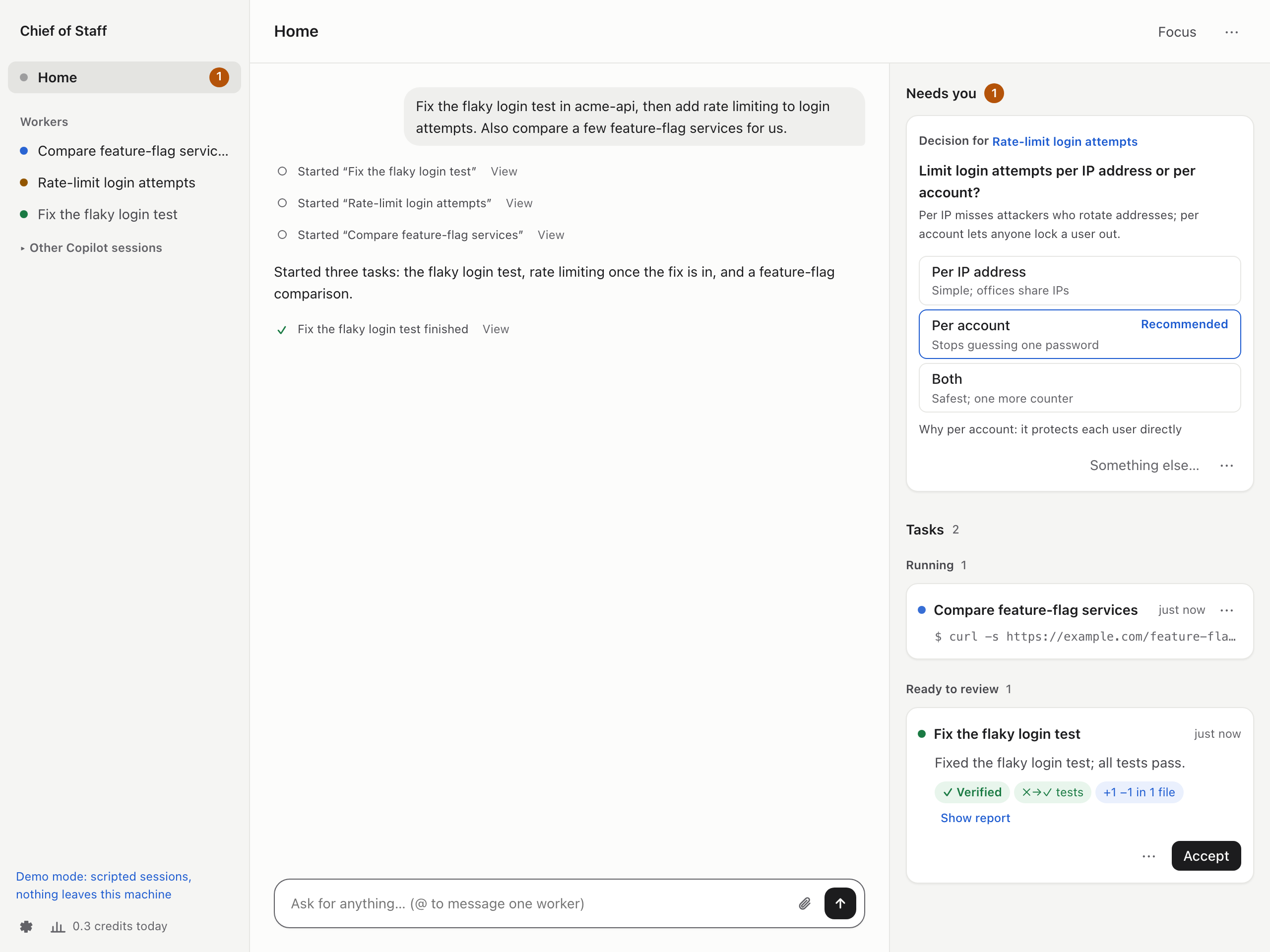
uvx chiefofstaff --demo # try it with scripted sessions, no sign-in needed
Why
Most of my day isn't writing code. It's answering a question in Slack, reviewing a PR, following up on a thread, checking whether a run finished. Copilot can do most of that, but I still had to notice each ask, start a session, keep an eye on it and write the reply myself. Chief of Staff does the noticing and the follow-through. I talk to one session, the Router: it hands each ask to its own Copilot session, keeps track of all of them, and comes back to me only with a decision to make or a draft to approve.
What it does
Catches what comes to you
- Watches what you ask it to (Slack mentions, doc comments, mail) with any tool your Copilot has, Glean or your company's search included, and turns what needs doing into tasks.
- React 🤖 to any Slack message, press a hotkey from any app, or just say what you need.
- Sends a follow-up to the session that did the work, with its history and checkout.
Answers in your voice, once you say OK
- Drafts Slack replies and PR reviews, approvals included, the way you write them.
- Sends them only when you approve; you can edit a draft first.
Shows proof, not just claims
- Shows what was observed next to each report (test runs, commits, diff, PR checks), and flags claims nothing backs.
- Lets you comment on the diff, send it back, and open the PR in one click.
Learns how you work
- Picks up how you write and what you keep asking for. Your style applies at once; habits wait for your OK.
- Turns mistakes workers fixed into checks that catch them next time.
Guards your focus
- Asks only when it needs you: one card per thing, a decision with options and a recommendation, a question, a draft.
- Reaches you when you are away from your desk (through your company's Slack bot, say) and takes your answers from there.
- Focus mode holds notifications and gives you one summary at the end; a daily summary says what finished, what waits for you and what was handled without you.
Keeps many things moving at once
- Splits a request into tasks and runs each in its own Copilot session, in parallel or in order.
- Shows every task live on one board: what it is doing now, what waits and why, what is done.
- The captain, the duck beside the name, shows how things stand at a glance: it salutes when something needs you, takes the wheel while work runs, keeps watch while tasks wait, and cheers when a task is done.
Your Copilot, your machine
- Uses the Copilot you already have: your plan, models, plugins, skills, MCP servers and your company's policies, plus anything you add in Settings. No other AI service or API key.
- If you also use Codex, workers can run on it instead, with your own Codex sign-in: turn it on in Settings (how).
- Every worker gets its own folder and git worktree, so your checkouts stay untouched. Workers
run like your own Copilot sessions (those that read Slack keep permission checks by default); turn on
Ask first for all of them (no pushes to
main, no force pushes, no writes outside their folders) or an OS sandbox in Settings.
Install
You need macOS, Linux or Windows (experimental), Python 3.11+, uv (or pipx) and the GitHub Copilot CLI:
npm install -g @github/copilot
copilot login
uv tool install chiefofstaff && chiefofstaff   # or: pipx install chiefofstaff
Your browser opens Chief of Staff through a private link printed in the terminal (keep it to
yourself). Tell it where your code lives, like ~/workspace, and type what you need.
Everything runs on your machine; data stays in ~/Library/Application Support/chiefofstaff
(macOS), ~/.local/share/chiefofstaff (Linux), or %LOCALAPPDATA%\chiefofstaff\chiefofstaff
(Windows; with a Python installed from the Store app, Windows keeps it under that Python's
%LOCALAPPDATA%\Packages\...\LocalCache instead: the Data: line at startup says where).
Ctrl+C stops it, and sessions pick up where they left off next time. Options: --port,
--data-dir, --no-browser, --demo. Update with
uv tool upgrade chiefofstaff. Launching uvx chiefofstaff@latest again and again works too,
but each new version leaves a cached environment behind in uv's cache: uv cache prune removes
the ones nothing uses. Never run uv cache clean while Chief of Staff is running: it can delete
the environment it runs from. Workers' folders, and how much disk they take, are under Storage
(the disk icon at the bottom of the sidebar).
On Windows (experimental), Send to Chief, the Copilot command sandbox, sandboxed checks and
the folder sizes under Storage (measured with du) are unavailable. Workers can access files
and networks available to your Windows account.
A new data directory, and the private launch link in it, are made readable only by you (and
SYSTEM and Administrators) with an access control list; a --data-dir that already exists
keeps its own, so check it. Storage cleanup cannot see programs running as administrator in a
worker's folder: close those before closing the worker. Git can still hit path length limits
in deeply nested folders; use a shorter project or data directory if that happens.
To start this checkout after uv sync --extra dev:
.\.venv\Scripts\python.exe -m chiefofstaff
Optional sign-ins
- GitHub:
gh auth loginwith every account you use, to review PRs and open them. - Slack: paste a user token in Settings (how), or reach Slack through a tool your Copilot already has, such as Glean.
- Other services (docs, issue trackers): a sign-in card appears when a worker needs one.
How it works
Each session is a regular Copilot CLI session, driven through the Copilot SDK; copilot --resume
lists them as "Chief of Staff · …". A Codex worker is a thread of its own codex app-server.
Sessions never talk to each other directly: they call tools
such as spawn_worker, report and tell_session, and Chief of Staff delivers each message,
labeled with who sent it, so a Slack message cannot pass itself off as you. Workers that work
together pass what the other needs straight to it; the Router gets a copy.
you ── Home ── Router ── tasks ──► worker · worker · worker
                 ▲                 (own folder and worktree)
Slack, GitHub, ──┘    drafts ────► wait for your approval
your watches          Watchdog ──► nudges stuck workers
Learn more
- User guide
- Architecture
- Security: what the OS sandbox, Chief of Staff and the model each enforce
- Changelog
Status
Early (0.1): expect rough edges. Copilot usage counts against your plan, and Home shows the credits each task used. Issues and ideas are welcome; to contribute, see CONTRIBUTING.md.
License
MIT. Chief of Staff is an independent project, not made by or affiliated with GitHub. GitHub Copilot is a trademark of GitHub, Inc.