
esrrhs/go-mosaic
esrrhs/go-mosaic has 33 GitHub stars and 10 forks. GitHot measured 0 stars in 24 hours. Last checked 2026-11-14 20:07 UTC. Last push 2026-11-10.
What you can do
- High Performance Concurrency: Concurrent multi-worker design for loading, resizing, and pixel mapping across multi-core CPUs.
- Modern Embedded Database: Powered by bbolt embedded key-value storage with caching, change detection, and hash validation.
- Modern Go Tooling: Written for Go 1.22+, completely race-condition free (verified with go test -race), with unit and integration test coverage.
- Multi-Platform Support: Ready for Linux, macOS (including Apple Silicon M-series), Windows, and FreeBSD, along with a minimal multi-stage Docker image.
Measured star growth
- in 24h
- 0
- in 7 days
- Collecting history
- in 15 days
- Collecting history
- in 1 month
- Collecting history
Net star changes over overlapping periods, not daily totals. Missing measurements are left blank. Stars measure attention, not software quality.
About
A high-performance Go CLI that rebuilds a photo as a montage mosaic from a large library of tiny images.
Developer ToolsREADME.md
Originalgo-mosaic






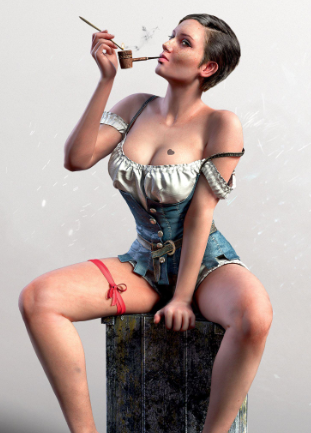
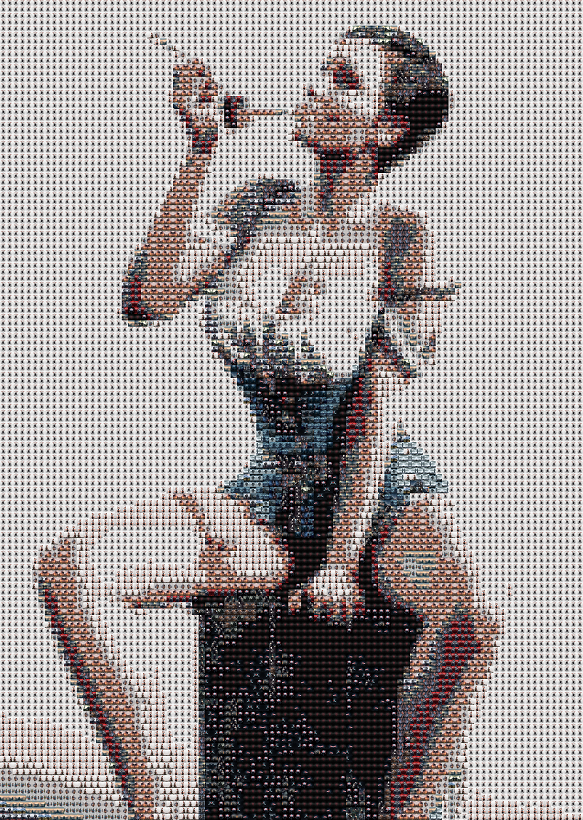
go-mosaic is a high-performance command-line tool for making photo mosaics (montage collages). It utilizes image processing algorithms to arrange and blend a vast library of small micro-photos into a unified, high-resolution artistic mosaic.
Features
- High Performance Concurrency: Concurrent multi-worker design for loading, resizing, and pixel mapping across multi-core CPUs.
- Modern Embedded Database: Powered by
bboltembedded key-value storage with caching, change detection, and hash validation. - Modern Go Tooling: Written for Go 1.22+, completely race-condition free (verified with
go test -race), with unit and integration test coverage. - Multi-Platform Support: Ready for Linux, macOS (including Apple Silicon M-series), Windows, and FreeBSD, along with a minimal multi-stage Docker image.
Quick Start
1. Build or Download
- Download the pre-built binary for your platform from GitHub Releases.
- Or compile locally using Go:
git clone https://github.com/esrrhs/go-mosaic.git
cd go-mosaic
make build
2. Generate Mosaic
./go-mosaic -src input.png -target output.jpg -lib ./test
-src: Source image to recreate as a mosaic.-target: Target output mosaic image path (supports.png,.jpg,.jpeg).-lib: Folder containing library images that form individual mosaic tiles.
3. Docker Usage
# Build Docker image
docker build -t go-mosaic:latest .

# Run mosaic generator inside container
docker run --rm -v $(pwd):/workspace go-mosaic:latest \
  -src /workspace/input.png \
  -target /workspace/output.png \
  -lib /workspace/test
Options
Usage of go-mosaic:
  -avoid-repeat int
      avoid repeated filenames within tile radius (0 disables; 1 includes diagonals)
  -color-adjust float
      tile color correction strength 0..1 (0 disables; max shift 32 levels)
  -color-space string
      matching color space: rgb or lab (D65 CIE76) (default "rgb")
  -checkhash
    	check database pic hash (default true)
  -database string
    	cache database (default "./database.bin")
  -lib string
    	image lib path
  -libname string
    	image lib name in database (default "default")
  -maxsize int
    	pic max size in GB (default 4)
  -pixelsize int
    	pic scale size per one pixel (default 64)
  -scalealg string
    	pic scale function NearestNeighbor/ApproxBiLinear/BiLinear/CatmullRom (default "CatmullRom")
  -src string
    	src image path
  -srcsize int
    	src image auto scale pixel size (default 128)
  -target string
    	target image path
  -worker int
    	worker thread num (default 12)
Optional tile variety and color matching
All new effects are off by default: -avoid-repeat 0 -color-space rgb -color-adjust 0 keeps the existing fast RGB bin index, cache, random tile choice and optional horizontal flip. No database migration or new dependencies are required.
# Avoid repeated source tiles in the immediate neighborhood (including diagonals)
./go-mosaic -src input.png -target varied.png -lib ./test -avoid-repeat 1

# Perceptual matching plus gentle color correction; effects may be used separately
./go-mosaic -src input.png -target enhanced.png -lib ./test \
  -avoid-repeat 1 -color-space lab -color-adjust 0.25
-avoid-repeat N(integer, default 0, must be nonnegative): exclude original filenames used within Chebyshev distance N of the current tile.1covers the eight surrounding positions;2covers a 5×5 neighborhood. Planning is sequential in row-major order before concurrent rendering, so filename choices do not depend on worker scheduling. Flipping a tile does not change its identity. The nearest eligible tile can have a different RGB color. If every filename is excluded (small libraries or large radius), fall back to the unfiltered nearest tile rather than fail; the log reportsrepeat-fallbacks. This is a greedy local constraint, not a global arrangement optimizer. Distinct files with identical contents are not deduplicated.-color-space rgb|lab(default rgb):labconverts the stored average sRGB colors to D65 CIELAB and uses CIE76 Euclidean Delta E, not CIEDE2000. Lab and repeat-avoidance queries use an exact balanced k-d tree with bounds in the selected space, including filename exclusion; RGB bounds are never reused for Lab. Equal-distance ties in this planner are resolved by filename. Existing library averages (including the legacy premultiplied-alpha treatment) remain unchanged; this is Lab of average RGB, not average per-pixel Lab.-color-adjust S(float 0..1, default 0): after resizing, shift each tile's straight sRGB channels toward the source pixel, using its alpha-weighted mean. Each shift is capped to ±32 levels before multiplying by S, then pixels are rounded and clamped to 0..255. Try 0.25 (at most 8 levels/channel);1permits at most 32. This is a small color cast correction, not a texture-destroying overlay, exposure correction, or guaranteed perceptual improvement. Alpha is preserved; fully transparent pixels stay transparent. Input/cached tiles are never modified. Zero bypasses correction entirely.
Enhanced mode keeps a tile plan in memory and decodes tiles per rendering job to avoid an unbounded decoded-image cache; it may be slower than the default path, especially on slow storage. Random horizontal flips remain enabled, so full output pixels need not be identical between runs. Best results require a varied library: enforcing variety can select less similar colors. Increase -pixelsize for more tile detail, or lower -srcsize for a smaller output.
Development
# Run tests with race detection
make test

# Code static analysis
make vet

# Cross-compile release binaries for all platforms
make pack

# Clean build artifacts
make clean
Example
| Original Target Image | Generated Mosaic Collage |
|---|---|
 |
 |