
erroralex/Metadata-Viewer
erroralex/Metadata-Viewer has 44 GitHub stars and 0 forks. GitHot measured 0 stars in 24 hours, 0 in 7 days, and 0 in 15 days. Last checked 2026-11-09 18:43 UTC. Last push 2026-08-21.
A JavaFX desktop application for extracting and managing AI image generation metadata across multiple platforms. Features recursive parsing logic, JSON persistence, and a custom dark theme.
What you can do
- Universal Compatibility: Intelligent parsing for ComfyUI (API & Workflow graphs), SwarmUI, Automatic1111 / Forge, InvokeAI, and NovelAI.
- Graph Traversal: Resolves connected prompts, samplers, schedulers, models, and LoRAs across complex execution flows.
- Custom Node Support: Recursively extracts parameters from advanced custom nodes (Power LoRA Loaders, KSampler variations, reroutes).
- Extended Field Discovery: Surfaces Scheduler, Denoise, and Hires. fix as dedicated fields; Distilled CFG (flux-guidance) is folded into the CFG field. Model Hash and ControlNet are A1111/Forge-only today — still captured, but only visible via the Raw Metadata inspector for other sources.
Measured star growth
- in 24h
- 0
- in 7 days
- 0
- in 15 days
- 0
- in 1 month
- Update delayed
Net star changes over overlapping periods, not daily totals. Missing measurements are left blank. Stars measure attention, not software quality.
README.md
Original

AI Metadata Viewer & Extractor




A high-performance JavaFX desktop application designed to inspect and extract generation metadata across the AI image generation ecosystem. It provides instant extraction, deep ComfyUI node-graph inspection, and raw metadata inspection for artists and developers.
[!NOTE] Favorites Library, Metadata Scrubber, and Speed Sorter have moved to Latent Library. Metadata Viewer is now focused purely as a lightweight, fast, single-screen extractor utility.
📸 Interface

Single-screen extractor: drop an image and every generation field populates instantly.
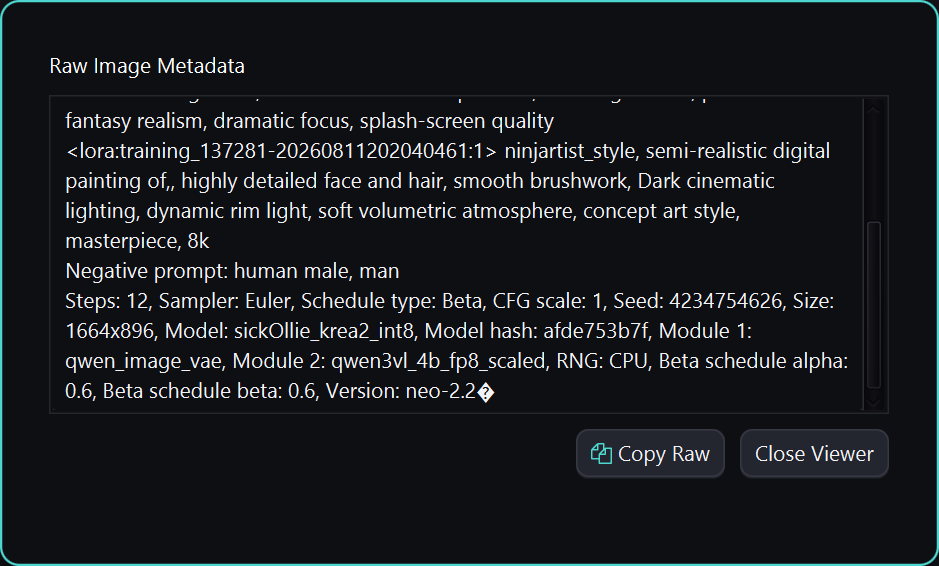
Raw Metadata: full unparsed output for non-standard or unrecognized sources, with one-click copy.
🔐 Stateless, Portable & Private
Built as a lightweight, zero-setup utility for quick, on-demand inspection.
- 100% Offline / No Telemetry: No network calls, no analytics, no cloud dependency. Your images and prompts never leave your machine.
- Zero Setup: No database, no config files, no background service. Drop an image and inspect it — nothing is written to disk.
- Portable Build: Ships as a single self-contained executable/app-image with a bundled Java 21 runtime. No system-wide Java installation required.
- Lightweight: Programmatic JavaFX (no FXML) keeps startup instant and the footprint small.
✨ Key Features
- Universal Compatibility: Intelligent parsing for ComfyUI (API & Workflow graphs), SwarmUI, Automatic1111 / Forge, InvokeAI, and NovelAI.
- Advanced ComfyUI Engine:
- Graph Traversal: Resolves connected prompts, samplers, schedulers, models, and LoRAs across complex execution flows.
- Custom Node Support: Recursively extracts parameters from advanced custom nodes (Power LoRA Loaders, KSampler variations, reroutes).
- Extended Field Discovery: Surfaces Scheduler, Denoise, and Hires. fix as dedicated fields; Distilled CFG (flux-guidance) is folded into the CFG field. Model Hash and ControlNet are A1111/Forge-only today — still captured, but only visible via the Raw Metadata inspector for other sources.
- Physical Fallback: Reads physical image headers to guarantee valid image dimensions and file size even when metadata is missing or malformed.
- Latent Design System: Clean, modern dark UI styled against the Latent ecosystem's token specifications — shadows, gradients, and type scale included.
- Interactive UI:
- Drag & Drop: Drop any PNG, JPG, JPEG, or WEBP directly onto the image preview for instant extraction — even to replace an image that's already loaded.
- Fullscreen Preview: Click any image for a modal, high-res inspection view.
- Raw Inspector: Debug non-standard outputs with a raw text/JSON inspection modal, with one-click copy.
- Copy Feedback: Prompt and raw-metadata copy actions confirm with a toast instead of a silent clipboard write.
- Responsive Layout: The metadata panel reflows underneath the image on narrower windows instead of clipping, and stat cards wrap to fit. Prompt boxes grow to fit their content, up to a cap, then scroll internally.
- Lightweight & Cross-Platform: Programmatic JavaFX (No FXML) with zero startup lag and cross-platform build support.
💻 System Requirements
- OS: Windows 10/11 (64-bit), Linux, or macOS (11+).
- Memory: Minimal. A few hundred MB of RAM is sufficient — no database or background indexing.
- Storage: ~100MB for the application (bundled Java 21 runtime included).
- Network: Not required. Metadata Viewer performs no network calls of any kind.
🛠️ Technical Architecture
- Strategy Pattern: Tool-specific parsing strategies (
ComfyUIStrategy,CommonStrategy,SwarmUIStrategy,InvokeAIStrategy,NovelAIStrategy) with heuristic chunk scoring. - Stateless & Portable: Zero background database or config locking — drop and inspect with zero setup overhead.
- Technology Stack: Java 21, JavaFX 21, Jackson, metadata-extractor (Drew Noakes), Ikonli (FontAwesome), SLF4J, JUnit 5.
🚀 Getting Started

- Download the appropriate file for your OS:
- Windows:
MetadataViewer-windows-X.X.X.exe— single self-contained file, no installation required. - Linux:
MetadataViewer-linux-X.X.X.zip - macOS:
MetadataViewer-macos-X.X.X.zip
- Windows:
- Extract the
.zip(macOS/Linux only — a real "Extract All", not just browsing into the archive) and run the app from inside the extracted folder. No installation is required. - Drop an image onto the preview to extract its generation metadata instantly.
🍎 macOS Users: Because this app is not yet signed with an Apple Developer Certificate, you may see an error saying the app is "damaged and can't be opened." This is a standard macOS security message for unsigned apps.
To fix this:
- Move the app to your Applications folder.
- Open Terminal.
- Run the following command to clear the quarantine attribute:
sudo xattr -cr "/Applications/MetadataViewer.app"- You can now open the app normally.
Building from source instead? See CONTRIBUTING.md.
📜 License
Distributed under the MIT License with the Commons Clause. Free to use, modify, and share. The Commons Clause restricts selling the Software or offering it as a paid hosted/consulting service. See LICENSE.md for the full text.
💖 Support the Project
If AI Metadata Viewer has streamlined your workflow, consider supporting its ongoing development.


Developed by

Copyright (c) 2025-2026 Alexander Nilsson
Explore related projects
affaan-m/ECC
The agent harness performance optimization system. Skills, instincts, memory, security, and research-first development for Claude Code, Codex, Opencode, Cursor and beyond.
300,706 starsNousResearch/hermes-agent
The agent that grows with you
262,407 starsmultica-ai/andrej-karpathy-skills
A single CLAUDE.md file to improve Claude Code behavior, derived from Andrej Karpathy's observations on LLM coding pitfalls.
231,812 starsfirecrawl/firecrawl
Supercharge your AI agents with data from the web and beyond. Building the library for superintelligence. 🔥
200,444 stars