
erikwb/blueferry
erikwb/blueferry has 341 GitHub stars and 28 forks. GitHot measured +3 stars in 24 hours. Last checked 2026-11-17 05:45 UTC. Last push 2026-11-09.
Measured star growth
- in 24h
- +3
- in 7 days
- Update delayed
- in 15 days
- Update delayed
- in 1 month
- Update delayed
Net star changes over overlapping periods, not daily totals. Missing measurements are left blank. Stars measure attention, not software quality.
About
iMessage/SMS over Bluetooth to Linux. No proxy or cloud!
Developer ToolsREADME.md
OriginalBlueFerry
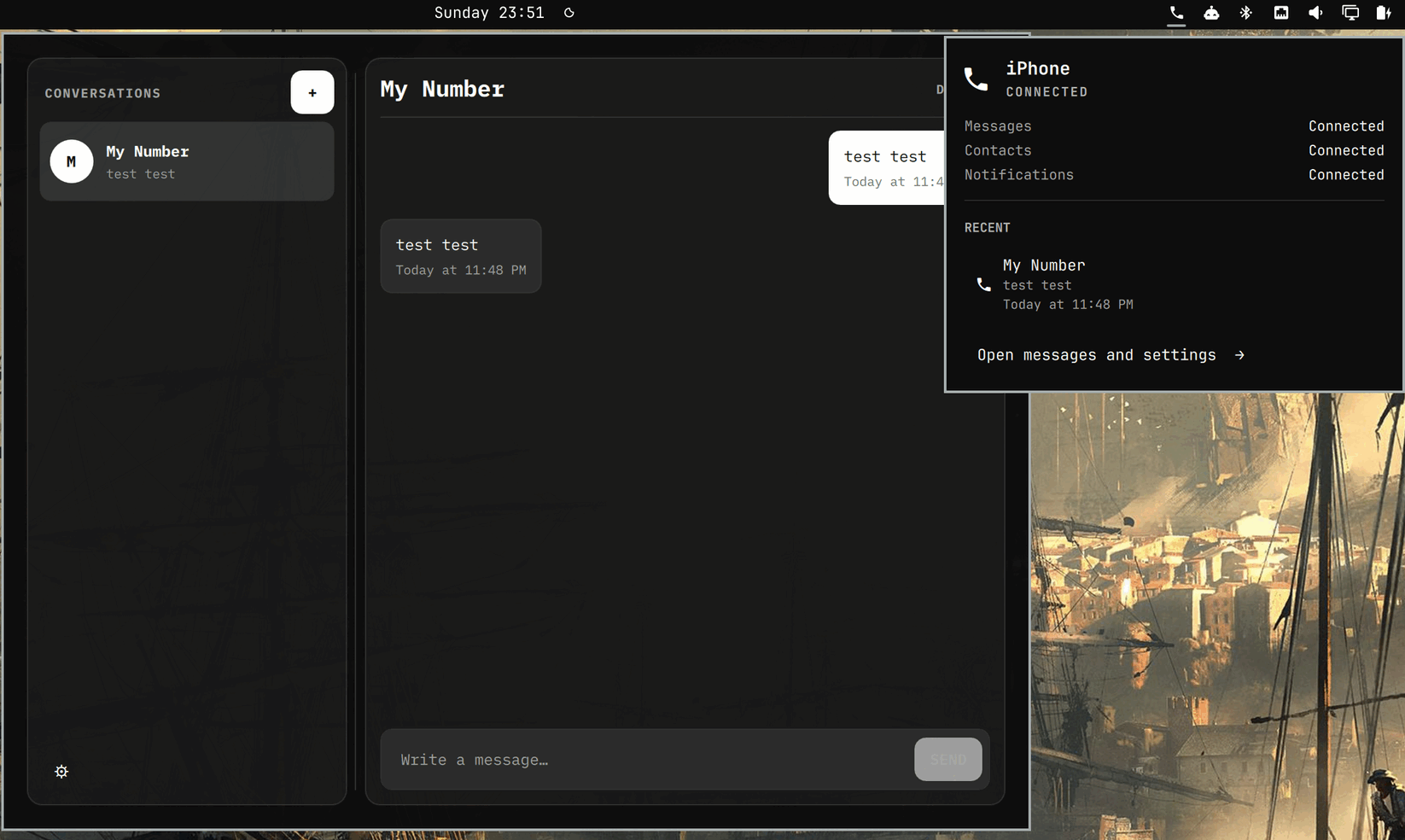
Use your iPhone's messages on Linux over Bluetooth.

BlueFerry brings SMS, RCS, and iMessage from a paired iPhone to your Linux desktop. You can read and reply to messages, start a conversation, search synced contacts, and optionally mirror other iPhone notifications. There is no Mac relay, Apple login, cloud service, or subscription.
This is still experimental software. Most development has used an iPhone 16 Pro Max on iOS 26.5, with additional successful testing on an iPhone 17 Pro Max running an iOS 27 beta. Apple can change the Bluetooth behavior BlueFerry relies on, so don't make it your only way to receive an important message yet.
What works
- Receive and send SMS, RCS, and iMessage through the iPhone.
- Sync contacts, including phone numbers and Apple-ID email addresses.
- Mark messages read from the desktop.
- Use native GTK, KDE/Kirigami, Quickshell, or terminal clients.
- Keep local history encrypted with GNOME Keyring or KDE Wallet.
- Group chats, when BlueFerry can identify the participants safely.
- Optional: recent calls and missed-call notifications (off by default; see Call history).
BlueFerry only knows about messages it sees while connected; it does not download your iCloud Messages archive. Attachments, reactions, typing indicators, FaceTime, and complete sent-message history are not supported. Phone calls are off by default; an experimental, opt-in oFono integration is described under Phone calls.
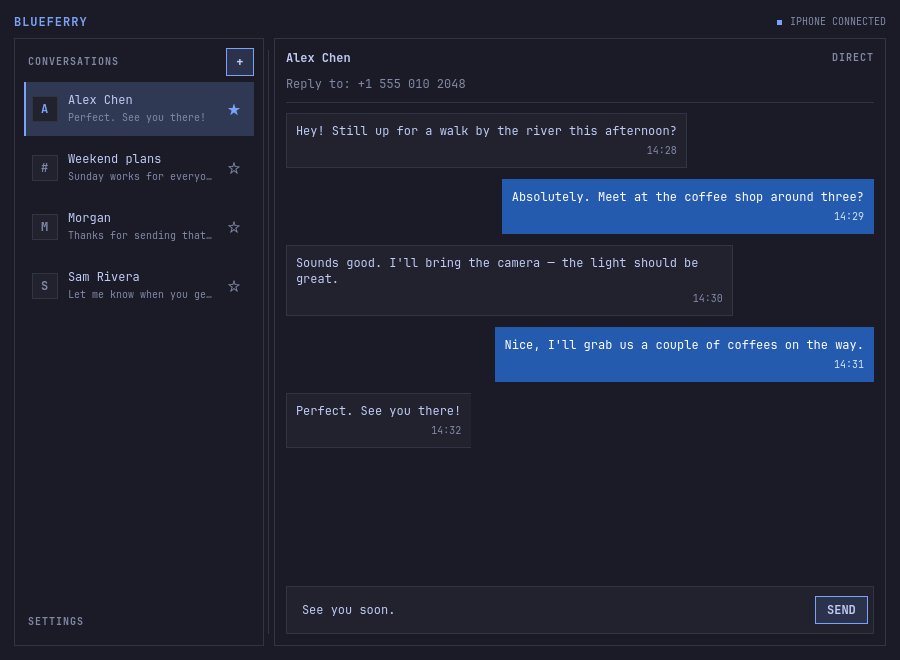
Direct conversations combine the phone numbers and email addresses that belong unambiguously to one synced contact. Replies use the most recent incoming address, shown as Reply to above the conversation. Shared addresses and contacts that merely have the same name stay separate. Original message addresses are retained; editing and syncing contacts updates the grouping.
Group replies are deliberately cautious. Bluetooth does not give BlueFerry a reliable group ID or complete roster, so it disables replies when the participants are unclear. For a named group, BlueFerry learns members only from the people who send to it, so it asks you to confirm the full reply list once. That saved list is kept until you delete the conversation, clear history, or change the storage mode; it does not change the group on the iPhone. A message is filed under its group only when BlueFerry also receives the iPhone's notification for it; without one, it appears in the sender's one-to-one conversation.
Install
Download the native packages for your distribution from the
latest BlueFerry release.
Install blueferry-backend plus the client for your desktop. The backend also
includes the blueferry-tui terminal client.
Clicking a message notification opens its conversation in a running graphical client, preferring the most recently used one. If none is running, BlueFerry opens the last client you used. With no previous choice, it prefers GTK on GNOME, Qt on KDE, and Quickshell on Omarchy/Hyprland, using an installed client if the preferred one is unavailable.
For Arch Linux or CachyOS, download the .pkg.tar.zst files and install them
with pacman. For example, to install the GTK client:
sudo pacman -U ./blueferry-backend-*.pkg.tar.zst ./blueferry-gtk-*.pkg.tar.zst
For Debian, Ubuntu, Mint, Pop!_OS, or PikaOS, download the .deb files and
install them with apt:
sudo apt install ./blueferry-backend_*.deb ./blueferry-gtk_*.deb
For Fedora 43 or 44, download the .fc43.noarch.rpm files. For Fedora 45,
download the .fc45.noarch.rpm files. Fedora 43 and 44 use the same package
build. Install the backend and your client with dnf:
# Fedora 43 and 44; use fc45 below for Fedora 45.
sudo dnf install ./blueferry-backend-*.fc43.noarch.rpm \
  ./blueferry-gtk-*.fc43.noarch.rpm
Replace the GTK package with blueferry-qt for KDE Plasma. Arch, CachyOS and
Fedora 44 or newer also provide blueferry-quickshell. The tested matrix currently covers Arch
Linux, CachyOS, Debian 13, Ubuntu 24.04 and 26.04, Linux Mint 22.3, Pop!_OS
24.04, PikaOS IV, and Fedora 43, 44, and 45. Ubuntu 24.04, Mint, and Pop!_OS do
not provide necessary Qt dependencies, so use the GTK or terminal client there.
Arch and Fedora packages set up the newer Bluetooth support needed for iPhone system notifications. Debian-family packages do not change or restart Bluetooth; messages and contacts still work, and notifications are added only when that machine already supports them.
Build packages from source
Clone the repository, then choose the build instructions for your distribution:
git clone https://github.com/erikwb/blueferry.git
cd blueferry
Arch based distros
Install the basic build tools, then build and install all four packages:
sudo pacman -S --needed base-devel python
./build.sh -si
Run ./build.sh without -i to build without installing. Finished packages
are written to packaging/arch/.
The build always uses /usr/bin/python, because the build and test
dependencies are Arch packages for the system interpreter. A mise, pyenv,
conda, or activated virtualenv python earlier in PATH is ignored rather
than producing a package for the wrong site-packages directory.
Debian based distros
sudo apt-get install devscripts equivs
sudo mk-build-deps -i -r -t 'apt-get -y --no-install-recommends' packaging/deb/control
./packaging/build-deb.sh
Finished packages are written to dist/deb/.
Fedora
sudo dnf install dnf-plugins-core rpm-build
sudo dnf builddep packaging/rpm/blueferry.spec
./packaging/build-rpm.sh
Finished packages are written to dist/rpm/.
OpenRC systems
On OpenRC, install BlueFerry's D-Bus activation file and let the session bus
start the backend; no init script is needed. An optional OpenRC user service
(OpenRC 0.62 or newer) is only for desktops whose session bus is
$XDG_RUNTIME_DIR/bus. Do not create one on dbus-run-session desktops such
as Plasma under greetd or SDDM. For iPhone system notifications, start
bluetoothd with -E (see /etc/conf.d/bluetooth) and run
sudo rc-service bluetooth restart. Without systemd, the daemon also runs
without the systemd unit's sandboxing. See
packaging/openrc/README.md before setting up.
See packaging/README.md for the exact support matrix and more packaging details.
Pair an iPhone
Start the client that fits your desktop:
blueferry-gtk         # GNOME, Cinnamon, and similar desktops
blueferry-qt          # KDE Plasma
blueferry-quickshell  # Quickshell
BlueFerry requires an adapter with Bluetooth Classic and Bluetooth 4.0 or newer with LE advertising support. LE advertising is needed to enable the iPhone's messages and contacts, including in compatibility mode. Bluetooth 3-only adapters are incompatible.
Then:
- Keep the iPhone unlocked with Settings → Bluetooth open.
- Let BlueFerry check your Bluetooth controller.
- In BlueFerry, choose Scan, select the iPhone, and choose Pair. BlueFerry starts the pairing request; you do not need to find and tap the computer under Other Devices on the phone.
- When the request appears on the iPhone, approve it and confirm that both devices show the same code. It can take around 15 seconds to appear.
- After pairing, tap ⓘ beside the computer on the iPhone and enable Show Message Notifications and Sync Contacts. If the toggles are missing, return to the Bluetooth device list and reopen the ⓘ page a few times. If iOS asks to Allow System Notifications, approve that too.
- Wait for Messages and Contacts to show as connected. If you use the default encrypted storage, approve the desktop wallet prompt.
System Notification access lets BlueFerry recognize group-message metadata. When it is unavailable, ordinary messages and contacts still work, but a group message may look like a direct conversation with its sender.
Pairing options
Most people should leave both options unchecked.
- Compatibility pairing for iOS 18 or earlier keeps the signal that makes the Messages and Contacts permissions appear, but does not connect iPhone system notifications. BlueFerry also chooses this automatically when the local BlueZ stack cannot support them.
- Use explicit Bluetooth pairing skips the normal connection-first approach and asks BlueZ to pair immediately. Try it only if normal pairing keeps getting canceled on that Bluetooth controller. It is independent of iOS compatibility mode.
For a clean retry, forget the computer on the iPhone and forget the iPhone on Linux before pairing again. Stale phone-side Bluetooth state can survive a one-sided forget, so reset both sides rather than repeatedly pairing over the old record.
The terminal wizard exposes the same flow:
blueferry pair-setup
blueferry pair-setup --compatibility-mode
blueferry pair-setup --explicit-pairing
Once setup is complete, the backend starts automatically and reconnects after normal Bluetooth interruptions. Package upgrades and same-version local rebuilds are detected automatically, so an old backend process is restarted when needed.
Terminal client
The TUI is included in blueferry-backend on every supported package format.
Arch uses its repository Textual package; DEB and RPM builds carry a private
Textual 8 runtime for the TUI.
Start it with either:
blueferry-tui
blueferry tui
Press ? for the keyboard map or Ctrl+P for the command palette. The TUI has
conversation search, a multiline composer, mouse support, themes, and a layout
that adapts to narrow terminals.
o opens Settings with the settings categories of the Qt and GTK clients
(Phone, Notifications, Calls & Audio, Security, About): the saved
preferences the backend offers, the restart-required feature switches with
Restart Service, and Run Diagnostics (blueferry doctor with a
copyable report). The command palette's iPhone Overview is the phone
card (name, connection, battery, signal, network, now playing, and which
setting turns on a feature that is off), and iPhone Notifications the
recent app notifications, read only while open.
System tray item
blueferry-tray ships with the Qt client: a small separate process for the
system tray (a StatusNotifierItem under KDE Plasma). Its phone icon carries
the number of unread messages; the tooltip shows the connection, battery,
signal, and network. Left-click opens the BlueFerry client you use, or
raises it: a running one first, otherwise the one you used last, otherwise
the one that suits your desktop. Quit Tray Icon closes only the tray item. The tray
only talks to a running backend and never starts or restarts the daemon.
While it runs, blueferry-qt leaves out its own tray icon.
The tray does not start at login by default. Check Start at login in its
menu, or run blueferry-tray --autostart on, to write
~/.config/autostart/io.weirdware.BlueFerry.Tray.desktop.
Omarchy Quattro
The native bar panel lives in omarchy-blueferry:
omarchy plugin add https://github.com/erikwb/omarchy-blueferry.git
Enable it from Setup › Plugins. Its popup shows connection health and recent conversations; the full Quickshell client handles pairing, messages, and preferences.
The Quickshell client follows Omarchy's active palette and system monospace font, with compact controls and thin frames. Sent message bubbles stay blue across themes. Outside Omarchy, it uses the desktop palette. Its iPhone settings use the same categories as the other clients (Phone, Notifications, Calls & Audio, Security, About), with the restart-required feature switches and Restart Service, Reconnect, Run Diagnostics, Sync Contacts and a compact list of recent iPhone notifications. As a panel it leaves plugins, Send to, Photos and companion tools to the Qt and GTK clients; see Clients.
Notifications and local data
BlueFerry can show message notifications only—the default—all iPhone notifications, or none. Other app notifications are displayed and discarded; they are not added to message history. Messages seen through both MAP and ANCS are deduplicated. The ANCS copy of an Apple Messages notification (title, subtitle and up to the first 1024 bytes of the text) is kept in local history, because it carries the group details that MAP lacks.
Message history and contacts are encrypted by default with a random key stored in GNOME Keyring or KDE Wallet. If the wallet is locked, live messages continue to work, but retained history and contact lookup wait until you unlock it. You can also choose unencrypted storage or Do not retain local data. Changing storage modes clears the existing cache so encrypted and plaintext records are never mixed.
Starred conversations, saved group participants, and group confirmations follow the same storage policy as history. Older plaintext preferences are encrypted during upgrade when the wallet is available; if it is locked, those old preferences are cleared so contact identities are no longer retained in plaintext. You can star conversations and confirm group rosters again after unlocking.
Configuration lives in ~/.config/blueferry; local state lives in
~/.local/state/blueferry. Uninstalling packages does not delete either
directory.
The common retention settings live in ~/.config/blueferry/local.env:
BLUEFERRY_SHOW_NOTIFICATION_CONTENT=false
BLUEFERRY_NOTIFICATION_TIMEOUT_MS=8000
BLUEFERRY_MARK_READ_ON_DISMISS=false
BLUEFERRY_HISTORY_RETENTION_DAYS=30
BLUEFERRY_HISTORY_MAX_EVENTS=10000
BLUEFERRY_HISTORY_MAX_PAYLOAD_BYTES=268435456
By default, dismissing a message's desktop popup marks it read on the
iPhone too. Some notification-center "block" or do-not-disturb actions
dismiss the popup instead of just hiding it, which silently marks the message
read on the phone. Set BLUEFERRY_MARK_READ_ON_DISMISS=false if you don't
want desktop dismissal to ever change read state on the iPhone.
When All iPhone Notifications is selected, optional exact bundle-ID rules can limit which non-Messages ANCS apps create desktop popups:
# Keep all iPhone app notifications except these apps:
BLUEFERRY_ANCS_APP_BLOCKLIST=com.example.Chat,com.example.Mail

# Or allow only these apps (omit this setting to allow every unblocked app):
# BLUEFERRY_ANCS_APP_ALLOWLIST=com.example.Calendar,com.example.Reminders
If both are configured, the blocklist wins. An explicitly empty allowlist blocks every non-Messages app. Apple Messages is always processed for group conversation metadata, but its duplicate ANCS popup remains suppressed in favor of the MAP message popup.
Bundle IDs are case-sensitive. To discover them, follow the user-service log while causing the app to send a notification; BlueFerry logs each app once per daemon run without logging its notification content:
journalctl --user -u blueferry -f | grep "ANCS app observed"
These variables stay a hard filter: an excluded app is never fetched and
never listed anywhere. For apps that pass it you can also mute single
apps without editing local.env: blueferry notifications apps lists the
apps that sent notifications since the daemon started, and
blueferry notifications mute com.example.Chat (or unmute) hides or shows
that app's desktop popups, effective with the next notification. Muted apps
are saved with their display name, under the local storage policy, as
ancs_muted_apps in settings.json; while the wallet is locked nothing is
muted. Messages cannot be muted. See
Mute apps.
One-time codes
BlueFerry can copy verification codes (2FA/OTP) from newly received SMS and
iMessages to the clipboard. This is off by default because it changes the
clipboard without you doing anything. Turn it on with the "Copy one-time
codes to the clipboard" checkbox in the Qt, GTK or Quickshell iPhone
settings, the terminal client's Settings (o), or blueferry otp enable.
The choice is saved in settings.json and applies at once;
BLUEFERRY_OTP_AUTOCOPY=true in local.env still works as the starting
value until a client changes it. The clear timer stays in local.env:
# Optional: clear the clipboard after this many seconds (0 = keep, max 600)
BLUEFERRY_OTP_CLEAR_SECONDS=60
Only an unread message that has just arrived from a sender who is not a
saved contact counts: sent messages, history, group conversations, messages
from contacts, and messages without a phone timestamp from the past five
minutes are ignored. BlueFerry checks the exact message's timestamp and current read flag in a bounded inbox listing; lookup
failures skip the copy. Candidates wait five seconds for live group metadata
from Apple Messages notifications, without delaying message delivery. At most
three eligibility checks and three copies per minute are allowed, bounding
phone work before it is queued. A number is treated as a code only
when it is tied to a code word: "verification code", "Bestätigungscode",
"mTAN" or "OTP" near it, "code: 123456" or "code is 123456", "123456 is your
… code", or "enter 123456" in a message about verifying or logging in. Words
like "verify" or "one-time" alone never pick a number, promotions and
bookings need a specific code word, and amounts, dates, times, phone numbers,
and order or tracking numbers are skipped. G-123456 and 123-456 are copied
as 123456. Check what a message would copy with
echo 'Your code is 123456' | blueferry otp check.
The message popup gets one extra line saying the code was copied; when there
is no message popup (for example with notifications limited to contacts), a
short popup of its own confirms the copy. The code and sender show only when
BLUEFERRY_SHOW_NOTIFICATION_CONTENT is on, and then the desktop's
notification server receives them, as it does for any message popup; with the
notification setting None the code is copied silently. The code is never
logged, stored, or published on BlueFerry's D-Bus API, so there is no command
to show it again.
The backend copies with wl-copy from wl-clipboard on Wayland, or xclip or
xsel on X11; blueferry otp status shows which one it finds. With
wl-clipboard 2.3 or newer the code is marked as sensitive; clipboard managers
that honor the hint keep it out of their history. The first copy waits for the
capability probe. Older versions and the X11 tools cannot set this hint.
The clear timer and backend shutdown release only BlueFerry's own clipboard
source. If a persistence tool such as wl-clip-persist takes the selection over,
its copy remains under that tool's control. BlueFerry never reads and globally
clears the clipboard, so cleanup cannot erase a later user copy or delete
entries a clipboard manager already saved.
The helpers need the graphical session in the backend service's
environment. On Wayland, WAYLAND_DISPLAY is used, or else the only
wayland-N socket in $XDG_RUNTIME_DIR; if wl-copy cannot reach that
display, BlueFerry tries xclip/xsel once. X11 needs DISPLAY and
XAUTHORITY in the service environment (for example through
systemctl --user import-environment DISPLAY XAUTHORITY). The systemd unit's
PrivateTmp=true hides /tmp: X clients still reach the server through its
abstract socket, but an XAUTHORITY file under /tmp is not visible, and the
log says so when that is why xclip/xsel failed. Copying relies on
the Wayland data-control protocol, which KWin and wlroots compositors provide;
GNOME/Mutter without it is untested.
The iPhone often sends message times without a time zone, and they are read in this computer's zone. If the phone and the computer use different zones, codes can look older than five minutes and are skipped; the debug log then shows "ignoring a message N seconds old".
iPhone notification actions (opt-in)
iOS attaches actions to some notifications, such as Accept/Decline on
an incoming call or calendar invitation, or Clear. With
All iPhone Notifications selected, you can show them as buttons on the
desktop popup. Turn it on with the Show iPhone action buttons switch in
the iPhone settings of the Qt, GTK or Quickshell client, or with
blueferry notification-actions enable. BLUEFERRY_ANCS_ACTIONS=true in
local.env only sets the initial value; a choice saved from a client wins.
# Popups with action buttons stay longer than ordinary ones (1000-120000 ms):
BLUEFERRY_ANCS_ACTION_TIMEOUT_MS=30000
Clicking a button asks the iPhone to perform that action through ANCS. This is
independent of hands-free calling: Accept on a call answers it on the
iPhone, and the audio stays wherever iOS routes it. Nothing is sent to the
phone unless you click a labelled button. Dismissing or letting a popup
expire never touches the phone, and a click on the popup body never runs an
action (the popup carries an explicit no-op default action, because some
notification servers map a body click to the only button). Buttons appear
only when the notification server reports the actions capability, and each
notification accepts one successful action.
Messages popups come from MAP and keep their existing open and dismiss
behavior.
The button text is chosen by the app that sent the notification, so it can
contain content (for example "Pay CHF 50 to Bob"). Actions therefore stay off
while BLUEFERRY_SHOW_NOTIFICATION_CONTENT=false: the labels are then not even
requested from the iPhone. iOS reuses notification numbers, so a button is
bound to the exact notification that offered it: any later event for the
same number, a replay of existing notifications, or a re-established iPhone
connection retires the old buttons and closes their popups.
Actions use the same one-at-a-time Control Point queue as notification
requests, ahead of queued requests. If the notification was already handled
on the iPhone, or the phone disconnected in the meantime, BlueFerry shows a
short "iPhone action not completed" notice instead; when the phone was only
busy or the write failed, the notice has a Retry button.
blueferry doctor and blueferry notification-actions report the setting,
and GetStatus includes ancs_actions, ancs_actions_preference, and
notification_content_shown.
This has only been exercised against simulated ANCS responses so far, not a physical iPhone.
Restart the user service after editing local.env settings.
Three on/off switches without a setting of their own
(BLUEFERRY_SHOW_NOTIFICATION_CONTENT, BLUEFERRY_MARK_READ_ON_DISMISS,
BLUEFERRY_NOTIFICATION_HISTORY) can also be changed in the Qt, GTK,
Quickshell or terminal settings (all offer Restart Service while a
change waits) or with
blueferry features (blueferry features on notification_history). They are stored in
~/.config/blueferry/settings.json, override local.env, and apply after
the service restarts; a variable set in the service's own environment still
wins.
Sync notifications with iPhone (opt-in)
With All iPhone Notifications selected, an iPhone app popup normally
stays until it times out, even after you cleared the notification on the
phone. Turn on Sync notifications with iPhone in the Qt, GTK, Quickshell
or terminal client's settings, or run blueferry notifications sync enable, and a notification
removed or dismissed on the iPhone also closes its desktop popup. It only
closes popups and never sends anything to the phone. The choice is saved as
mirror_iphone_removals in settings.json and reported under that key in
GetStatus. iOS reuses notification numbers per Bluetooth session, so
popups from before a reconnect just time out. Only the notification number
and popup id are kept, in memory.
International contact numbers
Contact search preserves the saved + prefix for sending messages. Local
numbers are matched to international replies using the desktop's telephone
region (LC_ALL, then LC_TELEPHONE, then LANG). For example, Australian
0412345678 matches +61412345678. To select a different numbering region,
set BLUEFERRY_PHONE_REGION=AU (a two-letter country code) in
~/.config/blueferry/local.env and restart the service. With no recognized
region, BlueFerry does not guess a country for local numbers.
After upgrading from a version that removed + during import, run
blueferry contacts-sync once to restore the saved international prefixes.
Contact cards
blueferry contacts list pages through the cached contacts (-q filters
by name, company, mail, postal address or number digits), and
blueferry contacts show ID (or a name that matches one card) prints every
number with its label, the email and postal addresses, the company and the
job title; --photo FILE also saves the photo when
contact photos are on. These details are
kept only in the encrypted contact cache. See
Contacts.
Search
blueferry search TEXT looks through conversations, messages (the most
recent 2,000 plus starred conversations), contacts and the retained call
history at once and groups the hits; --ids prints what a client needs to
open each one. Because local history is encrypted there is no search index
on disk: the background service searches the data it already holds in
memory, only when you search. See Search.
Contact photos (optional)
Contact photos are off by default. To show the iPhone's contact pictures as
avatars in the GTK, Qt and Quickshell conversation lists and headers and as
desktop notification icons, tick "Show contact photos from the iPhone" in
the Qt, GTK or Quickshell iPhone settings or the terminal client's Settings
(o), or run blueferry contact-photos enable. The choice is saved in
settings.json and applies at once, starting a contact sync that brings the
photos; BLUEFERRY_CONTACT_PHOTOS=true in local.env still works as the
starting value until a client changes it.
The iPhone already sends photos in the normal contact download, so this
doesn't add a second Bluetooth transfer. BlueFerry just stops throwing them
away. Photos are stored in the contact cache with the same encryption, storage
mode, and replacement as the contacts, and are erased when the option is
turned off (or when the backend starts with it off). Only JPEG and PNG photos
up to 256 KiB and 2048×2048 pixels are kept, at most 16 MiB per sync (one iPhone
on iOS 27 sent thumbnails of 2 to 19 KiB). A photo shows only when
its address belongs to exactly one contact. One log line per sync (grep "with photos") counts photo sizes (including how far over the limit dropped
photos were, and the largest size) and why photos were dropped, with no
contact data. The backend never decodes an image: the desktop clients and the
notification server do. For notifications, the backend puts a temporary
owner-only copy of the photo under $XDG_RUNTIME_DIR/blueferry, passes it as
the notification's image-path, stops reusing it when contacts change (it
stays readable for popups already shown, up to 64 files), and deletes it when
the storage mode changes or the backend stops. Plasma is expected to show that image. Neither Plasma nor any
other notification server has been tested with it yet, so a server that
ignores image-path just shows the usual icon. Before going back to a
BlueFerry release without this option, turn it off and wait until
blueferry contact-photos status reports cleanup complete. Cleanup waits for
active contact downloads and retries storage or file-deletion failures; otherwise the older release
deletes them with the contacts at its next contact sync. blueferry contacts-photo NAME -o FILE
exports one cached photo. Group conversations keep their group icons, and the
terminal client does not show photos.
Recent app notifications (opt-in)
BLUEFERRY_NOTIFICATION_HISTORY=true (or Keep recent iPhone notifications
in the Qt, GTK, Quickshell or terminal settings, or blueferry features on notification_history, after a service restart) keeps the last 200
non-Messages iPhone app notifications in the daemon's memory so the
Notifications tab of the Qt and GTK clients, the terminal client's iPhone
Notifications, Show Recent Notifications in the Quickshell settings
(the newest 30) and
blueferry notifications recent can list them. The list itself is not written
to disk: BlueFerry's history deliberately retains only Messages records, so
apart from pinned notifications the list starts empty after every backend
restart. Titles and bodies are kept only with
BLUEFERRY_SHOW_NOTIFICATION_CONTENT=true, otherwise just the app and the
time. Apps other than Messages only reach BlueFerry with the "All iPhone
Notifications" policy. While encrypted storage is locked the list is refused.
It is a recent history, not a mirror of the iPhone's Notification Center:
notifications dismissed on the iPhone stay in the list, marked "removed on
iPhone". Pinned notifications (blueferry notifications pin KEY, or Pin
in the clients) are listed first and kept until unpinned, also across
restarts: they are the only part of the list saved to disk, in the
owner-only settings file under the local data policy (encrypted by default,
never with "do not retain", at most 20). With the list off, saved pins are
deleted at the next service start. See
docs/en/user/notification-history.md.
Clicking iPhone app notifications
Clicking a message popup opens the conversation in BlueFerry. Other app
popups (All iPhone Notifications) do nothing when clicked unless you add
a click rule for that app. A rule maps one exact bundle ID to either an
http/https address, opened in your default browser, or a desktop entry
ID, launched like any installed app:
blueferry notifications open-map set com.apple.mobilemail org.mozilla.Thunderbird.desktop
blueferry notifications open-map set net.whatsapp.WhatsApp https://web.whatsapp.com
blueferry notifications open-map set com.tinyspeck.chatlyio com.slack.Slack.desktop
blueferry notifications open-map list
blueferry notifications open-map remove net.whatsapp.WhatsApp
The Qt and GTK clients edit the same rules in their notification settings
while all notifications are shown, and the terminal client in a panel opened with l.
Rules are stored with the other popup preferences in
~/.config/blueferry/settings.json (owner-only, not encrypted) and take
effect without restarting the service.
Rules only ever open the fixed address or app you configured. Nothing from
the notification (title, text, sender) is added to the address or passed to
the app, and no shell is involved. Addresses must be plain http(s) URLs
without credentials, quotes, spaces or other characters that need escaping;
javascript:, file: and custom app schemes are rejected. Desktop entries
must be bare IDs ending in .desktop (no paths, arguments or commands). Find
an app's ID with ls /usr/share/applications ~/.local/share/applications /var/lib/flatpak/exports/share/applications. Apps without a rule, and Apple
Messages, keep their normal behaviour.
BlueFerry leaves Bluetooth audio roles to the desktop's audio configuration.
The adapter-wide keep-audio-on-the-iPhone policy has been removed because it
prevented normal pairing and ANCS setup. Existing BlueFerry 90- and 99-
phone-audio fragments are removed on backend startup or before pairing;
WirePlumber is restarted only when cleanup changes a file. The former
BLUEFERRY_KEEP_PHONE_AUDIO_ON_PHONE setting is ignored. Audio may follow the
computer's normal Bluetooth routing; use the iPhone's output picker or
blueferry audio phone to send media playback back to the phone. Explicit
PC/phone choices in BlueFerry are now remembered for the selected iPhone;
blueferry audio auto clears that choice. With WirePlumber 0.5+, BlueFerry
uses a phone-specific auto-connect rule while remembering a route, leaving
the adapter's audio roles available for pairing. See iPhone sound.
Phone calls (optional, experimental)
BlueFerry can answer, decline, place, and hang up iPhone calls through oFono's Hands-Free Profile support. This is off by default and not needed for messaging. An earlier HFP experiment was removed from BlueFerry because oFono and PipeWire's native HFP backend race for the same BlueZ profile (see Historical HFP result); this opt-in integration leaves that choice and its setup to you, only suggests oFono as an optional package, and keeps working normally when oFono is missing.
The integration was developed against oFono 2.18 and BlueZ 5.87 and has been used with an iPhone on one Gentoo/OpenRC desktop: the modem comes up, an incoming call rings with a popup, and calls can be answered and hung up. Call waiting, DTMF, and other setups are untested; treat it as a preview.
Requirements:
oFono running as a system service, with its HFP hands-free plugin. BlueFerry never starts oFono itself (its calls carry D-Bus NO_AUTO_START).
oFono's D-Bus policy must admit your user. oFono's shipped
ofono.conf(for example/etc/dbus-1/system.d/ofono.confor/usr/share/dbus-1/system.d/ofono.conf, depending on the distribution) only allows root andat_consolesessions; a desktop without console tracking getsAccessDeniedand BlueFerry reports calls as unavailable (logged once). A minimal drop-in, for example/etc/dbus-1/system.d/ofono-local.conf:<!DOCTYPE busconfig PUBLIC "-//freedesktop//DTD D-BUS Bus Configuration 1.0//EN" "http://www.freedesktop.org/standards/dbus/1.0/busconfig.dtd"> <busconfig> <policy user="your-login"> <allow send_destination="org.ofono"/> </policy> </busconfig>Security meaning: every process running as that user (or, with
<policy group="…">, as any member of that group) may fully control oFono, i.e. place, answer, and end calls and change settings of every modem oFono manages, not only BlueFerry. Preferuser=over a broad group. The system bus normally picks up the new file by itself; otherwise reload it.PipeWire/WirePlumber configured to hand HFP to oFono. Your own fragment should only select the backend, for example
~/.config/wireplumber/wireplumber.conf.d/51-bluez-ofono.conf:monitor.bluez.properties = { bluez5.hfphsp-backend = "ofono" }If your own configuration restricts
bluez5.roles, includehfp_hffor phone calls. BlueFerry no longer overrides those roles.
Switch it on with Enable phone calls through this computer in the iPhone
settings of the Qt, GTK or Quickshell client, or with blueferry calls enable
(disable turns it off again). The choice is saved in settings.json and applied without a
restart. BLUEFERRY_CALLS_ENABLED=true in ~/.config/blueferry/local.env
still works as the initial value; a saved choice wins.
What turning it on means: while the iPhone is connected, its hands-free link
stays up with this computer, so calls ring here and, once answered here,
their audio plays here. Turning it off (or quitting the backend) powers the
hands-free modem down again (Powered=false) if BlueFerry powered it or
found it powered while calls were on, so
call audio goes back to the phone; a call in progress continues there.
Toggling rewrites the phone-audio fragment. BlueFerry restarts
wireplumber.service only through systemd; on hosts where WirePlumber is not
a systemd user service (for example OpenRC with a session launcher), restart
WirePlumber yourself, e.g. gentoo-pipewire-launcher restart. The backend
log then says "WirePlumber fragment changed; restart WirePlumber to apply".
What happens then:
The backend looks for the iPhone's oFono modem (type
hfp, path ending indev_XX_XX_XX_XX_XX_XXfor the paired phone). iOS does not power this modem up by itself: BlueFerry setsPowered=truewhile the Classic link is up, waits for oFono to confirm it, then setsOnline=true. Call control is ready once the modem is online and lists oFono's call manager. It also raises oFono's call volume to 100 % because the 50 % default is nearly inaudible with an iPhone.An incoming call shows a desktop notification with Answer and Decline (without the caller when
BLUEFERRY_SHOW_NOTIFICATION_CONTENT=false; the contacts-only notification setting deliberately does not apply to calls). The Qt client has a Phone Calls dialog, the terminal client a calls panel (c: answer, hold/resume, hang up, keypad tones, contact suggestions) and an "Incoming call" notice, and the CLI acallscommand group:blueferry calls # state and current calls blueferry calls enable # or: disable blueferry calls dial '+41 79 123 45 67' # asks first; --yes in scripts blueferry calls answer # the ringing call blueferry calls dtmf 1234# # tones on the active call blueferry calls hangup # or: hangup --all blueferry calls audio # speaker/microphone for callsCalls can use their own speaker and microphone (Speaker for calls and Microphone for calls in the settings,
blueferry calls audio output|input <node name>|system), and each running call can be switched to another device for that call only. Other sound and the system defaults stay as they are; a chosen device that is not connected falls back to the system's device. See Call speaker and microphone.dialaccepts plain numbers only (an optional leading+and digits; spaces, dashes, dots, parentheses, and slashes are ignored).*and#are refused: dialed, they form service codes such as**21*…#that reconfigure the phone (call forwarding) rather than place a call. Usedtmffor keypad symbols during a call.A fixed list of known emergency numbers (112, 911, 999, 000, 110, 117, 118, 119, 144 and about fifty other national ones,
EMERGENCY_NUMBERSincalls/model.py) is refused: call them on the iPhone, where the call does not depend on this computer's Bluetooth link or audio, and iOS's Emergency SOS and location sharing apply. The list matches whole numbers only and cannot be complete, so the phone stays the way to make emergency calls. Every client asks before it dials, because premium-rate prefixes differ by country and cannot be listed reliably.The Qt and GTK clients handle
tel:andcallto:links (for example a number on a web page): they show the number, and the contact's name when a conversation with it is known, and dial only after Call. With calls off they offer the iPhone settings instead. Make BlueFerry the default withxdg-mime default io.weirdware.BlueFerry.Qt.desktop x-scheme-handler/tel(or…Gtk.desktop), or in Plasma under System Settings → Default Applications → Phone Numbers; see Phone links.Bluetooth recovery (the adapter power cycle after a long ANCS outage) is held back while a call is in progress.
With a second call, answering holds the active call (HoldAndAnswer);
swapandhold-answerare available, but "release and answer" is not exposed. Hanging up the held call of two relies on the phone supportingAT+CHLD=1xthrough oFono and still needs hardware verification.If oFono is not installed, not running, or denies access, calls report unavailable; BlueFerry notices when oFono starts. Call details are only returned by the private
Calls1.ListCallsmethod; the broadcastCallsChangedsignal carries no content. Calls are not written to message history.
Phone battery, signal, and network
BlueFerry shows the iPhone's battery while it is connected, read over the
Bluetooth LE link it already holds for notifications: from the
standard GATT Battery Service (Battery Level), through BlueZ's Battery1
where BlueZ's battery plugin already follows it, otherwise read once and then
followed through notifications by BlueFerry itself. This
needs neither HFP nor oFono, is exact to 1 %, and was confirmed present on an
iPhone with iOS 27 (BlueZ 5.87 had cached its Battery Level); the reading
path itself is tested against fakes only.
With calls on, the phone's signal strength and network (operator) name are added from oFono's HFP indicators, and the HFP battery (20 % steps, shown as "about") fills in when no LE value exists. Without calls there is no signal or network: only the hands-free link reports them.
blueferry phone-status          # Battery: 87 % (Signal, Network with calls on)
blueferry phone-status --json
blueferry phone-status --warn   # or --no-warn
The Qt client shows a small battery and signal indicator next to "Conversations" (hover for the network name), the GTK client shows battery, signal and network on its phone card; the terminal client and the Quickshell header add battery and signal to their connection line, and the terminal client's iPhone Overview also shows the network.
An optional low-battery warning (off by default) fires once per discharge
when the battery reaches the threshold, and again only after the phone has
charged at least 20 % above it (and once more after a BlueFerry restart if
the phone is still low). Switch it on in the Qt, GTK, Quickshell or terminal
settings or with
blueferry phone-status --warn; the choice is saved in settings.json.
BLUEFERRY_PHONE_BATTERY_NOTIFY=true seeds it and
BLUEFERRY_PHONE_BATTERY_LOW_PERCENT=20 (0-80) sets the threshold.
With calls on, oFono answers the first request for the HFP battery by asking
the phone for its own number (AT+CNUM). BlueFerry discards that number and
never stores, logs, or returns it.
The values are part of the private GetStatus reply (keys
phone_battery_level, phone_battery_source = bluez/gatt/hfp,
phone_signal_strength, phone_network_name, phone_network_status, all
null when unknown, plus phone_battery_warning). Changes are announced
with the argument-free StatusChanged signal, only when a shown value
changed and at most every 10 seconds; no value is ever broadcast, and the
logs never contain the levels or the operator name.
Troubleshooting: if blueferry calls stays at searching although the
iPhone is connected, the likely cause is the startup-order race between oFono
and WirePlumber for the HFP profile. Restart oFono after WirePlumber
(sudo rc-service ofono restart on OpenRC, sudo systemctl restart ofono on
systemd), then check the backend log for the modem. With BlueZ 5.87 or newer, BlueZ's
own HFP hands-free plugin can also claim the RFCOMM channel before oFono
(oFono's Powered=true then times out). When that happens three times in a
row while bluetoothd 5.87 or newer runs with -E and without -P hfp,
BlueFerry reports the call state bluez_conflict, logs the remedy once, and
pages the phone only every five minutes, or when it reconnects, until a
power-up succeeds. The Arch and Fedora packages already start bluetoothd
with -P hfp, which leaves that plugin out; elsewhere add it yourself (for
example BLUETOOTH_OPTS="-E -P hfp" in /etc/conf.d/bluetooth on Gentoo, or
a bluetooth.service drop-in on systemd); blueferry doctor warns while
oFono runs next to a bluetoothd that loads the plugin. Independently, after
two such timeouts in a row with the Classic link up, BlueFerry resets the
iPhone's connection once (see
Reconnect and self-healing). Audio routing
itself is PipeWire's job; BlueFerry only controls the call.
Companion tools (optional)
The phone card of the GTK and Qt clients (section Tools; in GTK under
Plugins & Tools) and blueferry tools can start three
programs that BlueFerry does not ship. Each entry only works when its tool
is installed; otherwise it stays greyed out with what to install. These are
local client actions; the daemon is not involved.
- Mirror iPhone screen starts UxPlay.
A
uxplay.desktopentry (with your own UxPlay options) is used when present, otherwiseuxplay -n <host name> -nh. On the iPhone, open Control Center, tap Screen Mirroring and choose this computer. The same entry stops the UxPlay that BlueFerry started (tracked by a pid file in$XDG_RUNTIME_DIR/blueferry, never by a process search). - Send a file (LocalSend) opens the Flathub app
org.localsend.localsend_app, orlocalsendfrom PATH. - iPhone photos (USB) needs
ifuseand libimobiledevice (idevice_id,idevicepair) and an iPhone on a USB cable. It mounts the camera roll at$XDG_RUNTIME_DIR/blueferry/iphone-photos(mode 0700) and opensDCIMin the file manager; Eject runsfusermount3 -u. If the iPhone does not trust this computer yet, unlock it and confirm "Trust This Computer"; "Ask the iPhone again" runsidevicepair pair.
blueferry tools            # which tools are ready
blueferry tools mirror     # start or stop UxPlay
blueferry tools send
blueferry tools photos     # mount and open the camera roll
blueferry tools eject
blueferry tools pair       # ask the iPhone to trust this computer
Plugins (optional)
Features outside messaging run as separate plugin processes on your session bus, not inside the backend (see PLUGINS.md). Nothing is installed by default.
- Install with
blueferry plugins install URL(any https Git URL) or pick one from the curated store (blueferry plugins available), or from Settings › Plugins in the GTK or Qt client. Every install and update shows the source, the pinned ref and commit, the capabilities and the command the plugin's manifest runs (Exec), and asks first. Each plugin gets its own virtual environment under~/.local/share/blueferry/plugins; pip fetches its dependencies from the network. Everything runs as you; nothing asks for root. - Settings of a plugin come from its schema: a form in the GTK and Qt clients with
help links, Test connection, where offered a browser sign-in and the
plugin's own buttons (such as "Set up iPhone"), or
blueferry plugins config ID --set KEY=VALUE --secret KEY(--test,--login,--action ACTION). BlueFerry stores no plugin secrets; each plugin keeps its own (the published plugins use the desktop keyring). - Disable stops BlueFerry from calling a plugin at once and stops a
plugin process it installed;
blueferry plugins disable ID. - Card and Send to:
blueferry cardslists what plugins offer, for example the next calendar entry or a running transfer, with their actions;blueferry send FILE --to TARGEThands files to a plugin target such as "iPhone (LocalSend)". - From Plugins in the GTK and Qt phone card shows the same items with buttons; a plugin that fails shows a dimmed line. Send to… at the end of that section hands files to a plugin target, and an item can also take files directly (file dialog or drop).
- Popups from plugins follow BlueFerry's notification setting: off with "None", only the plugin name while notification content is hidden, at most six a minute per plugin. The popup's text never travels on a D-Bus signal: the daemon fetches it from the plugin it checked.
- Photos: with a plugin that has the
photoscapability, such as blueferry-plugin-immich for a self-hosted Immich server,blueferry photos recentlists the newest photos and videos and the Photos tab of the GTK and Qt clients shows them. - Logs: plugins write
~/.local/state/blueferry/plugins/<id>.log(owner-only, rotated, secrets masked);blueferry plugins log IDor Show Log in the settings.
blueferry plugins list
blueferry plugins available                 # the store
blueferry plugins install https://github.com/joshii-h/blueferry-plugin-immich
blueferry plugins config immich --set url=https://photos.example.org --secret api_key --test
blueferry cards                             # what plugins show on the card
blueferry send --list
blueferry send photo.jpg --to localsend
blueferry photos recent
Plugin text is plain text, and a plugin may only ask BlueFerry to open web links or files in its own cache. A plugin can replace a companion tool: while the LocalSend plugin is enabled, the LocalSend app disappears from Tools, because both would answer on the same port. If a plugin replaces UxPlay while mirroring is already running, Stop mirroring stays available until that receiver exits. BlueFerry blocks new starts while the replacement is enabled.
Lock when the iPhone goes away
BlueFerry can lock your desktop session after the paired iPhone has been disconnected for a while. It is off by default. Turn it on in the iPhone settings of the Qt, GTK or Quickshell client (Away Lock) or from a terminal:
blueferry proximity-lock enable --grace 60   # opt in, lock after 60 s away
blueferry proximity-lock status
blueferry proximity-lock test                # dry run, never locks
blueferry proximity-lock disable
BLUEFERRY_PROXIMITY_LOCK=true and BLUEFERRY_PROXIMITY_LOCK_GRACE_SEC=60
(10–3600) in local.env set the initial values; a choice saved through a
client or the CLI takes precedence, and the daemon logs once at startup when
it ignores a differing local.env or environment value for that reason.
This is a lock trigger, not a security feature. Bluetooth presence can be relayed or spoofed, and the phone turning off Bluetooth looks the same as the phone leaving. BlueFerry therefore only ever locks; it never unlocks the desktop when the iPhone returns, and you should keep your normal password or PIN. Use it as a "forgot to lock" safety net.
How it decides:
- Presence is the Bluetooth link state BlueFerry already maintains (Classic or LE connected). There is no extra scanning and no signal-strength check.
- It arms only after it has seen the iPhone connected since the service started, the system resumed, or the last lock.
- A disconnect starts the grace period; reconnecting within it cancels the lock. After locking once it waits until the iPhone is seen again.
- It never locks while the system is suspending, while desktop Bluetooth is off, during Bluetooth discovery or pairing, while BlueFerry itself is recovering the adapter, or after the iPhone is forgotten.
- When BlueZ reports that this computer ended the connection (for example "Disconnect" in a desktop Bluetooth applet), the lock pauses until the iPhone is connected again. Older BlueZ versions without this report simply do not pause.
Locking uses org.freedesktop.ScreenSaver.Lock on the session bus (KDE
Plasma and others) and falls back to org.freedesktop.login1.Session.Lock
for your own logind or elogind session. KDE answers only once its lock
screen is up; a slow answer is reported as screensaver-requested and does
not fall back to logind. If screen locking is disabled by policy (for
example a KDE Kiosk lock_screen=false restriction), Plasma reports the
request as successful without locking, and BlueFerry cannot tell.
Call history (optional)
BlueFerry can mirror the iPhone's Recents list (incoming, outgoing, and missed calls) and show a desktop notification for new missed calls. This is off by default because it retains who called you and when. It reuses the existing PBAP connection, so the iPhone's Sync Contacts permission is all it needs; call history itself never places, answers, or listens to calls.
Turn it on in the iPhone settings of the Qt, GTK or Quickshell client (Call History) or from a terminal; it applies at once:
blueferry call-history enable              # opt in, with missed-call popups
blueferry call-history enable --no-popups  # list only
blueferry call-history disable             # opt out and erase the list
BLUEFERRY_CALL_HISTORY_ENABLED and BLUEFERRY_MISSED_CALL_NOTIFICATIONS in
local.env set the initial values; a choice saved through a client or the CLI
takes precedence. BLUEFERRY_CALL_HISTORY_INTERVAL_SEC (60–86400, default
900) sets the fallback check described below.
- The list follows the same storage mode as message history: encrypted with
the wallet key by default, unencrypted if you chose that, and not kept at all
with Do not retain local data. Calls older than
BLUEFERRY_HISTORY_RETENTION_DAYSare removed. Clear history, changing the storage mode, and turning the option off erase it immediately. Because the missed-call check compares against that stored list, neither the list nor missed-call popups work while the wallet is locked or with Do not retain local data. - BlueFerry mirrors the phone's current lists; it is not a separate archive. Calls you delete on the iPhone disappear on the next full refresh.
- PBAP has no "new call" event. BlueFerry therefore refreshes a few seconds
after the iPhone's notification service (ANCS) reports a missed call or the
end of an incoming call; only the notification's category is used, under
every notification setting. As a fallback it checks the missed-calls list
every
BLUEFERRY_CALL_HISTORY_INTERVAL_SECseconds, so without ANCS a popup can arrive up to that long after the call. Dialled calls appear after the next full refresh (an incoming call,--sync, or Refresh from iPhone). - Messages come first. Contacts and call history share one Bluetooth transfer
queue with messages, so automatic refreshes pause while the message
connection is reconnecting and resume once it is back. If messages have
never connected, the list is fetched once after a three-minute grace period
and then only on demand. Each call list is its own transfer of at most
45 seconds, so a message send never waits behind a whole refresh, and a
failed refresh backs off instead of reconnecting Bluetooth.
--syncand Refresh from iPhone are never held back. - The first refresh after enabling the option, after clearing history, or after pairing another iPhone (or re-pairing this one) only records the existing list; you are not flooded with old missed calls. Pairing another iPhone also erases the previous phone's list. Each missed call is announced once, also when the iPhone moves to another time zone, calls older than 12 hours are never announced (for iPhone timestamps without a time zone, "12 hours" is measured in this computer's time zone), and more than three at once are summarized in one popup.
- Popups follow the same rules as message popups: No notifications
silences them, Only from contacts skips unknown callers, and
BLUEFERRY_SHOW_NOTIFICATION_CONTENT=falsehides the caller and time. They appear with the default Messages setting, not only with All iPhone notifications: a missed call is person-to-person communication like a message, and enabling the option is your consent. With All iPhone notifications, a call the iPhone's own popup already announced is not announced again. Popups are transient and do not stay in the desktop's notification history.
View the list with blueferry call-history (--missed, --limit N,
--sync to refresh from the iPhone first), the Calls tab of the KDE
or GTK client, or h in the terminal client. The Quickshell client does not show it yet.
iPhone media control (optional)
BlueFerry can show what the iPhone is playing and send play, pause, next, previous, volume, skip and like/dislike commands through Apple's Media Service (AMS). AMS uses the same Bluetooth LE bond as notifications, so it needs the full pairing mode; compatibility mode never connects LE. It is off by default because it adds Bluetooth traffic and is outside BlueFerry's messaging focus. Turn it on in the Qt client's iPhone settings (Media Control) or from a terminal; no restart is needed:
blueferry media enable     # opt in (blueferry media disable to opt out)
blueferry media            # now playing
blueferry media toggle     # also: play, pause, next, previous,
                           # skip-forward, skip-backward, like, ...
blueferry media volume up  # one iPhone volume step (also: volume down)
Only commands the iPhone currently offers are sent; for example, like/dislike
exist only for players that advertise them. While a player is active, the
Kirigami client shows a small now-playing bar above the conversations, the
Quickshell client a strip under its header, the GTK client the track with
its buttons on the phone card above its tabs, and the terminal client a line under
its status pills (p, [ and ] play/pause, go back and skip). No client
asks for now playing while the option is off.
With the MPRIS option (blueferry media enable-mpris, or the second
checkbox under Media Control), BlueFerry registers
org.mpris.MediaPlayer2.blueferry_iphone on your session bus while the iPhone
reports an active player. MPRIS is public within your login session: any
application you run can read the current title, artist and album and is
notified of changes, exactly as with a desktop music player. Without the MPRIS
option, track details are only available through BlueFerry's own
authenticated D-Bus API, and its change signal carries no content. AMS has no
absolute volume, seek or stop, so through MPRIS a volume change moves the
iPhone one step, seeking is not offered (use blueferry media skip-forward or
skip-backward for the phone's fixed skips), and Stop pauses playback. The
player has a D-Bus connection of its own, so the MPRIS name never reaches
BlueFerry's message interface.
BLUEFERRY_MEDIA_CONTROL_ENABLED=true in local.env sets the initial value;
a choice saved through a client or the CLI takes precedence. Media control
waits for BlueZ to report the iPhone's LE link (Bearer.LE1, BlueZ 5.86 or
newer with the bearer API); on older BlueZ blueferry media says so instead
of waiting forever.
With media control on, BlueFerry also shows the cover of the current track.
It comes over Bluetooth Classic (AVRCP cover art): BlueFerry keeps the
iPhone's cover-art connection open and stores the small images in
~/.cache/blueferry/cover, readable only by you and emptied when the phone
disconnects. Nothing goes to the internet. The Qt and GTK clients show it
next to the track, and with the MPRIS option desktops (GNOME, Plasma, DMS,
Waybar …) pick it up as mpris:artUrl. The track that is already playing
when the phone connects may get its cover only from the next track on.
BlueFerry does not act as an AVRCP controller itself: that could make the iPhone route its audio to this computer. Cover art only uses the connection BlueZ already has.
Internet sharing (experimental)
BlueFerry can also use the iPhone's Personal Hotspot over Bluetooth (PAN).
This is off until you enable it: tick Enable Bluetooth tethering under
Internet Sharing in the iPhone settings of the KDE or GTK client (the
Quickshell client has the same checkbox, the terminal client has it behind
t), or run blueferry tether enable. While it is off, BlueFerry leaves
Bluetooth network connections alone entirely (see below). This has only been
exercised against simulated BlueZ and NetworkManager services, not yet with a
real iPhone.
- Enable Bluetooth tethering as described above. The Share iPhone Internet switch and Connect automatically then appear.
- On the iPhone, open Settings → Personal Hotspot and turn on Allow Others to Join. When it is off the connection usually fails, and BlueFerry points you here.
- Make sure BlueFerry's normal connection to the iPhone is up. Tethering uses that existing Bluetooth link and never connects or disconnects the phone itself, so messages, contacts and notifications keep working.
- Run
blueferry tether onor flip the switch.blueferry tether offor the switch turns it off again.
With NetworkManager running, BlueFerry asks it to activate the phone's Bluetooth network (PAN) profile. If one already exists, for example because you connected through the Plasma network applet before, BlueFerry reuses it as is and never changes or deletes it. Only when there is none does it create "BlueFerry iPhone hotspot": visible only to your user, with autoconnect turned off, so NetworkManager does not tether by itself because of it. NetworkManager handles the address and DNS. If NetworkManager reports a permission error, the daemon is probably not part of an active desktop session as far as polkit is concerned.
Without NetworkManager, BlueFerry brings up only the Bluetooth link and prints
the interface name (usually bnep0). Run your own DHCP client on it, for
example sudo dhcpcd bnep0; BlueFerry never runs privileged commands. BlueZ
does not end that link when the daemon stops, so it keeps running across a
daemon restart (and is picked up again while tethering is enabled); end it
with blueferry tether off.
The kernel needs Bluetooth BNEP support (CONFIG_BT_BNEP), and BlueZ needs
its network plugin. The choices made in a client or with blueferry tether enable [--autoconnect|--no-autoconnect] / disable are saved in
settings.json and take precedence. Optional settings in
~/.config/blueferry/local.env only provide the first values:
# Initial opt-in (off by default); a saved choice wins.
BLUEFERRY_TETHER_ENABLED=false
# Tether automatically once messages are connected (off by default; only
# while tethering is enabled). `blueferry tether off` pauses this until the
# next explicit `on`, also across daemon restarts. A saved choice wins.
BLUEFERRY_TETHER_AUTOCONNECT=false
# auto (default) prefers NetworkManager; bluez forces the link-only mode.
BLUEFERRY_TETHER_BACKEND=auto
While tethering is off (the default):
- BlueFerry does not watch the phone's Bluetooth network state and never adopts a tether another tool started, for example from the Plasma network applet.
- Such a tether does not hold back BlueFerry's last-resort Bluetooth adapter recovery, so notification (ANCS) recovery keeps working as before.
blueferry tether onand the D-BusConnectcall are refused with a message that says how to enable it.
While it is on:
- A tether started elsewhere is shown as active in BlueFerry and can be turned off from it.
- While a tether link demonstrably exists (its network interface is present,
also after udev renamed
bnep0to a predictable name), BlueFerry skips its last-resort Bluetooth adapter power cycle so it does not cut your connection. This applies to applet-started tethers too. - Turning a tether off in the network applet counts as a deliberate stop: automatic tethering does not bring it back until you turn it on again.
Turning tethering off stops a tether BlueFerry started, stops watching, and releases the recovery hold at once. A tether another tool started keeps running; BlueFerry just stops tracking it.
iPhone sound on this computer (optional)
When this computer offers the Bluetooth audio sink role, BlueFerry can move the iPhone's media playback here and back, without touching PipeWire:
blueferry audio            # where the sound goes and where it plays
blueferry audio pc         # play the iPhone's sound on this computer
blueferry audio phone      # back to the iPhone
blueferry audio auto       # clear the remembered choice; use desktop routing
The Qt, GTK and Quickshell clients show the same switch as iPhone Sound
in the iPhone settings; the terminal client toggles it with a. pc opens
the iPhone's A2DP stream through BlueZ (ConnectProfile), phone closes it.
iOS pauses playback when its Bluetooth output goes away, so BlueFerry sends
Play once after handing a playing stream back (needs media control). With
media control on, the switch also says where the sound actually plays: iOS
keeps the stream open when you pick the iPhone in its AirPlay menu, and the
clients then say the iPhone plays on its own speaker.
Command line
The graphical clients cover normal use, but the CLI is useful for diagnostics and scripts:
blueferry sms-list
blueferry sms-send '+15551234567' 'on my way'
blueferry sms-send [email protected] 'hello from Linux'
blueferry sms-send Alice 'running late'
blueferry contacts-sync
blueferry contact-photos enable                     # opt in; disable / status
blueferry contacts-photo Alice --output alice.jpg   # needs contact photos on
blueferry contacts list -q Alice                    # cards with ids; show ID for details
blueferry search lunch                              # messages, contacts and calls at once
blueferry call-history --missed   # after `blueferry call-history enable`
blueferry media status
blueferry audio            # inspect the iPhone audio route
blueferry history-clear
blueferry otp status
blueferry notifications open-map list
blueferry notifications sync status
blueferry notifications apps   # mute APP_ID / unmute APP_ID
blueferry doctor
blueferry tether            # status; also: enable, disable, on, off
blueferry reconnect         # page the iPhone now instead of waiting
Ambiguous contact names are presented for you to choose from rather than guessed.
Troubleshooting
Start with the iPhone page in the app. It reports Messages, Contacts, and iPhone Notifications separately; messages and contact sync can work even when the optional notification connection does not.
For logs and prerequisite checks:
blueferry doctor
journalctl --user -u blueferry -f
With the optional OpenRC user service, the backend log is
~/.local/state/blueferry/daemon.log.
If messages work but names do not, use Sync Contacts or run
blueferry contacts-sync.
If blueferry-qt does not open a window or looks unstyled,
blueferry-qt --diagnose-style prints the Qt Quick Controls style it would
use, how it sets it, and where it looked for the style.
If iPhone notifications never connect and the app or blueferry doctor
says the Bluetooth pairing may be outdated, the LE half of the pairing is
possibly stale, for example after the pairing was removed on only one side.
The LE link then connects about every two seconds and drops right away
while Classic stays connected, with the log repeating LE reconnects.
btmon shows LE Start Encryption failing, followed by a disconnect with
reason 0x08 (supervision timeout). BlueFerry only reports this pattern; it
does not change how it connects. Re-pairing on both sides cured this on
the setup it was observed on, so it may help:
- On the iPhone, open Settings > Bluetooth, tap (i) next to this computer, and choose Forget This Device.
- On this computer, run
bluetoothctl remove <iPhone address>, using the addressblueferry doctorshows as the target. The backend stops when the pairing disappears. - Pair the iPhone again from the app.
If setup reports that Bluetooth Low Energy is switched off on this adapter,
the controller supports LE but BlueZ runs it in Classic-only mode, usually
because /etc/bluetooth/main.conf sets ControllerMode = bredr. iPhone
notifications need LE, so full-mode pairing stops before it changes anything.
Check the setting and switch it back to dual mode:
grep -i ControllerMode /etc/bluetooth/main.conf
# set ControllerMode = dual (or comment the line out), then:
sudo systemctl restart bluetooth   # OpenRC: sudo rc-service bluetooth restart
sudo btmgmt le on is not enough under ControllerMode = bredr: bluetoothd
then provides no LE advertising for the adapter until it restarts in dual mode.
If ControllerMode is not bredr, restarting bluetoothd switches LE back on.
The pairing wizard and the KDE client let you check again after the restart;
BlueFerry never edits main.conf. blueferry doctor reports the LE state and
the configured ControllerMode. Compatibility mode still pairs Messages and
Contacts without switching LE on, although iOS may not show their permission
toggles until LE is available.
If notifications previously worked with the same phone and adapter but stay unavailable for five minutes, BlueFerry can attempt one adapter power cycle. It first tries an LE-only reset and checks that the phone still answers a read-only MAP request. Automatic cycling is skipped if another Bluetooth device is paired or connected to that adapter, discovery is active, or BlueFerry is transferring data. It requires BlueZ to report power transitions and respects Bluetooth being turned off and explicit permission failures. The attempt limit survives backend restarts: another cycle requires five minutes of verified notification connectivity, and cycles are at least an hour apart. If a power request times out, the running backend keeps checking the original controller and retries restoration without issuing another power-off request. Pending restoration also survives backend restarts and finishes before normal Bluetooth setup resumes. Once power-on is confirmed by a reply or observed after power-off, restoration ends; a later manual power-off is left alone. Once power-off has been requested, a failed journal update does not prevent power-on. Failed journal cleanup is retried without pausing messaging; further automatic power cycles wait until cleanup succeeds. Recovery state is refreshed after acquiring the backend's D-Bus name, and a second daemon that cannot acquire it does not attempt restoration during shutdown. Restoration stops if the controller is unplugged, bluetoothd or the system bus restarts, the configured phone changes, or rfkill blocks it. D-Bus cannot make checking an adapter and changing its power atomic; BlueFerry watches for changes and rechecks immediately before requesting power-off. Recovery decisions and failures appear in the backend journal.
Pairing failures save a scrubbed report that can be attached to a GitHub issue. It includes the package build and source SHA, pairing mode, controller details, and an ordered setup timeline. Please also include the iPhone model and iOS version. Reports remove Bluetooth addresses and home-directory paths, but it is still sensible to inspect anything before posting it publicly.
Reconnect and self-healing
When the iPhone has been away, BlueFerry retries the Classic connection with a
growing pause (up to 10 minutes) and stops paging a phone that shows no sign of
being nearby, for example after Bluetooth was switched off on the iPhone. To
reconnect at once, use Reconnect on the iPhone page (Connection Health) or
in the main window's message, key b in the terminal client, or
blueferry reconnect. If that fails with "iPhone not reachable", check that
Bluetooth is on on the iPhone.
If bluetoothd itself stops answering (for example stuck in the kernel), BlueFerry stops its own connection attempts and the clients say "The system Bluetooth service is not responding"; restarting the computer is then the only fix. BlueFerry resumes on its own once bluetoothd answers again or is restarted.
With phone calls on, bluetoothd's own hfp plugin can hold the iPhone's call
channel so that oFono's modem power-up keeps timing out
(org.ofono.Error.Timedout). Start bluetoothd with -P hfp (see
Phone calls). Until then BlueFerry heals
it itself: after two timeouts in a row it disconnects the iPhone, waits three
seconds and connects it again, only while the Classic link is up, never during
a call, while bluetoothd does not answer or during an adapter recovery, and at
most once every ten minutes (longer while the reset does not help). Otherwise
Reconnect performs the same reset on request, and blueferry doctor shows
the last one. To switch the automatic reset off, untick Reset a stuck
iPhone connection automatically in the settings, press B in the terminal
client or run blueferry reconnect --no-auto-reset (saved in
~/.config/blueferry/settings.json, effective at once and taking precedence
over BLUEFERRY_AUTO_PROFILE_RESET=false in ~/.config/blueferry/local.env).
Details:
Reconnect and self-healing.
If an action answers "Please wait a moment, then try again", BlueFerry's request limit for that action was reached; it clears within a minute.
Technical details
BlueFerry uses three standard Bluetooth services:
- MAP over Bluetooth Classic carries messages, read state, and sends.
- PBAP over Bluetooth Classic supplies contacts.
- ANCS over Bluetooth LE supplies optional notifications and group-message display information.
One unprivileged per-user backend owns those connections and exposes a small session D-Bus API to the clients. Quickshell messaging reaches that API through one persistent stdin bridge; its short-lived command helpers are limited to setup before the backend is configured. Pairing and unpairing require approval in the initiating BlueFerry client and use normal Bluetooth confirmation; there is no hidden Apple protocol.
The deeper design and protocol notes live in ARCHITECTURE.md, PROTOCOL.md, TESTING.md. Release history is in CHANGELOG.md.
BlueFerry began from iphonebridge, created by Gabe Shatunovsky. Parts of the optional oFono call controller are adapted from tincan under the MIT License. The ANCS constants and wire-format code are adapted from ANCS4Linux, by Paweł Zmarzły and Bradley Harmon, under GPL-2.0-or-later.
BlueFerry is licensed under GPL-2.0-or-later.