
erdemsoftware/portly
erdemsoftware/portly has 24 GitHub stars and 2 forks. GitHot measured 0 stars in 24 hours and +1 in 7 days. Last checked 2026-11-10 19:23 UTC. Last push 2026-11-01.
Fast, portable, open-source local web development environment for Windows (Apache/Nginx, PHP, MySQL/MariaDB, Node.js...)
What you can do
- Projects: every folder in www becomes https://name.portly; Laravel-style public folders are detected. Group folders and sub-projects (blog.shop.portly), templates for Laravel, Symfony, CodeIgniter, CakePHP, Drupal, Vue, React, Svelte, Nuxt, Next.js, Angular and Astro. Each card shows what the project is built with and its database.
- Local network: open it on your phone with a QR code. Works over https; a guide on the phone installs Portly's certificate on iPhone and Android once. Optional password, time limit, start with Portly, list of connected devices; PHP errors from the phone show up in Portly's log.
- Internet: a free Cloudflare quick tunnel (no account), or your own domain such as demo.example.com through your Cloudflare account. Same password, time limit and device list.
- Per-site PHP version, one-click PHP extensions (17 PECL extensions, verified per PHP version), Xdebug, terminals that follow the project's PHP / Node version (.php-version, composer.json, .nvmrc).
Measured star growth
- in 24h
- 0
- in 7 days
- +1
- in 15 days
- Update delayed
- in 1 month
- Update delayed
Net star changes over overlapping periods, not daily totals. Missing measurements are left blank. Stars measure attention, not software quality.
README.md
Original
Portly
Fast, portable, open-source local web development environment for Windows
by Erdem Software · MIT · no ads, no tracking
English · Türkçe
The app itself speaks 31 languages (Arabic, Persian and Urdu right-to-left).
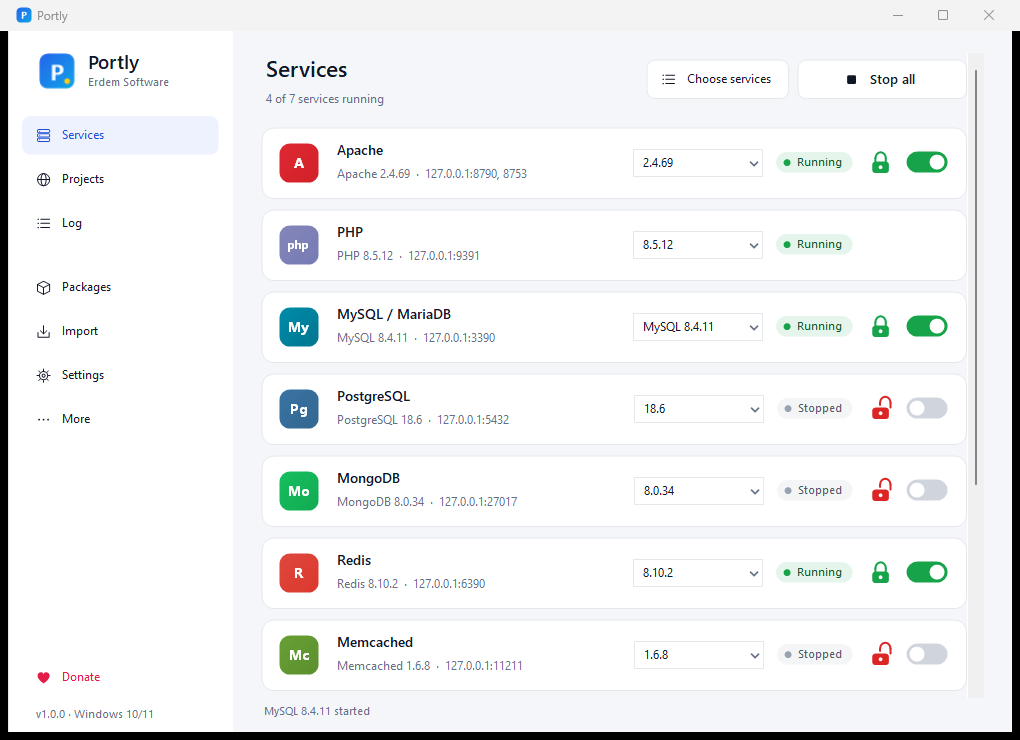
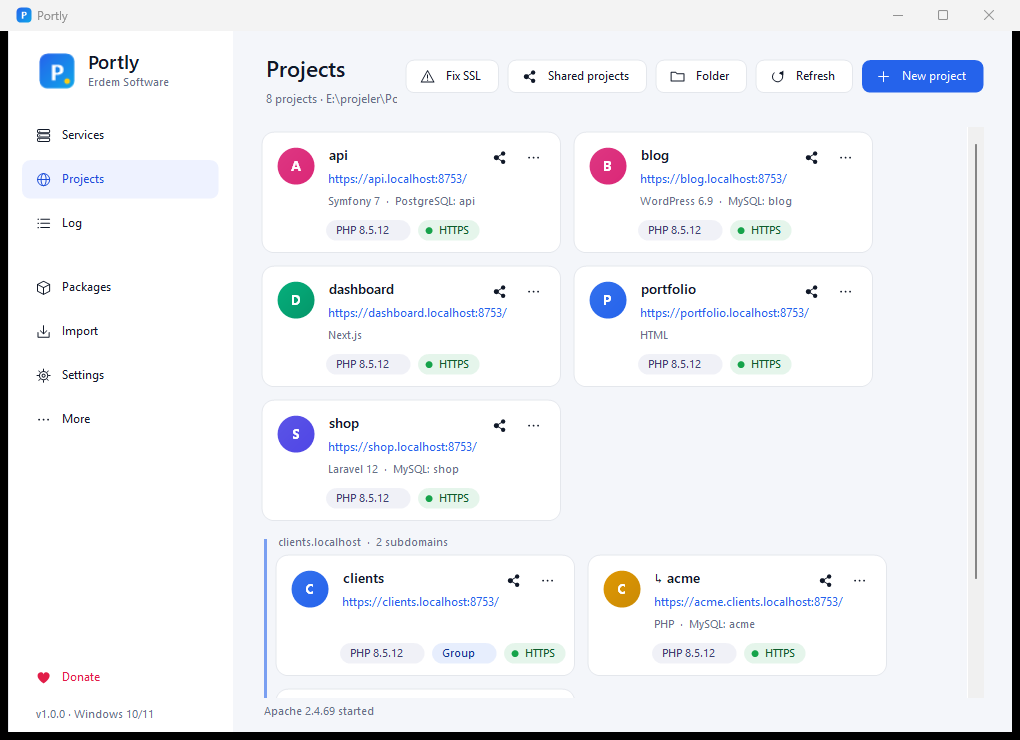
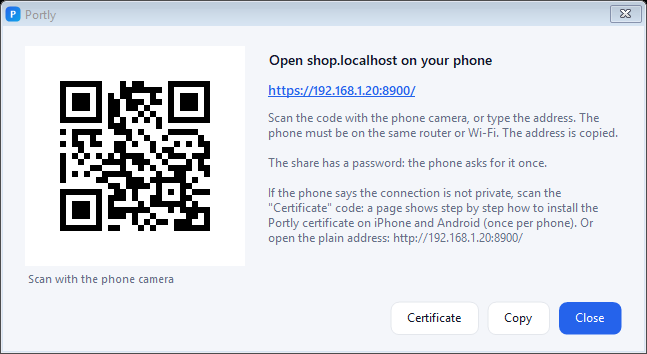
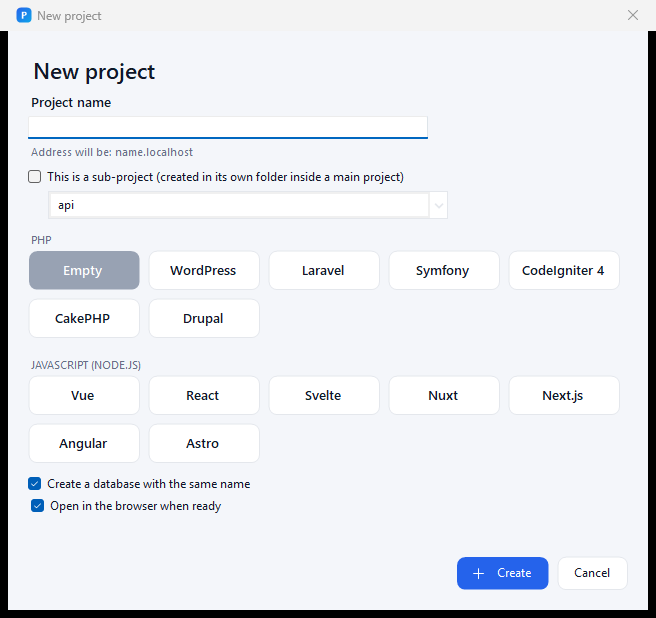
Portly runs Apache or Nginx, PHP, MySQL or MariaDB, PostgreSQL, MongoDB, Redis, Memcached, Node.js, Mailpit, Composer, Adminer and phpMyAdmin from a single folder. No installer needed and nothing installed into Windows by default: no Windows services (an optional service mode, off unless you switch it on in Settings > Features, can run the stack as a service), no registry clutter. It even works from a USB stick.
Why Portly?
| Laragon | Portly | |
|---|---|---|
| License | Closed source, paid for commercial use | MIT, completely free, no ads |
| App updates | Download a new installer | One click inside the app (SHA-256 verified) |
| Package list | Local packages.conf |
Remotely updated catalog + live PHP versions from windows.php.net |
| PHP version per site | No | Yes (every PHP version on its own FastCGI port) |
| HTTPS | One certificate, recreated per project | Local root CA trusted once, a certificate per site |
| Network safety | Listens on all interfaces | 127.0.0.1 by default (no firewall prompt) |
| PHP hardening | Defaults | session.upload_progress and allow_url_include off |
| Crash safety | — | If Portly dies, Windows stops the servers it started (job object) |
| Port conflicts | Error message | Shows the program holding the port; switch to a free port in one click or close that program |
| Sharing | ngrok (account needed) | Local network (phone / tablet on the same Wi-Fi, QR code, https, password) and internet through Cloudflare: random address without an account, or a fixed address on your own domain |
| Migration | — | Projects and databases from Laragon, XAMPP, WampServer, AMPPS, UwAmp, Uniform Server, Open Server, EasyPHP, MAMP (projects from Herd and Local) |
| Databases | MySQL | MySQL or MariaDB, PostgreSQL, MongoDB, SQLite; Redis and Memcached |
| Database tools | HeidiSQL | phpMyAdmin (opens logged in while root has no password), Adminer, HeidiSQL, DBeaver, Beekeeper Studio, DbGate, DB Browser for SQLite |
| WordPress | Manual | One-click WordPress (WP-CLI, admin user ready) |
| Languages | 34 (txt) | 31, plain JSON, open to contributions |
| Windows 7 / 8 / 8.1 | Unclear | Separate Legacy edition |
Features
- Projects: every folder in
wwwbecomeshttps://name.portly; Laravel-stylepublicfolders are detected. Group folders and sub-projects (blog.shop.portly), templates for Laravel, Symfony, CodeIgniter, CakePHP, Drupal, Vue, React, Svelte, Nuxt, Next.js, Angular and Astro. Each card shows what the project is built with and its database. - Share a project
- Local network: open it on your phone with a QR code. Works over https; a guide on the phone installs Portly's certificate on iPhone and Android once. Optional password, time limit, start with Portly, list of connected devices; PHP errors from the phone show up in Portly's log.
- Internet: a free Cloudflare quick tunnel (no account), or your own domain such as
demo.example.comthrough your Cloudflare account. Same password, time limit and device list.
- Per-site PHP version, one-click PHP extensions (17 PECL extensions, verified per PHP version), Xdebug, terminals that follow the project's PHP / Node version (
.php-version,composer.json,.nvmrc). - Services: Start all / Stop all with a padlock per service (choose which ones belong to the group), MySQL / MariaDB in one card, optional Tomcat + Java.
- Update notices ("PHP 8.6 is out" → install and switch in one click), end-of-life and CVE warnings.
- Database safety: check & repair, safe moves between MySQL / MariaDB versions, large SQL import, automatic backups, forgotten root password reset, InnoDB recovery mode.
- Developer workflow: background jobs (queue, scheduler, Vite), site logs, profiler,
portlyCLI with hooks,portly.ymlproject file, push / pull over SSH. - Sites: extra and wildcard domains, your own certificates, archive, Fix SSL, Firefox / Java certificate trust, Caddy and FrankenPHP (Octane).
- Problem prevention: OneDrive folders, non-ASCII and long paths, a second PHP or PHPRC, antivirus blocking the hosts file, quarantine check.
- Modern sidebar UI with light / dark theme that follows Windows, per-monitor DPI and screen-reader support. Rarely used features are switched on in Settings > Features.
Editions
| Download | Windows | Updates | Packages |
|---|---|---|---|
Portly-x.y.z-win10-11.zip |
10 / 11 (64-bit) | Yes: app + package catalog | Latest: PHP 8.5, MySQL 8.4 LTS / 26.x, Apache 2.4, Node 24 LTS ... |
Portly-x.y.z-win7-8.zip (Legacy) |
7 SP1 / 8 / 8.1 (64-bit) | No (frozen catalog) | Last versions that run on Windows 7: PHP 8.2, MySQL 5.7, Apache 2.4 VS16, Node 13 |
| macOS / Linux | — | — | Coming. The settings export is already platform-neutral. Star the repo or donate to help it happen. |
The Legacy edition needs .NET Framework 4.8 (already part of Windows 10 / 11).
Quick start
- Download a zip from Releases and unzip it to a folder without spaces, e.g.
C:\Portly. - Run
Portly.exe. The recommended packages are preselected on the first start: click Install selected. - Click Start all.
- Create a folder in
www:www\shopbecomeshttps://shop.portly. A folder named like a domain (www\example.com) opens ashttps://example.com, so URLs stay the same when you go live; a Local / Live switch on its card brings back the live site on your PC, while the local copy keeps working athttps://example.com.portly.
http://localhost opens a dashboard with all sites, Adminer, Mailpit and phpinfo(). More in docs/04-kullanim.md (Turkish).
Portly\
├─ Portly.exe            the app
├─ lang\  templates\     languages and config templates (renewed by updates)
├─ bin\                  packages: bin\php\php-8.5.12-..., bin\mysql\mysql-8.4.11-winx64 ...
├─ etc\                  generated configuration (rewritten at every start)
├─ usr\                  your settings, own templates, SSL authority (never touched by updates)
├─ data\                 databases (one folder per MySQL series)
├─ www\                  your projects (another folder can be chosen in Settings)
└─ logs\  tmp\  backup\
To change a config template, copy it from templates\ to usr\templates\ and edit the copy; updates leave it alone.
Build from source
Requirements: any .NET SDK 6 or newer (the app targets .NET Framework 4.8, so it runs on Windows 7 SP1 – 11 without extra runtimes). With Inno Setup installed, build.ps1 also makes the setup programs.
powershell -ExecutionPolicy Bypass -File build.ps1            # both editions -> dist\
dotnet build src\Portly\Portly.csproj -c Release              # Windows 10/11 edition only
dotnet build src\Portly\Portly.csproj -c Release -p:Edition=Legacy
dotnet run --project tests\Portly.SmokeTest -c Release        # end-to-end test on test ports
Architecture: docs/02-mimari.md, releasing: docs/03-yayinlama.md (Turkish).
Translations
Language files live in src/Portly/lang. Copy en.json, translate the values, keep the {0} placeholders and send a pull request. Missing keys fall back to English. See CONTRIBUTING.md.
Privacy
Portly has no telemetry, no analytics and no accounts. It only connects to other systems for things you start or switch on:
- Update check (on by default, can be turned off in Settings): downloads the package catalog and release information from this GitHub repository. Nothing about you or your projects is sent.
- Installing a package: downloads it from its official source (windows.php.net, dev.mysql.com, nodejs.org ...).
- Sharing a project on the internet: runs Cloudflare's
cloudflared; visitors reach your site through Cloudflare. Local network sharing stays inside your network.
Portly changes system settings only with a prompt: the hosts file and trusting its local certificate authority ask for confirmation (Windows UAC).
Uninstall: the portable zip is removed by deleting its folder; the setup version uninstalls from Windows Settings > Apps. To remove the trusted Portly certificate authority too, open certmgr.msc > Trusted Root Certification Authorities > Certificates and delete "Portly Local CA".
Code signing policy
Windows releases are built from this repository by GitHub Actions. Code signing through the SignPath Foundation is applied for; until then releases are unsigned and their SHA-256 sums are published with each release.
Team roles:
- Authors / committers: Erdem Software
- Reviewers: Erdem Software
- Approvers (release signing): Erdem Software
Donate
Portly is free and will stay free: no ads, no paid tiers, no tracking. If it saves you time, you can support its development.
- Card: Buy Me a Coffee
- Binance Pay ID: 50018297
- Crypto (USDT on TRC-20, BEP-20, Polygon, Solana, Ethereum): in the app, Menu > Donate
Apache, PHP, MySQL, MariaDB, PostgreSQL, MongoDB, Nginx, Node.js, Redis, Memcached, Mailpit, Composer, Adminer, phpMyAdmin, Cloudflare and the other tools are downloaded from their official sources and are the property of their respective owners. Portly is not affiliated with Laragon.
Explore related projects
codecrafters-io/build-your-own-x
Master programming by recreating your favorite technologies from scratch.
561,867 starspublic-apis/public-apis
A collective list of free APIs
498,228 starsmorluto/rea
Reverse engineer anything with agents, from app behavior down to native binaries.
452,608 starsopenclaw/openclaw
The AI that really does things. Any OS. Any Platform. The lobster way. 🦞
394,365 stars