Projects View on GitHub
emoRaivis/MacMorpheus
About
3D 180/360 video player for macOS and PSVR
Creative & MediaMeasured star growth
- in 24h
- 0
- in 7 days
- 0
- in 15 days
- Collecting history
- in 1 month
- Collecting history
Net star changes over overlapping periods, not daily totals. Missing measurements are left blank. Stars measure attention, not software quality.
README.md
OriginalMacMorpheus
What is this?
3D 180/360 video player for macOS for PSVR with head tracking.
Demo: https://youtu.be/qXFqAeZr4NM
Download here
https://github.com/emoRaivis/MacMorpheus/releases/download/0.2/MacMorpheus.app.zip
Setup instructions
- Power ON the PS4.
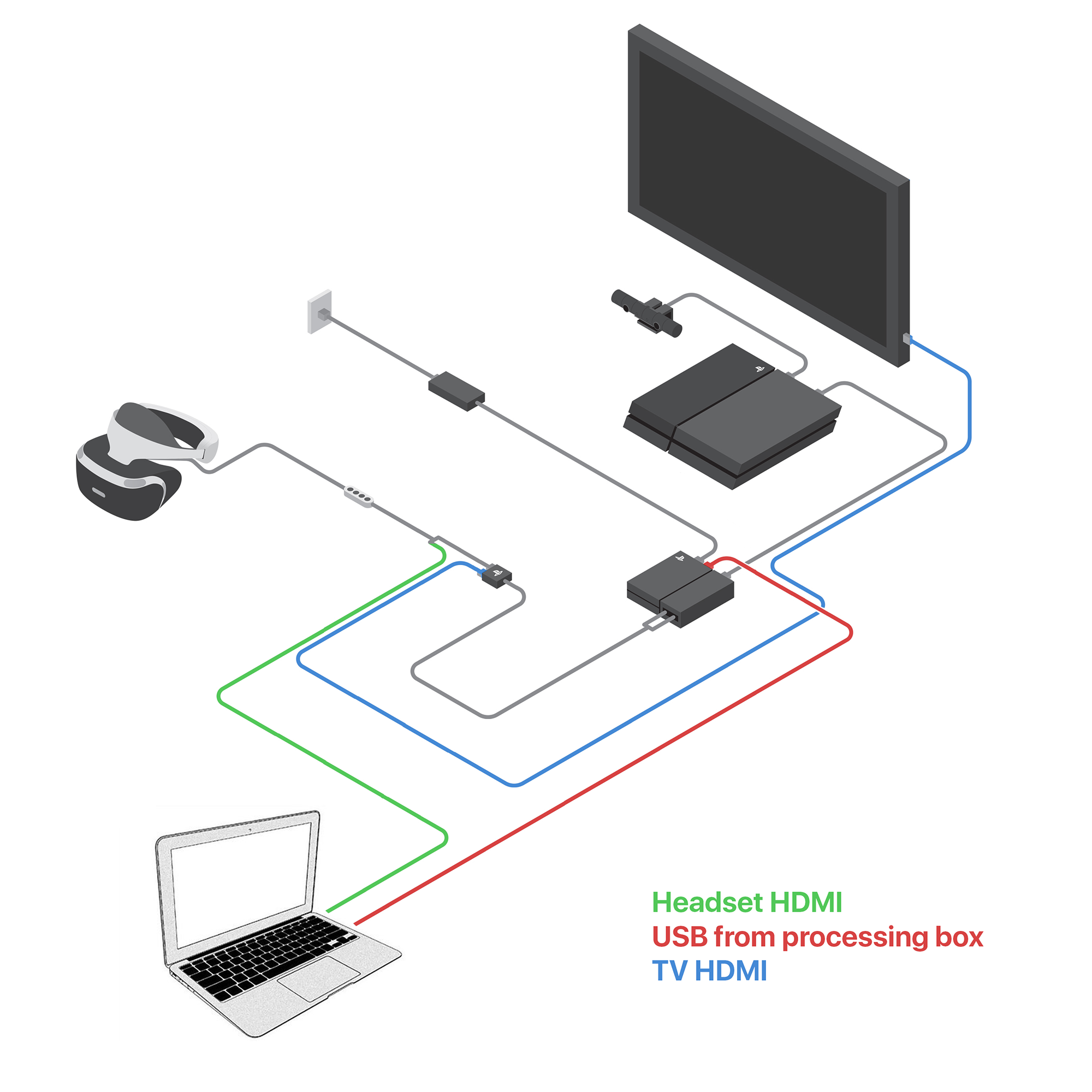
- Connect the HDMI from PSVR headset to the computer (leave the other connector connected to processing box).
- Connect any other HDMI screen in place of the headset (must be ON - use your TV)
- Connect USB from PSVR processing box to your computer.
- If confused, see the wiring diagram below.
- Launch the app and choose the video (mp4, mov, m4v supported now) and pick the correct format from the dropbox.
- That's it - it should work now. Use "R" button to reset view.
Wiring Diagram
Supported modes
- 2D 180°
- 3D 360° Horizontal (Stacked)
- 3D 180° Vertical (Side By Side)
Controls
- Enter - Toggle fullscreen
- Space - Play / Pause
- Arrows - Skip backward / forward
- R - Center view / reset orientation
- ESC - Exit fullscreen / quit
- Mouse drag - Look around
Explore related projects
Loading…