
ellermister/mtproxy
ellermister/mtproxy has 1,702 GitHub stars and 452 forks. GitHot measured +1 stars in 24 hours. Last checked 2026-11-07 03:13 UTC. Last push 2026-09-25.
MTProxyTLS一键安装绿色脚本
Measured star growth
- in 24h
- +1
- in 7 days
- Update delayed
- in 15 days
- Update delayed
- in 1 month
- Update delayed
Net star changes over overlapping periods, not daily totals. Missing measurements are left blank. Stars measure attention, not software quality.
README_EN.md
Original

mtproxy
A one-click installer for an MTProxy that Telegram clients can connect to. Fake TLS and an AdTag are supported by default.
It can also put Nginx in front of MTProxy so the traffic looks like a normal site. An IP whitelist on that front door allows only approved addresses through.
A Docker image is provided for this setup.
Community
Telegram group: https://t.me/EllerHK
Installation
Two ways:
Script (Debian/Ubuntu is the better host) This installs or builds on the machine and may pull in system packages.
Docker (any system that runs Docker) Docker is the easier choice. It does not install those packages on the host. Changing a config file takes a little Docker knowledge.
Script
If the script keeps failing, use Debian 9 or newer, or switch to Docker.
rm -rf /home/mtproxy && mkdir /home/mtproxy && cd /home/mtproxy
curl -fsSL -o mtproxy.sh https://github.com/ellermister/mtproxy/raw/master/mtproxy.sh
bash mtproxy.sh
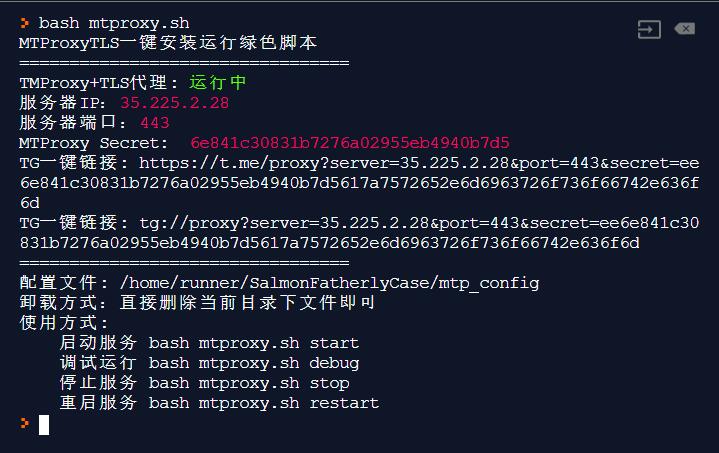
Docker
Use either the image or the script, not both. The commands below are ready to copy. The full parameter list is in docs/parameters.en.md.
If Docker is not installed:
curl -fsSL https://get.docker.com -o get-docker.sh
sh get-docker.sh
Fake TLS with the default IP-segment whitelist (recommended)
docker run -d \
--name mtproxy \
--restart=always \
-e domain="cloudflare.com" \
-p 8080:80 \
-p 8443:443 \
ellermister/mtproxy
Add -e ip_white_list="OFF" to disable the whitelist. Clients connect to the published port 8443.
WEB proxy (experimental)
The server can bind ports 80 and 443. Caddy inside the container requests a certificate and serves HTTPS. Point the domain at this machine first. web_listen stays on loopback; Caddy reaches it inside the container, so do not publish 18080.
docker run -d \
--name mtproxy \
--restart=always \
-e secret="548593a9c0688f4f7d9d57377897d964" \
-e proxy_mode="web" \
-e web_hostname="your-domain-replace.it" \
-e web_email="[email protected]" \
-e web_fallback="public" \
-e web_front="caddy" \
-e web_listen="127.0.0.1:8080" \
-p 80:80 \
-p 443:443 \
ellermister/mtproxy
No permission for ports 80 and 443, or a web server is already in front. Reverse-proxy that site to 18080 on the host or on this container, and keep the original Host header.
docker run -d \
--name mtproxy \
--restart=always \
-e secret="548593a9c0688f4f7d9d57377897d964" \
-e proxy_mode="web" \
-e web_hostname="your-domain-replace.it" \
-e web_fallback="public" \
-e web_front="external" \
-e web_listen="0.0.0.0:18080" \
-p 18080:18080 \
ellermister/mtproxy
web_fallback="public" is a path relative to the script directory. In the image that is /home/mtproxy/public, which already contains index.html. You can instead use https://host with no trailing slash.
Read the link from the logs:
docker logs -f mtproxy
Common parameters
provider:
- 1 Official MTProxy. Poor compatibility, and it only connects through Telegram's middle servers. Skip it when you do not need an adtag
- 2 mtg, the Go build. More architectures, and it supports an adtag. This is the WEB default
- 3 mtprotoproxy, the Python build. More architectures, and it supports an adtag
ip_white_list applies only to Fake TLS:
- OFF disables the whitelist
- IP records the visitor of the registration URL
- IPSEG records the IPv4 /24. This is the default
- AUTO accepts a valid FakeTLS handshake and records that IP
secret is 32 hexadecimal characters. Leave it empty and the container generates one; read it from the logs.
Everything else, including camouflage sites and reverse-proxy notes, is in docs/parameters.en.md.
Usage
Settings live in config. Keep the assignment format if you edit it by hand.
Start
bash mtproxy.sh start
Debug
bash mtproxy.sh debug
Stop
bash mtproxy.sh stop
Restart
bash mtproxy.sh restart
Reinstall or reconfigure
bash mtproxy.sh reinstall
Uninstall
Delete the directory.
rm -rf /home/mtproxy
Start on boot
The script is not installed as a system service. Add it to your boot script.
If /etc/rc.local is missing, check how this system runs boot scripts. Add:
cd /home/mtproxy && bash mtproxy.sh start > /dev/null 2>&1 &
Crontab
The official mtproxy binary mishandles a PID above 65535 and can exit. A crontab entry keeps it up. Run crontab -e and add:
* * * * * cd /home/mtproxy && bash mtproxy.sh start > /dev/null 2>&1 &
MTProxy Admin Bot
Sorry, an error has occurred during your request. Please try again later.(Code xxxxxx)
Telegram does not document this error. Reports usually come from accounts younger than two or three years.
Use an account older than three years that has not been banned.
References
Explore related projects
codecrafters-io/build-your-own-x
Master programming by recreating your favorite technologies from scratch.
560,703 starspublic-apis/public-apis
A collective list of free APIs
496,945 starsmorluto/rea
Reverse engineer anything with agents, from app behavior down to native binaries.
440,231 starsopenclaw/openclaw
The AI that really does things. Any OS. Any Platform. The lobster way. 🦞
394,118 stars