
eliboa/TegraRcmGUI
eliboa/TegraRcmGUI has 2,331 GitHub stars and 157 forks. GitHot measured +1 stars in 24 hours. Last checked 2026-11-07 21:53 UTC. Last push 2021-11-30.
C++ GUI for TegraRcmSmash (Fusée Gelée exploit for Nintendo Switch)
What you can do
- Inject payloads
- Manage favorites
- Run Linux on your switch (ShofEL2)
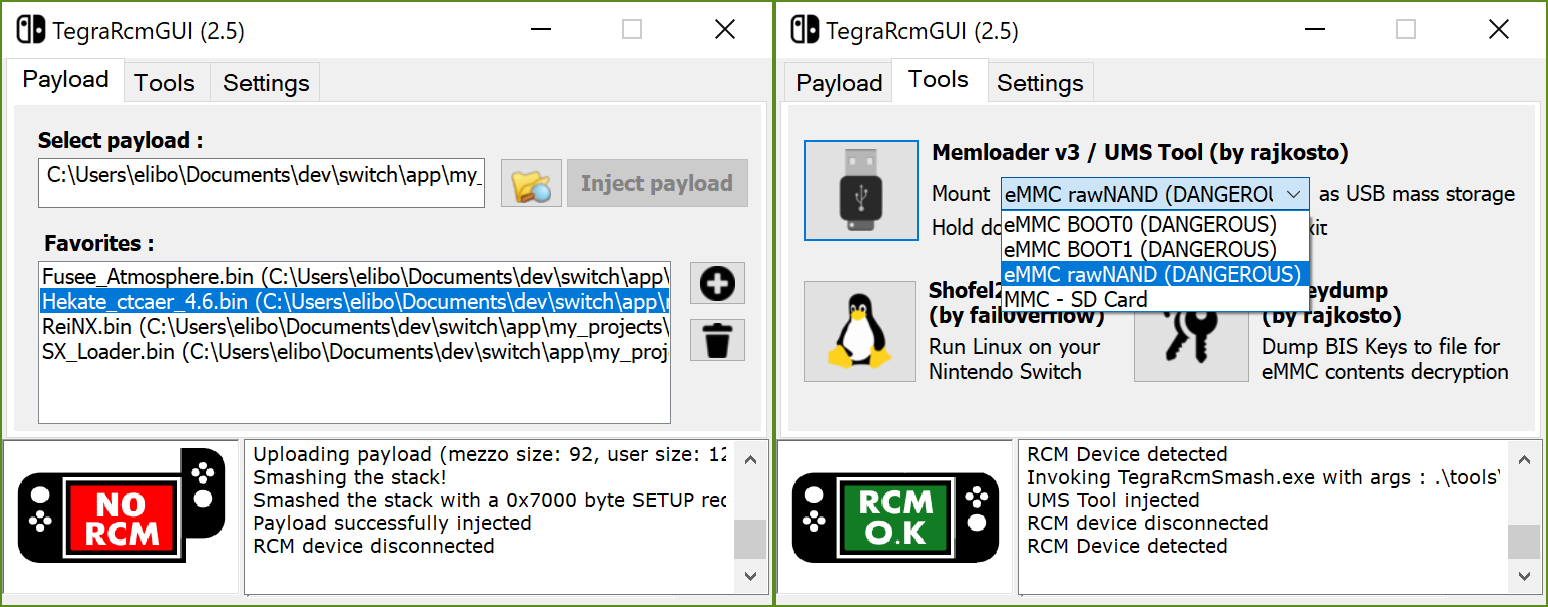
- Mount device as USB mass storage (read/write from/to SD card & NAND partitions, hold power button down for 5sec to exit)
Measured star growth
- in 24h
- +1
- in 7 days
- Update delayed
- in 15 days
- Update delayed
- in 1 month
- Update delayed
Net star changes over overlapping periods, not daily totals. Missing measurements are left blank. Stars measure attention, not software quality.
README.md
Original





TegraRcmGUI
C++ GUI for TegraRcmSmash by rajkosto (Fusée Gelée exploit for Nintendo Switch)
The RCM exploit only works on "unpatched" units, i.e manufactured before July 2018. To check if your Switch is patched, use https://ismyswitchpatched.com/
Features
- Inject payloads
- Manage favorites
- Run Linux on your switch (ShofEL2)
- Mount device as USB mass storage (read/write from/to SD card & NAND partitions, hold power button down for 5sec to exit)
- Dump BIS keys for eMMC content decryption (biskeydump by rajkosto)
- Option - "Auto inject" : automatically inject payload after selection or/and when the Switch is plugged in RCM mode
- Option - Minimize app to tray & tray icon's context menu
- Option - Run app at Windows startup
- Install APX device driver (if needed)
Download
Latest release (Windows)
Important notice
This UI is Windows-only. For other platforms, you can use :
- Fusée Launcher (GNU/Linux)
- NXBoot (OS X, iOS)
- JTegraNX (Windows, OS X, GNU/Linux)
- NXLoader (Android)
- Web Fusée Launcher (Cross-platform, only works with Chrome)
Issue / Suggestion
Please open new issue to report a bug or submit a suggestion.
Development
Install the libusbk dev kit using the setup program, then create an environment variable LIBUSBK_DIR with the installation path as the value.
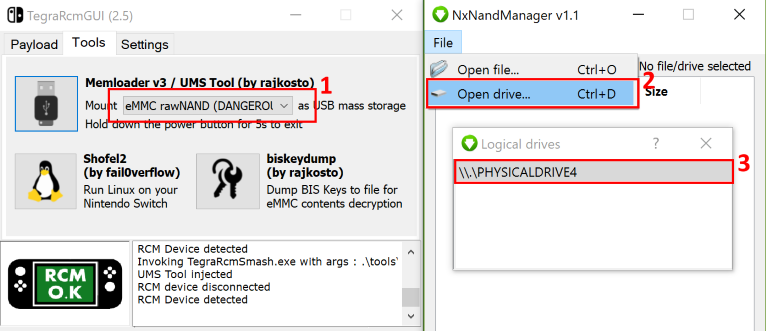
How to backup/restore your Nintendo Switch's NAND ?
- Use memloader v3 to mount eMMC on your computer
- Download and open NxNandManager. Select "File" then "Open drive".
- Select the mounted drive. You can now perform backup/restore operations.
Credits
- Rajkosto / TegraRcmSmash (Fusée Launcher reimplementation for Windows), memloader, SD tool, biskeydump
- Kate Temkin / Fusée Launcher
- fail0verflow / ShofEL2 (Boot stack for no-modification, universal code execution and Linux on the Nintendo Switch)
- SciresM / Atmosphere
- CTCaer / Hekate
- Reisyukaku / ReiNX
Explore related projects
codecrafters-io/build-your-own-x
Master programming by recreating your favorite technologies from scratch.
561,039 starspublic-apis/public-apis
A collective list of free APIs
497,281 starsmorluto/rea
Reverse engineer anything with agents, from app behavior down to native binaries.
443,348 starsopenclaw/openclaw
The AI that really does things. Any OS. Any Platform. The lobster way. 🦞
394,204 stars