
edinetdb/dexter-jp
edinetdb/dexter-jp has 316 GitHub stars and 41 forks. GitHot measured 0 stars in 24 hours and -2 in 7 days. Last checked 2026-11-18 20:19 UTC. Last push 2026-10-08.
Measured star growth
- in 24h
- 0
- in 7 days
- -2
- in 15 days
- Update delayed
- in 1 month
- Update delayed
Net star changes over overlapping periods, not daily totals. Missing measurements are left blank. Stars measure attention, not software quality.
About
日本株の自律型リサーチAIエージェント|AI agent for deep financial research on Japanese listed companies. Powered by EDINET DB + J-Quants.
AIREADME.en.md
Original🇯🇵 日本語版はこちら
Dexter JP — Autonomous Research Agent for Japanese Equities
Ask a question. It plans the research, pulls data from multiple sources, validates its own work, and delivers a finished report.
A financial AI agent built for the Japanese stock market, powered by EDINET DB + J-Quants. Forked from virattt/dexter (US equities) and rebuilt from the ground up for Japan.
⚠️ Disclaimer
This project is for educational, entertainment, and informational purposes only. It is not intended for real trading or investment.
- Not financial, investment, tax, or legal advice
- No guarantees of accuracy, completeness, or fitness for any purpose
- Outputs may be incorrect, incomplete, or out of date
- Creator and contributors assume no liability for any financial losses or damages
- Consult a licensed financial advisor before making investment decisions
- Past performance does not indicate future results
By using this software, you agree to use it solely for learning and informational purposes and accept all risks associated with its use.
Run it in 10 minutes
On a fresh machine it takes three steps. Install Bun first if you don't have it.
1. Replay a recording (no keys, no network)
git clone https://github.com/edinetdb/dexter-jp.git
cd dexter-jp
DEXTER_SKIP_BROWSER=1 bun install
bun run demo
2. Add your EDINET DB key
cp env.example .env
Put your key after EDINETDB_API_KEY= in .env. Keys are free here (sign-up required). You can leave the other lines as your-...; lines still holding the placeholder value from env.example are treated as unset at startup.
3. Pick an LLM and ask
bun run start
Once it starts, choose an LLM with /model.
- If you are logged in to Claude Code, choose "Claude Agent SDK" and it runs without an API key. See Claude Agent SDK mode for plan eligibility. If
ANTHROPIC_API_KEYis set in.envor your environment, that is a usage-billed path, so Dexter stops before sending anything (the setting to proceed on that path is described there too)./checkis not available in this mode yet (see Not in this release) - To use OpenAI or another API key, put the key on the matching line in
.envfirst, then choose it
For example:
Show me Toyota's financials over the last five years
The first screen lists what leaves your machine in this session. Check it together with the Where your data goes table.
Connect your own AI directly, without Dexter (MCP)
EDINET DB is also available as an MCP server. You can register it in Claude Code with one line. Authentication is required: sign in with your EDINET DB account when prompted, and if no sign-in prompt appears, use the API-key setup in the MCP guide below.
claude mcp add edinetdb https://edinetdb.jp/mcp --transport http
Steps for Claude.ai, Claude Desktop, ChatGPT, Cursor and Codex CLI are in the edinet-db-mcp README and the MCP guide. Ready-to-paste questions are in the prompt templates.
Answer-checking (v1.1.0-jp)
Bring your own hypothesis about a company. Dexter JP puts it against the paragraphs of that company's annual securities report (有価証券報告書), one claim at a time, and tells you which paragraphs support it, which contradict it, and which are about something else — with the source for each. It shows you what the company itself wrote. It does not tell you what to do about it.
/check 9983 中国事業は回復していると会社は説明している
Your hypothesis is split into claims (shown next to your original wording), the relevant sections of the annual report are cut into paragraphs, and each paragraph is checked against each claim. If the paragraphs cannot settle a claim, you get "判定不能" (cannot determine) — the model is not asked to fill the gap.
The panel shows your original wording, the claims it was split into, the company's own paragraphs behind each verdict (with document ID, filer, document type and section), and how much of the report was examined.
Run it first
DEXTER_SKIP_BROWSER=1 bun install
bun run demo
bun run demo replays a recorded run. No API keys, no network calls. The screen says so.
DEXTER_SKIP_BROWSER=1 skips the Chromium download (130MB+). Install without it when you want the browser tool.
What you need to run your own hypotheses
| Keys | What works | |
|---|---|---|
| 1 | none | bun run demo (replay of a recording) |
| 2 | EDINETDB_API_KEY + TYPESAFE_API_KEY |
/check |
An EDINET DB key is free (account required).
/check does not run without TYPESAFE_API_KEY. We did not make it fall back to a local LLM labelling things instead. Here is why.
The entrance to /check screens out inputs asking for trading advice or for a view on price level. That screen is two things: a deterministic check on vocabulary and phrasing, and a vote from the judge layer. Neither is enough alone. Measured on 30 advice-seeking inputs written by a separate model that was shown neither the implementation nor the word list:
| Screen | Got through | False positives on 20 ordinary inputs |
|---|---|---|
| Deterministic vocabulary and phrasing only | 12/30 | 0/20 |
| Judge layer (Jev) vote only | 1/30 | 0/20 |
| Both together (what ships) | 0/30 | 0/20 |
| Deterministic + a local LLM as the vote | 8/30 | 0/20 |
A local LLM standing in for the judge lets 8 of 30 through. We would rather stop than run with that gap. Use bun run demo to see the output before you add a key.
What it does not output
- Dexter JP does not provide investment advice.
/checkand/watchdo not output trade instructions, price targets, or position sizes - No view on whether a stock is cheap or expensive, and no fair value. Inputs asking for those do not reach the judgment step; you get two or three suggested rewordings that the disclosures can actually answer
- No market-regime labels (uptrend, near highs, and so on)
- Counts are reported as "how many of the examined paragraphs fell into each bucket". They are never rolled up into a single "support score"
- The probability shown is the model's estimate of the relationship between that paragraph and that claim. It is not the probability that your hypothesis is true
/checkrecords stay on your machine in.dexter/checks/. Delete that directory to delete them
Where your data goes
This table is a translation. The canonical list is the Japanese table in README.md, which a test keeps identical to the ledger in src/config/egress.ts.
| Destination | What is sent | When | Default |
|---|---|---|---|
| EDINET DB | Ticker codes and API requests (annual report text, financials, disclosure events) | EDINETDB_API_KEY |
on |
| Your selected LLM provider | Your hypothesis, annual report paragraphs, conversation (decomposition, summarisation, free-form questions) | The key for the provider you chose (/model) |
on |
| TypeSafe (Jev, US) | The claims split out of your hypothesis, and annual report paragraphs, one at a time | TYPESAFE_API_KEY |
off |
| Conversation-history embedding (OpenAI → Gemini → Ollama, auto-selected) | Full conversation text. Chosen independently of your selected LLM — with OPENAI_API_KEY set it goes to OpenAI even if /model is Claude |
On by default; any of OPENAI_API_KEY / GOOGLE_API_KEY / OLLAMA_BASE_URL |
on |
| LangSmith | LangChain prompts and tool results (traces) | LANGSMITH_TRACING=1 |
off |
| J-Quants | Ticker codes and dates (stock prices) | JQUANTS_API_KEY |
off |
| Web search provider (Tavily / Exa / Perplexity / LangSearch) | Search terms (only to the provider you chose with /search) |
The key for the provider you chose | off |
| X (Twitter) | Search terms you typed, or that the agent composed | X_BEARER_TOKEN |
off |
| Ollama (local by default; remote if configured) | Conversation text and text to embed | OLLAMA_BASE_URL / OLLAMA_CLOUD_API_KEY |
off |
| OpenRouter | Conversation text (when an OpenRouter model is selected) | OPENROUTER_API_KEY |
off |
| Moonshot | Conversation text (when Kimi is selected) | MOONSHOT_API_KEY |
off |
| DeepSeek | Conversation text (when a DeepSeek model is selected) | DEEPSEEK_API_KEY |
off |
| Messaging gateways (Slack / Discord / WhatsApp / LINE) | Agent replies (only if you start a gateway) | When you start that gateway | off |
We do not write that TypeSafe (Jev) "does not store" your data. Their terms say inputs are not used as training data, while reserving the right to process them for telemetry, abuse prevention and legal compliance. Read each service's terms yourself.
Conversation-history embedding is on by default, and its destination is chosen independently of the model you selected. If OPENAI_API_KEY is in your .env, your conversation goes to OpenAI even when /model is set to Claude. On startup, Dexter JP prints the destinations your .env keys make possible for that session (listing a destination does not mean data is actually sent; conditions vary by feature, and the embedding destination is selected automatically).
Bundled data
The paragraphs replayed by bun run demo are annual report text, identical to the bundled data in src/data/materials/ (a test checks this). Each entry there carries a document ID, filer, document type, section, retrieval date, the required attribution, and the party that edited it.
出典:EDINET閲覧(提出)サイト(https://disclosure2.edinet-fsa.go.jp/)、PDL1.0(https://www.digital.go.jp/resources/open_data/public_data_license_v1.0)
This data is not covered by the MIT licence. Its terms are in LICENSE-DATA, along with the procedure for a filer to request a change or removal.
Before you use it
If you use the output of this tool to provide information to third parties (a public bot, for example), you may yourself fall under the Financial Instruments and Exchange Act or other regulations.
Not in this release
- TradingView connection. Reading your watchlist is deferred to a later release
/checkunder Agent SDK mode. We have not verified that decomposition and summarisation run through a single SDKquery(), so it is unsupported here/watchas a command. The data layer is implemented; wiring it up as a command comes next- Checking numeric claims against financial data. The parts exist but are not wired into
/checkyet, so/checkin this release only checks text claims against paragraphs
When verdicts split
Run against the full annual report, the judge can read a paragraph about a segment's or a region's profit increase as contradicting a consolidated profit decline, so claims can come back split. On Toyota's 122nd-period annual report (103 paragraphs across MD&A, business risks and management policy), the hypothesis "the company explains that the fall in operating profit was mainly due to exchange rates" came back split on all three claims (the decline: 12 supporting / 3 contradicting). The bun run demo recording uses 10 paragraphs selected from the same report.
Not Just Another Financial Tool
Most financial tools stop at "here's a screener" or "here's the data." Dexter JP goes further.
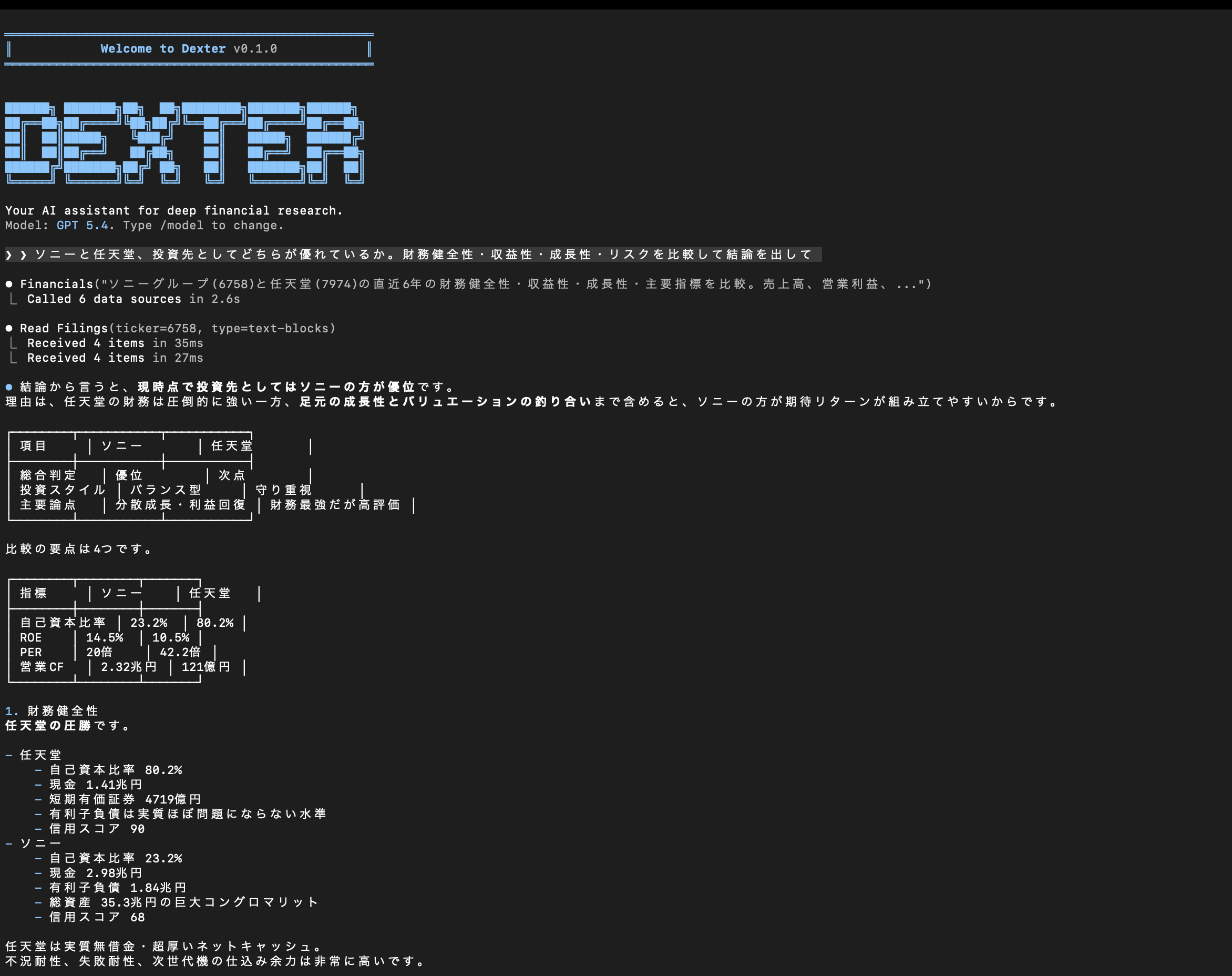
Ask: "Line up Sony and Nintendo on ROE and equity ratio using the annual report values, and compare the business risks each one discloses" and it will:
- Build a plan — decide which metrics matter (profitability, growth, balance sheet strength, risk) on its own
- Call multiple tools autonomously — pull financial statements, annual report risk factors, and earnings summaries for both companies in parallel
- Self-validate mid-process — check whether the numbers and narrative are consistent, and whether it has enough data
- Deliver a report — output a structured analysis with comparison tables and a clear conclusion
One question, zero human intervention. This is not single-tool data retrieval. It is multi-source, autonomous analysis.
Setup
Requirements
Environment Variables
Set these in your .env file:
# === Required ===

# LLM (at least one; you can set multiple and switch between them in the CLI)
OPENAI_API_KEY=sk-...          # OpenAI (default)
ANTHROPIC_API_KEY=sk-ant-...   # Claude
GOOGLE_API_KEY=...             # Gemini
XAI_API_KEY=...                # Grok
OPENROUTER_API_KEY=...         # OpenRouter (access to multiple models)

# Japanese equity data
EDINETDB_API_KEY=edb_...       # Get yours at edinetdb.com (free tier available)

# === Optional ===

# Stock prices (enables the get_stock_price tool)
JQUANTS_API_KEY=...            # Free, no expiration — jpx-jquants.com

# Web search (enables the web_search tool; priority: Exa > Perplexity > Tavily)
EXASEARCH_API_KEY=...
PERPLEXITY_API_KEY=...
TAVILY_API_KEY=...

# X/Twitter search
X_BEARER_TOKEN=...

# Local LLM
OLLAMA_BASE_URL=http://127.0.0.1:11434
Install & Run
git clone https://github.com/edinetdb/dexter-jp.git
cd dexter-jp
bun install
cp env.example .env  # Edit this file and add your API keys
bun run start
Usage Examples
Autonomous Analysis (Where the Agent Shines)
Throw a complex question at Dexter and it will plan, gather data across multiple sources, and produce a report:
Comprehensive analysis of Toyota's competitiveness. Cover financials, risk factors from the annual report, and latest earnings — compile everything into a report.

Line up Sony and Nintendo on ROE, equity ratio, and operating margin using the annual report values, and compare the business risks each one discloses.

Screen for companies with ROE of at least 15% and dividend yield of at least 4%, show up to three in stock code order, and check each company's equity ratio and the business risks disclosed in its annual securities report.

Check Keyence's sales and operating profit over the last 5 years in its annual reports, and list three business risks the company itself discloses.
Simple Queries Work Too
Show me Toyota's financial trends over the last 5 years.

Screen for companies with ROE above 15% and equity ratio above 50%.

Pull the risk factors section from Nintendo's annual securities report.

Find high-dividend stocks yielding above 4%.
Works in English
Analyze Toyota's competitiveness. Cover financials, risk factors from the annual report, and latest earnings.

Compare Sony and Nintendo on ROE and equity ratio using the values in their annual reports, and list the risks each one discloses.
Architecture
User's question
    |
Agent loop (LangChain)
    | Plan -> Select tools -> Execute -> Validate -> Repeat
    |
+-------------------------------------------+
|  get_financials (meta-tool)               |
|    -> get_financial_statements            |
|    -> get_company_info                    |
|    -> get_key_ratios                      |
|    -> get_analysis                        |
|    -> get_earnings                        |
+-------------------------------------------+
|  read_filings                             |
|    -> text-blocks (annual report text)    |
|    -> shareholders (large shareholdings)  |
+-------------------------------------------+
|  company_screener (100+ metrics)          |
+-------------------------------------------+
|  get_stock_price (J-Quants V2)            |
+-------------------------------------------+
|  web_search / browser / skills            |
+-------------------------------------------+
    |
Structured report output
How the Meta-Tool Works
get_financials is not a simple API wrapper. It is a routing agent with its own internal LLM:
- Receives a natural language query from the user
- Its internal LLM decides which sub-tools to invoke
- Runs multiple sub-tools in parallel
- Consolidates results and returns them
"Compare Sony and Toyota's profit margins" triggers four API calls behind the scenes, automatically.
Skills System
Complex multi-step workflows are defined in SKILL.md files. Ships with a built-in DCF valuation skill:
- WACC calculation based on Japanese government bond yields
- Awareness of TSE's PBR-below-1x governance push
- All analysis in JPY
Research Rules (.dexter/RULES.md)
Define your investment style and analysis preferences in Markdown. The rules are automatically loaded into the system prompt and guide Dexter's research behavior.
mkdir -p .dexter
cp RULES.md.example .dexter/RULES.md
# Edit to match your preferences
Use /rules in the CLI to verify your current rules are active.
Examples:
- Always compare against 5 sector peers
- Report financials in JPY millions
- Screen using value criteria (ROE > 10%, PBR < 1.5)
Context Compaction
During long research sessions with heavy data retrieval, a fast LLM automatically compresses accumulated tool results into a structured summary. Unlike simple clearing, key numbers and conclusions are preserved — keeping analysis coherent across the full session.
Memory
Persists across sessions. Dexter remembers your investment thesis, portfolio information, and past analyses.
Supported LLMs
Switch models on the fly with the /model command:
- OpenAI (GPT-4o, GPT-4o-mini, etc.)
- Anthropic (Claude)
- Google (Gemini)
- xAI (Grok)
- OpenRouter
- Ollama (local LLMs)
- Claude Agent SDK (see below)
Claude Agent SDK mode
A run mode powered by @anthropic-ai/claude-agent-sdk. The agent loop is delegated to the SDK, and authentication is resolved by the SDK — Dexter implements no auth flow of its own.
- Pick the Claude Agent SDK provider via
/model, choose a model (claude-fable-5 / claude-opus-4-8 / claude-sonnet-4-6), and go. No API key entry is requested. - The SDK resolves credentials. It works with your Claude Code login,
CLAUDE_CODE_OAUTH_TOKEN, orANTHROPIC_API_KEY— the SDK decides which, based on your environment. - Whether the Agent SDK can be used on a Claude plan (Pro/Max), and under what terms, is described in Anthropic's help (Use the Claude Agent SDK with your Claude plan). Terms may change.
- Use it with your own personal credentials only; do not offer it as a multi-user service.
- Billing-path check: if a usage-based credential (
ANTHROPIC_API_KEY,CLAUDE_CODE_USE_BEDROCK,CLAUDE_CODE_USE_VERTEX, …) is present in the environment, the mode reports what it detected at startup and stops before running so it does not proceed on an unintended billing path (fail-loud). To proceed on that path, setDEXTER_AGENT_SDK_ALLOW_METERED=1and retry. - To cap cost, set
DEXTER_AGENT_SDK_MAX_BUDGET_USD(USD); the SDK stops when its estimate reaches it. - In this mode Dexter's finance/data tools return raw data for the main model to interpret (no internal LLM re-call inside tools). SDK built-in tools (Bash / Write / WebSearch, etc.) are not used.
Note: availability and pricing of this mode depend on Anthropic's terms and may change. This does not claim the mode is "free" or "no extra cost"; the startup line shows which credential path is actually in use.
Messaging Integrations
Use Dexter beyond the CLI — connect it to Slack, Discord, or LINE. Start with bun run gateway:
| Channel | Protocol | Public URL Required? | Environment Variables |
|---|---|---|---|
| Slack | Socket Mode (WebSocket) | No | SLACK_BOT_TOKEN + SLACK_APP_TOKEN |
| Discord | Gateway (WebSocket) | No | DISCORD_BOT_TOKEN |
| LINE | Webhook (HTTP) | Yes | LINE_CHANNEL_SECRET + LINE_CHANNEL_ACCESS_TOKEN |
| Baileys (WebSocket) | No | QR code login |
Only channels with configured environment variables will start. Multiple channels can run simultaneously.
Slack Bot Setup
- Go to api.slack.com/apps -> Create New App -> From scratch
- Socket Mode -> Enable -> Generate an App-Level Token (starts with
xapp-) - OAuth & Permissions -> Add Bot Token Scopes:
chat:write,im:history,im:read,app_mentions:read
- Event Subscriptions -> Enable Events -> Subscribe to bot events:
message.im(DM),app_mention(mentions)
- App Home -> Turn on Messages Tab -> Check "Allow users to send Slash commands and messages from the messages tab"
- Install to Workspace -> Copy the Bot Token (starts with
xoxb-) - Add to
.env:SLACK_BOT_TOKEN=xoxb-... SLACK_APP_TOKEN=xapp-...
In channels, Dexter replies in threads. In DMs, it replies directly.
Discord Bot Setup
- Go to discord.com/developers/applications -> New Application
- Bot -> Reset Token -> Copy the Bot Token
- Bot -> Privileged Gateway Intents -> Enable Message Content Intent
- OAuth2 -> URL Generator:
- Scopes:
bot - Bot Permissions:
Send Messages,Read Message History,Send Messages in Threads
- Scopes:
- Open the generated URL in your browser and invite the bot to your server
- Add to
.env:DISCORD_BOT_TOKEN=MTQ4...
In servers, mention @BotName to get a threaded reply. In DMs, it replies directly.
LINE Bot Setup
LINE uses webhooks (not WebSocket), so you need a publicly accessible URL — unlike Slack/Discord.
- Create a LINE Official Account at LINE Official Account Manager
- As of 2026, you cannot create Messaging API channels directly from the LINE Developers Console
- In LINE Official Account Manager → Settings → Messaging API → Enable Messaging API
- Select an existing provider
- In LINE Developers Console → your channel → Messaging API tab:
- Channel access token (long-lived) → Issue
- Webhook URL →
https://{your-domain}/webhook/line - Use webhook → ON
- Webhook redelivery → OFF (prevents duplicate processing)
- In LINE Official Account Manager → Settings → Response settings:
- Auto-reply messages → OFF
- Greeting messages → OFF
- Get the Channel Secret from the Basic settings tab
- Add to
.env:LINE_CHANNEL_SECRET=your-channel-secret LINE_CHANNEL_ACCESS_TOKEN=your-channel-access-token WEBHOOK_PORT=3000 # default
For the public webhook URL:
- Local testing:
ngrok http 3000→ use the generated URL +/webhook/line - Production: Deploy to any service that supports long-lived processes (not serverless):
Start the Gateway
bun run gateway # All configured channels start simultaneously
Data Sources
| Source | Coverage | Required? |
|---|---|---|
| EDINET DB | Financial statements, annual report text, screening, AI analysis (~3,800 companies) | Required |
| J-Quants | Stock price OHLC (official TSE data) | Optional |
| Web search | Exa / Perplexity / Tavily | Optional |
Differences from the Original (US Version)
| Original (US) | JP Version | |
|---|---|---|
| Data source | Financial Datasets API | EDINET DB API |
| Market | US equities | Japanese equities (~3,800 companies) |
| Filings | SEC 10-K/10-Q/8-K | Annual Securities Reports (EDINET) |
| Earnings | 8-K earnings | TDNet Earnings Summaries |
| Shareholder data | SEC Form 4 (insider transactions) | Large Shareholding Reports (5%+ holdings) |
| Stock prices | Financial Datasets | J-Quants V2 (official TSE feed) |
| Screening | GICS sectors | 33 TSE industries, 100+ metrics |
| DCF | US Treasury rates (~4%) | JGB yields (~1%) |
| Language | English | Japanese + English |
License
MIT