
echo-loop/Echo-Loop
echo-loop/Echo-Loop has 4,654 GitHub stars and 489 forks. GitHot measured +7 stars in 24 hours and +83 in 7 days. Last checked 2026-11-05 03:27 UTC. Last push 2026-11-01.
Echo Loop is a scientific, efficient AI app for English listening and speaking practice. Through intensive listening, shadowing, blind listening, retelling, and spaced review, it automatically guides learners to truly understand, master, and speak every audio segment.
Measured star growth
- in 24h
- +7
- in 7 days
- +83
- in 15 days
- Collecting history
- in 1 month
- Collecting history
Net star changes over overlapping periods, not daily totals. Missing measurements are left blank. Stars measure attention, not software quality.
README.en.md
Original
Echo Loop — Efficient English Listening & Speaking Training
You no longer have to figure out how to practice English on your own.
Intensive listening · Shadowing · Blind listening · Retelling · Review — Echo Loop guides you through every step at a scientifically-paced rhythm.
This project is academically advised by Yang Yan from the School of Foreign Studies, Minzu University of China.







📱 Screenshots
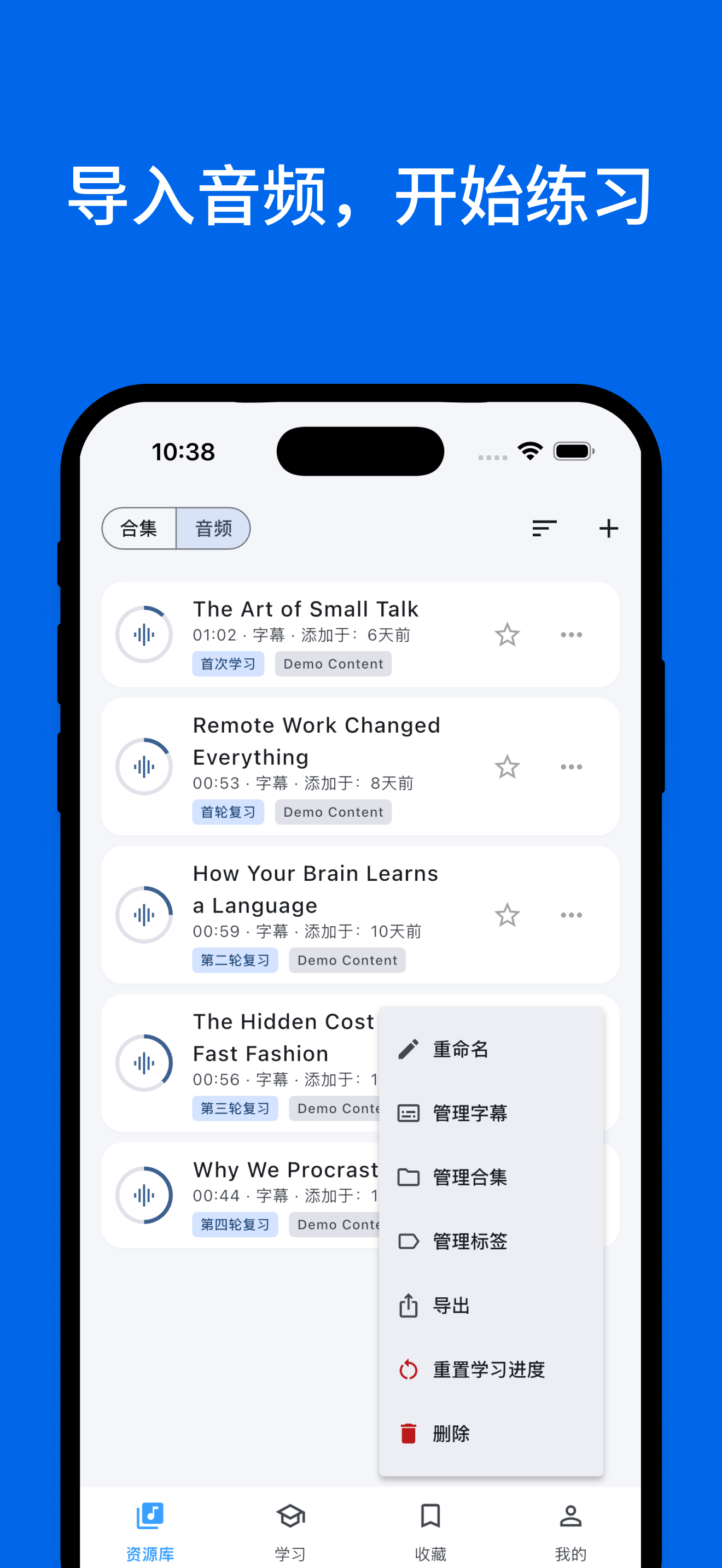 Import audio, start practicing |
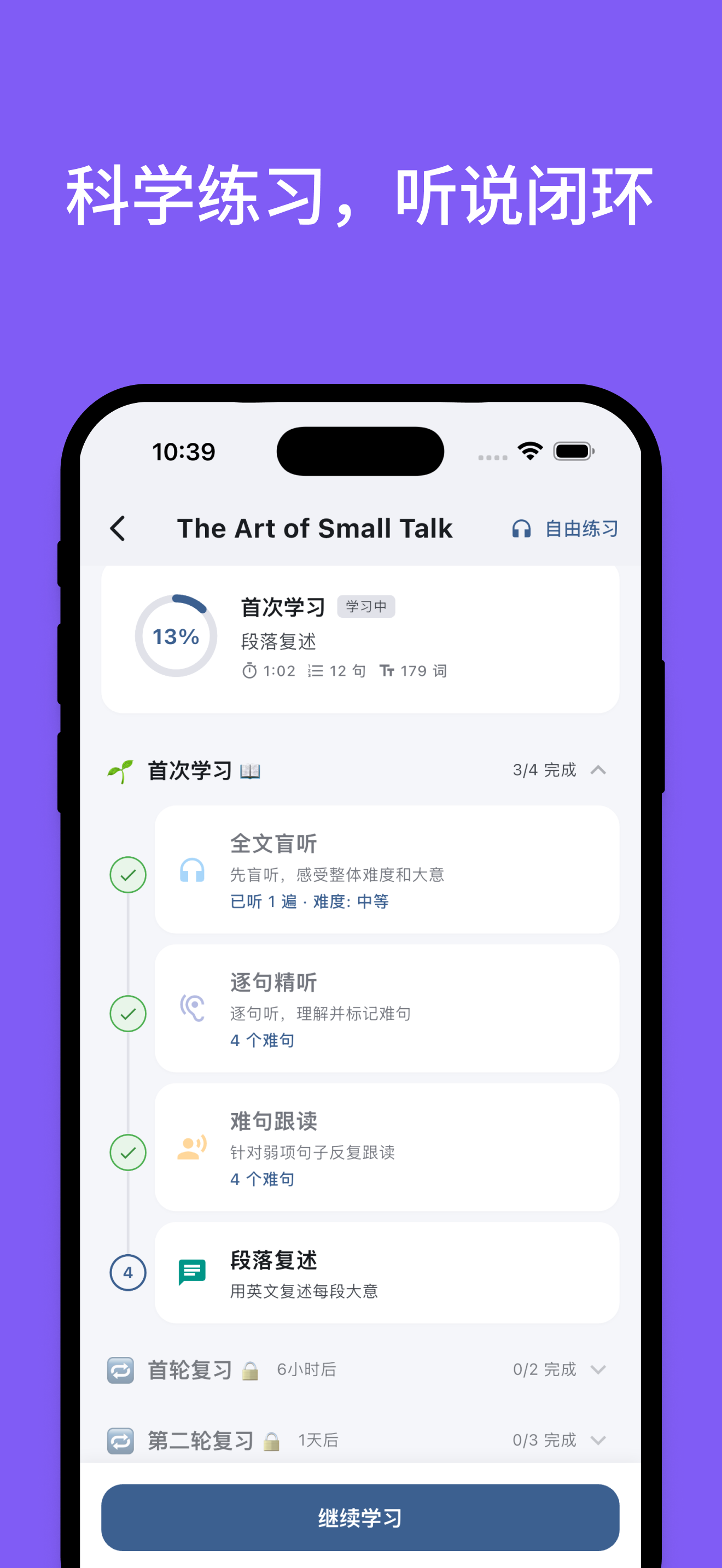 Scientific practice, listen-speak loop |
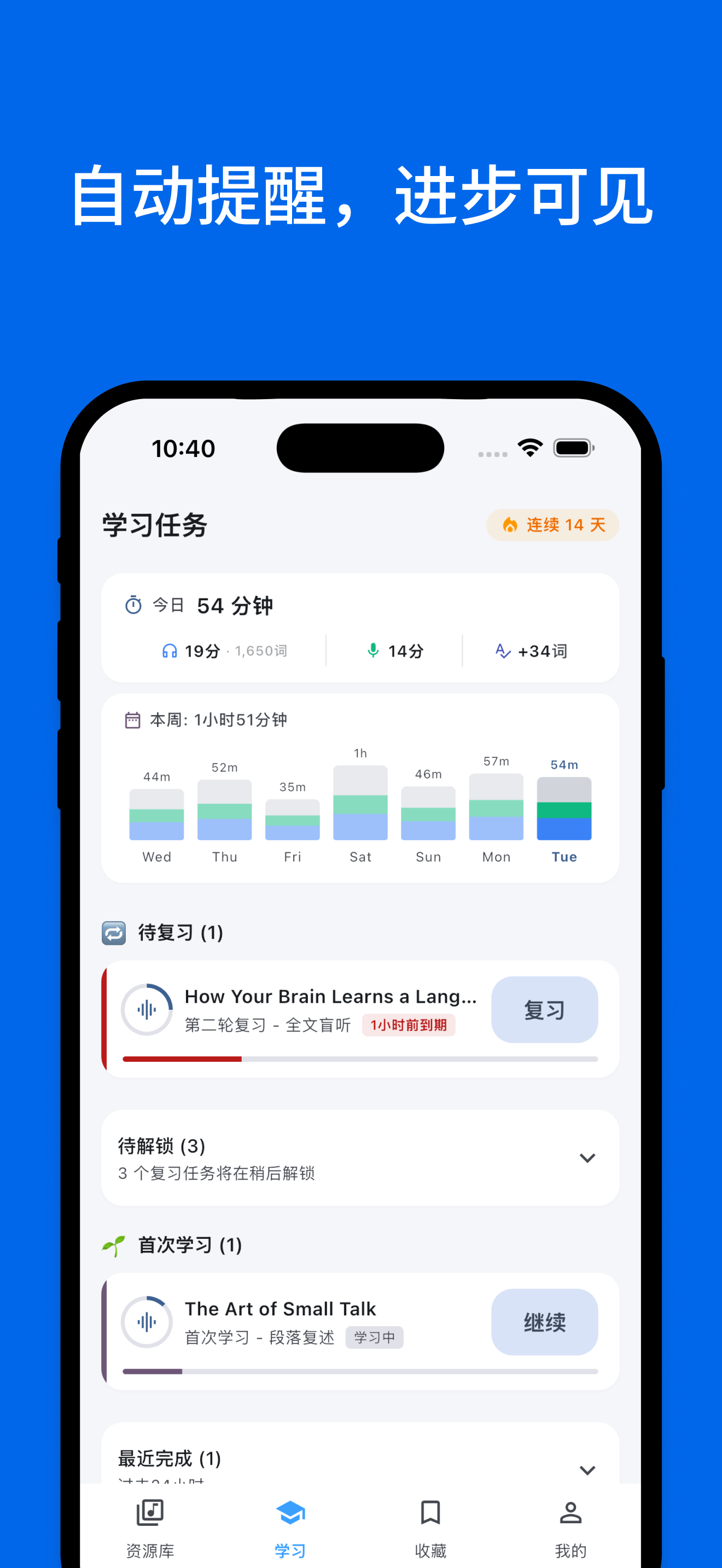 Auto reminders, visible progress |
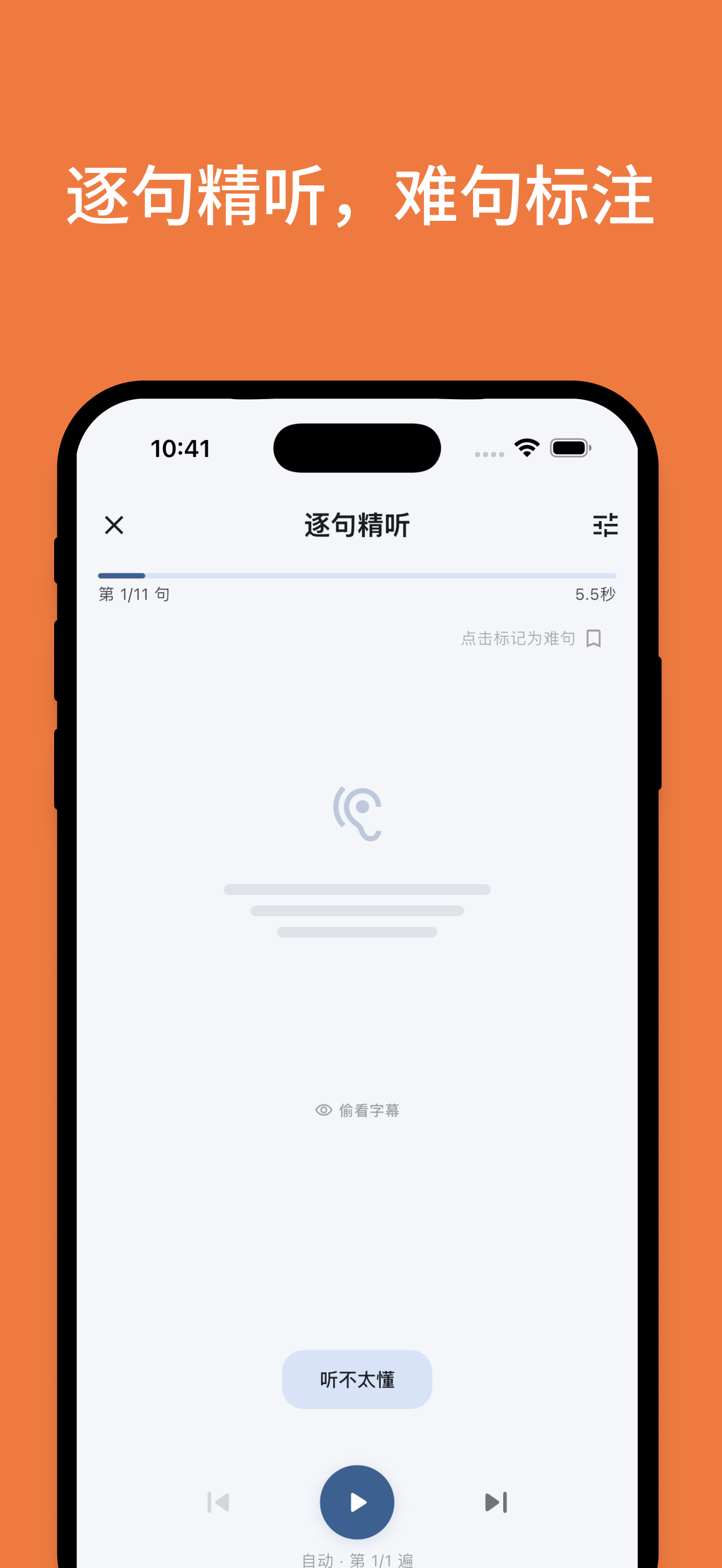 Sentence-by-sentence intensive listening |
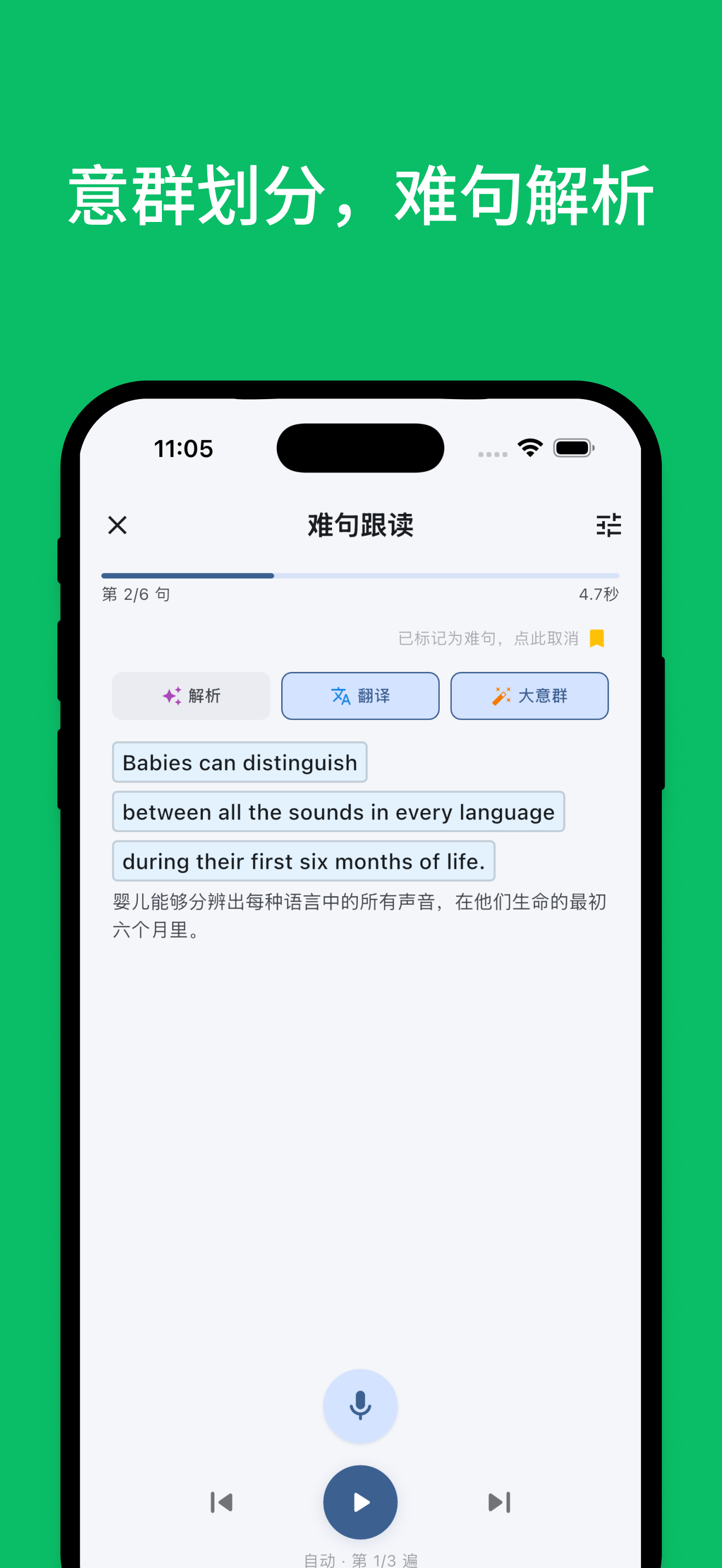 Sense-group split, hard sentence analysis |
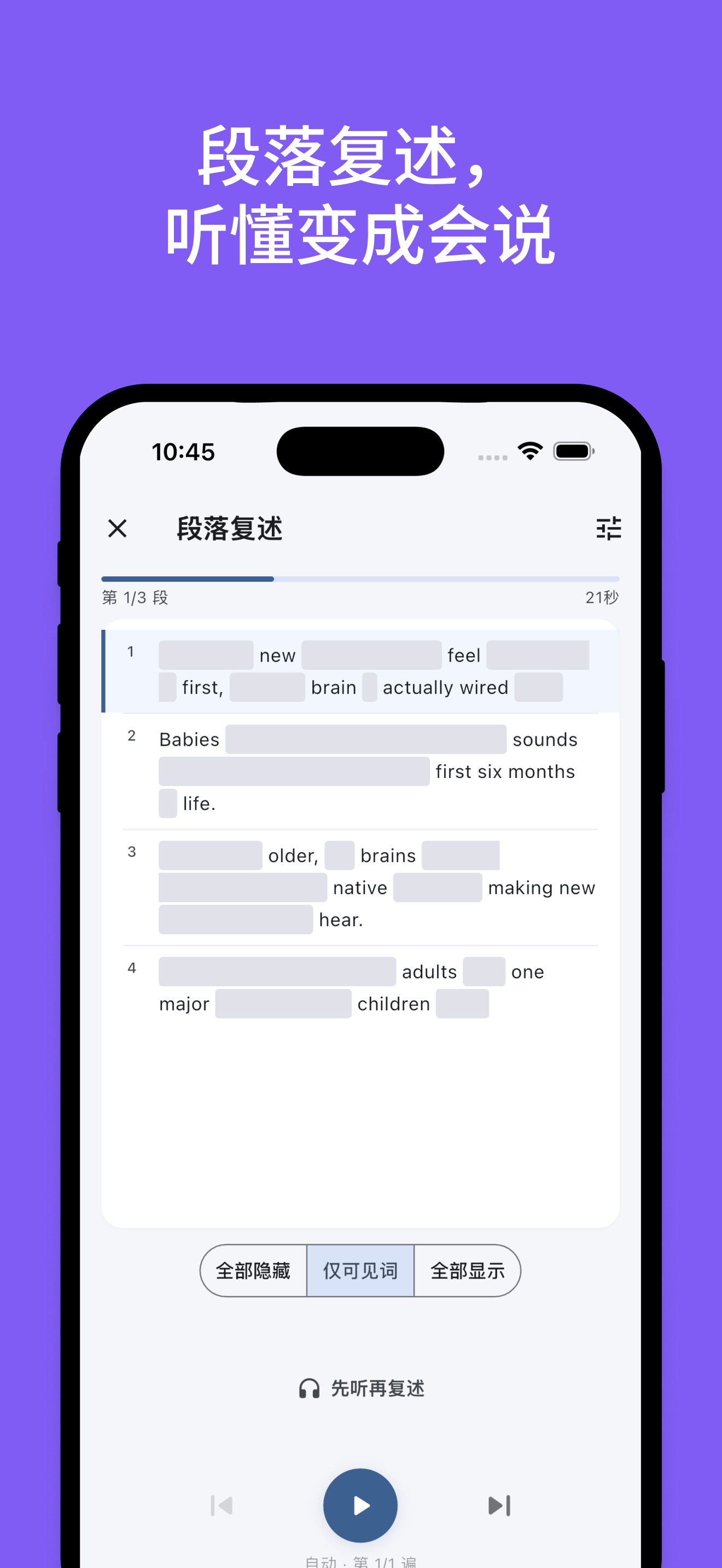 Retelling: turn comprehension into output |
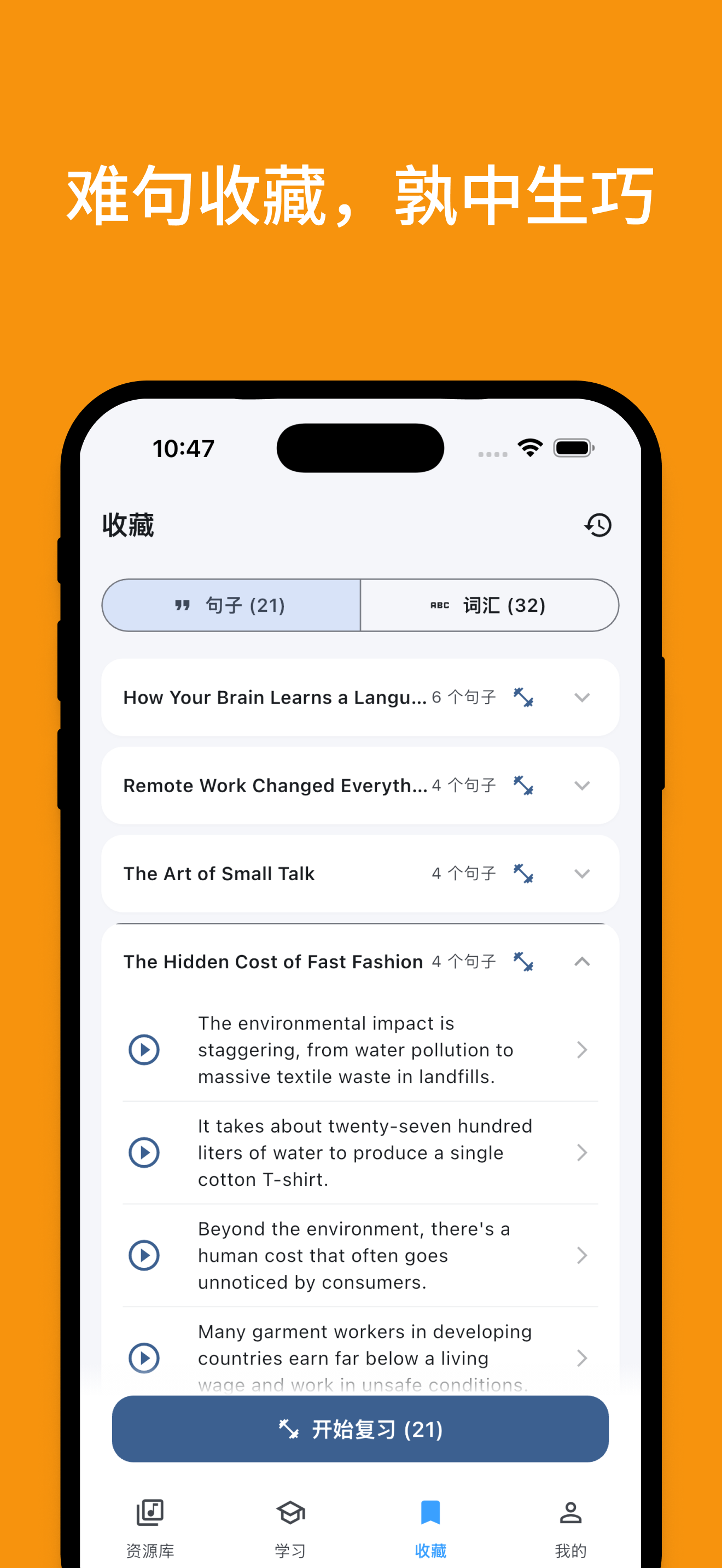 Saved hard sentences, practice to mastery |
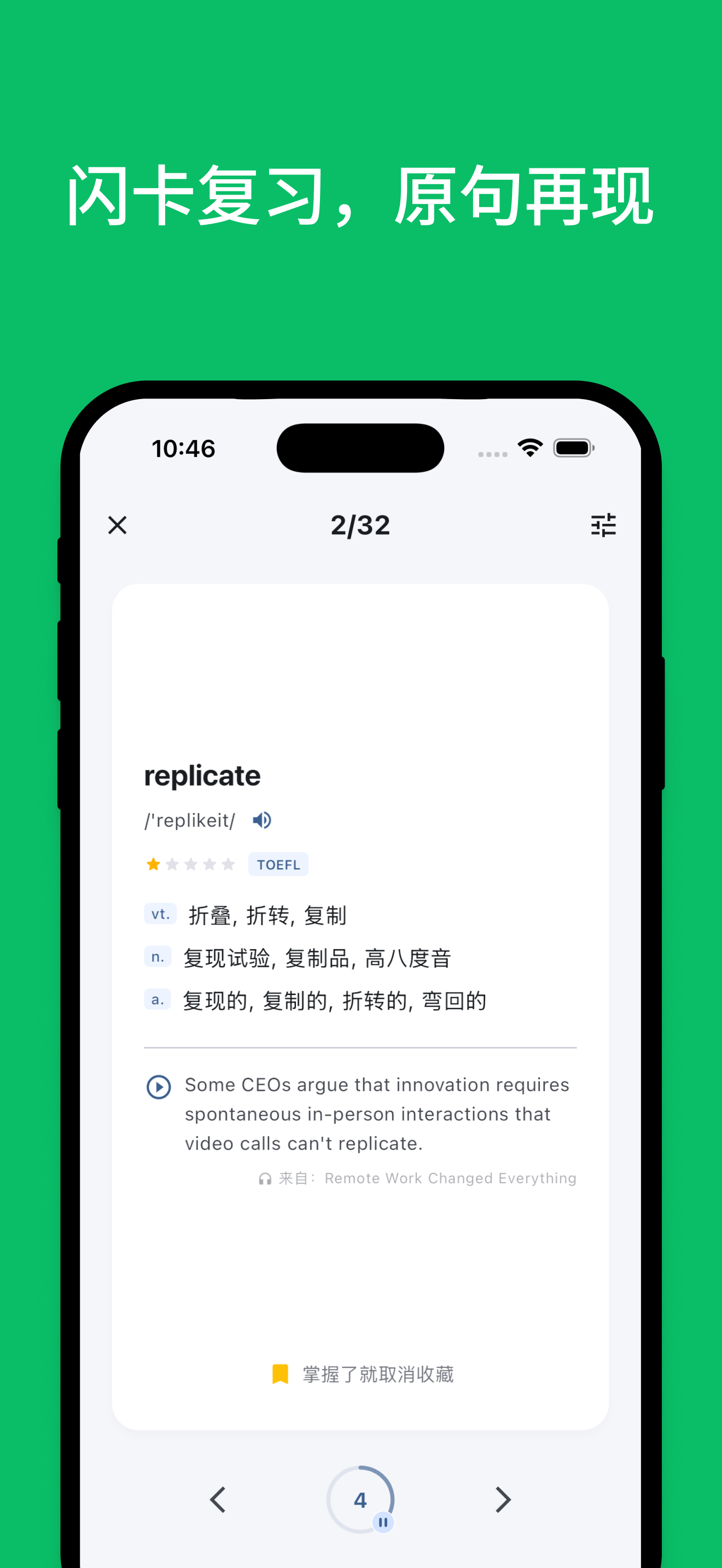 Flashcard review with original context |
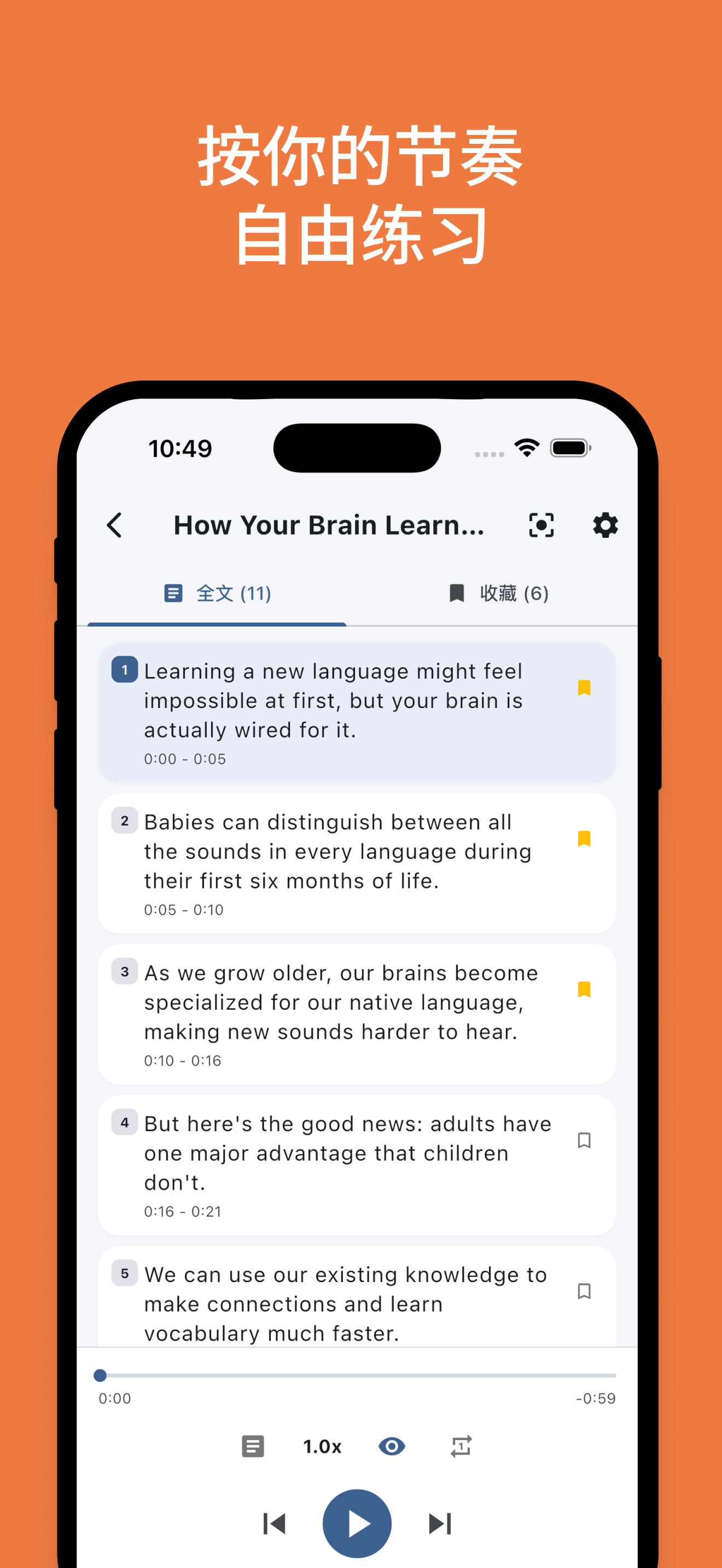 Practice freely at your own pace |
|
✨ Features
- 🤖 Auto-driven learning rhythm: Shadowing repetitions, review timing, and hard-sentence marking all advance automatically — you just focus on listening and speaking.
- 🎯 Listen-speak loop: Intensive listening, shadowing, and retelling flow seamlessly. From understanding the content, to imitating expression, to saying it in your own words.
- 🧩 Sense-group splitting for long sentences: Long sentences are split by sense groups, breaking complex structures into digestible chunks.
- ⭐ Save hard sentences and review them on demand: Hard sentences are auto-archived for focused shadowing and repeated practice — no more "marked and forgotten".
- 📚 Contextualized flashcard review: Saved words and sense groups are reviewed alongside their original sentence context — memorize in context, not in isolation.
- 💡 AI translation, analysis, and vocabulary explanation: Bilingual translation, sentence analysis, word usage and collocations — expand on demand without breaking your flow.
- 📍 Resume where you left off: Automatically records your stage and current sentence, so you can pick up instantly — even 5-minute fragments count.
- 📊 Learning statistics: Tracks practice time, input/output ratio, and unique vocabulary — see exactly how much you've practiced and spoken.
- 🎙️ AI shadowing evaluation: Automatically aligns ASR results with the original text, highlights matched words, and gives a shadowing rating.
- 🎧 Local audio import + AI subtitles: Batch-import local audio, import existing subtitles, or auto-transcribe with AI.
🤔 Why we built this
When using other English-learning apps, you have to decide for yourself: how many times should I listen today? Intensive or extensive? Which sentence haven't I mastered yet? Should I shadow it? When should I review?
Those decisions themselves are what drains your willpower — it's not that you can't understand, it's that you don't know what to do next.
Echo Loop takes those decisions off your plate. Pick a piece of audio you want to understand, hit start, and from intensive listening to completion, every step tells you "what to do right now".
You just need to keep opening the app — Echo Loop handles the rest. Practicing one piece thoroughly beats listening to 100 random ones.
🆚 How it differs from other solutions
We picked four English-learning apps most familiar to Chinese learners for comparison. Each individual feature exists, more or less, in other apps. But Echo Loop's real difference is this: it strings every step together and drives you through automatically — you don't need to figure out the method, control repetition counts, or manage review intervals yourself.
| Feature | Echo Loop | Daily English Listening | Kekenet | Liulishuo | Anki |
|---|---|---|---|---|---|
| App-driven learning rhythm | ✅ Fully automatic | ❌ | ❌ | ❌ | ❌ |
| Listen → speak loop (intensive + shadowing + retelling) | ✅ | ⚠️ Partial | ⚠️ Partial | ⚠️ Partial | ❌ |
| Sense-group splitting for long sentences | ✅ | ❌ | ❌ | ❌ | ❌ |
| Saved-sentence focused review | ✅ | ❌ | ❌ | ❌ | ❌ |
| Contextualized flashcard review | ✅ | ❌ | ❌ | ❌ | ⚠️ Manual cards required |
| AI translation / sentence analysis / word deep-dive | ✅ | ⚠️ Partial | ⚠️ Partial | ❌ | ❌ |
| Resume where you left off | ✅ | ⚠️ Partial | ⚠️ Partial | ⚠️ Partial | ⚠️ Partial |
| Stats: time / input-output ratio / unique vocabulary | ✅ | ⚠️ Partial | ⚠️ Partial | ⚠️ Partial | ❌ |
| AI shadowing evaluation | ✅ | ✅ | ✅ | ✅ | ❌ |
| Local audio import | ✅ | ✅ | ❌ | ❌ | ⚠️ Manual cards |
| Offline available | ✅ | ✅ | ✅ | ⚠️ Partial | ✅ |
| Open source | ✅ | ❌ | ❌ | ❌ | ✅ |
🧠 Methodology
Intensive listening → Shadowing → Blind listening → Retelling → Spaced review → Completion.
flowchart LR
  A[Intensive listening<br/>Understand sentence by sentence, mark hard ones] --> B[Shadowing<br/>Imitate pronunciation and intonation]
  B --> C[Blind listening<br/>Listen through once, check overall comprehension]
  C --> D[Retelling<br/>Express in your own words, build output ability]
  D --> E[Spaced review<br/>Re-practice before forgetting, consolidate long-term memory]
  E --> F[Completion<br/>Finish this round of learning]
Every step above is auto-driven by Echo Loop — no judgment calls required.
You don't need to manage "how many times should I listen" or "is it time to review last week's material". Open the app, and what to do today appears right in front of you.
The full process is quantified: practice time · input/output ratio · unique vocabulary.
How are spaced reviews scheduled?
Each piece of material is split into 1 first-pass session + 7 spaced reviews. Intervals stretch from 6 hours to 28 days, hitting the memory trace just before forgetting — aligned with the Ebbinghaus forgetting curve.
| Stage | Interval since last | Tasks |
|---|---|---|
| First pass | — | Intensive → Shadowing → Blind → Retelling |
| Review 1 | After 6 hours | Hard-sentence drills + retelling |
| Review 2 | After 1 day | Blind listening + drills + retelling |
| Review 3 | After 2 days | Blind listening + drills + retelling |
| Review 4 | After 4 days | Blind listening + drills + retelling |
| Review 5 | After 7 days | Blind listening + drills + retelling |
| Review 6 | After 14 days | Blind listening + drills + retelling |
| Review 7 | After 28 days | Blind listening + drills + retelling |
📥 Download & try it
|
Desktop: macOS in development · Windows planned · Web not planned |
 Scan to download iOS |
 Scan to download Android |

❓ FAQ
Is Echo Loop free?
All core features are free, with no usage caps and no item limits:
- Unlimited imports: local files, links, Baidu Netdisk and podcast subscriptions
- Unlimited favorites: save as many hard sentences, words and sense groups as you like
- The full learning loop: intensive listening, shadowing, blind listening and retelling, plus 7 rounds of spaced review with reminders
- Focused review of hard sentences + in-context flashcards
- Shadowing evaluation: runs on your device's built-in speech recognition, with no usage count
- Offline transcription: download a model and generate subtitles on your device, no sign-in needed
- Offline dictionary, learning statistics, PDF note export, backup & restore
AI explanation features come with a free monthly quota, which covers everyday study for most people. Only heavy AI users need to upgrade to a membership in the app.
Which features use the AI quota?
Only the AI explanation features: AI translation, sentence analysis, sense-group splitting, word analysis, the AI study assistant, retelling evaluation and cloud transcription. None of the free features listed above use the quota.
What happens when the free quota runs out?
You can keep studying as usual. AI features come back when the quota resets next month, or you can upgrade to a membership in the app if you don't want to wait.
Why does an open-source project charge anything?
The code is fully open source (AGPL-3.0). Every AI request costs us money paid to the model provider, and memberships cover that cost so the project can keep going.
Which platforms are supported?
Right now the focus is iOS and Android: get it from the App Store or Google Play, or download the Android APK from Releases. Native macOS and Windows versions are in development and will be released later.
To use it on a computer today:
- Mac (Apple silicon): search for Echo Loop in the Mac App Store and install the iOS version directly
- Windows: install Tencent's YingYongBao (应用宝) app store, then install the Echo Loop Android APK inside it
How is it different from other English apps?
Other apps mostly give you materials and tools and leave it to you to work out how to practice. Echo Loop handles the how: intensive listening, shadowing, blind listening, retelling and spaced review run as a single flow, and the app tells you what to do at every step. You don't need to make a plan, count repetitions or track review dates. See "🆚 How it differs from other solutions" above for a detailed comparison.
What materials are supported?
- Audio: mp3, m4a, wav, aac, flac
- Video: mp4, mov, m4v, mkv (you can hide the picture and practice with audio only)
- Subtitles: srt, vtt, lrc; subtitle files with the same name as the audio are paired automatically. No subtitles? Generate them with AI transcription
- Sources: local files, direct audio links, Baidu Netdisk, podcast subscriptions
Podcasts, TED talks, TV clips and textbook audio all work. For best results, pick content you're interested in and that's slightly above your current level.
What English level do I need?
If you can follow the gist of a material with subtitles, you're ready. When a sentence is hard to follow, break it down with sense-group splitting, AI translation and sentence analysis. If you're still building your basics, start with short, slow-paced materials.
How soon will I see results?
After the first study session on a material, you'll understand it and be able to retell it in your own words. The 7 rounds of spaced review that follow take about 8 weeks and lock it into long-term memory. Overall listening and speaking skills build up over time: practice 20–30 minutes a day with 2–3 materials at once, and within a few weeks listening should feel easier and speaking more fluent.
Can I use it offline?
Yes. The learning flow, reviews, favorites, shadowing evaluation and local transcription all work offline. Only cloud AI features need a connection.
Where is my data stored? What if I switch phones?
Your learning data is stored on your device. Before switching phones or reinstalling, export a backup from Settings → Backup & Restore, then restore it on the new device.
💬 Join the community
Practice English alongside other committed learners: share methods, give feedback, and be the first to hear about new features.
- Join the QQ group (1109595757): Share learning methods and resources with other committed learners.
- Contact us on WeChat: Scan the QR code to contact Echo Loop.
- Follow us on Bilibili: Get English-learning content and feature updates.
- Follow us on Xiaohongshu: Get practical tips, feature updates, and English-learning content.
🗺️ Roadmap
✅ 1 · Core features
- Learning loop: intensive / shadowing / blind / retelling
- Spaced review scheduling (6h → 28d)
- Sense-group splitting for long sentences
- Saved hard sentences + focused review
- Contextualized flashcard review
- AI translation / sentence analysis
- iOS / macOS native ASR shadowing evaluation
- Resume where you left off
- Learning statistics
🚧 2 · AI capabilities
- AI speaking partner
- AI learning assistant (on-demand Q&A)
- AI word lookup
- Personalized material recommendations
🔭 3 · Experience & platforms
- Custom task flows
- Streaks / learning badges
- Official macOS / Windows desktop release
🔭 4 · Content ecosystem
- Official curated collections (by topic + difficulty)
- User-shared collections / UGC learning materials
⭐ Star History
---🎓 Academic guidance & acknowledgements
Academic guidance
Thanks to Yang Yan (School of Foreign Studies, Minzu University of China; PhD in English Language and Literature, Peking University) for guiding this project's methodology.
Core dependencies
- Audio & speech: just_audio · audio_session · flutter_tts · sherpa_onnx
- Data & state: drift · flutter_riverpod
- Text processing: subtitle · lemmatizerx
- System capabilities: file_picker · flutter_local_notifications
🧑💻 For developers
🚀 Quick start
git clone [email protected]:echo-loop/Echo-Loop.git
cd Echo-Loop
cp .dev.env.template .dev.env   # fill in Supabase / Google settings
flutter pub get
dart run build_runner build
flutter run -d <ios|android|macos> --dart-define-from-file=.dev.env
Supabase, Google, and other compile-time settings live in
.dev.env(debug) /.prod.env(release) and are injected via--dart-define-from-file. Both files are gitignored. The global API defaults tohttps://www.echo-loop.topand can be overridden at compile time withAPI_BASE_URL. The model CDN addresses are configured inlib/config/regional_service_endpoints.dart. The China API defaults tohttps://www.echo-loop.cnand can be overridden withAPI_CHINA_BASE_URL. Local builds can override them in.prod.env; GitHub Actions CI/Release passes the corresponding GitHub Variables directly to the build commands. release builds use oneisChinaUserresult: China Apple Storefront, device country, or/api/v1/client/configcontext.countryCodeset toCN/CHNselects China, so one package contains both global and China API candidates and serves both regions. When there is no China evidence, the first API request uses the global endpoint. When the region conclusion changes, the app keeps its current API endpoint while a config request probes the new preference. It tries the other region once on a network error or 5xx. A successful probe activates the preferred region; alternate success keeps API requests on the available endpoint for the session, and a later config refresh probes the preference again. Model CDN routing always followsisChinaUser; source API defaults apply when no override is set.
🤝 How to contribute
Issues and PRs are welcome. Before submitting, please run:
flutter analyze
flutter test
Commit titles follow the PREFIX: content format (check git log for common prefixes — FEAT / FIX / DOCS / MOD / OPT / CHORE / CI / RELEASE, etc.). A detailed contribution guide will live in CONTRIBUTING.md (TBD). This project follows the Contributor Covenant code of conduct.
🛠️ Tech stack


| Category | Technology | Purpose |
|---|---|---|
| UI framework | Flutter + Material 3 | Cross-platform UI |
| State management | Riverpod (code generation) | Unidirectional data flow |
| Audio playback | just_audio + audio_session | Audio engine layer |
| Subtitle parsing | subtitle | SRT/VTT |
| File picker | file_picker | Local audio/subtitle import |
| Persistence | Drift (SQLite) + shared_preferences | Progress, favorites, cache |
| i18n | flutter_localizations + ARB | 简体中文 / English |
| Testing | flutter_test + mocktail | Unit / widget / integration |
| Static analysis | flutter_lints | Code style |
📁 Project structure
lib/
├── l10n/              # i18n files (ARB format)
├── models/            # Data models (AudioItem, Sentence, Collection, etc.)
├── providers/         # Riverpod state management
│   ├── audio_engine/  # Audio engine layer (low-level playback control)
│   └── listening_practice/  # Listening practice layer (business logic)
│       ├── sentence_tracker.dart   # Sentence locator (binary search)
│       └── bookmark_manager.dart   # Bookmark manager
├── screens/           # Pages
├── services/          # Service layer (StorageService, SubtitleParser)
└── widgets/           # Reusable components

integration_test/      # End-to-end tests
test/                  # Unit / widget tests
⌨️ Dev commands cheat sheet
Run
flutter run -d ios            # iOS
flutter run -d android        # Android
flutter run -d macos          # macOS (in development, unreleased)
flutter run -d chrome         # Web (debug only, no release plan)

# iOS Simulator
xcrun simctl list devices available
xcrun simctl boot <DEVICE_UDID>
open -a Simulator
Test / quality checks
flutter analyze                          # Static analysis
flutter test                             # All tests
flutter test integration_test -d macos   # Integration tests
# Maestro UI smoke test (start a device and install the dev build first)
MAESTRO_APP_ID=app.echoloop.dev scripts/test_maestro.sh
# Android device: build, install the dev build, then run the Study tests
scripts/test_maestro_android.sh
# With multiple devices, specify the target; alternatively export MAESTRO_ANDROID_DEVICE=<adb-serial> once
scripts/test_maestro_android.sh --device <adb-serial>
dart format .                            # Format
Install the Maestro CLI with
curl -fsSL https://get.maestro.mobile.dev | bash. For the iOS dev build, useMAESTRO_APP_ID=top.echo-loop.dev; flows live inmaestro/.
Code generation (after modifying Riverpod providers)
dart run build_runner build
Build
# Supabase / Google compile-time variables are injected from an env file (.prod.env for release)
flutter build macos --dart-define-from-file=.prod.env
flutter build apk   --dart-define-from-file=.prod.env
flutter build ios   --dart-define-from-file=.prod.env

# Run on device
flutter run --release -d <DEVICE_ID> --dart-define-from-file=.dev.env
The release scripts
scripts/run_simulator.sh(reads.dev.env) andscripts/release_{android,ios,macos}.sh(read.prod.env) already pass--dart-define-from-filefor you.
Requirements
- Flutter SDK 3.9.2+
- iOS Simulator / Android emulator / physical devices
- Desktop: macOS / Windows / Linux dev environment
AtomGit mirror for users in China: Echo Loop on AtomGit
📄 License
Explore related projects
sindresorhus/awesome
😎 Awesome lists about all kinds of interesting topics [NOTE: Pull requests are temporarily disabled until I have a chance to catch up with the existing ones]
531,300 starsEbookFoundation/free-programming-books
:books: Freely available programming books
400,899 starsnilbuild/developer-roadmap
Interactive roadmaps, guides and other educational content to help developers grow in their careers.
371,297 starsvinta/awesome-python
The definitive list that answers "I want to do X in Python, which tool should I use?"
332,617 stars