
dwim-sh/dwim has 35 GitHub stars and 2 forks. GitHot measured 0 stars in 24 hours. Last checked 2026-11-12 13:03 UTC. Last push 2026-11-09.
dwim is a coding agent that runs locally on your machine.
What you can do
- Fully local coding agent. Runs commands, reads their output, and keeps going.
- Qwen3.8-27B. At four bits, 16 GB, on a machine with 32 GiB of memory or more, decoding several tokens at a time with the drafter its file ships.
- Fast local inference. Metal on macOS, Vulkan on Linux.
- Built-in local inference server. The model is loaded once, in a dwim server that every dwim you run connects to. The first one starts it in the background, and it exits when idle. Sessions share the weights, and each has its own context on the GPU, so you can run several at once.
Measured star growth
- in 24h
- 0
- in 7 days
- Collecting history
- in 15 days
- Collecting history
- in 1 month
- Collecting history
Net star changes over overlapping periods, not daily totals. Missing measurements are left blank. Stars measure attention, not software quality.
README.md
Original
dwim
Do what I mean.
A coding agent that runs on your own GPU.
The agent, the model, and the engine that runs it, in one Rust program: no API key, no cloud, and nothing leaves your machine.


[!WARNING] dwim is experimental software. Expect bugs, rough edges, and changes that break things from one commit to the next. The model runs shell commands on your machine without asking first, so use it on code you have committed or backed up.
Installation
To install the latest release:
curl -fsSL https://dwim.sh/install.sh | sh
To install the latest development version:
cargo install --git https://github.com/dwim-sh/dwim
Or, from a checkout, with the manual page:
make install                     # in ~/.local
make install PREFIX=/usr/local   # system-wide, which may need sudo
Either way, the model (16 GB) is downloaded on first use into your
Hugging Face cache, where hf download and other tools would put it, and
used from there if one of them already did. dwim --download fetches it
ahead of time.
Features
- Fully local coding agent. Runs commands, reads their output, and keeps going.
- Qwen3.8-27B. At four bits, 16 GB, on a machine with 32 GiB of memory or more, decoding several tokens at a time with the drafter its file ships.
- Fast local inference. Metal on macOS, Vulkan on Linux.
- Built-in local inference server. The model is loaded once, in a
dwimserver that everydwimyou run connects to. The first one starts it in the background, and it exits when idle. Sessions share the weights, and each has its own context on the GPU, so you can run several at once. - Bring your own sandbox.
dwimexpects to run inside a sandbox, such as a container or a virtual machine, and does not confine the model itself. Commands run without confirmation and without a time limit, until they finish.
Getting started
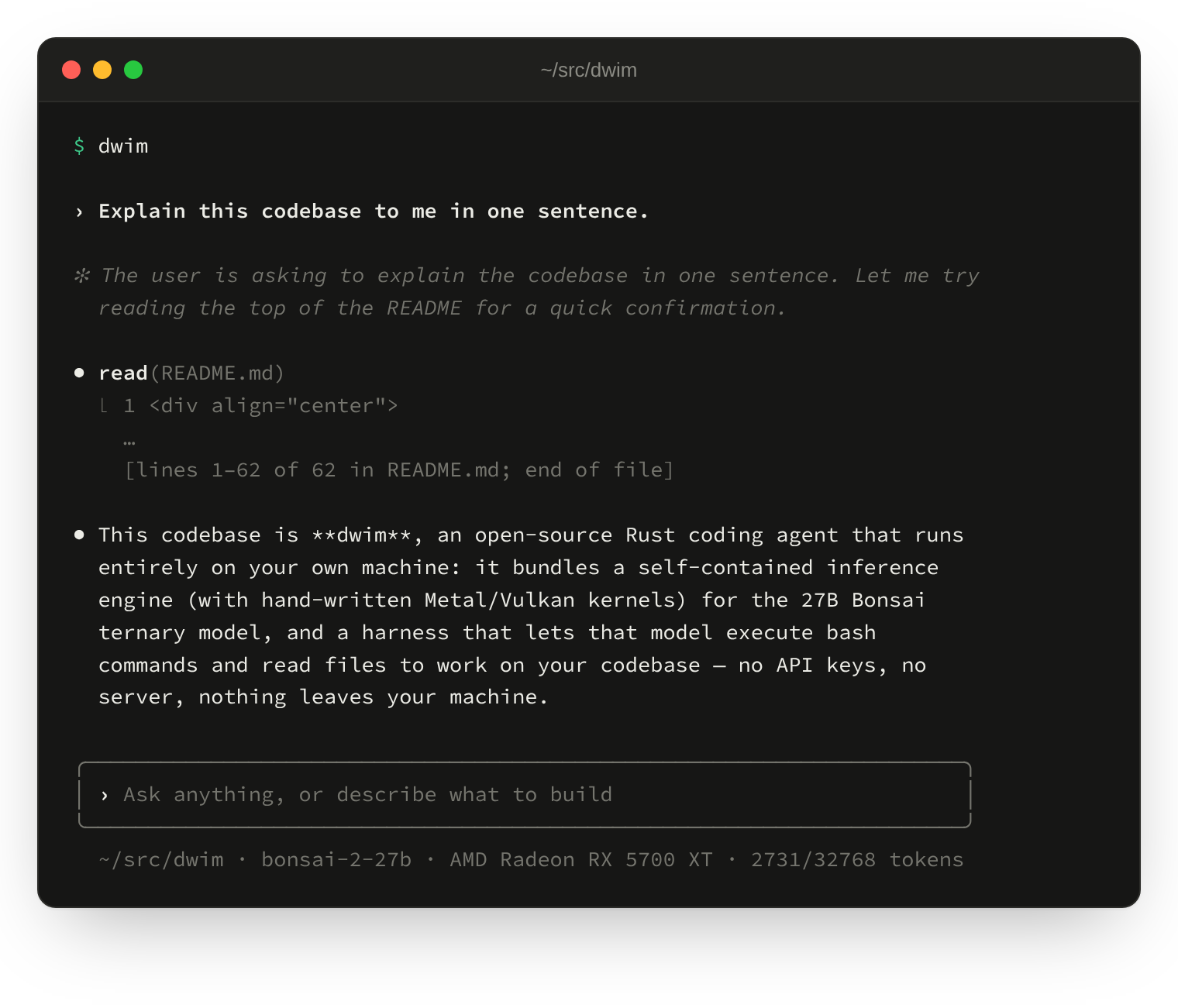
Run dwim in a project directory. It opens a shell: type what you want, and
the model reads files, runs commands, and answers.
Run dwim in another terminal and it connects to the same server, ready in
a moment instead of loading the model again. Two sessions fit at once by
default, each with its own context; --sessions sets how many, and
/server in the shell shows, stops, or restarts the server.
To ask one thing and exit, give the prompt on the command line:
dwim "Explain this codebase to me in one sentence."
The manual page has the options, the shell's commands and keys, and the files it reads:
man dwim
Using dwim as a sub-agent
dwim also makes a good sub-agent: your main agent plans the change, and dwim writes the code. The dwim skills teach an agent such as Claude Code or Codex to delegate to it:
npx skills add dwim-sh/skills
Then, in the agent, ask for the change "with dwim":
/dwim planreads the code, decides the design, and writes one self-contained task file per commit under.dwim/plans/<name>/, with aPLAN.mdthat holds the goal, the design, the checks, and the steps as a checklist. It runs nothing: you read the plan and edit what you want./dwim doruns the plan step by step: it hands each task file to dwim, watches the run, reviews the change as it would a pull request, fixes and verifies it, commits it withGenerated-by: dwim, ticks the step off, and goes on to the next until a step fails review or none remain./dwim do nextor/dwim do 3runs just one step, and/dwim statusshows where the plan stands.
The main agent spends its tokens on the decisions and the review, and dwim, on your own GPU, on the code.
License
MIT.
Explore related projects
affaan-m/ECC
The agent harness performance optimization system. Skills, instincts, memory, security, and research-first development for Claude Code, Codex, Opencode, Cursor and beyond.
301,951 starsNousResearch/hermes-agent
The agent that grows with you
262,950 starsmultica-ai/andrej-karpathy-skills
A single CLAUDE.md file to improve Claude Code behavior, derived from Andrej Karpathy's observations on LLM coding pitfalls.
232,515 starsfirecrawl/firecrawl
Supercharge your AI agents with data from the web and beyond. Building the library for superintelligence. 🔥
200,932 stars