
dsh-tauri/deepseek-harness-desktop
dsh-tauri/deepseek-harness-desktop has 3,576 GitHub stars and 236 forks. GitHot measured +14 stars in 24 hours and +108 in 7 days. Last checked 2026-11-11 06:23 UTC. Last push 2026-11-02.
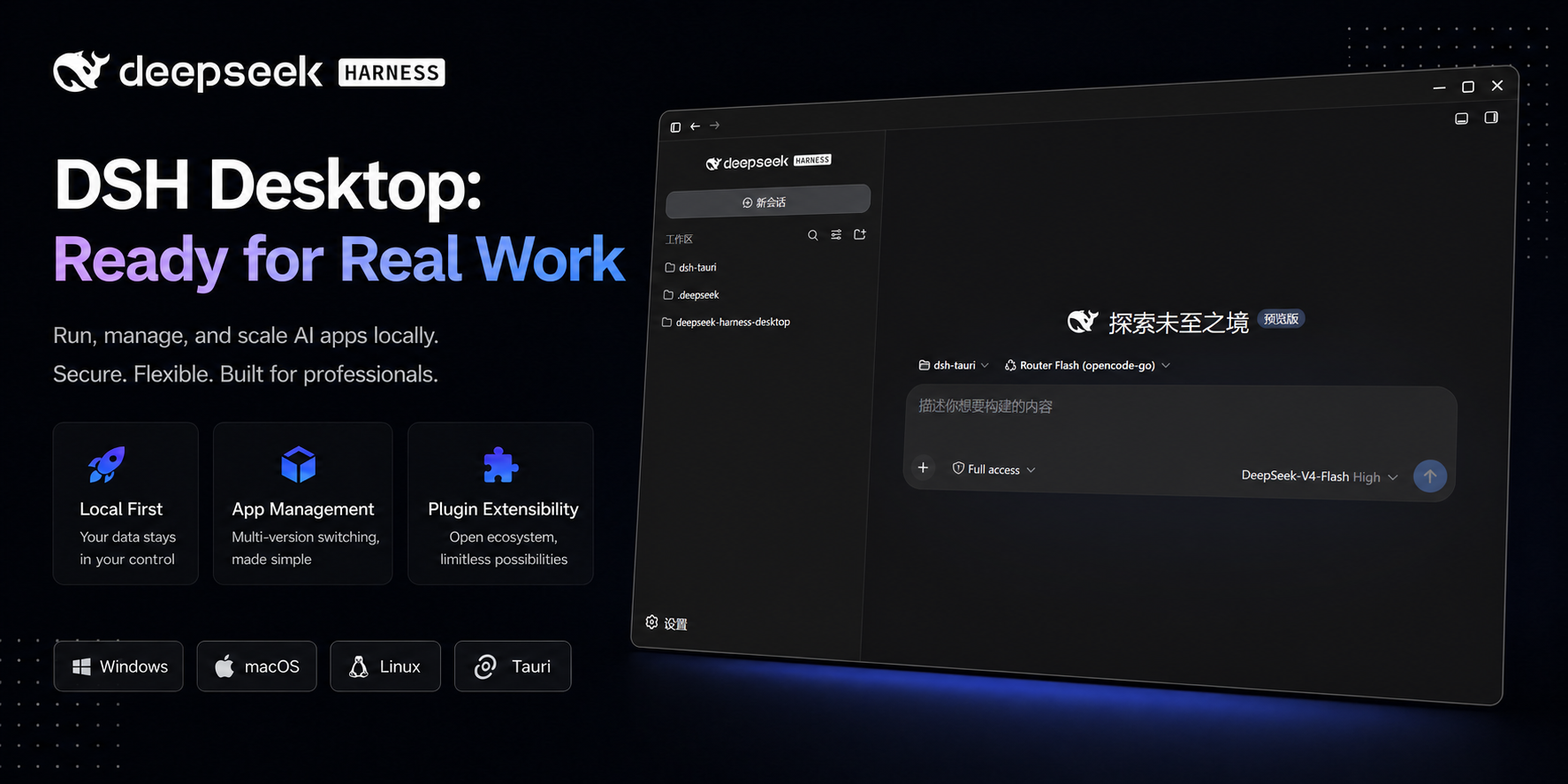
DSH Tauri 桌面版 | Better DSH desktop, zero environment setup, preset plugins, Windows / macOS / Linux.
Measured star growth
- in 24h
- +14
- in 7 days
- +108
- in 15 days
- Update delayed
- in 1 month
- Update delayed
Net star changes over overlapping periods, not daily totals. Missing measurements are left blank. Stars measure attention, not software quality.
README.en.md
Original

DeepSeek Harness Tauri Desktop
Run DeepSeek Harness on your desktop —
no manual Node.js, pnpm, or Docker setup; standard installs may need network initialization on first launch.





Download · English · Español · Русский · 한국어 · Docs · 中文
Features
- 🪶 Native desktop — Tauri 2(Electron Runtime) + React 19 + HeroUI 3, embedding the local Harness UI.
- 📱 Remote connection — Scan a QR code in the Android / iOS app to connect to your computer's DSH over LAN or a Cloudflare public tunnel.
- 🔄 Runtime management — Install dependencies, select core versions, and access desktop/core updates.
- 🧩 Plugin management — 12 built-in plugins, plus local-directory installs, built-in disabling, community plugin installation, upgrades, removal, and error details.
- 🗂️ Profile configuration — Separate plugin/settings configurations, with one-click profile data migration, backup, and cloning.
- 💽 Data directory — Pick where data lives during installation (Windows); migrate or roll it back later in Settings on Windows, macOS, and Linux.
- ⌨️ CLI integration — Managed
dsh/pnpmcommands via shims, not a global npm core installation. - 🐾 Desktop pets — Pets / Codex resources, pack imports, and conversation activity; preset media comes from remote hosts.
- 🎨 Personalization — 8 palettes, local UI scaling, terminal mode, adjustable opacity, and optional frosted blur.
Built-in plugins
First-party plugins distributed with desktop resources:
- DSH Tauri — Core plugin: desktop-to-Harness communication, version adapters, and plugin dependency management
- DSH Tauri UI — Desktop settings UI, native core components, themes, and palettes
- DSH Tauri Mobile UI — Touch layouts and mobile preferences
- DSH Tauri Worktree — Session-level Git worktrees and checkout
- DSH Tauri Extension — Official plugin manager, plugin market, Skills, and MCP
- DSH Tauri Scheduler — Scheduled tasks and run history
- DSH Tauri Archive — Chat archiving and restoration
- DSH Tauri Pet — Desktop pet and activity state settings
- DSH Tauri Rightclick Menu — Session, workspace, and text context menus
- DSH Tauri Model — Model selection, parameters, and automatic configuration
- DSH Tauri Remote — Remote Harness connections and sync over SSH, plus sharing the local Harness over LAN or a public tunnel
- DSH Tauri Notification — Conversation notifications and actions
Optional presets
Setup offers the following community plugins for installation on demand.
- DSH Better Sidebar — Per-session editor sidebar
- DSH Office Kit — Office documents, PDF, presentations and spreadsheets
- DSH Market — Community plugin market
- DSH Rewind — Conversation rewind and workspace backups
- DSH IM — IM channels and bot management
- DSH OPS — Low-level operations tools to reduce token usage and task execution time
- Billion Context — Context compression and history restoration
Request new or updated presets via Issues. Available versions follow the manifest's core compatibility rules.
Quick Start
Download the installer for your platform and architecture from Releases:
| Platform | Requirements | Installer |
|---|---|---|
| Windows | Windows 10+ (bundled Chromium engine) | x64 .exe / .msi |
| macOS | macOS 12+ (bundled Chromium engine) | Intel / Apple Silicon .dmg |
| Linux | Bundled Chromium engine | x64 .AppImage / .deb |
macOS also supports Homebrew installation:
brew install dsh-tauri/desktop/deepseek-harness
On Fedora 43+ (x64 / ARM64) you can install from the Copr repository. Upgrades come through dnf upgrade and in-app updates are disabled. For prereleases install dsh-tauri-beta instead (it conflicts with dsh-tauri; switch with sudo dnf swap dsh-tauri dsh-tauri-beta):
sudo dnf copr enable fairyband/dsh-tauri
sudo dnf install dsh-tauri        # stable
- Standard installers need network on first launch to download missing runtime/core components. Git features require an available Git.
- Names with a
Bundlesuffix are offline installers (_Bundle_*.exe,_Bundle_*.deb, and two_Bundle_*.dmg). - Local execution is not fully offline: model services, plugin installation, updates, and preset pet media can still use network.
- For Linux display, Wayland, AppImage, and permission workarounds, see the installation and troubleshooting docs.
Desktop proxy
- Set an HTTP, HTTPS, SOCKS5, or SOCKS5H proxy in Configuration → Application → Proxy URL.
- Applies only to desktop runtime/core downloads, update checks, and plugin metadata—not model requests or plugin subprocess networking.
- Leave empty to inherit system/environment settings. Saved changes apply to new requests; retry failed downloads afterward.
- SOCKS5H resolves destination names through the proxy; loopback connections stay direct.
Mobile support
DSH Mobile accesses Harness on your computer over LAN or a public tunnel; it does not run a core on the phone.
- Android: download an APK from Releases.
- iOS: install the beta through the TestFlight invitation, subject to approval and available slots. Unsigned IPAs in Releases require your own signing.
Enable sharing from Share in the desktop's top bar, then scan the QR code to pair. Keep the computer, Harness, and any tunnel online. Access is not read-only; keep QR and access codes private. See the mobile remote access guide.
The app is maintained only until an official mobile service launches. Development details are in the mobile specification.
Runtime
Windows startup failures show a native dialog with the underlying error. For STARTUP_LOW_INTEGRITY:
- The process runs below Medium integrity and cannot write normal user data; updates can inherit a folder's Low label.
- Inspect the folder and executable with
icacls. Restore a trusted installation to Medium, or reinstall into a normal folder. - Running as administrator does not remove the Low-label restriction. Keep sessions and
DSH_HOMEunchanged.
| Current baseline | Version |
|---|---|
| Recommended Harness core | 0.2.1-rc.4 |
| Minimum supported core | 0.2.1-rc.4; not a compatibility guarantee for every plugin |
Older cores are no longer supported. Earlier compatibility records describe history, not the current support range.
- Core and preset selection follow the resource manifest and declared plugin version ranges, not a promise of compatibility with arbitrary latest upstream releases.
- CLI integration is enabled by default in release: Windows / macOS / Linux update PATH automatically. Reopen your terminal; other shells may still need manual setup.
Community
 QQ Group |
 WeChat Group (full, add me on WeChat first) → |
 |
Development
See the English development guide or Chinese development guide. Feature details are in the online docs.
Notes
[!WARNING] Developer preview — upstream
dshevolves quickly and may introduce breaking changes; check compatibility before upgrading.
[!NOTE] Security —
dshcan execute code locally. For learning / research / testing only; run it in a trusted, isolated environment.
Community Picks
- dsh-tauri-notify-webhook - Forward notifications to webhook, email (SMTP) or pushplus when a task stops abnormally or finishes by @iuuuuuuuu
- dsh-pdf-reader - Page-by-page PDF reading, local OCR, citations, search and visual cropping by @SkanderBog
- dsh-context-manager - Review context before applying, and choose per full-history group to keep, summarize or omit earlier content by @SkanderBog
- @ryuu-64/dsh-find-all - Ctrl+F in the current conversation to find saved history by @Ryuu-64
Related
- deepseek-harness — upstream
dshagent platform - deepseek-harness-pkg — prebuilt Harness distributions and download source
- electron-rs · tauri-runtime-electron — Electron Rust and the Electron runtime for Tauri 2
- dsh-pet · dsh-pet-mov · dsh-pet-component — pet assets and renderer
- dsh-plugin-codex-pets · BongoCat · dsh-dafeiyu · codex-to-dsh-pet — pet reference projects
Contributors
License
MIT with a Non-Commercial Condition © deepseek-harness-desktop contributors
Explore related projects
codecrafters-io/build-your-own-x
Master programming by recreating your favorite technologies from scratch.
561,889 starspublic-apis/public-apis
A collective list of free APIs
498,272 starsmorluto/rea
Reverse engineer anything with agents, from app behavior down to native binaries.
452,936 starsopenclaw/openclaw
The AI that really does things. Any OS. Any Platform. The lobster way. 🦞
394,367 stars