
dqzg12300/fridaUiTools
dqzg12300/fridaUiTools has 2,020 GitHub stars and 427 forks. GitHot measured +1 stars in 24 hours and 0 in 7 days. Last checked 2026-11-13 16:29 UTC. Last push 2026-05-18.
Measured star growth
- in 24h
- +1
- in 7 days
- 0
- in 15 days
- Collecting history
- in 1 month
- Collecting history
Net star changes over overlapping periods, not daily totals. Missing measurements are left blank. Stars measure attention, not software quality.
About
frida工具的缝合怪
Developer ToolsREADME_en.md
OriginalfridaUiTools
English | 中文
fridaUiTools is a PyQt5-based desktop Frida workbench. It brings common connection flows, attach actions, script template management, log viewing, AI-assisted analysis, GumTrace, and memory search into one interface, so you can build a reusable local repository of your own Frida workflows.
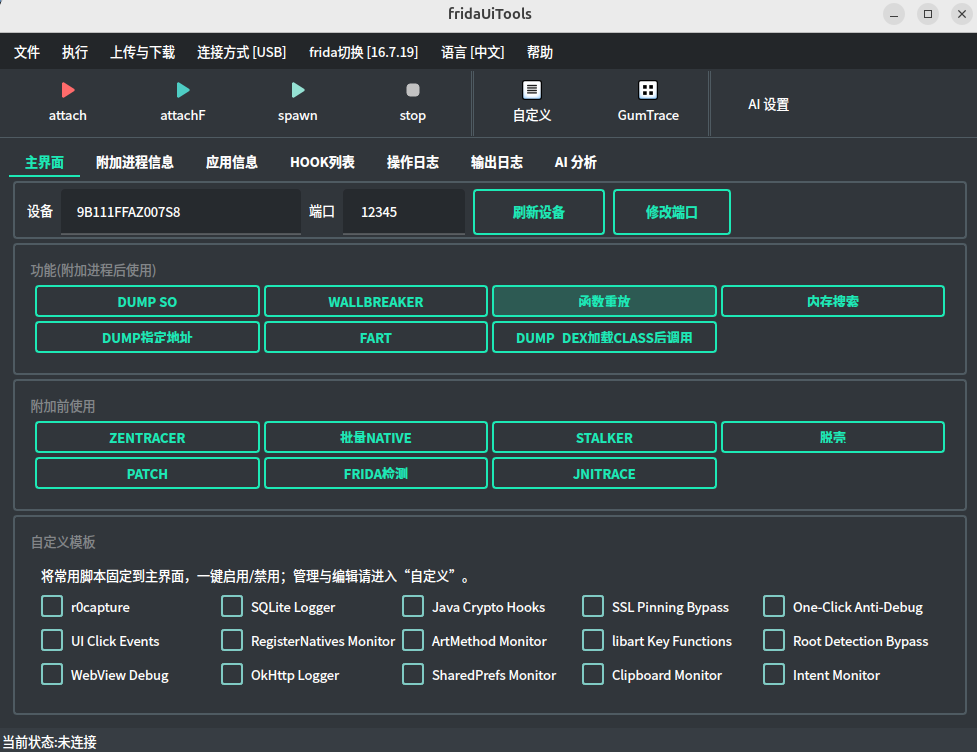
Project Positioning
- Reduce the daily operating cost of Frida through a desktop UI
- Gradually reshape built-in features into a maintainable template library
- Save commonly used scripts as custom templates and enable them quickly
- Connect to AI-compatible endpoints for AI script generation and AI log analysis
Feature Overview
- Multiple attach modes: attach current foreground process, attach a specified process, and spawn attach
- Multiple connection modes: USB, WiFi, custom port, and multi-device switching
- Custom script management: template maintenance, quick enable, import and export of hook lists
- Common reversing features: JNI Trace, Stalker, Dump So, Dump Dex, Patch, and Wallbreaker
- AI assistance: log analysis and script generation
- GumTrace workbench: visual trace script generation and log download
- Memory workbench: experimental string/value search, breakpoints, and disassembly support
Environment Requirements
- Python 3
- ADB must be available, and USB debugging must be enabled on the device
- The target device must already have the matching
frida-serverbinary - Linux, macOS, and Windows are supported
Install and Run
Using a virtual environment is recommended:
python3 -m venv .venv
source .venv/bin/activate
pip install -r requirements.txt
python3 kmainForm.py
If you already have your own Python environment, you can also run:
pip install -r requirements.txt
python3 kmainForm.py
5-Minute Quick Start
- Connect the phone and make sure
adb devicescan see the target device. - Start the application with
python3 kmainForm.py. - Select the current device in the main window.
- Upload and start the matching
frida-serverversion from the menu. - Switch USB / WiFi connection mode and port when needed.
- Select the templates or custom scripts you want to enable.
- Start working with attach current process, attach specified process, or spawn attach.
- View the output in the log panel.
AI Configuration
[ai]
host = https://api.openai.com/v1
apikey = your_api_key
model = gpt-5.4
Thanks
Explore related projects
codecrafters-io/build-your-own-x
Master programming by recreating your favorite technologies from scratch.
562,286 starspublic-apis/public-apis
A collective list of free APIs
498,708 starsmorluto/rea
Reverse engineer anything with agents, from app behavior down to native binaries.
456,997 starsopenclaw/openclaw
The AI that really does things. Any OS. Any Platform. The lobster way. 🦞
394,448 stars