
dovvnloading/Cortex
dovvnloading/Cortex has 37 GitHub stars and 6 forks. GitHot measured 0 stars in 24 hours. Last checked 2026-11-14 19:54 UTC. Last push 2026-11-13.
Measured star growth
- in 24h
- 0
- in 7 days
- Collecting history
- in 15 days
- Collecting history
- in 1 month
- Collecting history
Net star changes over overlapping periods, not daily totals. Missing measurements are left blank. Stars measure attention, not software quality.
About
Local first mini-harness fully capable of simple every-day coding or admin tasks using Ollama/gguf
AIREADME.md
OriginalCortex
Cortex is a local-first AI workspace for Windows. It runs models on the machine
-- either through Ollama or by loading a local .gguf file with its own managed
llama.cpp runtime -- keeps conversations and memory in local storage, and
presents the React/TypeScript interface inside a Python-owned pywebview/WebView2
window. The normal launcher owns the backend, native window, and any development
frontend process; Cortex does not open the user's installed browser.
The workspace
The interface is deliberately small: a chat library, a focused transcript, a composer with a local model picker, and settings for model, memory, appearance, and execution controls.
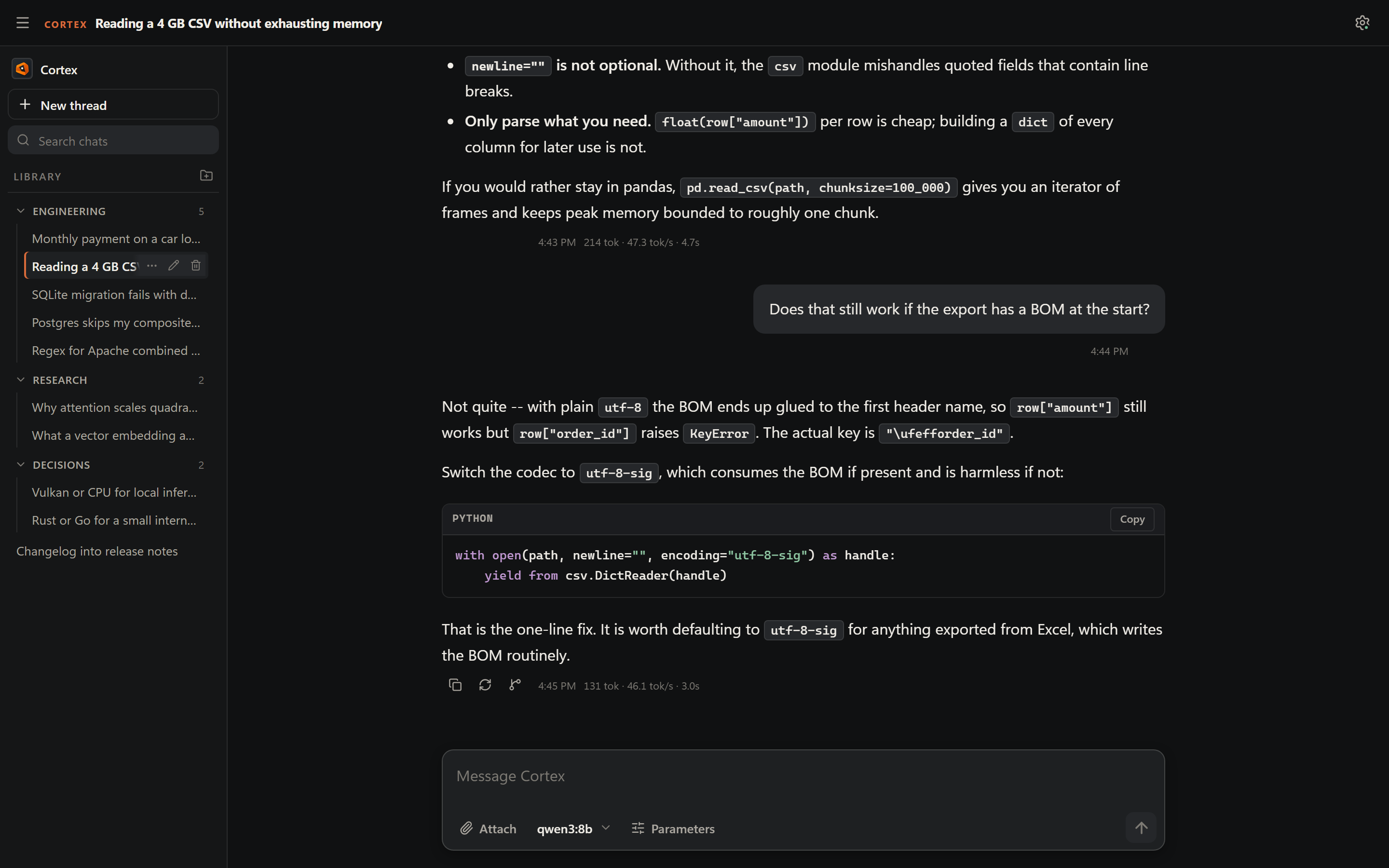
Every response carries its own footer -- timestamp, token count, and tokens per second -- with copy, regenerate, and fork controls that appear on hover.
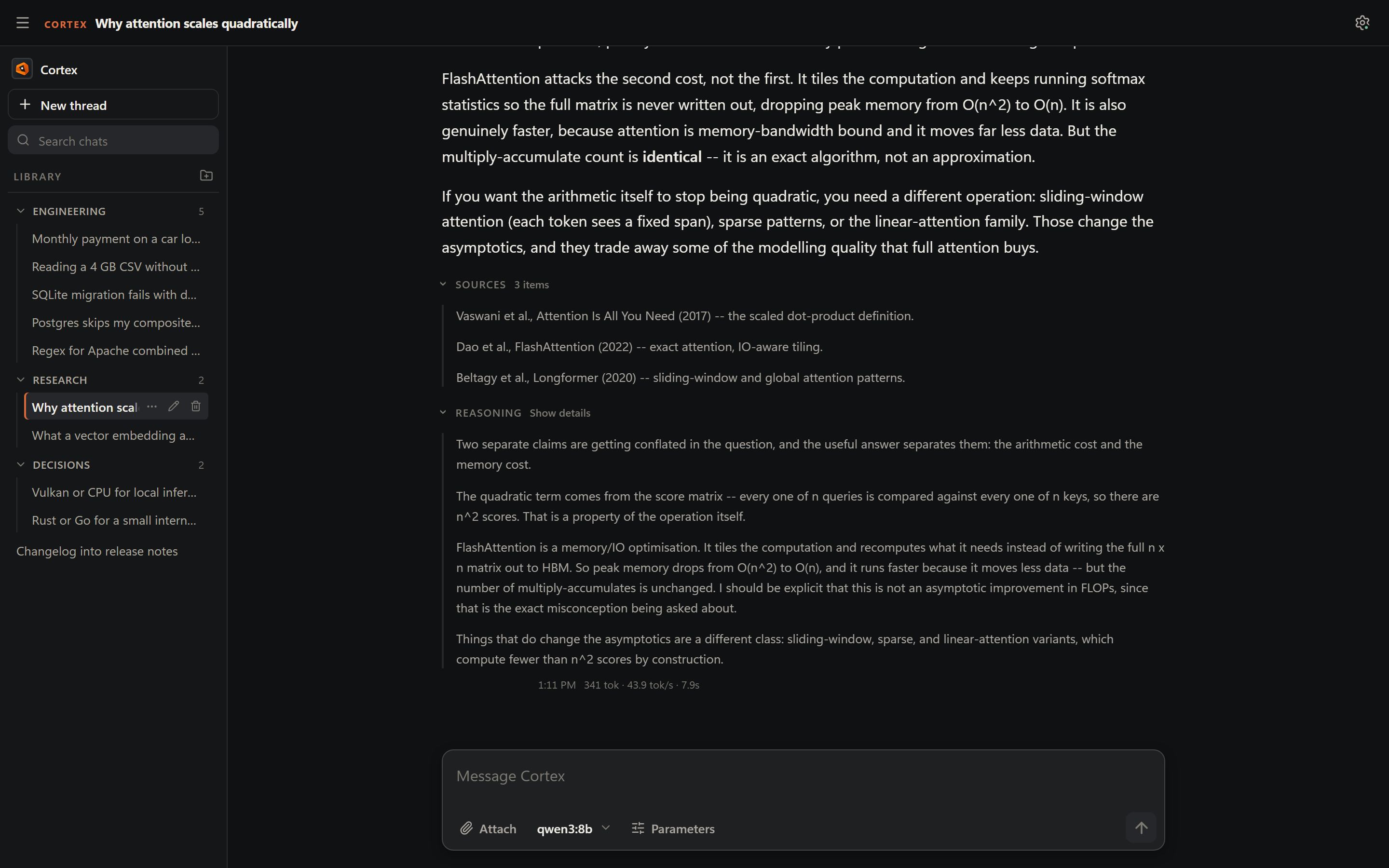
Reasoning and sources stay out of the answer body until asked for, each as its own disclosure beneath the response:
Models and runtimes
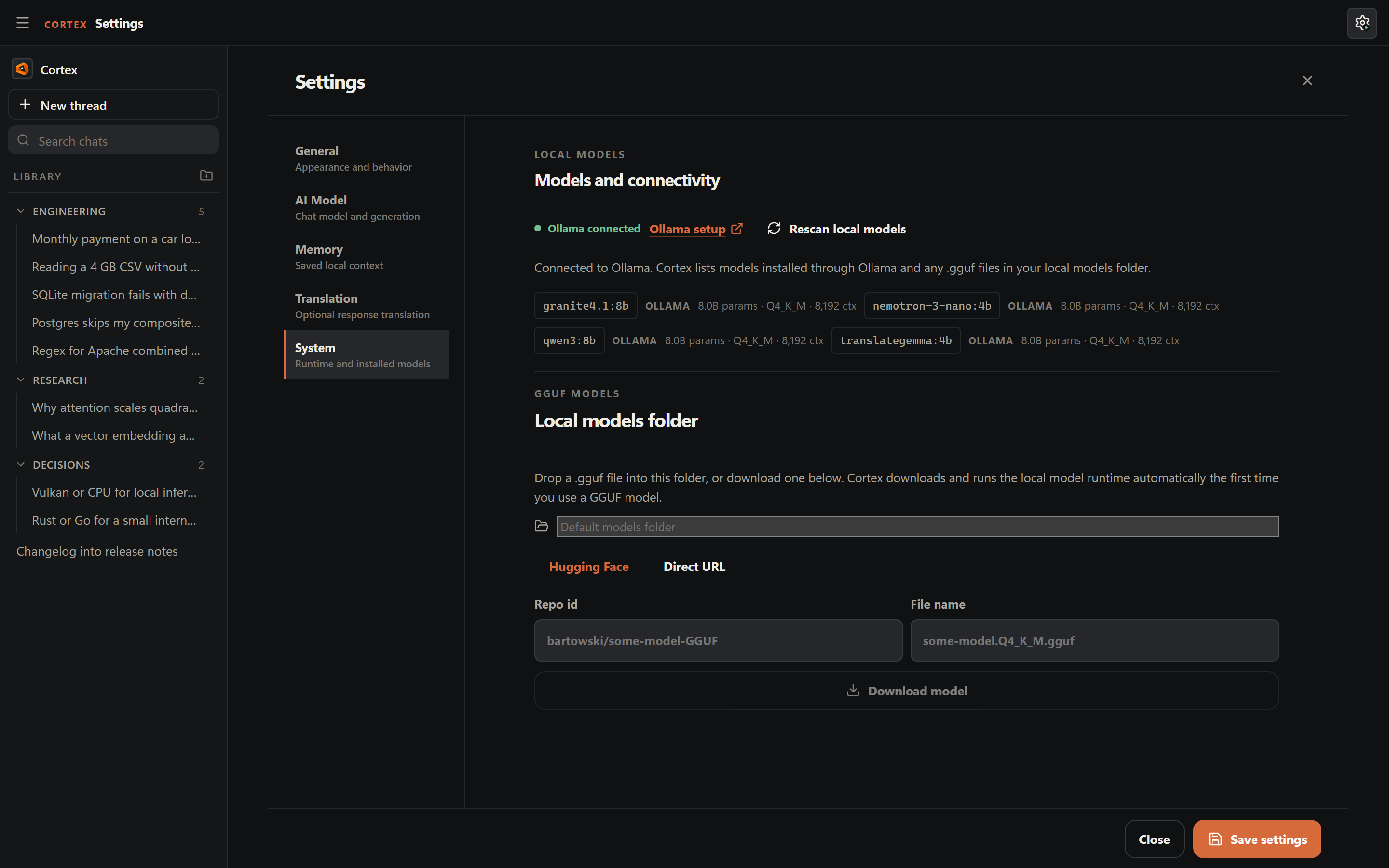
Cortex lists models installed through Ollama alongside any .gguf files in the
local models folder, each with the parameter size, quantization, and context
length read from the model itself. A GGUF can be fetched by Hugging Face repo id
or direct URL, then selected from the same picker as everything else:
Generation defaults live in one place, and the chat model doubles as the title model so there is only one choice to make:
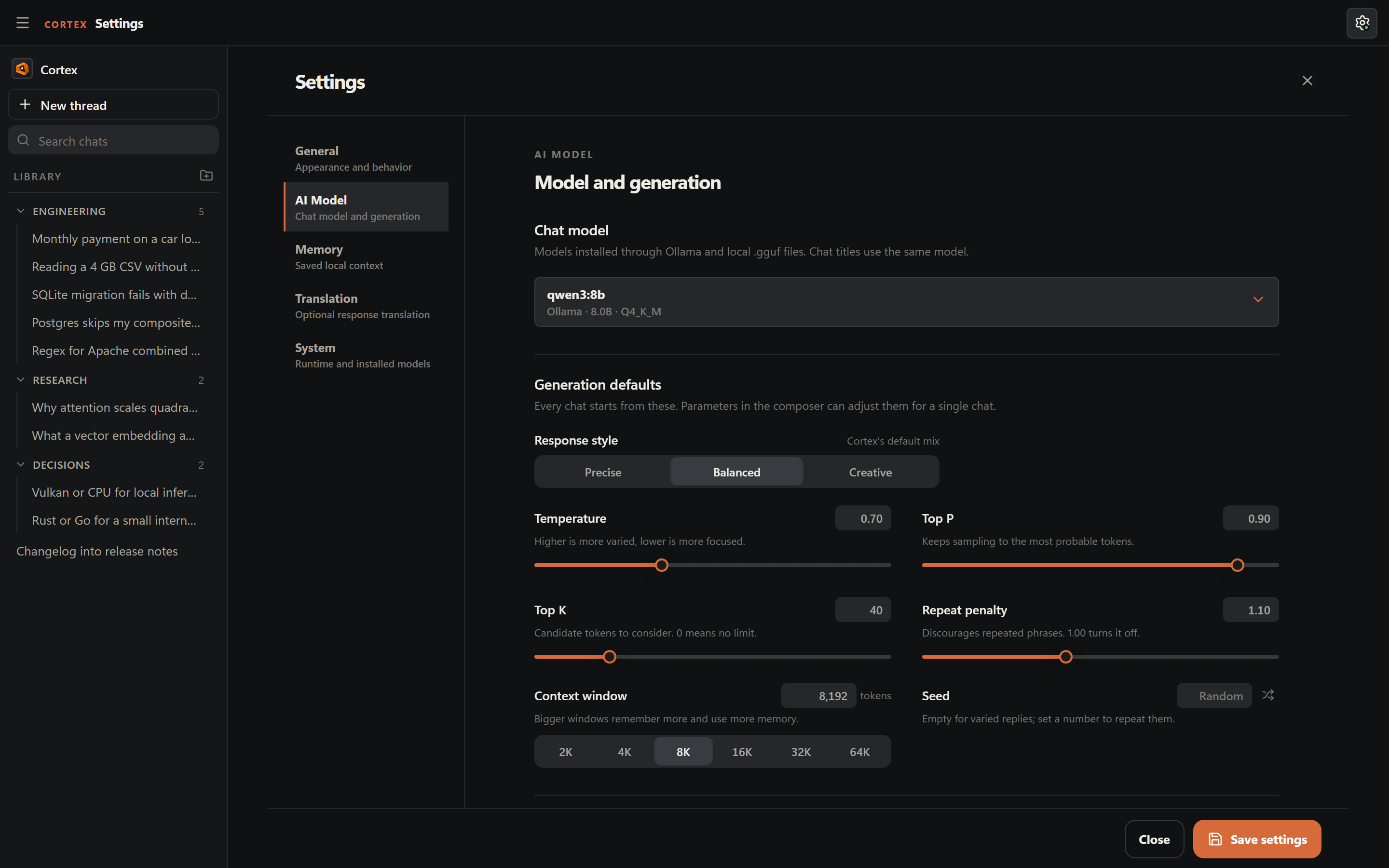
Temperature, top-p, top-k, repeat penalty, and context window can also be overridden for a single conversation from the composer, without disturbing these standing defaults.
Keyboard-first
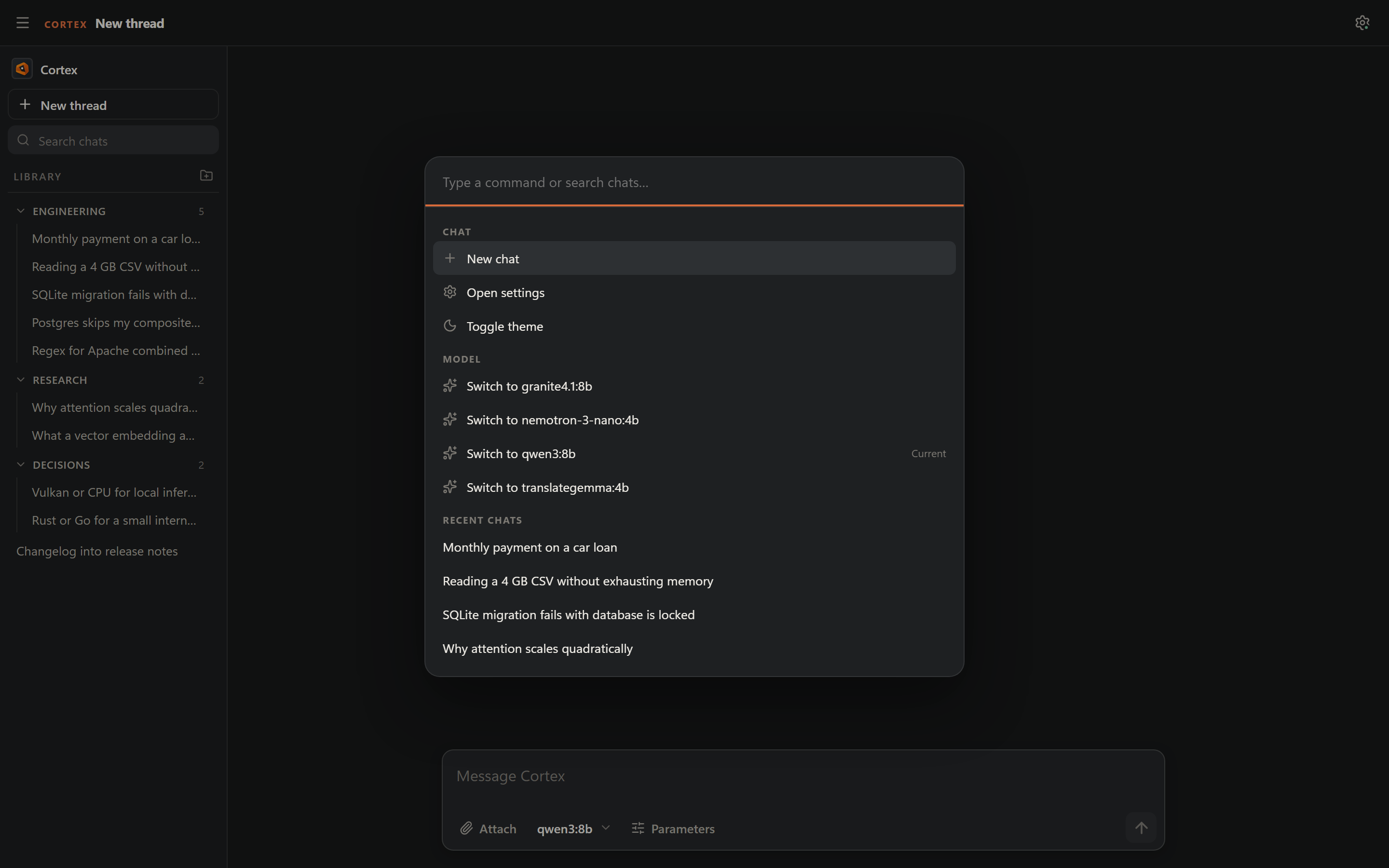
Ctrl/Cmd+K opens a command palette that reaches new chat, settings, theme,
model switching, and recent conversations without leaving the keyboard:
The whole workspace follows the system theme, or can be pinned light or dark:
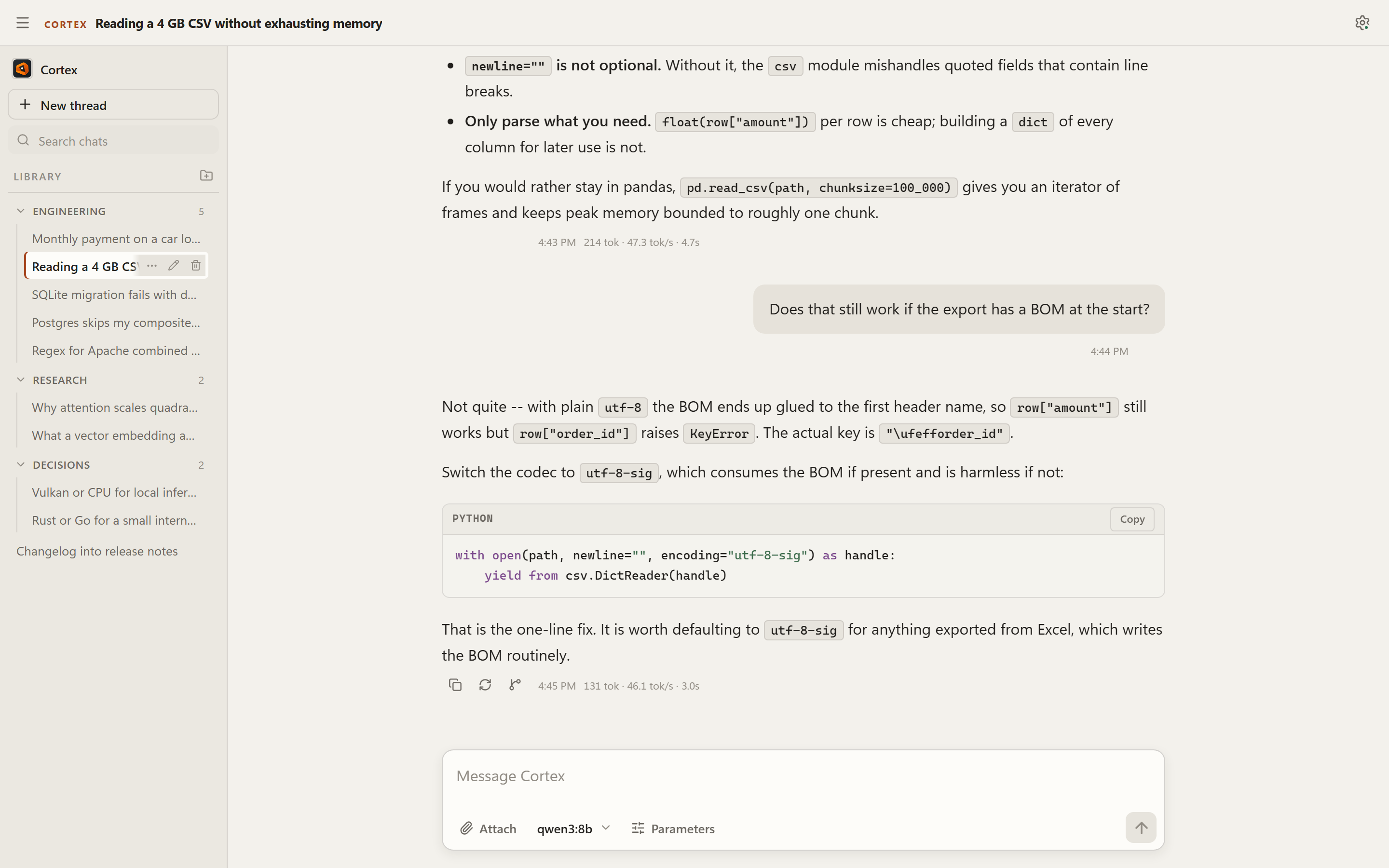
The application in these images is the real build. The conversations, library, memories, and staged tasks are a fixed demo workspace defined in
tools/screenshots/showcase_server.py-- no model is contacted during a capture, so the images regenerate byte for byte with./tools/screenshots/showcase.ps1.
What Cortex provides
- Local chat. Stream responses from a local model with Markdown, syntax-highlighted fenced code, reasoning details, sources, code-block copy controls, retry/regenerate, and forked threads. Long transcripts render in a virtualized list so scroll performance stays smooth regardless of history length.
- Two local runtimes. Use models installed through Ollama, or point Cortex at
a folder of
.gguffiles and it serves them through its own managed llama.cpp runtime -- no separate install. Thellama-serverbinary is fetched once, verified against a pinned SHA-256, and cached. GPU backend selection isauto(try Vulkan, fall back to CPU; Vulkan is skipped when the machine has no Vulkan loader),vulkan, orcpu. A loaded model is released after 30 idle minutes (Settings > System; 0 keeps it loaded) or with "Unload model", and its context window is held to what the model was trained for. - Bring your own GGUF. Download a model into the local folder by direct URL
or Hugging Face repo, then select it from the same picker as everything else.
For a repository, Settings can list its
.gguffiles (with sizes, folders shown, a split model as one entry) to pick from, or take a typed file name. A running download can be cancelled from Settings, and a reload picks its progress back up. The folder is searched a few levels deep, so the one-folder-per-repository layout downloaders use works as-is; a file appears asgguf:<path>, e.g.gguf:Qwen3-8B-GGUF/Qwen3-8B-Q4_K_M.gguf. A download that drops resumes from the bytes already stored, a split model (-00001-of-00003) is fetched whole or not at all, and a gated Hugging Face repository works once its access token is in theHF_TOKENenvironment variable (it is sent to huggingface.co only, never stored or logged). Links must behttps://and must resolve to public addresses; that is checked before every request and redirect. One limit: the check looks the host name up itself and the connection then looks it up again, so a DNS server that answers differently the second time (DNS rebinding) is not stopped by the check alone. TLS still applies, because the connection is verified against the requested host name and no request is sent before that succeeds, but Cortex does not pin the connection to the address it checked, so only download from hosts you trust. - Composer model control. Inspect the local inventory, switch models without leaving the composer, refresh the inventory, and stage local image or text attachments.
- Per-chat generation parameters. Temperature, top-p, top-k, repeat penalty, and context window default to the values in Settings but can be overridden for a single conversation from the composer, without changing the standing default. Each response shows its token count and tokens/sec once generation finishes.
- Prompt control. Standing system instructions apply to every turn, with no length cap. A local model can also be run raw: Bypass Cortex's default system prompt leaves the built-in identity and safety instructions out of the request entirely. It is off by default and takes a deliberate opt-in.
- Model loading. When Ollama has to load a model into memory, the turn says
so instead of looking hung. By default Cortex leaves how long Ollama keeps a
model loaded to Ollama itself (its
OLLAMA_KEEP_ALIVEvariable, or its five-minute default), exactly as before. To choose for Cortex's own requests instead, setgeneration.keep_alive_minutesto 1-1440 minutes, or-1to keep the model loaded until Ollama stops; the value is sent on every request, so it takes priority overOLLAMA_KEEP_ALIVE, and0(the default) sends none. It applies to Ollama models only and has no control in the Settings panel yet, so it is set through the settings API. - Model details. The Models panel shows each installed model's parameter size, quantization, and context length alongside its name, read from Ollama's existing model-detail response.
- Keyboard-first navigation. A command palette (Ctrl/Cmd+K) reaches new
chat, settings, theme, model switching, and recent chats;
?opens a shortcuts reference. The sidebar also supports searching chats by title. - Durable context. Threads live in SQLite; permanent memories use atomic local JSON storage. Existing JSON chat history and Windows settings are read additively during migration without rewriting the legacy source. For a managed llama.cpp model, Cortex remeasures shortened prompts with the runtime's tokenizer before generation instead of trusting a character-ratio estimate. If even the history-free prompt is too large, it refuses the turn rather than knowingly sending text the runtime would silently truncate.
- Exact arithmetic. An explicit calculation ("what is 17.5% of 2,340?") is checked by a deterministic local calculator before the model answers, so the figure in the reply is computed rather than guessed.
- Approval-gated Python. A local model may propose a task in a small,
restricted subset of Python (no imports, no
def/class/while, no method or attribute calls -- assignment, bounded loops, comprehensions, and a fixed builtin list), and the backend validates it, records the source digest and requested capabilities, and waits for one-time user approval. The task tray shows pending approval, progress, output, errors, cancellation, and revoke state. Ordinary assistant text and fenced code are never executed. - Optional response translation. A configured local model can translate each response into a target language, off by default and set independently of the chat model. The untranslated answer is kept beside the translation and is what the chat model sees as its own earlier turn, so the conversation it continues stays in one language. That applies to answers translated from this version on: one translated by an earlier version has no untranslated copy, so the model still sees it in the target language.
- Native local runtime. The API binds to loopback, the native handoff uses an expiring session token, and the embedded WebView uses a private Cortex-owned profile.
How local execution is bounded
When a model proposes a task, the transcript states what it wants and the exact access it is asking for, and the task parks in the tray until the user decides. Nothing runs in the meantime:
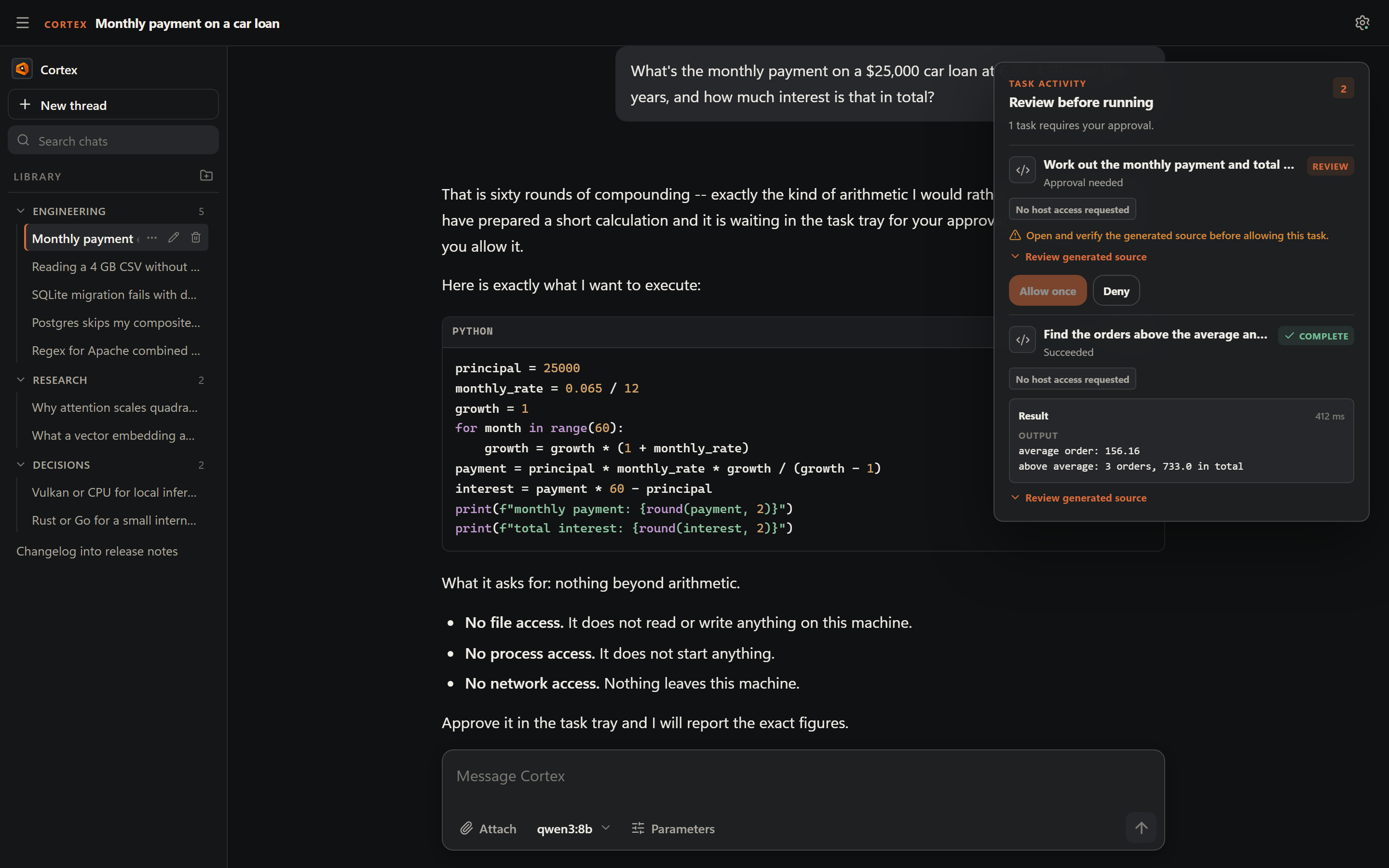
The tray names the requested host access, flags broad access as a high-risk choice for that run, and lets the generated source be inspected before anything executes. A finished task keeps its captured output alongside it:
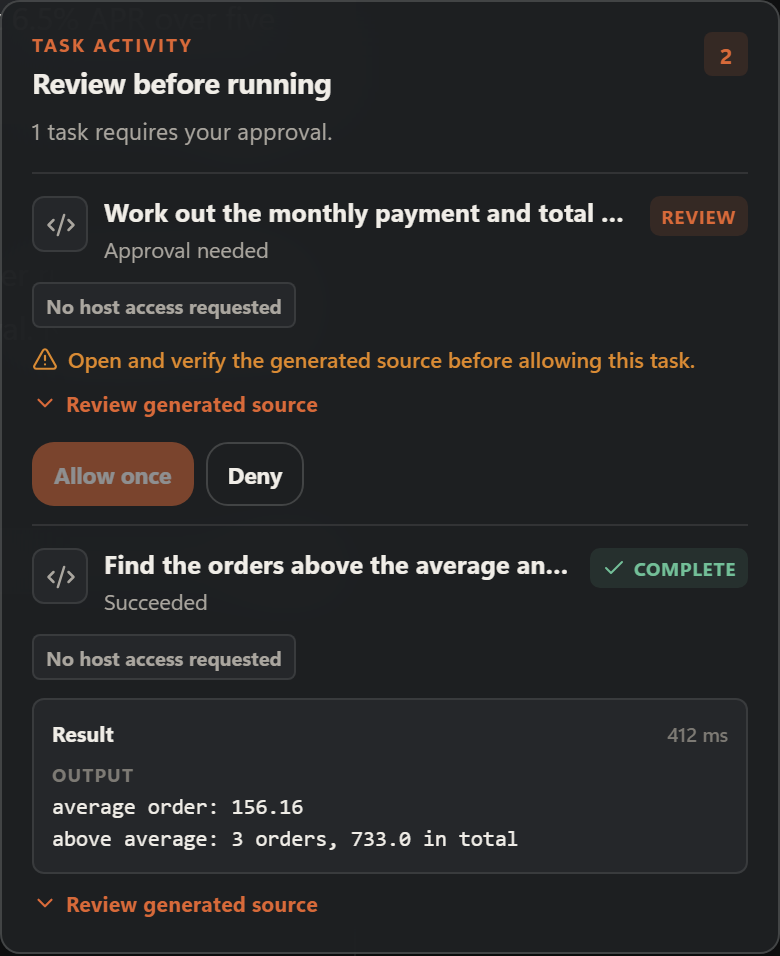
Both tasks in these images pass the real validator, and the output shown is
what the restricted interpreter prints for that source
(tests/test_showcase_fixtures.py holds the demo to that).
Code execution is a separate capability from scratch computation:
- The local model emits a structured request containing Python source, a plain- language intent, and the exact filesystem, process, and network capabilities it wants.
- Cortex validates and persists a pending job. A model response, Markdown block, or malformed request cannot start a worker.
- The user chooses Allow once or Deny. Permissions are not carried into the next run.
- An isolated, short-lived worker applies source, time, memory, output, and
child-process limits. Host operations go through the brokered
cortexAPI. The worker is started with Cortex's own environment and clears the environment variables it inherited (keeping only the Windows system root) before it runs any source or makes any brokered call; the network broker also ignores proxy settings. That is a clearing step inside the worker, not a launch with a clean environment. - The task tray records the lifecycle and renders structured output. Stop, cancellation, timeout, denial, and revoke invalidate the grant.
Broad filesystem, process, or network access is a clearly labeled high-risk choice for that run. It is never silently enabled or persisted. If the required worker boundary cannot be established, Cortex fails closed and ordinary chat remains available.
The calculator and the image transform run the same way as code: a short-lived child that clears its inherited environment and then waits at a checkpoint, touching nothing it was given, until Cortex has put it in a Windows job object. The job ends the child if Cortex exits, caps the memory the child can commit, allows the calculator and image workers exactly one process (the code worker a handful), and blocks clipboard, desktop and other-window access. That is a resource and lifetime boundary, not a sandbox: a job does not limit which files or network addresses a process running as you could otherwise reach.
What the capabilities reach today is deliberately narrow:
- Files: a scratch folder created empty for that one run and deleted afterwards. A task cannot read your documents or your projects.
- Processes: refused. Starting another program is not available until Windows can enforce the same boundary the broker promises.
- Network: a small number of HTTP GET requests to public addresses; private, local, and carrier-NAT ranges are refused.
The language itself is a restricted Python subset, so this suits calculations over data the model writes into the program -- not editing files or running your tests. The consent-gated desktop Project workspace now supports bounded repository research, reviewed edits, approved checks, and explicit recovery. Ordinary chat does not silently acquire those privileges.
Experimental local coding workspace (desktop)
Project workspace in the desktop sidebar is an opt-in coding mode, separate from ordinary chat. Choose a local project with the native folder picker or enter its absolute path, then explicitly approve indexing its eligible source files. Cortex creates an in-memory, owner-scoped, expiring snapshot (up to 2048 small UTF-8 files and 16 MiB, valid for 15 minutes). Secret files, dependencies, symlinks and binary files are excluded. Search/read and the model research loop use that copy, not arbitrary paths from the model.
The selected Ollama model can investigate a problem and optionally stage
exact, hash-checked text replacements as a review-only unified diff. The
model cannot apply the patch. Review the proposed changes, then choose Review
& apply patch and confirm a separate write grant. Cortex checks every
original source hash, file identity and linked directory before installing the
edited contents with temporary sibling files. Undo applied patch restores
the captured original bytes only if the edited files are unchanged. The undo
checkpoint is retained through separately approved edits and a session refresh.
Before ANY approved file edit, Cortex also writes a durable local recovery
checkpoint to its private data directory, in
workspace_checkpoints.sqlite. It records the first original file bytes and
the expected before/after hashes before writing the checkout. If Cortex stops
mid-edit, the checkpoint remains in the database (with a pending state) and can
be restored manually after restarting the app. Checkpoints are separate from
chat, model history and temporary workspace snapshots.
The desktop Saved recovery checkpoints panel lists only paths and status, never backed-up contents. Select Restore originals and explicitly confirm: Cortex first verifies the project root and every current file against its recorded original, pre-write or proposed hashes, and refuses the entire restore if any file has changed unexpectedly. An interrupted restore can be explicitly retried; it never restores files automatically. Discard backup deletes the saved originals without touching your checkout. These source copies are stored as unencrypted SQLite blobs in the existing per-user-protected Cortex data directory, so protect and back up that data directory appropriately. The bounded journal stores up to 32 files per checkpoint and 64 MiB of original data across all checkpoints. When full, edits fail closed until older checkpoints are explicitly restored or discarded. Nothing here replaces Git or a separate backup; Windows file permissions and metadata beyond the original source bytes are not guaranteed to be preserved.
A multi-file write or restore failure may still require manual recovery, and Cortex refuses to overwrite intervening external changes. Saved recovery records remain available after a crash, reload, session expiry or normal workspace close, but only within the same installation's private data directory.
The check controls offer only Python pytest, npm test, and npm build, and require another explicit confirmation each time. A project test or build script executes code with your Windows account privileges; Windows job objects bound its process lifetime, memory and number of descendants but do not sandbox filesystem or network access. Use this mode only on trusted repositories.
Continue after a failed check: select Refresh source & investigate failure to explicitly recapture eligible files into the same temporary workspace, then review the test output loaded into the next model question. The refresh is a new consented read; it never runs the model, applies code or executes another check on its own. It extends that session's 15-minute lease, preserves its original-file undo checkpoint and invalidates any old unapplied preview. Cortex refuses refresh if any previously applied source file has changed outside the approved edit, preventing silent loss of undo. Several separately approved patches can now be applied to the same or different files, and Undo applied patch restores the pre-first-edit bytes across all of them, only when all current file hashes still match. The temporary source snapshot remains in memory, but the approved original-byte recovery checkpoint is persisted in the private SQLite journal until restored or explicitly discarded.
Unattended edit/test/repair loops and arbitrary shell commands remain unsupported: each iteration requires a deliberate user-initiated refresh, model prompt, reviewed patch approval and separate command confirmation.
The UI's native folder chooser is only a convenience: it never grants read, write or command authority by itself. The REST endpoints require Cortex's existing local bearer session. No project grant persists when Cortex closes. This is an unreleased experimental feature on the development branch, not a published desktop release.
Experimental read-only repository research (CLI)
The first read-only slice of that workspace direction is available to
developers through a separate terminal command, independent of ordinary chat
and the desktop Project workspace. Pass an absolute local repository path and the explicit
--allow-read-only consent flag. Cortex copies eligible small UTF-8 source
files into a bounded, short-lived in-memory snapshot, then searches and
reads from the snapshot instead of returning to the working tree.
python tools/workspace_research.py --root "C:\src\project" --allow-read-only --list
python tools/workspace_research.py --root "C:\src\project" --allow-read-only --search "class Client"
python tools/workspace_research.py --root "C:\src\project" --allow-read-only --model qwen3:8b --question "Where is request authentication checked?"
python tools/workspace_research.py --root "C:\src\project" --allow-read-only --model qwen3:8b --question "Propose fixing this parser bug" --preview-patch
The research turn uses loopback Ollama only and can make up to four read/search tool calls before returning an answer. It cannot edit files, run tests, start a shell, install packages, or read outside its snapshot. Each grant expires after 15 minutes, is scoped to its owner, and can be revoked; the CLI revokes it on exit. No grant or file contents are persisted by this feature. Hidden credentials, dependency/build directories, symlinks and Windows reparse points are excluded; indexing is bounded by file count, file size and total bytes, and reports when it is incomplete. Original files are not changed.
With --preview-patch, the model can additionally propose exact,
one-occurrence text replacements within already-indexed files. Each proposal
must carry the SHA-256 of the baseline file reported by the read tool. Cortex
stages the replacement in memory only, checks for ambiguity, stale hashes
and size limits, and returns a unified diff for inspection. The original
checkout is never edited. A preview is not an applied patch and no tests run.
Limitations: This developer-facing backend/CLI command remains read-only and independent of the desktop coding-agent workflow. It is not an OS sandbox: concurrent hostile filesystem mutation during snapshot capture can still create path races, and code files themselves may contain sensitive text. Grant access only to a repository you trust to share with the chosen local model. Model answers and file citations remain unverified until checked against source. Applying changes, executing tests, persistent recovery and automatic repair are not part of the CLI command; the desktop workspace handles approved patches and recovery separately.
Architecture
main.py
  +-- supervised FastAPI backend (Python)
  |   +-- versioned loopback API, session auth, SSE jobs
  |   +-- SQLite conversations/settings and local memory repositories
  |   +-- model and generation services (Ollama + managed llama.cpp)
  |   `-- scratch, image, attachment, and code execution lifecycles
  +-- native pywebview / WebView2 window
  `-- supervised Vite server (development mode only)

frontend/                 React + Vite + TypeScript application
backend/cortex_backend/   API, repositories, services, and worker boundaries
contracts/                generated TypeScript API contracts
assets/                   externalized model prompt assets
packaging/                Windows PyInstaller build and WebView2 bootstrapper
tools/                    contract generation, artifact review, screenshots
tests/                    Python API, lifecycle, worker, and migration tests
The supported source runtime is Windows. User data stays under
%APPDATA%\ChatLLM\ChatLLM-Assistant unless an explicit --data-dir is supplied.
The large, re-downloadable folders a new install creates -- the llama.cpp runtime,
the default GGUF models folder and the WebView profile -- go under
%LOCALAPPDATA%\ChatLLM\ChatLLM-Assistant instead, so a roaming profile does not
synchronise gigabytes of them. A folder that already exists in the data directory
stays where it is and keeps being used there; Cortex does not move or copy an
existing one to the new location. With
--data-dir everything stays together under that folder.
Cortex does not pull an embedding model at startup and has no semantic retrieval.
Requirements
- Windows 10 or later
- Python 3.11 or later
- At least one local model, from either runtime:
- Ollama installed and running at
http://127.0.0.1:11434, or - a
.gguffile in the local models folder, served by the managed llama.cpp runtime (no Ollama required)
- Ollama installed and running at
- Node.js 22+ and npm for frontend development or source builds
Quick start
Get a model, create a virtual environment, and launch the native desktop application:
ollama pull qwen3:8b
python -m venv .venv
.venv\Scripts\Activate.ps1
python -m pip install -r requirements.txt
python main.py
If you would rather not run Ollama, skip the first line and instead drop a
.gguf file into the local models folder shown under Settings -> System, or
download one from there by URL or Hugging Face repo. Cortex serves it with its
own llama.cpp runtime.
The first launch checks the local model inventory. Choose a model from the composer's model picker, or under Settings -> AI Model. If neither runtime has a usable model, Cortex still opens and explains the connection state; generation becomes available once a model is present and the inventory is refreshed.
Useful launcher options:
python main.py --dev                 # supervise Vite while developing the UI
python main.py --headless --port 8765 # backend only, for diagnostics/automation
python main.py --data-dir PATH       # use an isolated local profile
python main.py --skip-build-check    # reuse the existing frontend/dist bundle
python main.py --build-frontend      # build the frontend and exit
--no-browser is retained as a deprecated alias for --headless. The Ollama
endpoint can be intentionally changed for a trusted local network setup with
CORTEX_OLLAMA_HOST; the default remains loopback.
Development checks
The local check script covers the fast gates CI runs, from the repository root.
For contributor setup, install requirements-dev.txt as described in
CONTRIBUTING.md so the local Ruff version matches CI:
./scripts/check.ps1              # fast gates, including the artifact-boundary review
./scripts/check.ps1 -Tier full   # adds compileall, Playwright, and the bundle build
For coding-agent work, read the repository-level agent operating contract first. Cortex's current product boundary is bounded local execution: approval-gated code in a restricted Python subset, safe computation, and fixed-function image recipes. Nothing here enables arbitrary workspace or shell authority.
The backend also ships a deterministic trajectory evaluator that exercises code-proposal admission, validation, bounded repair, cancellation, contextual history, untrusted tool output, and feedback handoff against scripted model replies. It performs no model download or code execution, and is part of the local quick gate and Windows CI:
python tools/harness_eval.py --check --json
python tools/harness_eval.py --case approved-result-feedback --json
Its pass rate measures harness contracts, not real-model task success or state-of-the-art coding performance. A future live-model benchmark must report model identifiers, hardware, corpus, tokens, time, and approval outcomes separately; never report the deterministic score as an agent benchmark.
To run them automatically before every push:
git config core.hooksPath .githooks
Use npm.cmd on Windows when PowerShell execution policy blocks the npm.ps1
shim. API contract artifacts are generated with:
python tools/generate_contracts.py --write
The README screenshots are regenerated from a fixed demo workspace, so they stay
in step with the UI without hand-editing images. showcase.ps1 writes the full
showcase set (to the Desktop by default, or -OutDir); the images used above are
a curated subset copied into .github/images/:
npm.cmd run build --prefix frontend
./tools/screenshots/showcase.ps1
Windows packaging
Build the one-folder package with:
powershell -ExecutionPolicy Bypass -File packaging/build_windows.ps1
By default, packaging requires Python 3.11 and installs the same hash-locked
runtime dependencies as release CI (requirements.lock.txt). Run from a fresh
Python environment for the closest parity with release artifacts. An explicitly
unlocked development package may be built with -UnlockedDependencies;
-SkipDependencyInstall uses the existing environment and is not release-equivalent.
The script checks the packaged executable's loopback health endpoint before
reporting a successful build.
The result is written to dist/Cortex/Cortex.exe. The package contains the
frontend, prompt assets, Python runtime, pywebview bridge, and the signed
Evergreen WebView2 bootstrapper. A packaged launch does not require Node.js, a
global Python installation, or an installed browser.
Upgrading and recovery
Back up %APPDATA%\ChatLLM\ChatLLM-Assistant before installing a new release.
Cortex keeps reading legacy SQLite, JSON chat, permanent-memory, and Windows
registry settings, and both the chat and settings databases carry verified
backups. Those backups and the untouched legacy settings source are the
rollback path; an untested in-place downgrade is not.
What is kept, all beside the database files in that folder:
cortex_db.sqlite.bakand.bak.1(and the same forcortex_settings.sqlite) are the two newest verified backups. They are refreshed each launch, after any schema upgrade, so they hold the new schema. The chat database's.bakis checked before it takes the.bak.1slot, and one that fails the check is replaced instead, so a backup that has rotted never pushes the older good copy out. If a backup cannot be written (a full disk, a file held by another program) Cortex still starts and logs the failure. The failure is also reported by the diagnostics API (GET /api/v1/diagnostics); the app does not show it yet.cortex_db.sqlite.pre-v<N>.bakis a snapshot of the chat database taken just before a release upgraded it from schema versionN, and it is the file an older release can open. The upgrade does not run without it: if Cortex cannot write the snapshot (a full disk, a file held by another program) it refuses to upgrade, changes nothing, and tries again on the next launch. The name always holds the newest snapshot for that version. One that already exists and no longer matches the database (a rollback followed by more chats on the older release, then a second upgrade) is kept aspre-v<N>.bak.superseded-<n>. Cortex never deletes any of these.- If the chat or settings database is found corrupt at launch, Cortex restores
the newest verified backup and keeps what it replaced as
<database>.corrupt-<id>, with its write-ahead log beside it as<database>.corrupt-<id>-wal. The restored data is the backup's, which is the state at the previous launch; the diagnostics API (GET /api/v1/diagnostics,chat_backupandsettings_backup) names the quarantined file. Cortex never deletes it. If Cortex is stopped part-way through a recovery, the next launch finishes it from the newest verified backup, and any write-ahead log the earlier attempt had set aside under a different name is moved beside the quarantined file (the diagnostics list it asadopted_sidecars). The diagnostics are API-only for now: nothing in the app reads them yet. A database that is simply missing beside a.corrupt-<id>file and a valid backup looks like exactly that interrupted recovery and is restored, so to start over on purpose remove the backups and the.corrupt-<id>files along with it (they hold copies of your chats). - Deleting chats frees space inside
cortex_db.sqlitebut not on disk. At launch, once that launch's backup has been written and verified, Cortex hands the space back when more than a quarter of the file is free. A database created by this release does it in small steps; an older one is rewritten once (which needs roughly twice its size free on the data drive and the temporary-files drive, and is skipped when there is not, when the database holds over 1 GiB, or when it takes over 20 seconds). A skipped or interrupted pass changes nothing. One that was skipped for lack of room or because another program had the database open is tried again on the next launch; a rewrite that failed or ran out of its 20 seconds is not tried again for seven days (a smallcortex_db.sqlite.reclaim-backofffile beside the database holds only the time it failed; deleting it lifts the wait), so a very large old database does not add those seconds to every launch. - Chats imported from the old JSON
chat_historyfolder are moved tochat_history_migrated_<time>and files that could not be read tochat_history/quarantine. Once thechat_historyfolder is completely empty it is renamed tochat_history.retired(never deleted, so it is yours to remove); anything still in it is left where it is.
Cortex needs write-ahead logging, so the data directory has to be on a local
drive SQLite can use it on; some network, cloud-synced and removable drives
cannot (a folder on a network share is one; when %APPDATA% itself is a network
path, Cortex uses %LOCALAPPDATA% for its data instead of refusing to start). If SQLite
reports that it could not enable it, Cortex stops at startup with a message
saying so rather than running with weaker durability. Your existing databases
are not deleted or modified when it does, and your chats and settings are still
in the data folder. To keep using them, first copy the existing data files (the
whole folder, including the databases and any -wal and -shm files beside
them) into a folder on a local drive, then start Cortex with --data-dir
pointing at that folder. A --data-dir folder that starts out empty holds no
chats.
To go back to an older release after a newer one upgraded the chat database:
close Cortex, move cortex_db.sqlite and any -wal and -shm files beside it
into a folder of your own, copy cortex_db.sqlite.pre-v<N>.bak to
cortex_db.sqlite, and start the older release. Anything written after the
upgrade is only in the files you moved aside. If you upgrade again later, that
upgrade takes a fresh snapshot, so the next rollback goes back to that one and
the earlier snapshot stays beside it as .superseded-<n>. An older release that
meets a newer database refuses it without changing it and names the snapshot to
restore.
Troubleshooting
- If Cortex reports Ollama unavailable, verify the Ollama service and endpoint.
- If no models appear, run
ollama listand install a generation model. - The window opens on a short "Starting Cortex" page while the backend starts, and shows what went wrong (and where the log is) if startup fails.
- If the native window does not open from source, reinstall
requirements.txtand verify that the Microsoft Edge WebView2 Runtime is installed. When it is missing Cortex asks before installing it (Cancel closes Cortex without an error); offline, or if the installer fails, the message names Microsoft's download link. From source,packaging/prepare_webview2.ps1fetches the installer Cortex looks for. - Two logs live in the data folder:
startup.log(startup failures, one line per successful start, and the previous file asstartup.log.1) andlogs\cortex.log(what the backend and launcher log, rotating at 1 MiB with three backups;--log-levelsets its verbosity). Both are redacted for credential-like text, and a traceback incortex.logkeeps only its frames and exception class names, never an exception message. Read them before sharing anyway. - If a previous Cortex instance is already running, launching Cortex again restores its native window rather than starting a second server. If that instance is still starting, the second launch waits up to 90 seconds for its window instead of reporting an error.
Privacy and security
Cortex keeps the API on loopback and requires an expiring authenticated native
window session. The embedded view uses a private profile and does not inherit
browser cookies, history, extensions, or profiles. Prompts, responses, memories,
and raw model output are excluded from diagnostic logs. When a request fails
with a server error, the log records the exception class and the source
locations it passed through, never its text, tagged with a short request id.
Every response the API sends carries that id in an X-Request-ID header
(refusals by the host check and the size limit included; a response the web
server itself sends before a request reaches Cortex, for a malformed request,
does not). The message of a failed repository call and of an unhandled server
error also quotes it, so a report can be matched to its log line; other error
messages, such as a 404, a 409 or a change that did not persist, carry the
header only. Ollama remains local unless CORTEX_OLLAMA_HOST is intentionally
configured otherwise.
The code-execution worker is a bounded containment boundary, not a claim of arbitrary operating-system isolation. Review the exact source and capabilities before approving a run. See SECURITY.md for reporting guidance.
Project documentation
License
Cortex is distributed under the terms in LICENSE.