
doudou770/flyreq-image-studio
doudou770/flyreq-image-studio has 171 GitHub stars and 32 forks. Star changes are not measured yet. Last checked 2026-11-13 00:07 UTC. Last push 2026-09-25.
AI生图工作台 (AI Image Generator)、视频工作台。支持 Agent 与工作台模式、无限画布、素材管理、提示词反推/广场及 PWA,支持外链式配置;可接入 Grok、GPT Image 2 等自定义模型生图。自适应手机端。
Measured star growth
- in 24h
- Update delayed
- in 7 days
- Update delayed
- in 15 days
- Update delayed
- in 1 month
- Update delayed
Net star changes over overlapping periods, not daily totals. Missing measurements are left blank. Stars measure attention, not software quality.
README.en.md
OriginalFlyReq Image Studio
简体中文 | English
Self-hosted AI Image Studio · Video Studio · Multi-model Protocols · Infinite Canvas · Asset Library · PWA


Overview
FlyReq Image Studio is a self-hosted AI image and video creation workspace for individuals and teams. It combines a static Next.js 16 + React 19 PWA frontend with a lightweight Node.js, SQLite, and WebSocket backend that queues jobs and proxies image- and video-generation APIs.
Built from tianjiangqiji/nova-image-studio and maintained at doudou770/flyreq-image-studio.
Highlights:
- Multi-model access: Configure image, video, and text models independently across Google, OpenAI, xAI, and New API.
- Capability-aware controls: Show resolution, references, duration, aspect ratio, and advanced options based on each model's limits.
- Unified image and video creation: Generate images, edit references, create GIFs and videos, and work on an infinite canvas.
- Production-friendly deployment: Configure branding, defaults, concurrency, and rate limits through environment variables without overwriting existing user settings.
- Fast setup from links: Prefill image, video, or text models from a URL, then save only after user confirmation.
- Reliable, traceable jobs: Persistent queues, live WebSocket updates, polling fallback, failure diagnostics, and local backup are built in.
Product Preview
Image Workspace
| Wide | Mobile |
|---|---|
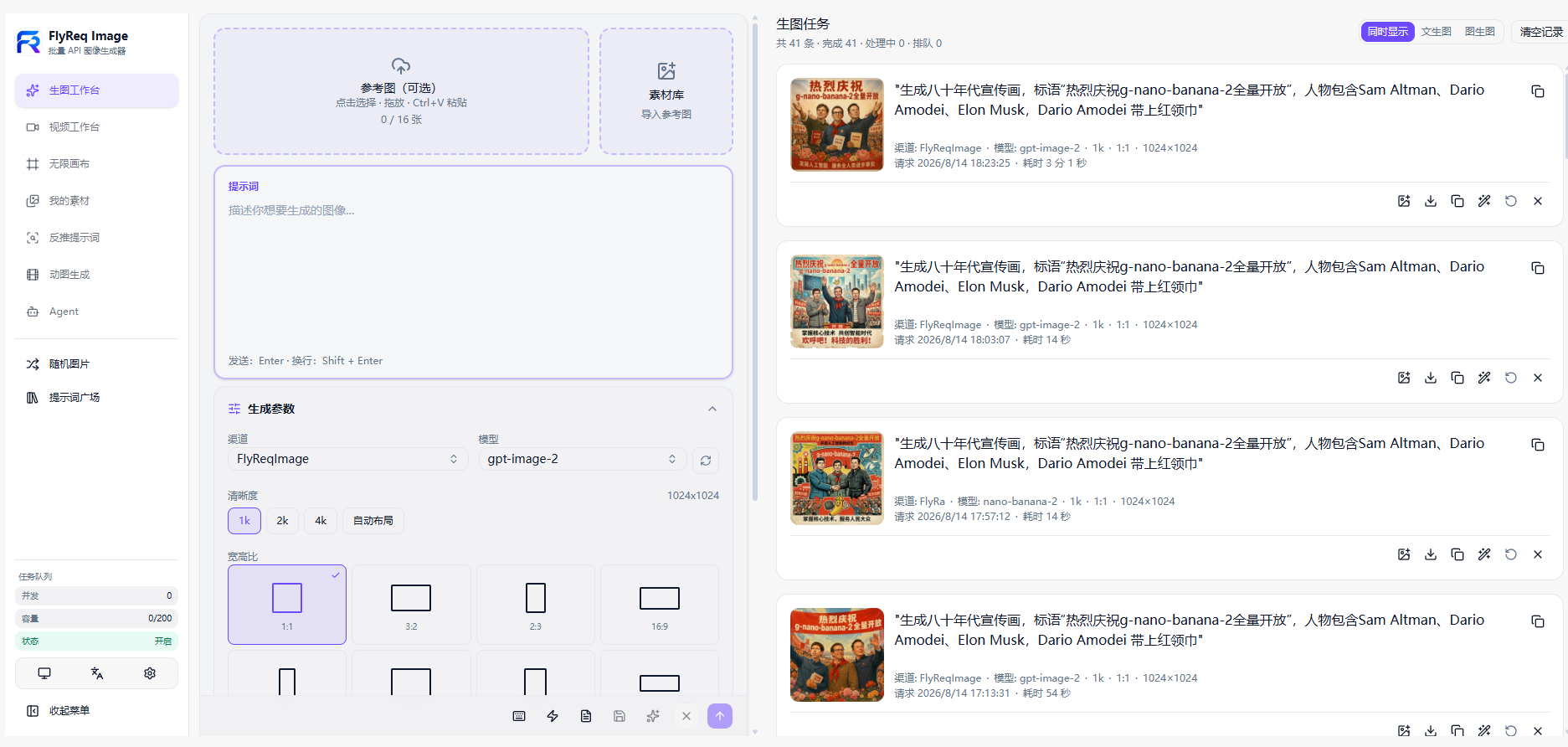 |
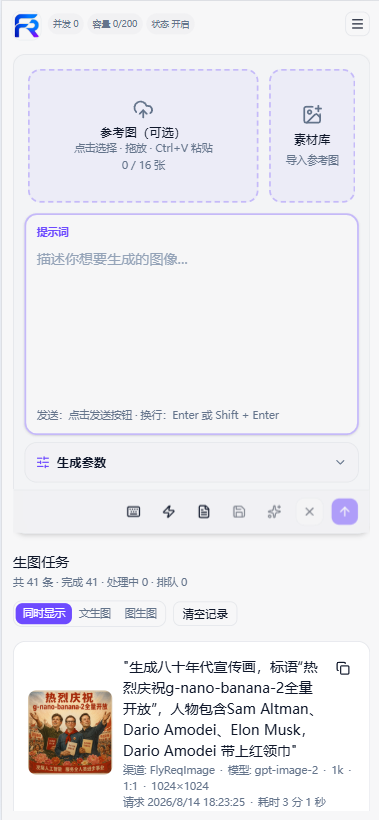 |
Video Workspace
| Wide | Mobile |
|---|---|
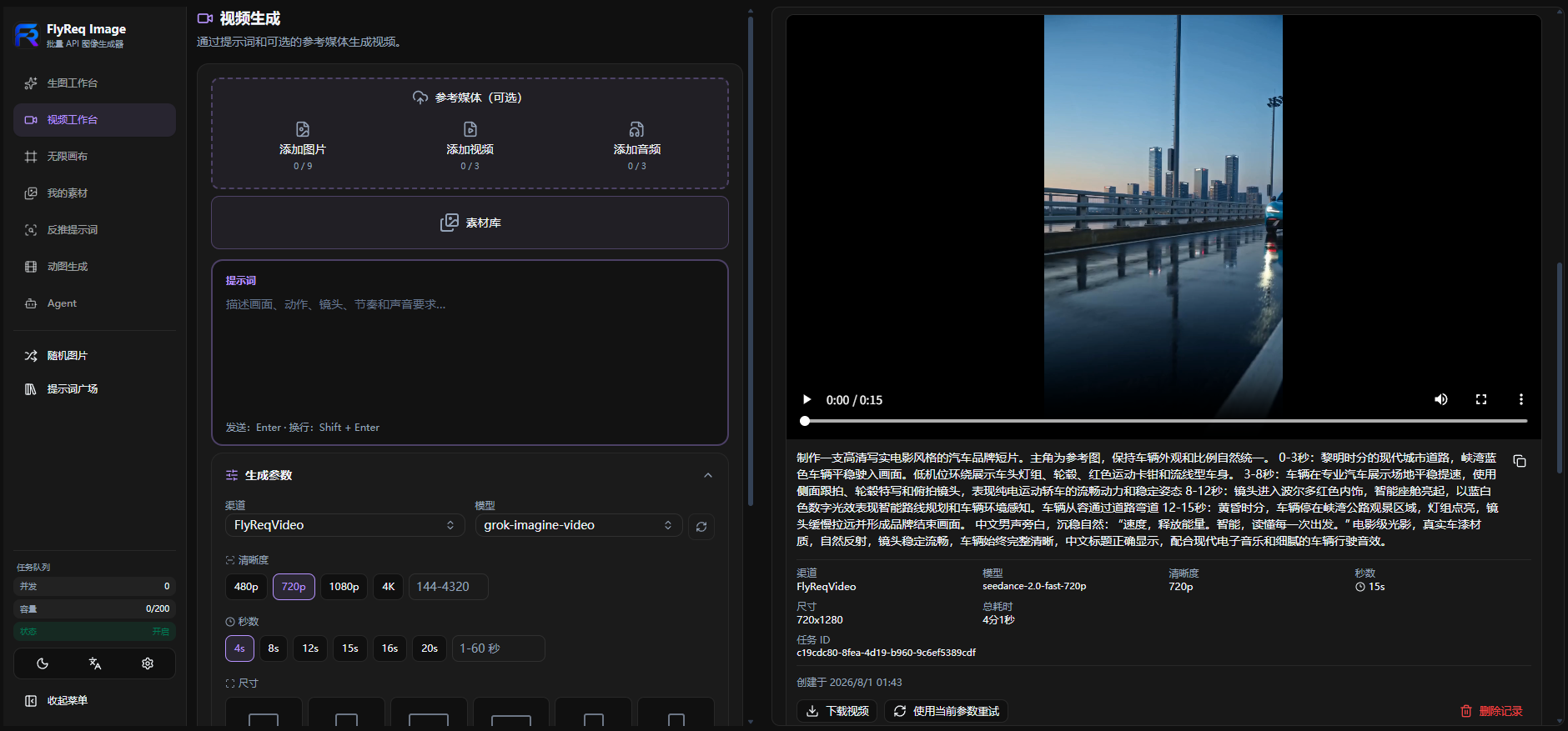 |
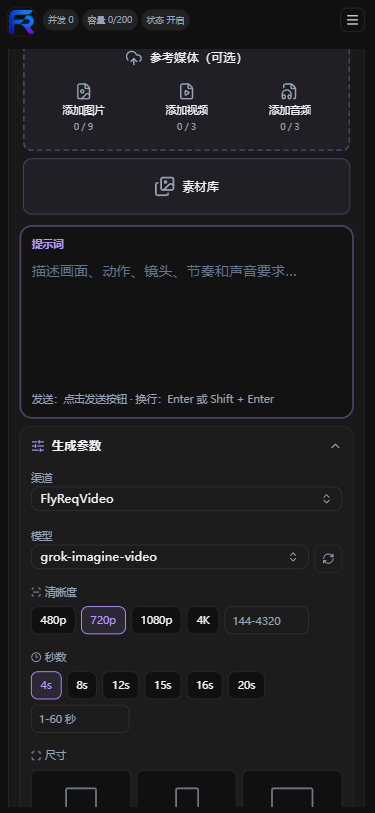 |
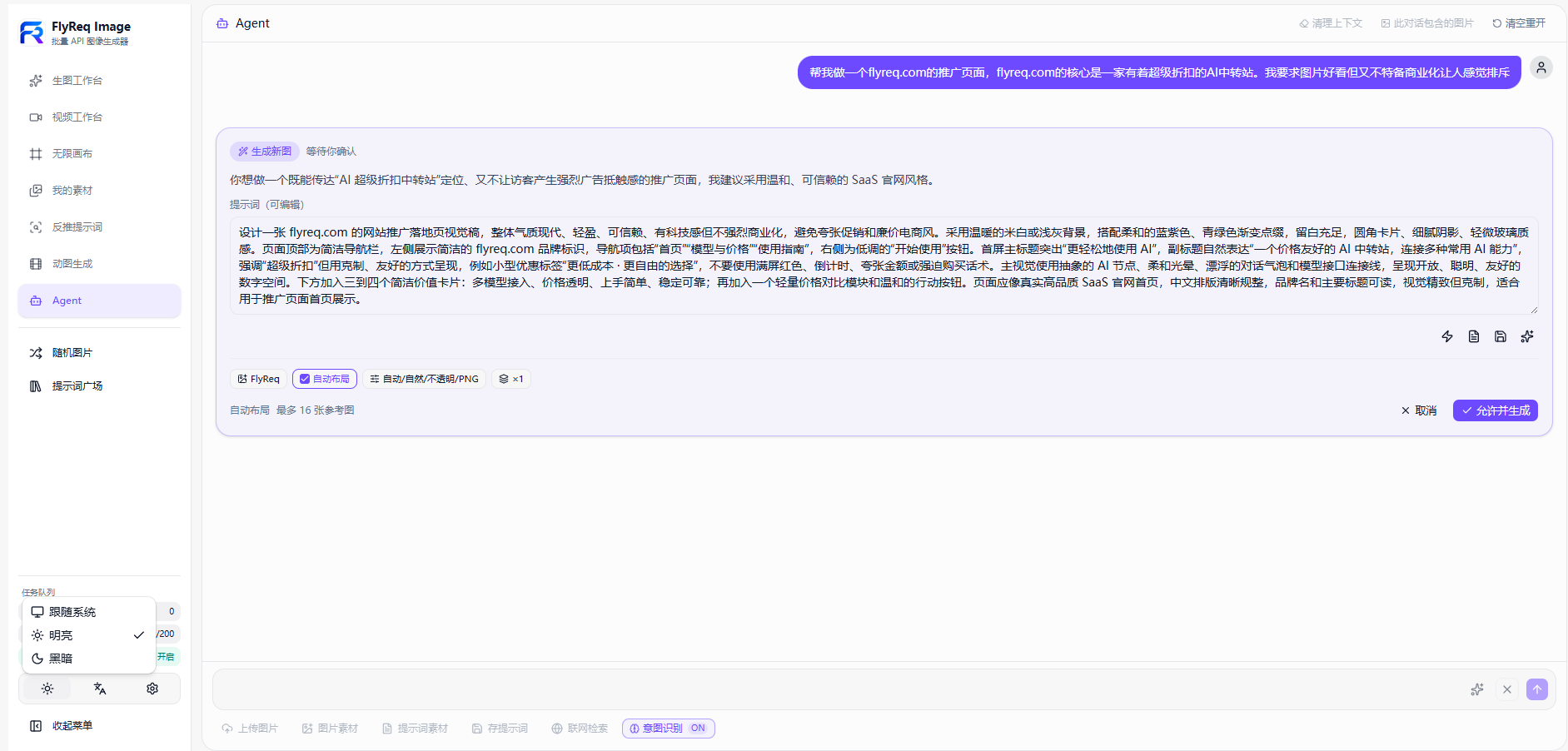
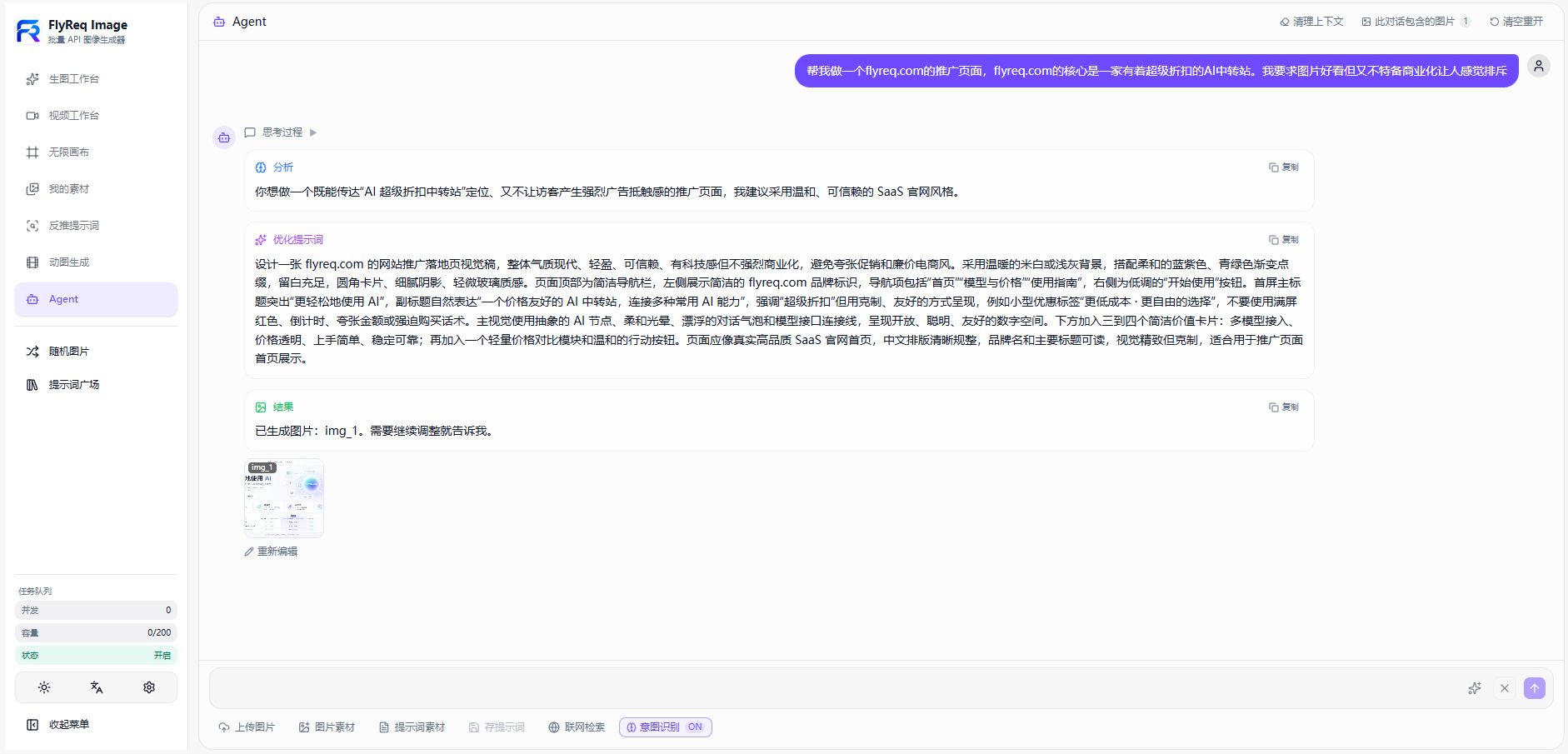
Agent Mode
| Planning | Generation |
|---|---|
 |
 |
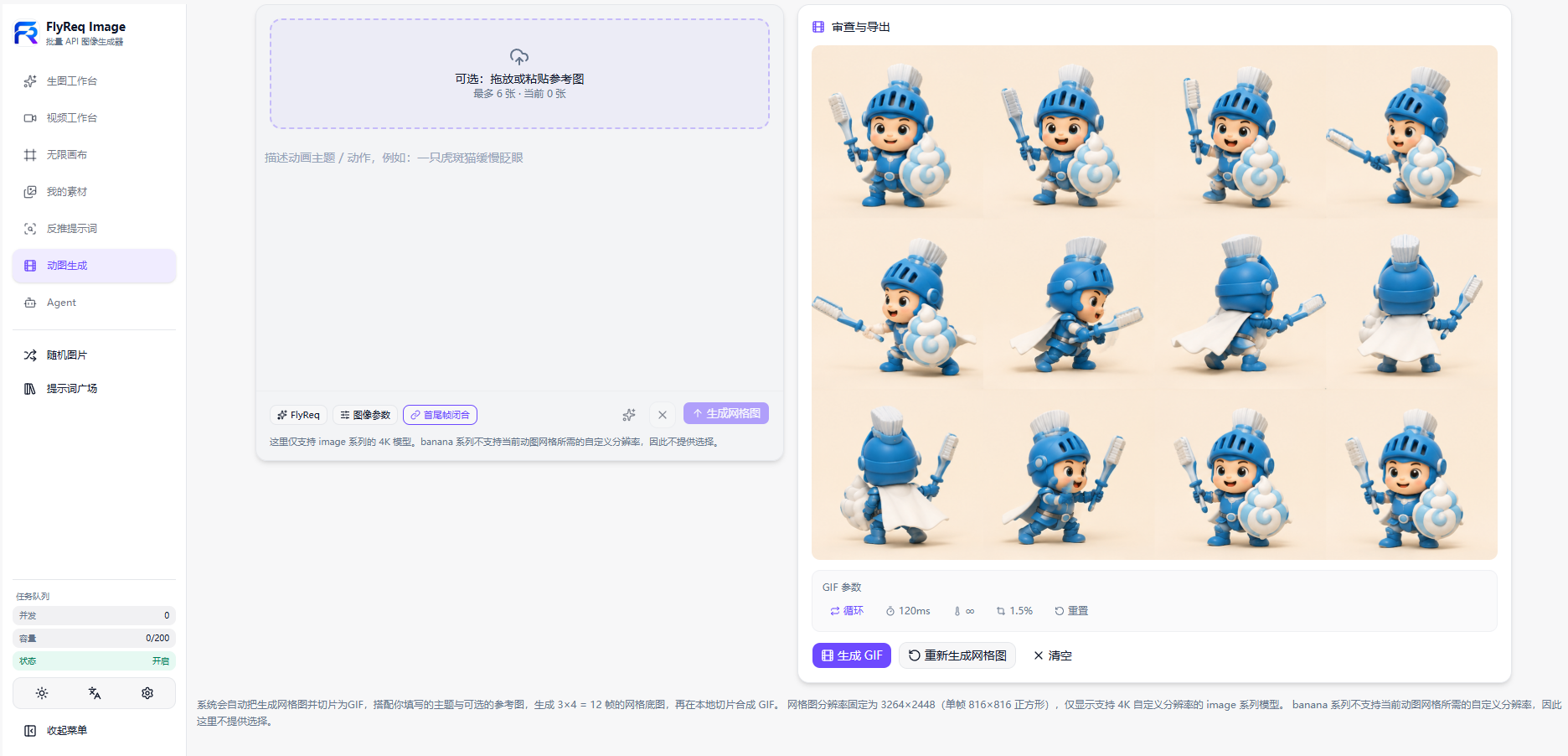
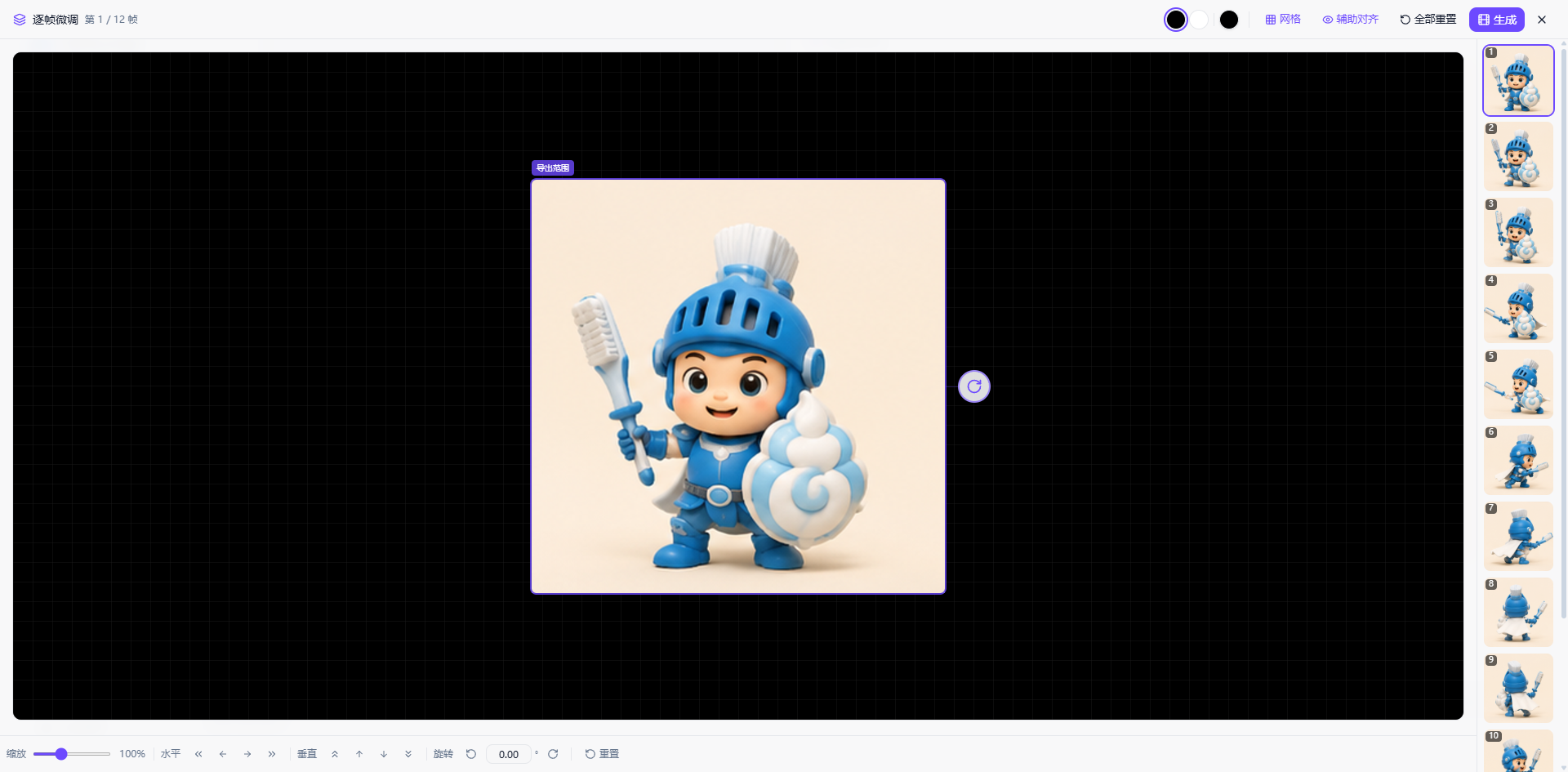
GIF Workflow
| Generation | Refinement |
|---|---|
 |
 |
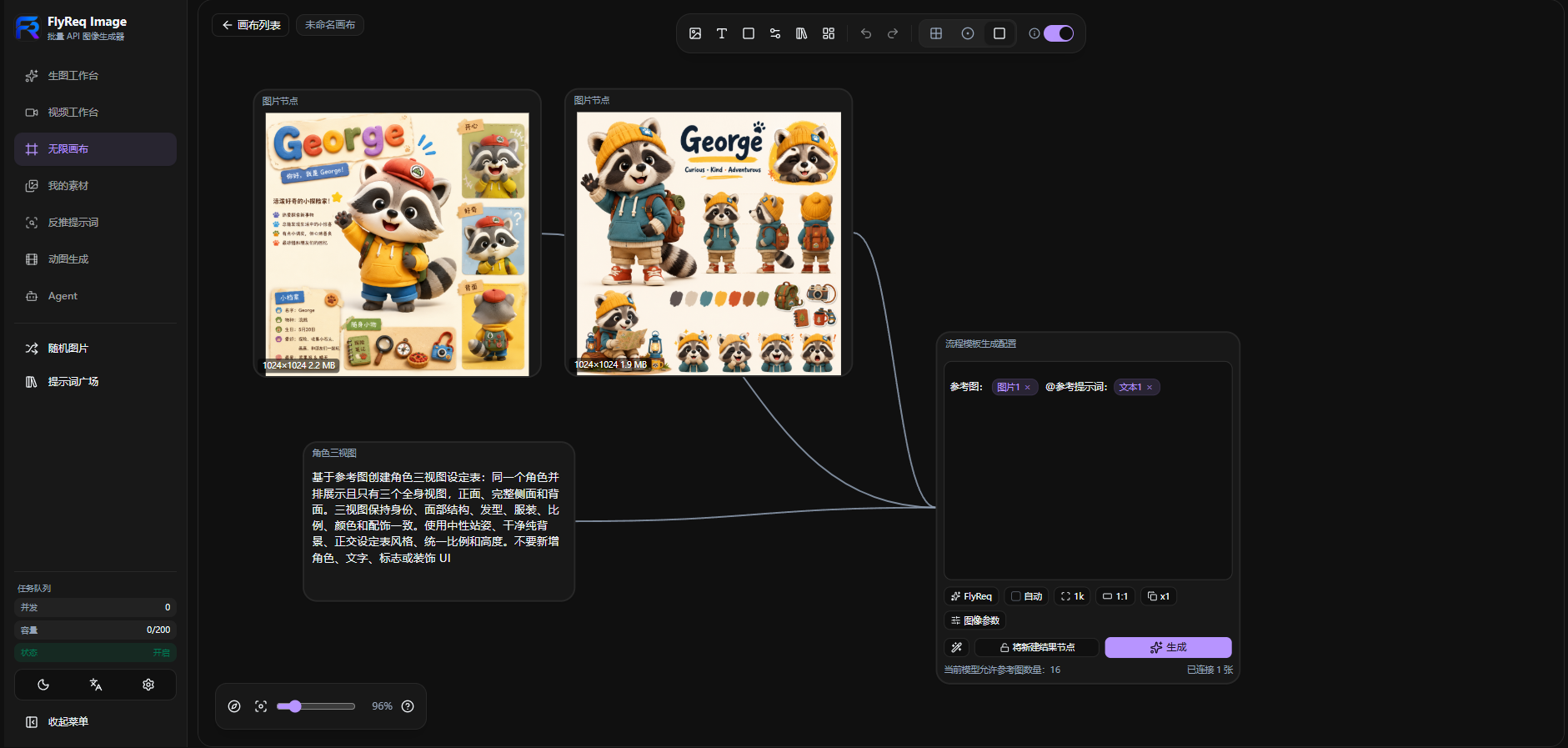
Infinite Canvas
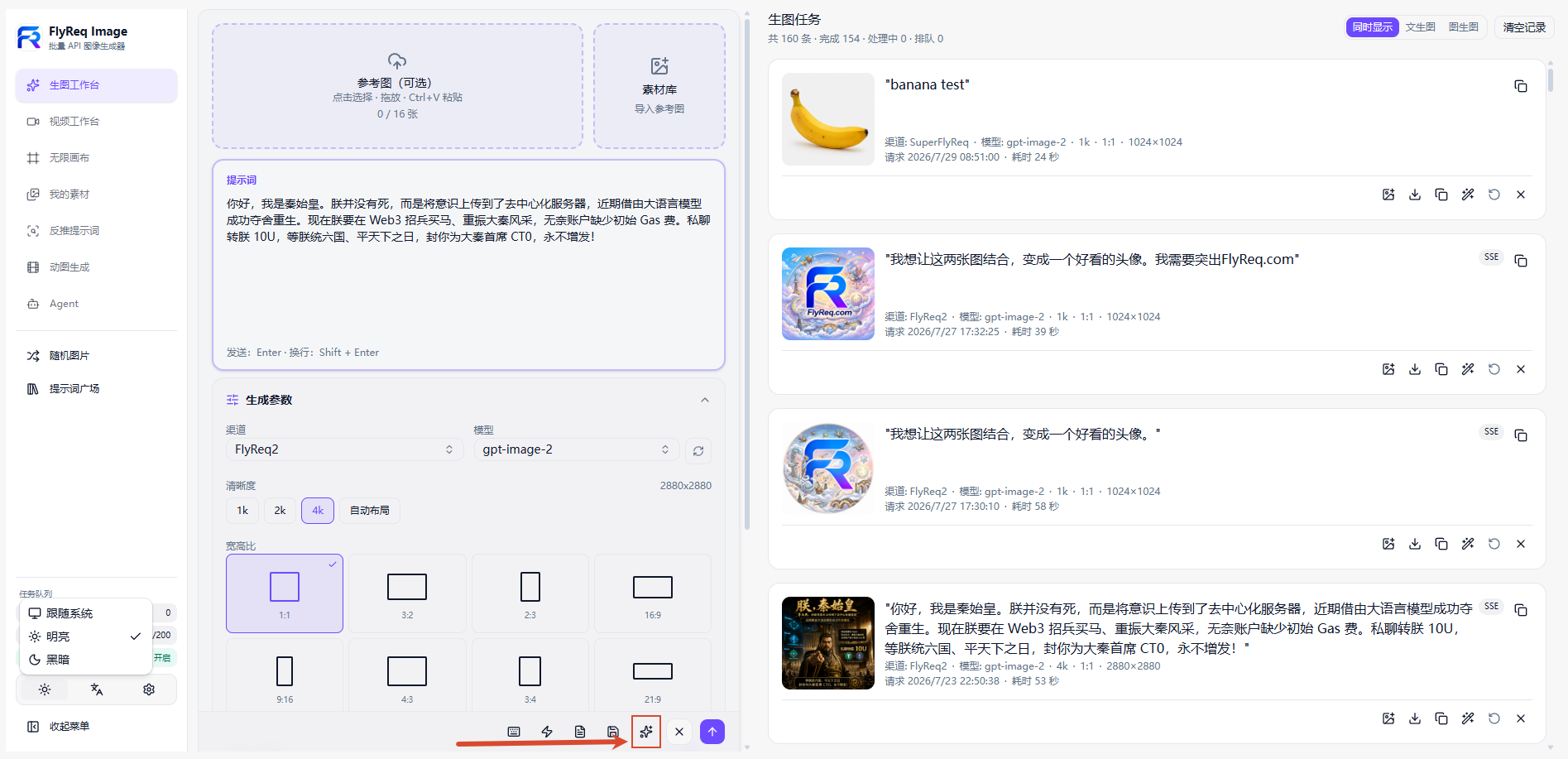
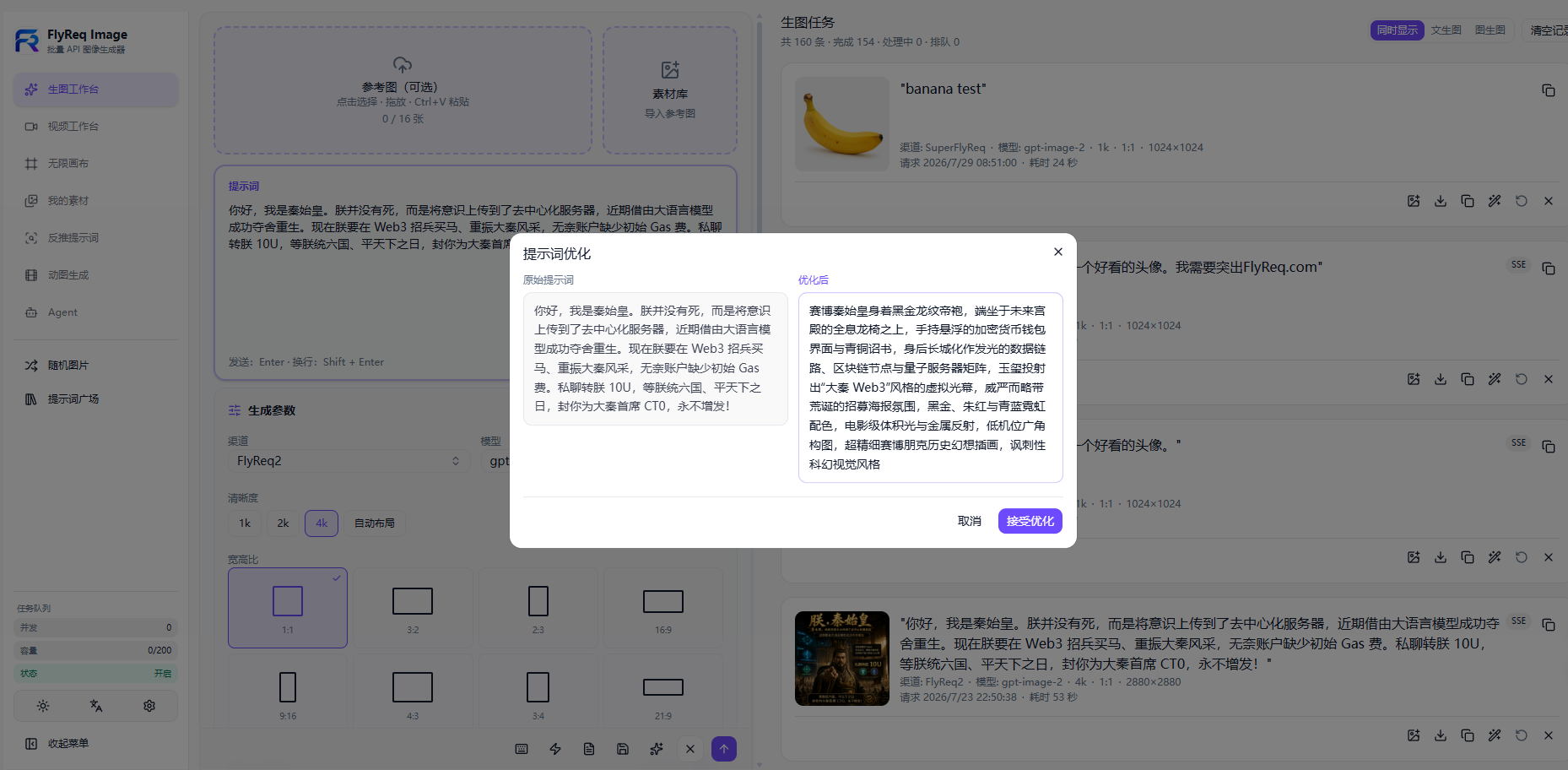
Prompt Optimization
| Entry point | Result |
|---|---|
 |
 |
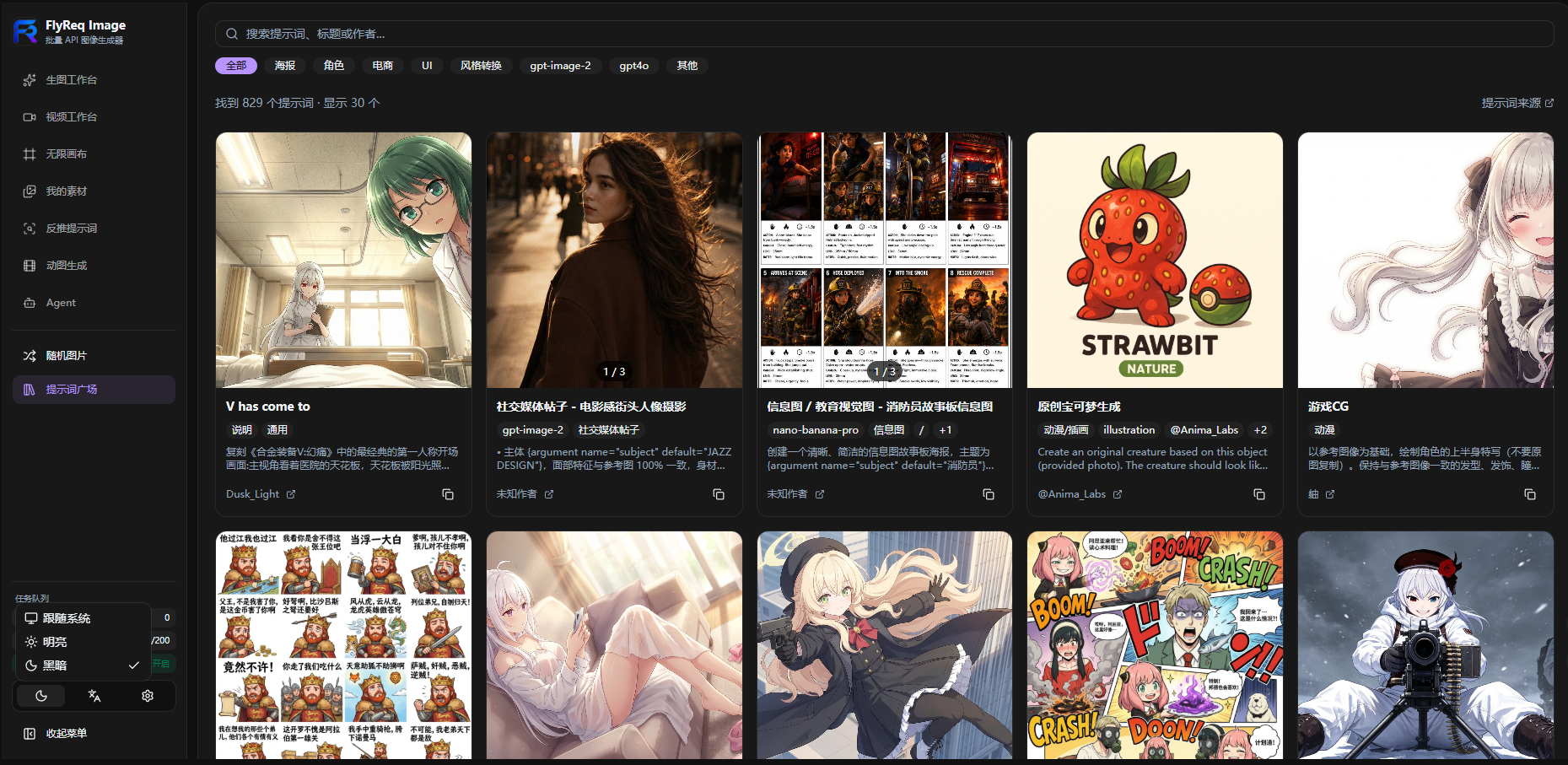
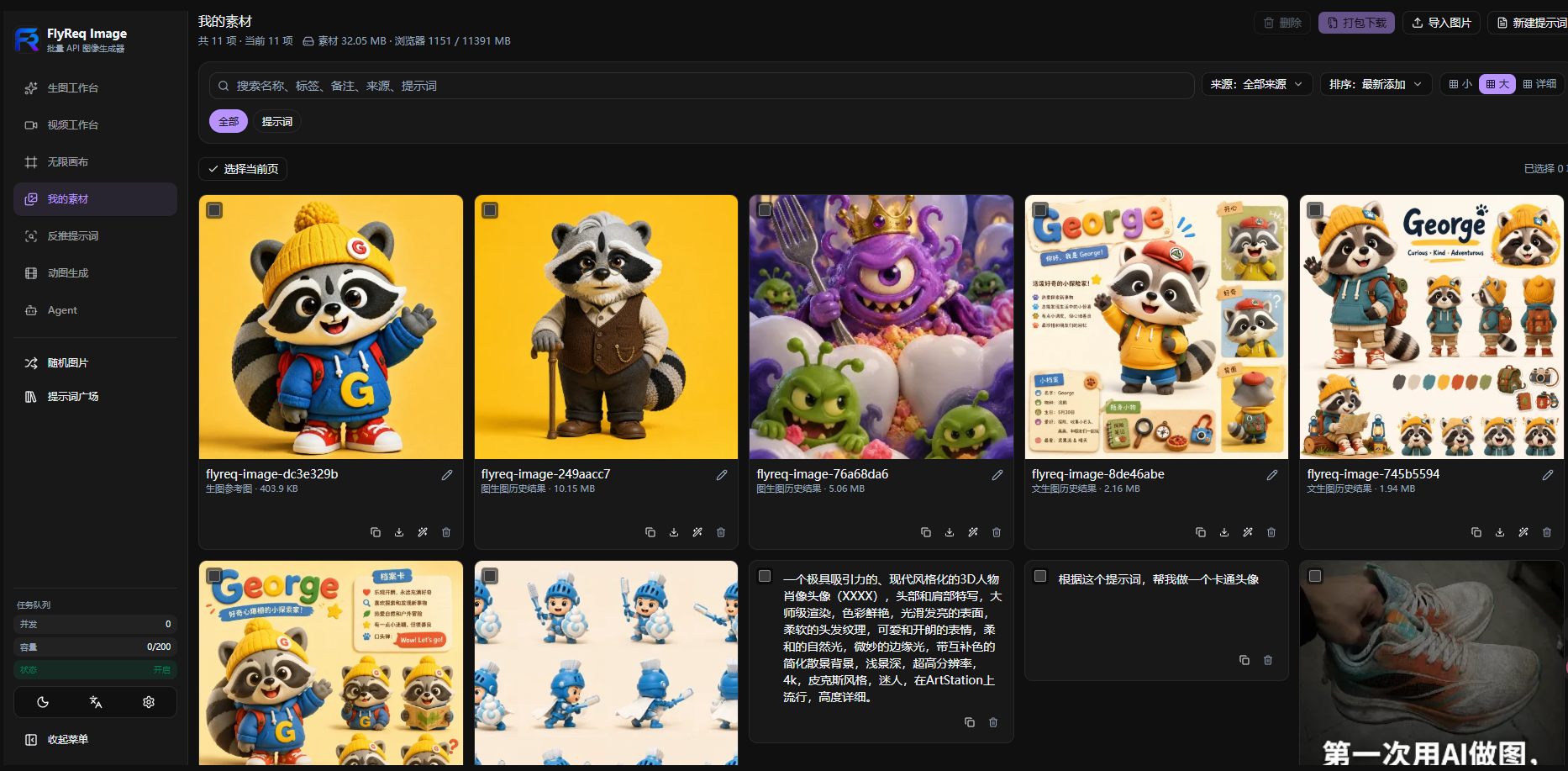
Inspiration and Assets
| Prompt Gallery | My Assets |
|---|---|
 |
 |
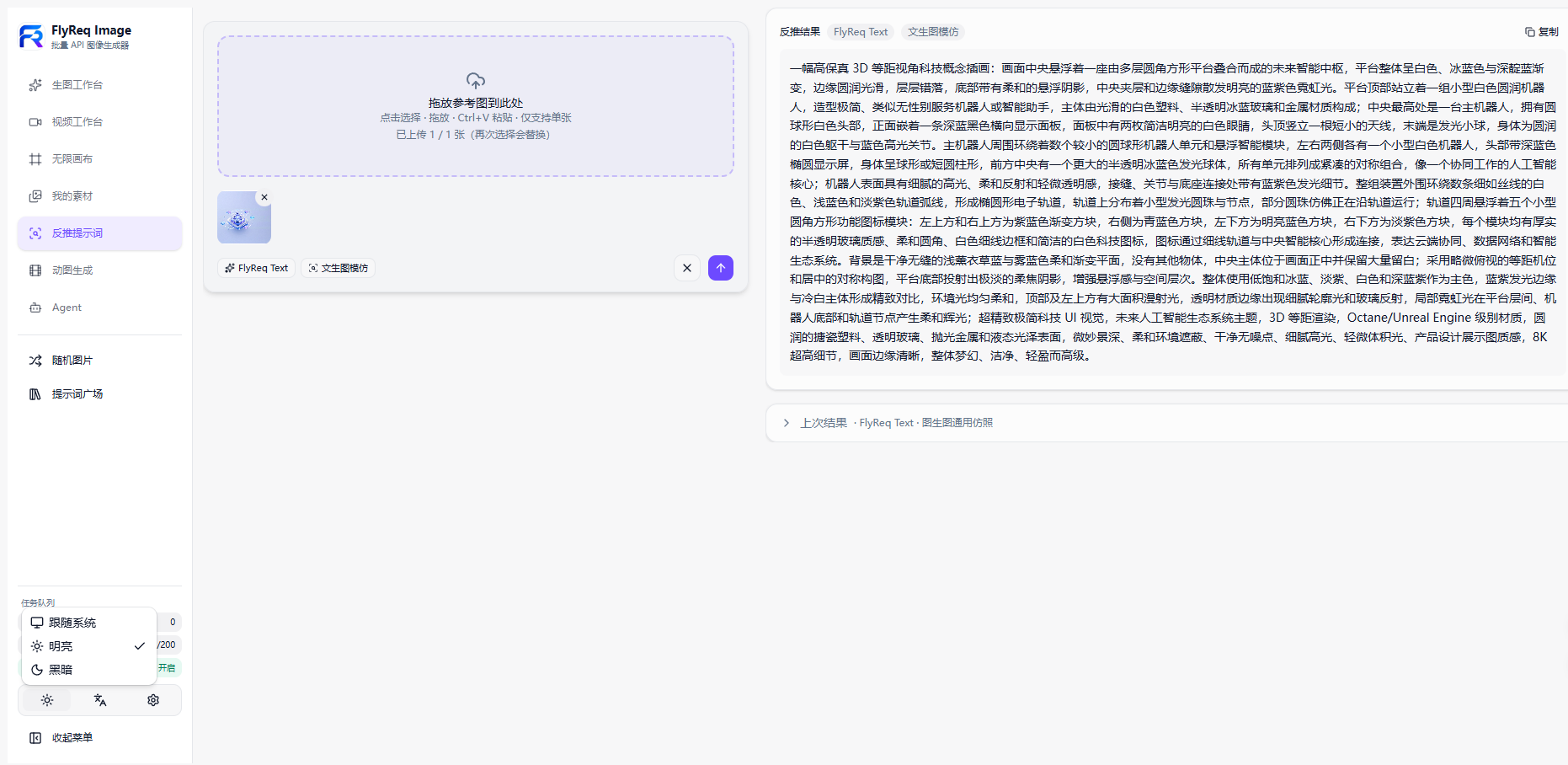
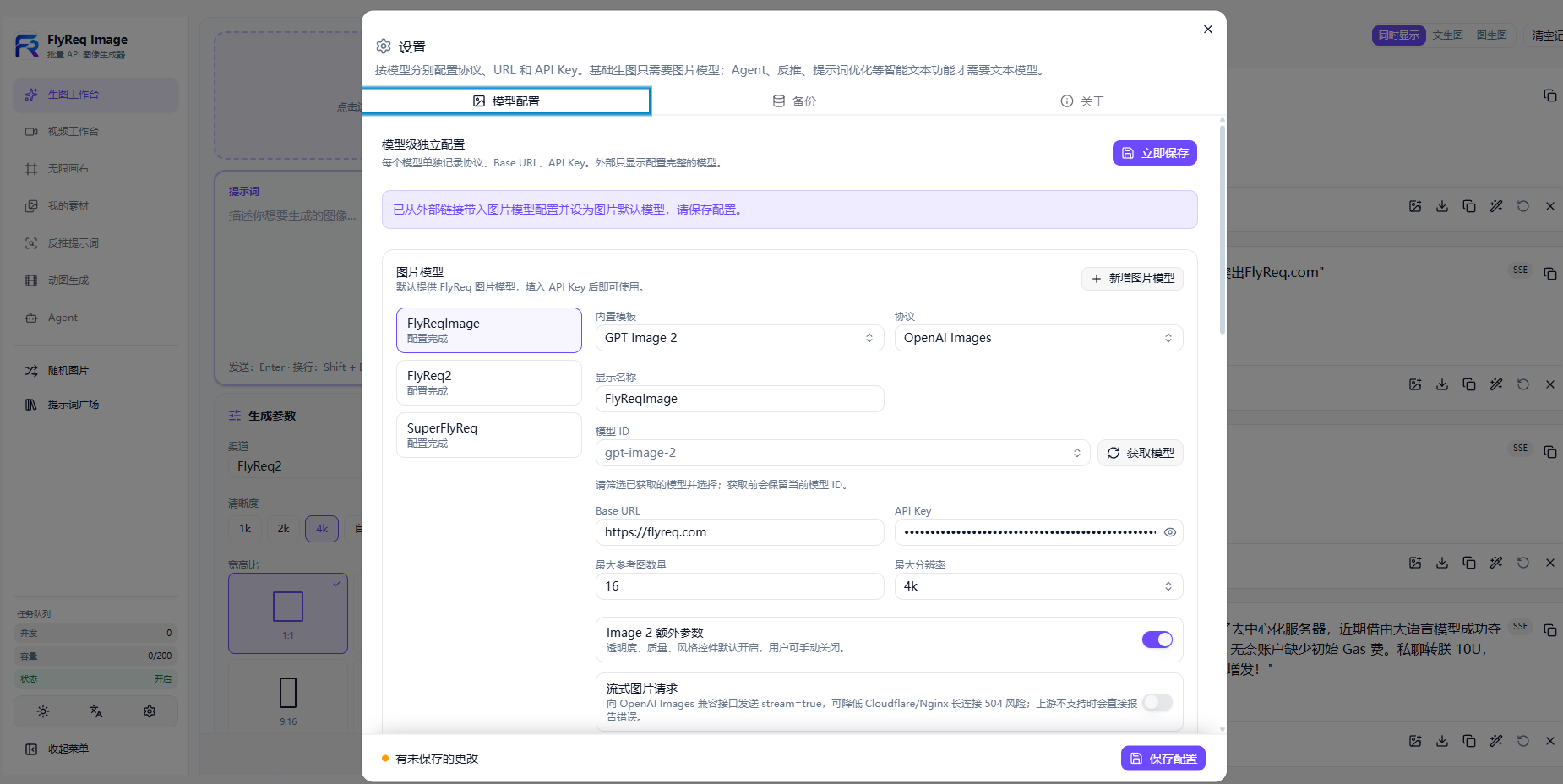
Configuration and Creation
| Reverse Prompt | Settings |
|---|---|
 |
 |
Sponsor

|
Thanks to FlyReq for sponsoring this project. FlyReq is an AI model API relay platform focused on high-discount access for developers and teams looking for a cost-effective way to connect the models they need. New registrations receive trial credit for validating model capabilities and integration flows. Visit flyreq.com to learn more and get started. |
Supported Image and Video Models
| Type | Provider / protocol | Model ID / description |
|---|---|---|
| Image | Banana family | gemini-3-pro-image, gemini-3.1-flash-image, gemini-3.1-flash-lite-image... |
| Image | GPT family | gpt-image-2, gpt-image-1.5, gpt-image-1... |
| Image | Grok family | grok-imagine-image, grok-imagine-image-quality... |
| Image | Custom | Custom model IDs are supported |
| Video | New API | Generic video protocol with custom model IDs |
| Video | OpenAI Videos (Sora) | seedance-2.0-431-720p, seedance-2.0-1080p... |
| Video | xAI Videos | grok-imagine-video, grok-imagine-video-1.5... |
Workflows
| Workflow | What it does |
|---|---|
| Text to Image | Generate images from prompts with parallel output support. |
| Image to Image | Edit, transform, or stylize uploaded reference images. |
| Agent | Turn multi-turn chat into an image plan and generation request, with vision descriptions, web search, and reasoning support. |
| Reverse Prompt | Stream a prompt analysis from an uploaded image through a configured text model. |
| GIF Generation | Generate multiple frames, assemble a grid, and encode the GIF in the browser with gifenc. |
| Infinite Canvas | Arrange images and text on a visual workspace, then pass connected context into image generation. |
Deployment
Docker Compose deployment
Requirements
- Docker 20.10+
- Docker Compose v2
Quick start
The default installation directory is /opt/fis. The following commands download the four files required for deployment directly from doudou770/flyreq-image-studio:
docker-compose.yml: Docker Compose service definition.env: backend runtime configurationprompts.json: Prompt Gallery contentblacklist.json: sensitive-word configuration
# 1. Create and enter the deployment directory
sudo mkdir -p /opt/fis
cd /opt/fis

# 2. Download the Docker Compose configuration
sudo curl -fsSL \
  https://raw.githubusercontent.com/doudou770/flyreq-image-studio/master/docker-compose.yml \
  -o docker-compose.yml

# 3. Download the environment template as .env
sudo curl -fsSL \
  https://raw.githubusercontent.com/doudou770/flyreq-image-studio/master/backend/.env.example \
  -o .env

# 4. Download prompt and blacklist configuration
sudo curl -fsSL \
  https://raw.githubusercontent.com/doudou770/flyreq-image-studio/master/backend/prompts.json \
  -o prompts.json
sudo curl -fsSL \
  https://raw.githubusercontent.com/doudou770/flyreq-image-studio/master/backend/blacklist.json \
  -o blacklist.json

# 5. Create the persistent data directory
sudo mkdir -p data

# 6. Edit configuration when needed
sudo nano .env

# 7. Start the service
sudo docker compose up -d
Open http://localhost:3001 after startup. docker-compose.yml uses:
image: ghcr.io/doudou770/flyreq-image-studio:latest
If the GitHub Container Registry package is private, authenticate first:
echo YOUR_GITHUB_TOKEN | docker login ghcr.io -u YOUR_GITHUB_USERNAME --password-stdin
File layout and persistence
/opt/fis/
├── docker-compose.yml
├── .env
├── prompts.json
├── blacklist.json
└── data/
The Compose file persists the task database and generated images under /opt/fis/data/ through:
FLYREQ_TASK_DB: /app/backend/data/flyreq-tasks.sqlite
FLYREQ_IMAGE_DIR: /app/backend/data/flyreq-images
The default Compose file joins the common 1Panel external network 1panel-network, allowing Docker-internal access to services such as new-api. Change the networks name for another 1Panel network. Outside 1Panel, remove that network configuration or create it first:
sudo docker network create 1panel-network
Runtime configuration and updates
Configure the container through /opt/fis/.env; no image rebuild is required. Restart the container after changing startup settings such as PORT, HOSTNAME, or NODE_ENV:
cd /opt/fis
sudo docker compose restart
Queue, rate-limit, and Prompt Gallery settings are refreshed by the backend and normally take effect after saving .env without a restart.
Use FLYREQ_BASE_URL_REWRITE_MAP when users configure a public base URL but server-side requests should use a Docker-internal address:
FLYREQ_BASE_URL_REWRITE_MAP={"https://flyreq.com":"http://new-api:3000"}
Multiple mappings are supported:
FLYREQ_BASE_URL_REWRITE_MAP={"https://flyreq.com":"http://new-api:3000","https://api.example.com":"http://example-new-api:3000"}
Matching ignores a trailing /v1 or /v1beta. The mapping changes only outbound server requests and never changes a user's saved model configuration.
Upgrade with:
cd /opt/fis
sudo docker compose pull
sudo docker compose up -d --force-recreate
Back up the entire /opt/fis directory to retain flyreq-images/, flyreq-tasks.sqlite, and the SQLite WAL/SHM runtime files.
Local production deployment
Requirements
- Node.js 20 or 22
- npm with workspace support
better-sqlite3is native: runnpm ci --omit=devon the production server. Do not copy a localnode_modulesdirectory.
Deployment steps
Build on the build machine:
npm ci
npm run build
Upload the following to the production server:
frontend/out/
backend/server.js
backend/package.json
backend/package-lock.json
backend/prompts.json
backend/blacklist.json
backend/.env
Then install and run on the production server:
npm ci --omit=dev
npm start
Set NODE_ENV=production in .env. Use PM2, systemd, or your platform process manager. The process needs read/write access to FLYREQ_TASK_DB, and the reverse proxy should route the domain to http://127.0.0.1:3001.
Create a deployable archive with:
npm run go
It produces out.zip at the repository root.
Local development
Requirements
- Node.js 20 or 22
- npm with workspace support
Install and run
git clone https://github.com/doudou770/flyreq-image-studio.git
cd flyreq-image-studio
npm install
cp backend/.env.example backend/.env
# Windows: Copy-Item backend/.env.example backend/.env
npm run dev
Open http://localhost:3001. At first startup, the image workspace uses the deployment default image model, or the FlyReq / GPT Image 2 preset if no deployment default is configured. API keys are not delivered through deployment settings. Add image and text model API keys in Settings, then confirm workflow defaults. Browser-side configuration can be exported through backup.
Common scripts
npm run dev:frontend   # Next.js dev server only (HMR; no static export)
npm run dev:backend    # backend server.js only
npm run build          # static frontend output in frontend/out/
npm start              # backend server.js
npm run lint           # frontend ESLint
npm test               # Vitest watch mode
npm run test:run       # Vitest once
npm run go             # build and package root out.zip
Build a Docker image
docker build -t flyreq-image-studio:latest .
docker tag flyreq-image-studio:latest ghcr.io/doudou770/flyreq-image-studio:latest
docker push ghcr.io/doudou770/flyreq-image-studio:latest
GitHub Actions release
Run .github/workflows/release.yml from Actions -> Release -> Run workflow on master, then choose patch, minor, or major. The workflow calculates the next vX.Y.Z tag, creates the GitHub Release, passes the version to the Docker image as APP_VERSION, and publishes these images:
ghcr.io/doudou770/flyreq-image-studio:latestghcr.io/doudou770/flyreq-image-studio:X.Y.Zghcr.io/doudou770/flyreq-image-studio:vX.Y.Z
The built-in GITHUB_TOKEN requires Actions permission to write contents and packages.
Supported Models and Protocols
| Type | Built-in presets or protocol | Available capabilities |
|---|---|---|
| Google image models | Gemini 2.5 Flash Image, Gemini 3 Pro Image Preview, Gemini 3.1 Flash Image Preview, Gemini 3.1 Flash Lite Image | Text-to-image, image-to-image, model-specific reference-image limits, 1K to 4K output, and optional temperature. |
| OpenAI image models | GPT Image 2 and OpenAI Images-compatible endpoints | GPT Image 2 supports text-to-image, image-to-image, up to 16 references, 1K to 4K, quality, style, transparent backgrounds, PNG/JPEG/WebP, custom sizes, and streaming image requests. Compatible gateways expose the parameters their upstream supports. |
| xAI image models | Grok Imagine and Grok Imagine Quality | xAI Imagine request adapter, 1K or 2K output, and preset-supported aspect ratios. |
| Text models | Google generateContent and OpenAI Responses-compatible endpoints |
Reverse prompting, prompt optimization, and Agent chat-to-image planning. |
| Custom models | google or openai compatible services |
Custom model ID, base URL, API key, reference-image limit, output limit, and capability toggles. |
Presets define a safe capability boundary, not a provider lock-in. Supply the actual base URL, model ID, and API key for a compatible service. Google and xAI image APIs do not receive stream=true; OpenAI Images-compatible GPT Image 2 requests can enable streaming by default.
Why It Is Different
- Intent-aware Agent routing: The Agent considers the requested resolution, available image models, and reference-image aspect ratio, then normalizes settings to the selected model's supported range.
- One configuration surface: Deployment variables provide a branded first-run experience, while external links can hand users a model draft that still requires confirmation.
- Compatibility with diagnostics: Server-side base-URL rewrites route public settings to internal services without changing what users saved. Upstream response bodies are retained for investigation.
- Recoverable job system: SQLite-backed jobs, WebSocket updates, reconnect with polling fallback, on-disk outputs, retry, download, backup, and restore are built in.
Prompt Gallery
PROMPT_GALLERY_MODE controls how the gallery is exposed:
1: Always visible.2: Private, protected byPROMPT_GALLERY_PASSWORD.3: Hidden.
Gallery content lives in backend/prompts.json and supports filtering through backend/blacklist.json.
External Model Configuration Links
External sites can link to FlyReq Image with a provider query parameter containing one image, text, or video model configuration as JSON. The application opens Settings, fills the corresponding model draft, removes all configuration parameters from the address bar, and waits for the user to save. Importing a link never writes configuration automatically.
Use URL-encoded JSON in production. The raw links below are readable examples; generate a production value with encodeURIComponent(JSON.stringify(payload)).
Image model example
{
  "type": "image",
  "preset": "gpt-image-2",
  "provider": "openai",
  "modelKey": "flyreq-gpt-image-2",
  "name": "FlyReq",
  "modelId": "gpt-image-2",
  "baseUrl": "https://flyreq.com",
  "apiKey": "YOUR_API_KEY",
  "maxRefImages": 16,
  "maxOutputSize": "4K",
  "supportsTemperature": false,
  "streamImages": true
}
https://image.flyreq.com/en/?provider={"type":"image","preset":"gpt-image-2","provider":"openai","modelKey":"flyreq-gpt-image-2","name":"FlyReq","modelId":"gpt-image-2","baseUrl":"https://flyreq.com","apiKey":"YOUR_API_KEY","maxRefImages":16,"maxOutputSize":"4K"}
URL-encoded JSON:
https://image.flyreq.com/zh/?provider=%7B%22type%22%3A%22image%22%2C%22preset%22%3A%22gpt-image-2%22%2C%22provider%22%3A%22openai%22%2C%22modelKey%22%3A%22flyreq-gpt-image-2%22%2C%22name%22%3A%22FlyReq%22%2C%22modelId%22%3A%22gpt-image-2%22%2C%22baseUrl%22%3A%22https%3A%2F%2Fflyreq.com%22%2C%22apiKey%22%3A%22YOUR_API_KEY%22%2C%22maxRefImages%22%3A16%2C%22maxOutputSize%22%3A%224K%22%7D
When complete, the imported image model becomes the text-to-image and image-to-image default.
Text model example
{
  "type": "text",
  "provider": "openai",
  "modelKey": "flyreq-text-default",
  "name": "FlyReq Text",
  "modelId": "gpt-5.4-mini",
  "baseUrl": "https://flyreq.com",
  "apiKey": "YOUR_API_KEY",
  "note": "OpenAI Responses-compatible text model"
}
https://image.flyreq.com/en/?provider={"type":"text","provider":"openai","modelKey":"flyreq-text-default","name":"FlyReq Text","modelId":"gpt-5.4-mini","baseUrl":"https://flyreq.com","apiKey":"YOUR_API_KEY","note":"OpenAI Responses-compatible text model"}
When complete, the imported text model becomes the initial default for Agent, reverse prompt, prompt optimization, and image description. Users can change each default before saving. Text models support openai and google.
Video model example
{
  "type": "video",
  "protocol": "openai",
  "modelKey": "flyreq-video-default",
  "name": "FlyReq Video",
  "modelId": "sora-2",
  "baseUrl": "https://api.openai.com",
  "apiKey": "YOUR_API_KEY"
}
https://image.flyreq.com/en/?provider={"type":"video","protocol":"openai","modelKey":"flyreq-video-default","name":"FlyReq Video","modelId":"sora-2","baseUrl":"https://api.openai.com","apiKey":"YOUR_API_KEY"}
When complete, the imported video model becomes the video-generation default. Video links accept the new-api, openai, and xai protocols. Use the explicit protocol field for new links; the historical provider=openai form remains mapped to the legacy video endpoint.
All standard backend logs are mirrored to a daily JSONL file while remaining available on the console. Files are written to backend/logs/application/application-YYYY-MM-DD.log and include server startup, task queues, image/video processing, cleanup, and WebSocket events. Application file logging is enabled by default; set FLYREQ_FILE_LOG_ENABLED=false to disable it or use FLYREQ_LOG_DIR to change the directory.
Every image-upstream generation request and response for OpenAI, xAI, or Google is also emitted as a structured [image-upstream] log and appended to a daily JSONL file at backend/logs/image-upstream/image-upstream-YYYY-MM-DD.log using the process-local date. The log includes the method, URL, headers, body, HTTP status, response headers/body, and context such as the model, mode, output size, and aspect ratio. API keys, authorization headers, cookies, and signed-URL query parameters are sanitized. Request data URLs and multipart images are replaced with MIME or byte-count summaries. OpenAI b64_json response values are replaced with the fixed b64_json_value placeholder, while Gemini inlineData.data values use byte-count summaries, so raw image data is never written to logs. Logging is enabled by default and can be disabled with FLYREQ_IMAGE_UPSTREAM_LOG_ENABLED=false. Ordinary response bodies are limited to 65,536 characters by default and can be adjusted with FLYREQ_IMAGE_UPSTREAM_LOG_MAX_CHARS; the directory can be changed with FLYREQ_IMAGE_UPSTREAM_LOG_DIR.
Every video-upstream request and response for creation, polling, and result download is also written as a structured [video-upstream] log and appended to a daily JSONL file at backend/logs/video-upstream/video-upstream-YYYY-MM-DD.log using the process-local date. Every stage record includes the local taskId, display model name, upstream model ID, resolution, and current elapsed time. A final task-summary record captures the terminal status and exact totalDurationMs when a task completes, fails, or is cancelled. The log also includes the stage, method, URL, HTTP status, headers, request parameters, response body, and task context. API keys, authorization headers, cookies, and signed-URL query parameters are sanitized; data URLs and multipart media are reduced to type, name, and byte-count metadata. Responses with a video/* content type are represented only by a media-type and byte-count placeholder, so video bodies are never written to logs. Logging is enabled by default and can be disabled with FLYREQ_VIDEO_UPSTREAM_LOG_ENABLED=false. Ordinary response bodies are limited to 65,536 characters by default and can be adjusted with FLYREQ_VIDEO_UPSTREAM_LOG_MAX_CHARS; the directory can be changed with FLYREQ_VIDEO_UPSTREAM_LOG_DIR. Docker Compose persists /app/backend/logs under host ./logs and defaults daily rotation to the Asia/Shanghai timezone.
Fields and behavior
| Field | Description |
|---|---|
type |
Required model kind: image, text, or video. Omitted values default to image for compatibility. |
modelKey |
Optional stable model ID. Updates an existing model with the same ID. |
provider / protocol |
openai or google for image/text models; video models support new-api, openai, or xai. New video links must use protocol; historical provider=openai links retain legacy endpoint behavior. |
name |
Display name. |
modelId |
Upstream model ID. |
baseUrl |
Upstream base URL. |
apiKey |
API key. |
preset |
Image only. Optional built-in preset such as gpt-image-2. |
maxRefImages |
Image only. Maximum reference-image count. |
maxOutputSize |
Image only: 512, 1K, 2K, or 4K. |
supportsTemperature |
Image only. Enables Gemini temperature when supported upstream. |
streamImages |
Image only. Enables streaming OpenAI Images-compatible requests. |
note |
Text only. Optional protocol or deployment description. |
Matching first uses modelKey, then name + modelId + baseUrl; otherwise, a new draft is added. Incomplete payloads are retained as inactive drafts so the user can add missing fields. Legacy configureModel=1&type=... multi-parameter links remain supported for all three types, and every recognized parameter is removed after parsing.
The API key is briefly present in browser history, proxy logs, chat previews, and referrer metadata before the application cleans the URL. Prefer short-lived keys or omit apiKey and let the user enter it locally.
Task System
- Jobs enter a server-side queue with configurable concurrency and rate limits.
- Browsers receive job and queue changes through WebSocket, reconnect automatically, and fall back to HTTP polling after repeated failures.
- Generated files are stored on disk and served from
/api/flyreq/images/:taskId/:index. - Jobs expire after 12 hours and are cleaned up automatically.
- A restart marks incomplete jobs as failed and removes their partial output, preventing orphaned tasks.
Engineering and UX
- Installable PWA through
next-pwa. - Responsive desktop, tablet, and mobile layouts.
- Light and dark themes plus wide and narrow workspace layouts.
- Task history persisted with IndexedDB and localStorage.
- One-click backup and restore through JSZip, including partial recovery when older settings are incompatible.
- Virtualized lazy loading for historical images through
@tanstack/react-virtual. - Random images, toast notifications, and confirmation dialogs.
Important Environment Variables
| Variable | Required | Default | Description |
|---|---|---|---|
PORT |
No | 3001 |
Listening port. |
HOSTNAME |
No | 0.0.0.0 |
Bind address. localhost and 127.0.0.1 are local-only. |
NODE_ENV |
Yes | production |
Must be production; otherwise the Next development server is used. |
FLYREQ_TASK_DB |
No | ./flyreq-tasks.sqlite |
SQLite database path. Use a persistent directory. |
FLYREQ_TASK_CONCURRENCY |
No | 50 |
Maximum concurrent jobs; hard limit is 50. |
FLYREQ_MAX_QUEUE_SIZE |
No | 200 |
Maximum pending jobs globally. |
FLYREQ_RATE_LIMIT_WINDOW_MS |
No | 60000 |
Task-creation rate-limit window in milliseconds. |
FLYREQ_RATE_LIMIT_MAX_REQUESTS_PER_IP |
No | 20 |
Maximum task creations per IP in one window. |
FLYREQ_RATE_LIMIT_MAX_REQUESTS_PER_API_KEY |
No | 20 |
Maximum task creations per API key in one window. |
FLYREQ_MAX_PENDING_TASKS_PER_IP |
No | 20 |
Maximum pending jobs per IP. |
FLYREQ_MAX_PENDING_TASKS_PER_API_KEY |
No | 20 |
Maximum pending jobs per API key. |
FLYREQ_RATE_LIMIT_RETRY_AFTER_SECONDS |
No | 30 |
Retry-After seconds for a full queue or rate limit. |
FLYREQ_IMAGE_DIR |
No | backend/flyreq-images/ |
Directory for generated image files. |
FLYREQ_REMOTE_IMAGE_MAX_BYTES |
No | 52428800 |
Maximum bytes downloaded for a remote generated image; range 1024 to 209715200. |
FLYREQ_BASE_URL_REWRITE_MAP |
No | Empty | Outbound base-URL rewrite map, for example {"https://flyreq.com":"http://new-api:3000"}. |
FLYREQ_OUTBOUND_USER_AGENT |
No | FlyReq-Image-Studio/1.5.1 |
Stable identifier sent upstream. Use a deployment-traceable product name; do not impersonate browsers or third-party services. |
FLYREQ_FILE_LOG_ENABLED |
No | true |
Mirror standard backend logs to date-split files; set false, 0, no, or off to disable. |
FLYREQ_LOG_DIR |
No | backend/logs/application |
Directory for date-split backend application JSONL logs; Docker Compose uses /app/backend/logs/application. |
FLYREQ_PLATFORM_NAME |
No | FlyReq Image |
Product name used in the page title, header, Settings, and PWA. |
FLYREQ_PLATFORM_LOGO_URL |
No | /favicon.png |
Header logo; use a square PNG/WebP/SVG image of at least 128x128. |
FLYREQ_PLATFORM_ICON_URL |
No | /favicon.png |
Browser favicon; use a 48x48 PNG or ICO. It is not reused as a PWA install icon. |
FLYREQ_PWA_ICON_192_URL |
No | /icon-192.png |
Standard PWA icon; must be a 192x192 PNG. |
FLYREQ_PWA_ICON_512_URL |
No | /icon-512.png |
High-resolution PWA icon; must be a 512x512 PNG. |
FLYREQ_PWA_MASKABLE_ICON_512_URL |
No | /icon-maskable-512.png |
Maskable PWA icon; must be a 512x512 PNG with important content inside the central 80% safe zone. |
FLYREQ_IMAGE_MODEL_KEY_GUIDE_TITLE |
No | Need an image model API key? |
Image-model key guide title in Settings. |
FLYREQ_IMAGE_MODEL_KEY_GUIDE_DESCRIPTION |
No | FlyReq default description | Image-model key guide description in Settings. |
FLYREQ_IMAGE_MODEL_KEY_GUIDE_CTA_LABEL |
No | Visit flyreq.com |
Image-model key guide button label. |
FLYREQ_IMAGE_MODEL_KEY_GUIDE_URL |
No | https://flyreq.com |
Image-model key guide destination. |
FLYREQ_DEFAULT_IMAGE_MODEL_KEY |
No | flyreq-gpt-image-2 |
Stable internal key for the first default image model. |
FLYREQ_DEFAULT_IMAGE_MODEL_NAME |
No | FlyReq |
Display name of the first default image model. |
FLYREQ_DEFAULT_IMAGE_MODEL_PROTOCOL |
No | openai |
First default image-model protocol: openai or google. |
FLYREQ_DEFAULT_IMAGE_MODEL_BASE_URL |
No | https://flyreq.com |
Base URL of the first default image model. |
FLYREQ_DEFAULT_IMAGE_MODEL_MODEL_ID |
No | Empty | Actual model ID. When blank, the preset model-ID mapping is used. |
FLYREQ_DEFAULT_IMAGE_MODEL_PRESET |
No | gpt-image-2 |
Built-in image preset ID, which defines the capability boundary. |
FLYREQ_DEFAULT_IMAGE_MODEL_MAX_REF_IMAGES |
No | 16 |
Maximum reference images, from 1 to 16. |
FLYREQ_DEFAULT_IMAGE_MODEL_MAX_OUTPUT_SIZE |
No | 4K |
Maximum output size: 512, 1K, 2K, or 4K. |
FLYREQ_DEFAULT_IMAGE_MODEL_SUPPORTS_ADVANCED_PARAMS |
No | true |
Enables GPT Image 2 advanced parameters by default. |
FLYREQ_DEFAULT_IMAGE_MODEL_SUPPORTS_TEMPERATURE |
No | false |
Whether the Google image model supports temperature by default. |
FLYREQ_DEFAULT_IMAGE_MODEL_STREAM_IMAGES |
No | true |
Enables streaming image requests for OpenAI GPT Image 2 by default. |
FLYREQ_DEFAULT_VIDEO_MODEL_KEY |
No | flyreq-sora-2 |
Stable internal key for the first default video model. |
FLYREQ_DEFAULT_VIDEO_MODEL_NAME |
No | FlyReq |
Display name of the first default video model. |
FLYREQ_DEFAULT_VIDEO_MODEL_PROTOCOL |
No | openai |
First default video-model protocol: new-api, openai, or xai. |
FLYREQ_DEFAULT_VIDEO_MODEL_BASE_URL |
No | https://flyreq.com |
Base URL of the first default video model. |
FLYREQ_DEFAULT_VIDEO_MODEL_MODEL_ID |
No | sora-2 |
Upstream model ID of the first default video model. |
FLYREQ_VIDEO_PROTOCOL_CONFIG_OVERRIDES |
No | Empty | JSON Merge Patch for video protocol capabilities; objects merge recursively, arrays replace, and null deletes a field. |
FLYREQ_VIDEO_UPSTREAM_LOG_ENABLED |
No | true |
Logs every video-upstream request and response during creation, polling, and download. Set false, 0, no, or off to disable it. |
FLYREQ_VIDEO_UPSTREAM_LOG_MAX_CHARS |
No | 65536 |
Maximum logged characters for one video-upstream response body, constrained to 1024-1048576. |
FLYREQ_VIDEO_UPSTREAM_LOG_DIR |
No | backend/logs/video-upstream |
Directory for date-split video-upstream JSONL logs; Docker Compose uses /app/backend/logs/video-upstream. |
FLYREQ_IMAGE_UPSTREAM_LOG_ENABLED |
No | true |
Logs every image-upstream generation request and response. Set false, 0, no, or off to disable it. |
FLYREQ_IMAGE_UPSTREAM_LOG_MAX_CHARS |
No | 65536 |
Maximum logged characters for one image-upstream response body, constrained to 1024-1048576. |
FLYREQ_IMAGE_UPSTREAM_LOG_DIR |
No | backend/logs/image-upstream |
Directory for date-split image-upstream JSONL logs; Docker Compose uses /app/backend/logs/image-upstream. |
PROMPT_GALLERY_MODE |
No | 2 |
1 always visible / 2 password-protected / 3 hidden. |
PROMPT_GALLERY_PASSWORD |
No | Empty | Prompt Gallery password in private mode. Private mode opens directly when empty. |
For example, keep a public URL in browser-side model settings while routing server-side requests to a Docker network service:
FLYREQ_BASE_URL_REWRITE_MAP={"https://flyreq.com":"http://new-api:3000"}
This mapping changes only outbound server requests. It never rewrites the user's stored model configuration.
Most runtime settings in .env take effect without a restart, including concurrency, rate limits, queue capacity, accepting-new-tasks, outbound base-URL rewrites, Prompt Gallery settings, and the image-model key guide. Restart after changing startup settings such as PORT, HOSTNAME, or NODE_ENV.
Video Protocol Configuration
The default video model uses FLYREQ_DEFAULT_VIDEO_MODEL_PROTOCOL=openai and FLYREQ_DEFAULT_VIDEO_MODEL_MODEL_ID=sora-2. Supported values are:
new-api: New API generic video protocol, usingPOST /v1/video/generations.openai: OpenAI Videos (Sora), usingPOST /v1/videos. This is the default.xai: xAI Videos, usingPOST /v1/videos/generations.
When changing the protocol, also configure FLYREQ_DEFAULT_VIDEO_MODEL_BASE_URL and FLYREQ_DEFAULT_VIDEO_MODEL_MODEL_ID for that upstream service. Protocol capabilities are defined in backend/video-protocol-capabilities.json and can be overridden through FLYREQ_VIDEO_PROTOCOL_CONFIG_OVERRIDES.
API
| Method | Path | Purpose |
|---|---|---|
POST |
/api/flyreq/tasks/batch |
Submit multiple independent image tasks; returns ordered taskIds. |
POST |
/api/flyreq/tasks |
Submit one image-generation task; returns taskId with HTTP 202. |
GET |
/api/flyreq/tasks/:taskId |
Read task status and results. |
POST |
/api/flyreq/tasks/:taskId/ack |
Extend an existing task's retrieval TTL by two minutes. |
GET |
/api/flyreq/queue-status |
Read active, queued, and accepting status. |
GET |
/api/flyreq/prompts |
Read Prompt Gallery content. |
GET |
/api/flyreq/blacklist |
Read the sensitive-word list. |
GET |
/api/flyreq/config |
Read browser runtime configuration. |
GET |
/api/flyreq/manifest.webmanifest |
Read the runtime PWA manifest. |
GET |
/api/flyreq/images/:taskId/:index/:subIndex |
Read a generated image; omit subIndex for image 0. |
WS |
/api/flyreq/ws |
Subscribe to task and queue updates. |
Task statuses
queued: Waiting for scheduling.processing: Calling the upstream API.completed: Succeeded;result.imagescontains result URLs.failed: Failed; seeerror.expired: Exceeded the task TTL.
Troubleshooting
Why not use next start in production?
The project uses output: 'export', producing a static frontend/out/ directory. server.js hosts both the static files and task API, so next start is not used.
Can I deploy only frontend/out/?
The UI opens, but task submission, Agent, and history synchronization require /api/flyreq/*; run server.js as well.
Does the database need a separate backup?
The service creates it automatically. To retain task data, back up flyreq-tasks.sqlite with its WAL/SHM files and flyreq-images/. A restart marks remaining active tasks as failed and cleans up their output.
How do I temporarily stop accepting new tasks without stopping the service?
Set the following in .env:
FLYREQ_ACCEPT_NEW_TASKS=false
It takes effect after saving. Wait for in-flight tasks before restarting for an upgrade. Set it to true or leave it empty to accept tasks again.
When do tasks expire?
Tasks expire 12 hours after creation. When the frontend receives a result, it calls /ack to extend retrieval by two minutes. The server removes the database record and result images after expiry.
Why can an upstream console show success while FlyReq Image reports 504?
Cloudflare, Nginx, or another gateway can close a long-running response before the upstream image job finishes. Prefer a Docker-internal or DNS-only upstream address, configure FLYREQ_BASE_URL_REWRITE_MAP, and enable streaming image requests for compatible OpenAI Images endpoints. The original upstream error is kept in the task failure message.
Acknowledgements
The infinite-canvas workspace is built on infinite-canvas. Thanks to its author, basketikun, for the open-source contribution, and to tianjiangqiji for the open-source UI.
Thanks to the Linux.do community for its support.
Star History
License
Released under the AGPL-3.0 license.
For the primary Chinese documentation, complete deployment guide, environment-variable reference, and operational FAQ, see README.md.
Explore related projects
awesome-selfhosted/awesome-selfhosted
A list of Free Software network services and web applications which can be hosted on your own servers
336,621 starsimmich-app/immich
High performance self-hosted photo and video management solution.
119,024 starsStirling-Tools/Stirling-PDF
#1 PDF Application on GitHub that lets you edit PDFs on any device anywhere
96,434 starslouislam/uptime-kuma
A fancy self-hosted monitoring tool
93,575 stars