
dososo/HarmonyOS-Design
dososo/HarmonyOS-Design has 41 GitHub stars and 2 forks. GitHot measured 0 stars in 24 hours. Last checked 2026-11-09 13:48 UTC. Last push 2026-10-31.
面向 AI Agent 的 HarmonyOS / ArkUI 设计与动效 Skill、规则库与评测基线 · Design & motion Skills, rule library and evaluation baseline for HarmonyOS / OpenHarmony / ArkUI
Measured star growth
- in 24h
- 0
- in 7 days
- Update delayed
- in 15 days
- Update delayed
- in 1 month
- Update delayed
Net star changes over overlapping periods, not daily totals. Missing measurements are left blank. Stars measure attention, not software quality.
README.en.md
OriginalHarmonyOS-Design
An independent, unofficial set of design and motion Skills, a rule library, and an evaluation baseline for AI coding agents, HarmonyOS designers, and ArkUI developers. It turns the public design principles of HarmonyOS / OpenHarmony and the capabilities of ArkUI into product judgment that is triggerable, executable, verifiable, and traceable.





Core proposition:
Consistent but not identical; continuous but never blocking; feedback is immediate yet state stays truthful. Foundational principles endure while platform expression is versioned. System capabilities come first, and evidence is traceable.
Quick Start
Copy the Skill directories you need into the skills directory of any client that supports Agent Skills:
git clone https://github.com/dososo/HarmonyOS-Design.git
cp -r harmonyos-design/skills/harmonyos-design            <your-agent-skills-directory>/
cp -r harmonyos-design/skills/review-harmonyos-design      <your-agent-skills-directory>/
cp -r harmonyos-design/skills/harmonyos-motion-vocabulary  <your-agent-skills-directory>/
Single-sentence triggers (the Skill detects and loads them automatically):
Review the design, motion, and accessibility of this ArkTS page for me
Build a HarmonyOS tablet productivity app from scratch, starting with a design baseline and navigation plan
This ArkUI card slams to a stop when I release the drag; help me analyze the motion
Live Demo
The repository includes a runnable ArkUI sample project, examples/pilot-app/, that turns the correct implementations the Skills advocate into four scenarios, all verified running on the HarmonyOS emulator (API 21):
- Async state truthfulness — Tap → button disabled with "Saving…" → "Saved" only after the real result is confirmed; the success state never appears early.
- Gesture velocity handoff — The drag tracks the finger; on release,
springMotioninherits the velocity and settles. - Tablet breakpoint adaptation —
GridRowchanges its column count with window width (2 columns on phones / 4-6 on tablets). - Accessible icon button —
Buttoncarries the icon plus anaccessibilityTextaccessible name.
Deploying and running in DevEco Studio
The two screenshots below show pilot-app deployed and running on the DevEco Studio emulator (Mate 80 Pro Max image · HarmonyOS 6.0.1 / API 21):
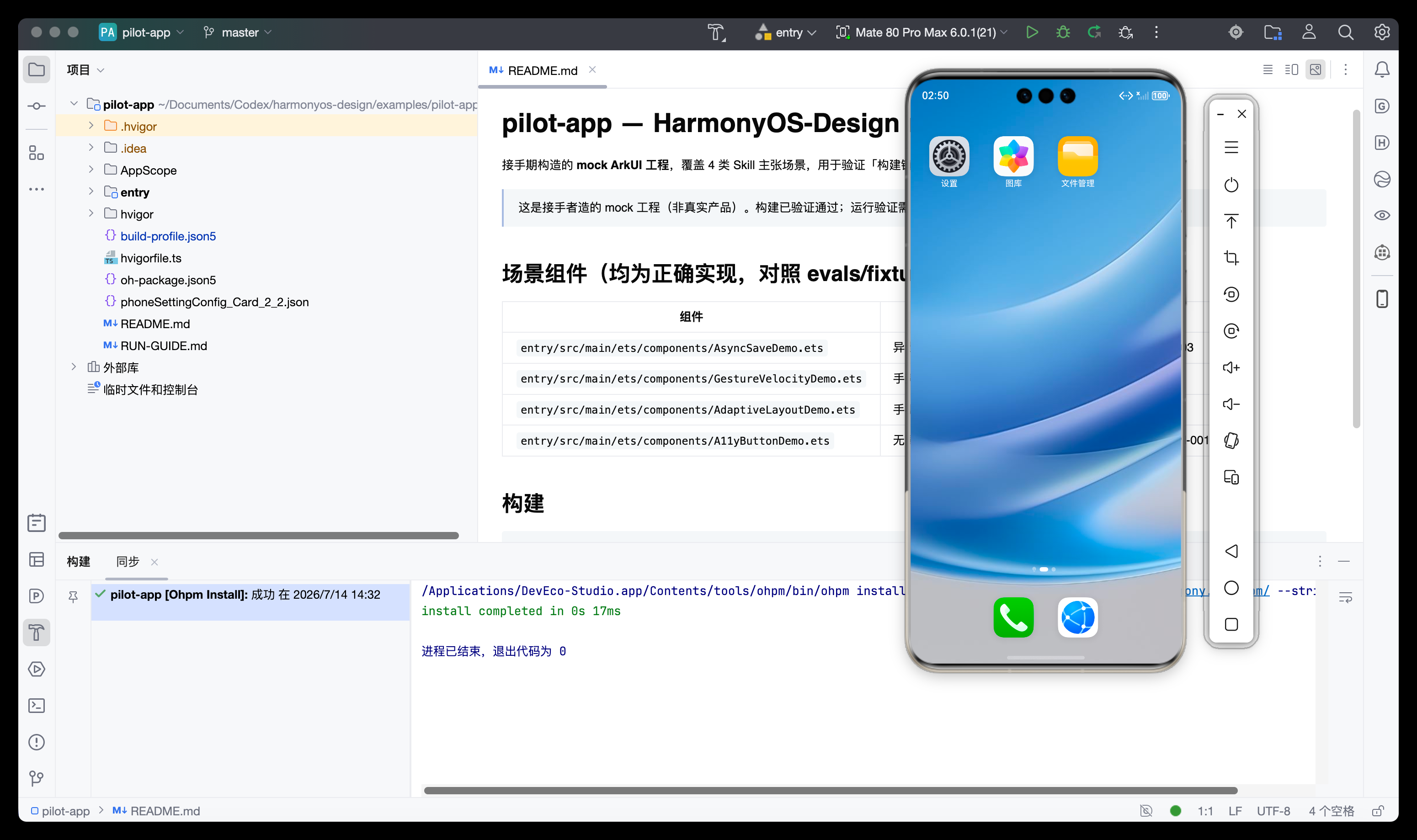
ohpm installresolves dependencies (exit code 0); the app builds, deploys, and the device home screen is ready.
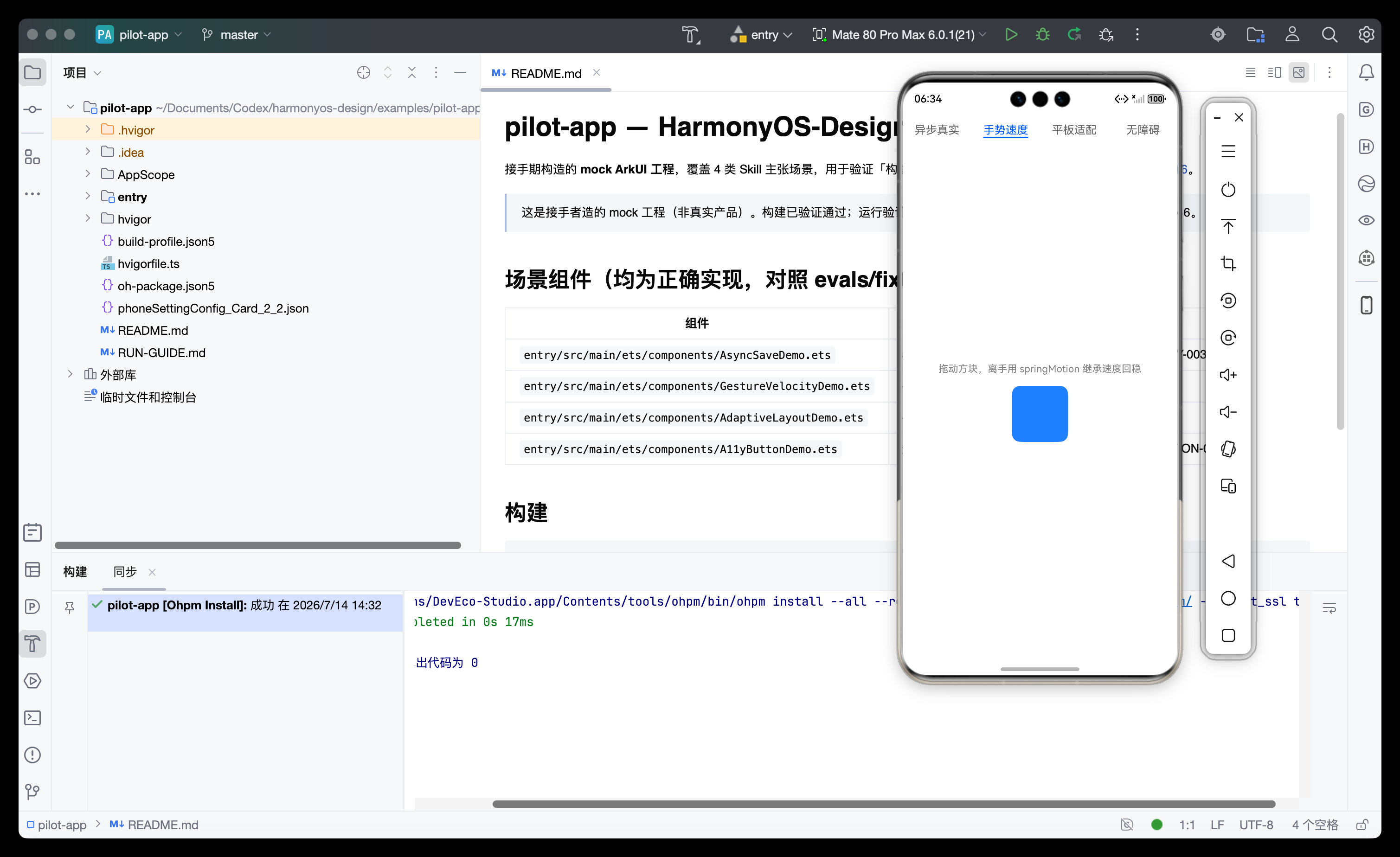
The drag tracks the finger; on release,
springMotioninherits the velocity and settles smoothly.
Why These Skills
Common problems AI coding agents run into on HarmonyOS UI tasks:
- Porting Android, iOS, or Web motion straight onto ArkUI;
- Focusing only on phones, never asking about tablets, foldables, PCs, wearables, or input methods;
- Generating arbitrary durations and curves while ignoring the press, focus, and transition behaviors system controls already provide;
- Gestures that track the finger but drop velocity to zero on release; animations that can't be interrupted or that jump during rapid, repeated actions;
- Driving high-frequency animation with layout properties, causing reflow and dropped frames;
- Letting motion lie on the backend's behalf — showing "success" the instant a control is tapped, before the request is even confirmed;
- Presenting project preferences as official specifications;
- Producing reams of aesthetic prose that can't be turned into code changes.
This project compresses expert judgment into triggerable Skills + citable rules + actionable engineering guidance + verifiable evaluations, keeping that judgment stable and its evidence traceable — rather than settling for "a longer prompt."
What It Does / Doesn't Do
What it does (in scope)
- Reviews the design, navigation, cross-device adaptation, input states, motion, async truthfulness, accessibility, and performance of ArkTS/ArkUI;
- Establishes a design baseline, platform version profile, prototypes, and an acceptance matrix for a new project from scratch;
- Translates vague motion impressions ("it slams to a stop on release," "the page grows out of the same card") into precise terminology and concrete ArkUI implementations;
- Backs every significant finding with a rule ID, a source level (H1-H4), a concrete ArkUI implementation, and a clear conclusion.
What it doesn't do (out of scope)
- Does not replace the official HarmonyOS design guidelines, and does not redistribute Huawei brand assets;
- Is not a complete ArkUI component library, and does not automatically rewrite an entire project;
- Does not pass project preferences off as official, and does not invent ArkUI APIs;
- Does not handle pure engineering concerns such as signing, builds, networking, storage, or permissions;
- Does not do general-purpose video editing/narration or generative video.
Core Features
1 · Three complementary Skills
| Skill | Responsibility |
|---|---|
harmonyos-design |
The main Skill: greenfield startup, implementation guidance, and review of existing products (three modes — design / implement / review — with dual entry points) |
review-harmonyos-design |
A strict reviewer: reviews only, never edits; passing requires evidence; delivers rule IDs and explicit conclusion thresholds |
harmonyos-motion-vocabulary |
Motion vocabulary: maps vague impressions to precise terminology and ArkUI capabilities |
2 · 38 machine-readable rules — each carries its source, scope, evidence, ArkUI implementation, detection method, stability, and knowledge layer; validated by JSON Schema, with stable IDs ready for static scanning and tooling integration.
3 · Async state truthfulness — enforces a clear separation of Idle → Acknowledged → Pending → Confirmed / Failed; success animations and accessibility announcements may appear only after the real result is confirmed, never in advance.
4 · Anti-homogenization — every design/review output specifies "product traits to preserve / generic styles not to apply / House Style that is allowed," refusing to reduce every product to the same glassy, rounded, bouncy idea of "premium."
5 · Three-layer knowledge architecture — a timeless foundation layer (human factors / state / continuity), a versioned platform layer (current SDK / API / visuals), and a project override layer (brand / House Style) are maintained separately; a new visual trend never overrides state truthfulness or accessibility.
6 · On-device verification + evaluation baseline — includes 52 trigger evals, 17 review evals, and 13 Skill-routing evals, plus a runnable ArkUI sample project already verified on the emulator.
Philosophy and Principles
- Context before rules: when the device, window, input, or API is unclear, the conclusion must state its assumptions.
- System capabilities first: favor system controls, default states, default transitions, and native ArkUI animation.
- Consistent but not identical: keep tasks and architecture consistent across devices while optimizing the presentation per device.
- Continuous but not blocking: feedback on press, gestures that track the finger, velocity carried through on release, and interruptible animation.
- Immediate feedback, truthful state: success is expressed only after the real result is confirmed, and animation duration is never coupled to remote completion.
- Semantic tokens first: no scattered, unsourced magic numbers.
- Accessibility is the default: accessibility, large fonts, focus, and reduced-motion strategies belong in the baseline checks.
- Evidence over an authoritative tone: when there is no source, label it as inference or a project recommendation; H3/H4 never masquerade as official.
- Foundational principles endure, platform expression is versioned: long-term human-factors principles and the current HarmonyOS visuals/APIs are maintained in separate layers.
- Prototype before concluding: for gestures, motion, and cross-device behavior, a runnable check is never replaced by a static mockup or by model confidence.
Data and Privacy
- Fully offline: every validation script is read-only and network-free by default, and uploads no code or data;
- No collection: gathers no usage data, calls no external service, and runs no unknown scripts from the project under review;
- No writes to your project: by default it outputs only findings and a patch plan, with all automatic fixes turned off;
- Transparent sourcing: citations keep only the link, a summary, and the source level, and never redistribute copyrighted third-party full text.
Project Structure
harmonyos-design/
├── skills/                      Three Agent Skills
│   ├── harmonyos-design/        Main Skill + 6 references (principles/motion/adaptation/accessibility/ArkUI mapping/sources)
│   ├── review-harmonyos-design/ Strict reviewer
│   └── harmonyos-motion-vocabulary/  Motion vocabulary
├── rules/                       Rule library
│   ├── harmony-design-rules.yaml  38 machine-readable rules
│   ├── schema.json                Rule JSON Schema
│   └── sources.yaml               Source registry (official + project-owned)
├── evals/                       Evaluation data
│   ├── trigger-evals.json         52 trigger evals
│   ├── review-evals.json          17 review evals
│   ├── skill-routing-evals.json   13 Skill-routing evals
│   └── fixtures/                  ArkTS positive/negative examples
├── examples/                    Design cases + runnable sample project pilot-app/
├── scripts/                     Offline validation tools (skills/rules/evals/links/packaging)
├── tests/                       Unit tests
├── templates/                   Case and rule-proposal templates
└── assets/screenshots/          On-device run screenshots
Local Verification
python -m venv .venv && source .venv/bin/activate
pip install -e ".[dev]"

python scripts/validate_repo.py   # Validate Skills / rules / sources / evals
pytest                            # Unit tests
python scripts/check_links.py     # Check internal doc links
Expected: repository validation passes (Skills 3 / rules 38 / sources 26 / triggers 52 / reviews 17 / routing 13), and pytest reports 9 passed.
FAQ
Q: Is this an official Huawei project? No. It is an independent, unofficial community project with no affiliation with or endorsement from Huawei or OpenHarmony. The rules clearly separate official sources (H1/H2) from project recommendations (H4) and never claim to be official.
Q: Are the numeric values in the rules (durations, curves, scales) official standards? Every value is tagged with a type: official requirement / official reference / ArkUI default / observed value / House Style. For example, the "0.97 press scale" is explicitly marked as project House Style, not an official value.
Q: Will the Skills edit my code automatically? No. By default they output only findings and a minimal fix plan, with all automatic fixes disabled; changes are made by external tools only after your explicit approval.
Q: Which devices and inputs are supported? The rules cover phones, tablets, foldables, PCs, wearables, smart displays, and in-car systems, along with touch, mouse, keyboard, stylus, remote, and dial inputs; each rule states its applicable scope.
Q: How do I verify a motion or an async interaction? The Skills require a minimal interactive prototype or an on-device run, plus evidence covering the build, target device, rapid repeated actions, reverse interruption, slow-motion playback, accessibility, and frame rate — a successful build does not mean the experience passes.
Q: How do I contribute rules or cases?
See CONTRIBUTING.md and templates/; a new rule must have a clear failure mode and a source, and must pass validate_repo.py and pytest.
About the Author
HarmonyOS-Design is independently created and maintained by BLCaptain (爆裂队长NEXT) — an independent, unofficial open-source project focused on distilling the public design principles of HarmonyOS / OpenHarmony and the implementation capabilities of ArkUI into an evidence-traceable design-judgment system for AI agents and engineering teams.
- GitHub: @dososo
- X / Twitter: @thinkszyg
- Email: [email protected]
- Maintainer of an open-source catalog of traditional Chinese patterns: wenyang.net
If this project helps you, Star it, share it, or reach out to me on X.
HarmonyOS, OpenHarmony, ArkUI, Huawei, and related names and trademarks belong to their respective owners. Rules should be verified against your target SDK, devices, official documentation, and on-device results.
License
Explore related projects
affaan-m/ECC
The agent harness performance optimization system. Skills, instincts, memory, security, and research-first development for Claude Code, Codex, Opencode, Cursor and beyond.
300,269 starsNousResearch/hermes-agent
The agent that grows with you
262,100 starsmultica-ai/andrej-karpathy-skills
A single CLAUDE.md file to improve Claude Code behavior, derived from Andrej Karpathy's observations on LLM coding pitfalls.
231,390 starsfirecrawl/firecrawl
Supercharge your AI agents with data from the web and beyond. Building the library for superintelligence. 🔥
200,178 stars