
doramart/DoraCMS
doramart/DoraCMS has 3,553 GitHub stars and 1,032 forks. GitHot measured 0 stars in 24 hours. Last checked 2026-11-06 18:28 UTC. Last push 2026-11-02.
DoraCMS 是一个基于 EggJS 3.x + Vue 3 + TypeScript 的现代化内容管理系统,采用 pnpm monorepo 架构管理。它不仅仅是一个 CMS 系统,更是一个优秀的企业级应用架构实践。
Measured star growth
- in 24h
- 0
- in 7 days
- Collecting history
- in 15 days
- Collecting history
- in 1 month
- Collecting history
Net star changes over overlapping periods, not daily totals. Missing measurements are left blank. Stars measure attention, not software quality.
README.en.md
OriginalEggCMS - Modern CMS System Based on EggJS + Vue3


📦 GitHub: doramart/DoraCMS | 📖 Documentation: www.doracms.net | 🇨🇳 中文: README.md
A modern content management system based on EggJS 3.x + Vue 3 + TypeScript, managed with pnpm monorepo architecture.
🔗 Live Demo
- Frontend: https://demo.doracms.net
- Admin: https://demo.doracms.net/admin-center
- Admin login: username
doracmspasswordHello985
📸 Screenshots
Admin Center

User Center

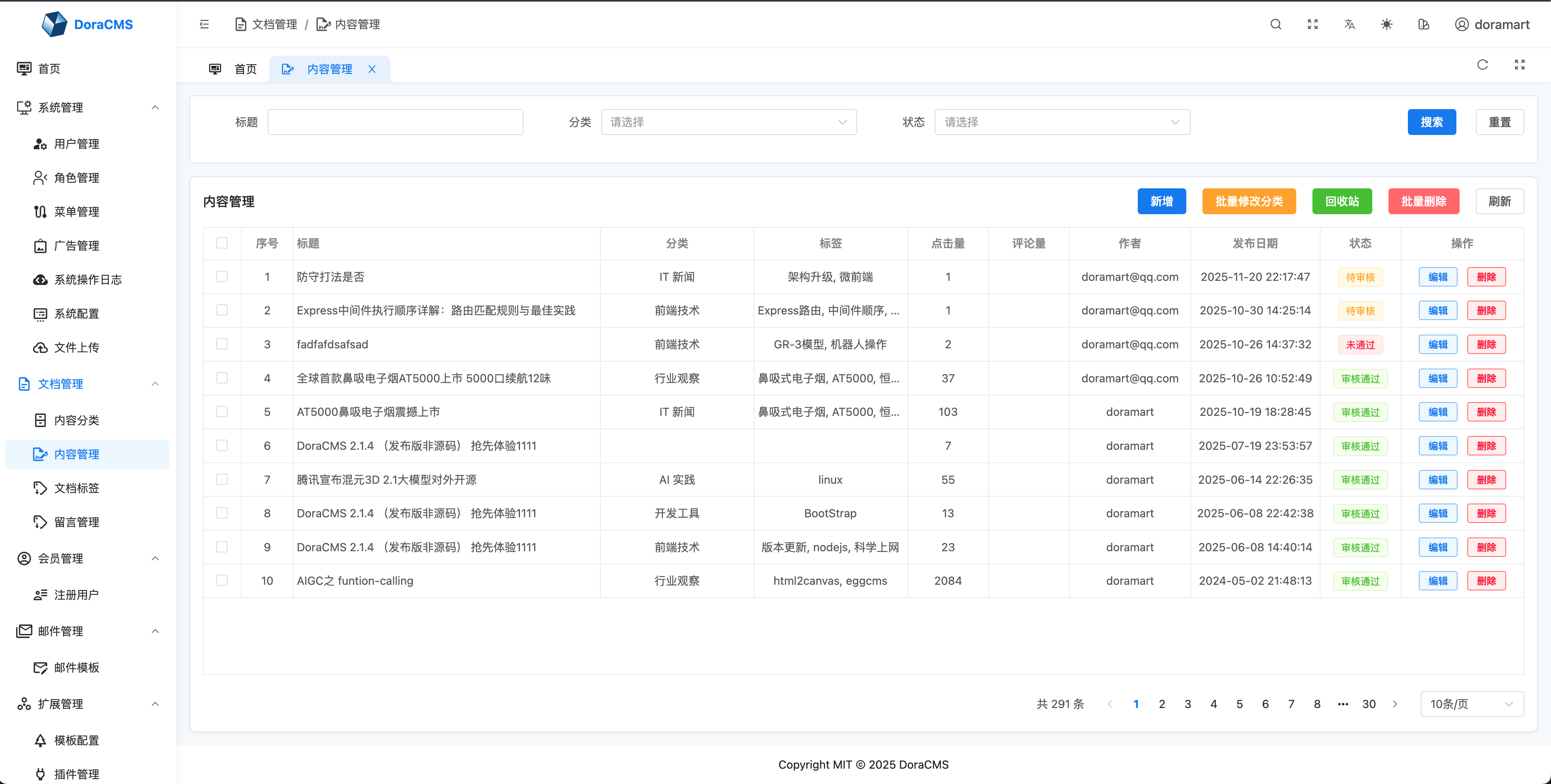
Content Management
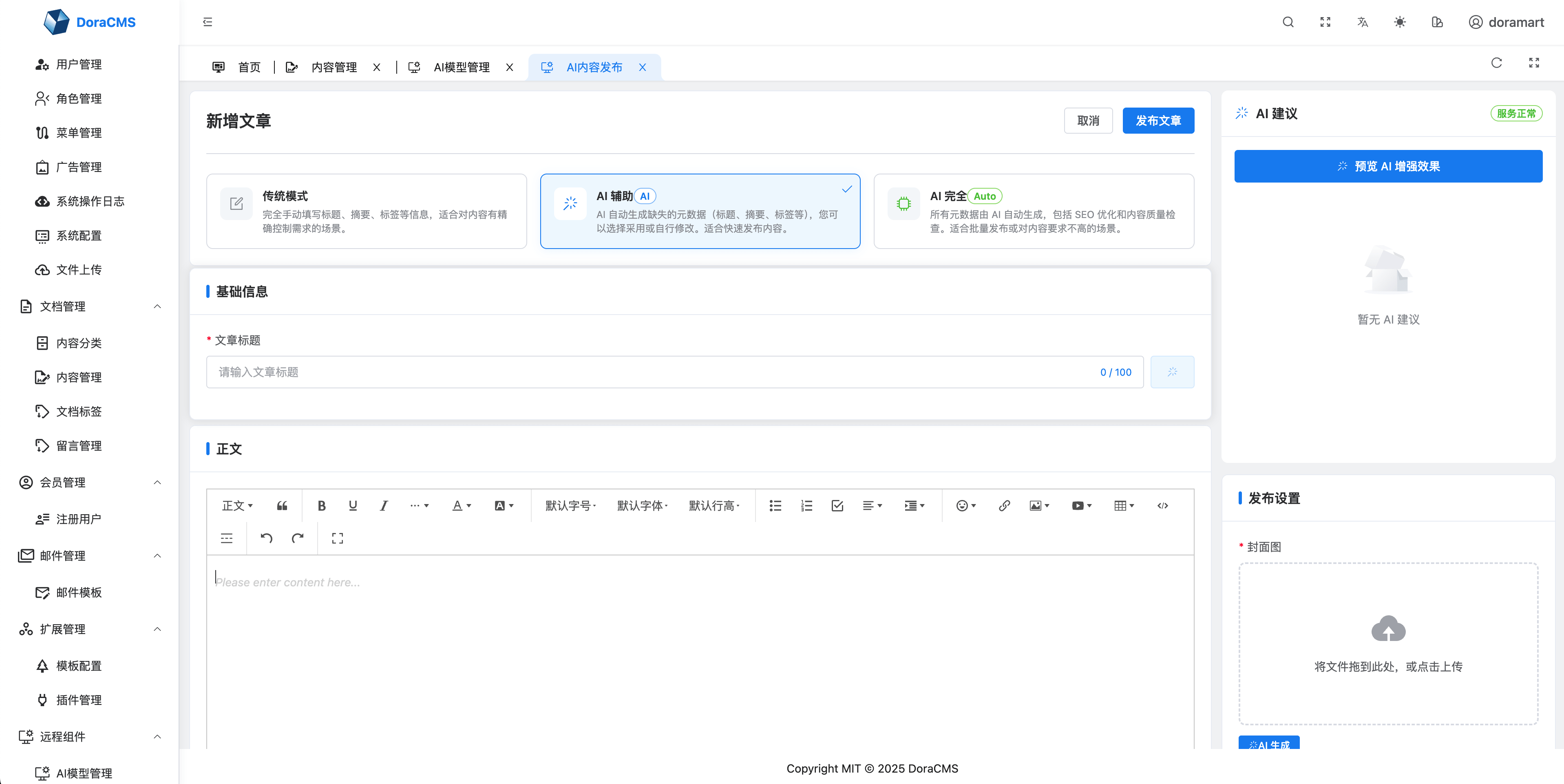
AI Content Publishing
Model Management

Home Page

🏗️ Project Architecture
This project uses a monorepo architecture with three main modules:
egg-cms/
├── server/                    # EggJS backend service
├── client/
│   ├── user-center/          # Vue3 user frontend
│   └── admin-center/         # Vue3 + TypeScript admin center
└── package.json              # Root configuration
🛠️ Tech Stack
Backend (Server)
- Framework: EggJS 3.x
- Database: MongoDB + Mongoose / MariaDB + Sequelize (dual database support)
- Authentication: JWT
- Cache: Redis (optional)
- File Upload: Supports Alibaba Cloud OSS, Qiniu Cloud
- Deployment: Docker + Docker Compose
Frontend (User Center)
- Framework: Vue 3 + Composition API
- Build Tool: Vite 4.x
- UI Library: Element Plus
- State Management: Pinia
- Internationalization: Vue i18n
Admin Center
- Framework: Vue 3 + TypeScript
- Build Tool: Vite 6.x
- UI Library: Element Plus
- Styling: UnoCSS + Sass
- State Management: Pinia
- Charts: Echarts, @antv/g2
- Rich Text Editor: @wangeditor/editor
🌍 Internationalization
- The server enables the
localeDetectormiddleware, automatically selecting the language based on URL, Cookie, andAccept-Language, and syncing to session. - All admin APIs use unified internationalization keys (
common.*,template.*,mail.*, etc.), which can be extended inserver/config/locale. - Nunjucks filters and date utilities read the current request's
ctx.localeto keep page rendering consistent with API responses.
🚀 Quick Start
Requirements
Local Development
- Node.js >= 14.0.0 (recommended 18.x)
- pnpm >= 8.0.0
- MongoDB or MariaDB
- Redis (optional)
Docker Deployment
- Docker >= 20.10
- Docker Compose >= 2.0
Install Dependencies
# Clone the project
git clone https://github.com/doramart/DoraCMS.git
cd DoraCMS

# Install all project dependencies
pnpm install
Development Mode
# Start server and user frontend together
pnpm dev

# Start all projects (in parallel)
pnpm dev:all

# Start projects individually
pnpm dev:server       # Start backend service (port: 7001)
pnpm dev:user-center  # Start user frontend (port: 3000)
pnpm dev:admin-center # Start admin center (port: 5173)
Production Build
# Build all projects
pnpm build

# Build individually
pnpm build:server
pnpm build:user-center
pnpm build:admin-center
📝 Available Scripts
Development
pnpm dev- Start server + user frontendpnpm dev:all- Start all projects in parallelpnpm dev:server- Start backend service onlypnpm dev:user-center- Start user frontend onlypnpm dev:admin-center- Start admin center only
Build
pnpm build- Build all projectspnpm build:server- Build backendpnpm build:user-center- Build user frontendpnpm build:admin-center- Build admin center
Code Quality
pnpm lint- Lint all project codepnpm lint:server- Lint backend codepnpm lint:user-center- Lint user frontend codepnpm lint:admin-center- Lint admin center codepnpm format- Format all code
Cleanup
pnpm clean- Clean all node_modulespnpm clean:server- Clean backend dependenciespnpm clean:user-center- Clean user frontend dependenciespnpm clean:admin-center- Clean admin center dependencies
Plugin Management
pnpm plugin:install- Install server pluginspnpm plugin:build- Build pluginspnpm plugin:clean- Clean plugins
🌐 Access URLs
Development Mode
- User Frontend: http://localhost:3000
- Admin Center: http://localhost:5173
- Backend API: http://localhost:7001
Docker Deployment
- Application: http://localhost:8080
- Admin Center: http://localhost:8080/admin
- API: http://localhost:8080/api
🐳 Docker Deployment
📖 Complete Deployment Guide: Docker Deployment Guide
Quick Start
# 1. Clone the project
git clone https://github.com/doramart/DoraCMS.git
cd DoraCMS

# 2. Use the quick start script
./docker-quickstart.sh

# Or use Docker Compose
docker compose up -d
Database Selection
Using MongoDB (Default)
# Start MongoDB mode
docker compose up -d

# View logs
docker compose logs -f eggcms-app
Using MariaDB
# Start MariaDB mode
docker compose --profile mariadb up -d

# View logs
docker compose logs -f eggcms-app-mariadb
Optional Components
# Enable Redis cache
docker compose --profile redis up -d

# Enable Nginx reverse proxy
docker compose --profile nginx up -d

# Full stack (MongoDB + Redis + Nginx)
docker compose --profile full up -d

# Full stack (MariaDB + Redis + Nginx)
docker compose --profile mariadb --profile redis --profile nginx up -d
Configure Environment Variables
# Copy environment variable template
cp docker.env.example .env

# Edit configuration (important: modify security-related settings)
vim .env
⚠️ Configuration that must be modified in production:
APP_KEYS- Application secret keySESSION_SECRET- Session secret- Database password
Generate random keys:
# Using Node.js
node -e "console.log(require('crypto').randomBytes(32).toString('hex'))"

# Or using OpenSSL
openssl rand -hex 32
💡 Tip: For more detailed Docker deployment instructions, data persistence, health checks, troubleshooting, etc., please refer to the Complete Docker Deployment Guide
📚 More Documentation
- Docker Deployment Guide - Complete Docker deployment documentation (recommended)
- Docker Deployment Guide (Local) - Local Docker deployment documentation
- Development Guide - Local development and project structure
- Database Migration Guide - MongoDB ↔ MariaDB migration
- Repository Pattern - Database adapter layer documentation
- SoybeanAdmin - Admin center is based on SoybeanAdmin with custom development
🤝 Contributing
Pull Requests and Issues are welcome!
💬 Community & Support
Join our community to discuss and learn with other developers:
📄 License
MIT License
🔧 FAQ
Q: How to add dependencies for a specific project?
# Add dependency for server
pnpm --filter "./server" add package-name

# Add dependency for user frontend
pnpm --filter "./client/user-center" add package-name

# Add dependency for admin center
pnpm --filter "./client/admin-center" add package-name
Q: How to resolve dependency conflicts?
# Clean all dependencies and reinstall
pnpm clean
pnpm install
Q: What if Node.js version is incompatible?
admin-center requires Node.js >= 18.20.0. If the version is incompatible, use nvm to switch versions:
nvm use 18
# or
nvm install 18.20.0
nvm use 18.20.0
Code Standards
The project uses ESLint and Prettier for code quality checks and formatting. lint-staged will automatically run checks when committing code.
Explore related projects
codecrafters-io/build-your-own-x
Master programming by recreating your favorite technologies from scratch.
560,435 starspublic-apis/public-apis
A collective list of free APIs
496,755 starsmorluto/rea
Reverse engineer anything with agents, from app behavior down to native binaries.
437,950 starsopenclaw/openclaw
The AI that really does things. Any OS. Any Platform. The lobster way. 🦞
394,067 stars