
dontbesilent2025/dbskill
dontbesilent2025/dbskill has 11,342 GitHub stars and 1,317 forks. GitHot measured +16 stars in 24 hours and +254 in 7 days. Last checked 2026-11-09 10:18 UTC. Last push 2026-11-03.
dontbesilent 的商业诊断 Skills
Measured star growth
- in 24h
- +16
- in 7 days
- +254
- in 15 days
- Collecting history
- in 1 month
- Collecting history
Net star changes over overlapping periods, not daily totals. Missing measurements are left blank. Stars measure attention, not software quality.
README.en.md
Originaldbskill
简体中文 | English | 日本語 | 한국어 | 繁體中文


This update: The repository is now all rights reserved. You can still install and use the Skills for free, including in your own business and for your clients; without permission you may not repost, bundle, sell, or use them for AI training. See LICENSE for the full terms
What dbskill is
dbskill is a Chinese AI Skills toolkit made by dontbesilent, with 34 Skills. After you install it in Doubao, WorkBuddy, Claude Code, Codex, or another Agent that supports Skills, you can use it directly in the conversation.
A Skill is a working method written for an Agent. With dbskill installed, you can ask your Agent to:
- Find where a business problem comes from, for example low renewals or customers saying the price is too high
- Find peers worth learning from and see exactly how they work
- Turn a topic into a content plan, and check where a draft fails to connect with readers
- Write the title, cover text, and opening for a video, and check it for platform-review risks before publishing
- Analyze why you know what to do but still have not done it
- Turn a local folder into a knowledge base you can query at any time
The methods come from 16,152 public posts by dontbesilent, organized into 4,176 knowledge atoms. Author: @dontbesilent
Quick start
Step 1: Install
Run in a terminal:
npx -y skills add dontbesilent2025/dbskill -g --all
To use the Claude Code marketplace or install a single Skill, see Installation details below.
In Grok Bot, just add the ready-made dbs 创业教练 (startup coach) or dbs 内容教练 (content coach). See Use it in Grok Bot.
Step 2: Give your question to /dbs
In your Agent's chat box, enter /dbs followed by your situation and question. Incomplete information is fine:
/dbs I run coding classes for children. I have 40 paid students, but renewals are low. I don't know whether to check the product, pricing, or customer fit first.
If this is your first time, you can enter /dbs 新手入门 to see which tasks it can handle.
Step 3: Continue in the same conversation
After you get a result, add facts, material, or change requests directly. You do not need to enter the command again. When you switch to a new goal, enter /dbs again.
Use it in Grok Bot
In Grok Bot you don't type any commands. Add one of the ready-made coaches, and it installs dbskill by itself in your first chat. The coaches talk in Chinese.
| Coach | What it helps with | Add link |
|---|---|---|
| dbs 创业教练 (startup coach) | Find where your business is stuck and the one thing to do this week; if you want, it checks in every Monday | https://x.ai/bot/kpZtlm5CADHoXaaAqTV5Z |
| dbs 内容教练 (content coach) | Pick topics, write titles, cover text and openings, check drafts, review how each post did; if you want, it checks in every Friday | https://x.ai/bot/qonh7lyBBYsbUXsR9LtO2 |
How to use it
- Open a link above, tap "Add to Grok Bot", and confirm in the Grok Bot app
- Say "hi" to the new coach. It spends a few minutes installing dbskill, then asks you a few questions about your business or account
- Then just ask your question, for example "My course renewal rate is low. What should I check first?"
If the coach says it cannot install
Send it the block below as-is. For the content coach, replace the final startup with content:
Please run these two commands in your environment to install dbskill, and show me the output as-is:
git clone --depth 1 https://github.com/dontbesilent2025/dbskill /tmp/dbskill 2>/dev/null || git -C /tmp/dbskill pull --ff-only
python3 /tmp/dbskill/tools/grok/install.py --coach startup
To install dbskill in your own Grok Bot without a coach, send the same block with startup replaced by all. This installs all 29 public Skills.
How /dbs arranges Skills
/dbs is the Skill dispatch desk of dbskill. It starts from the final result you want, then decides which Skills to use and in what order. It uses as few as possible: simple questions get a direct answer, and if one Skill is enough, it uses only one.
There are 6 common arrangements:
- Use only one: to diagnose a business model, it uses only
dbs-diagnosis - Run in sequence: the next step needs the result of the previous one.
dbs-contentgives a content plan, you write the draft, thendbs-content-risk-checkchecks publishing risks - Run separately: the tasks are unrelated.
dbs-ai-checkchecks for AI-sounding text,dbs-wechat-htmldoes the layout, and you get two separate results - Judge first, then decide whether to proceed:
dbs-content-valuefirst judges whether a topic is worth doing; if it is,dbs-contentproduces the plan - Analyze separately, then compare: one problem can have several possible causes. When a post gets low traffic,
dbs-content-valueanddbs-resonateeach give their reasons, and/dbscompares them - Check after writing, then revise: for text with high requirements,
dbs-plain-writingwrites it,dbs-ai-checkchecks it, and then it is revised based on the issues found
When a direction needs your decision, /dbs lists the options for you and does not choose for you. Before it starts, it explains how it plans to arrange the work and why.
All Skills
If you already know which Skill you need, you can enter its command directly. For when to use each Skill, input examples, and boundaries, see the beginner guide and full Skill directory.
Entry
| Command | Use |
|---|---|
/dbs |
Chooses and arranges Skills for your question and moves the work forward in the current conversation |
Business judgment and problem clarification
| Command | Use |
|---|---|
/dbs-diagnosis |
Judges whether a business problem holds up, or checks a whole business, and gives the first thing to do tomorrow |
/dbs-benchmark |
Picks peers worth imitating and breaks down how they acquire, convert, and deliver |
/dbs-jtbd |
Analyzes why customers choose or drop a product |
/dbs-goal |
Turns a vague wish into a checkable goal and completion criteria |
/dbs-good-question |
Rewrites a vague question clearly and judges which parts an Agent can handle |
/dbs-deconstruct |
Breaks down an unclear concept and explains what it means in different contexts |
/dbs-theory-grounding |
Checks claims in courses, slides, or methodologies and finds credible theoretical support |
/dbs-standard-answer |
Studies the relevant theories and historical cases for a problem and gives a conditional standard answer |
Content creation and publishing
| Command | Use |
|---|---|
/dbs-content |
Turns a chosen topic into a content plan: format, platform, structure, and expression |
/dbs-title-cover-intro |
Settles the topic first, then writes titles, cover text, and openings for Xiaohongshu, Bilibili, Douyin, and WeChat Channels |
/dbs-resonate |
Finds where a finished draft fails to connect with its target audience and suggests cuts and edits |
/dbs-script-flow |
Checks transitions and spoken flow in a short-video script and marks where viewers may swipe away |
/dbs-content-value |
Judges who a piece will attract, whether the opening keeps people, and its likely traffic and commercial value |
/dbs-spread |
Explains why a piece that already got a response made people relate to it or share it |
/dbs-ai-check |
Marks traces of AI writing in copy |
/dbs-content-risk-check |
Checks platform-review risks sentence by sentence before publishing and gives the smallest fix |
/dbs-plain-writing |
Writes product, feature, and update descriptions in factual order, without marketing packaging |
/dbs-wechat-html |
Lays out Markdown as HTML you can paste into the WeChat Official Account editor |
Video processing
| Command | Use |
|---|---|
/dbs-video-extract |
Gets post data and speech transcripts from platform links; requires external service credentials |
/dbs-video-navigation |
Splits a local video into chapters and creates a navigation bar you can import into a video editor |
Action, learning, and decisions
| Command | Use |
|---|---|
/dbs-action |
Analyzes why you know what to do but have not done it, and gives one step you can take today |
/dbs-learning |
Breaks a subject into a series of learning articles and adjusts the next one based on your feedback |
/dbs-decision |
Creates local records for decisions that need long-term tracking, then fills in results and reviews later |
Saving and reports
| Command | Use |
|---|---|
/dbs-save |
Saves the current conversation's conclusions and next steps on your computer |
/dbs-restore |
Reads the last saved record and continues from there |
/dbs-report |
Combines several saved records into one report |
Multi-perspective discussion
| Command | Use |
|---|---|
/dbs-chatroom |
Has several expert roles speak on one topic in turn, then summarizes |
/dbs-chatroom-austrian |
Discusses a problem from the perspectives of Austrian economists Hayek and Mises |
Resources and tools
| Command | Use |
|---|---|
/dbs-knowledge |
Turns a local folder into a knowledge base an Agent can search, add to, and maintain |
/dbs-content-system |
Organizes a batch of old drafts into a content library you can split and reuse |
/dbs-human-dispatch |
Assigns tasks to employees or collaborators, follows up on progress, and checks the results |
/dbs-skill-maker |
Makes a new Skill or improves an existing one |
/dbs-install-skill |
Installs Skills into multiple Agents and cleans up duplicate entries |
Installation details
Run the following commands in a terminal. Do not send them to the Agent as chat messages.
Skills CLI
npx -y skills add dontbesilent2025/dbskill -g --all
-g means global installation, and --all means installing to every Agent the Skills CLI recognizes. To install to only one Agent, remove --all and choose when prompted.
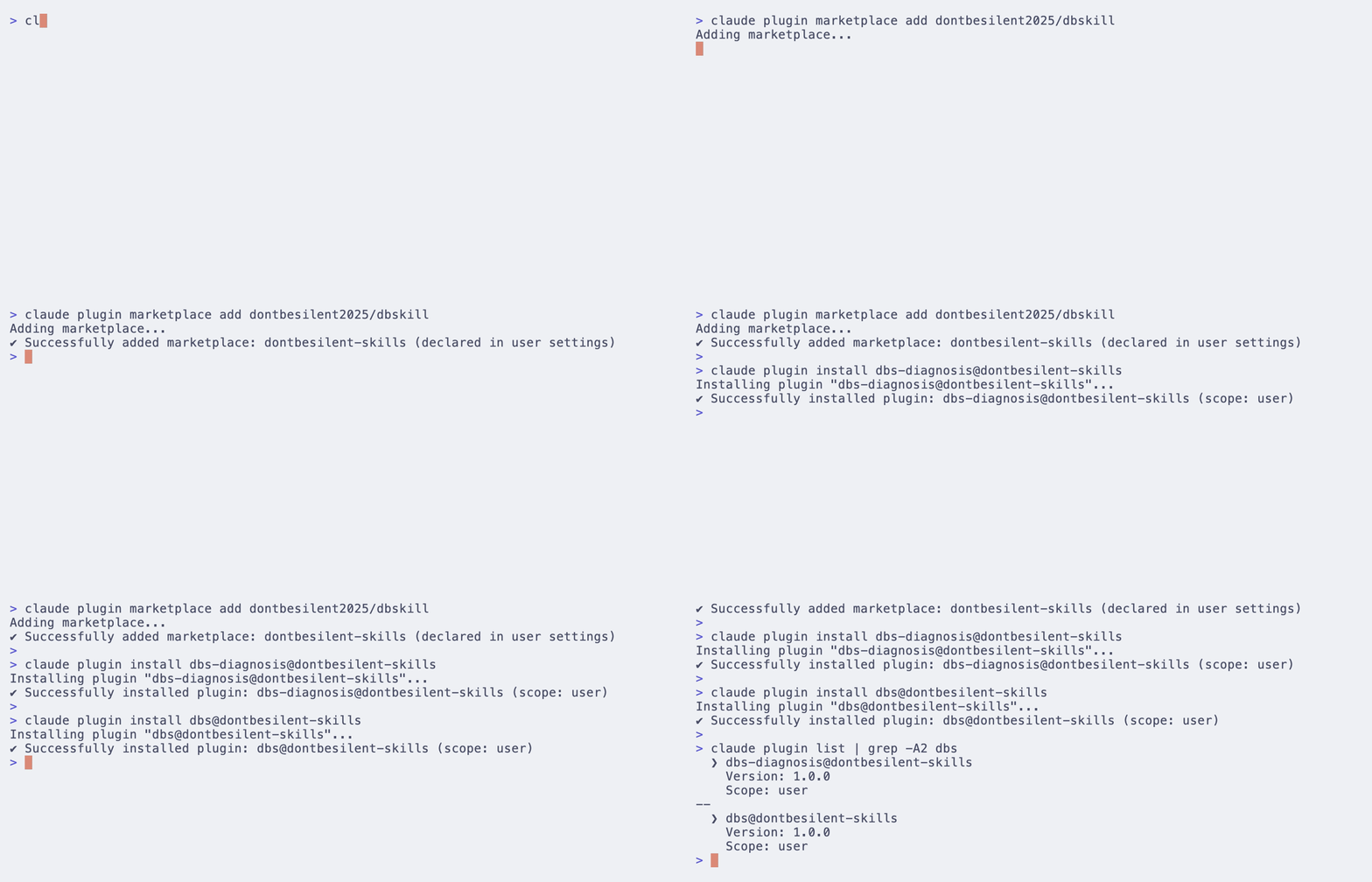
Claude Code marketplace
claude plugin marketplace add dontbesilent2025/dbskill
claude plugin install dbs@dontbesilent-skills
With the plugin, commands need the dbs: prefix, for example /dbs:dbs and /dbs:dbs-diagnosis.
To install only one Skill, install its plugin, for example:
claude plugin install dbs-diagnosis@dontbesilent-skills
Commands not showing after installation
First confirm that the install command succeeded and that it installed to the Agent you are using. Skills CLI installs use short commands, such as /dbs; Claude Code plugins use commands with dbs:. The exact names are whatever your Agent shows.
More usage
Call a Skill directly
After the command, write your question, material, and the result you want:
/dbs-diagnosis I offer home-organization consulting at 3,000 yuan per client. Of my last 10 inquiries, 6 said it was too expensive and 3 did not reply. Please judge what I should verify first.
/dbs-title-cover-intro This is a short-video script I plan to shoot. Please target Xiaohongshu and give me the title, cover text, and opening: paste script
Your results will be more accurate if you include:
- The facts and numbers you already have, such as price, headcount, and sales
- The full draft or material, not just a summary
- The result you want, such as a judgment, a plan, or text you can use directly
Skills that read local files, go online, or process video also need the Agent to have the matching permissions or tools. See each Skill's description for details.
Use a three-digit code from a video
After you get a three-digit code from one of dontbesilent's videos, enter:
/dbs 123
Replace 123 with the code from the video. To see all current codes, enter /dbs 给我所有隐藏级 skill. The code content is read from GitHub when used, so the Agent needs access to GitHub.
Keep conclusions across conversations
Use /dbs-save to save the current conclusions, and /dbs-restore next time to continue. Saved records are stored on your computer in ~/.dbs/.
Repository resources
Installing the Skills does not download these resources. Look them up in the repository when needed.
| Resource | Use |
|---|---|
| Public post collection (Markdown) | Search, read, or give to an AI for analysis |
| Public post collection (PDF) | Read and keep |
| Atom library guide | Data scope, fields, and how to use it |
| Knowledge atom data | Build your own search, analysis, or RAG |
| Skill knowledge packs | Method material organized by Skill |
Updates and help
Say this in your Agent conversation:
更新 dbskill
Updating syncs the official dbskill, keeps the saved records and logs in ~/.dbs/, and automatically removes old Skills that have been retired. For manual cleanup, see the beginner guide. For past changes, see the commit history.
- Beginner guide and full Skill directory
- Report an issue or suggestion
- Paid Q&A group details
- Author: @dontbesilent · Xiaohongshu · Douyin
Contributors
The sensitive-word checking in dbs-content-risk-check was improved together by these co-creators:
License
Copyright © dontbesilent. All rights reserved. See LICENSE for the full terms (the Chinese version prevails).
- You may install and use the Skills for free, including in your own business and when serving your own clients, and you may modify them on your own devices for your own use.
- Without written permission, you may not repost, redistribute, bundle into other products, sell, or publicly release modified versions, or use the content to train AI models. Sharing links to this repository is fine.
- The
books/directory is for free reading only. See books/LICENSE. - Versions released before 2026-11-02 remain under CC BY-NC 4.0 as granted at the time.
To request permission, email [email protected].
Explore related projects
codecrafters-io/build-your-own-x
Master programming by recreating your favorite technologies from scratch.
561,227 starspublic-apis/public-apis
A collective list of free APIs
497,462 starsmorluto/rea
Reverse engineer anything with agents, from app behavior down to native binaries.
445,528 starsopenclaw/openclaw
The AI that really does things. Any OS. Any Platform. The lobster way. 🦞
394,228 stars