
donlon/cloudflare-error-page
donlon/cloudflare-error-page has 5,788 GitHub stars and 286 forks. GitHot measured -1 stars in 24 hours. Last checked 2026-11-08 11:43 UTC. Last push 2026-07-06.
✅Browser ❌Cloudflare ✅Host — Generator for customized Cloudflare error pages. (unofficial)
Measured star growth
- in 24h
- -1
- in 7 days
- Collecting history
- in 15 days
- Collecting history
- in 1 month
- Collecting history
Net star changes over overlapping periods, not daily totals. Missing measurements are left blank. Stars measure attention, not software quality.
README.md
OriginalCloudflare Error Page Generator
What does this project do?
This project creates customized error pages that mimic the well-known Cloudflare error page. You can also embed it into your own website.
Online Editor
Here's an online editor to create customized error pages and example server apps. Try it out here.
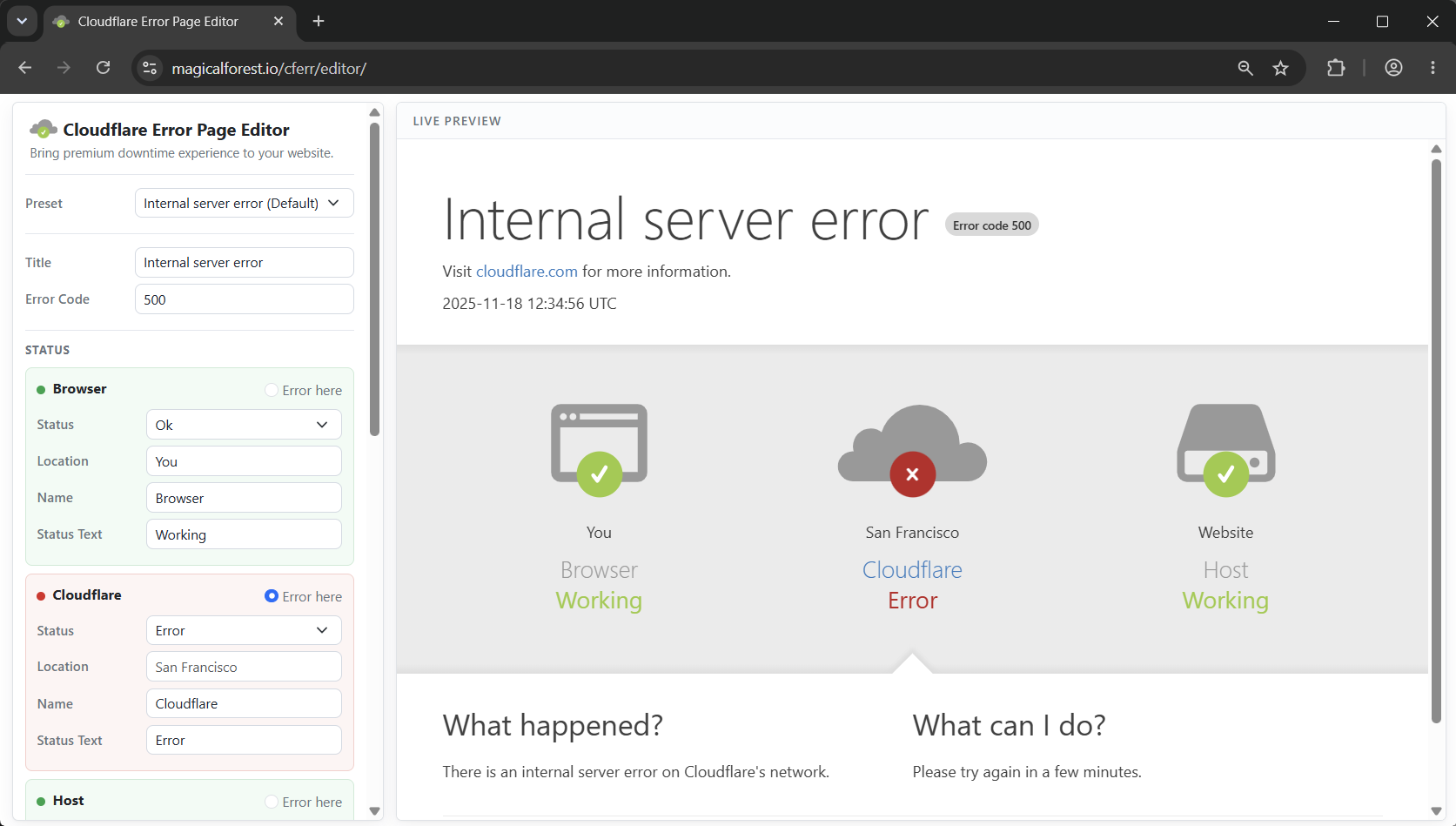
Quickstart for Programmers
JavaScript/NodeJS
Install the cloudflare-error-page package using npm:
npm install cloudflare-error-page
The following example demonstrates an Express application that automatically handles server errors.
import express from 'express';
import { render as render_cf_error_page } from 'cloudflare-error-page';

const app = express();

app.get('/', (req, res) => {
  /* Some code that break prod. Pushed by a new employee recently. */
  let [feature_values, _] = features
    .append_with_names(self.config.feature_names)
    .unwrap();
}

app.use((err, req, res) => {
  /* Handle the error intelligently by using a custom handler */
  res.status(500).send(render_cf_error_page({
    "title": "Internal server error",
    "error_code": "500",
    "what_happened": err.toString(),
    "what_can_i_do": "Please try again in a few minutes.",
  }));
});

app.listen(3000);
(Thanks @junduck for creating the original NodeJS version.)
Python
Install cloudflare-error-page using pip.
pip install cloudflare-error-page
Then an error page can be generated using the render function provided by the package. (example.py)
import webbrowser
from cloudflare_error_page import render as render_cf_error_page

# This function renders an error page based on the input parameters
error_page = render_cf_error_page({
    # Browser status is ok
    'browser_status': {
        "status": 'ok',
    },
    # Cloudflare status is error
    'cloudflare_status': {
        "status": 'error',
        "status_text": 'Error',
    },
    # Host status is also ok
    'host_status': {
        "status": 'ok',
        "location": 'example.com',
    },
    # Position of the error indicator, valid options are 'browser', 'cloudflare', and 'host'
    'error_source': 'cloudflare',

    # Texts shown in the bottom of the page
    'what_happened': '<p>There is an internal server error on Cloudflare\'s network.</p>',
    'what_can_i_do': '<p>Please try again in a few minutes.</p>',
})

# Write generated webpage to file
with open('error.html', 'w') as f:
    f.write(error_page)

# Open the generated page in browser
webbrowser.open('error.html')
A demo server using Flask is available in flask_demo.py, and you can also see live demo here.
More Examples
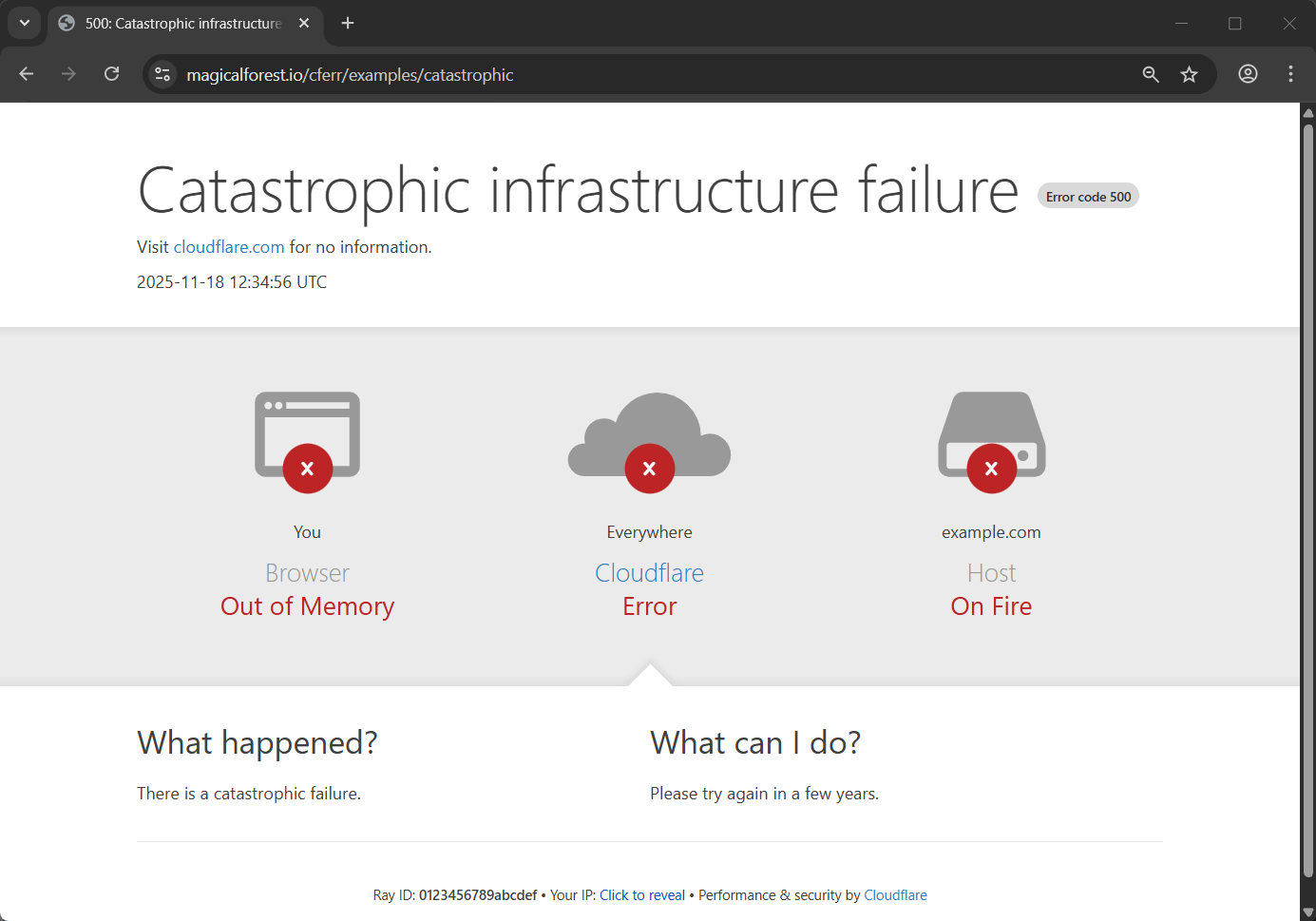
Catastrophic infrastructure failure
params = {
    "title": "Catastrophic infrastructure failure",
    "more_information": {
        "for": "no information",
    },
    "browser_status": {
        "status": "error",
        "status_text": "Out of Memory",
    },
    "cloudflare_status": {
        "status": "error",
        "location": "Everywhere",
        "status_text": "Error",
    },
    "host_status": {
        "status": "error",
        "location": "example.com",
        "status_text": "On Fire",
    },
    "error_source": "cloudflare",
    "what_happened": "<p>There is a catastrophic failure.</p>",
    "what_can_i_do": "<p>Please try again in a few years.</p>",
}
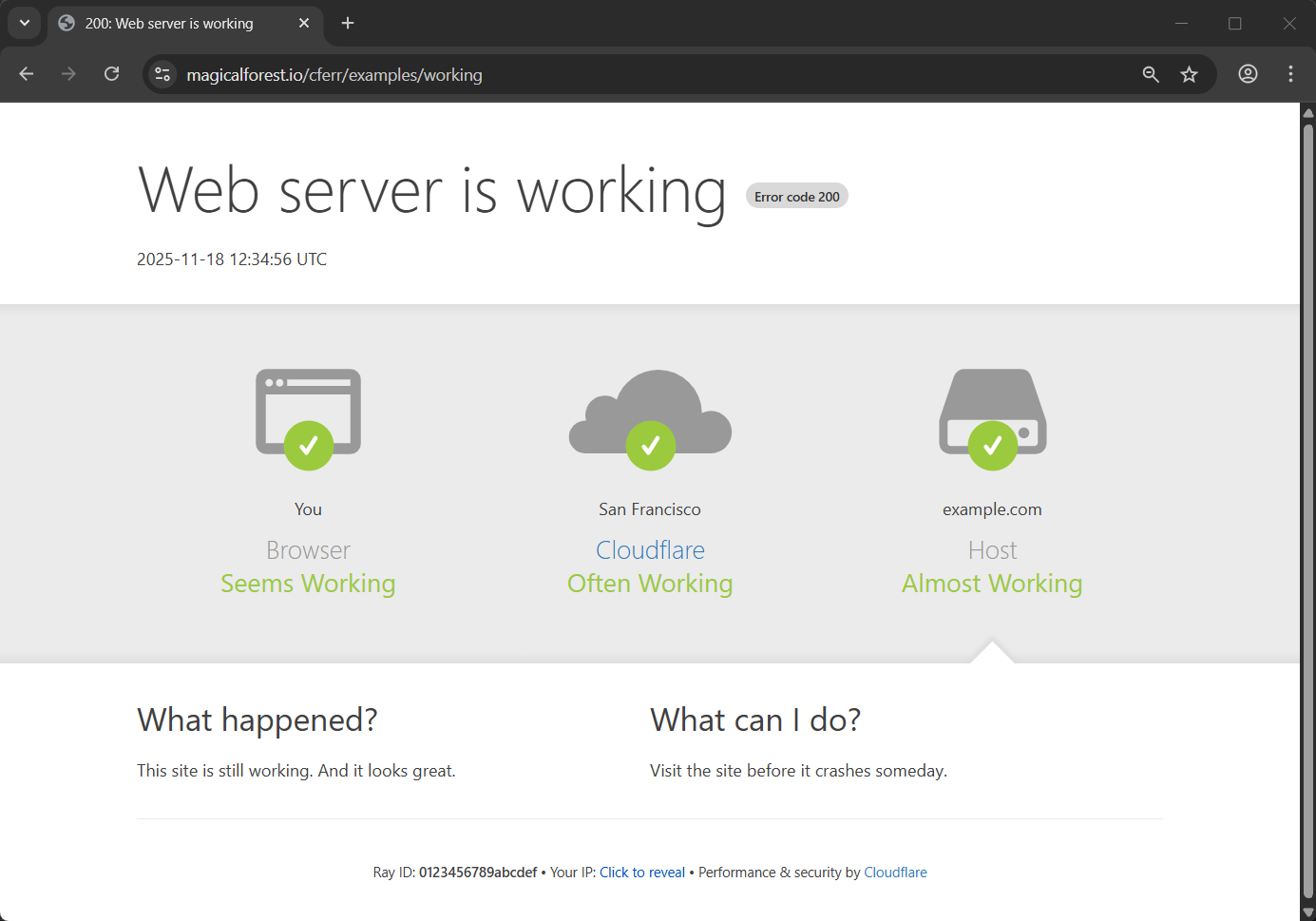
Web server is working
params = {
    "title": "Web server is working",
    "error_code": "200",
    "more_information": {
        "hidden": True,
    },
    "browser_status": {
        "status": "ok",
        "status_text": "Seems Working",
    },
    "cloudflare_status": {
        "status": "ok",
        "status_text": "Often Working",
    },
    "host_status": {
        "status": "ok",
        "location": "example.com",
        "status_text": "Almost Working",
    },
    "error_source": "host",
    "what_happened": "<p>This site is still working. And it looks great.</p>",
    "what_can_i_do": "<p>Visit the site before it crashes someday.</p>",
}
FAQ
💡 How to show real user IP / Cloudflare Ray ID / data center location in the error page so that it looks more realistic?
Ray ID and user IP field in the error page can be set by ray_id and client_ip properties in the params argument passed to the render function. The real Cloudflare Ray ID and the data center location of current request can be extracted from the Cf-Ray request header (e.g. Cf-Ray: 230b030023ae2822-SJC). Detailed description of this header can be found at Cloudflare documentation.
To lookup the city name of the data center corresponding to the three letter code in the header, you can use a location list here
The demo server runs in our website did handle these. Take a look at this file for reference.
🤔 Is putting this on my website totally legal? As it contains trademarked logo/name and it's pretending to be an official one.
Use it at you own risk. There're still chances Cloudflare send you takedown request or take legal actions. But it depends on if you use it properly. It's better to change texts on the page so users know it's a joke.
If you do want to use an error page that pretends to be a Cloudflare one on your production environment, don't forget to fix your server quickly when it goes down so that they won't find that you are faking their error page. (See #4)
See also
cloudflare-error-page-3th.pages.dev
Error page of every HTTP status code (reload to show random pages).
-
React reimplementation of the original page, and can be deployed directly to Cloudflare Pages.
Full Parameter Reference
{
    "html_title": "cloudflare.com | 500: Internal server error",
    "title": "Internal server error",
    "error_code": "500",
    "time": "2025-11-18 12:34:56 UTC",  // Current UTC time will be shown if empty

    // Configuration of "Visit ... for more information"
    "more_information": {
        "hidden": false,
        "text": "cloudflare.com",
        "link": "https://www.cloudflare.com/",
        "for": "more information",
    },

    // Configuration of the Browser/Cloudflare/Host status block
    "browser_status": {
        "status": "ok", // "ok" or "error"
        "location": "You",
        "name": "Browser",
        "status_text": "Working",
        "status_text_color": "#9bca3e",
    },
    "cloudflare_status": {
        "status": "error",
        "location": "Cloud",
        "name": "Cloudflare",
        "status_text": "Error",
        "status_text_color": "#bd2426",
    },
    "host_status": {
        "status": "ok",
        "location": "Website",
        "name": "Host",
        "status_text": "Working",
        "status_text_color": "#9bca3e",
    },
    // Position of the error indicator, valid options are 'browser', 'cloudflare', and 'host'
    "error_source": "host",

    "what_happened": "<p>There is an internal server error on Cloudflare's network.</p>",
    "what_can_i_do": "<p>Please try again in a few minutes.</p>",

    "ray_id": '0123456789abcdef',  // Random hex string will be shown if empty
    "client_ip": '1.1.1.1',

    // Configuration of 'Performance & security by ...' in the footer
    "perf_sec_by": {
        "text": "Cloudflare",
        "link": "https://www.cloudflare.com/",
    },
}
Explore related projects
codecrafters-io/build-your-own-x
Master programming by recreating your favorite technologies from scratch.
560,973 starspublic-apis/public-apis
A collective list of free APIs
497,232 starsmorluto/rea
Reverse engineer anything with agents, from app behavior down to native binaries.
442,848 starsopenclaw/openclaw
The AI that really does things. Any OS. Any Platform. The lobster way. 🦞
394,187 stars