
dominatos/devtoolbox-cheats
dominatos/devtoolbox-cheats has 32 GitHub stars and 2 forks. GitHot measured 0 stars in 24 hours. Last checked 2026-11-15 15:21 UTC. Last push 2026-10-27.
What you can do
- Category Organization - Group cheats by topic with emoji icons
- Live Search - Filter cheats as you type
- Copy to Clipboard - One-click copy (wl-clipboard/xclip)
- Open in Editor - Launch any editor (auto-detected or custom)
Measured star growth
- in 24h
- 0
- in 7 days
- Update delayed
- in 15 days
- Update delayed
- in 1 month
- Update delayed
Net star changes over overlapping periods, not daily totals. Missing measurements are left blank. Stars measure attention, not software quality.
About
Cross-Desktop cheatsheet manager for Linux with native support for GNOME, KDE, XFCE, Windows and more. Access your Markdown command references instantly from your panel or menu.
ProductivityREADME.md
Original
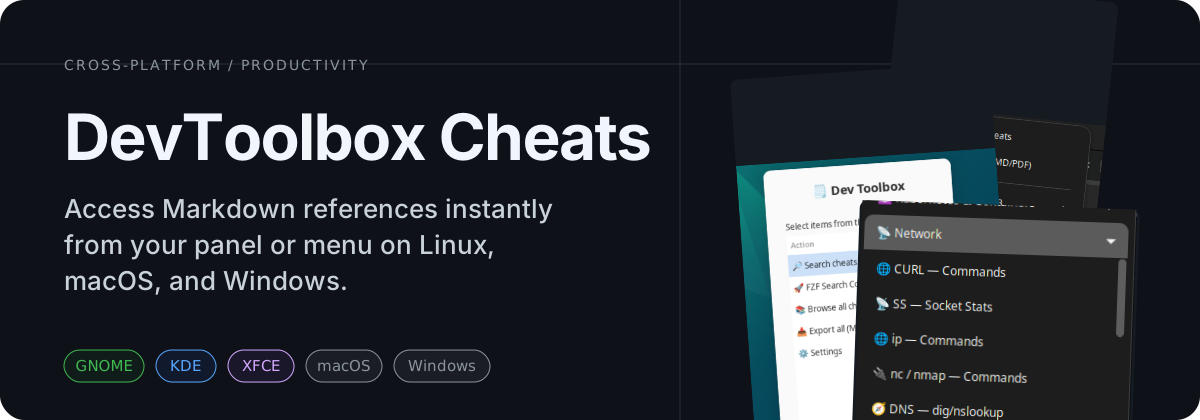




🌐 Online version available at cheats.alteron.net
Example Screenshots
Screenshots from GNOME ARGOS
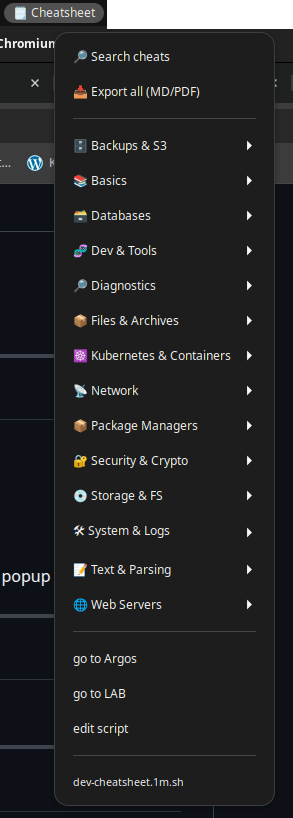
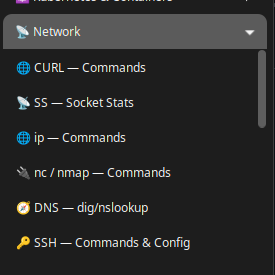
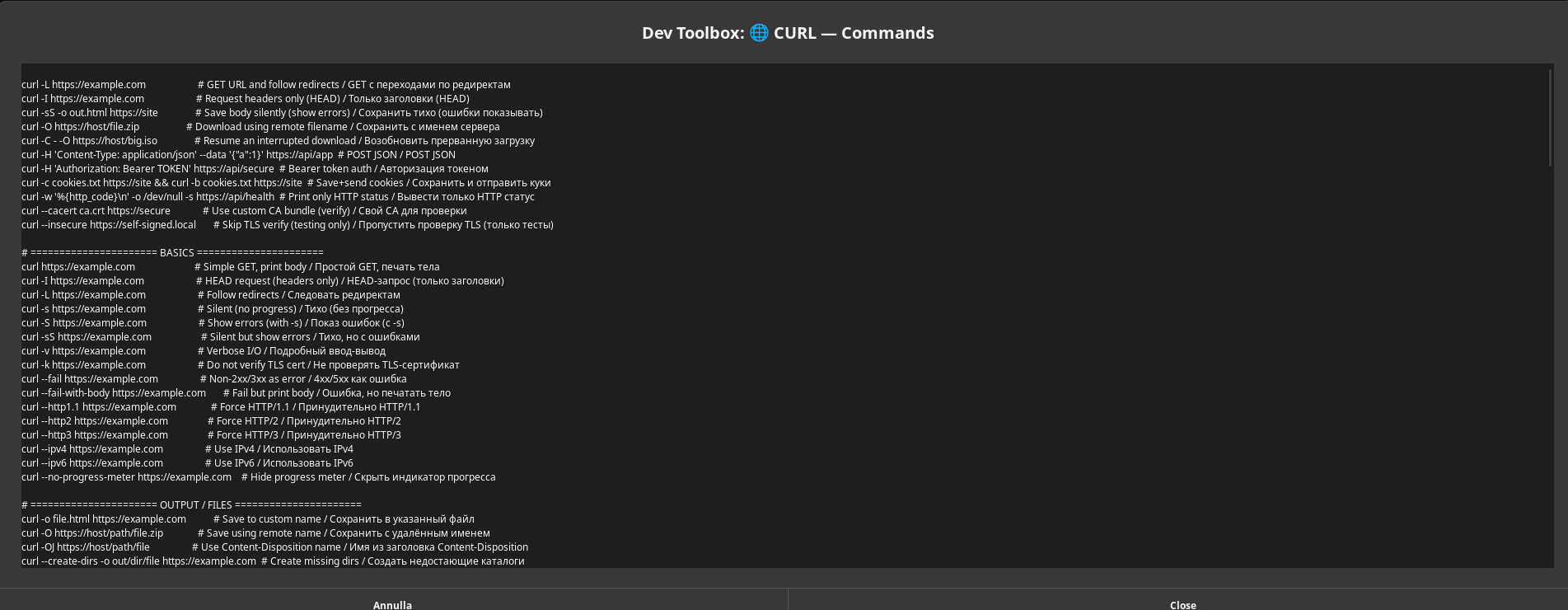
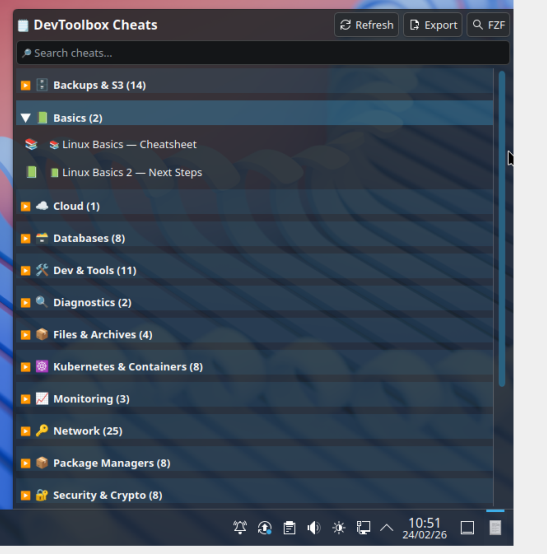
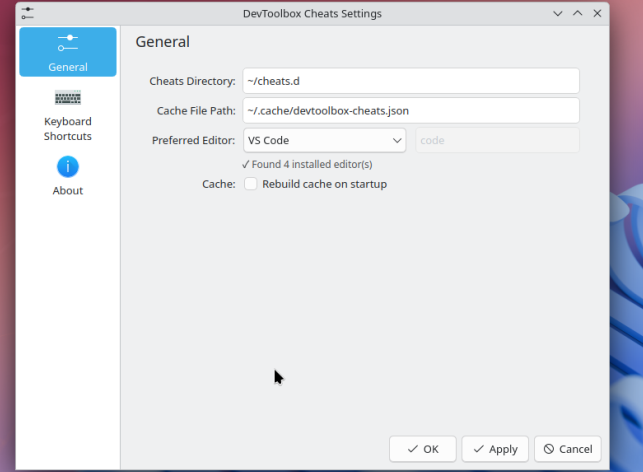
Screenshots from KDE Plasma 5/6
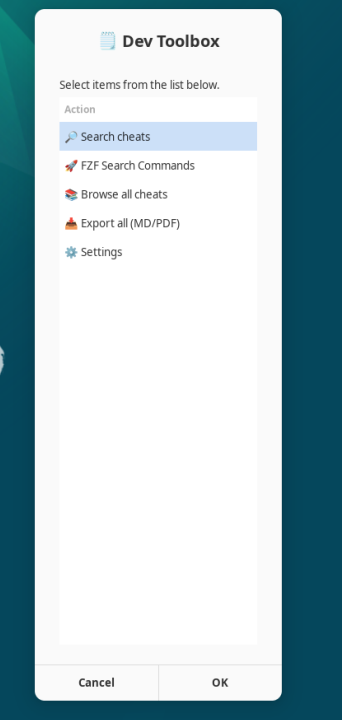
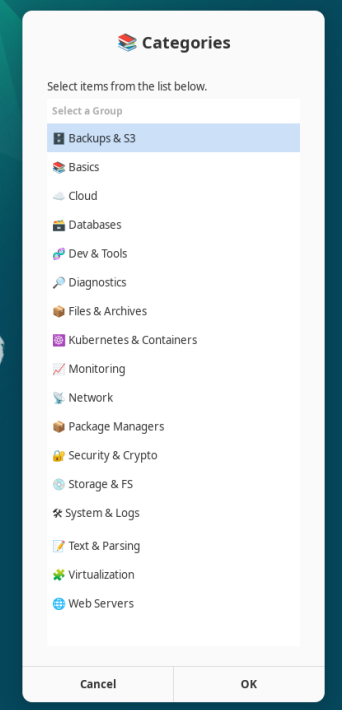
Screenshots from universal Zenity (XFCE, MATE, Cinnamon, LXQt, LXDE, Budgie, Pantheon, Deepin)
Screenshots from macOS (SwiftBar, Beta)
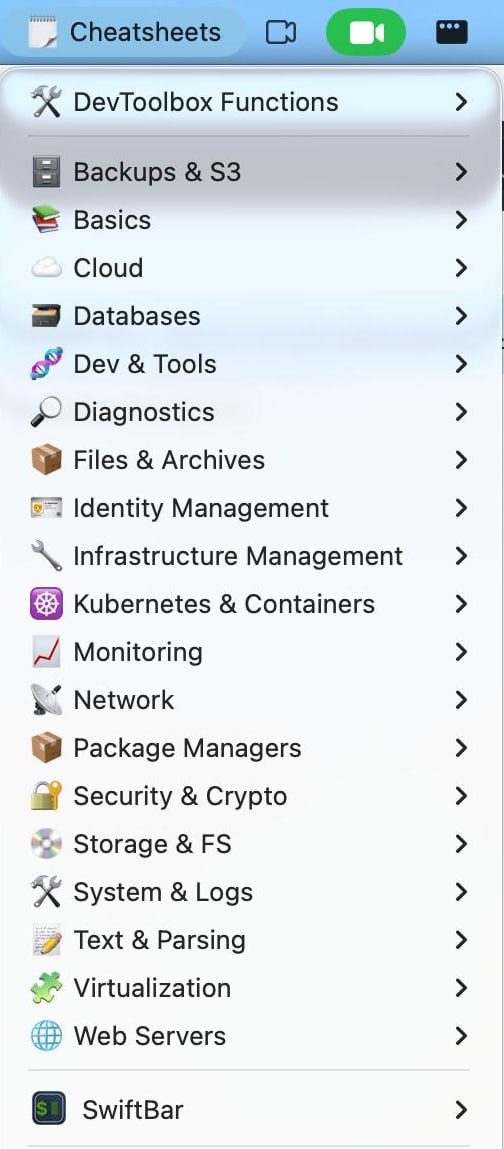
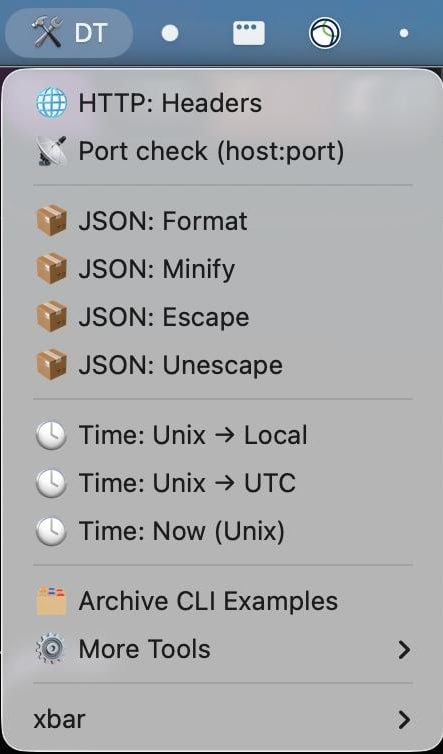
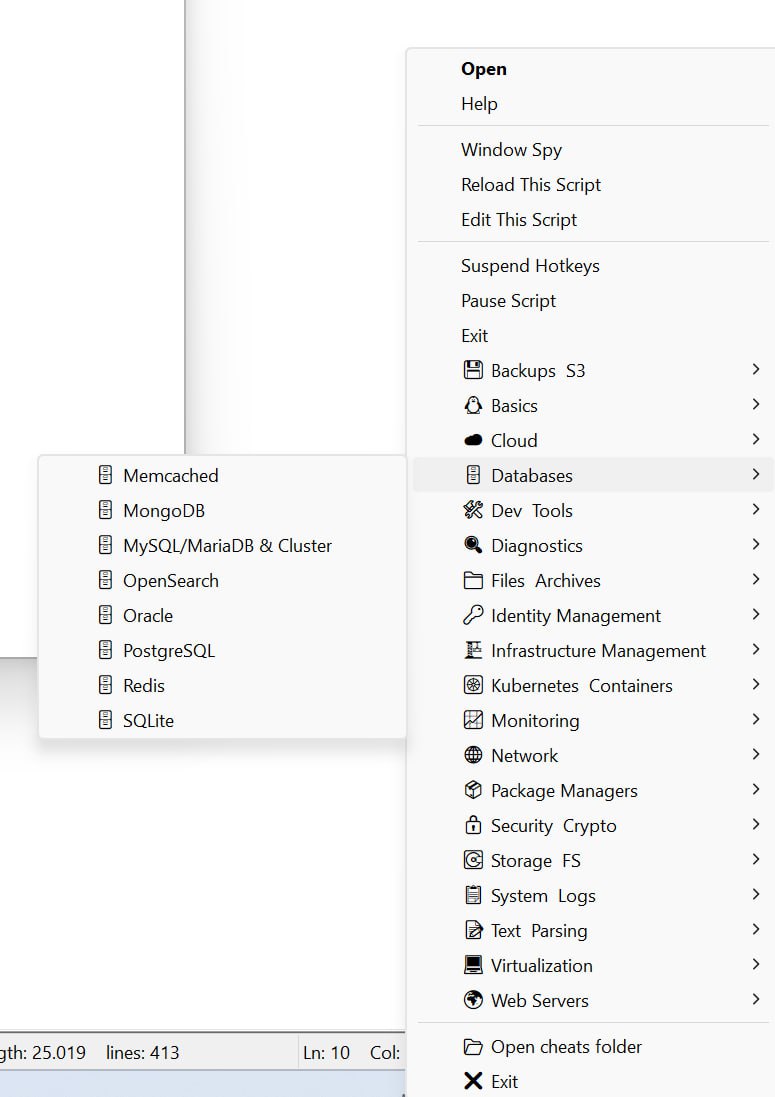
Screenshots from Windows (Native Tray App)
🚀 Quick Install (Linux & macOS)
curl -fsSL https://raw.githubusercontent.com/dominatos/devtoolbox-cheats/main/install.sh -o /tmp/devtoolbox-install.sh && bash /tmp/devtoolbox-install.sh
Overview
[!IMPORTANT] Batteries Included! This repository is not just a menu engine; it comes pre-packed with a comprehensive collection of over 100+ production-ready cheatsheets for sysadmins, DevOps, and developers.
If you like this project, consider supporting me on Buy Me a Coffee ☕️
✨ Features
🌍 Universal Desktop Support
- GNOME - Native Argos panel menu with dropdown
- KDE Plasma 5/6 - Native widget with full UI
- XFCE / MATE / Cinnamon - Dialog-based menus (zenity/yad)
- LXQt / LXDE - Lightweight dialog menus
- Budgie / Pantheon / Deepin - Dialog-based menus with auto-detection
- Tiling WMs - Terminal-based with FZF (i3, sway, bspwm, hyprland)
- macOS (BETA) - SwiftBar menu-bar integration with a standalone macOS updater (View Guide)
- Windows (BETA) - Native tray application via AutoHotkey with full autodiscovery & search support (View Guide)
- Auto-Detection - Detects your DE and adapts automatically
🚀 Performance
- Instant Loading - Smart caching loads 100+ cheats in <100ms
- Fast Category Toggle - Optimized for instant expand/collapse (KDE widget)
- Auto Cache Invalidation - Rebuilds only when files change
🎯 Core Features
- Category Organization - Group cheats by topic with emoji icons
- Live Search - Filter cheats as you type
- Copy to Clipboard - One-click copy (wl-clipboard/xclip)
- Open in Editor - Launch any editor (auto-detected or custom)
- Export - Save individual or all cheats to Markdown/PDF
- FZF Integration - Powerful fuzzy search in terminal with syntax highlighting
- TOC Link Formatting - Multi-platform support to automatically format Markdown TOC anchors for Obsidian or GitHub compatibility.
- TLDR Generation - Compile authored Markdown cheats into external TLDR pages
🔧 Generated Outputs
- Source of Truth - Authored cheats remain in
~/cheats.d - Native TLDR Staging Output - Generated TLDR pages go to
~/cheats.d-gen/tldr/pages/common - External NAVI Path Reserved - Planned NAVI output path is
~/cheats.d-gen/navi - TLDR Cache Install - Generated pages are also copied into
~/.cache/tldr/pages/commonby default - Runtime Isolation - Generated outputs stay outside
CHEATS_DIR, so Argos, KDE, dialog DEs, and terminal mode are unaffected
🛠️ TLDR Generator
# Generate native TLDR pages and merge them into the local tldr cache
./generate-tldr.sh

# Preview without writing files
./generate-tldr.sh --dry-run

# Verify staging output and cache pages are current
./generate-tldr.sh --check

# Skip cache installation and only populate the staging tree
./generate-tldr.sh --no-cache-install

# Replace existing cached TLDR pages instead of merging into them
./generate-tldr.sh --overwrite-existing
After generation, test a page with the regular client:
tldr grep
tldr openssl
🎨 Smart Features (KDE Widget)
- Editor Auto-Detection - Scans for 16+ popular editors
- Editor Dropdown - Quick selection with ✓ marks for installed
- Auto-Fallback - Uses first available editor if preferred missing
- Custom Icons - Emoji or system icons per category/cheat
- Safe Install - No crashes, works in VMs
📦 Installation
Quick Install (Linux & macOS)
The fastest way to install DevToolbox Cheats is via our automated installation script for Linux and macOS (beta):
curl -fsSL https://raw.githubusercontent.com/dominatos/devtoolbox-cheats/main/install.sh -o /tmp/devtoolbox-install.sh && bash /tmp/devtoolbox-install.sh
Choose Your Desktop Environment
macOS (SwiftBar, Beta)
The macOS beta uses SwiftBar for menu-bar integration and a dedicated standalone updater. See the macOS Setup Guide for prerequisites, installation, launchd scheduling, and updater usage.
🪟 Windows (Native Tray App)
DevToolbox Cheats is fully supported on Windows using an automated PowerShell installer and AutoHotkey.
See the dedicated Windows Setup Guide for full details.
Quick Automated Install
- Open PowerShell (do not run as Administrator).
- Navigate to the repository's
Windows-betadirectory:cd "C:\path\to\devtoolbox-cheats\Windows-beta" - Run the installer:
powershell.exe -ExecutionPolicy Bypass -File .\install-devtoolbox.ps1 - Double-click the generated
cheats.exeto run the app.
🟠 GNOME (Argos Extension)
1. Install Argos Extension
From extensions.gnome.org or GitHub
2. Install Dependencies
# Debian/Ubuntu
sudo apt install zenity xclip fzf bat pandoc

# Fedora
sudo dnf install zenity xclip fzf bat pandoc

# Arch
sudo pacman -S zenity xclip fzf bat pandoc
3. Clone and Install
git clone https://github.com/dominatos/devtoolbox-cheats.git
cd devtoolbox-cheats
./install.sh
4. Restart Argos
Disable and re-enable the Argos extension, or press Alt+F2 → r → Enter
Result: 🗒️ icon appears in your top panel with dropdown menu.
(Note: The installer also adds devtools.1m.sh to provide an additional tools menu in your panel).
🔵 KDE Plasma 5/6 (Native Widget)
Quick Install
# Clone repository
git clone https://github.com/dominatos/devtoolbox-cheats.git
cd devtoolbox-cheats

# Run universal installer (auto-detects Plasma version)
./install.sh
The installer will:
- ✅ Install widget to
~/.local/share/plasma/plasmoids/ - ✅ Clear QML cache (ensures config shows correctly)
- ✅ Deploy 133 example cheatsheets to
~/cheats.d - ✅ Install dependencies (fzf, bat, wl-clipboard, fonts)
- ✅ Prompt for safe Plasma Shell restart
After Install
Add to Panel:
- Right-click panel → Add Widgets
- Search "DevToolbox Cheats"
- Drag to panel or desktop
Configure:
- Right-click widget → Configure
- Editor Dropdown - Select from auto-detected editors (marked with ✓)
- Cheats Directory - Default:
~/cheats.d - Cache File - Default:
~/.cache/devtoolbox-cheats.json
Usage:
- Click widget to open
- Click categories to expand
- Click cheat to open in editor
- Use buttons: Copy, Open, Export, FZF Search
🟢 XFCE / MATE / Cinnamon
1. Install Dependencies
# Debian/Ubuntu
sudo apt install zenity xclip fzf bat pandoc

# Fedora
sudo dnf install zenity xclip fzf bat pandoc

# For Wayland sessions, use wl-clipboard instead of xclip
2. Clone Repository
git clone https://github.com/dominatos/devtoolbox-cheats.git
cd devtoolbox-cheats
./install.sh
3. Run Manually or Add to Panel
Run manually:
devtoolbox-cheats-menu menu
Add to panel (XFCE):
- Install Genmon plugin:
sudo apt install xfce4-genmon-plugin - Right-click panel → Add New Items → "Generic Monitor"
- Right-click the new monitor → Properties:
- Label: 🗒️ (or leave blank)
- Command:
devtoolbox-cheats-menu menu - Period (s): 30
Add to panel (MATE):
- Right-click panel → "Add to Panel..."
- Select "Custom Application Launcher" → Add
- Configure properties:
- Type: Application
- Name: DevToolbox Cheats
- Command:
devtoolbox-cheats-menu menu - Icon: 🗒️ (click to select icon)
Add to panel (Cinnamon):
- Right-click the Menu applet → Configure → Menu → "Open the menu editor"
- Select a category (e.g., Accessories) → "New Item"
- Configure properties:
- Name: DevToolbox Cheats
- Command:
devtoolbox-cheats-menu menu - Icon: 🗒️ (click to select icon)
- Save and close the menu editor.
- Open the Cinnamon Menu, search for "DevToolbox Cheats", right-click it, and select "Add to panel".
🟣 LXQt / LXDE (Lightweight)
1. Install Dependencies
# Debian/Ubuntu (LXQt)
sudo apt install zenity xclip fzf bat pandoc

# Lubuntu (LXQt)
sudo apt install zenity xclip fzf bat pandoc

# LXDE
sudo apt install zenity xclip fzf bat pandoc

# Arch
sudo pacman -S zenity xclip fzf bat pandoc
2. Clone Repository
git clone https://github.com/dominatos/devtoolbox-cheats.git
cd devtoolbox-cheats
./install.sh
3. Add to Panel
LXQt Panel:
- Right-click panel → "Manage Widgets" → "Add Widgets"
- Select "Custom command" → Add
- Right-click the Custom command widget → Configure
- Click "+" to add new launcher:
- Name: DevToolbox Cheats
- Command:
devtoolbox-cheats-menu menu - Click command:
devtoolbox-cheats-menu menu - Icon: Click to browse and select a suitable icon (e.g., accessories-text-editor)
- Click OK and close
LXDE Panel (PCManFM):
- Right-click panel → "Add / Remove Panel Items"
- Select "Application Launch Bar" → Add
- Click "Application Launch Bar" → Preferences
- Click "+" to add application:
- Browse to create desktop file or add command:
- Command:
devtoolbox-cheats-menu menu
- Close preferences
Or use desktop shortcut: The installer automatically creates an application shortcut. Open your application launcher and search for DevToolbox Cheats.
Result: Clicking launches dialog menu with all cheats
🟡 Budgie Desktop
1. Install Dependencies
# Ubuntu Budgie / Solus
sudo apt install zenity xclip fzf bat pandoc

# Arch (with Budgie)
sudo pacman -S zenity xclip fzf bat pandoc
3. Install and Launch
git clone https://github.com/dominatos/devtoolbox-cheats.git
cd devtoolbox-cheats
./install.sh
Find in Budgie Menu:
- Open Budgie Menu and type "DevToolbox"
- Drag the shortcut to your Favorites or panel.
- Optional: Right-click any icon in Plank dock → Preferences, and drag from the applications menu.
Result: Clicking launches dialog menu with zenity interface
🔷 Pantheon (elementary OS)
1. Install Dependencies
# elementary OS
sudo apt install zenity xclip fzf bat pandoc
3. Install and Launch
git clone https://github.com/dominatos/devtoolbox-cheats.git
cd devtoolbox-cheats
./install.sh
4. Add to Dock
- Press
Super(Windows key) to open Applications - Search for "DevToolbox Cheats"
- Right-click → "Add to Dock"
Or add to Wingpanel (top panel) using keyboard shortcut:
- Open System Settings → Keyboard → Shortcuts → Custom
- Click "+" to add:
- Name: DevToolbox Cheats
- Command:
devtoolbox-cheats-menu menu - Shortcut: Press keys (e.g.,
Super+C)
Result: Elegant zenity dialog matching elementary OS design language
🔵 Deepin Desktop
1. Install Dependencies
# Deepin OS / UbuntuDDE
sudo apt install zenity xclip fzf bat pandoc

# Arch with Deepin
sudo pacman -S zenity xclip fzf bat pandoc
3. Install and Launch
git clone https://github.com/dominatos/devtoolbox-cheats.git
cd devtoolbox-cheats
./install.sh
4. Add to Dock or Control Center
- Open Launcher (click grid icon in dock)
- Find "DevToolbox Cheats" in Applications
- Right-click → "Send to Desktop" or "Pin to Dock"
Or use Control Center shortcut:
- Open Control Center → Keyboard and Language → Shortcuts → Custom Shortcuts
- Click "+" to add:
- Name: DevToolbox Cheats
- Command:
devtoolbox-cheats-menu menu - Shortcut: Click "None" and press keys (e.g.,
Ctrl+Alt+C)
Result: Beautiful dialog matching Deepin's aesthetic with blur effects
🚀 Cosmic (Pop!_OS - NEW 2025)
1. Install Dependencies
# Pop!_OS with Cosmic
sudo apt install zenity fzf bat pandoc wl-clipboard

# Cosmic uses Wayland by default
3. Install and Launch
git clone https://github.com/dominatos/devtoolbox-cheats.git
cd devtoolbox-cheats
./install.sh
4. Add Keyboard Shortcut
- Open Settings → Keyboard → View and Customize Shortcuts → Custom Shortcuts
- Click "+" to add:
- Name: DevToolbox Cheats
- Command:
devtoolbox-cheats-menu menu - Shortcut: Press keys (e.g.,
Super+C)
Or add to Cosmic Dock:
- Press
Super+/to open Launcher - Type "DevToolbox Cheats"
- Right-click → "Pin to Dock"
Result: Modern Rust-based dialog with native Cosmic integration
⚫ Tiling WMs (i3, sway, bspwm, hyprland)
1. Install Dependencies
# X11 Window Managers (i3, bspwm, awesome)
sudo apt install fzf bat xclip pandoc zenity

# Wayland Compositors (sway, hyprland, river)
sudo apt install fzf bat wl-clipboard pandoc wofi

# Arch (X11)
sudo pacman -S fzf bat xclip pandoc zenity rofi

# Arch (Wayland)
sudo pacman -S fzf bat wl-clipboard pandoc wofi
2. Clone Repository
git clone https://github.com/dominatos/devtoolbox-cheats.git
cd devtoolbox-cheats
./install.sh
3. Add Keybinding
i3 config (~/.config/i3/config):
bindsym $mod+c exec --no-startup-id devtoolbox-cheats-menu menu
sway config (~/.config/sway/config):
bindsym $mod+c exec devtoolbox-cheats-menu menu
bspwm config (~/.config/sxhkd/sxhkdrc):
super + c
    devtoolbox-cheats-menu menu
hyprland config (~/.config/hypr/hyprland.conf):
bind = SUPER, C, exec, devtoolbox-cheats-menu menu
awesome wm config (~/.config/awesome/rc.lua):
awful.key({ modkey }, "c",
    function () awful.spawn.with_shell("devtoolbox-cheats-menu menu") end,
    {description = "open devtoolbox cheats", group = "launcher"})
dwm config (config.h - requires recompile):
static const char *cheatcmd[] = { "/bin/sh", "-c", "devtoolbox-cheats-menu menu", NULL };
{ MODKEY, XK_c, spawn, {.v = cheatcmd } },
4. Add to Launcher Menu (Optional)
rofi (X11):
# Add this alias to ~/.bashrc or ~/.zshrc
alias cheats='devtoolbox-cheats-menu menu'

# Or integrate directly with rofi
bindsym $mod+c exec "rofi -show run -run-command 'bash -c devtoolbox-cheats-menu menu'"
wofi (Wayland):
# Add to sway/hyprland config
bindsym $mod+c exec devtoolbox-cheats-menu menu | wofi --dmenu
Result: Opens dialog menu (if zenity/rofi installed) or FZF terminal search
📋 Requirements
Core (All Platforms)
- Bash 4.0+
find,grep,sed,awk
Desktop-Specific
| Desktop | Required | Optional |
|---|---|---|
| GNOME | Argos extension | zenity, xclip, fzf, bat |
| KDE Plasma | kdialog, wl-clipboard |
fzf, bat, noto-fonts-emoji |
| XFCE/MATE/Cinnamon | zenity, xclip |
fzf, bat |
| LXQt/LXDE | zenity, xclip |
fzf, bat |
| Budgie | zenity, xclip |
fzf, bat |
| Pantheon | zenity, xclip |
fzf, bat |
| Deepin | zenity, xclip |
fzf, bat |
| Cosmic | zenity, wl-clipboard |
fzf, bat |
| Wayland | wl-clipboard |
zenity, fzf, bat |
| X11 | xclip |
zenity, fzf, bat |
| Terminal/Tiling WM | fzf |
bat, zenity, rofi, wofi |
Supported Editors (Auto-Detected)
- VS Code (
code), VS Codium (codium) - Kate (
kate), KWrite (kwrite) - Geany (
geany), Gedit (gedit) - Sublime Text (
subl), Atom (atom) - Vim (
vim), Neovim (nvim) - Emacs (
emacs), Nano (nano) - Mousepad (
mousepad), Pluma (pluma) - XED (
xed), Notepadqq (notepadqq) - Custom - Any command
📚 Creating Cheatsheets
[!TIP] Want to add your own custom cheatsheets, create new categories, or change the default directory? Check out our dedicated guide: 📂 Managing Custom Cheatsheets.
File Structure
Cheatsheets are Markdown files organized in category subfolders under ~/cheats.d/.
Directory structure:
~/cheats.d/
├── databases/
│   ├── mysqlcheatsheet.md
│   ├── mongodbcheatsheet.md
│   ├── postgrescheatsheet.md
│   └── redis_prod_cheatsheet.md
├── kubernetes-containers/
│   ├── docker-basics.md
│   ├── docker-compose.md
│   └── kubernetes-commands.md
├── network/
│   ├── nginx-config.md
│   ├── ssh-tunneling.md
│   └── firewall-basics.md
└── security-crypto/
    ├── ssl-certificates.md
    ├── gpg-basics.md
    └── openssl-commands.md
Each Markdown file contains metadata in the first 80 lines:
Title: MySQL Queries
Group: Databases
Icon: 🗄️
Order: 1

# MySQL Commands

## Basic Queries

```bash
# Show databases
mysql -u root -p -e "SHOW DATABASES;"

# Create database
mysql -u root -p -e "CREATE DATABASE mydb;"
Metadata Fields
- Title: (Required) Display name for the cheat
- Group: (Required) Category name (matches subfolder or custom)
- Icon: (Optional) Emoji (🐳) or system icon name (
docker) - Order: (Optional) Sort order within group (1-999)
Icon Options
Emoji:
Icon: 🐳
Icon: 🔒
Icon: 🌐
System Icons:
Icon: docker
Icon: database-server
Icon: network-server
Result in Menu
Categories are auto-detected from subfolders:
- 🗄️ Databases → MySQL Queries, MongoDB Basics, PostgreSQL, Redis
- 🐳 Kubernetes & Containers → Docker Basics, Docker Compose, Kubernetes Commands
- 🌐 Network → Nginx Config, SSH Tunneling, Firewall Basics
- 🔒 Security & Crypto → SSL Certificates, GPG Basics, OpenSSL Commands
🎯 Usage
GNOME (Argos)
- Click 🗒️ icon in top panel
- Dropdown menu appears with:
- 🛠 DevToolbox Functions (Submenu containing Search, Export, Settings, Layout Switcher, etc.)
- Categories (auto-adaptive layout — see below)
- Click cheat name to copy & view
- Content copied to clipboard automatically
Argos Layout Options:
You can switch layouts directly from the Argos menu (🛠 DevToolbox Functions → 🔄 Layout) without editing any files.
- Standard (default): Categories expand inline as native Argos submenus. Fastest for quick browsing without extra windows.
- Zenity (dialog cheat list): Categories are shown at the root level. Clicking a category opens a popup Zenity dialog listing all cheats for that category. Excellent for small screens or when you prefer isolated windows.
- Drill-down (category→cheats): Clicking a category replaces the entire Argos menu with that category's cheats inline. Click
◀ Backto return to the category list.
Auto-adaptive category layout (Standard Mode):
The menu dynamically calculates how many category groups can safely fit on screen.
- If categories exceed the safe limit (e.g. 19 groups on 1080p), they are grouped under 📂 Browse by Category ▶ to prevent submenus from being clipped off-screen.
- On larger screens (≥1440p with fewer categories) categories are listed directly at the top level.
- On small screens (≤1368×768) the compact flat menu is shown instead.
KDE Widget
- Click widget in panel
- Full window opens with:
- Search field at top
- Category list with counts
- Action buttons: Copy, Open, Export, FZF
- Browse: Click category to expand
- Search: Type in search field
- Copy: Click cheat → copied to clipboard
- Open: Click cheat name → opens in editor
- Export: Button to save all as Markdown
- FZF: Opens terminal fuzzy search
Other DEs (Dialog Menu)
- Launch script (panel button, keybinding, or manually)
- Dialog appears with options:
- 🔎 Search cheats
- 🚀 FZF Search Commands
- 📚 Browse all cheats
- 📥 Export all (MD/PDF)
- 🌐 Online Version
- 🐙 GitHub Repository
- ⚙️ Settings
- ── Categories ──
- 📚 Basics
- 📡 Network
- ... (all your categories listed directly)
- Search: Type query → select from results
- Browse: Select a category directly from the list → select cheat
- FZF: Opens terminal with fuzzy search
Terminal / FZF Search
# Direct FZF search
devtoolbox-cheats-menu fzfSearch

# Or from menu → FZF Search Commands
- Start typing to filter
- Preview shows file with syntax highlighting (bat)
- Press
Enterto open in editor at exact line Escto cancel
⚙️ Configuration
Environment Variables
# Override cheats directory (default: ~/cheats.d)
export CHEATS_DIR=~/my-cheats

# Override cache file
export CHEATS_CACHE=~/.cache/my-cheats.cache

# Force cache rebuild on every run (for debugging)
export CHEATS_REBUILD=1

# Force specific desktop environment
export DEVTOOLBOX_DE=kde     # kde, gnome, xfce, lxqt, budgie, terminal

# Set preferred viewers (space-separated, tried in order)
export CHEAT_VIEWERS="code codium antigravity windsurf subl warp obsidian joplin macdown typora bear iawriter ulysses textmate kate kwrite geany gedit mousepad pluma xed notepadqq zenity"
GNOME Argos: Adaptive Menu Layout
The Argos menu automatically adapts to your screen resolution and number of cheatsheet categories:
| Screen | Categories ≤ threshold | Categories > threshold |
|---|---|---|
| ≥1440p | Expanded (categories at top level) | Collapsed (📂 Browse by Category) |
| 1080p | Expanded | Collapsed (19 groups trigger this) |
| ≤768p | Compact flat menu (no inline categories) | Same |
The threshold is calculated as: (screen_height − 30px panel) / 28px per item × 60%
KDE Widget Settings
Right-click widget → Configure:
- Cheats Directory - Where your
.mdfiles are stored - Cache File - JSON cache for fast loading
- Preferred Editor - Dropdown with auto-detected editors (✓ mark)
- Auto-Rebuild Cache - Force rebuild on widget load
Custom Integration
Add to i3/sway config:
bindsym $mod+c exec devtoolbox-cheats-menu menu
Add to polybar:
[module/devtoolbox]
type = custom/script
exec = echo "🗒️"
click-left = devtoolbox-cheats-menu menu
Add to waybar:
"custom/devtoolbox": {
  "format": "🗒️ {}",
  "on-click": "devtoolbox-cheats-menu menu"
}
🔄 Auto-Updater
Keep your cheatsheets in sync with the latest upstream version using the built-in updater.
Commands
After installation, cheats-updater is available in your PATH (~/.local/bin/):
# Check what changed upstream
cheats-updater check

# Download / update all official cheatsheets
cheats-updater update

# List all available cheatsheets
cheats-updater list
Behavior:
- Only changed files are overwritten (
cmpdiff check) - Custom cheatsheets you add to
~/cheats.d/are never touched - Automatic backup is created before every update at
~/.local/share/devtoolbox-cheats/backups/
Automatic Daily Updates (systemd)
The installer sets up a systemd user timer that runs %h/.local/bin/cheats-updater update once per day.
# Check timer status
systemctl --user status devtoolbox-cheats-updater.timer

# View update logs
journalctl --user -u devtoolbox-cheats-updater.service

# Trigger a manual run via systemd
systemctl --user start devtoolbox-cheats-updater.service

# Disable automatic updates
systemctl --user disable --now devtoolbox-cheats-updater.timer

# Re-enable automatic updates
systemctl --user enable --now devtoolbox-cheats-updater.timer
Manual Setup (if not using install.sh)
# Symlink the executable to PATH
mkdir -p ~/.local/bin
ln -sf ~/devtoolbox-cheats/cheats-updater.sh ~/.local/bin/cheats-updater

# Symlink units and enable timer
mkdir -p ~/.config/systemd/user
ln -sf ~/devtoolbox-cheats/systemd/devtoolbox-cheats-updater.service ~/.config/systemd/user/
ln -sf ~/devtoolbox-cheats/systemd/devtoolbox-cheats-updater.timer   ~/.config/systemd/user/
systemctl --user daemon-reload
systemctl --user enable --now devtoolbox-cheats-updater.timer
Environment Variables
# Override target directory (default: ~/cheats.d)
CHEATS_DIR=/custom/path ./cheats-updater.sh update
🔧 Troubleshooting
GNOME: Icon Not Showing
Cause: Argos not detecting script
Solution:
# Check script name matches pattern
ls ~/.config/argos/*.sh

# Should be: something.30s.sh (30 seconds refresh)

# Restart Argos: disable/enable extension
KDE: Widget Not Showing
Cause: QML cache not cleared
Solution:
# Clear QML cache
rm -rf ~/.cache/plasmashell/qmlcache
rm -rf ~/.cache/plasma-plasmashell/qmlcache
rm -rf ~/.cache/qt6/qmlcache

# Restart Plasma Shell
systemctl --user restart plasma-plasmashell.service
KDE: Config Page Not Showing
Solution: Reinstall with cache clearing
cd kde-widget-plasma6
./install.sh
# Choose option 2 for automatic restart
KDE: Editor Not Found
Behavior: Widget auto-falls back to first available editor
Fix: Right-click → Configure → Select different editor from dropdown
Any DE: Copy Not Working
Cause: Missing clipboard tool
Solution:
# For Wayland (Cosmic, sway, hyprland, Plasma 6 Wayland)
sudo apt install wl-clipboard

# For X11 (most traditional DEs)
sudo apt install xclip
Dialog Menu Not Showing
Cause: Missing dialog tool
Solution:
# Install zenity (universal, works with all DEs)
sudo apt install zenity

# Or kdialog (KDE only)
sudo apt install kdialog

# Or yad (advanced dialogs, more features)
sudo apt install yad
FZF Search Not Working
Cause: Missing fzf or terminal
Solution:
# Install fzf and bat
sudo apt install fzf bat

# Ensure terminal is installed
sudo apt install konsole          # KDE
sudo apt install gnome-terminal   # GNOME
sudo apt install xfce4-terminal   # XFCE
sudo apt install lxterminal       # LXDE/LXQt
sudo apt install mate-terminal    # MATE
sudo apt install io.elementary.terminal  # Pantheon/elementary
sudo apt install deepin-terminal  # Deepin
sudo apt install alacritty        # Cosmic/modern compositors
Budgie/Pantheon/Deepin: Script Not Launching
Cause: Desktop file permissions or path issue
Solution:
# Verify the script is in your PATH and executable
devtoolbox-cheats-menu menu

# Update desktop database
update-desktop-database ~/.local/share/applications
🚀 Performance
Benchmark Results
Test System: 133 cheatsheets, 15 categories
| Operation | Time | Platform |
|---|---|---|
| First Load | ~1-2s | All (builds cache) |
| Cached Load | <100ms | KDE Widget / Script |
| Category Toggle | <10ms | KDE Widget (optimized) |
| Search Filter | <50ms | KDE Widget |
| FZF Search | Instant | Terminal (fzf) |
| Copy to Clipboard | <200ms | All |
Cache System
- Format: TSV index with metadata
- Location:
~/.cache/devtoolbox-cheats.idx(script) or.json(widget) - Invalidation: Auto-detects file changes via mtime
- Rebuild: Only when needed or forced
🛠 Development
Project Structure
devtoolbox-cheats/
├── devtoolbox-cheats.30s.sh    # Universal script (all DEs)
├── devtools.1m.sh              # Argos additional tools menu
├── cheats-updater.sh           # Cheats update manager
├── install.sh                  # Universal installer
├── bump-version.sh             # Version bump utility
├── generate-tldr.sh            # TLDR page generator
├── systemd/                    # Systemd user units
│   ├── devtoolbox-cheats-updater.service
│   └── devtoolbox-cheats-updater.timer
├── kde-widget-plasma6/               # Plasma 6 widget
│   ├── install.sh
│   ├── uninstall.sh
│   └── DevToolboxPlasmoid/
│       ├── contents/ui/
│       │   ├── FullRepresentation.qml    # Main UI
│       │   └── configGeneral.qml         # Config page
│       └── contents/code/
│           ├── indexer.sh                 # Cache builder
│           └── fzf-search.sh              # FZF helper
├── kde-widget-plasma5/               # Plasma 5 widget (same structure)
├── Windows-beta/                     # Windows AutoHotkey implementation
│   ├── cheats.ahk
│   ├── install-devtoolbox.ps1
│   └── README-windows.md
├── cheats.d/                         # Example cheatsheets (133+ files)
│   ├── databases/                    # Category subfolder
│   ├── kubernetes-containers/        # Category subfolder
│   ├── network/                      # Category subfolder
│   └── ...                           # More category subfolders
├── docs/                             # Documentation assets
│   ├── img/                          # Screenshots
│   └── cheats-readme.sh
├── version.txt                       # Current version number
├── CHANGELOG.md                      # Release history
├── README.md
└── LICENSE
Testing
Test Universal Script:
# Force specific DE
DEVTOOLBOX_DE=kde ./devtoolbox-cheats.30s.sh menu
DEVTOOLBOX_DE=gnome ./devtoolbox-cheats.30s.sh
DEVTOOLBOX_DE=lxqt ./devtoolbox-cheats.30s.sh menu
DEVTOOLBOX_DE=terminal ./devtoolbox-cheats.30s.sh menu

# Test FZF search
./devtoolbox-cheats.30s.sh fzfSearch
Test KDE Widget:
cd kde-widget-plasma6
./install.sh

# View logs
journalctl --user -f | grep DevToolbox
Contributing
Pull requests welcome! Please:
- Fork the repository
- Create feature branch:
git checkout -b feature/amazing - Test on your DE
- Commit changes:
git commit -m 'Add amazing feature' - Push to branch:
git push origin feature/amazing - Open Pull Request to
mainbranch
📝 Changelog
Please see CHANGELOG.md for release history.
Included categories
- 📚 Basics
- 📡 Network
- 💿 Storage & FS
- 🗄️ Backups & S3
- 📦 Files & Archives
- 📝 Text & Parsing
- ☸️ Kubernetes & Containers
- 🛠 System & Logs
- 🌐 Web Servers
- 🗃️ Databases
- 📦 Package Managers
- 🔐 Security & Crypto
- 🧬 Dev & Tools
- 🧩 Misc
- 🔎 Diagnostics
- ☁️ Cloud
- 📈 Monitoring
- 🔧 Infrastructure Management
- 🪪 Identity Management
- 🖥️ Virtualization
- 🤖 AI
Included cheats (full list)
This repository includes ready-to-use cheatsheets for popular tools, organized by category:
Backups & S3
- 🗄️ aws-cli — AWS S3 Backups
- 🗄️ azcopy — Azure Blob Storage
- 🗄️ Bareos/Bacula — Enterprise Backup
- 🗄️ BorgBackup — Deduplicating Backups
- 🗄️ Commvault v11 — Enterprise Backup
- 🗄️ Complete Server Clone & Backup Cheatsheet — Linux
- 🗄️ Duplicity — Encrypted Incremental Backups
- 🗄️ gsutil — Google Cloud Storage
- 🗄️ rclone — Remotes/S3
- 🗄️ MinIO — S3 Compatible Storage
- 🗄️ restic — Backups
- 🗄️ Snapshots — LVM/ZFS/Btrfs
- 🗄️ tar + GPG — Classic Encrypted Backups
- 🗄️ Veeam Agent — Linux Backup
- 🗄️ Veritas InfoScale
- 🗄️ SSH Chroot Backup Server
Basics
Cloud
Databases
- 📊 ClickHouse — Columnar OLAP
- 🗃️ Memcached — Sysadmin Cheatsheet
- 🍃 MongoDB — Cheatsheet
- 🗃️ MySQL/MariaDB
- 🔎 OpenSearch — Cheatsheet
- 🗃️ Oracle Database
- 🐬 Percona XtraDB Cluster (PXC)
- 🗃️ PostgreSQL — psql/pg_dump
- 🔀 ProxySQL — MySQL Proxy
- 🗃️ Redis — Production Cheatsheet
- 🗃️ SQLite
- 🐬 MySQL Galera Cluster
- 🗄️ PMM — Disaster Recovery
- 📊 ClickHouse — Columnar OLAP
- 🔀 PgBouncer — PostgreSQL Pooler
Dev & Tools
- 🛠️ Ansible
- 🛠️ Apache Kafka
- 🛠️ Apache Zookeeper
- 🛠️ Build — Make/CMake
- 🧬 Git — Advanced
- 🧬 Git — Basics
- 🛠️ Jenkins CI/CD
- 🟢 Node — nvm/npm/yarn
- 🐍 Python — venv/pip/pipx
- 🛠️ Terraform
- 🧷 tmux — Commands
- 🔍 Meld (Merge & Diff)
- 🛠️ Debezium CDC — Sysadmin
Diagnostics
Files & Archives
- 🔁 diff / patch — File Comparison
- 📦 TAR — Archive Commands
- 📦 TAR + Zstandard (zstd) — Compression
- 📦 ZIP / 7z / ZSTD — Archive Tools
Kubernetes & Containers
- 🐳 Docker — Commands
- ⛏ Helm — Commands
- 🎛 k9s — Hotkeys
- ☸️ KUBECTL — Commands
- ☸️ KUBECTL — JSONPath
- ☸️ Kustomize — kustomization.yaml
- ☸️ OpenShift (OCP)
- 🫙 Podman / nerdctl — Commands
- 🐳 containerd — Container Runtime
- ⚙️ runc — Container Runtime CLI
- 🔄 Argo CD — GitOps Delivery
- 🌿 Flux — GitOps Toolkit
- 🗄️ etcd — Distributed KV Store
Infrastructure Management
Identity Management
- 🪪 adcli (Active Directory CLI)
- 🪪 Keycloak — Identity Management
- 📇 OpenLDAP — LDAP Directory
- 🪪 FreeIPA — Integrated Identity
- 🪪 SSSD — System Security Services
Monitoring
- 🧠 Cerebro (Elasticsearch Admin)
- 📈 CheckMK
- ✅ Checkmk Agent
- 📊 Filebeat
- 📈 Nagios Core
- 📡 SNMPD
- 📈 Telegraf
- 📈 VictoriaMetrics
- 📈 Zabbix Server
- 📈 Prometheus — Metrics & PromQL
- 📊 Grafana — Dashboards
- 🔍 Loki — Log Aggregation
- 📤 Promtail — Log Shipper
- 📊 Vector — Data Pipeline
Network
- 🔁 autossh — Resilient tunnels
- 🌐 CURL — Commands
- 🧭 DNS — dig/nslookup
- 🚓 Fail2Ban — Commands
- 🔥 firewalld — Commands
- 🌐 ip — Commands
- 🔥 iptables — Commands
- 🔁 iptables → nftables — Mapping
- 🔌 nc / nmap — Commands
- 🛰️ Network diag — mtr/traceroute/iperf3
- 📡 Network Backend Detection
- 🌐 nmcli — NetworkManager CLI
- 🌐 NetworkManager — Commands
- 🌐 Netplan — Configuration
- 🌐 systemd-networkd — Configuration
- 🌐 VPN Plugins — NetworkManager
- 🕸 nftables — Commands
- resolvectl — DNS/Network
- RSYNC — Commands
- SCP — Commands
- 📡 SS — Socket Stats
- 🔑 SSH / VPN / Port Forwarding
- SSH — Commands & Config
- 🧱 UFW — Commands
- WireGuard — Quickstart
- 🌐 OpenVPN — VPN Tunnel
- 📂 vsftpd — FTP Server
Package Managers
- 📦 Package Managers
- 📦 APT — Debian/Ubuntu
- 📦 DNF — RHEL/Fedora
- 🟢 Pacman — Arch Linux
- 🟢 Zypper — OpenSUSE
- 📦 Snap — Universal Packages
- 📦 Flatpak — Application Sandboxes
- 📦 AppImage — Portable Apps
Security & Crypto
- 🛡️ AIDE — File Integrity Checker
- 🔬 Cerbero Suite — File Analysis & RE
- 🛡️ CrowdSec — Intrusion Prevention
- 🔐 GPG / age — Encryption
- 🔐 htpasswd — Basic Auth
- 🔐 OpenSSL — Commands
- 🔐 Git Secret Leak Detection
- 🛡️ Polkit (PolicyKit) — Privilege Management
- 🔑 SSH Keys & Access Management
- 🔐 OpenSSL — CSR with SAN
- 🔐 pass — Password Store
- 🍯 SSH Honeypot & CrowdSec
- 🔐 Certbot — Let's Encrypt
- 🔐 sudoers / PAM — Privilege & Auth
- 🛡️ auditd — Linux Audit Framework
Storage & FS
- 💿 ACL — Access Control Lists
- 💿 Chroot — System Recovery
- 💿 Grow Disk (Cloud EXT4/XFS)
- 💿 LVM — Basics
- 📁 NFS — Network File System
- 💿 Partition & Mount
- 💿 SMART & mdadm RAID
- 🔒 LUKS — Full-Disk Encryption
- 📁 Samba — SMB/CIFS Shares
- 💾 ZFS — Advanced Filesystem
- 🐙 Ceph — Distributed Storage
- 📦 GlusterFS — Scale-out FS
System & Logs
- ⏰ cron / at — Commands
- 📅 date / TZ — Commands
- 💽 du/df/lsof/ps — Commands
- 📜 Ionice / Nice — Priority
- 📜 journalctl — Basics
- 📜 journalctl — Commands
- 📜 Kibana
- 📜 Kernel-panic — RHEL/CentOS
- 🌀 logrotate — Basics
- � VPS Optimization — Ubuntu/Debian
- �🛡️ SELinux / AppArmor — Basic diag
- 🛠 systemctl — Commands
- 🕰️ systemd timers — Basics
- 🧩 systemd unit — template
- ⚙️ sysctl — Kernel Parameters
- 💾 Swap — Management
- ⏰ chrony / NTP — Time Sync
- 📊 systemd-analyze — Boot Analysis
- 📦 supervisord — Process Manager
- ⚡ runit — Init & Process Manager
Text & Parsing
- 🦾 AWK — Commands
- 🔪 cut/sort/uniq — Commands
- 🗃 FIND — Commands
- ⚡ fzf — Fuzzy Finder
- 🔎 GREP — Commands
- 🧩 JQ — Commands
- 🌀 Bash — Loops
- ⚡ modern-cli — ripgrep / fd / bat / eza
- ✂️ SED — Commands
- 🌳 Tree — Cheatsheet
- 🔤 tr/head/tail/watch — Commands
- ✍️ vim — Quickstart
- 🧪 yq — YAML processor
Web Servers
- 🪶 Apache HTTPD — Cheatsheet
- 🔒 Caddy — Cheatsheet
- 🌀 HAProxy — Cheatsheet
- 🌐 Nginx — Cheatsheet
- 🌐 WebLogic Server
- 🐱 Tomcat — Cheatsheet
- 🦅 WildFly (JBoss)
- 🧭 Traefik — Reverse Proxy
- 🌀 Varnish — HTTP Cache
- 🐘 PHP-FPM — Process Manager
Virtualization
AI
- 🤖 Ollama — Local LLM Runtime
- 🧬 OpenCode — AI Coding Agent
- 🚀 vLLM — LLM Serving Engine
- ⚡ llama.cpp — Inference Engine
- 🧩 LocalAI — Multi-modal AI Engine
- 🌐 Open WebUI — Self-hosted AI Chat
- 🚪 LiteLLM — AI Gateway
- 🖥️ NVIDIA Container Toolkit
📄 License
MIT License - See LICENSE file
🙏 Credits
- Developer: Sviatoslav (@dominatos)
- Inspired by: DevHints, tldr, cheat.sh, Argos
- Icons: Noto Color Emoji
- Tested on: GNOME, KDE Plasma, XFCE, MATE, Cinnamon, LXQt, Budgie, Pantheon, i3, sway
🔗 Links
- Repository: https://github.com/dominatos/devtoolbox-cheats
- Issues: https://github.com/dominatos/devtoolbox-cheats/issues
- Releases: https://github.com/dominatos/devtoolbox-cheats/releases
- Argos Extension: https://github.com/p-e-w/argos
⭐ Support
If you find this useful:
- ⭐ Star the repository
- 🐛 Report bugs via Issues
- 💡 Suggest features
- 🍴 Fork and contribute
- 💬 Share with the Linux community
If you like this project, consider supporting me on Buy Me a Coffee ☕️
Made with ❤️ for the Linux community