
dmuth/IsSeptaFcked
dmuth/IsSeptaFcked has 65 GitHub stars and 10 forks. Star changes are not measured yet. Last checked 2026-11-18 06:54 UTC. Last push 2026-11-15.
Measured star growth
- in 24h
- Update delayed
- in 7 days
- Collecting history
- in 15 days
- Collecting history
- in 1 month
- Collecting history
Net star changes over overlapping periods, not daily totals. Missing measurements are left blank. Stars measure attention, not software quality.
About
Real-time status for Philadelphia Regional Rail
Developer ToolsREADME.md
OriginalWhat is this?
This is the code repository for the IsSEPTAFcked.com Or, if you are a regular commuter on SEPTA: IsSEPTAFucked.com
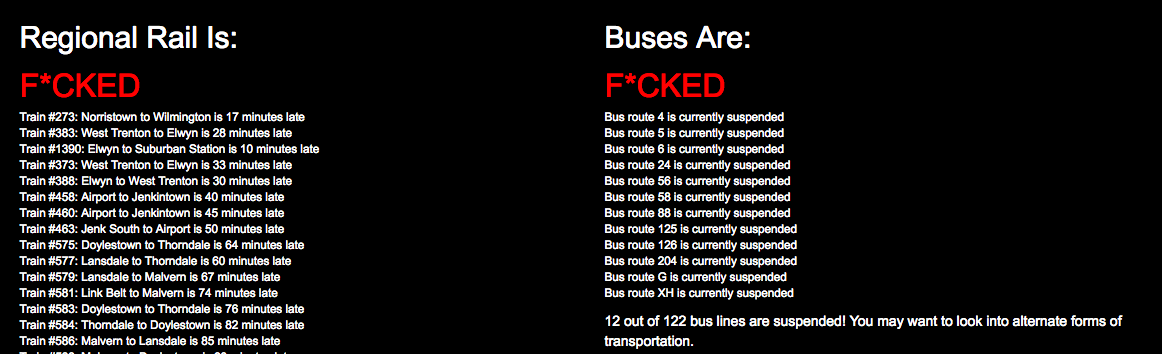
Screenshot:
Why the profanity?
This, and many more questions are answered in the FAQ: http://www.isseptafucked.com/faq
How does it work?
Once every minute, it makes an API request for SEPTA's Regional Rail trains.
It then esitmates "fuckedness" as follows:
- All trains < 10 minutes late: Not Fucked
- 1 or more trains >= 10 minutes late and < 30 minutes late: A Little Fucked
- 1 or more trains >= 30 minutes late: Fucked
If you have any questions, feel free to reach out to me. I can be reached here on GitHub or through the many social networks I am on: http://www.dmuth.org/contact
Media Coverage
- New Web App Tells You When SEPTA Is F#$%ed
- Now more timely than ever: Is SEPTA F*cked
- That snow storm sent SEPTA trains to new ‘Turbo F*cked’ status
- The evolution of Doug Muth’s irreverent SEPTA delay tracker
Awards
Never thought I would win an award for profanity, Yet here we are. IsSeptaFucked won the "Best Side Prject" award in the NET/WORK Philly 2017 awards.
Architecture Overview
For fellow nerds out there, here's a brief rundown on how the various node.js modules are laid out:
views/- Jade templates for public facing pages.public/- CSS and the site's robots.txtnode_modules/- Modules installed with npm.lib/logger.mjs- Handles custom logging in Express. Heroku uses proxies, and I would like to log the IP that incoming requests are forwarded for.lib/septa/rr/api.mjs- Module that actually connects to SEPTA's Regional Rail API, and translates their data into something we can actually use.lib/septa/rr/main.mjs- The main function in here is called at Express boot time, and it is responsible for calling SEPTA's API once a minute. It is also responsible for determing the level of "fuckedness" of Regional Rail.lib/septa/rr/text.mjs- Create messages based on the lateness data.lib/septa/bus/api.mjs- Module that actually connects to SEPTA's bus API, and translates their data into something we can actually use.lib/septa/bus/main.mjs- The main function in here is called at Express boot time, and it is responsible for calling SEPTA's bus API once every 5 minutes. It is also responsible for determing the level of "fuckedness" of Regional Rail.lib/septa/bus/text.mjs- Create messages based on the lateness data.
lib/sfw.mjs- Makes the determination if we are running under the SFW domain, and does filtering of strings.routes/- Each file in here corresponds to the same named URI, and handles requests to that URI.
Development
In Docker Compose
docker-compose build && docker-compose up
Now, go to http://localhost:5000/
In Docker
./bin/docker-build
Now, go to http://localhost:5000/
The reason this script exists is to wrap some of the underlying complexity with the build process.
In bash in Docker
./bin/docker-build bash

# Spin up the webserver on port 5000
cd /mnt && npm start
Now, go to http://localhost:5000/
The Manual Way
- Run
npm startto spin up the webserver on port 5000. - http://localhost:5000
Testing
Testing can be done by setting these environment variables to force different kinds of behavior:
- Regional Rail:
SEPTA_RR_API_STATUS- Set the HTTP status code of the SEPTA Regional Rail API fetchSEPTA_RR_BAD_JSON- Fake broken JSON from SEPTA Regional Rail APISEPTA_RR_API_LATE- Starting at 0, increment each train's late time by this value.SEPTA_RR_API_SECS- How often to fetch from SEPTA's Regional Rail APISEPTA_RR_API_AGE_CHECK_SECS- How often to check the age of the RR dataSEPTA_RR_API_AGE_MAX_SECS- Max possible age of RR data. If exceeded, SEPTA's API is called again.SEPTA_RR_TEXT_AGE_MAX_SECS- Max possible age of RR data in the text display portion. If exceeded, the output changes.SEPTA_RR_NO_DATA_FOUND- Set to return no RR train dataSEPTA_RR_DEBUG- Set to print debug info on the CLI
- Bus:
SEPTA_BUS_API_STATUS- Set the HTTP status code of the SEPTA Regional Rail API fetchSEPTA_BUS_BAD_JSON- Fake broken JSON from SEPTA Regional Rail APISEPTA_BUS_API_UNKNOWN- Make bus statuses be "unknown"SEPTA_BUS_API_LATE_CHANGE- 1 in N chance of suspending a busSEPTA_BUS_API_SECS- How often to fetch from SEPTA's Bus APISEPTA_BUS_API_AGE_CHECK_SECS- How often to check the age of the Bus dataSEPTA_BUS_API_AGE_MAX_SECS- Max possible age of Bus data. If exceeded, SEPTA's API is called again.SEPTA_BUS_TEXT_AGE_MAX_SECS- Max possible age of Bus data in the text display portion. If exceeded, the output changes.SEPTA_BUS_NO_DATA_FOUND- Set to return no Bus dataSEPTA_BUS_DEBUG- Set to print debug info on the CLI
- Website:
SEPTA_SITE_SFW- Set for the SFW site
Deployment in Fly.io
# Deploy the app.  This will set the Git SHA1 and Build Time variables
./bin/fly-deploy

# Check the status of the app
flyctl status

# Watch the app log in real-time
flyctl logs

# Open the website in the browser
flyctl apps open

# List IPs
flyctl ips list
Additional troubleshhoting can be found at https://fly.io/docs/getting-started/troubleshooting/.
TODO
- Express 4
- Proper testing