
dmarcotte/easy-move-resize
dmarcotte/easy-move-resize has 1,347 GitHub stars and 102 forks. GitHot measured 0 stars in 24 hours. Last checked 2026-11-07 07:28 UTC. Last push 2026-05-11.
Adds "modifier key + mouse drag" move and resize to OSX
Measured star growth
- in 24h
- 0
- in 7 days
- Collecting history
- in 15 days
- Collecting history
- in 1 month
- Collecting history
Net star changes over overlapping periods, not daily totals. Missing measurements are left blank. Stars measure attention, not software quality.
README.md
Original Easy Move+Resize
Adds easy modifier key + mouse drag move and resize to OSX
Usage
Easy Move+Resize is based on behavior found in many X11/Linux window managers
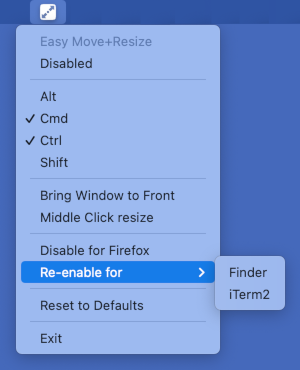
Cmd + Ctrl + Left Mouseanywhere inside a window, then drag to move.Cmd + Ctrl + Right Mouseanywhere inside a window, then drag to resize,- The resize direction is determined by which region of the window is clicked. i.e. a right-click in roughly the top-left corner of a window will act as if you grabbed the top left corner, whereas a right-click in roughly the top-center of a window will act as if you grabbed the top of the window.
- To use the middle mouse button as the resize modifier, select the
Middle Click resizemenu item.
- The choice of modifier keys to hold down to activate dragging or resizing can be customized by toggling the appropriate modifier key name in the application icon menu.
- Click the menu item to toggle it.
- All keys toggled to selected must be held down for activation.
- Behavior can be disabled by toggling the
Disableditem in the application icon menu. - If you are dragging or resizing a window in the background and want it to rise to the top, select the
Bring Window to Frontmenu item. - To restore application settings, select the
Reset to Defaultsmenu item. - To disable for a particular app, select
Disable for ...from the menu after using Easy Move+Resize on that app.
Installation
brew
brew install --cask easy-move-plus-resize
manually
- Grab the latest version from the Releases page
- Unzip and run!
troubleshooting
- If MacOS refuses to launch Easy Move+Resize because it "cannot check it for malicious software": see here
- If Accessibility permission for Easy Move+Resize is not working: see here
Contributing
Contributions welcome!
Release process
Automated (GitHub Actions)
Releases can be built, signed, notarized, and published automatically via the release workflow.
Prerequisites — the following secrets must be configured in the repository's GitHub Actions settings:
APPLE_ID— Apple ID email used for notarizationAPPLE_TEAM_ID— Apple Developer Team IDAPPLE_APP_PASSWORD— app-specific password for the Apple IDDEVELOPER_ID_APPLICATION— full name of the Developer ID Application signing identity (e.g.Developer ID Application: Your Name (TEAMID))DEVELOPER_ID_CERT_P12_BASE64— base64-encoded.p12export of the Developer ID Application certificateDEVELOPER_ID_CERT_PASSWORD— password for the.p12file
Steps:
- Choose a new version number following semantic versioning guidelines
- Update the version number in
easy-move-resize/easy-move-resize-Info.plist, (example) - Commit and push the version number update
git tag <chosen version number>git push origin --tags- On GitHub, go to the Actions tab, select the release workflow, and click Run workflow
- Enter the release version (e.g.
v1.2.3), toggle Mark as pre-release if applicable, then click Run workflow - The workflow validates the repo, builds the
.appwithxcodebuild, signs/notarizes/staples it, creates the git tag, and publishes a GitHub Release with the signed zip attached - Once the workflow completes, the new release will appear on the Releases page
Manual (backup)
- Choose a new version number following semantic versioning guidelines
- Update the version number in
easy-move-resize/easy-move-resize-Info.plist, (example) - Commit and push the version number update
git tag <chosen version number>git push origin --tags- In XCode, choose
Product->Archive - Click "Distribute App", select "Custom...", "Next", then "Copy App", "Next"
- In a shell, navigate to the directory created, then:
zip -r Easy.Move+Resize.app.zip Easy\ Move+Resize.app- Upload the resulting zip file to the appropriate tag on the Releases page
Explore related projects
affaan-m/ECC
The agent harness performance optimization system. Skills, instincts, memory, security, and research-first development for Claude Code, Codex, Opencode, Cursor and beyond.
298,876 starsNousResearch/hermes-agent
The agent that grows with you
261,362 starsmultica-ai/andrej-karpathy-skills
A single CLAUDE.md file to improve Claude Code behavior, derived from Andrej Karpathy's observations on LLM coding pitfalls.
230,462 starsfirecrawl/firecrawl
Supercharge your AI agents with data from the web and beyond. Building the library for superintelligence. 🔥
199,303 stars