
dimtpap/obs-pipewire-audio-capture
dimtpap/obs-pipewire-audio-capture has 850 GitHub stars and 25 forks. GitHot measured +3 stars in 24 hours and +11 in 7 days. Last checked 2026-11-11 17:05 UTC. Last push 2026-10-30.
Audio device and application capture for OBS Studio using PipeWire
Measured star growth
- in 24h
- +3
- in 7 days
- +11
- in 15 days
- Collecting history
- in 1 month
- Collecting history
Net star changes over overlapping periods, not daily totals. Missing measurements are left blank. Stars measure attention, not software quality.
README.md
OriginalAudio device and application capture for OBS Studio using PipeWire
This plugin adds 3 sources for capturing audio outputs, inputs and applications using PipeWire

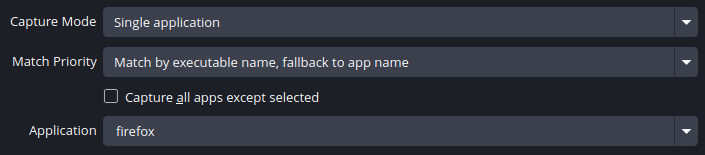
Usage
Requirements
- OBS Studio 28.0 or later
- WirePlumber
- PipeWire 0.3.62 or later (#17, PipeWire#2874)
For the plugin to be able to capture applications, PipeWire should be set up to handle audio on your system.
For most applications, the pipewire-pulse compatibility layer should be enough, but there are also
pipewire-jack and pipewire-alsa. If applications aren't showing up in the plugin, your system may be
missing one of those components.
Installation
Flatpak
If OBS Studio is installed as a Flatpak, install the plugin from Flathub. Use your software center or the following command
flatpak install flathub com.obsproject.Studio.Plugin.PipeWireAudioCapture
If the sources show no devices or apps, run flatpak override --filesystem=xdg-run/pipewire-0 com.obsproject.Studio and restart OBS Studio.
Others
Follow the appropriate instructions for the version of OBS Studio you useVersion 33 and newer
- Get the
linux-pipewire-audio-(version)-33.tar.gzarchive from the latest release - Extract it in
~/.local/share/obs-studio/plugins(create the folders if they don't exist)
Your files should look like this
.../obs-studio/plugins
├── linux-pipewire-audio
│   ├── linux-pipewire-audio.so
│   └── data
│       └── locale
│           ...
Version 28 to 32
- Get the
linux-pipewire-audio-(version).tar.gzarchive from the latest release - In OBS Studio, go to File, then click Show Settings Folder
- In the folder that opens, create a folder called
pluginsif it doesn't already exist - Extract the archive you downloaded in the
pluginsfolder - Restart OBS Studio
Your files should look like this
.../obs-studio/plugins
├── linux-pipewire-audio
│   ├── bin
│   │   └── 64bit
│   │       └── linux-pipewire-audio.so
│   └── data
│       └── locale
│           ...
Building (for development)
Ensure you have CMake, PipeWire and OBS Studio/libobs development packages.
[!IMPORTANT] If building for OBS versions older than 33, pass
-DLEGACY=ONwhen configuring CMake.
Then in the project's root, run
cmake -B build -DCMAKE_INSTALL_PREFIX="/usr" -DCMAKE_BUILD_TYPE=RelWithDebInfo #-DLEGACY=ON
cmake --build build
# To install it system-wide:
cmake --install build
Inclusion in upstream OBS Studio
This plugin is currently in the process of being worked on to merge into upstream OBS Studio. See https://github.com/obsproject/obs-studio/pull/6207
Explore related projects
ytdl-org/youtube-dl
Command-line program to download videos from YouTube.com and other video sites
141,527 starsexcalidraw/excalidraw
Virtual whiteboard for sketching hand-drawn like diagrams
135,492 starsgodotengine/godot
Godot Engine – Multi-platform 2D and 3D game engine
119,942 starsmrdoob/three.js
JavaScript 3D Library.
118,122 stars