
digitalsamba/claude-code-video-toolkit
digitalsamba/claude-code-video-toolkit has 2,452 GitHub stars and 422 forks. GitHot measured +11 stars in 24 hours. Last checked 2026-11-06 00:08 UTC. Last push 2026-11-02.
AI-native video production toolkit for Claude Code
Measured star growth
- in 24h
- +11
- in 7 days
- Update delayed
- in 15 days
- Update delayed
- in 1 month
- Update delayed
Net star changes over overlapping periods, not daily totals. Missing measurements are left blank. Stars measure attention, not software quality.
README.md
Originalclaude-code-video-toolkit




Tell Claude Code what video you want — it writes the script, generates the voiceover, music, and visuals, and renders the MP4. An AI-native video production workspace: the skills, commands, templates, and tools your AI agent needs to take a video from concept to final render, on open-source models that cost cents (voiceover ~$0.01, AI video clips ~$0.23).
See What It Makes
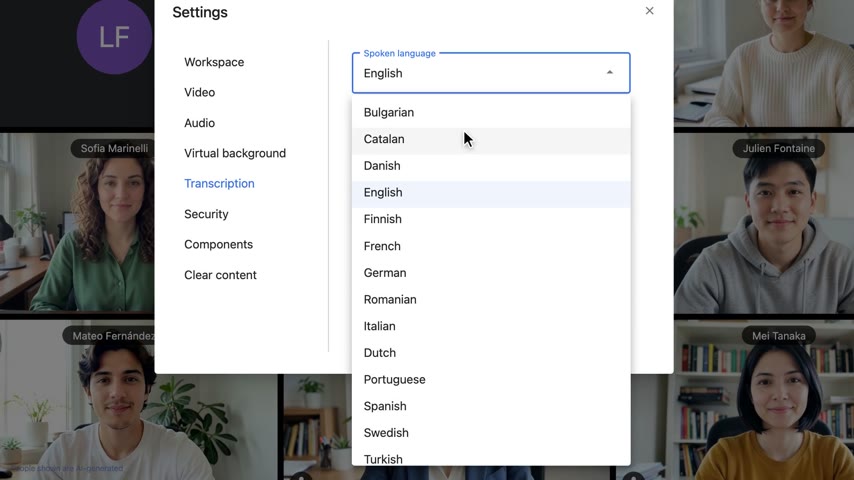
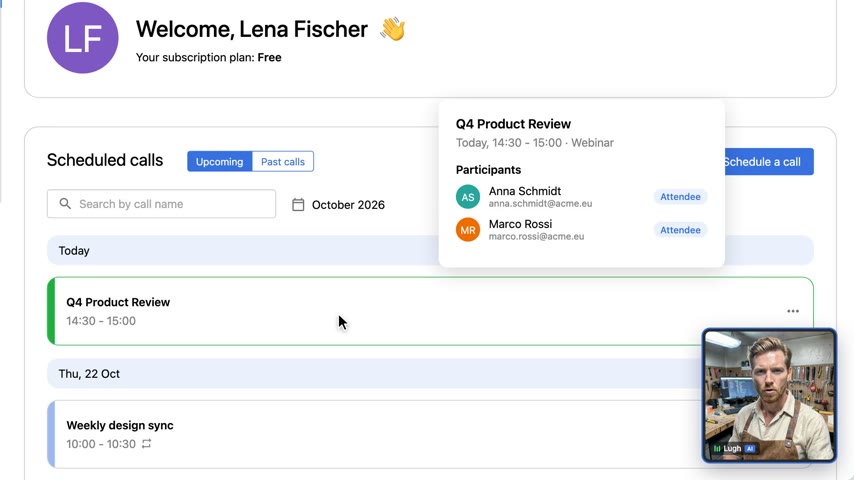
Every frame below was generated in this workspace — click to watch.
 |
 |
| Release-notes video product UI rebuilt from source, no screen recording |
Product demo scripted cursor and camera, AI narrator tile |
 |
 |
 |
| Super Bowl-style launch ad LTX-2 animated cameo, dramatic AI announcer |
AI hallucinations explainer 9:16 short — Ideogram 4 cards, cloned voice, burned captions |
"Why is the sky blue?" 52s vertical short, ~$0.80 in generation |
More in the showcase table below.
Quick Start
git clone https://github.com/digitalsamba/claude-code-video-toolkit.git
cd claude-code-video-toolkit
uv sync   # Optional: AI voiceover, image gen, music, moviepy examples
claude    # Open Claude Code in the toolkit
Python dependencies are managed with uv —
uv synccreates.venv/and installs everything from the lockfile in seconds. No uv yet?curl -LsSf https://astral.sh/uv/install.sh | sh(macOS/Linux) orpowershell -c "irm https://astral.sh/uv/install.ps1 | iex"(Windows).
Then in Claude Code:
/setup                    # Configure cloud GPU, storage, voice (~5 min, mostly free)
/video                    # Create your first video
That's it. /setup walks you through everything interactively — cloud GPU provider, file transfer, voice config. /video creates a project from a template and guides you through the whole workflow.
What's free: The toolkit leans heavily on open-source AI models — voiceovers (Qwen3-TTS), image generation (FLUX.2), music (ACE-Step), and more. You deploy them to your own cloud GPU account and run them at cost. Cloudflare R2 has a generous free tier (10GB, zero egress), and Modal gives $30/month free compute on the Starter plan — more than enough for a few 5-minute videos a month.
Requirements: Node.js 22+ (24 LTS recommended) and Claude Code. uv recommended for the AI tools (it installs Python 3.10+ for you). FFmpeg optional.
Want to skip setup and just render something?
cd examples/hello-world && npm install && npm run renderNo API keys needed — outputs an MP4 immediately.
A Note from the Author (not AI-generated)
I've spent months painstakingly putting this toolkit together and plan to keep iterating on it. AI makes things easier, but hard work still has huge value. Every video I create is a chance for improvement — every skill, template, tool, and workflow here has been refined through that cycle. It would be wonderful if others wanted to get involved with that: use it, refine it, and feed back into the repo via an issue or PR what you learn.
My own use case is fairly specific: creating sprint review videos for the AI mobile development arm of Digital Samba. But the idea behind this project is a reusable toolkit for using Claude Code to autonomously generate any kind of "explainer" style video — product demos, walkthroughs, presentations, whatever you need. Autonomous video creation is a lofty ideal for such a subjective field, but we can try :)
What makes this work is that Claude Code is fantastically resourceful and flexible — give it the framing and tooling that this toolkit provides and it will adapt it to create templates and videos based on your prompting. The skills, templates, and tools here are building blocks. Claude Code is the builder. You are the director, editor, and designer.
If you're getting started, run
/setupthen/videoand let Claude Code guide you. Or start with/templateto create a template for your own use case.Cloud GPU — I recommend Modal for running the toolkit's AI tools. The Starter plan gives you $30/month free compute, which is more than enough. RunPod is also supported as an alternative. Run
/setupto deploy the tools you need.My motto: Be brave. Experiment. And please share any videos you create or ideas you have back with the project — it helps me keep improving this toolkit for everyone.
Features
Skills
Claude Code has deep knowledge in:
| Skill | Description |
|---|---|
| remotion | React-based video framework — compositions, animations, rendering |
| elevenlabs | AI audio — text-to-speech, voice cloning, music, sound effects |
| ffmpeg | Media processing — format conversion, compression, resizing |
| playwright-recording | Browser automation — record demos as video |
| video-design | Visual design for video: colour by act, one data accent, type steps, a contact-sheet critique; takes direction from any design skill (design sources) |
| qwen-edit | AI image editing — prompting patterns and best practices |
| ideogram4 | AI image generation with best-in-class in-image text — title cards, thumbnails, exact brand colors |
| acestep | AI music generation — prompts, lyrics, scene presets, video integration |
| ltx2 | AI video generation — text-to-video, image-to-video clips, prompting guide |
| moviepy | Python video composition — overlay text on LTX-2/SadTalker output, build.py-style projects |
| runpod | Cloud GPU — setup, Docker images, endpoint management, costs |
The always-current catalog of skills, commands, tools, and templates lives in
_internal/toolkit-registry.json.
Commands
| Command | Description |
|---|---|
/setup |
First-time setup — cloud GPU, file transfer, voice, prerequisites |
/video |
Video projects — list, resume, or create new |
/scene-review |
Scene-by-scene review in Remotion Studio |
/design |
Set a video's design direction (design.md) from a design source, refine a scene, or critique the render |
/brand |
Brand profiles — list, edit, or create new |
/template |
List available templates or create new ones |
/skills |
List installed skills or create new ones |
/contribute |
Share improvements — issues, PRs, examples |
/record-demo |
Record browser interactions with Playwright |
/generate-voiceover |
Generate AI voiceover from a script |
/redub |
Redub existing video with a different voice |
/voice-clone |
Record, test, and save a cloned voice to a brand |
/thumbnail |
Generate a YouTube thumbnail with Ideogram 4 (hook phrase + brand colours) |
/publish |
Publish a finished video to YouTube (metadata auto-filled from project.json) |
/versions |
Check dependency versions and toolkit updates |
Note: After creating or modifying commands/skills, restart Claude Code to load changes.
Templates
Pre-built video structures in templates/:
- sprint-review — Sprint review videos with demos, stats, and voiceover
- sprint-review-v2 — Composable scene-based sprint review with modular architecture
- product-demo — Marketing videos with dark tech aesthetic, stats, CTA
- concept-explainer-short — 9:16 vertical TikTok/Reels/Shorts explainers (Python/moviepy, no Remotion)
- ds-release-notes — Synthetic release-notes videos: product screens rebuilt from source, scripted cursor and camera, sentence-level cloned narration (ships as the Digital Samba 650 build)
See examples/ for finished projects you can learn from (newest first — scroll down to watch the toolkit evolve in reverse):
| Date | Demo | Description |
|---|---|---|
| 2026-11-04 | data-chart-stars | 31s chart video of the toolkit's GitHub star history, drawn as SVG by the new LineChart and BarChart components: the line is drawn while Lugh narrates each stretch, and the March spike's band and the monthly bars light on the words that name them, timed with cue() (examples/data-chart-stars) |
| 2026-11-01 | the-agent-handoff | 57s showcase an agent made unattended from one Discord message: Lugh wrote the script and the shot list, video_job.py voiced it with his clone, generated four LTX-2 clips and a diagram card, built and QC'd it, and the Discord bot posted the link when it went live; $0.47, the fourth take after three pipeline fixes (docs/agent-video-jobs.md) |
| 2026-10-28 | ds-release-650 | 87s release-notes video built from the ds-release-notes template: six items across the room and account center, Lugh's cloned voice made livelier with voice_prosody.py, checked with qc.py --render --layout (templates/ds-release-notes) |
| 2026-10-21 | ds-release-649 | Release-notes video with no screen recording: three product UIs rebuilt from their source code, driven by a scripted cursor and camera, narrated by Lugh (examples/ds-release-649) |
| 2026-10-21 | ds-free-schedule-demo | 26s synthetic product demo of scheduling a call, with a SoulX talking-head narrator tile (examples/ds-free-schedule-demo) |
| 2026-06-09 | hallucinations-short | 3:41 vertical explainer on AI hallucinations — Ideogram 4 cards, LTX-2 b-roll, burned karaoke captions, Qwen3-TTS voice clone (reference sample from Pixabay) |
| 2026-06-09 | sky-blue-short | 52s "Why is the sky blue?" — concept-explainer-short template showcase (examples/sky-blue-short), stock Qwen3-TTS voice |
| 2026-04-08 | q2-townhall-stars | GitHub star history time-lapse with animated chart and deadpan-to-excited commentary |
| 2026-04-08 | q2-townhall-longarm-ad | Super Bowl-style launch ad with dramatic Qwen3-TTS announcer and LTX-2 animated Lugh cameo |
| 2026-03-15 | the-space-between | AI-generated video essay — flux2 avatar, Qwen3-TTS voice, SadTalker animation |
| 2026-02-23 | cortina | Mobile platforms sprint review |
| 2026-01-25 | schlumbergera | Android sprint review video |
| 2026-01-22 | ds-remote-mcp | Remote MCP server demo (the jazz background music is a joke) |
| 2025-12-10 | digital-samba-skill-demo | Product demo showcasing Claude Code skill |
| 2025-12-05 | sprint-review-cho-oyu | iOS sprint review with demos |
Scene Transitions
The toolkit includes a transitions library for scene-to-scene effects:
| Transition | Description |
|---|---|
glitch() |
Digital distortion with RGB shift |
rgbSplit() |
Chromatic aberration effect |
zoomBlur() |
Radial motion blur |
lightLeak() |
Cinematic lens flare |
clockWipe() |
Radial sweep reveal |
pixelate() |
Digital mosaic dissolution |
checkerboard() |
Grid-based reveal (9 patterns) |
Plus official Remotion transitions: slide(), fade(), wipe(), flip()
Preview all transitions:
cd showcase/transitions && npm install && npm run studio
See lib/transitions/README.md for full documentation.
Brand Profiles
Define visual identity in brands/. When you create a project with /video, the brand's colors, fonts, and styling are automatically applied.
brands/my-brand/
├── brand.json    # Colors, fonts, typography
├── voice.json    # ElevenLabs voice settings
└── assets/       # Logo, backgrounds
Included brands: default, digital-samba
Create your own with /brand.
Project Management System
Video projects are tracked through a multi-session lifecycle:
planning → assets → review → audio → editing → rendering → complete
Each project has a project.json that tracks:
- Scenes — What to show, asset status, visual types
- Audio — Voiceover and music status
- Sessions — Work history across Claude Code sessions
- Phase — Current stage in the workflow
The system automatically reconciles intent (what you planned) with reality (what files exist), and generates a CLAUDE.md per project for instant context when resuming.
See lib/project/README.md for schema details, scene status tracking, and filesystem reconciliation logic.
Python Tools
Audio, video, and image tools in tools/:
# AI voiceover — ElevenLabs or self-hosted Qwen3-TTS (9 voices + cloning)
uv run tools/voiceover.py --provider qwen3 --speaker Ryan --scene-dir public/audio/scenes --json

# AI music (ACE-Step — free cloud API)
uv run tools/music_gen.py --preset corporate-bg --duration 120 --output music.mp3

# AI image generation (FLUX.2) and editing (Qwen-Image)
uv run tools/flux2.py --preset title-bg --brand digital-samba --cloud modal
uv run tools/image_edit.py --input photo.jpg --prompt "Add sunglasses" --cloud modal

# AI video generation (LTX-2.3 — text-to-video, image-to-video)
uv run tools/ltx2.py --prompt "A sunset over the ocean, cinematic" --cloud modal

# Talking head from a portrait + audio (SoulX-FlashHead)
uv run tools/soulx.py --image portrait.png --audio voiceover.mp3 --output talking.mp4
All tools — sound effects, redub, upscaling, watermark removal, NotebookLM rebranding, in-image text…
# Generate voiceover (ElevenLabs)
uv run tools/voiceover.py --script script.md --output voiceover.mp3

# Generate voiceover (Qwen3-TTS — self-hosted, cheaper alternative)
uv run tools/voiceover.py --provider qwen3 --speaker Ryan --scene-dir public/audio/scenes --json
uv run tools/qwen3_tts.py --text "Hello world" --tone warm --output hello.mp3

# Generate background music (ElevenLabs)
uv run tools/music.py --prompt "Upbeat corporate" --duration 120 --output music.mp3

# Generate background music (ACE-Step — free cloud API, XL Turbo 4B model)
uv run tools/music_gen.py --preset corporate-bg --duration 120 --output music.mp3
uv run tools/music_gen.py --prompt "Dramatic cinematic" --duration 30 --bpm 90 --key "D Minor" --output reveal.mp3
uv run tools/music_gen.py --prompt "Upbeat indie rock" --duration 60 --variations 4 --output intro.mp3

# Generate sound effects
uv run tools/sfx.py --preset whoosh --output sfx.mp3

# Redub video with different voice
uv run tools/redub.py --input video.mp4 --voice-id VOICE_ID --output dubbed.mp4

# Add background music to existing video
uv run tools/addmusic.py --input video.mp4 --prompt "Subtle ambient" --output output.mp4

# Rebrand NotebookLM videos (trim outro, add your logo/URL)
uv run tools/notebooklm_brand.py --input video.mp4 --logo logo.png --url "mysite.com" --output branded.mp4

# AI image editing (style transfer, backgrounds, custom prompts)
uv run tools/image_edit.py --input photo.jpg --style cyberpunk --cloud modal
uv run tools/image_edit.py --input photo.jpg --prompt "Add sunglasses" --cloud modal

# AI image upscaling (2x/4x)
uv run tools/upscale.py --input photo.jpg --output photo_4x.png --cloud modal

# Remove watermarks (requires cloud GPU)
uv run tools/dewatermark.py --input video.mp4 --preset sora --output clean.mp4 --cloud modal

# Locate watermark coordinates
uv run tools/locate_watermark.py --input video.mp4 --grid --output-dir ./review/

# Generate talking head video from image + audio (SoulX-FlashHead)
uv run tools/soulx.py --image portrait.png --audio voiceover.mp3 --output talking.mp4

# AI image generation (FLUX.2 klein 4B; klein-9B is a non-commercial Modal opt-in)
uv run tools/flux2.py --prompt "A sunset over mountains" --cloud modal
uv run tools/flux2.py --preset title-bg --brand digital-samba --cloud modal
uv run tools/flux2.py --list-presets

# AI video generation (LTX-2.3 22B — text-to-video + image-to-video)
uv run tools/ltx2.py --prompt "A sunset over the ocean, cinematic" --cloud modal
uv run tools/ltx2.py --prompt "Gentle camera drift" --input photo.jpg --cloud modal

# Publish a finished render to YouTube (OAuth 2.0 + Data API v3) — contributed by @dascope (#29)
uv run tools/youtube_upload.py --auth                                   # one-time browser login
uv run tools/youtube_upload.py --video out/video.mp4 --title "My video" --privacy private --json-out
Tool Categories:
| Type | Tools | Purpose |
|---|---|---|
| Project | voiceover, music, music_gen, sfx | Used during video creation workflow |
| Utility | redub, addmusic, notebooklm_brand, locate_watermark | Quick transformations, no project needed |
| Cloud GPU | image_edit, upscale, dewatermark, sadtalker, soulx, qwen3_tts, flux2, music_gen, ltx2 | AI processing via Modal or RunPod |
| Publishing | youtube_upload | Upload a finished render to YouTube (or use /publish) |
Cloud GPU (Modal + RunPod)
8 AI tools run on cloud GPUs. Use --cloud modal (recommended) or --cloud runpod on any tool.
| Tool | What It Does | Est. Cost |
|---|---|---|
qwen3_tts |
AI text-to-speech (9 speakers, voice cloning) | ~$0.01 |
flux2 |
AI image generation & editing | ~$0.02 |
image_edit |
AI image editing & style transfer | ~$0.03 |
upscale |
AI image upscaling (2x/4x) | ~$0.01 |
music_gen |
AI music generation (8 scene presets) | Free (acemusic) / ~$0.05 (self-hosted) |
soulx |
Talking head video from portrait + audio — holds identity over long takes | ~$0.0024/sec |
sadtalker |
Talking head video, warp-based — fast, cheap drafts | ~$0.10 |
ltx2 |
AI video generation (text-to-video, image-to-video) | ~$0.23 |
dewatermark |
Video watermark removal | ~$0.10 |
Modal (recommended): Each tool deploys from docker/modal-*/app.py — Modal builds and hosts the containers. $30/month free compute on the Starter plan, typical usage is $1-2/month. Run /setup to deploy all tools automatically.
RunPod (alternative): Uses pre-built Docker images from ghcr.io/conalmullan/video-toolkit-*. Pay-per-second, no minimums. Run uv run tools/<tool>.py --setup to create endpoints.
See docs/modal-setup.md and docs/runpod-setup.md for details.
Project Structure
claude-code-video-toolkit/
├── .claude/
│   ├── skills/          # Domain knowledge for Claude
│   └── commands/        # Slash commands (/video, /brand, etc.)
├── lib/                 # Shared components, theme system, utilities
│   ├── components/      # Reusable video components (11 components)
│   ├── transitions/     # Scene transition effects (7 custom + 4 official)
│   ├── theme/           # ThemeProvider, useTheme
│   └── project/         # Multi-session project system
├── tools/               # Python CLI tools
├── templates/           # Video templates
├── brands/              # Brand profiles
├── projects/            # Your video projects (gitignored)
├── examples/            # Curated showcase projects with finished videos
├── assets/              # Shared assets
├── playwright/          # Recording infrastructure
├── docs/                # Documentation
└── _internal/           # Toolkit metadata & roadmap
Documentation
- Getting Started
- Modal Setup — Cloud GPU with Modal (recommended)
- RunPod Setup — Cloud GPU with RunPod (alternative)
- Creating Templates
- Creating Brands
- Project System — Multi-session lifecycle, schema, reconciliation
- Optional Components — Local GPU tools setup
- Agent Video Jobs — Brief in, MP4 out for any agent:
video_job.pysubmit/status/result, the MCP server, and theskills/video-toolkit/skill for OpenClaw, Codex, Hermes and friends - Toolkit Development — Roadmap, backlog, changelog
Video Workflow
/video → Script → Assets → Scene Review → Design → Audio → Preview → Render → Publish
- Create project — Run
/video, choose template and brand - Review script — Edit
VOICEOVER-SCRIPT.mdto plan content and assets - Gather assets — Record demos with
/record-demoor add external videos - Scene review — Run
/scene-reviewto verify visuals in Remotion Studio - Design —
/videosets the design direction before scenes are built;/designchanges it, refines a scene withvideo-design, or critiques the render - Generate audio — AI voiceover with
/generate-voiceover - Configure — Update config file with asset paths and timing
- Preview —
npm run studiofor live preview - Iterate — Work with Claude Code to adjust timing, styling, content
- Render —
npm run renderfor final MP4
Using with Codex
The toolkit is built for Claude Code, but an experimental migration script installs its skills and workflows for Codex and generates an AGENTS.md block from CLAUDE.md:
uv run scripts/migrate_to_codex.py --force
See docs/codex.md for what it installs, how the AGENTS.md block is managed, and how to remove it. Contributed by @kimhoontae-gogo in #16.
Using with Kiro CLI
A sibling migration script installs the toolkit's skills and workflows for Kiro CLI — /video, /setup, etc. work as slash commands, from any directory:
uv run scripts/migrate_to_kiro.py --force
See docs/kiro.md for what it installs, how it achieves Claude Code-parity, and how to remove it.
Design sources
Plug in your own design skill, or use ours. /design and /scene-review take their visual direction from the
source you choose, then apply the toolkit's own video rules (video-design) and critique the render from a contact
sheet. The choice is saved per project; nothing here depends on one particular skill.
| Source | What it's good for | Install |
|---|---|---|
| Ours (default) | video-design's act palettes and rules, with your brand's colours and fonts |
Nothing to install |
| taste-skill (recommended plug-in) | Dealt directions and palettes from 247 studied sites, measured house rules, a juror's critique (MIT) | /plugin marketplace add Leonxlnx/taste-skill then /plugin install taste-skill@taste-skill |
| frontend-design | Anthropic's general visual direction for interfaces (written for web pages) | See the anthropics/skills README |
Bring your own: any design skill works if it can fill design.md (palette per act, ink, one accent, type).
To list one here, open an issue with a link, its licence, and a contact sheet of examples/data-chart-stars
restyled with it. See .claude/skills/video-design/sources.md.
Community add-ons
Projects built on or around the toolkit that live in their own repos — typically because they need software or a service we can't bundle. We haven't reviewed them; check each project's README.
| Add-on | What it does | Needs |
|---|---|---|
| VOICEPEAK for voiceover.py | Offline Japanese TTS provider (patches voiceover.py) |
VOICEPEAK (paid, local) |
| arkiv | Natural-language search (EN/中文/日本語) over your own footage archive, returning scenes with start/end timecodes to use as a template's videoFile |
A local arkiv instance (source-available, PolyForm Perimeter) |
| Upload-Post publishing | Publish a rendered video to TikTok, Instagram, YouTube, LinkedIn, Facebook, X, Threads, Pinterest and Bluesky via a /publish-social command |
An Upload-Post account and API key (hosted, free plan available) |
| CommentKeyword comment-to-DM | Sets up the Instagram auto-DM behind a video's "Comment KEYWORD" CTA, armed for the next post, via a /comment-dm command |
A CommentKeyword account and API token (hosted, free plan available; Instagram only) |
| easybrandkit | Reads a live site's logo, colors and fonts into a BRAND.md that /brand can start from |
Node 22 and Chrome, Chromium, Edge or Brave |
To be listed, open an issue with a link and a one-line description. Integrations that need a hosted third-party service live here rather than in the toolkit itself — see CONTRIBUTING.md for why, and for how the few exceptions came about.
Contributing
Contributions welcome! See CONTRIBUTING.md for guidelines.
License
MIT License — see LICENSE for details.
Built for use with Claude Code by Anthropic.
Explore related projects
codecrafters-io/build-your-own-x
Master programming by recreating your favorite technologies from scratch.
560,377 starspublic-apis/public-apis
A collective list of free APIs
496,673 starsmorluto/rea
Reverse engineer anything with agents, from app behavior down to native binaries.
437,459 starsopenclaw/openclaw
The AI that really does things. Any OS. Any Platform. The lobster way. 🦞
394,056 stars