
digitalgust/miniJVM
digitalgust/miniJVM has 416 GitHub stars and 105 forks. GitHot measured 0 stars in 24 hours and 0 in 7 days. Last checked 2026-11-09 07:29 UTC. Last push 2026-10-29.
Develop iOS Android app in java, Cross platform java virtual machine , the minimal jvm .
What you can do
- Builds on iOS, Android, mingw-w64 (32/64-bit), MSVC (32/64-bit), macOS, and Linux
- No external dependencies
- Minimal memory footprint
- Small binaries and an embeddable JVM
Measured star growth
- in 24h
- 0
- in 7 days
- 0
- in 15 days
- Update delayed
- in 1 month
- Update delayed
Net star changes over overlapping periods, not daily totals. Missing measurements are left blank. Stars measure attention, not software quality.
README.md
Original


DeepWiki miniJVM Documentation
miniJVM
Build iOS and Android apps in Java with a cross-platform, lightweight Java Virtual Machine. Run the same Java code on mobile and desktop with small binaries and a low memory footprint.
- Features
- Architecture
- Build for iOS/Android
- Build for Windows/Linux/macOS
- How to debug source
- Using miniJVM in a project
- Documentation
- License
Features
- Builds on iOS, Android, mingw-w64 (32/64-bit), MSVC (32/64-bit), macOS, and Linux
- No external dependencies
- Minimal memory footprint
- Small binaries and an embeddable JVM
- Minimal bootstrap class library (not a full JDK 8 implementation)
- Supports Java source compilation (Janino)
- JIT support
- Low-latency Java garbage collection
- Remote debugging via JDWP
- Option to translate miniJVM classes to C for faster execution
iOS/Android Platform Extended Features
- OpenGL ES 3.0
- Swing-like GUI library with HTML-style XML layout
- Audio/video playback and capture
- Photo capture from camera or album
- Save and load files on the device
- Desktop-compatible API so apps can run on desktop as well
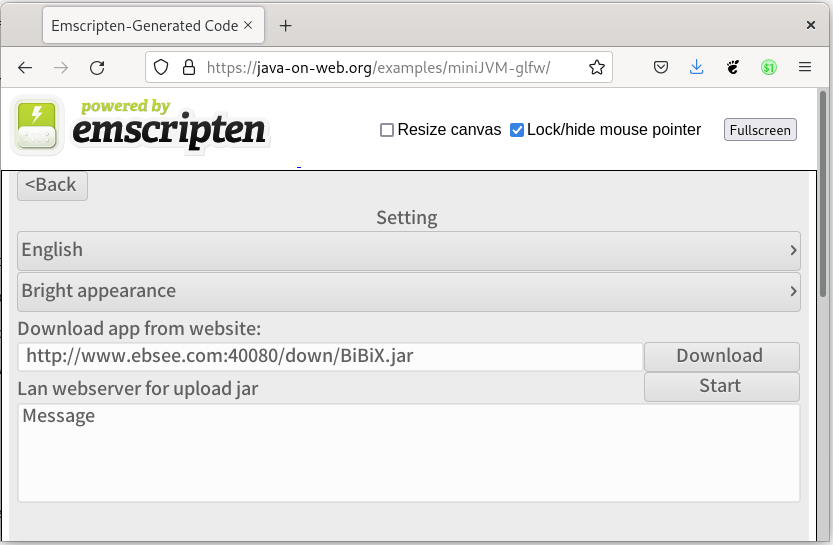
miniJVM on the Web
miniJVM on the web, built by Starcommander. Source Web demo
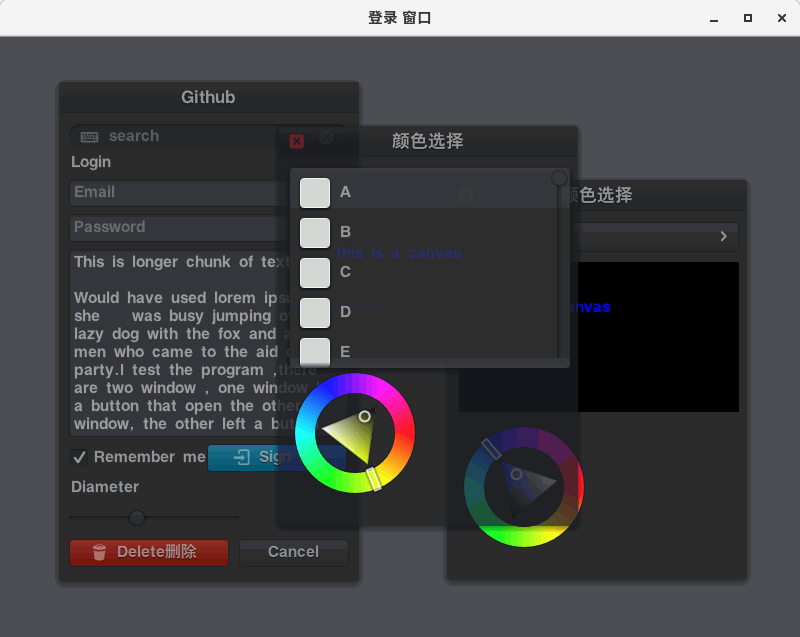
miniJVM GUI Demos


Architecture
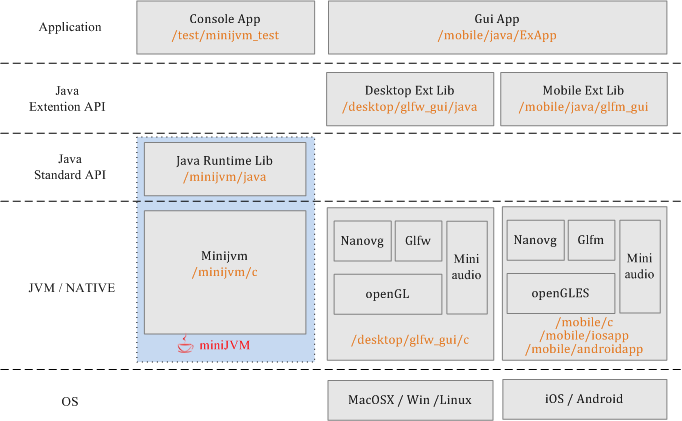
Changelog
- 2026.03 Added a profiling performance monitoring page to observe real-time execution time for each JVM method call.
- 2023.09 Reworked GLFW and GLFM graphics JNI bindings; moved GUI Java classes to the
xguipackage. - 2022.11 Added documentation.
- 2021.03 Added the
j2cmodule, which converts miniJVM Java source to C and builds native apps for desktop and mobile. - 2020.12 Added build scripts and released v2.1.
- 2020.10 Refactored source and removed binaries from the repository.
- 2020.10 Added HTTPS support.
- 2020.03 Added XML layout for the GUI system; fixed JDWP debugging for JetBrains IDEs.
- 2019.12 Integrated the cross-platform AWTK UI system - see awtk-minijvm.
- 2019.12 Enabled JIT based on the SLJIT project.
- 2019.10 JIT in development.
- 2018.12 Optimized performance.
- 2017.09 Project started.
Build for iOS/Android
Write Java code once and run it on iOS, Android, macOS, Windows, and Linux. The required JARs are not prebuilt, so build them first. Preferred IDEs: Eclipse, NetBeans, or JetBrains IntelliJ IDEA.
Run /binary/build_jar.sh or /binary/build_jar.bat to generate JARs. Alternatively:
- Build the Maven project in
/minijvm/java, then copy the output to /mobile/assets/resfiles/minijvm_rt.jar - Build the Maven project in
/mobile/java/glfm_gui, then copy the output to /mobile/assets/resfiles/glfm_gui.jar - Build the Maven project in
/mobile/java/ExApp, then copy the output to /mobile/assets/resfiles/ExApp.jar - Optionally modify /mobile/java/ExApp/src/main/java/test/MyApp.java; add resources to /mobile/java/ExApp/src/main/resource/res/ (audio, images, etc.); configure /mobile/java/ExApp/src/main/config.txt for icon, version, boot class, and other app settings.
- Build the Maven project in
In Xcode, open /mobile/iosapp; configure your developer account in Signing & Capabilities; build and install to a device; then verify the app before running it (Settings -> General -> Device Management -> {developer account} -> Verify App -> Trust).
In Android Studio, open /mobile/androidapp and build/install to an Android device.
AppManager starts and runs:
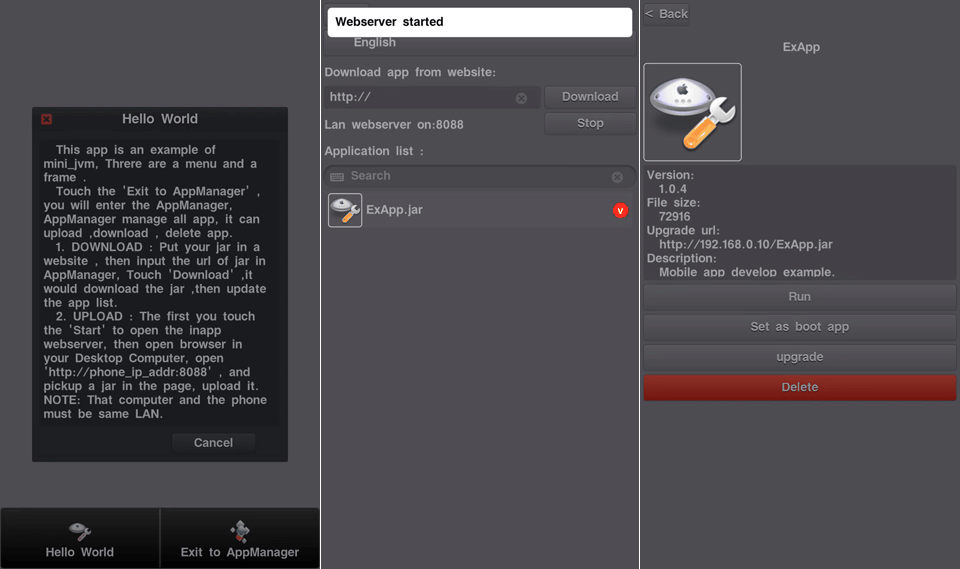
Build for Windows/Linux/macOS
Run /binary/build_jar.sh or /binary/build_jar.bat to generate JARs. Alternatively:
- Build Java bootstrap classes in /minijvm/java; build the JAR with Maven and copy it to
/binary/lib/minijvm_rt.jar - Build GUI classes in /desktop/glfw_gui/java; build the JAR with Maven and copy it to
/binary/libex/glfw_gui.jar - Build console test classes in /test/minijvm_test; build the JAR with Maven and copy it to
/binary/libex/minijvm_test.jar - Build GUI test app classes in /mobile/java/ExApp; build the JAR with Maven and copy it to
/binary/{platform}/apps/ExApp.jar
- Build Java bootstrap classes in /minijvm/java; build the JAR with Maven and copy it to
Run /binary/build_mac_linux.sh, /binary/build_wini686.bat, or /binary/build_winx64.bat to generate binaries. Alternatively:
- Build the GUI JNI C dynamic library in
/desktop/glfw_gui/cwith CMake - Build miniJVM in
/minijvm/cwith CMake
- Build the GUI JNI C dynamic library in
Run the test script:
/binary/{platform}/test.shortest.bat.
How to Debug Source
Most Java IDEs support remote debugging. The IDE connects to miniJVM's debug port over TCP and starts a debugging session. miniJVM provides two options: enable debugging, and suspend on startup (wait for the IDE to attach before executing bytecode). Configure both options before initializing the VM.
These options are defined in jvm.h:
struct _MiniJVM {
    ...
    s32 jdwp_enable; // 0: disable Java debug, 1: enable Java debug and disable JIT
    s32 jdwp_suspend_on_start;
    ...
};
Enable miniJVM debug mode. Desktop: Run
mini_jvmwith-Xdebug, add parameter if needed-Xjdwp:transport=dt_socket,server=y,suspend=n,address=5005, or set it in source before building./minijvm/c/main.c:jvm->jdwp_enable = 1;iOS/Android: set it in source before building./mobile/c/glfmapp/main.c:jvm->jdwp_enable = 1;For device debugging, check the device IP address in Settings -> Wi-Fi -> (i).Run the VM with JARs, for example:
mini_jvm.exe -Xdebug -bootclasspath ../lib/minijvm_rt.jar -cp ../libex/glfw_gui.jar org.mini.glfw.GlfwMainOpen a project in your IDE, for example:
/mobile/java/ExAppIntelliJ IDEA: Run -> Edit Configurations -> + Remote; Transport: Socket; Debugger mode: Attach; host/port of yourmini_jvm, for example127.0.0.1:5005or192.168.0.32:5005. Eclipse: configure similarly. NetBeans: Debug -> Attach Debugger; Connector: SocketAttach; host/port of yourmini_jvm, for examplelocalhost:5005; Timeout:10000.Set breakpoints, pause the VM, and inspect variables.
Profiling
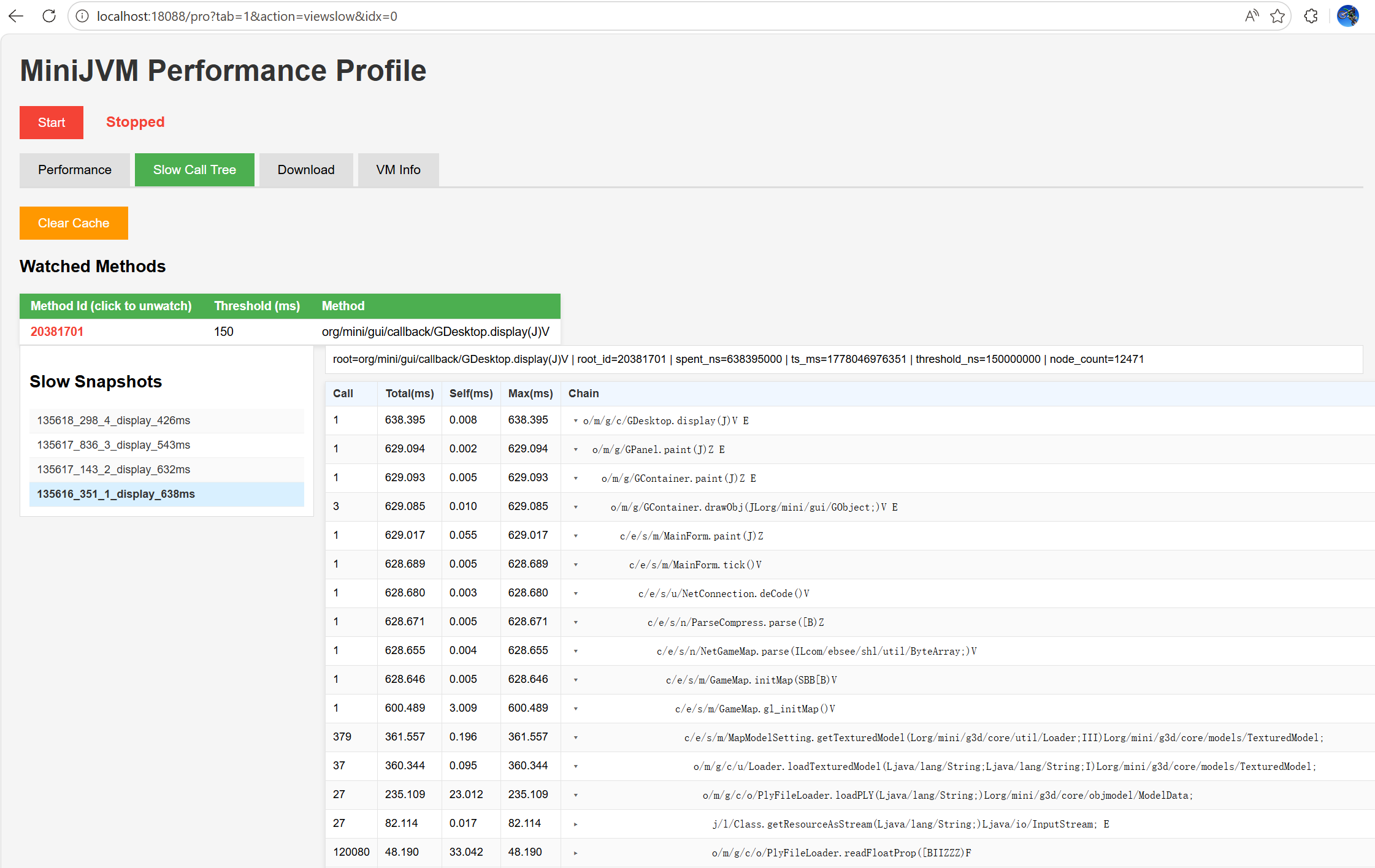
Use the built-in profiling page to monitor method execution cost in real time. The following methods also apply to all platforms, including iOS and Android devices or emulators.
Enable profiling in
jvm.h:#define _JVM_DEBUG_METHOD_PROFILE 1Rebuild miniJVM.
Run miniJVM, then open
Settings -> Developer Options -> Enable LAN Web Server.Your browser opens automatically at http://localhost:18088/.
On this web page:
- You can upload plugin apps.
- You can click VM infomation (VM Information) to open the profiling page.
Profiling Page Features
- View the top 200 methods by execution time.
- Click a method to set a call-time threshold. If a call exceeds this threshold, miniJVM saves a call snapshot.
- Open SlowCallTree to inspect saved snapshots and expand the call stack.
- Dump the current heap memory, download the dump file, and open it in VisualVM to analyze memory usage.
- View runtime VM information, including garbage collector activity; data refreshes every 5 seconds.
Projects Based on miniJVM
- Awtk-minijvm: AWTK cross-platform native UI bound to miniJVM.
- LWJGUI-Mobile: Java LWJGL UI library.
- BiBiX: Java instant messenger.
- miniJVM web demo: miniJVM web demo.
Referenced Projects and Technologies
- Oracle CLDC: CLDC API reference.
- OpenJDK: Java API reference.
- Miniz: Reads JAR files.
- Glfm: Cross-platform (Android/iOS) GUI.
- Nanovg: GUI rendering.
- Stb: GUI TrueType fonts and images.
- Glad: OpenGL/GLES header replacement.
- Glfw: Cross-platform desktop GUI.
- Dirent: Linux-style file and directory APIs on Windows VC.
- Tinycthread: Cross-platform threads.
- JRegex: Java string regex matching.
- Janino: Compiles Java source files.
- MiniAudio: Java audio playback and capture.
- Sljit: Platform-independent low-level JIT compiler.
- Mbedtls: HTTPS support via mbedtls.
- Avian: Java API reference.
Recommended Development IDEs
- C / ObjC: JetBrains CLion, Xcode, Visual Studio
- Swift: Xcode
- Java: JetBrains IntelliJ IDEA, NetBeans
- Android: Android Studio
Using miniJVM in a Project
Copy C sources from /minijvm/c into your project, and copy the built minijvm_rt.jar into your project's resource folder.
#include "jvm/jvm.h"

int main(int argc, char **argv) {
    char *bootclasspath = "../../binary/lib/minijvm_rt.jar";
    char *classpath = "../../binary/libex/minijvm_test.jar;./";
    char *main_name = "test.Foo3";

    s32 ret = 1;
    MiniJVM *jvm = jvm_create();
    if (jvm != NULL) {
        jvm->jdwp_enable = 0; // set to 1 to enable Java remote debugging
        jvm->jdwp_suspend_on_start = 0;
        jvm->max_heap_size = 25 * 1024 * 1024;

        ret = jvm_init(jvm, bootclasspath, classpath);
        if (ret) {
            printf("[ERROR] minijvm init error.\n");
        } else {
            ret = call_main(jvm, main_name, NULL);
        }
        jvm_destroy(jvm);
    }
    return ret;
}
Third-Party Libraries
Janino Java Compiler
- Project: Janino
- Janino is a very small and very fast Java compiler.
- Janino can compile source files to class files like
javac, and it can also compile a Java expression, a block, a class body, one.javafile, or multiple.javafiles in memory, then load and execute the generated bytecode directly in the same JVM. Janino is not a full Java compiler; see limitations, for example:
List<String> list = new ArrayList();
list.add("abc");
String s = (String) list.get(0); // cannot omit the (String) cast.
- Download JARs:
- janino.jar
- commons-compiler.jar
# compile /binary/res/BpDeepTest.java
mini_jvm -bootclasspath ../lib/minijvm_rt.jar -cp ../libex/janino.jar:../libex/commons-compiler.jar org.codehaus.janino.Compiler ../res/BpDeepTest.java
LuaJ
- Project: LuaJ
- miniJVM adaptation: Luaj minijvm
- LuaJ is a lightweight, fast, Java-centric Lua interpreter for JME and JSE. It includes string, table, package, math, io, os, debug, coroutine, and luajava libraries, plus JSR-223 bindings, full metatag support, weak tables, and direct Lua-to-Java bytecode compilation.
- Download JAR:
- luaj.jar
mini_jvm -bootclasspath ../lib/minijvm_rt.jar -cp ../libex/luaj.jar Sample
Screenshots
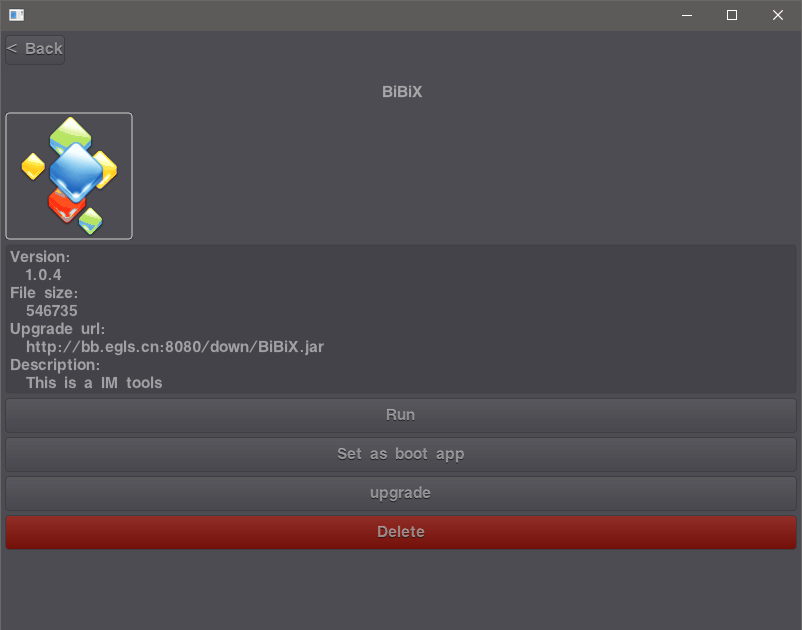
Windows mini_jvm GUI
 |
macOS mini_jvm GUI
 |
Linux mini_jvm GUI
 |
Web mini_jvm GUI
 |
Directory Structure
.
├── binary              miniJVM binaries for builds (win32/win64/mac/linux)
├── desktop
│   ├── awtk_gui        open-source AWTK GUI JNI bindings
│   └── glfw_gui        desktop OpenGL, GLFW, miniaudio, native module
├── j2c                 tools to translate miniJVM Java source to C
│   ├── app
│   └── translator
├── minijvm             core source
│   ├── c               miniJVM C source
│   └── java            miniJVM runtime library
├── mobile
│   ├── androidapp      Android launcher
│   ├── assets          app resources (fonts, JARs, images, audio, etc.)
│   ├── c               mobile native libs: OpenGLES, GLFM framework, GUI JNI, glfmapp
│   ├── iosapp          iOS launcher
│   └── java            mobile Java libs, GUI, AppManager, example app
├── doc
└── test                miniJVM test cases
License
License: MIT
Gust, [email protected]
Explore related projects
ytdl-org/youtube-dl
Command-line program to download videos from YouTube.com and other video sites
141,500 starsexcalidraw/excalidraw
Virtual whiteboard for sketching hand-drawn like diagrams
135,396 starsgodotengine/godot
Godot Engine – Multi-platform 2D and 3D game engine
119,840 starsmrdoob/three.js
JavaScript 3D Library.
117,905 stars