
dezuhan/khaoyu-note
dezuhan/khaoyu-note has 20 GitHub stars and 0 forks. GitHot measured +1 stars in 24 hours. Last checked 2026-11-15 06:36 UTC. Last push 2026-11-13.
What you can do
- Infinite canvas — pan, zoom, dotted grid, marquee selection and keyboard-first editing.
- Cards for real work — note, link, to-do, table, document, sketch, image, video and audio.
- Boards and columns — nested boards with live thumbnails, columns, sections and connections.
- Local-first storage — SQLite database and local assets; boards open offline.
Measured star growth
- in 24h
- +1
- in 7 days
- Collecting history
- in 15 days
- Collecting history
- in 1 month
- Collecting history
Net star changes over overlapping periods, not daily totals. Missing measurements are left blank. Stars measure attention, not software quality.
About
Milanote alternatives, moodboard note taking with Rust local-first (out of token right now, no update)
ProductivityREADME.md
OriginalKhaoyu Note
A local-first visual workspace for thinking, planning and writing. Khaoyu Note runs as a native desktop app or a local browser host, stores every board in SQLite, and works without an account or network. An optional self-hosted service adds team accounts, sync and sharing when you need them.
0.36.0 local-first release: backend controls are temporarily disabled in the app. Sync, Share, Add Server and the remote workspace sections are hidden; Local storage supports multiple boards, with New Board in the Workspace popover. The service source remains in
service/for a later release, and backend connection files are gitignored.
Downloads
Version 0.36.0 local-first builds:
- Windows:
Khaoyu Note_0.36.0_x64-setup.exe(NSIS) orKhaoyu Note_0.36.0_x64_en-US.msi - Linux:
Khaoyu-Note_0.36.0_amd64.deb,Khaoyu-Note_0.36.0_amd64.AppImageor the portableKhaoyu-Note_0.36.0_linux-x86_64.tar.gz
About
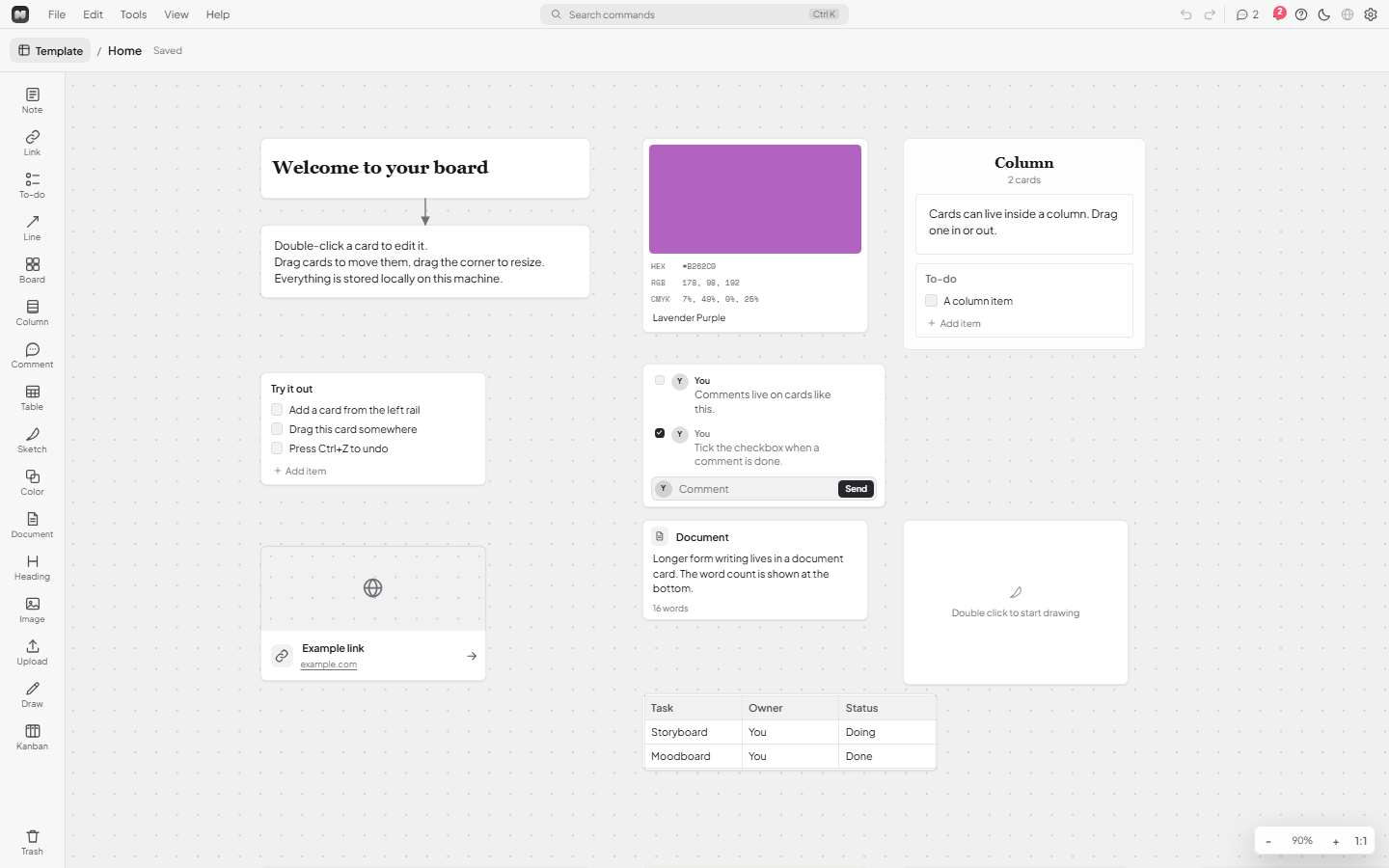
Khaoyu Note is built around an infinite canvas with plain, editable cards. A board is a single JSON document, so text editing, selection, accessibility and IME support come from the browser instead of a custom renderer. Nested boards keep large projects readable, and the same document can be edited in the desktop app or the local web host.
The project is split into two parts:
- Local app — Tauri v2 + Rust, with a vanilla ES-module frontend and a local SQLite database.
- Service — an optional self-hosted Node 24 service for accounts, workspaces, sync, share links and an admin dashboard.
Local use is always the default. Connecting a server is opt-in per board.
Core features
- Infinite canvas — pan, zoom, dotted grid, marquee selection and keyboard-first editing.
- Cards for real work — note, link, to-do, table, document, sketch, image, video and audio.
- Boards and columns — nested boards with live thumbnails, columns, sections and connections.
- Local-first storage — SQLite database and local assets; boards open offline.
- Desktop and browser — the same frontend and database in Tauri or through
node server.mjs. - Optional collaboration — self-hosted accounts, workspaces, roles, OIDC/2FA/passkeys, durable sync, comments and public share links with expiry, passwords and download limits.
- MCP server — 14 board tools over stdio for local AI agents, using the same SQLite database.
Install the server
The service is optional: the desktop and local web host work without it. Docker Compose with PostgreSQL + Redis is the recommended team deployment; Node 24 + SQLite works for a single instance.
Requirements
- Docker with Compose, or Node 24 or newer with the built-in
node:sqlitemodule. - A public URL if remote clients or share links will use the service (HTTPS recommended).
Team stack (Docker + PostgreSQL + Redis)
cd service
./scripts/setup-team.sh
The installer asks for the service URL, public share URL, first owner email and optional Cloudflare
Tunnel token. It generates .env.team with random secrets, starts PostgreSQL/Redis and the service,
runs migrations, waits for /readyz, bootstraps the owner and prints the one-time password.
Without the installer:
cd service
cp .env.team.example .env.team
# Edit .env.team: public URL, service secret, database/Redis passwords, owner email/password.
docker compose --env-file .env.team -f docker-compose.team.yml up -d --build
docker compose --env-file .env.team -f docker-compose.team.yml exec -T service \
  node src/cli.mjs bootstrap-postgres
By default the frontend and API listen on 127.0.0.1:18080 and 127.0.0.1:18081. Open
http://127.0.0.1:18080/admin for the dashboard.
Single user (Node + SQLite)
cd service
cp .env.example .env
# Set KHAOYU_SERVICE_SECRET to: openssl rand -hex 32
export KHAOYU_SERVICE_COOKIE_SECURE=false
export KHAOYU_BOOTSTRAP_PASSWORD='use-a-unique-password-of-12-plus'
node src/cli.mjs migrate
node src/cli.mjs bootstrap
node src/server.mjs
The server prints the frontend and backend URLs. Use the frontend URL for login, /admin and share
links. To keep it running after the terminal closes, use npm run start:background (stop with
npm run stop).
Before exposing the server, read service/README.md for reverse-proxy examples, TLS, OIDC, backups, upgrades, secret requirements and the full environment reference. Security reports follow SECURITY.md; production gates are in docs/production-readiness.md.
MCP server
khaoyu-note-mcp exposes local boards to MCP clients over stdio. It opens the same SQLite database as
the app in WAL mode (both can run together) and makes no outbound network requests.
Tools: list_boards, get_board, get_board_json, get_card, search, list_comments,
create_board, update_board, delete_board, create_card, update_card, delete_card,
add_comment and connect_cards.
Build it from the app source:
cd app/src-tauri
cargo build --release --bin khaoyu-note-mcp
# Linux binary: target/release/khaoyu-note-mcp
# Windows binary: target/release/khaoyu-note-mcp.exe
Put the binary somewhere stable, then register it with any MCP client:
{
  "mcpServers": {
    "khaoyu-note": {
      "command": "/absolute/path/to/khaoyu-note-mcp"
    }
  }
}
The repository includes a configuration-only bundle in dsh-bundle-note-studio-mcp/ for DeepSeek
Harness; after installing it, the tools appear as mcp__khaoyu-note__<tool>. Settings > MCP in the
app shows the resolved binary path and a copyable client configuration.
The database directory matches the app's app-data folder:
%APPDATA%\com.dezuhan.khaoyunote on Windows,
$XDG_DATA_HOME/com.dezuhan.khaoyunote (usually ~/.local/share/com.dezuhan.khaoyunote) on Linux,
and ~/Library/Application Support/com.dezuhan.khaoyunote on macOS. Set KHAOYU_NOTE_DB_DIR to use
another folder.
License
Khaoyu Note is open source under the
GNU Affero General Public License v3.0 only (AGPL-3.0-only).
- You may use, study, modify, self-host, distribute and commercialize the software.
- If you distribute a modified version, or run a modified version as a network service, you must publish the complete corresponding source under the AGPL and keep the copyright and license notices.
- Forks must give attribution to Khaoyu Note.
- The Khaoyu Note name, logo and app icon are not licensed for modified distributions; see TRADEMARK.md.
- Resale is only allowed under AGPL terms with the source available. A fork may not be presented as the official Khaoyu Note app.
This is an independent local-first app. No third-party client code, assets, fonts or icons are included; vendored design tokens remain under their own repository license.