
devblackops/Terminal-Icons
devblackops/Terminal-Icons has 2,956 GitHub stars and 139 forks. GitHot measured 0 stars in 24 hours and +2 in 7 days. Last checked 2026-11-07 04:02 UTC. Last push 2024-08-06.
A PowerShell module to show file and folder icons in the terminal
Measured star growth
- in 24h
- 0
- in 7 days
- +2
- in 15 days
- Collecting history
- in 1 month
- Collecting history
Net star changes over overlapping periods, not daily totals. Missing measurements are left blank. Stars measure attention, not software quality.
README.md
OriginalTerminal-Icons
A PowerShell module to show file and folder icons in the terminal.
| GitHub Actions | PSGallery | License |
|---|---|---|
 |
 |
 |

Overview
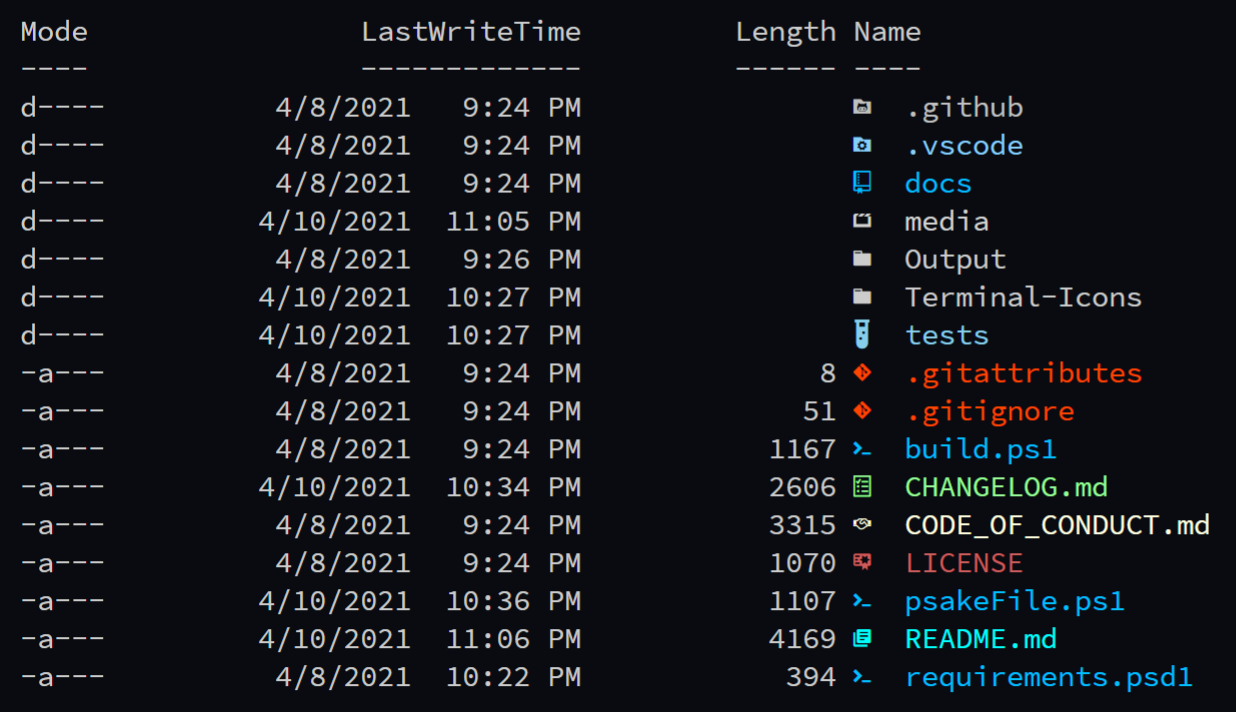
Terminal-Icons is a PowerShell module that adds file and folder icons when displaying items in the terminal. This relies on the custom fonts provided by Nerd Fonts.
You must be using one of the fonts provided by Nerd Fonts for this module to work as these fonts include tons of custom glyphs/icons that are referenced by their unicode number.
How Does this Work?
It uses a custom format.ps1xml file that inspects the items being displayed and looks up their appropriate icon based on name or extension. Icons for well-known files/folders are attempted to be used first before displaying an icon based on the file extension. Any files/folders that are not matched are shown using a generic file or folder icon.
Installation
To install the module from the PowerShell Gallery:
Install-Module -Name Terminal-Icons -Repository PSGallery
You can also install it from Scoop:
scoop bucket add extras
scoop install terminal-icons
Usage
Import-Module -Name Terminal-Icons

Get-Item ./README.md

Get-ChildItem

Get-ChildItem | Format-List

Get-ChildItem | Format-Wide
Commands
| Command | Description |
|---|---|
| Add-TerminalIconsColorTheme | Add a Terminal-Icons color theme for the current user. |
| Add-TerminalIconsIconTheme | Add a Terminal-Icons icon theme for the current user. |
| Format-TerminalIcons | Prepend a custom icon (with color) to the provided file or folder object when displayed. |
| Get-TerminalIconsColorTheme | List the available color themes. |
| Get-TerminalIconsIconTheme | List the available icon themes. |
| Get-TerminalIconsTheme | Get the currently applied color and icon theme. |
| Remove-TerminalIconsTheme | Removes a given icon or color theme. |
| Set-TerminalIconsColorTheme | DEPRECATED Set the Terminal-Icons color theme. |
| Set-TerminalIconsIconTheme | DEPRECATED Set the Terminal-Icons icon theme. |
| Set-TerminalIconsTheme | Set the Terminal-Icons icon and/or color theme. |
| Show-TerminalIconsTheme | List example directories and files to show the currently applied color and icon themes. |
Screenshots
Get-ChildItem -Path . -Force
Tips
If using the default console in Windows and not something like VSCode, ConEmu, Terminus, etc., you may have issues getting a nerd font to be recognized correctly. Try following this quick guide by Mark Wragg. Issue #269 on Nerd Fonts has more information.
Contributions
Any ideas on how to improve this module are welcome. If you have ideas for an appropriate glyph to display for a well-known folder or file, or a particular file extension, please raise an issue. If you'd like to submit an entirely new color or icon theme, take a look at the existing ones here and here, create your new file(s) named what ever you like, and submit a pull request.
Explore related projects
codecrafters-io/build-your-own-x
Master programming by recreating your favorite technologies from scratch.
560,661 starspublic-apis/public-apis
A collective list of free APIs
496,906 starsmorluto/rea
Reverse engineer anything with agents, from app behavior down to native binaries.
439,905 starsopenclaw/openclaw
The AI that really does things. Any OS. Any Platform. The lobster way. 🦞
394,108 stars