
demi-sh/demi has 31 GitHub stars and 1 forks. GitHot measured 0 stars in 24 hours and +1 in 7 days. Last checked 2026-11-15 21:43 UTC. Last push 2026-11-08.
Measured star growth
- in 24h
- 0
- in 7 days
- +1
- in 15 days
- Update delayed
- in 1 month
- Update delayed
Net star changes over overlapping periods, not daily totals. Missing measurements are left blank. Stars measure attention, not software quality.
About
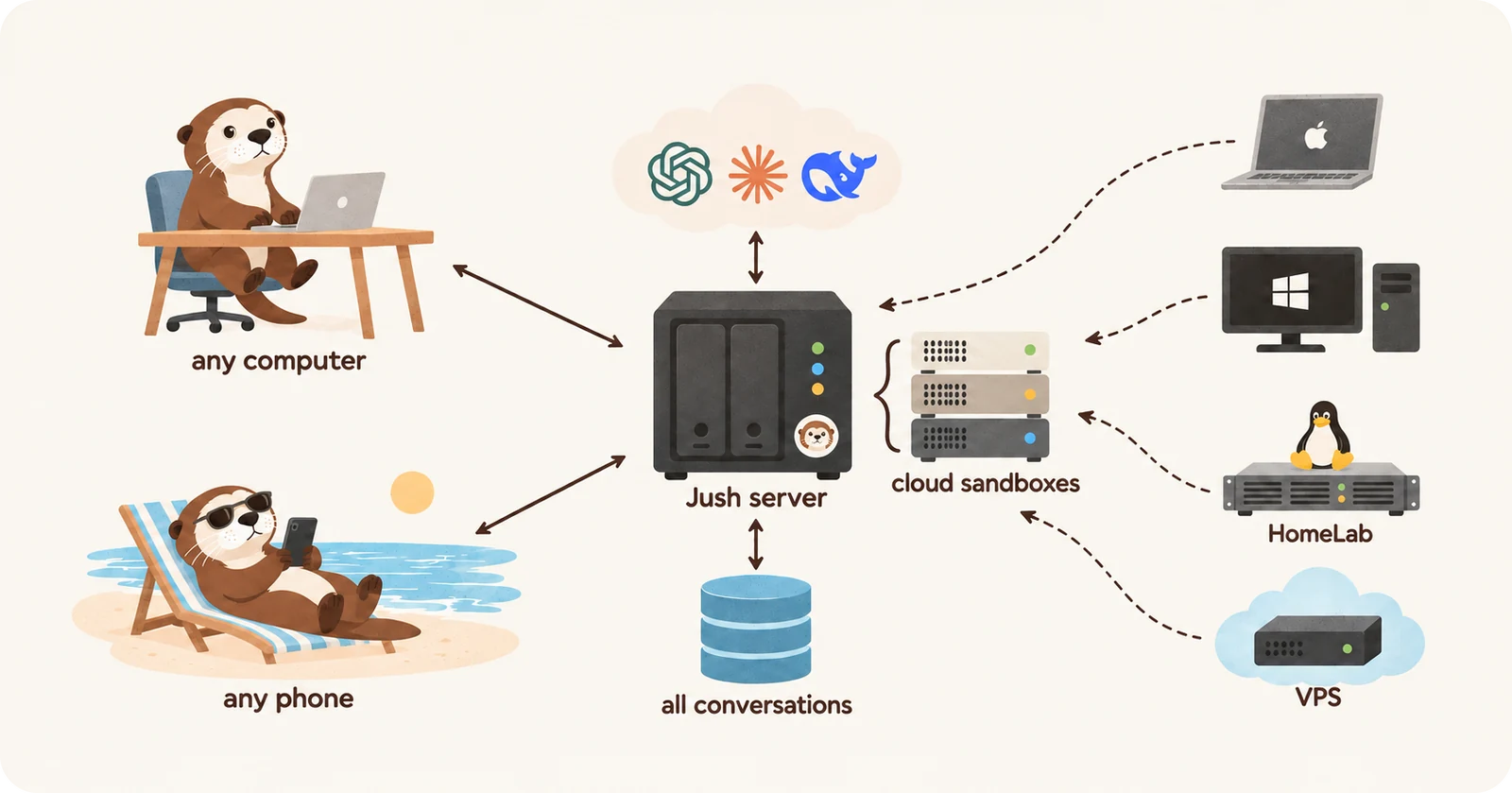
Your agent, across all your machines. A self-hosted, web-based AI agent: one server holds every conversation and works in a cloud sandbox or on your Macs, PCs and servers.
Self-hostedREADME.md
Original

Your agent, across all your machines.
A web-based AI agent you host on your own server.



English · Deutsch · Español · Français · Português · 简体中文 · 繁體中文 · 日本語 · 한국어
Demi is a web-based AI agent you host on your own server. Open it in any browser and hand it anything: research, websites, files or code. Your conversations stay on your server, and the work runs in a cloud sandbox or on your own machines, even after you close the tab.
[!NOTE] Demi is in early development. Expect breaking changes between releases.
Quick start
Deploy Demi in a few clicks:




Or install it on a Linux server of your own, with a domain name:
curl -fsSL https://demi.sh/install.sh | sudo bash
Or ask a coding agent, such as Claude Code or Codex, to install it:
Install Demi on my server by following https://raw.githubusercontent.com/demi-sh/demi/main/docs/delivery/install-with-an-agent.md
Then open Demi, create the admin account, and add a model in Settings › Providers. The installation guide covers supported systems, HTTPS, the Canary channel and what each setup costs.
Key features
Chat, work and code
- One conversation for everything: quick questions and multi-step jobs alike.
- Coding: edit repositories, run builds and tests, review each change as a diff.
- Research: search the web and read pages, PDFs and documents.
- Real browser: Demi drives Chrome. Watch it and take over any time.
- Phone apps: install and test apps on iOS Simulators and Android Emulators.
- Files and data: documents, spreadsheets and images, returned as attachments.
- Images, video and audio: made through the model providers you add.
- Comments and questions: select words in a reply to ask about them.
- Share and search: share a read-only link, and search every message.
Anywhere, on any machine
- Any browser: computer, tablet, phone or foldable, with nothing to install.
- Always on: tasks keep running after you close the tab, and notify you.
- One home for conversations: start on your laptop, continue on your phone.
- Private cloud sandbox: each user gets their own Linux sandbox.
- Your own computers: connect macOS, Windows and Linux with one command.
- Many machines, one task: build on a Mac, test on Windows, switch mid-task.
- Files everywhere: browse, preview and search every machine's files.
- Port forwarding: reach a port of one machine from another.
- Sign in your way: QR code or passkey, in nine languages.
Agent
- Multi-agent: a team of agents splits a large task and works in parallel.
- Profiles and workflows: specialist agents, shared through your repository.
- Schedules: wake a conversation on a timer, by cron, or on a change.
- Conversations work together: one conversation messages or reads another.
- Skills: teach Demi new tasks.
- Secure credentials: secrets go through a form, never the conversation.
Models and teams
- Your subscriptions: Claude, ChatGPT and Grok Build, rotating accounts at their limits.
- Any API: Anthropic, OpenAI, Gemini, coding plans such as Kimi, GLM or MiniMax, and local models.
- Switch models any time, even in the middle of a task.
- Usage and cost: see each subscription's limits and what the work cost.
- Multi-user: each user has their own sandbox, devices and conversations.
An agent built on a shell
Demi doesn't wrap Claude Code or Codex: its own runtime drives every model.
Where most agents give the model a long list of tools, Demi gives it one, a
shell. The browser, other machines and subagents are demi commands in it:
T=$(demi browser tab new) && demi browser open $T http://localhost:5173 && demi browser screenshot $T | demi file view
demi device shell --device windows 'cargo test'
demi agent spawn --profile research --description "Compare pricing pages" < brief.md
- Composable: commands chain with pipes, so one step does the work of several tool calls.
- Lean prompts: the model reads a command's
--helponly when it needs it. - Same shell everywhere: one bash-compatible shell, written in Rust, on every machine.
- Same for every model: switching models doesn't change what the agent can do.
- Built for long jobs: commands run in the background and report back.
[!NOTE] Planned: an OpenAPI for the Demi server, so your own programs can use its conversations, agents and cloud sandboxes.
Architecture
  Browsers (computer, phone, tablet)
        │  HTTPS + WebSocket
        ▼
  ┌──────────────────────────┐   HTTPS   ┌────────────────────┐
  │ Demi server              │──────────▶│ Model providers    │
  │ users, conversations,    │           └────────────────────┘
  │ agents                   │
  └──────────────────────────┘
        ▲                ▲
        │ WebSocket      │ WebSocket
  ┌─────┴──────────┐  ┌──┴───────────────────────────┐
  │ Runner in your │  │ Runners on your computers    │
  │ cloud sandbox  │  │ and servers (macOS, Windows, │
  │                │  │ Linux)                       │
  └────────────────┘  └──────────────────────────────┘
- The server runs the agent, runners do the work: each runner connects out, so it works behind NAT and firewalls.
- One runner everywhere: every feature works on every machine.
- Light on bandwidth: large files stay where they were made until you open them.
- Native: Rust for the server, runner and tools; Vue and TypeScript for the web app.
Read the design docs, starting with the overview.
Comparison
How Demi differs from OpenHands, Orca, T3 Code, DeepSeek Harness, opencode, Pi and herdr, feature by feature: Demi compared.
Documentation
- Design docs: how every part of Demi works
- Contributing: development setup, checks, and adding a provider
- Security: reporting vulnerabilities and where data is stored
License
Demi is released under the Apache License 2.0.