
deepmancer/HairPort
deepmancer/HairPort has 44 GitHub stars and 2 forks. GitHot measured 0 stars in 24 hours. Last checked 2026-11-15 03:02 UTC. Last push 2026-07-17.
Measured star growth
- in 24h
- 0
- in 7 days
- Collecting history
- in 15 days
- Collecting history
- in 1 month
- Collecting history
Net star changes over overlapping periods, not daily totals. Missing measurements are left blank. Stars measure attention, not software quality.
About
🔥 (SIGGRAPH 2026) 3D-aware hairstyle transfer for images: in-context bald conversion, pose-aligned hair import, and identity-preserving synthesis.
AIREADME.md
OriginalHairPort
In-context 3D-aware Hair Import and Transfer for Images
SIGGRAPH Conference Papers '26
A. Heidari, A. Alimohammadi, and A. Mahdavi-Amiri







HairPort transfers a reference hairstyle onto a source face while explicitly handling large pose and scale differences through 3D-aware alignment before image synthesis.
News
- June 2026: HairPort preprint is now available on arXiv: arXiv:2606.12562.
- May 2026: ACM assigned the HairPort DOI: 10.1145/3799902.3811046.
- May 2026: HairPort was accepted to SIGGRAPH Conference Papers '26.
- May 2026: Launched the HairPort project page.
- April 2026: Initial HairPort source code released; packaging and dependency manifests will be finalized soon.
- April 2026: Released the Baldy dataset for paired bald/original image training.
- April 2026: Released the Bald Converter LoRA weights.
Results Teaser
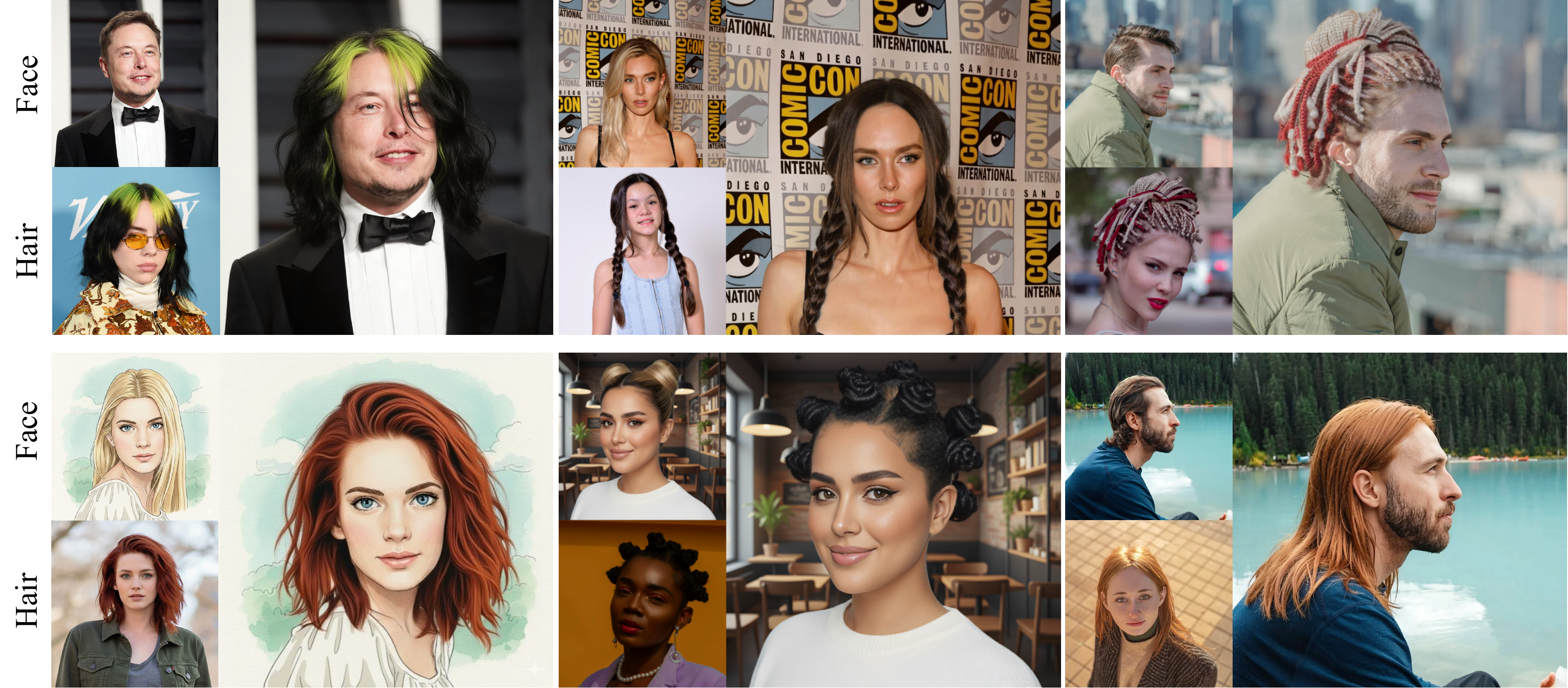
Figure 1. HairPort transfers hairstyles across challenging identity, pose, scale, and style differences.
Method At A Glance
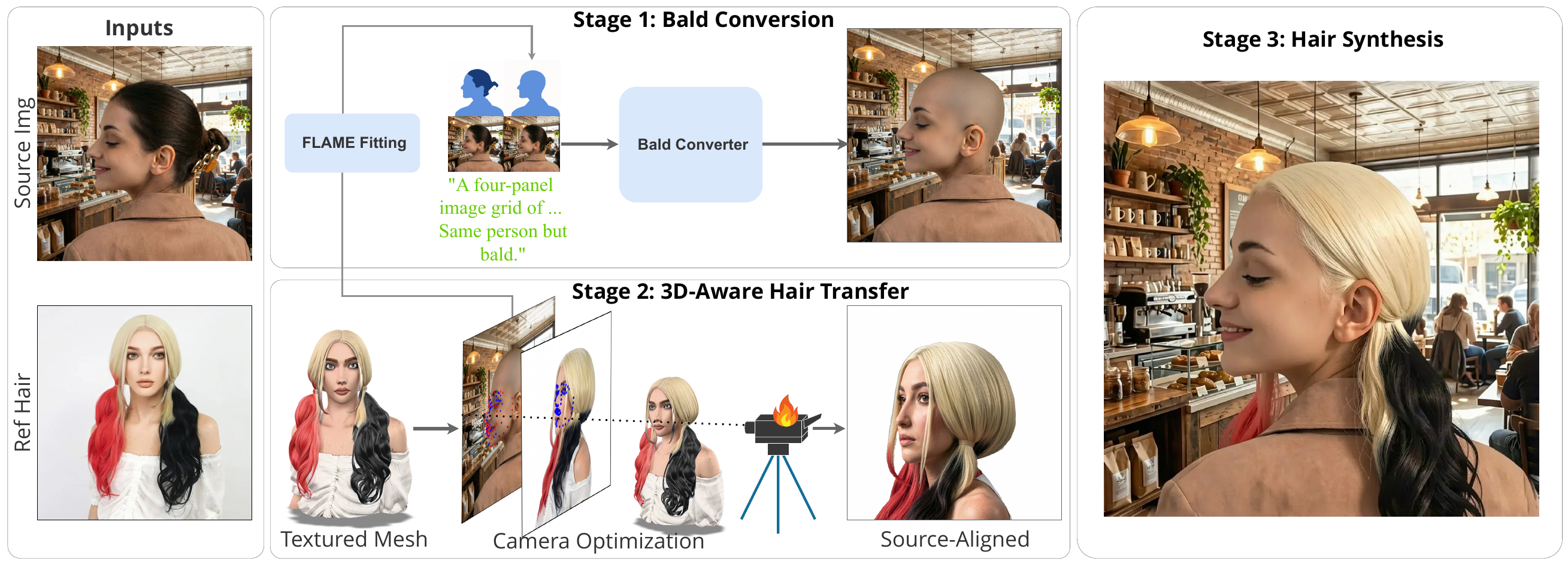
Figure 2. HairPort removes source hair, aligns the reference hairstyle in 3D, and synthesizes the final transfer from source-aligned hair evidence.
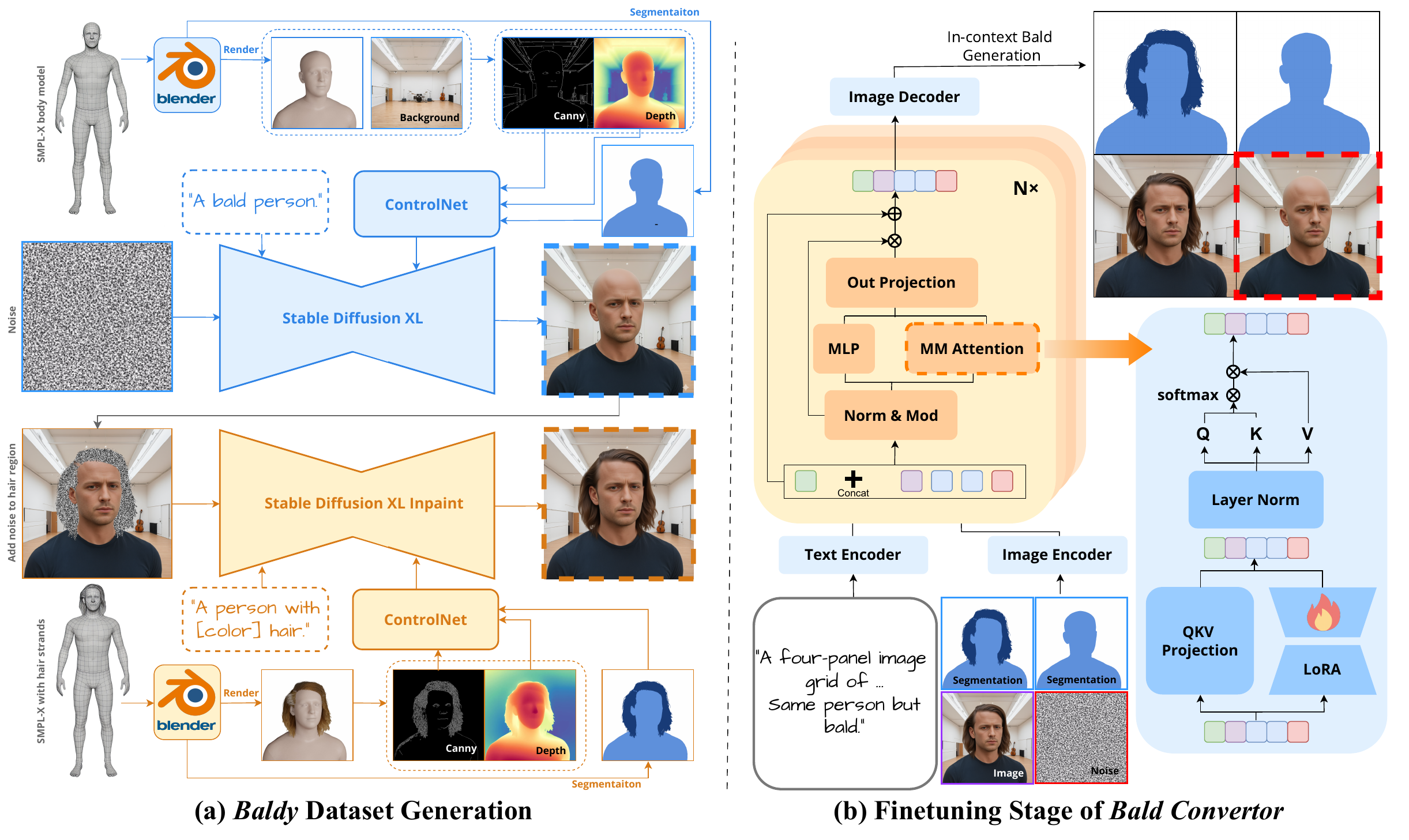
Figure 3. Baldy dataset generation and LoRA-based Bald Converter finetuning for in-context bald generation.
Paper Abstract
Transferring hairstyles between images is an important but challenging task in computer graphics, computer vision, and visual effects. It enables users to explore new looks without physically altering their hair, with applications in virtual try-on systems, augmented reality, and entertainment. Most prior works operate best under small pose gaps, and they fall short under large viewpoint and scale differences, where missing hair content must be synthesized rather than transferred.
We propose HairPort, a 3D-aware hairstyle transfer framework that addresses these issues by explicitly separating hair removal from transfer and enforcing geometric consistency before synthesis. We introduce a Bald Converter, which produces realistic bald versions of faces through LoRA-based in-context adaptation of FLUX. To train the Bald Converter, we introduce a new dataset, Baldy, containing 6,400 paired bald and original images across diverse identities and conditions. We also use a 3D-aware Transfer Pipeline that reconstructs and re-renders the reference hairstyle from the target viewpoint before compositing it onto the source image. Being 3D-aware, our method supports large pose and scale discrepancies between the source and target. With these components in place, we employ a conditional flow-matching generator to synthesize the final image conditioned on the bald source, the pose-aligned hair rendering, the original reference image, and a text prompt. Together, our method enables accurate, pose-consistent, and identity-preserving hairstyle transfer, outperforming existing methods both qualitatively and quantitatively.
Repository Status
Official source preview. This repository contains the official SIGGRAPH 2026 implementation snapshot, including the pipeline source, configuration, asset layout, README figures, Bald Converter links, and dataset links.
The repository ships a
pyproject.toml:pip install -e .installs thehairportpackage and thebald-konverterconsole script. Runtime dependencies (CUDA wheels, git packages) are managed separately viarequirements.txt/scripts/install.sh.
Installation
Requirements
- Python >= 3.10
- CUDA-capable GPU recommended; most stages are GPU-heavy and >=24 GB VRAM is recommended
- Blender >= 4.0 for multi-view rendering in 3D landmark and rendering stages
- Hugging Face access for auto-downloaded model weights. The Bald Converter base model
black-forest-labs/FLUX.1-Kontext-devis gated: accept its license and authenticate withhuggingface-cli loginbefore first use.
1. Create an environment
conda create -n hairport python=3.11 -y
conda activate hairport
2. Install PyTorch
Install the PyTorch build matching your CUDA version. Example for CUDA 12.4:
pip install torch torchvision --index-url https://download.pytorch.org/whl/cu124
3. Get HairPort
git clone https://github.com/deepmancer/HairPort.git
cd HairPort
pip install -e .   # installs the `hairport` package + `bald-konverter` CLI
4. Install remaining dependencies
The current full dependency recipe is documented in scripts/install.sh. It is a full bootstrap/reference script rather than a minimal in-place package installer, so review it before running or adapting it. It includes system-level tools, source builds, CUDA-specific packages, and optional project utilities.
# From the parent directory that contains HairPort:
cd ..
bash HairPort/scripts/install.sh
cd HairPort
5. Set up external modules
This initializes the CodeFormer / MV-Adapter clones and the PEAR head/body fitting submodule, downloads all data assets, and builds pytorch3d:
bash scripts/setup_submodules.sh
Head and body fitting is performed by PEAR
(SMPL-X + FLAME EHM recovery), wrapped behind the modular
hairport.fitting backend layer. PEAR's ehm_model_stage1.pt
checkpoint is auto-downloaded from the Hugging Face Hub on first use, and the
person detector is YOLOv8 (ultralytics, AGPL-3.0 — see the License
section), also auto-downloaded. PEAR's parametric assets (SMPL-X / FLAME) ship in
the hairport_data.zip bundle (step 6).
Hi3DGen is not bundled. Generate shape meshes externally and place them at shape_mesh/<id>/shape_mesh.glb before running the full transfer pipeline.
6. Download data assets
scripts/download_assets.py fetches hairport_data.zip from the Hugging Face Hub
and places everything the pipeline + PEAR need: the MediaPipe/FLAME landmark
embeddings (assets/landmarks/) and the PEAR runtime models
(modules/PEAR/assets/{FLAME,SMPLX}). The setup script in step 5 already runs it;
to (re)fetch on its own:
python scripts/download_assets.py
By downloading the FLAME/SMPL-X assets you agree to the FLAME and SMPL-X license terms.
Validate external modules and user-supplied assets before beginning GPU inference:
python -m hairport.preflight
After the validated GPU smoke run, export the exact publication environment lock:
bash scripts/export_environment_lock.sh
Commit the generated requirements.inference.lock.txt alongside the immutable models.*_revision settings used for reported results.
7. Log in to Hugging Face
Most model weights are downloaded automatically on first use.
huggingface-cli login
Quick Start
This example transfers the reference hairstyle from reference.png onto the source face in source.png.
1. Prepare inputs
mkdir -p my_project/image
mkdir -p my_project/matted_image
mkdir -p my_project/matted_image_centered

cp source.png    my_project/image/source.png
cp reference.png my_project/image/reference.png
cp source.png    my_project/matted_image_centered/source.png
cp reference.png my_project/matted_image_centered/reference.png
The filename stem becomes the identity ID used throughout the pipeline.
2. Add canonical shape meshes
HairPort expects user-provided shape meshes under shape_mesh/. Stage 3 then runs MVAdapter texturing and writes textured_mesh.glb outputs under mvadapter/<shape_provider>/<id>/textured_mesh.glb.
mkdir -p my_project/shape_mesh/source
mkdir -p my_project/shape_mesh/reference

# Required files:
# my_project/shape_mesh/source/shape_mesh.glb
# my_project/shape_mesh/reference/shape_mesh.glb
For MVAdapter texturing, centered mattes are required at matted_image_centered/<id>.png.
3. Create transfer pairs
Create my_project/pairs.csv:
target_id,source_id,lift_3d,head_diff_angle
reference,source,True,0.98
target_id is the identity providing the reference hairstyle. source_id is the identity providing the source face. The lift_3d and head_diff_angle columns are optional; if omitted, they are computed automatically and written to generated pair_decisions.json output. Input pairs.csv is never modified.
4. Run HairPort
python -m hairport.pipeline \
  --data_dir my_project \
  --shape_provider hi3dgen \
  --texture_provider mvadapter \
  --bald_version w_seg
5. Find the output
The full 3D-aware run produces both official conditioning variants:
my_project/view_aligned/shape_hi3dgen__texture_mvadapter/reference_to_source/w_seg/3d_aware/enhanced/transferred_klein/hair_restored.png
my_project/view_aligned/shape_hi3dgen__texture_mvadapter/reference_to_source/w_seg/3d_aware/blended/transferred_klein/hair_restored.png
Depending on GPU memory and model cache state, the full pipeline can take several minutes per transfer pair.
Python API
from hairport.pipeline import HairPortPipeline

pipeline = HairPortPipeline(
    data_dir="my_project",
    shape_provider="hi3dgen",
    texture_provider="mvadapter",
    bald_version="w_seg",
)

results = pipeline.run()
for r in results:
    status = "OK" if r.success else "FAIL"
    print(f"[{status}] {r.stage:20s} {r.duration_seconds:.1f}s")
Pipeline Stages
| # | Stage | What happens |
|---|---|---|
| 1 | Baldify | Generate a realistic bald source portrait using the Bald Converter. |
| 2 | Caption | Outpaint bald images and generate text descriptions with Qwen Image-Edit. |
| 3 | Shape Mesh | Texture canonical shape_mesh/<id>/shape_mesh.glb inputs with MVAdapter. |
| 4 | Landmark 3D | Estimate 3D facial landmarks from the supported single frontal Blender render. |
| 5 | Align View | Optimize camera alignment from reference hairstyle to source face. |
| 6 | Render View | Render target-hair alignment views from the postprocessed textured mesh. |
| 7 | Enhance View | Refine rendered views with FLUX.2 Klein 9B and CodeFormer. |
| 8 | Blend Hair | Warp and Poisson-blend enhanced hair onto the bald source. |
| 9 | Transfer Hair | Synthesize final outputs for enhanced-view and blended-view conditioning. |
Run a subset of stages when debugging:
# Resume from a stage
python -m hairport.pipeline --data_dir my_project --start render_view

# Run only selected stages
python -m hairport.pipeline --data_dir my_project --only blend_hair transfer_hair

# Skip selected stages
python -m hairport.pipeline --data_dir my_project --skip shape_mesh landmark_3d
Data Layout
HairPort expects inputs and writes intermediates under data_dir:
data_dir/
├── image/                          # Input portraits
│   ├── source.png
│   └── reference.png
├── matted_image/                   # Background-removed images
├── matted_image_centered/          # Centered mattes used for MVAdapter texturing
├── pairs.csv                       # Transfer pairs
│
├── shape_mesh/                     # User-provided input meshes
│   ├── source/shape_mesh.glb
│   └── reference/shape_mesh.glb
├── mvadapter/hi3dgen/              # Generated textured meshes (Stage 3)
│   ├── source/textured_mesh.glb
│   └── reference/textured_mesh.glb
│
├── bald/
│   └── w_seg/
│       ├── image/                  # Bald portraits
│       └── image_outpainted/       # Outpainted bald images
├── lmk_3d/
│   └── shape_hi3dgen__texture_mvadapter/
│       └── <identity>/
│           ├── postprocessed_textured_mesh.glb
│           └── landmarks_3d.npy
│
└── view_aligned/
    └── shape_hi3dgen__texture_mvadapter/
        ├── pair_decisions.json            # Generated decisions; pairs.csv remains input-only
        └── <target>_to_<source>/
            └── <bald_version>/
                ├── alignment/              # Version-scoped rendered/enhanced views
                └── 3d_aware/
                    ├── blending/
                    ├── enhanced/transferred_klein/hair_restored.png
                    └── blended/transferred_klein/hair_restored.png
Configuration
HairPort uses a centralized OmegaConf configuration. Defaults live in configs/default.yaml.
Configuration covers:
- Global settings:
device,seed - Paths: asset directories and external module locations
- Models: Hugging Face IDs, LoRA weights, checkpoints
- Per-stage parameters: resolution, inference steps, thresholds
- Prompts used across the pipeline
landmark_3d.num_perturbations: 0: the supported inference contract is single frontal viewtransfer_hair.conditioning_sources: [enhanced, blended]: generated final variantscache.policy: validated: artifacts are reused only when their provenance sidecar matches
Generated artifacts carry .provenance.json sidecars recording resolved configuration, inputs, model identifiers/revisions, and seeds. Existing artifacts without matching provenance are regenerated. Validated cache reuse is disabled while the repository checkout has uncommitted changes, since such a state cannot name the producing code exactly.
For publication runs, set the models.*_revision values to immutable Hugging Face snapshot commits; preflight warns when a selected stage uses an unpinned revision. These fields cover FLUX, RealVis/SDXL, ControlNet, MV-Adapter, SAM, BEN2, PEAR, Qwen, and Bald Converter dependencies used by the supported pipeline.
Per-item seeds make sampled decisions reproducible; exact pixel equality additionally depends on deterministic GPU kernels and is recorded in provenance through the active Torch/cuDNN determinism flags.
Stage 3 invokes the pinned external MV-Adapter checkout; for reported runs, set shape_mesh.sdxl_model_id to an immutable local Hugging Face snapshot path so its internal loader cannot resolve a moving repository head.
Memory policy (GPU model residency)
Large models are never kept on the GPU together. memory.policy in
configs/default.yaml controls this:
exclusive(default) — at most one large model is GPU-resident at a time; the others are parked in CPU RAM between usage windows (e.g. the bald converter offloads FLUX while SAM3/BEN2 preprocessing and the PEAR SMPL-X fit run, and the hair-transfer stage offloads FLUX.2 Klein during SDXL uncropping). Costs a few seconds of PCIe transfer per swap.resident— legacy behavior: models stay loaded for maximum speed.
memory.flux_offload (none | model | sequential) additionally enables
diffusers component-level CPU offload for the big pipelines (FLUX.1-Kontext,
FLUX.2 Klein, MV-Adapter SDXL): model keeps only the active component
(text encoder / transformer / VAE) on GPU — roughly halving peak VRAM for
~10-20 % speed — and sequential minimizes VRAM at a larger speed cost.
# Fastest (legacy) behavior:
python -m hairport.pipeline --set memory.policy=resident
# Lowest VRAM:
python -m hairport.pipeline --set memory.flux_offload=model
Residency utilities live in hairport/memory.py (on_gpu, offload,
apply_offload_mode) — new stages should route model placement through them.
Override defaults with a custom YAML file:
python -m hairport.pipeline --config configs/my_experiment.yaml
Or with dot-list CLI overrides:
python -m hairport.pipeline --set device=cpu seed=123 enhance_view.num_inference_steps=6
Programmatic configuration:
from hairport.config import load_config, set_config

cfg = load_config(
    "configs/my_experiment.yaml",
    overrides=["device=cpu", "baldify.seed=123"],
)
set_config(cfg)
Standalone Tools
Individual stages
Each stage can be run directly from the repository root:
python -m hairport.stages.baldify       --data_dir my_project
python -m hairport.stages.caption       --data_dir my_project
python -m hairport.stages.shape_mesh    --data_dir my_project
python -m hairport.stages.landmark_3d   --data_dir my_project
python -m hairport.stages.align_view    --data_dir my_project
python -m hairport.stages.render_view   --data_dir my_project
python -m hairport.stages.enhance_view  --data_dir my_project
python -m hairport.stages.blend_hair    --data_dir my_project
python -m hairport.stages.transfer_hair --data_dir my_project
Bald Converter
Use the Bald Converter independently when you only need bald portrait generation:
from hairport.bald_konverter import BaldKonverterPipeline

pipeline = BaldKonverterPipeline(mode="auto")
result = pipeline("portrait.jpg")
result.bald_image.save("bald.png")
CLI form:
python -m hairport.bald_konverter.cli --input photo.jpg --output bald.png
python -m hairport.bald_konverter.cli --input-dir ./faces/ --output-dir ./bald/
python -m hairport.bald_konverter.cli --input photo.jpg --output bald.png --mode w_seg
3D Landmark Estimation
from hairport.fit_lmk import estimate_3d_landmarks

results = estimate_3d_landmarks(
    mesh_path="head.glb",
    cam_loc=[0.0, -1.45, 0.0],
    cam_rot=[1.5708, 0.0, 0.0],
    output_dir="./landmarks_output",
)
Project Structure
HairPort/
├── configs/
│   └── default.yaml                # Centralized YAML configuration
├── scripts/
│   ├── install.sh                  # Full dependency recipe
│   └── setup_submodules.sh         # External module setup
├── assets/
│   ├── images/                     # README figures
│   └── landmarks/flame/            # MediaPipe/FLAME landmark embeddings
├── modules/
│   └── PEAR/                       # PEAR fitting submodule (+ its assets/)
├── hairport/
│   ├── pipeline.py                 # HairPortPipeline orchestrator
│   ├── config.py                   # OmegaConf config system
│   ├── data.py                     # Dataset path management
│   ├── memory.py                   # GPU model-residency policy
│   ├── stages/                     # Pipeline stage modules
│   ├── bald_konverter/             # Bald Converter package
│   ├── fitting/                    # Modular head/body fitting backends (PEAR)
│   ├── fit_lmk/                    # 3D landmark estimation
│   ├── core/                       # Shared vision and geometry components
│   ├── utility/                    # Rendering, warping, outpainting utilities
│   └── postprocessing/             # Hair restoration and mask helpers
├── LICENSE
└── README.md
External Dependencies / Models
External modules
| Module | Repository | Used for |
|---|---|---|
| CodeFormer | sczhou/CodeFormer | Face super-resolution |
| MV-Adapter | huanngzh/MV-Adapter | Multi-view generation adapter for SDXL |
| PEAR | Pixel-Talk/PEAR | SMPL-X + FLAME head/body fitting (head segmentation and orientation) |
PEAR uses YOLOv8 (ultralytics) for person detection, which is AGPL-3.0
licensed; the PEAR code itself is Apache-2.0. SMPL-X / SMPL / FLAME parametric
models retain their MPI license terms.
Acknowledgements
HairPort builds on a number of excellent open-source projects and research assets. We thank the authors and maintainers of MV-Adapter, Hi3DGen, CodeFormer, PEAR, FLAME, SMPL-X, MediaPipe, Segment Anything, BEN2, Hugging Face Diffusers/Transformers, FLUX, and Qwen for making their work available to the community.
Please refer to the respective projects for their licenses, model terms, and citation requirements.
Citation
If you use HairPort in your research, please cite:
Publication details: SIGGRAPH Conference Papers '26, July 19--23, 2026, Los Angeles, CA, USA. DOI: 10.1145/3799902.3811046. ACM ISBN: 979-8-4007-2554-8/2026/07. Preprint: arXiv:2606.12562.
@inproceedings{heidari2026hairport,
  title     = {HairPort: In-context 3D-aware Hair Import and Transfer for Images},
  author    = {A. Heidari and A. Alimohammadi and A. Mahdavi-Amiri},
  booktitle = {Special Interest Group on Computer Graphics and Interactive Techniques Conference Conference Papers (SIGGRAPH Conference Papers '26)},
  year      = {2026},
  isbn      = {979-8-4007-2554-8/2026/07},
  doi       = {10.1145/3799902.3811046},
  url       = {https://doi.org/10.1145/3799902.3811046},
  location  = {Los Angeles, CA, USA}
}
License
This repository is released under the Creative Commons Attribution-NonCommercial-NoDerivatives 4.0 International License (CC BY-NC-ND 4.0).
Unless otherwise noted, this license applies to the HairPort source code, documentation, and repository-owned assets. Third-party code, models, datasets, and external assets retain their own upstream licenses, model terms, and citation requirements.
Copyright (c) 2026