
dbuzatto/gif-terminal
dbuzatto/gif-terminal has 29 GitHub stars and 26 forks. Star changes are not measured yet. Last checked 2026-11-16 04:25 UTC. Last push 2026-11-09.
What you can do
- Fetches real-time GitHub stats (commits, stars, PRs, followers, rank, languages)
- Three themes — classic terminal, macOS Liquid Glass, or Debian GNOME
- Custom wallpaper — drop any image into assets/ and point to it with one variable
- Username auto-detected — no code editing needed after forking
Measured star growth
- in 24h
- Update delayed
- in 7 days
- Update delayed
- in 15 days
- Update delayed
- in 1 month
- Update delayed
Net star changes over overlapping periods, not daily totals. Missing measurements are left blank. Stars measure attention, not software quality.
About
Animated retro terminal GIF for GitHub Profile README - displays live GitHub stats and tech skills with automatic daily updates
Developer ToolsREADME.md
OriginalTerminal GIF for GitHub Profile
An animated terminal GIF showcasing your GitHub stats — auto-generated daily.
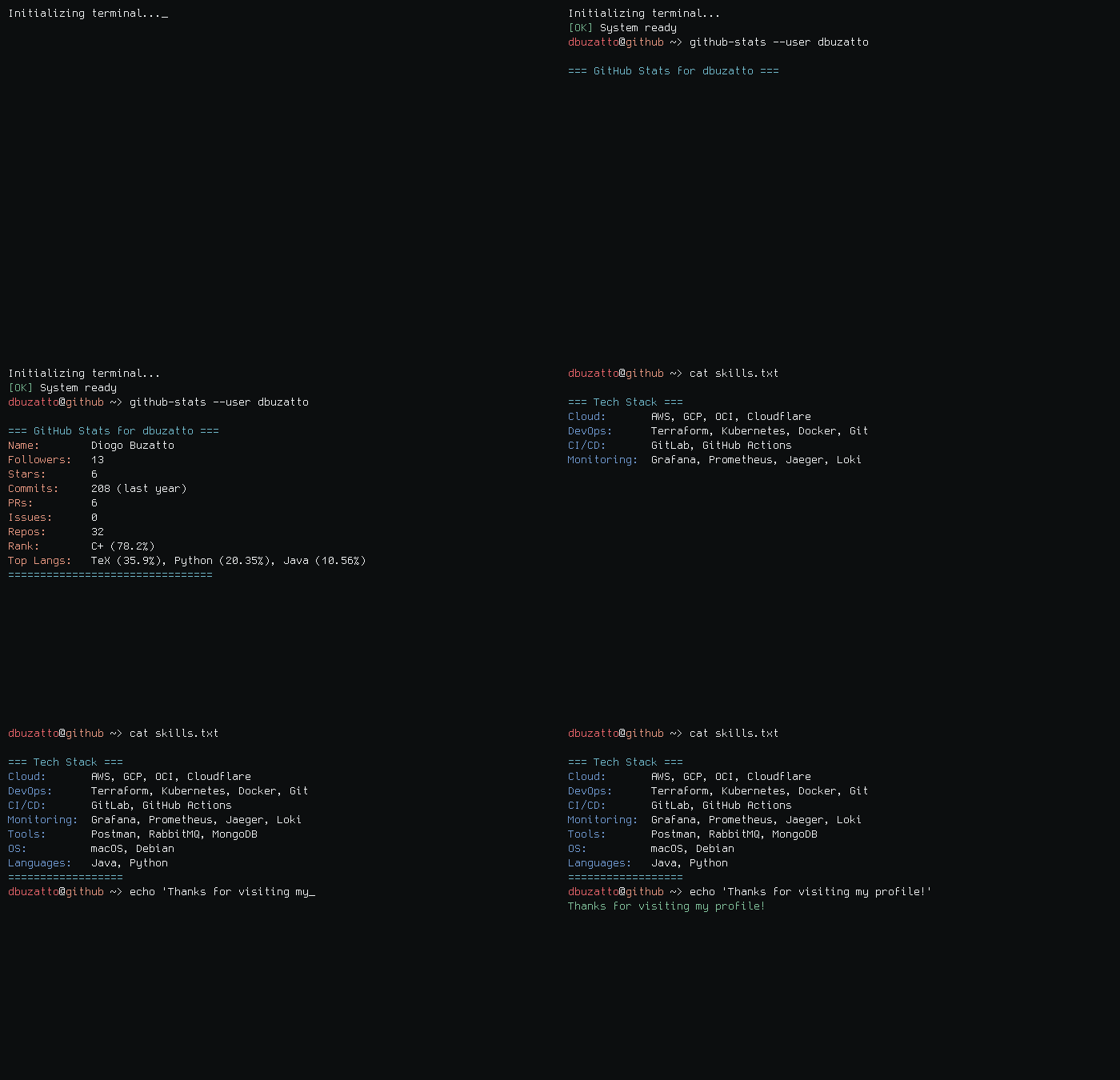


Features
- Fetches real-time GitHub stats (commits, stars, PRs, followers, rank, languages)
- Three themes — classic terminal, macOS Liquid Glass, or Debian GNOME
- Custom wallpaper — drop any image into
assets/and point to it with one variable - Username auto-detected — no code editing needed after forking
- Auto-regenerated daily via GitHub Actions
Themes
| Value | Theme | Description |
|---|---|---|
default |
Classic dark (default) | Clean dark terminal, no wallpaper |
macos |
macOS Liquid Glass | Frosted glass terminal over a macOS wallpaper |
debian |
Debian GNOME | GNOME terminal with title bar, menu bar, and Tango colors |
Quick Start (fork & use)
1. Fork this repository
Click the Fork button at the top right of this page.
2. Add your GitHub Token
Go to Settings → Secrets and variables → Actions and add a new secret:
| Name | Value |
|---|---|
GH_TOKEN |
Your GitHub Personal Access Token |
Generate a token at github.com/settings/tokens — only the
read:userscope is needed.
3. Choose your theme
Go to Settings → Secrets and variables → Actions, open the Variables tab and add:
| Name | Value |
|---|---|
THEME |
macos or debian or default |
If you skip this step the
defaulttheme is used.
4. (Optional) Set your wallpaper
Upload any image to assets/ in your fork, then add a second variable:
| Name | Value |
|---|---|
WALLPAPER |
filename inside assets/ — e.g. debian_dark_wallpaper.jpg |
This works for the debian theme. If WALLPAPER is not set, debian_wallpaper.png is used.
For the macos theme, replace assets/macos_wallpaper.jpg directly.
5. Trigger the first run
Go to Actions → Generate Terminal GIF → Run workflow.
6. Add to your profile README

Running Locally
Install dependencies
pip install github-readme-terminal requests python-dotenv Pillow

# ffmpeg (optional — PIL fallback is used if not installed)
brew install ffmpeg        # macOS
sudo apt install ffmpeg    # Ubuntu / Debian
Configure
cp .env.example .env
# fill in GITHUB_TOKEN and GIT_USERNAME
Generate
# Debian theme — default wallpaper
python3 generate_debian.py

# Debian theme — custom wallpaper
WALLPAPER=debian_dark_wallpaper.jpg python3 generate_debian.py

# macOS theme
python3 generate_liquid_glass.py

# Classic dark
python3 generate_with_stats.py
Project Structure
.
├── generate_debian.py            # Debian GNOME theme
├── generate_liquid_glass.py      # macOS Liquid Glass theme
├── generate_with_stats.py        # Classic dark theme
├── assets/
│   ├── debian_wallpaper.png      # Default Debian wallpaper
│   ├── debian_dark_wallpaper.jpg # Dark Debian wallpaper
│   └── macos_wallpaper.jpg       # macOS wallpaper (replace with your own)
├── output.gif                    # Generated GIF (auto-updated by CI)
├── .env.example
└── .github/workflows/generate-gif.yml
Updating from a previous version
If you already forked this repo, sync with upstream and you're done — nothing breaks:
THEME=debiankeeps working exactly as before- The window buttons changed visually from colored circles to
˅ ◇ ×icons - New: add a
WALLPAPERvariable pointing to any image inassets/to use a custom wallpaper (see step 4 above)
No code edits required.
Contributing
Contributions, issues, and feature requests are welcome. Feel free to open an issue or submit a pull request.
If this project helped you, consider leaving a ⭐