
davide-troiani/moeshift
davide-troiani/moeshift has 122 GitHub stars and 7 forks. GitHot measured +1 stars in 24 hours and +69 in 7 days. Last checked 2026-11-17 02:27 UTC. Last push 2026-11-15.
Measured star growth
- in 24h
- +1
- in 7 days
- +69
- in 15 days
- Collecting history
- in 1 month
- Collecting history
Net star changes over overlapping periods, not daily totals. Missing measurements are left blank. Stars measure attention, not software quality.
About
Memory efficient and high performance Mixture-of-Experts inference for Apple Silicon
Developer ToolsREADME.md
OriginalMoEShift
Large AI models on your Mac. Starting with 10 GB of RAM.
125 billion parameters. Up to 11 tokens per second. Under 10 GB of peak process memory. MoEShift is optimized for Apple Silicon: on a Mac mini M4 Pro with 24 GB of unified memory, it runs Qwen 3.8 Flash Next with roughly half the peak process memory of Strata and processes long prompts 2.6× faster.
MoEShift leaves room for your other apps, helping your Mac stay responsive during inference instead of grinding to a halt under memory pressure. Keep browsing, writing and coding while the model works—all locally, with no cloud subscription.
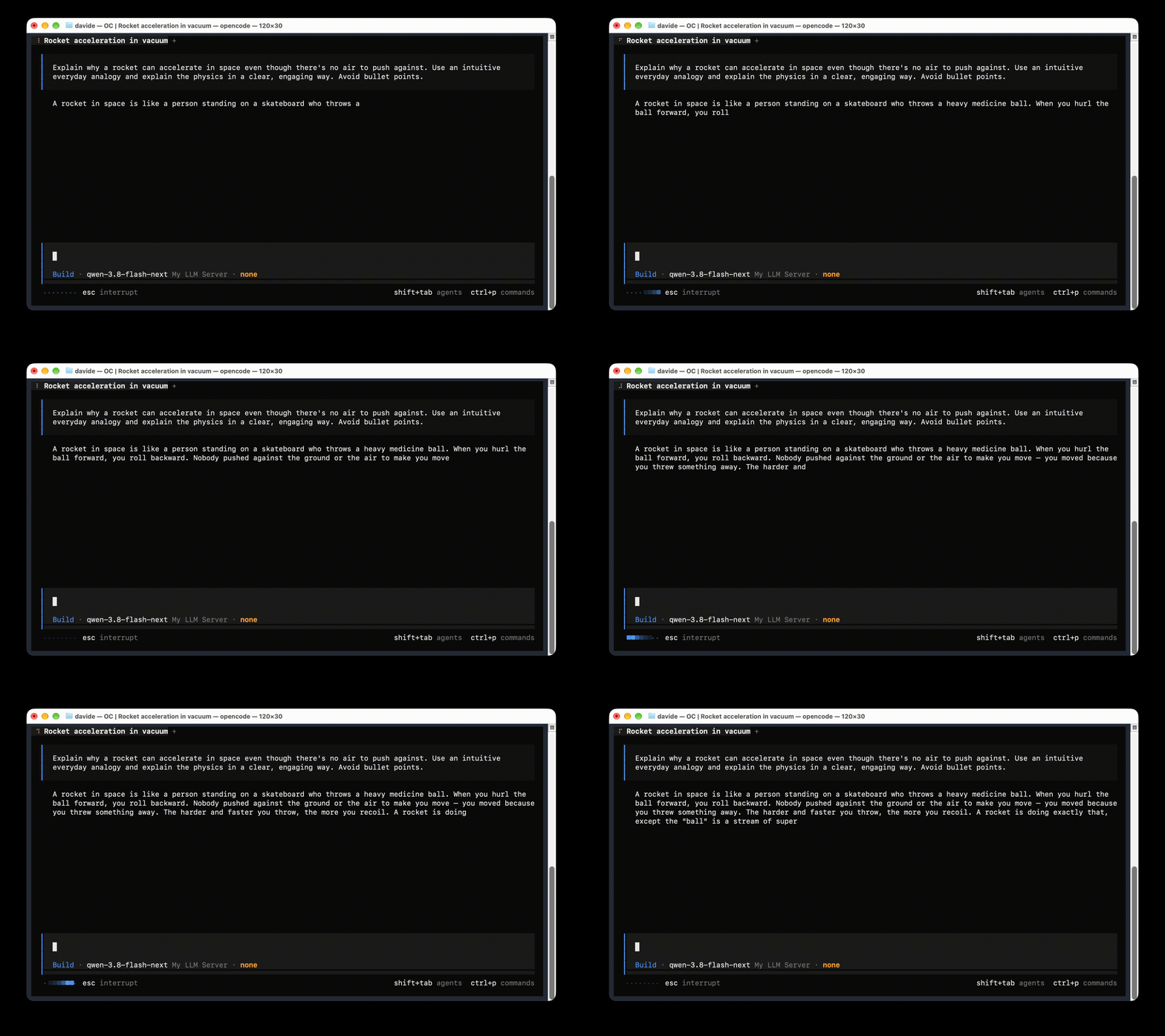
Qwen 3.8 Flash Next running locally with MoEShift, connected to OpenCode.
Alpha release. The core runtime is working, and the project is evolving quickly. You may encounter rough edges; your feedback helps shape the next release. Tested models and quantizations are listed below.
Tested models and benchmarks
| Model | GGUF architecture | Tested quantization |
|---|---|---|
| Qwen 3.8 Flash Next (125B) | qwen4exp |
ISTA-DASLab GSQ-RCO IQ3_XXS |
| Qwen3.6-35B-A3B | qwen35moe |
UD Q6_K XL (Q6_K/Q8_0 experts) |
Both use the shared SSD expert runtime on Apple Silicon. See supported architectures.
Qwen 3.8 Flash Next
Compared with Strata, a popular choice for local MoE inference, on a Mac mini M4 Pro with 24 GB unified memory. Both ran Qwen 3.8 Flash Next (125B), ISTA-DASLab GSQ-RCO IQ3_XXS, with an 8,192-token context, no cached prompt tokens and 256 output tokens. Strata: 0.2.7, build 0.1.52.
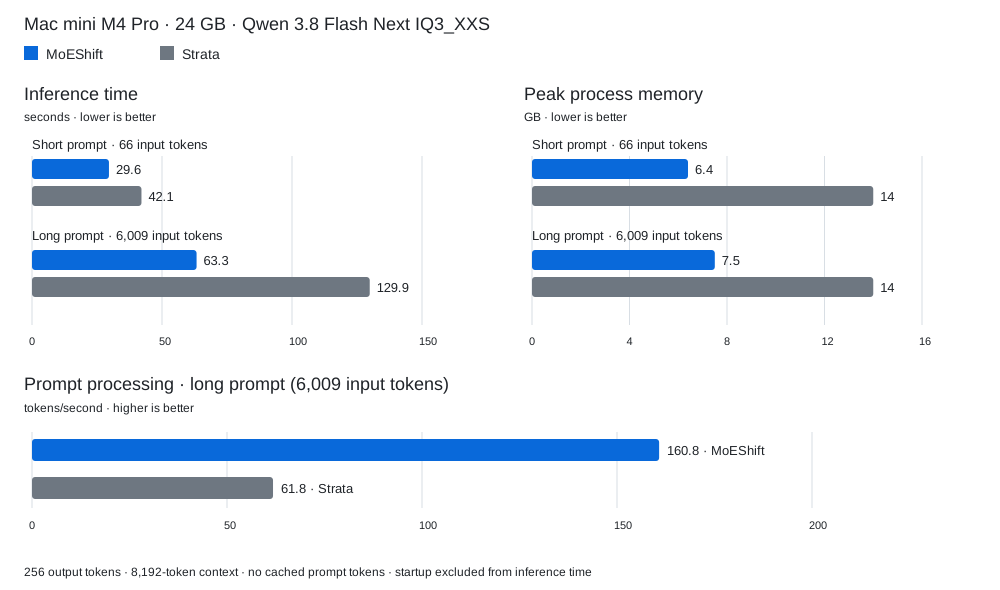
| Measurement | Short prompt: MoEShift / Strata | Long prompt: MoEShift / Strata |
|---|---|---|
| Input tokens | 66 / 66 | 6,009 / 6,009 |
| Inference time ↓ | 29.6 / 42.1 s | 63.3 / 129.9 s |
| Prompt processing ↑ | — | 160.8 / 61.8 tok/s |
| Text generation ↑ | 10.44 / 8.4 tok/s | 9.9 / 7.8 tok/s |
| Peak process memory ↓ | 6.4 / 14 GB | 7.5 / 14 GB |
Time includes server-measured prompt processing and generation, excluding
startup. Memory is macOS footprint -p peak physical process footprint.
Qwen3.6-35B-A3B
UD Q6_K XL on the same Mac mini M4 Pro with 24 GB unified memory. Medians of three measured runs after warmup, with no cached prompt tokens and 512 output tokens, using the benchmark runner. These runs use different output lengths from the Flash Next comparison above.
| Measurement | Short prompt | Long prompt |
|---|---|---|
| Input tokens | 72 | 6,060 |
| Inference time ↓ | 34.25 s | 49.45 s |
| Prompt processing ↑ | - | 417.24 tok/s |
| Text generation ↑ | 16.50 tok/s | 14.66 tok/s |
| Peak process memory ↓ | 5.4 GB | 5.6 GB |
What you need
- A Mac with Apple Silicon (M-series).
- At least 10 GB of RAM.
- A fast SSD with space for both the GGUF and prepared expert files: at least 120 GB for the Flash Next setup below, or about 60 GB for Qwen3.6 UD Q6_K XL.
- Homebrew, the package manager for macOS. If you have never used it, follow its installation instructions, then return here.
1. Install MoEShift
Open Terminal and run:
brew install davide-troiani/moeshift/moeshift
The installation includes model preparation tools. MoEShift creates
~/.config/moeshift/config.json automatically on first launch and preserves
your settings on subsequent launches and upgrades.
2. Download the model
Choose a model and quantization from its download page:
| Model | Download |
|---|---|
| Qwen 3.8 Flash Next | ISTA-DASLab GGUF files |
| Qwen3.6-35B-A3B | Unsloth GGUF files |
Quantization is your choice: smaller files reduce storage and expert-cache memory; higher precision requires more space and memory. The benchmarks above apply only to the tested quantizations listed above.
Download all shards of your chosen quantization into the same folder, keeping
their names. Both models use the same preparation steps and the same
~/.config/moeshift/config.json; each has its own entry under models.
The commands below use Flash Next GSQ-RCO IQ3_XXS as an example:
- Qwen3.8-Flash-Next-GSQ-RCO-IQ3_XXS-00001-of-00002.gguf
- Qwen3.8-Flash-Next-GSQ-RCO-IQ3_XXS-00002-of-00002.gguf
These two files total about 76 GB. Reuse them if already downloaded. MoEShift does not distribute or requantize models.
3. Get the downloaded model ready to use
Run this once to copy the model's specialized parts (“experts”) into files
MoEShift can read directly from SSD. Keep all original GGUF files.
Set MODEL to your GGUF (the first shard for split files) and EXPERTS to a
separate output folder for that model and quantization:
MODEL="$HOME/Downloads/Qwen3.8-Flash-Next-GSQ-RCO-IQ3_XXS-00001-of-00002.gguf"
EXPERTS="$HOME/Models/moeshift/qwen-iq3-experts"
MOESHIFT_PREFIX="$(brew --prefix moeshift)"
"$MOESHIFT_PREFIX/libexec/bin/python" \
  "$MOESHIFT_PREFIX/share/moeshift/tools/moe/experts.py" \
  extract --model "$MODEL" --out-dir "$EXPERTS"
Then check that the new files match the downloaded model:
"$MOESHIFT_PREFIX/libexec/bin/python" \
  "$MOESHIFT_PREFIX/share/moeshift/tools/moe/experts.py" \
  verify --model "$MODEL" --experts "$EXPERTS"
Wait for both commands to finish successfully. Verification compares the copied weights with the originals. Keep the output folder intact (about 43 GB for the Flash Next IQ3_XXS example). If interrupted, retry into a new empty folder and verify again.
4. Set the model paths in the configuration file
Run moeshift once to create the configuration, then stop it with Ctrl-C.
Open the configuration:
open -e "$HOME/.config/moeshift/config.json"
Inside models → your chosen model ID → args, replace these two values:
| Setting | What to enter |
|---|---|
model |
The full path to the first downloaded .gguf file. |
moe-experts |
The full path to the folder created in step 3. |
Use full paths in JSON (not ~ or $HOME), keep the quotes and commas, and save.
Both model profiles are included in the template. Existing user configurations
are preserved; copy the desired profile from the template
if it is missing. Use its model ID in API requests and clients. Leave the other
settings at their defaults for your first run.
5. Start MoEShift
moeshift
Leave this Terminal open. MoEShift starts a local server at
http://127.0.0.1:8080. Stop it with Ctrl-C. Next time, just run the same
command; you do not need to repeat the model preparation.
Try a message from Terminal
Open another Terminal and run:
curl http://127.0.0.1:8080/v1/chat/completions \
  -H 'Content-Type: application/json' \
  -d '{"model":"qwen-3.8-flash-next-rco-gsq-iq3-xxs","messages":[{"role":"user","content":"Say hello in one sentence."}],"chat_template_kwargs":{"enable_thinking":false},"max_tokens":128,"stream":false}'
Connect your chat or coding application
In any client that supports an OpenAI-compatible API, enter:
| Field | Value |
|---|---|
| Base URL | http://127.0.0.1:8080/v1 |
| Model | qwen-3.8-flash-next-rco-gsq-iq3-xxs |
MoEShift handles one inference request at a time and listens only on localhost.
Architecture
Read the MoEShift architecture for the project’s design: LES (Lookahead Expert Scheduling), expert loading and Metal execution, cache policy, memory management, and server/worker lifetimes.
Adjust speed and memory use
You can adjust these settings in the configuration file to suit your Mac.
With more RAM, you can increase moe-prefill-bank and
LLAMA_MOE_PROTECTED_SLOTS to keep more model data in memory and reduce SSD
reads. Lower them to use less RAM. For better control, change one setting at a time and restart
MoEShift to apply it.
| Setting | Default | Direct effect |
|---|---|---|
args.ctx-size |
65536 |
Maximum conversation length in tokens. Lower it to limit memory growth during long conversations; raise it to allow longer conversations, with more memory use as they grow. |
args.moe-prefill-bank |
512 / 256¹ |
Expert cache used when reading your prompt. More slots can reduce SSD reads and speed up prompt processing, using more RAM; fewer slots save RAM. |
args.prefill-max-tokens |
3072 |
Amount of prompt text processed per batch. Smaller batches reduce peak working memory; larger batches can improve prompt-processing speed. |
env.LLAMA_MOE_PROTECTED_SLOTS |
24 |
Extra experts kept in memory while generating replies. More slots can reduce SSD reads and improve speed, using more RAM; fewer slots save RAM. |
args.threads |
10 |
CPU threads available to inference. More threads can help CPU work but compete with other apps; more is not always faster. |
env.LLAMA_GPU_KEEPALIVE |
1 |
Keeps the GPU active to reduce wake-up delays. Set to 0 to reduce idle GPU activity and power use, but expect lower speeds. |
env.LLAMA_MOE_QUIET |
1 |
Keeps expert diagnostics out of Terminal. Set to 0 for more detail when investigating a problem. |
port |
8080 |
Change this if another application already uses the port; use the same port in your client. |
¹ Flash Next / Qwen3.6. Slot sizes depend on the model and quantization;
equal slot counts do not imply equal memory use. The Flash Next defaults were
tuned on a Mac mini M4 Pro with 24 GB unified memory. The
full configuration reference covers the remaining options,
valid combinations and command-line overrides. Settings under env are edited
in this file, rather than exported in Terminal.
Feedback and issues
Found a problem or have an idea? Open an issue, after checking whether someone has already reported it.
Choose Bug report for installation, startup or inference problems, or Feature request for suggestions, or Benchmark result to share measurements from your Mac. The form guides you through the useful information: your Mac chip and RAM, macOS version, MoEShift version, model files, steps to reproduce and relevant Terminal output. Remove private prompts, credentials and personal paths before posting.
Contributing
See CONTRIBUTING.md for fixes, suggestions and pull requests.
Share how MoEShift runs on your Mac
Help someone with a Mac like yours decide whether MoEShift fits their day. Can you keep browsing in Safari while it answers? How does it feel on battery, or with your usual apps open? Share a benchmark from your MacBook, Mac mini or Mac Studio—every chip and memory size adds a useful piece of the picture.
You do not need a perfectly idle machine. Keep your normal setup and tell us what you were doing. The benchmark runner handles the fixed short and long prompts, repeats the measurements and creates a JSON report for you. It collects benchmark metrics only; you describe your Mac and working conditions yourself.
Then share your results and attach the report. Screenshots and a few words about how responsive your other apps felt are welcome too. Your experience can help the next user find out what to expect—and help us see where MoEShift needs to improve.
Documentation scope
The alpha targets Apple Silicon Macs. Some remaining documents describe upstream components and may mention platforms or features outside MoEShift's scope; they will be cleaned up over time. Start with this README and the configuration reference. Runtime details: adaptive prefill, protected cache, and GPU keepalive.
Credits and license
MoEShift builds on tc-mb/llama.cpp-omni, llama.cpp and ggml. The inherited MoE-SSD/LES foundations precede MoEShift's Qwen runtime, Metal scheduling and cache changes. The protected cache adapts the demand-weighted decay idea from LRFU.
Model and quantization credits belong to their respective authors; the recommended GGUF files are published by ISTA-DASLab.
Original Git history and copyright notices are retained. See LICENSE and the bundled third-party licenses. Model weights retain their own licenses.