
datumbrain/claude-code-privacy-guard
About
🛡️ Claude Code plugin that blocks prompts containing secrets, API keys, and PII before they reach Claude.
SecurityWhat you can do
- ✅ Blocks prompts containing secrets or PII before they're sent to Claude
- ✅ Guards tool calls - stops Claude from reading .env, SSH keys, cloud credential files, or any file whose contents hold a secret, and from dumping the environment through Bash
- ✅ Works in auto mode - where a confirmation prompt would never reach you, it denies instead of asking
- ✅ Warns after the fact - if a secret shows up in tool output, you're told so you can rotate it, and Claude is told not to repeat it
Measured star growth
- in 24h
- 0
- in 7 days
- 0
- in 15 days
- Collecting history
- in 1 month
- Collecting history
Net star changes over overlapping periods, not daily totals. Missing measurements are left blank. Stars measure attention, not software quality.
README.md
OriginalClaude Code Privacy Guard

🛡️ Stops Claude Code from reading your secrets, not just from you typing them.
A privacy-first plugin for Claude Code. Coding agents don't only see what you type: they read files and run commands on their own, and one cat .env puts your credentials in the model's context. Privacy Guard checks every path a secret can take - your prompts, the agent's tool calls, the files it reads, and the output it gets back - and blocks the leak before it reaches the AI. It keeps protecting in auto mode, where nobody is approving tool calls.
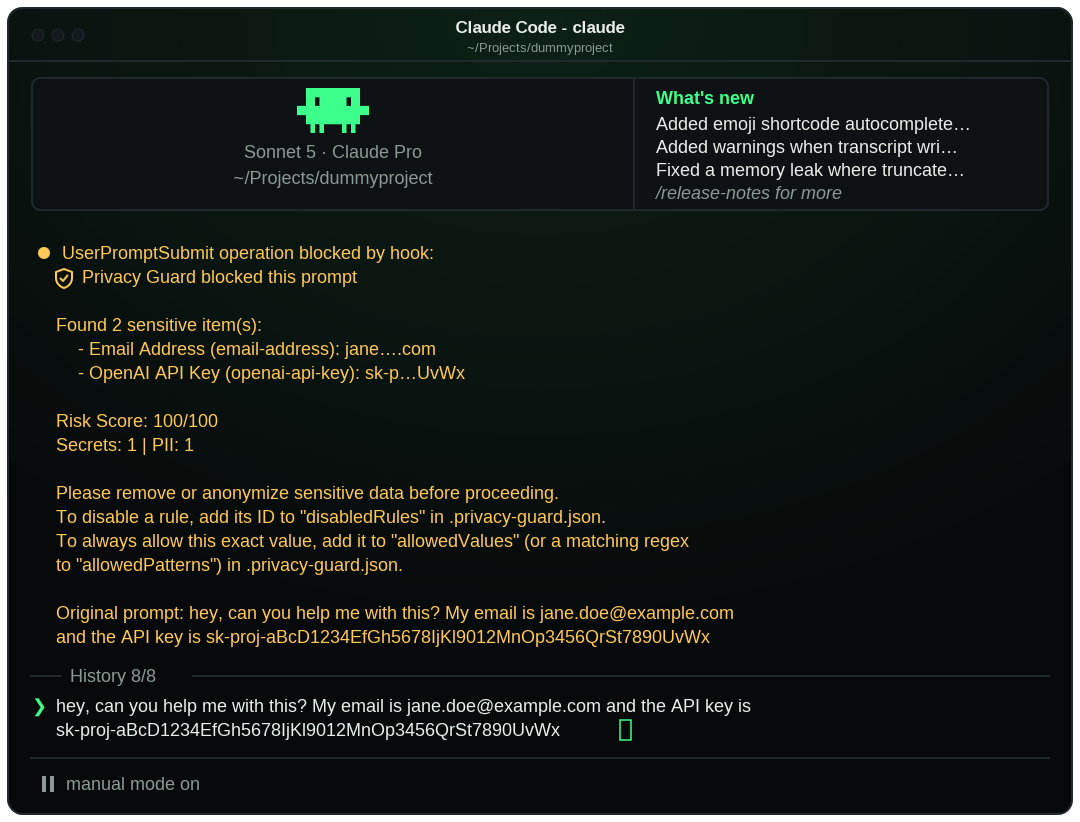
Features
- ✅ Blocks prompts containing secrets or PII before they're sent to Claude
- ✅ Guards tool calls - stops Claude from reading
.env, SSH keys, cloud credential files, or any file whose contents hold a secret, and from dumping the environment through Bash - ✅ Works in auto mode - where a confirmation prompt would never reach you, it denies instead of asking
- ✅ Warns after the fact - if a secret shows up in tool output, you're told so you can rotate it, and Claude is told not to repeat it
- ✅ Broad detection - about 200 rules from gitleaks plus code-focused checks (
.envlines, high-entropy tokens), and opt-in card, SSN and phone detection - ✅ Works locally - no network calls, no telemetry; adds roughly 20 ms per check
- ✅ Zero configuration - works out of the box, and documentation addresses like
[email protected]are never flagged - ✅ Toggle rules and manage allowlists - by hand in
.privacy-guard.json, or vianpx claude-code-privacy-guard rulesfor a local web UI
Installation
# Add the marketplace (if not already added)
/plugin marketplace add datumbrain/claude-code-privacy-guard

# Install the plugin
/plugin install claude-code-privacy-guard
⚠️ Important: Restart Required
After installing the plugin, you must restart your Claude Code session for it to take effect. This is because hooks are registered at session startup - Claude Code doesn't dynamically load new hooks mid-session.
Simply close and reopen Claude Code, or start a new session.
Once restarted, the plugin automatically scans your prompts and Claude's tool calls. To update later, run /plugin marketplace update datumbrain-plugins and restart.
Rules UI without the plugin (npm)
The rules/allowlist web UI also ships as an npm package, so it can be run without installing the Claude Code plugin:
npx claude-code-privacy-guard rules
From a clone, node dist/cli/index.js rules does the same.
What Gets Detected
✅ Secrets
- OpenAI API keys (
sk-...,sk-proj-...) - Anthropic, OpenRouter, Google AI, Groq, and Perplexity API keys
- Hugging Face API tokens
- AWS credentials
- GCP service account keys
- Azure client secrets (Microsoft Entra ID)
- GitHub tokens (classic and fine-grained PATs)
- GitLab tokens (personal access, deploy, runner, pipeline trigger, service account, CI job)
- Slack tokens
- Stripe keys
- Twilio API key SIDs and account SIDs
- SendGrid API keys
- npm access tokens
- Database connection strings with inline credentials (postgres/mysql/mongodb/redis/amqp, including SQLAlchemy URLs like
postgresql+psycopg2://andredis://:password@host) - JWT tokens
- Bearer tokens
- SSH, PEM and PGP private keys, including a key cut off before its
ENDline - Generic API key/secret/token assignments in code (
=,:, Go's:=, Ruby/PHP's=>) - Unquoted
.env-style assignments (API_KEY=...,export SECRET=...) - Unknown-prefix high-entropy tokens that follow a secret keyword (
token:,api_key=,secret,password, ...). Entropy is never used alone, so git SHAs, UUIDs and hashes without a keyword in front are not flagged. Thresholds live inENTROPY_CONFIGinsrc/scanner/entropy.ts.
Plus about 200 service-specific rules converted from gitleaks' MIT-licensed ruleset (data/gitleaks-rules.json, license in data/gitleaks-LICENSE). Like gitleaks, each rule only runs when one of its keywords appears in the text and drops low-entropy matches, which keeps false positives down. See Managing Rules to browse the full list, and scripts/convert-gitleaks-rules.mjs to refresh it.
✅ Personal Information (PII)
- Email addresses (except reserved documentation domains -
example.com,example.org,example.net, and anything ending in.test,.example,.invalidor.localhost- which never belong to a real person, so README and test fixtures don't trip the guard; git SSH remotes like[email protected]and image names like[email protected]are not treated as emails either)
Credit card numbers, US Social Security Numbers, and phone numbers are
detected only when you opt in through the piiProfile config option (see
Configuration). They are off by default so the tool stays
coding-focused. Each one is validated, not just pattern-matched:
- Credit cards need a valid Luhn checksum, a real issuer prefix (Visa, Mastercard, Amex, Discover, JCB, Diners) and a matching length.
- SSNs must be dashed (
123-45-6789) and are rejected for area000,666or9xx, group00, or serial0000. - Phone numbers accept E.164 (
+14155552671) and separated US formats ((415) 555-2671,415-555-2671), checked against North American numbering rules. Bare 10-digit strings are ignored so order IDs don't match.
How It Works
Prompts
- You type a prompt in Claude Code
- Privacy Guard intercepts it via a
UserPromptSubmithook - Scans for sensitive data using regex patterns
- Reacts according to the configured
mode(see Block, Redact, or Warn? below) - by default, blocks the prompt if sensitive data is found - Shows you exactly what was detected
Blocking relies on the UserPromptSubmit hook JSON protocol: the hook prints {"decision": "block", "reason": "..."} to stdout and exits with code 0. (Exit code 0 is required for the JSON decision to be honored - a non-zero exit is treated as a non-blocking hook error, and the prompt would go through anyway.) A non-blocking warning uses {"systemMessage": "..."} instead, which surfaces the message without stopping the prompt.
Tool calls
Prompts are only half the leak path: Read on .env, cat ~/.aws/credentials, or grep output full of tokens all put secrets into the conversation too. scripts/tool-guard.js handles two more hooks:
PreToolUse(Read,Grep,Bash) - the only point where a leak can still be prevented. Privacy Guard asks for your permission (or denies, withtoolGuard.preToolUse: "deny") before the calls below. Inauto,bypassPermissionsanddontAskpermission modes Claude Code settles an "ask" without showing you a prompt, so there Privacy Guard denies instead, and the message says how to allow the file (toolGuard.allowedPaths). The calls it guards:- reading or grepping a credentials file:
.env,.env.*(not.env.example/.sample/.template, or.env.<env>.exampleand the like),*.pem,*.key,id_rsa*/id_ed25519*(custom-named keys too, not*.pub),.netrc,.npmrc,.git-credentials,.aws/credentials,.docker/config.json,.kube/config,service-account*.json, and more; - reading any other file whose contents contain a secret (the first
maxScanBytesof it are scanned with the same rules as prompts); - a Grep whose
pathis one of those files or whoseglobtargets them (.env*,*.pem), unlessoutput_modeisfiles_with_matchesorcount, which print only file names and numbers; - a Bash command that prints one of those files (
cat .env,cat .env*,grep KEY .env,< .env,"$(cat .env)") or dumps the environment (env,printenv, bareexport,export -p,declare -p). Commands that use a file without printing it (source .env,ls .env,docker run --env-file .env), commands that write one (cat .env.example > .env), search patterns that merely mention a path (grep -rn ".env" src,jq .env app.json) and heredoc text are left alone.
- reading or grepping a credentials file:
PostToolUse(Read,Grep,Bash,WebFetch, MCP tools) - scans tool output. Claude Code does not let a hook rewrite a built-in tool's output, so by this point the output is already in context: Privacy Guard shows you what leaked (so you can rotate it) and tells Claude not to repeat the values.
Both hooks fail open: an internal error never blocks your tools.
Example
A prompt with a secret
Input:
My API key is sk-proj-1234567890abcdefghij and email is [email protected]
Result:
🛡️ Privacy Guard blocked this prompt

Found 2 sensitive item(s):
  - OpenAI API Key (openai-api-key): sk-p…ghij
  - Email Address (email-address): john…p.io

Risk Score: 100/100
Secrets: 1 | PII: 1

Please remove or anonymize sensitive data before proceeding.
To disable a rule, add its ID to "disabledRules" in .privacy-guard.json.
To always allow this exact value, add it to "allowedValues" (or a matching regex to "allowedPatterns") in .privacy-guard.json.
Claude trying to read .env
You: read .env
Claude Code (auto mode):
Read(.env)
  Not run · permission denied
  Privacy Guard: .env usually holds credentials. Reading it would put them
  into the conversation. Blocked rather than asked because this session is
  in "auto" permission mode, where a confirmation prompt would not reach you.
  To allow it, add the path to "toolGuard.allowedPaths" in .privacy-guard.json,
  or switch to the default permission mode and retry.
In the default permission mode you get Claude Code's normal permission prompt instead, with the same reason, and you decide.
Configuration
Create a .privacy-guard.json file (searched upward from your current
working directory, so a repo-root or home-directory config both work; when
nothing is found up the tree, ~/.privacy-guard.json is used, so the global
config also covers projects outside your home directory) to override the
defaults. List options (allowedDomains, allowedValues, allowedPatterns,
disabledRules) must be arrays of strings: a single string is read as a
one-item list and anything else is ignored, both with a console warning. See .privacy-guard.example.json for a starter
file.
| Option | Type | Default | Status |
|---|---|---|---|
enabled |
boolean |
true |
✅ Implemented. Set to false to disable the plugin entirely without uninstalling it. |
mode |
"block" | "redact" | "warn" |
"block" |
✅ Implemented. "block" rejects the prompt outright. "redact" also blocks (the hook API can't rewrite a submitted prompt) but the block reason includes a cleaned, copy-pasteable version of your prompt so you don't have to retype it. "warn" lets the prompt through unchanged and shows a non-blocking warning with what was found. See Block, Redact, or Warn?. |
disabledRules |
string[] |
[] |
✅ Implemented. Rule IDs to skip - see Managing Rules below for how to discover and toggle IDs. |
externalRulesJsonPath |
string |
bundled data/gitleaks-rules.json |
✅ Implemented. Path (relative to the config file's directory) to a custom external regex dataset, replacing the bundled one. Entries may carry flags, entropy, keywords, secretGroup and secretOnly (see data/gitleaks-rules.json for the format). Patterns that look prone to catastrophic backtracking are skipped at load time (with a console warning) rather than risking a hang. |
externalRulesMode |
"coding-only" | "all" |
"coding-only" |
✅ Implemented. "coding-only" filters the external dataset down to rules whose name/description mentions a coding-secret keyword (key, token, secret, password, private key, etc.) or that are marked "coding": true; "all" loads every external rule. Every bundled gitleaks rule is marked coding, so this only matters for a custom dataset. |
piiProfile |
{ creditCard?: boolean, ssn?: boolean, phone?: boolean } |
{} (all off) |
✅ Implemented. Opt-in PII detectors, each enabled by setting its flag to true. Rule IDs are pii-credit-card, pii-ssn and pii-phone, and they can be turned off individually via disabledRules. |
toolGuard |
object |
see below | ✅ Implemented. Tool-call scanning. enabled (default true); preToolUse: "ask" (default; becomes "deny" in auto/bypassPermissions/dontAsk permission modes, which can't show a prompt), "deny" or "off"; postToolUse: "warn" (default) or "off"; sensitivePaths: extra globs to treat as credentials files; allowedPaths: globs never asked about (skips the path check, the content scan, and the after-read warning); maxScanBytes (default 200000). A glob without / matches the file name, one with / (a leading ./ is ignored) matches the end of the path, ** crosses directories, and **/ also matches no directory at all. |
allowedDomains |
string[] |
[] |
✅ Implemented. Extra email domains to allow through the email-address rule, on top of the reserved documentation domains that are always allowed. An entry matches the exact domain or any subdomain (e.g. acme-corp.io allows [email protected] and [email protected]); matching is case-insensitive. |
allowedValues |
string[] |
[] |
✅ Implemented. Exact matched values to always allow, from any rule (e.g. a documented example key). Comparison is case-sensitive against the raw matched text. |
allowedPatterns |
string[] |
[] |
✅ Implemented. Regexes; a finding whose matched text satisfies any of these is always allowed, from any rule. Patterns that fail to compile or look prone to catastrophic backtracking are skipped with a console warning. |
The vetted external ruleset is cached in
${XDG_CACHE_HOME:-$HOME/.cache}/claude-code-privacy-guard/external-rules-cache.json
(%LOCALAPPDATA% on Windows) and reused until the ruleset file,
externalRulesMode, or the plugin version changes. The cache is best-effort:
if it can't be read or written, the rules are simply loaded fresh.
Example:
{
  "enabled": true,
  "allowedDomains": ["acme-corp.io"],
  "allowedValues": [],
  "allowedPatterns": [],
  "disabledRules": [],
  "externalRulesMode": "coding-only",
  "piiProfile": { "creditCard": true, "ssn": true, "phone": false },
  "toolGuard": {
    "preToolUse": "ask",
    "postToolUse": "warn",
    "sensitivePaths": ["secrets/**"],
    "allowedPaths": [".env.test"]
  }
}
Managing Rules
Every detection rule - built-in and external - has a stable id (e.g. email-address, openai-api-key, external-slack-bot-token). Blocked prompts show each finding's ID, so you always know what to put in disabledRules.
To manage rules and allowlists without hand-editing the config, run:
npx claude-code-privacy-guard rules
This starts a local-only web UI (bound to 127.0.0.1, never exposed to your network) with three tabs:
- Settings - toggle
enabled, pick themode(block/redact/warn, with a short description of each), chooseexternalRulesMode(coding-only vs all), and setexternalRulesJsonPath. Path changes only take effect the next time you run the rules editor. - Rules - every rule with its ID, title, severity, and category. Unchecking one saves it to
disabledRules. - Allowlists - add/remove entries for
allowedDomains,allowedValues, andallowedPatterns. Regexes are checked for validity and catastrophic backtracking as you type, using the samesafe-regex2check the scanner applies at load time - so a pattern the UI accepts is one the scanner will actually use, and a rejected pattern never reaches your config.
Every change saves automatically, and only the keys shown in the UI are rewritten - anything else in your .privacy-guard.json is preserved as-is.
The UI doesn't have controls for toolGuard or piiProfile yet; set those in the JSON file (see Configuration). The UI leaves them untouched.
It edits whichever .privacy-guard.json ConfigLoader.findConfig would resolve for the directory you run it from: an existing project-level config always wins, but if none exists anywhere up the directory tree it falls back to ~/.privacy-guard.json - a systemwide default that applies to every project, since Privacy Guard is protecting you, not one repo. Run it from ~ (or any directory with no project-level config) to edit that global default; run it from inside a specific project to create or edit a project-level override instead. The page and console output both tell you which one you're editing.
Development
# Clone the repository
git clone https://github.com/datumbrain/claude-code-privacy-guard.git
cd claude-code-privacy-guard

# Install dependencies
npm install

# Build
npm run build

# Test the prompt hook directly (prints a "block" decision)
echo '{"prompt":"my key is AKIAZ7QWERTYUIOPASDF"}' | node scripts/prompt-guard.js

# Test the tool hook directly (prints an "ask" decision)
echo '{"hook_event_name":"PreToolUse","tool_name":"Read","tool_input":{"file_path":".env"}}' | node scripts/tool-guard.js
Claude Code runs a copy of the plugin cached per version under ~/.claude/plugins/cache/, so local source changes don't affect your installed plugin until you release a new version and update (or load your clone with claude --plugin-dir .).
Release:
make release
This runs an interactive flow (single keypress, no Enter) that asks for a version bump - 1 patch, 2 minor, 3 major - refuses on a dirty tree or an existing tag, runs build and test, syncs the version into plugin.json and marketplace.json, creates the release commit, and then optionally pushes and creates the GitHub release (with auto-generated notes). Publishing to npm is a separate opt-in prompt that defaults to No.
See CONTRIBUTING.md for how to add a detection rule and the dist/ rebuild requirement.
Privacy & Security
- ✅ All scanning happens locally on your machine
- ✅ No data is sent to external services
- ✅ No telemetry or tracking
- ✅ Open source and fully auditable
- ✅ The plugin only blocks, asks or warns - it doesn't store or log your sensitive data
Limitations
Privacy Guard reduces accidental leaks; it is not a sandbox. Worth knowing:
- Tool output can't be cleaned. Claude Code doesn't let a hook rewrite a built-in tool's output, so a secret that reaches
PostToolUseis already in context. The guard warns you (so you can rotate it) and tells Claude not to repeat it. - File contents are only pre-scanned for
Read. For Bash, the guard checks which files a command reads and whether it dumps the environment, but it can't know what an arbitrary program will print (python script.py,grep -r KEY .). Those cases are caught after the fact byPostToolUse. - The Bash check is not a full shell parser. It handles quoting, redirection, pipes and
$(...), but a determined command can still get around it. It guards against an agent reading secrets by accident, not against someone trying to evade it. - Any finding in a file asks first, including an email address. Reading a file that contains a maintainer email (a LICENSE,
package.json) asks in the default mode and is denied in auto mode. Add the domain toallowedDomainsor the path totoolGuard.allowedPaths. - Placeholder credentials can still match, e.g.
postgres://user:password@localhost. UseallowedValuesorallowedPatternsfor ones your project uses.
Block, Redact, or Warn?
Claude Code's UserPromptSubmit hook API doesn't support rewriting or replacing the prompt that was submitted - a hook can only block it (decision: "block") or allow it through, optionally with an added message. That constrains what each mode can actually do:
block(default) - rejects the prompt outright. Sensitive data never reaches the AI, which is the safest option.redact- also blocks the original prompt (there's no way to swap in a cleaned one automatically), but the block reason includes a redacted copy of your prompt (secrets/PII replaced with placeholders like<EMAIL_1>) that you can copy, paste, and resubmit instead of manually finding and removing the sensitive parts yourself.warn- lets the prompt through unchanged and shows a non-blocking warning listing what was detected. Use this if you want visibility without interruptions, e.g. while iterating onallowedValues/allowedPatternsfor known false positives.
Debugging
Debug logging is off by default. To enable it, set PRIVACY_GUARD_DEBUG=1 in your environment before starting Claude Code, then check the log.
On macOS/Linux:
cat "${XDG_CACHE_HOME:-$HOME/.cache}/claude-code-privacy-guard/debug.log"
On Windows the log is written under %LOCALAPPDATA%:
type "$env:LOCALAPPDATA\claude-code-privacy-guard\debug.log"
The log only contains execution metadata (timestamp, plugin root, working directory, Node version, exit path/code) - it never contains matched secret or PII values.
Detection stats
The prompt hook keeps a local count of what it has caught in stats.json, next to the debug log (${XDG_CACHE_HOME:-$HOME/.cache}/claude-code-privacy-guard/ on macOS/Linux, %LOCALAPPDATA%\claude-code-privacy-guard\ on Windows).
It holds a global total plus one entry per Claude Code session_id, each with totalPrompts, totalFindings, and counts byCategory and byRule. Session entries idle for more than 30 days are pruned. Only counts are stored, never matched values or prompt text, and nothing leaves your machine. Prompts scanned while enabled is false are not counted.
Contributing
Contributions welcome! See CONTRIBUTING.md for dev setup, how to add a detection rule, and the release process.
License
MIT © Datum Brain
Explore related projects
Loading…