
daptify14/chezit
daptify14/chezit has 45 GitHub stars and 4 forks. GitHot measured +1 stars in 24 hours. Last checked 2026-11-09 09:17 UTC. Last push 2026-11-04.
Terminal UI for chezmoi dotfile management
Measured star growth
- in 24h
- +1
- in 7 days
- Update delayed
- in 15 days
- Update delayed
- in 1 month
- Update delayed
Net star changes over overlapping periods, not daily totals. Missing measurements are left blank. Stars measure attention, not software quality.
README.md
Originalchezit


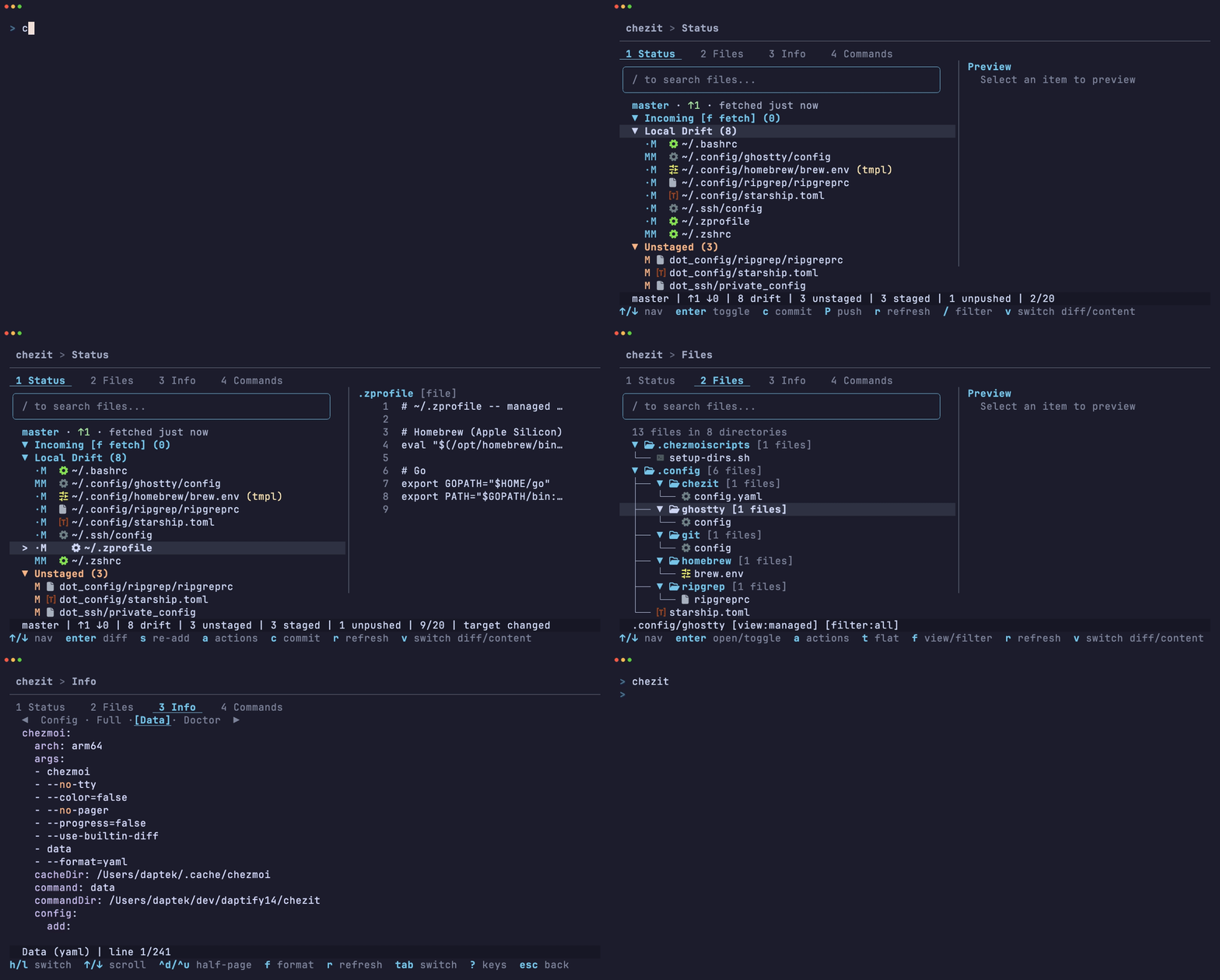
A terminal UI for chezmoi dotfile management.
Browse changes, view diffs, stage/unstage files, commit, push, and run chezmoi commands interactively.
Install
Requirements
chezmoi-- must be installed and initialized- Nerd Font (optional) -- enables file-type icons in the default
nerdfontmode; seticons: unicodeoricons: nonein config if not installed
Homebrew
brew install daptify14/tap/chezit
Pre-built binaries
Download from GitHub Releases (macOS, Linux and Windows, arm64 and amd64).
From source
go install github.com/daptify14/chezit/cmd/chezit@latest
Usage
chezit              # open the landing menu
chezit status       # jump to Status tab
chezit files        # jump to Files tab
chezit info         # jump to Info tab
chezit commands     # jump to Commands tab
chezit --version    # print version
On the landing page, f fetches from the remote.
Tabs
Status
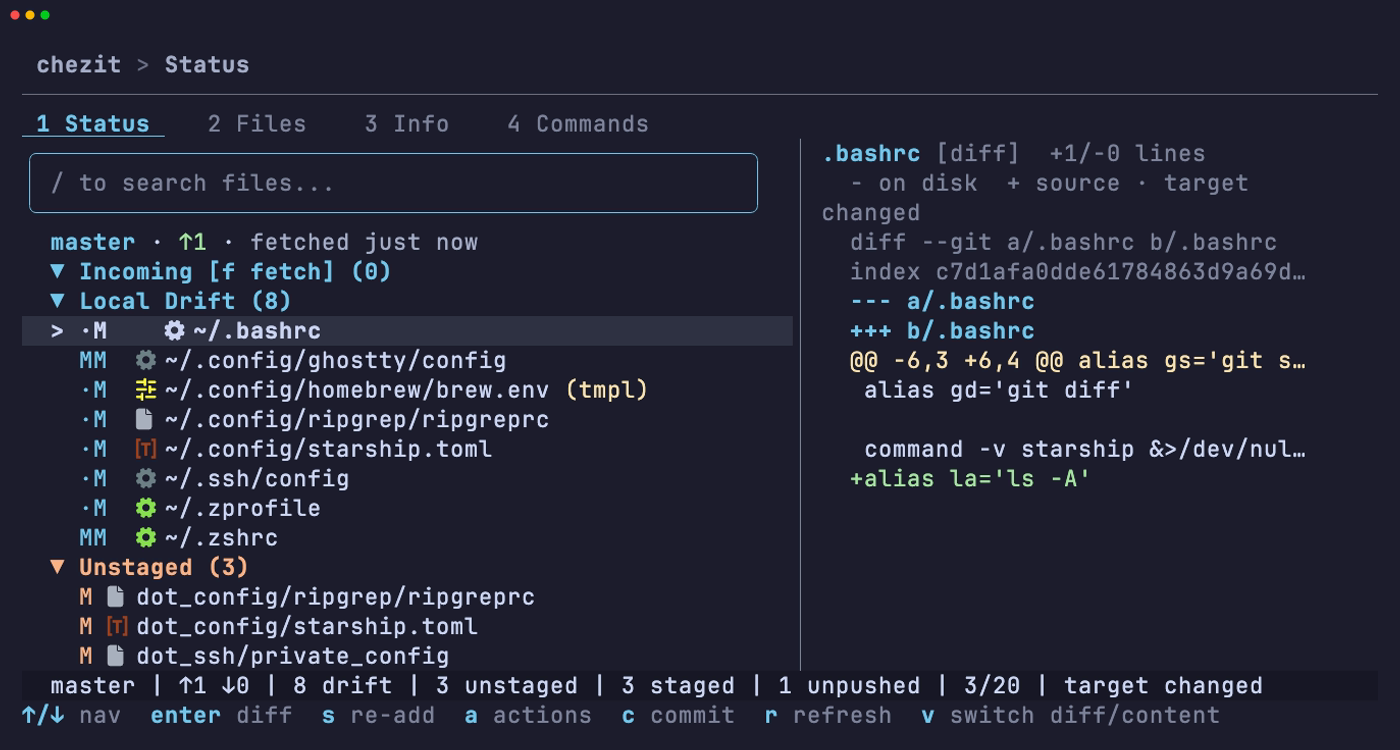
Organized into sections — Incoming, Local Drift, Unstaged, Staged, and Unpushed Commits — covering upstream changes, source/target drift, and git operations from staging through push. Each section offers context-aware actions, with diffs or file content shown in the side panel.
The header shows the branch, ahead/behind counts, and how fresh the upstream comparison is (fetched 2m ago, upstream unreachable, no upstream).
Local Drift distinguishes source/target state:
M·means source-only change (pending apply)·Mmeans target-only change (target changed)MMmeans both sides changed (diverged)R·on script entries means script source changed (pending script run)
· marks the side with no change. When a drift row is selected, its subtype label (e.g. pending apply) appears in the status bar and panel header.
Key bindings
| Key | Action |
|---|---|
Enter |
Open diff / toggle section |
Shift+↑/↓ |
Range select |
s / S |
Stage / stage all (or re-add when applicable) |
u / U |
Unstage / unstage all |
x |
Discard / undo |
e |
Edit file |
c |
Commit staged |
P |
Push |
f / p |
Fetch / pull |
a |
Actions menu |
r |
Refresh |
Files
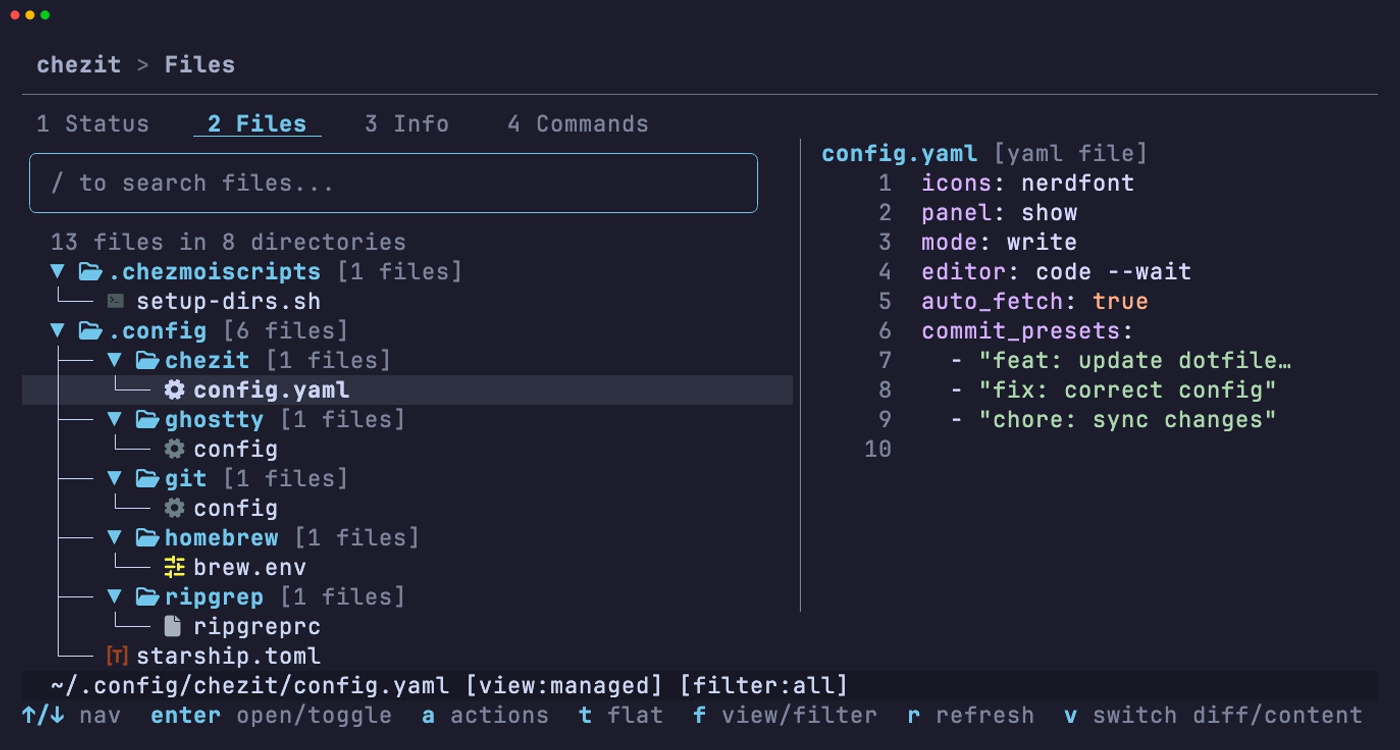
Browse dotfiles in tree or flat view with fuzzy search and filtering by status (Managed / Ignored / Unmanaged / All). Deep-search your target directory to find unmanaged files and add them to chezmoi. Actions include add, apply, forget, edit, and more.
Key bindings
| Key | Action |
|---|---|
Enter / l / space |
Expand directory (tree) / open actions (flat) |
h |
Collapse directory (tree) |
t |
Tree / flat toggle |
f |
View/filter picker |
F |
Jump to filter section in picker |
c |
Clear active search (tree mode only) |
a |
Actions menu |
r |
Refresh |
Info
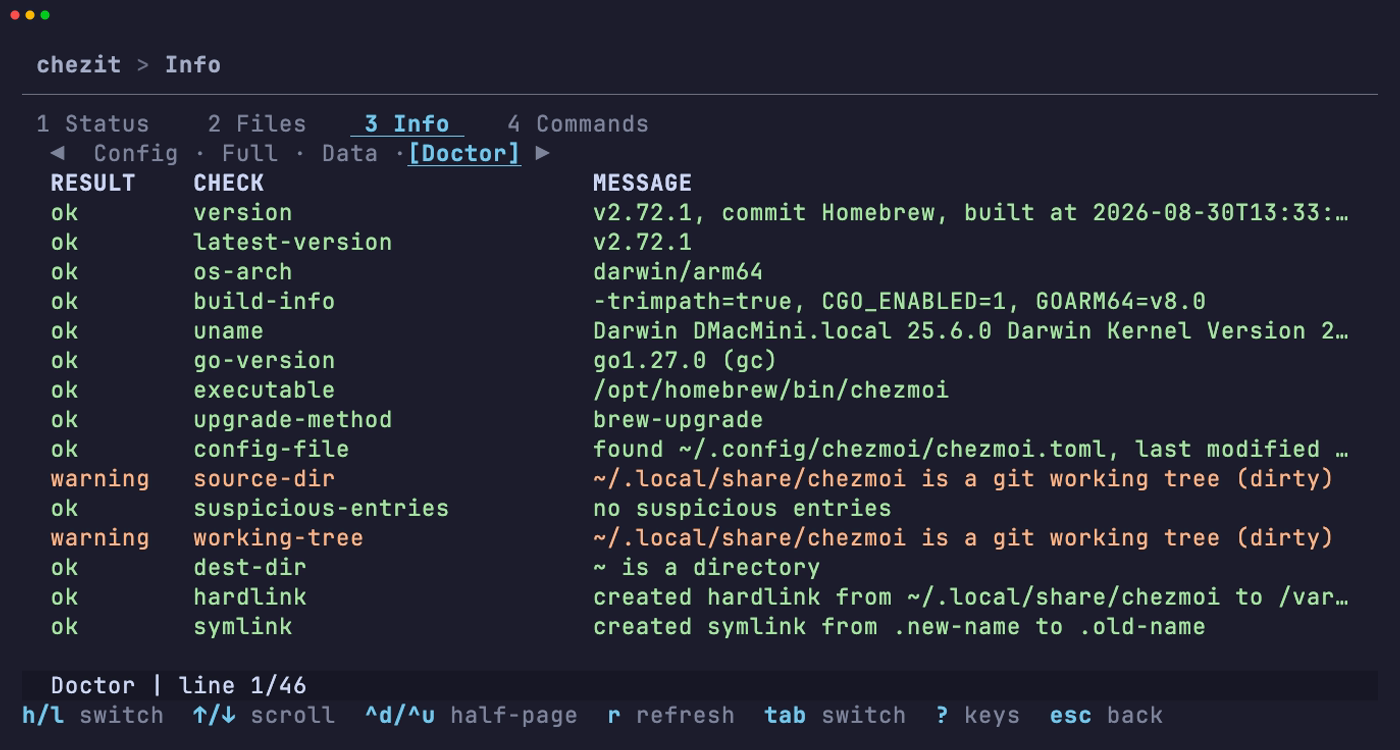
View your chezmoi config file, full computed config, template data, and chezmoi doctor output in one place — useful for debugging templates or verifying your setup.
Key bindings
| Key | Action |
|---|---|
← / → or h / l |
Previous / next sub-view |
↑/↓ or j/k |
Scroll |
Ctrl+d / Ctrl+u |
Half-page down / up |
Ctrl+f / Ctrl+b |
Full-page down / up |
f |
Toggle yaml/json format |
r |
Refresh |
Commands
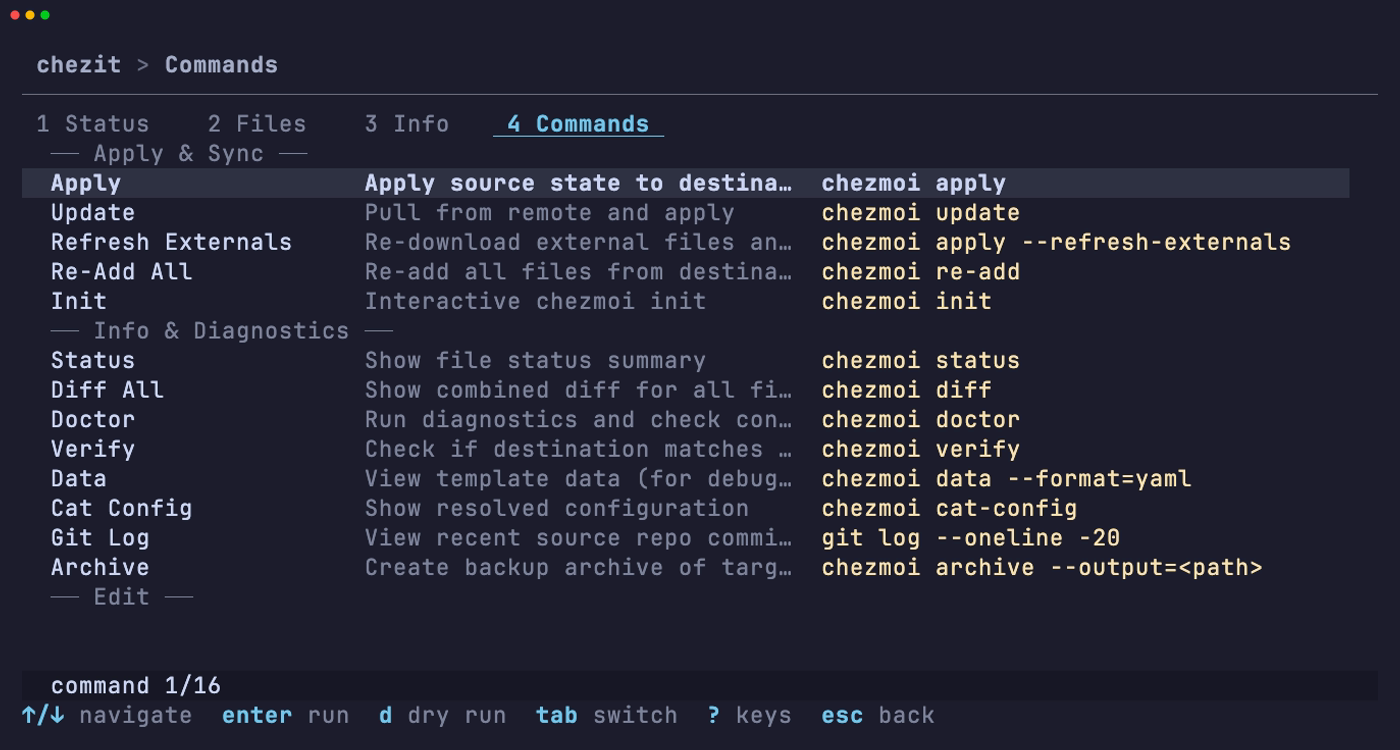
Quick access to common chezmoi operations (apply, update, re-add, doctor, verify, and more) with optional dry-run mode.
Key bindings
| Key | Action |
|---|---|
Enter |
Run command |
d |
Dry run |
Preview Panel
Shows in Status and Files tabs when the terminal is wide enough. Displays diffs or file content with syntax highlighting. For drift files, detail lines include subtype labels (pending apply, target changed, diverged, pending script run).
| Key | Action |
|---|---|
p |
Show/hide panel |
→/l / ←/h |
Focus panel / return to list |
v |
Switch diff/content mode |
↑/↓ or j/k |
Scroll |
Ctrl+d / Ctrl+u |
Half-page down / up |
Global key bindings
| Key | Action |
|---|---|
Tab / Shift+Tab / 1-4 |
Next / previous / jump to tab |
j/k or ↑/↓ |
Navigate |
g / G |
Jump top / bottom |
Enter |
Select / expand |
/ |
Filter/search |
m |
Toggle mouse mode (off allows terminal text selection) |
? |
Help overlay |
Esc |
Back |
q / Ctrl+C |
Quit |
Configuration
chezit reads ~/.config/chezit/config.yaml when present.
icons: nerdfont      # nerdfont | unicode | none
mode: write          # write | read_only
panel: auto          # auto | show | hide
commit_presets: []   # e.g. ["dotfiles: update config"]
binary_path: ""      # e.g. /opt/homebrew/bin/chezmoi (only needed when chezmoi is not on $PATH)
chezmoi_config_path: "" # optional custom chezmoi config file path (equivalent to --config)
editor: ""           # e.g. "code --wait"; overrides $VISUAL and $EDITOR for edit actions
diff_builtin: false  # true = ignore chezmoi diff.pager and use chezit's built-in diff rendering
auto_fetch: true     # false = never fetch on startup; f still fetches on demand
Colors adapt automatically to your terminal background (dark or light) at startup using Catppuccin palettes.
Defaults are shown in the YAML example above.
| Key | Accepted values | Behavior / when to change |
|---|---|---|
icons |
nerdfont, unicode, none |
nerdfont gives rich icons (requires Nerd Font); use unicode or none for maximum compatibility. |
mode |
write, read_only |
read_only disables mutating actions (apply, re-add, stage, commit, push). |
panel |
auto, show, hide |
auto shows the preview only when terminal width allows. |
commit_presets |
list of strings | Optional preset commit messages shown in the commit flow. |
binary_path |
path to chezmoi binary (~ supported) |
Set only if chezmoi is not on PATH. |
chezmoi_config_path |
path to chezmoi config file (~ supported) |
Optional. Use to force chezit to run every chezmoi command with --config <path>. |
editor |
editor command, arguments allowed | Optional. Used for chezmoi edit and chezit's own editor launches in place of $VISUAL and $EDITOR. chezit's own launches split the string on whitespace, while chezmoi edit parses quotes itself. chezmoi's edit.command still takes precedence for chezmoi edit, and chezit's own launches follow edit.command and edit.args the way chezmoi does when editor is unset. |
diff_builtin |
true, false |
When true, bypass chezmoi's diff.pager and use chezit's built-in diff rendering instead. |
auto_fetch |
true, false |
When true (default), fetch from the remote in the background when git info first loads so ahead/behind reflect upstream. Failures show as an indicator, never an error. |
Diff Pager Support
chezit respects chezmoi's diff.pager setting. When a supported pager is configured, all diff surfaces (drift, git, apply preview, panel, full-screen) use the pager's styling instead of chezit's built-in coloring.
# ~/.config/chezmoi/chezmoi.toml
[diff]
    pager = "delta"
Supported pagers: delta, bat, diff-so-fancy. If the configured pager is missing or fails, chezit falls back silently to built-in styling. To request support for a new pager, open an issue or PR.
If you want to keep a pager configured for regular chezmoi CLI use but bypass it in chezit, set diff_builtin: true in ~/.config/chezit/config.yaml. chezit will use its built-in diff rendering instead. This only affects chezit.
Development
Requires Go 1.27+ and task. Uses Bubble Tea v2, Lip Gloss v2, Bubbles v2, and Huh v2.
task setup          # install dev tools and git hooks
task fmt            # format code (gofumpt + gci via golangci-lint)
task check          # run all checks (fmt, lint, test)
task test           # run tests (supports filters via --, e.g. task test -- -run TestGolden)
task test-update    # regenerate golden snapshot files
task test-update -- -run TestGoldenStatusTab|TestGoldenActionsMenu  # regenerate status-related golden snapshots
task record         # re-record the README demo GIF and screenshots (needs vhs, chezmoi, a Nerd Font)
Notes:
task setupinstalls local dev tools (golangci-lint,svu,goreleaser) to./bin/and sets up Git hooks vialefthook.lefthookitself is installed globally viago install, so ensure$(go env GOPATH)/binis on your$PATH.- Use
task testfor quick local iteration; runtask checkbefore opening a PR.
Contributing
Contributions are welcome -- feel free to open an issue or send a PR. Run task check before submitting to make sure everything passes. See Development for setup.
Acknowledgments
Built on top of chezmoi, a fantastic dotfile manager. Under the hood, chezit uses Bubble Tea v2, Lip Gloss v2, Cobra, Chroma, and Catppuccin.
License
MIT -- see LICENSE.
Explore related projects
codecrafters-io/build-your-own-x
Master programming by recreating your favorite technologies from scratch.
561,345 starspublic-apis/public-apis
A collective list of free APIs
497,592 starsmorluto/rea
Reverse engineer anything with agents, from app behavior down to native binaries.
446,712 starsopenclaw/openclaw
The AI that really does things. Any OS. Any Platform. The lobster way. 🦞
394,251 stars