
danieljustus/symaira-vault
danieljustus/symaira-vault has 34 GitHub stars and 3 forks. GitHot measured 0 stars in 24 hours. Last checked 2026-11-09 08:38 UTC. Last push 2026-11-06.
🔐 The password manager for terminal users and AI agents. Age-encrypted, keyring-cached, MCP-ready. Zero telemetry.
What you can do
- Modern Encryption: age (X25519 + ChaCha20-Poly1305)
- TOTP Support: Store and generate TOTP codes
- Clipboard Auto-Clear: Automatic clearing after timeout
- Autotype: Automatic password entry (macOS arm64, Linux)
Measured star growth
- in 24h
- 0
- in 7 days
- Update delayed
- in 15 days
- Update delayed
- in 1 month
- Update delayed
Net star changes over overlapping periods, not daily totals. Missing measurements are left blank. Stars measure attention, not software quality.
README.md
OriginalSymaira Vault
Accepted product direction — implementation pending: The independent symvault CLI/service and repository remain. Brain GUI/CLI become the normal integrated credential-management entrypoints. The separate management app remains transitional and is retired only after verified replacement, secure input/approval, data migration and rollback. This is not a removal of the credential service or a requirement to install Brain for CLI use. See PB-2026-09-09.



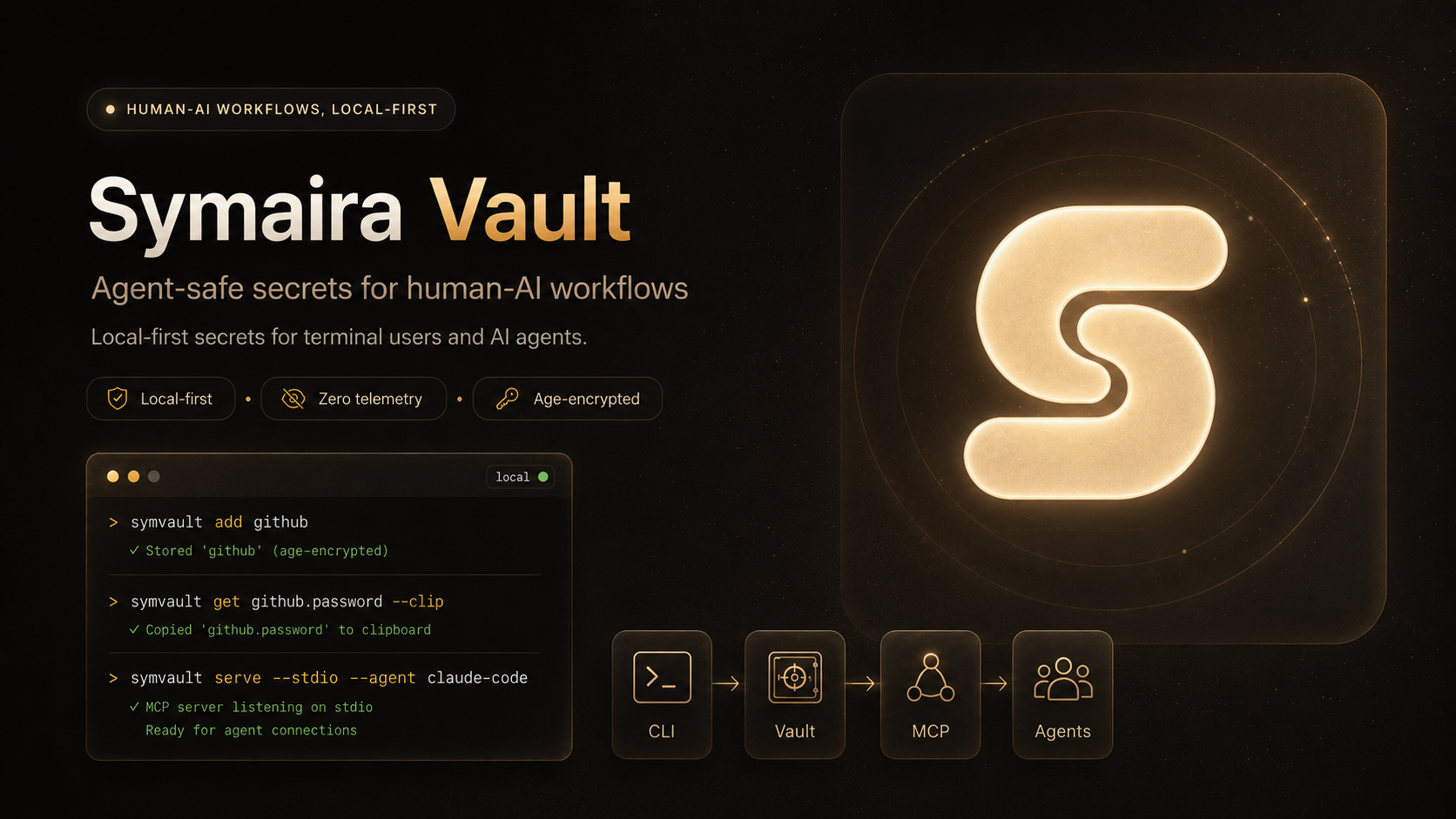
A modern, secure command-line password manager (symvault) written in Rust. Uses age for encryption with built-in MCP server support for AI agent integration.

Status: pre-1.0 — the CLI surface and vault format are stabilizing under SemVer; see CHANGELOG.md for the release history.
Safety Notice: Symaira Vault manages sensitive secrets. Use at your own risk, keep tested backups of your vault, and verify recovery before relying on it for critical credentials.
Features
- Modern Encryption: age (X25519 + ChaCha20-Poly1305)
- TOTP Support: Store and generate TOTP codes
- Clipboard Auto-Clear: Automatic clearing after timeout
- Autotype: Automatic password entry (macOS arm64, Linux)
- Secret Execution: Run commands with vault secrets injected as environment variables
- Session Caching: OS keyring with 15-minute TTL
- Git Integration: Automatic commits and sync
- Multi-User Vaults: age recipients for shared access
- MCP Server: stdio and HTTP for AI agent integration with scoped token management
- MCP Slash Commands:
add-credential,rotate-credential,find-and-use,share-credential— guided workflows surfaced as slash commands in Claude Code, OpenCode, Hermes - Native Secure-Input Dialog: popups (macOS osascript, Linux zenity/kdialog) for collecting credentials from agents without exposing them in chat
- Review-Gated Credential Intake: stage loose credential files (
.envexports, screenshots, certificates) into an encrypted quarantine for human review before anything enters the vault (symvault intake,symvault intake watch) - Native macOS Client: SwiftUI app for browsing, unlocking, creating, editing, generating, copying, and deleting local vault entries
- Egress Credential Broker: opt-in loopback proxy that attaches vault credentials to an agent's outbound requests server-side, without exposing them to the child process (
symvault broker,symvault run --broker) - MCP API Templates: shape
execute_api_requestcalls with YAML templates and built-in provider catalog (Anthropic, GitHub, OpenAI, Stripe, …), with credentials resolved from the vault at request time - Approval Devices: pair a phone to approve or deny an agent's write requests in real time (
symvault device approval-pair), the human-in-the-loop behindapprovalMode: prompt - Platforms: macOS arm64 and Linux CLI; iOS and Web where applicable
Installation
Supported native targets are macOS on Apple Silicon (arm64) and Linux CLI/server. iOS and Web are supported where applicable. Windows and Intel Macs are unsupported and receive no CI or release artifacts; FreeBSD has been dropped. See #1550.
Quick install
macOS / Linux:
curl -sSfL https://raw.githubusercontent.com/danieljustus/symaira-vault/main/scripts/install.sh | sh
Homebrew:
brew tap danieljustus/tap
brew install symvault
Nix (Flake):
# Run directly (no install needed)
nix run github:danieljustus/symaira-vault

# Or add as a flake input
# flake.nix:
#   inputs.symvault.url = "github:danieljustus/symaira-vault";
Note: The flake builds the Rust CLI from
Cargo.lock(rustPlatform.buildRustPackage). It needs a nixpkgs whoserustcsatisfies the workspacerust-version(1.98); if the build reportsrequires rustc 1.98, runnix flake update nixpkgs.
Cargo (build from source):
cargo install --locked --git https://github.com/danieljustus/symaira-vault --tag <release tag> symvault-cli
Use the tag of the release you want (for example the latest on the
releases page).
This installs the symvault binary into ~/.cargo/bin.
Requires git: symvault runs the git executable for vault history and
sync, so git must be on PATH (see
ADR 0033). The deb/rpm/apk
packages depend on git and pull it in; with the install script, Homebrew-less
manual downloads or cargo install, install it yourself — macOS:
xcode-select --install (Xcode Command Line Tools, which will prompt on first
use) or brew install git; Debian/Ubuntu: sudo apt install git;
Fedora/RHEL: sudo dnf install git; Alpine: sudo apk add git.
For manual downloads, Linux packages, release verification (including Cosign signature verification), and build-from-source instructions, see docs/distribution.md.
| Platform | amd64 | arm64 | Install Methods |
|---|---|---|---|
| macOS | Unsupported | ✓ | Quick install, Homebrew, Cargo, Manual |
| Linux | ✓ | ✓ | Quick install, Homebrew, Cargo, Manual, deb/rpm/apk |
| Windows | Unsupported | Unsupported | None |
| NixOS / Nix | ✓ | ✓ | Nix flake (nix run github:danieljustus/symaira-vault) |
Native macOS app (from source)
The repository includes a native SwiftUI client in client/.
It embeds the public symvault runtime in the app bundle and also exposes a
reusable SymvaultFeature module. The accepted target moves normal management
to Brain, not the retired Symaira Hub. This client remains transitional until
the replacement and security/migration gates in PB-2026-09-09
pass. No account or hosted service is required.
make rust-cli && cp target/release/symvault symvault   # the app embeds ../symvault
bash scripts/build-vaultcore.sh  # Rust SymvaultFFI XCFramework; needs full Xcode with the iOS SDK
cd client
xcodegen generate
xcodebuild -project Symvault.xcodeproj -scheme Symvault -scmProvider system build
Usage
Quick start
# Initialize vault
symvault init

# Add a password
symvault add github
# or non-interactive (reads from stdin):
echo "mysecretpassword" | symvault set github.password --stdin-value

# Add TOTP metadata
symvault add github --totp-secret JBSWY3DPEHPK3PXP --totp-issuer GitHub

# Retrieve (default: copies to clipboard on a TTY, clears after 30s)
symvault get github.password

# Autotype is available through the MCP autotype tool (see docs/mcp-api.md)

# Show entry details, including the current TOTP code when configured
symvault get github

# List and search
symvault list
symvault find mybank

# Generate secure passwords
symvault generate --length 32 --symbols
symvault generate --store newaccount.password --length 20 --symbols

# Session management
symvault unlock   # cache passphrase
symvault lock     # clear cache
symvault auth status
symvault auth set touchid      # macOS Touch ID unlock
symvault auth set passphrase   # passphrase-only unlock

# Interactive Terminal UI
symvault ui

# Recipients for multi-user vaults
symvault recipients list
symvault recipients add age1...

# Git sync
symvault git pull
symvault git push

# Secret execution (injects vault secrets as env vars)
symvault run --env API_KEY=api.kimi-key -- sh -c 'exec curl -H "Authorization: Bearer $API_KEY" https://api.example.com'

# Load mappings from a file (each line: NAME=path.field)
symvault run --env-file .env.symvault -- npm run dev

# Pass through parent env vars such as NODE_ENV and PORT
NODE_ENV=production PORT=8080 symvault run --passthrough NODE_ENV,PORT --env DB_PASS=prod/db.password -- ./deploy.sh

# Forward stdin to the child process (heredocs and pipes work)
cat input.json | symvault run --env API_KEY=api.kimi-key -- node process.js

# Backup/Restore
symvault backup ~/backups/symvault-$(date +%Y%m%d).tar.gz
symvault restore ~/backups/symvault-20260427.tar.gz

# Review-gated intake of loose credential files (never writes normal vault paths)
symvault intake ~/Downloads/creds.env --dry-run        # validate + suggest, nothing stored
symvault intake ~/Downloads/creds.env                  # stage into quarantine/<import-id>/
symvault import review promote <import-id>             # promote after human review

# Watch a folder (e.g. Downloads) and quarantine new credential files automatically
symvault intake watch ~/Downloads --once               # single scan, cron/LaunchAgent friendly
Intake sources are content-sniffed, copied into a private spool, and stored as an encrypted quarantine batch with SHA-256 provenance. Nothing enters normal vault paths and no agent can read the batch before you promote it.
Backup archives contain encrypted vault files, identity material, config, and MCP tokens. Protect them like the vault itself and test restore before relying on backups.
Configuration templates
Generate configuration files from vault secrets without exposing values in shell history or intermediate files. Templates support positional KEY=ref arguments and the --prefix flag to auto-select every entry under a vault path.
# Generate a .env file from specific vault secrets
symvault template generate --type env DB_PASS=prod/db.password API_KEY=stripe.token

# Generate a .env file from every entry under work/ (key becomes entry.field)
symvault template generate --type env --prefix work/ > .env

# Generate a Kubernetes Secret manifest, mixing a prefix with one explicit ref
symvault template generate --type k8s-secret --name prod-secrets --prefix work/ DB_HOST=infra.db.host

# Preview output with secrets masked
symvault template generate --type env --prefix work/ --dry-run

# Write output to a file (created with 0600 permissions)
symvault template generate --type docker-compose --prefix work/ --output docker-compose.env
Supported template types: env, docker-compose, k8s-secret, github-actions, and terraform. Custom templates can be added in $HOME/.config/symvault/templates.
Migration from other managers
Symaira Vault can import from 1Password, Bitwarden, pass, CSV exports, FIDO Credential Exchange Format (CXF) archives, and browser CSV exports (Apple Passwords, Chrome, Firefox). otpauth:// TOTP URIs in imports are normalized into structured TOTP data:
symvault import <format> <source>
symvault import bitwarden ~/exports/bitwarden.json
symvault import pass ~/.password-store
symvault import cxf ~/exports/passkeys.cxf
symvault import apple ~/exports/apple-passwords.csv
symvault import chrome ~/exports/chrome-passwords.csv
symvault import firefox ~/exports/firefox-logins.csv
See docs/migration.md for export steps, format details, and verification guidance.
MCP & Agent Integration
MCP Server
Symaira Vault exposes an MCP server for AI agent integration:
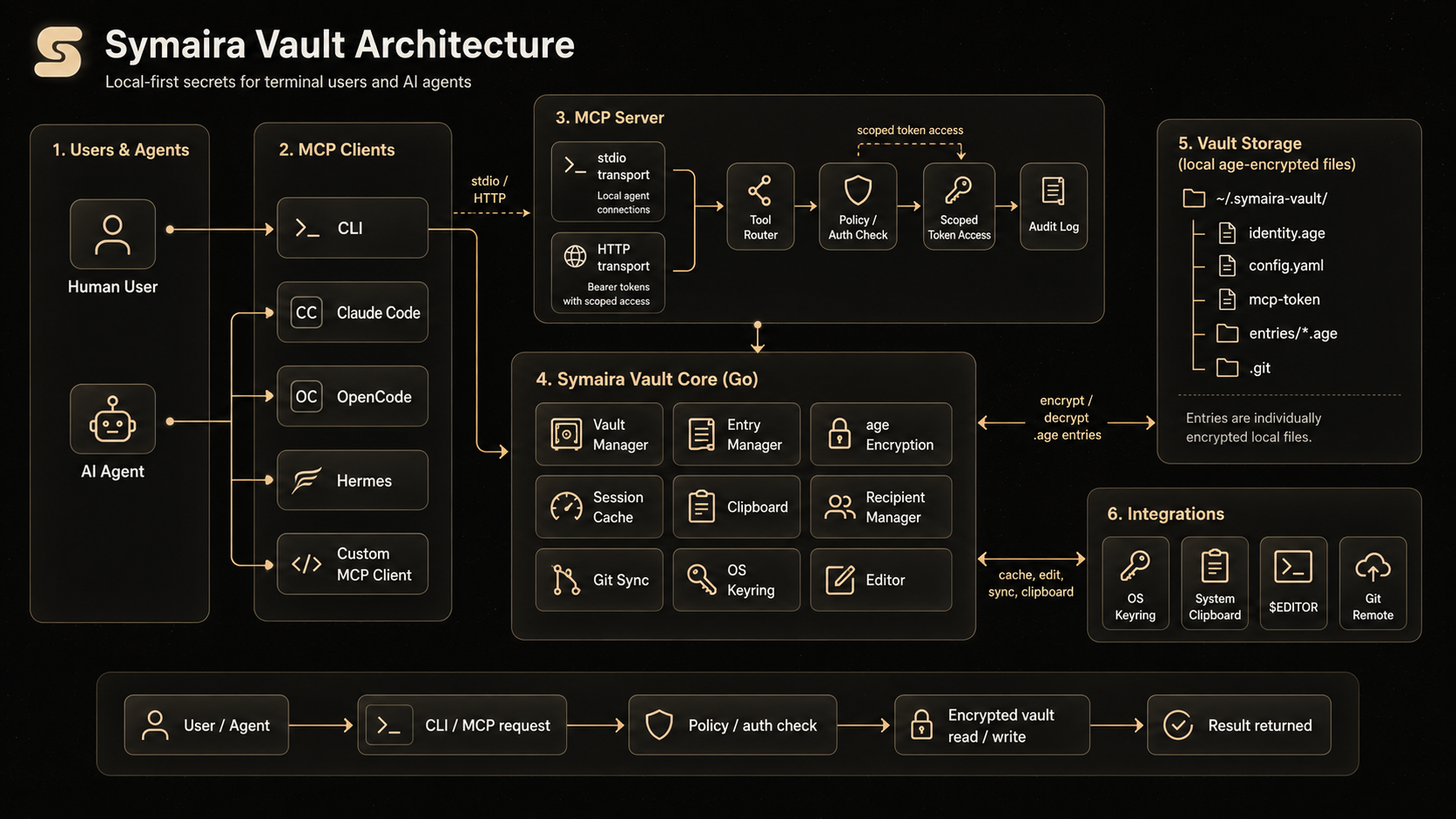
# Stdio mode (recommended for local agents)
symvault mcp --stdio --agent claude-code

# HTTP mode
symvault mcp --port 8080
Use symvault agent install to write the detected client's MCP configuration:
symvault agent install claude-code --config-only
symvault agent install claude-code --http --config-only
symvault agent install hermes --http --config-only
HTTP mode binds to 127.0.0.1 by default and uses bearer token authentication. Agents can use the MCP generate_totp tool to get current TOTP codes without receiving the stored TOTP secret.
Scoped Token Management: Create fine-grained access tokens for agents:
symvault agent token new hermes --tools list_entries,get_entry --ttl 24h
symvault agent token list hermes
symvault agent token revoke hermes <token-id>
For detailed agent setup, profiles, token management, and observability, see docs/agent-integration.md.
MCP API templates
symvault can call external APIs on an agent's behalf through the execute_api_request MCP tool. Each call is shaped by an API template — a small YAML file declaring the base URL, auth shape, and allowed endpoints. Built-in templates ship for Anthropic, GitHub, OpenAI, Stripe, Telegram, and more; credentials are resolved from a vault entry at request time and never enter the agent's environment, argv, logs or audit trail. See docs/api-templates.md for the catalog and custom-template guide.
Egress credential broker
symvault broker is an opt-in loopback MITM forward proxy that attaches vault credentials to an agent's outbound HTTPS/HTTP requests server-side — a brokered secret never enters the agent's process environment, argv or process listing:
# One-shot: run a child command with the broker in-process
symvault run --broker -- gh pr create

# Standalone broker on a fixed port, strict mode
symvault broker --addr 127.0.0.1:8080 --strict

# Passthrough for certificate-pinning clients
symvault broker --passthrough corporate.internal,legacy.example.com
Strict mode rejects requests for hosts without a matching API template; passthrough hosts are tunneled without TLS interception. Every brokered request produces a tamper-evident audit record. See docs/egress-broker.md for details.
Ecosystem
Symaira Vault (symvault) serves as the credential management and secret-resolution layer for the Symaira tool suite:
- AI Agents & MCP Clients: Connect directly to
symvaultvia the Model Context Protocol (symvault mcp), using tools such asget_entry,execute_with_secret,execute_api_request, andgenerate_totpwith scoped access tokens and tamper-evident audit logging. - Brain management UI (accepted target): Integrate human credential management through the separate service, preserving native secure input, authorization and biometrics. The existing client remains supported until replacement is verified; Desktop is not a second credential-management product.
- CLI & Automation Workflows: Resolve secrets dynamically across shell scripts and pipelines via
symvault run(environment injection),symvault broker(transparent egress credential proxying), orsymvault template(configuration file generation).
Configuration
Global config lives in the XDG config directory: $XDG_CONFIG_HOME/symaira-vault/config.yaml (default ~/.config/symaira-vault/config.yaml). The legacy ~/.symvault/config.yaml is used when ~/.symvault exists and the XDG data directory does not; when both data directories exist, XDG takes precedence. See config.yaml.example for a commented starting point.
For the full configuration reference, see docs/configuration.md.
The optional vault.search_index_cache setting keeps a decrypted search index
in memory during an unlocked session to speed up repeated searches and
incremental writes. It is disabled by default: leave it disabled when
ciphertext-only memory residency is the safer operational choice. Locking the
vault clears the in-memory index; the persisted index remains encrypted.
Environment Variables
SYMVAULT_VAULT— Path to vault directory (default:$XDG_DATA_HOME/symaira-vault, i.e.~/.local/share/symaira-vault; legacy installs use~/.symvault)
Vault Structure
~/.local/share/symaira-vault/   # XDG data dir (legacy installs: ~/.symvault/)
├── identity.age      # Encrypted age identity
├── config.yaml       # Vault configuration
├── mcp-token         # Bearer token for HTTP MCP
├── entries/          # Encrypted password entries
│   ├── github.age
│   └── work/
│       └── aws.age
└── .git/             # Git repository
Security
- age encryption: X25519 + ChaCha20-Poly1305
- Passphrase never stored in plain text
- Session caching via OS keyring (15-minute TTL)
- Each entry individually encrypted
- Git history contains only ciphertext
- HTTP MCP bound to
127.0.0.1with bearer token auth - No telemetry (see SECURITY.md)
Documentation
- Configuration reference
- Approval devices
- Agent integration
- MCP API
- MCP API templates
- Egress credential broker
- Audit event schema
- Audit retention & integrity
- Local secret-leak detection
- Distribution channels
- Troubleshooting
- Architecture
- Security policy
Comparison
Last updated: May 2026. Features, pricing, and availability are subject to change. Please verify all details on the respective product's official website before making decisions.
Disclaimer: All product names, logos, and brands referenced in this comparison are trademarks or registered trademarks of their respective owners. Use of these names is for identification and informational purposes only and does not imply endorsement, affiliation, or sponsorship. The information in this comparison is provided "as is" without warranty of any kind.
| Feature | Symaira Vault | 1Password | Bitwarden | pass (zx2c4) | Sharing with AI Agents in Chat |
|---|---|---|---|---|---|
| Encryption | age (X25519 + ChaCha20-Poly1305) | AES-256 | AES-256 | GPG | None (plaintext) |
| Primary Interface | Terminal-first | GUI-first (CLI available) | GUI-first (CLI available) | Terminal-only | Chat interface |
| AI Integration | MCP server (stdio + HTTP) with scoped tokens | Agentic Autofill, SDKs for AI agents | MCP server, Agent Access SDK | No AI integration | Paste secrets into prompts |
| Pricing | Free (Apache-2.0) | Subscription ($47.88/yr Individual) | Freemium / Subscription ($19.80/yr Premium) | Free (GPL) | Free (but risky) |
| Sync | Git (built-in) | Cloud (1Password servers) | Cloud (Bitwarden servers) or self-host | Git (automatic commits) | Manual copy-paste |
| Self-hosting | Full control (local vault + git) | Partial (Connect Server, SCIM Bridge) | Yes (official Docker/K8s or Vaultwarden) | Full control | N/A |
| Open Source | Yes (Apache-2.0) | Partial (SDKs open, core proprietary) | Mostly (core GPL/AGPL, Enterprise Bitwarden \ | ||
| TOTP | Built-in | Built-in | Premium feature | Extension only | Manual entry |
| Autotype | Built-in (cross-platform) | Built-in (Windows Auto-Type, macOS Universal Autofill) | Browser autofill only (desktop autotype in development) | No built-in | Manual entry |
| Secret Execution | Built-in (symvault run) |
Built-in (op run) |
Built-in (bws run) |
No built-in | Not applicable |
| Session Caching | OS keyring (15m TTL) | Biometric unlock, Magic Unlock, SSO | Biometric unlock, PIN, BW_SESSION token |
gpg-agent | None |
| Git Integration | Built-in | SSH agent, commit signing | SSH agent, GitHub Actions, GitLab CI | Built-in (automatic commits) | No |
| MCP Server | Built-in (stdio + HTTP) | Community (official: no raw secrets via MCP) | Official (bitwarden-mcp) |
No | No |
| Password Generation | Built-in | Built-in | Built-in | Built-in | Manual / ad-hoc |
| Cross-Platform | macOS arm64, Linux CLI | macOS, Linux, Windows, mobile | macOS, Linux, Windows, mobile, web | Unix-like (Linux, macOS, FreeBSD) | Any chat platform |
| Telemetry | None | Opt-in (personal), on-by-default (business) | Administrative data only (vault zero-knowledge) | None | Logged by chat providers |
| Entry Format | Individual encrypted files | Proprietary database (1PUX export documented) | Encrypted JSON / SQLite | Individual encrypted files | Plaintext in chat history |
Symaira Vault differentiators:
- Terminal-native: Designed for keyboard-driven workflows without GUI dependency
- Modern encryption: age instead of GPG — simpler key management, no web of trust
- MCP-ready: Native AI agent integration via Model Context Protocol with scoped tokens and audit logging
- Zero telemetry: No analytics, no cloud dependency, no account required
- Built-in utilities: TOTP, autotype, secret execution, and password generation without external tools
- Git-native: Automatic sync with full version history of encrypted entries
Security note on AI agent chat sharing: Pasting passwords into chat interfaces exposes secrets in plaintext chat history, model training logs, and provider databases. Unlike Symaira Vault's MCP integration — which keeps credentials encrypted and uses scoped tokens with audit logging — chat sharing provides no access control, rotation, or revocation capabilities.
Dependencies
- Rust: the toolchain pinned in
rust-toolchain.toml; crate versions are locked inCargo.lock - age — encryption
- clap — CLI framework
- keyring — OS keyring
Contributing
See CONTRIBUTING.md for development setup and PR process.
Testing
# Format check + Clippy (-D warnings)
make rust-lint

# Run all tests (nextest + doctests)
make rust-test

# Run one crate's tests
cargo test -p symvault-store
Some tests are skipped automatically:
- Headless CI: Tests requiring the OS keyring (session caching) skip when no keyring backend is available (e.g., containerized or headless CI). These are environment-dependent and not failures.
License
Apache-2.0 License
Acknowledgments
- Inspired by pass from zx2c4
- MCP support via the Model Context Protocol
- Former name: OpenPass
Disclaimer
Use at your own risk. Always keep tested backups of your vault.
Explore related projects
codecrafters-io/build-your-own-x
Master programming by recreating your favorite technologies from scratch.
561,398 starspublic-apis/public-apis
A collective list of free APIs
497,679 starsmorluto/rea
Reverse engineer anything with agents, from app behavior down to native binaries.
447,495 starsopenclaw/openclaw
The AI that really does things. Any OS. Any Platform. The lobster way. 🦞
394,261 stars