
daniel3303/AgentQL
daniel3303/AgentQL has 34 GitHub stars and 1 forks. GitHot measured 0 stars in 24 hours, 0 in 7 days, and 0 in 15 days. Last checked 2026-11-09 18:43 UTC. Last push 2026-08-21.
Reusable .NET library that translates EF Core models into LLM-friendly schema descriptions and provides safe SQL query execution for AI agents.
Measured star growth
- in 24h
- 0
- in 7 days
- 0
- in 15 days
- 0
- in 1 month
- Update delayed
Net star changes over overlapping periods, not daily totals. Missing measurements are left blank. Stars measure attention, not software quality.
README.md
OriginalAgentQL


Reusable .NET library that translates EF Core DbContext models into LLM-friendly schema descriptions and provides safe SQL query execution. Enables LLMs to understand your database structure and query it via function calling.
See docs/ for full documentation.
Overview
AgentQL sits between your EF Core database and any AI provider (OpenAI, Anthropic, Ollama). It:
- Introspects your EF Core model — tables, columns, types, relationships, enums, inheritance — and produces a text description the LLM can reason about.
- Executes SQL queries safely inside transactions with configurable row limits, timeouts, and read-only enforcement.
- Exposes three LLM tool functions (
GetDatabaseSchema,ExecuteQuery,ReportFailure) through Microsoft.Extensions.AI, so any compatible chat client can call them automatically.
Packages
| Package | Description | NuGet |
|---|---|---|
| Equibles.AgentQL | Core attributes and configuration |  |
| Equibles.AgentQL.EntityFrameworkCore | EF Core schema introspection + query execution |  |
| Equibles.AgentQL.MicrosoftAI | AI provider bridge (OpenAI, Anthropic, Ollama) |  |
Installation
Pick the package that matches your needs:
# Full stack — schema + query + AI chat client (includes all dependencies)
dotnet add package Equibles.AgentQL.MicrosoftAI

# Schema introspection + query execution only (bring your own AI client)
dotnet add package Equibles.AgentQL.EntityFrameworkCore

# Core only — just the attributes and configuration (for shared model projects)
dotnet add package Equibles.AgentQL
Each package pulls in its dependencies automatically — MicrosoftAI includes EntityFrameworkCore, which includes Core.
Getting Started
Minimal setup:
builder.Services.AddDbContext<MyDbContext>(o => o.UseSqlite("DataSource=app.db"));

builder.Services.AddAgentQLChat<MyDbContext>(configureChat: options =>
{
    options.Provider = AiProvider.OpenAI;
    options.ApiKey = "sk-...";
    options.ModelName = "gpt-4o";
});
That's it — ISchemaProvider, IQueryExecutor, AgentQLPlugin, and IChatClient are all registered and ready for DI.
Full Example
using Equibles.AgentQL.MicrosoftAI;
using Equibles.AgentQL.MicrosoftAI.Configuration;
using Equibles.AgentQL.MicrosoftAI.Extensions;
using Microsoft.EntityFrameworkCore;
using Microsoft.Extensions.AI;
using Microsoft.Extensions.DependencyInjection;

var services = new ServiceCollection();

services.AddDbContext<MyDbContext>(o => o.UseSqlite("DataSource=app.db"));

services.AddAgentQLChat<MyDbContext>(
    configureAgentQL: agentQL =>
    {
        agentQL.MaxRows = 50;
        agentQL.ReadOnly = true;
        agentQL.CommandTimeout = 30;
    },
    configureChat: chat =>
    {
        chat.Provider = AiProvider.OpenAI;
        chat.ApiKey = Environment.GetEnvironmentVariable("OPENAI_API_KEY");
        chat.ModelName = "gpt-4o";
    });

var sp = services.BuildServiceProvider();

using var scope = sp.CreateScope();
var chatClient = scope.ServiceProvider.GetRequiredService<IChatClient>();
var plugin = scope.ServiceProvider.GetRequiredService<AgentQLPlugin>();

var chatOptions = new ChatOptions { Tools = [.. AIFunctionFactory.Create(plugin)] };
var messages = new List<ChatMessage> { new(ChatRole.System, "You are a helpful database assistant.") };

while (true)
{
    Console.Write("You: ");
    var input = Console.ReadLine();
    if (string.IsNullOrEmpty(input)) break;

    messages.Add(new ChatMessage(ChatRole.User, input));
    var response = await chatClient.GetResponseAsync(messages, chatOptions);
    messages.AddRange(response.Messages);

    Console.WriteLine($"Assistant: {response}");
}
Configuration
AgentQLOptions
Passed via configureAgentQL when calling AddAgentQL or AddAgentQLChat:
| Property | Type | Default | Description |
|---|---|---|---|
MaxRows |
int |
25 |
Maximum rows returned per query |
MaxColumns |
int |
50 |
Maximum columns the result set may have. Wider queries are refused with an error message so the LLM picks a narrower projection list. Extraction defense on top of MaxRows |
MaxSqlLength |
int |
8192 |
Maximum length of the raw SQL string. Longer queries are refused before sanitization or transmission, so neither the executor nor the DBMS pays parse cost on pathological input |
MaxBytes |
long |
1048576 |
Maximum cumulative byte cost of the result. Checked per value during read so a single oversized cell aborts on the spot. Strings count UTF-8 bytes, byte arrays count raw length, primitives use fixed widths |
ReadOnly |
bool |
true |
When true, the executor refuses persisted writes — see ReadOnly mode below for per-provider enforcement details |
CommandTimeout |
int |
15 |
SQL command timeout in seconds |
DefaultBehavior |
IncludeBehavior |
IncludeAll |
Whether entities/properties are included or excluded by default |
ReadOnly mode
With ReadOnly = true the executor applies three layers of defense:
- Statement whitelist (provider-agnostic). Before the connection is opened, the SQL is parsed and any statement that is not a
SELECT,VALUES,TABLE, orWITHwith a read-shaped body (CTEs validated recursively) is silently neutralized — the result returnsSuccess=truewith empty data, the write never reaches the database. Parenthesized query heads ((SELECT ...), alone or combined viaUNION/INTERSECT/EXCEPT) are unwrapped and validated the same way, and any statement whose shape cannot be read is rejected rather than assumed harmless. Every DML, DDL, transaction-control, permission, session-settings, anonymous-block, and stored-procedure call is refused at this layer. - DBMS session read-only (where the provider supports it). The connection's session is flipped to read-only so the database itself refuses any write that did somehow get past the whitelist — including writes attempted under an implicit autocommit transaction after an embedded
COMMIT. - End-of-query rollback. The executor's transaction rolls back at the end of every query regardless of outcome.
| Provider | DBMS-level enforcement | Mechanism |
|---|---|---|
| PostgreSQL | Yes | SET SESSION CHARACTERISTICS AS TRANSACTION READ ONLY |
| SQLite | Yes | PRAGMA query_only = 1 |
| SQL Server | No — covered only by the statement whitelist and rollback | No equivalent in-band session command |
| MySQL | Yes | SET SESSION TRANSACTION READ ONLY |
| Oracle | No — covered only by the statement whitelist and rollback | SET TRANSACTION READ ONLY is per-transaction; no session-level equivalent |
Even with all three layers, the recommended production hardening is to point AgentQL at a least-privileged DB principal that has only SELECT (PostgreSQL/MySQL/Oracle) or db_datareader (SQL Server). Connection-level options such as ApplicationIntent=ReadOnly against an Always-On read-only secondary (SQL Server) or Options=-c default_transaction_read_only=on (PostgreSQL) provide a similar guarantee at the auth/config layer.
AgentQLChatOptions
Passed via configureChat when calling AddAgentQLChat:
| Property | Type | Default | Description |
|---|---|---|---|
Provider |
AiProvider |
OpenAI |
AI provider (OpenAI, Anthropic, Ollama) |
ApiKey |
string |
— | API key for the provider |
Endpoint |
string |
— | Custom endpoint URL (auto-resolved per provider if omitted) |
ModelName |
string |
— | Model identifier (e.g. gpt-4o, claude-sonnet-4-20250514) |
MaxOutputTokens |
int |
4096 |
Maximum tokens in the AI response |
SystemPrompt |
string |
(built-in) | System prompt sent to the LLM |
AgentQLSelfCorrectionOptions
Passed via configureSelfCorrection when calling AddAgentQLChat:
| Property | Type | Default | Description |
|---|---|---|---|
MaxAttempts |
int |
4 |
Maximum number of system-reminder nudges before giving up. Each nudge re-runs the tool loop |
ExhaustionMessage |
string |
(English default) | Returned as the answer when the agent never produces a usable result within MaxAttempts. Override to match the app's language |
Self-Correction
The function-invocation loop ends as soon as the model stops calling tools — including when it gives up with an empty message after a failed query. The self-correction guard wraps that loop and inspects the final turn: if the model answered nothing, or stopped right after an ExecuteQuery error without retrying or calling ReportFailure, it injects a <system-reminder> (restating the question and telling the model to read the error, fix the SQL, and retry) and runs the loop again — up to MaxAttempts times. If it still can't answer, it returns ExhaustionMessage instead of an empty response.
It is enabled by default in AddAgentQLChat. To add it to a hand-built pipeline, register it before UseFunctionInvocation so it wraps the loop:
IChatClient pipeline = innerClient
    .AsBuilder()
    .UseAgentQLSelfCorrection()
    .UseFunctionInvocation()
    .Build();
Attributes
[AgentQLEntity]
Apply to entity classes to set descriptions or change the default property inclusion:
[AgentQLEntity(Description = "Customer orders", PropertyDefault = IncludeBehavior.ExcludeAll)]
public class Order
{
    public int Id { get; set; }

    [AgentQLProperty(Description = "Total in USD")]
    public decimal Total { get; set; }

    public string InternalNotes { get; set; } // excluded by PropertyDefault
}
[AgentQLProperty]
Apply to properties to add descriptions visible to the LLM:
[AgentQLProperty(Description = "ISO 4217 currency code")]
public string Currency { get; set; }
[AgentQLIgnore]
Exclude a property from the schema regardless of other settings:
[AgentQLIgnore]
public string PasswordHash { get; set; }
Fluent API
Configure inclusion/exclusion in code instead of (or in addition to) attributes:
builder.Services.AddAgentQLChat<MyDbContext>(configureAgentQL: options =>
{
    // Exclude an entire entity
    options.Entity<AuditLog>().Exclude();

    // Include an entity and configure individual properties
    options.Entity<Customer>(e =>
    {
        e.Include();
        e.Description = "Registered customers";
        e.Property<Customer>(c => c.Email).Include();
        e.Property<Customer>(c => c.Ssn).Exclude();
    });
});
Include/Exclude Hierarchy
Each level overrides the one above it:
- Context-level —
AgentQLOptions.DefaultBehavior(IncludeAllorExcludeAll) - Entity-level —
Entity<T>().Include()/.Exclude()or[AgentQLEntity] - Property-level —
Property().Include()/.Exclude(),[AgentQLProperty], or[AgentQLIgnore]
Primary keys and discriminator columns are always included regardless of configuration.
Exclusion is schema hiding, not access control. Include/exclude only affects the schema description shown to the model — the query executor does not parse or block SQL that references excluded tables or columns. A model that guesses (or is prompt-injected into trying)
SELECT "Ssn" FROM "Customers"will get real data back, and database error messages returned to the model can confirm that hidden columns exist. Treat exclusion as a token-budget and relevance tool; protect genuinely sensitive data at the database itself — column grants, views, or the least-privileged principal described under ReadOnly mode.
AI Providers
OpenAI
configureChat: options =>
{
    options.Provider = AiProvider.OpenAI;
    options.ApiKey = "sk-...";
    options.ModelName = "gpt-4o";
}
Anthropic
configureChat: options =>
{
    options.Provider = AiProvider.Anthropic;
    options.ApiKey = "sk-ant-...";
    options.ModelName = "claude-sonnet-4-20250514";
}
Ollama
configureChat: options =>
{
    options.Provider = AiProvider.Ollama;
    options.Endpoint = "http://localhost:11434"; // default
    options.ModelName = "llama3";
}
Using Without the AI Layer
If you only need schema introspection and query execution (no chat client):
builder.Services.AddDbContext<MyDbContext>(o => o.UseSqlite("DataSource=app.db"));

builder.Services.AddAgentQL<MyDbContext>(options =>
{
    options.MaxRows = 100;
    options.ReadOnly = true;
});

// Then inject ISchemaProvider and IQueryExecutor wherever needed:
public class MyService
{
    private readonly ISchemaProvider _schema;
    private readonly IQueryExecutor _query;

    public MyService(ISchemaProvider schema, IQueryExecutor query)
    {
        _schema = schema;
        _query = query;
    }

    public async Task<string> GetSchema() => await _schema.GetSchemaDescription();

    public async Task<QueryResult> RunQuery(string sql) => await _query.Execute(sql);
}
Docker
Build and run the demo app in a container:
docker build -t agentql-demo .
docker run -p 8080:8080 \
  -e AgentQL__Provider=OpenAI \
  -e AgentQL__ApiKey=sk-... \
  -e AgentQL__ModelName=gpt-4o \
  agentql-demo
Available environment variables:
| Variable | Description |
|---|---|
ConnectionStrings__DefaultConnection |
SQLite connection string (default: DataSource=travel.db) |
AgentQL__Provider |
OpenAI, Anthropic, or Ollama |
AgentQL__ApiKey |
API key for the chosen provider |
AgentQL__Endpoint |
Custom API endpoint URL |
AgentQL__ModelName |
Model name (e.g. gpt-4o, claude-sonnet-4-20250514) |
Demo App
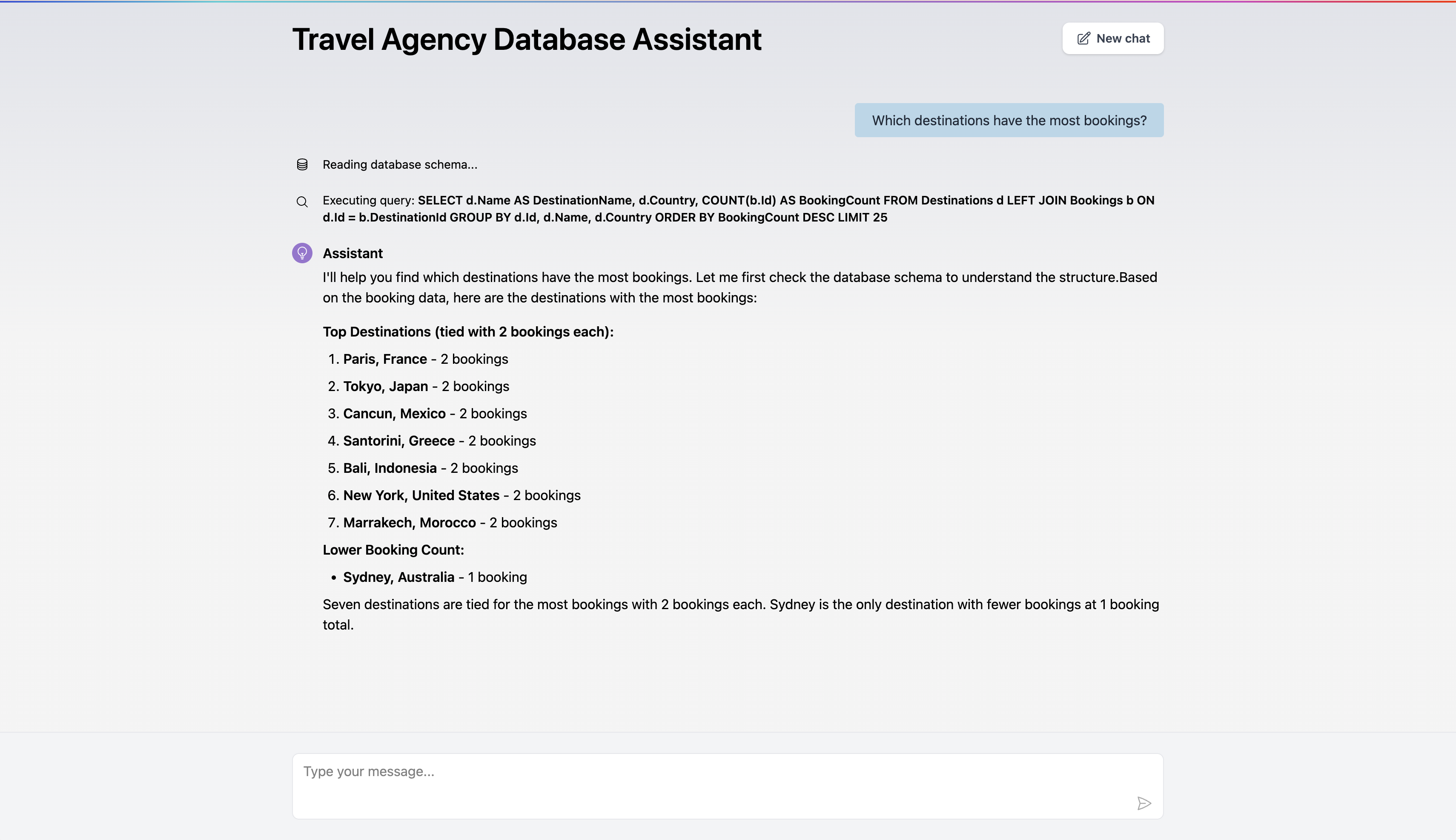
The included demo is a Blazor Interactive Server app simulating a travel agency chat interface. It uses a SQLite database (travel.db) that auto-seeds on first run.
dotnet run --project src/Equibles.AgentQL.Demo
Open http://localhost:5143 in your browser. Configure your AI provider in src/Equibles.AgentQL.Demo/appsettings.json:
{
  "AgentQL": {
    "Provider": "OpenAI",
    "ApiKey": "sk-...",
    "ModelName": "gpt-4o"
  }
}
Testing
The solution uses xUnit v3 on the Microsoft Testing Platform (opted in via global.json).
# Fast, no dependencies — pure logic
dotnet test --project tests/Equibles.AgentQL.UnitTests/Equibles.AgentQL.UnitTests.csproj

# Schema introspection + query execution against a real PostgreSQL
# instance (Testcontainers — requires Docker running), plus the
# end-to-end LLM tool loop driven by a fake IChatClient
dotnet test --project tests/Equibles.AgentQL.IntegrationTests/Equibles.AgentQL.IntegrationTests.csproj

# Everything
dotnet test
Demo
Contributing
dotnet tool restore        # restores CSharpier
prek install -f            # installs the git pre-commit hooks (brew install prek)
prek run --all-files       # run all hooks once
Use Conventional Commits for PR titles (feat:, fix:, docs:, chore:,
ci:, style:). See CONTRIBUTING.md for the full guide.
License
Author
Daniel Oliveira



Explore related projects
affaan-m/ECC
The agent harness performance optimization system. Skills, instincts, memory, security, and research-first development for Claude Code, Codex, Opencode, Cursor and beyond.
300,798 starsNousResearch/hermes-agent
The agent that grows with you
262,443 starsmultica-ai/andrej-karpathy-skills
A single CLAUDE.md file to improve Claude Code behavior, derived from Andrej Karpathy's observations on LLM coding pitfalls.
231,856 starsfirecrawl/firecrawl
Supercharge your AI agents with data from the web and beyond. Building the library for superintelligence. 🔥
200,444 stars