
dan0dev/ScreenPrompt
dan0dev/ScreenPrompt has 45 GitHub stars and 4 forks. GitHot measured 0 stars in 24 hours and 0 in 7 days. Last checked 2026-11-09 03:18 UTC. Last push 2026-10-23.
A transparent overlay window for Windows that is invisible to screen capture software. Perfect for presentations, video calls, content creation, and keeping notes visible while screen sharing.
What you can do
- Capture-proof: excluded from screen shares and recordings
- Always on top: adjustable transparency and click-through lock
- Keyboard-first: every action has a shortcut
- Formatted notes: paste or write Markdown and see headings, bold and lists while you present
Measured star growth
- in 24h
- 0
- in 7 days
- 0
- in 15 days
- Update delayed
- in 1 month
- Update delayed
Net star changes over overlapping periods, not daily totals. Missing measurements are left blank. Stars measure attention, not software quality.
README.md
Original
ScreenPrompt
Notes only you can see.
A transparent overlay for Windows that stays invisible in screen shares and recordings.
Download for Windows · Share your story · Request a feature · Report a bug



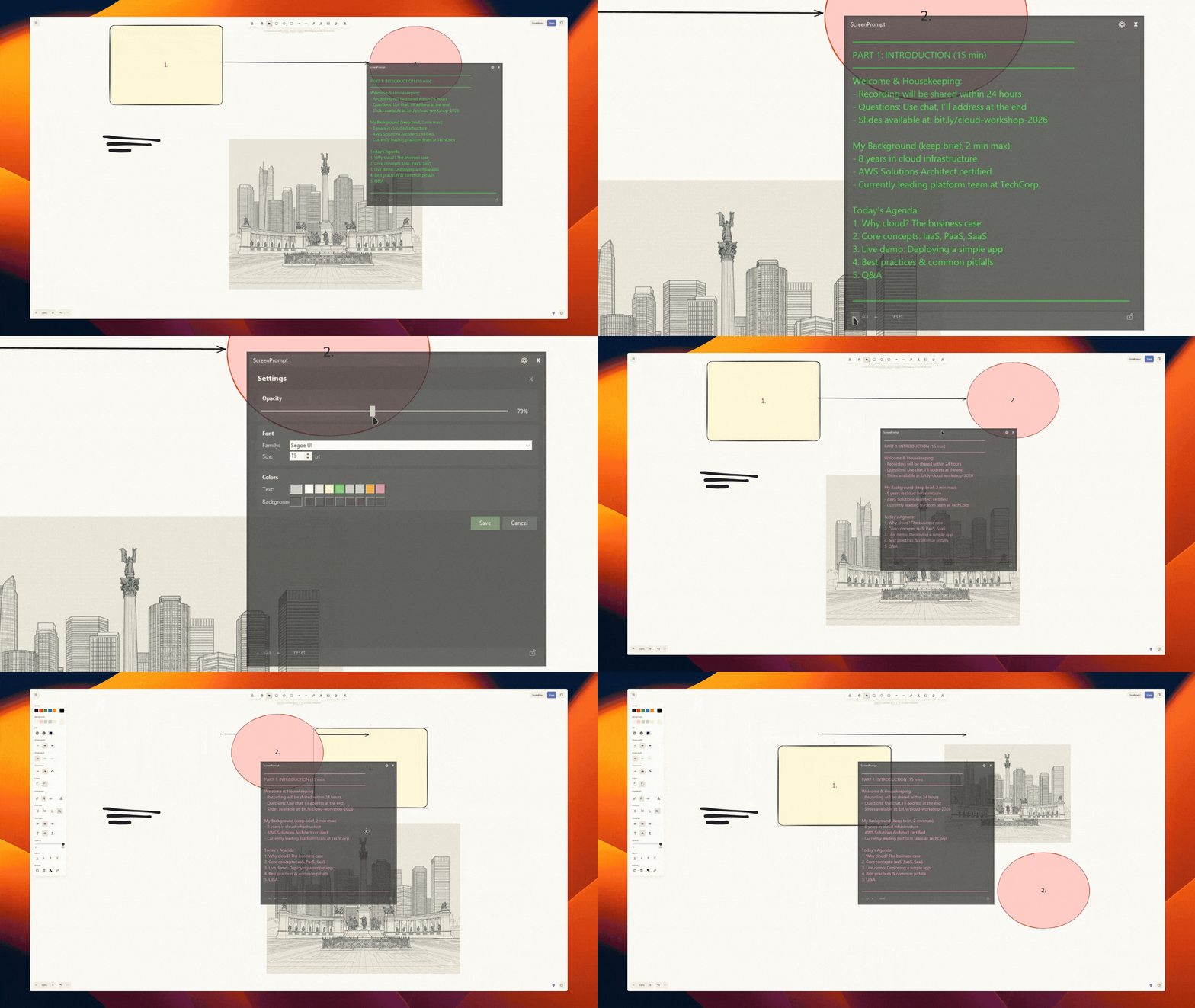
| You see | They see |
|---|---|

|

|
Why
Keep talking points, names, numbers, and scripts right where you're looking, so you never have to glance at a second screen or your phone mid-call.
Hidden from Zoom, Teams, OBS, and Snipping Tool.
Made for calls, demos, streams, and presentations. It's not for cheating on exams or interviews, or for getting around proctoring software or any platform's rules, and features for that won't be added (see Project scope).
Features
- Capture-proof: excluded from screen shares and recordings
- Always on top: adjustable transparency and click-through lock
- Keyboard-first: every action has a shortcut
- Formatted notes: paste or write Markdown and see headings, bold and lists while you present
- Auto-scroll: your notes scroll by themselves at a speed you set, teleprompter style
- Make it yours: font, size, colors, and position presets
- Private: your notes never leave your PC; no telemetry, no data collection. The only network request is an update check against GitHub releases, which you can turn off in Settings
Quick start
- Download
ScreenPrompt_x.y.z_x64-setup.exefrom Releases - Install and launch
- Type or paste your notes, then share your screen as usual
Requires Windows 10 (build 2004+) or Windows 11.
Essential shortcuts
| Shortcut | Action |
|---|---|
Ctrl+Shift+H |
Show / hide |
Ctrl+Shift+L |
Lock (click-through) |
Esc |
Unlock (or Ctrl+click the lock icon) |
Ctrl+Shift+E |
Edit text |
Ctrl+Shift+Space |
Start / pause / resume auto-scroll |
F1 |
All shortcuts (while ScreenPrompt is focused) |
Ctrl+Shift+F1 |
Panic close, works even when locked |
Locked mode
Lock the overlay (Ctrl+Shift+L or the lock icon) when you're presenting, and it gets out of your way:
- Clicks and scrolling go through to the app below, everywhere on the overlay, including the lock icon.
- To scroll your notes, hold
Ctrland scroll over the overlay. - To unlock, press
EscorCtrl+click the lock icon. The bottom bar shows this while locked. - To edit quickly, press
Ctrl+Shift+E: it unlocks until you click away, then locks again.
Auto-scroll and formatting
- Auto-scroll:
Ctrl+Shift+Space(or ▶) starts and pauses it, andCtrl+Shift+,/.change the speed. - Formatting: Markdown formats as you type. Use
Ctrl+B/Ctrl+Ior the T button, and turn it off in Settings if you prefer plain text.
All shortcuts
These work anywhere, even while the overlay is locked or another app has focus:
| Shortcut | Action |
|---|---|
Ctrl+Shift+O |
Cycle opacity |
Ctrl+Shift+Q |
Quit |
These work while the overlay is focused (click it, or press Ctrl+Shift+E when locked), so they
don't override the same keys in your other apps:
| Shortcut | Action |
|---|---|
Ctrl+Shift+PageUp / PageDown |
Font size up / down |
Ctrl+Shift+Home |
Reset font size |
Ctrl+Shift+S |
Settings |
Ctrl+Shift+C |
Copy all text |
Ctrl+Shift+V |
Paste and replace all (undo with Ctrl+Z for a few seconds) |
Ctrl+Shift+Delete |
Clear all text (undo with Ctrl+Z for a few seconds) |
Ctrl+Shift+Arrows |
Nudge window 20px |
Ctrl+Shift+R |
Reset size and position |
Position presets work anywhere (layout is auto-detected, or set it in Settings)
| Position | QWERTY | QWERTZ |
|---|---|---|
| Top row | Ctrl+Alt+7/8/9 |
Ctrl+Shift+7/8/9 |
| Middle row | Ctrl+Alt+4/5/6 |
Ctrl+Shift+4/5/6 |
| Bottom row | Ctrl+Alt+1/2/3 |
Ctrl+Shift+1/2/3 |
Build from source
Requires Node.js 20+ and rustup, which installs the pinned Rust version on the first build.
git clone https://github.com/dan0dev/ScreenPrompt.git
cd ScreenPrompt/screenprompt-tauri
npm install
npm run tauri build
The installer is written to src-tauri/target/release/bundle/nsis/.
What ScreenPrompt does on your PC
ScreenPrompt uses a few Windows features that are worth knowing about. None of them records your input or sends it anywhere.
- Hidden from capture: the overlay calls
SetWindowDisplayAffinitywithWDA_EXCLUDEFROMCAPTURE, so Windows leaves it out of screen shares, recordings, and screenshots. - Click-through lock: locking marks the window as transparent to the mouse, so clicks and scrolling reach the app below.
- Keyboard and mouse hooks, only while locked: a locked window gets no input of its own, so
ScreenPrompt installs two low-level hooks while it is locked and removes them when you unlock.
The keyboard hook only reacts to
Esc(to unlock) and passes every key through. The mouse hook only reacts toCtrl+click on the lock icon andCtrl+wheel over the overlay. Nothing is logged, stored, or sent anywhere. - Global shortcuts: shortcuts that work anywhere, such as
Ctrl+Shift+H, are registered with Windows. The rest only work while the overlay is focused. - Update check: see Privacy.
Privacy
Your notes and settings are stored only on your PC. ScreenPrompt has no telemetry, no analytics, and no accounts.
This program will not transfer any information to other networked systems unless specifically requested by the user or the person installing or operating it, with these exceptions:
- Update check: on startup, ScreenPrompt asks the GitHub Releases API
(
api.github.com) for the latest version number. The request contains no notes, settings, or personal data, but GitHub sees your IP address, as with any web request. If a newer version is available, ScreenPrompt asks you before downloading it from GitHub. To turn the check off, open Settings and clear Check for updates on startup. GitHub's handling of the request is covered by the GitHub Privacy Statement. - WebView2 during installation: if your PC doesn't have Microsoft Edge WebView2 (Windows 11 and most Windows 10 PCs already do), the installer downloads it from Microsoft. This is covered by the Microsoft Privacy Statement.
Share your story
How do you use ScreenPrompt? Tell us in this discussion: what you use it for, how it feels, and what's missing. Many of the stories will appear on the upcoming ScreenPrompt website (only if you say it's OK).
Code signing policy
Free code signing provided by SignPath.io, certificate by SignPath Foundation.
Signed releases are built by GitHub Actions from the source code in this repository, and each one is approved by hand before it is signed.
Explore related projects
n8n-io/n8n
Fair-code workflow automation platform with native AI capabilities. Combine visual building with custom code, self-host or cloud, 400+ integrations.
209,919 starslanggenius/dify
Build Agentic workflows, RAG pipelines, with rich AI model and tool support on one collaborative workspace. Deploy on cloud, VPC, or self-hosted, so teams move from prototype to production without rebuilding the stack.
160,680 starsmicrosoft/PowerToys
Microsoft PowerToys is a collection of utilities that supercharge productivity and customization on Windows
140,755 starsstablyai/orca
Orca is the place for working with a fleet of agents (e.g. Grok Bot, Claude Code). Run any coding agent with your own subscription. Available on desktop, mobile and remote runtime.
120,203 stars