
creold/ai-to-psd
creold/ai-to-psd has 218 GitHub stars and 29 forks. GitHot measured 0 stars in 24 hours. Last checked 2026-11-20 11:27 UTC. Last push 2025-12-25.
Measured star growth
- in 24h
- 0
- in 7 days
- Collecting history
- in 15 days
- Collecting history
- in 1 month
- Collecting history
Net star changes over overlapping periods, not daily totals. Missing measurements are left blank. Stars measure attention, not software quality.
About
A script for prepare export of vector objects from Adobe Illustrator to Photoshop
Developer ToolsREADME.md
Original
Ai2Psd v4.1


Description
The Ai2Psd script may help to prepare vector layers for export from AI to PSD file.
Export
| Object | Support | Format |
|---|---|---|
| Basic shapes | YES | Editable |
| Path shapes | YES | Editable |
| Groups | YES | Editable |
| Text | YES | Editable |
| Fills | YES | Editable |
| Clipping Paths | YES | Editable |
| Gradients | NO | Rasterized |
| Strokes | NO | Rasterized |
| Filter Effects | NO | Clear |
P.S. Some layers in the PSD could get merged randomly...in Adobe Illustrator 2026 there's still no reliable way to control it. We tried!
Warning
You must have the Layers panel shown and expanded on the screen for the script to work properly.The script makes changes to the opened file, so it is better to copy and run it.
You can't rerun the script on a file that has already been processed. First, use
File → Revertto revert to the previously saved state.
Blog Article
En: How to export an Illustrator file into a vector layered Photoshop file
Ru: Экспортируем векторные слои из AI в PSD
System Requirements
Should work with Adobe Illustrator CS6 and later.
The script has been tested on Illustrator CS6 (Windows 7), Illustrator CC 2017-2026 (Windows 10, Mac OS).
How to run script
Variant 1 — Install
- Download archive and unzip. All scripts are in the folder
jsx - Place
Ai2Psd.jsxin the Illustrator Scripts folder:- OS X:
/Applications/Adobe Illustrator [vers.]/Presets.localized/en_GB/Scripts - Windows (32 bit):
C:\Program Files (x86)\Adobe\Adobe Illustrator [vers.]\Presets\en_GB\Scripts\ - Windows (64 bit):
C:\Program Files\Adobe\Adobe Illustrator [vers.] (64 Bit)\Presets\en_GB\Scripts\ - RU lang:
C:\Program Files\Adobe\Adobe Illustrator [версия]\Стили\ru_RU\Сценарии\
- OS X:
- Restart Illustrator
Variant 2 — Drag & Drop
Drag and drop the script file (JS or JSX) onto the tabs of Illustrator documents. If you drag it to the area of the open document, the script may not work correctly (Adobe bug).

Variant 3 — Use extensions
I recommend the Scripshon Trees or LAScripts panel. In it you can specify which folder your script files are stored in.
Variant 4 — Utilities
You can use them to create macros to run scripts with hotkeys.
- SPAi (Mac OS, free)
- Hammerspoon (Mac OS, free)
- Keyboard Maestro (Mac OS, paid)
- BetterTouchTool (Mac OS, paid)
- AutoHotkey (Windows, free)
[!WARNING]
To run scripts via the F1-F15 hotkeys, users add them to the Actions panel. If another action is running inside the script, Illustrator will freeze. How do you check it? Open the script in a text editor, if you findapp.doScript()in the code, it is using an action. This is in all versions from CS6 to CC 2025 on Mac and Windows.
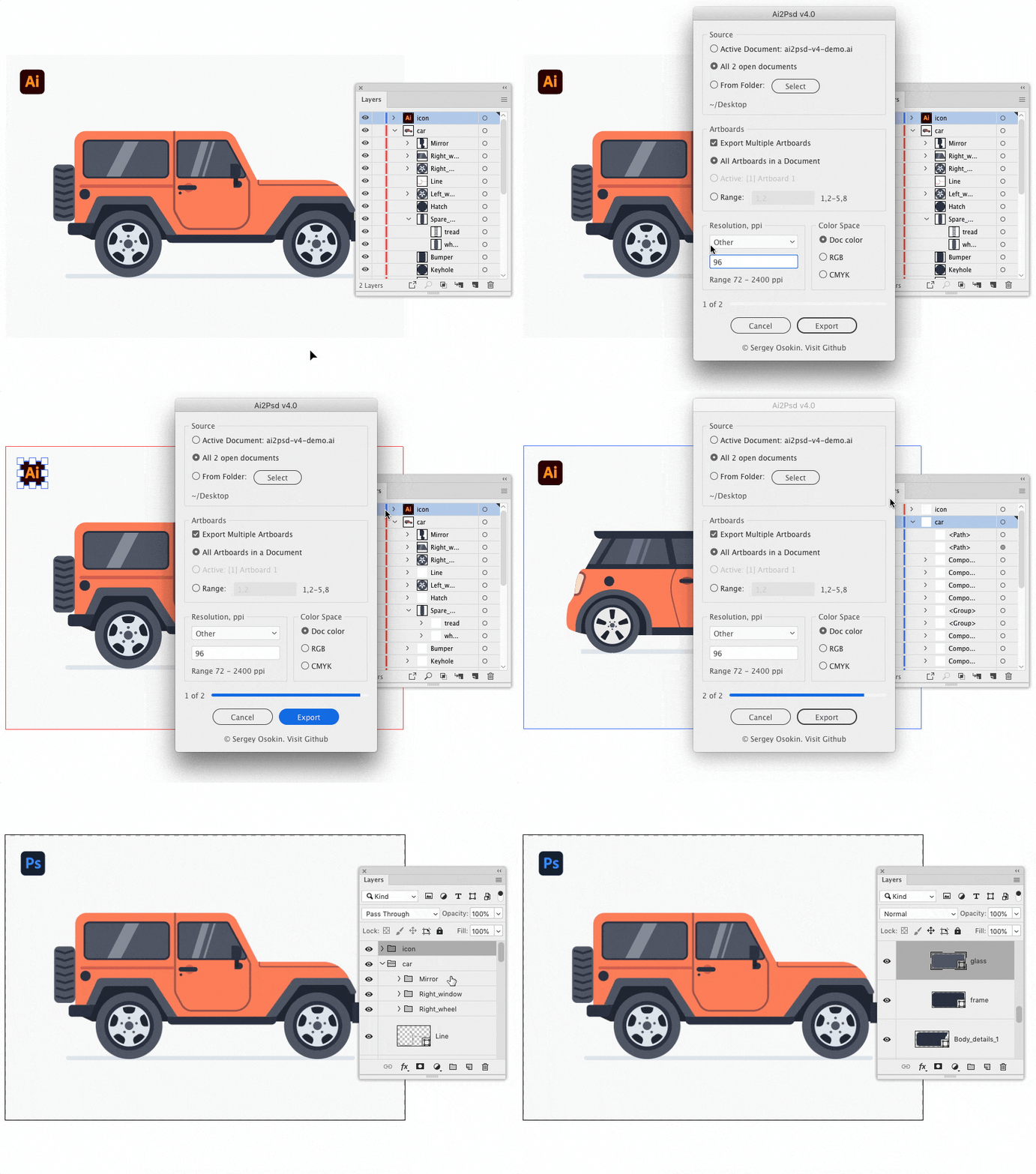
How to use Ai2Psd
- Open document(s) in Adobe Illustrator or go next step
- Choose
File → Scripts → Ai2Psd - Choose settings
- Click the Export button
- Wait for completion
Note
If the Ai document is not saved, the PSD is exported to the desktop.
Note
On low-spec computers, I recommend switching Illustrator to full screen mode to speed up the script.
Document Optimization
Strokes
If you want to save the vector stroke in the PSD, then you have to select the object and use Object → Path → Outline Stroke.

Similar paths
If you have a large group of small objects, e.g. hair brush draws, fur or outlined text, it'd be better for the to combine such elements into the Compound Path with Object → Compound Path → Make before the script is executed.

Note
Meshes, objects with a gradient fill or Spot color, pattern, various strokes can't be left as vectors after the export, but they will be separate raster layers in the PSD file.

Testimonials
- Mateusz Nowak: “Thanks for Ai-to-Psd script!”
- Dilyana Aleksandrova: “ai to psd saved my ass at work man, thank you for sharing it!”
- Weyn Cueva: “This is amazing! I’ve been looking for something similar because I work more in Photoshop. Thank you.”
- Maggie Stilwell: “This is awesome! A great timesaver. Thank you for sharing it.”
- datenshi_blue: “It is a great script, i downloaded it to and i love it”
- Michael Helmrich: "This is really powerful! Thank you for sharing"
Donate
Many scripts are free to download thanks to user support. Help me to develop new scripts and update existing ones by supporting my work with any amount via Buymeacoffee USD, CloudTips RUB, ЮMoney RUB, Tinkoff RUB, Donatty RUB, DonatePay RUB. Thank you.




Changelog
| Version | Notes |
|---|---|
| v4.1 | Fixed Adobe Illustrator issues. Minor improvements. |
| v4.0 | Added UI with batch export. Minor improvements. |
| v3.0 | Algorithm issues fixed. Added: Saving custom path names, Russian localization. |
| v2.3 | Minor issues fixed. |
| v2.2 | Added progress bar and timer. |
| v2.1 | Fixed unlock and order of objects issue. |
| v2.0 | The script doesn't need to load the helper Action file. |
| v1.3 | Fixed Overprint issue. |
| v1.2 | Improved preformance. |
| v1.1 | The script unlocks visible layers & objects before and the do the rest. |
| v1.0 | Initial Version. |
Contribute
This script is in active development.
Found a bug? Please submit a new issues on GitHub.
Contact
Email [email protected]
Co-author
Radmir Kashaev: GitHub
License
Ai2Psd is licensed under the MIT licence.
See the included LICENSE file for more details.