
cpiber/NebulaEnhance
cpiber/NebulaEnhance has 51 GitHub stars and 3 forks. GitHot measured 0 stars in 24 hours. Last checked 2026-11-15 06:56 UTC. Last push 2026-11-12.
What you can do
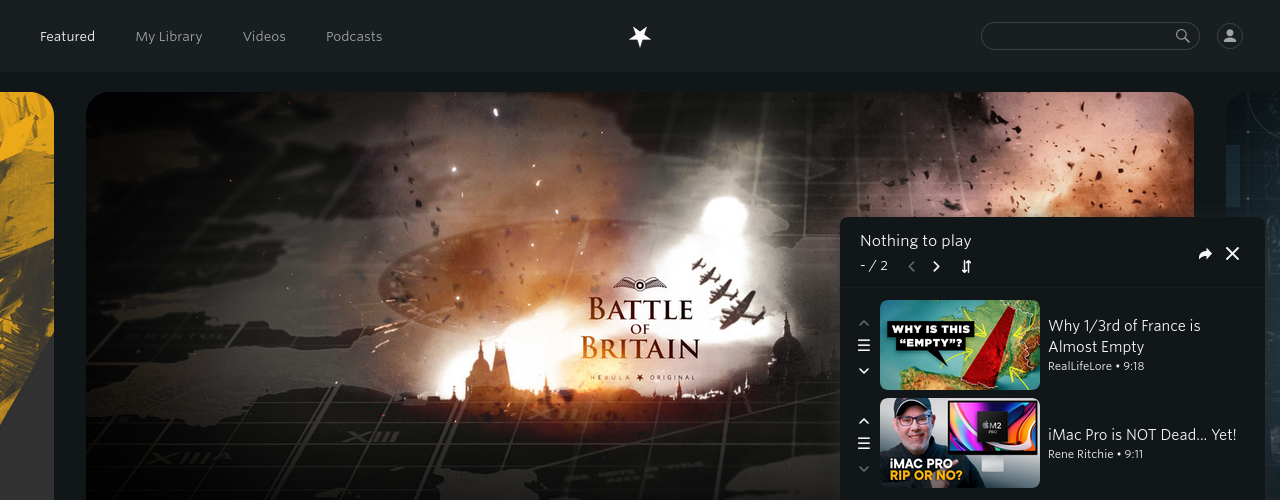
- Queue: Add videos to watch queue
- Share: Queue is shareable -- Bookmark and Share your list!
- YouTube Link: This extension can try to find the corresponding YouTube video (enable in settings)
- Optionally automatically open it in a new tab
Measured star growth
- in 24h
- 0
- in 7 days
- Collecting history
- in 15 days
- Collecting history
- in 1 month
- Collecting history
Net star changes over overlapping periods, not daily totals. Missing measurements are left blank. Stars measure attention, not software quality.
About
A browser extension for bringing quality-of-life features to https://nebula.tv
Creative & MediaREADME.md
OriginalEnhancer for Nebula
Heavily inspired by Enhancer for YouTube™
This extension aspires to bring some useful features to the Nebula site.
Installing
This extension is available on the official add-on stores:
- Firefox:
- Chromium:
The most recent releases are available here for installing manually.
Installing the enhancer_for_nebula-<version>.zip should work on any browser that supports MV2.
For MV3-only browsers (Chromium based), use the enhancer_for_nebula-v3-<version>.zip.
The enhancer_for_nebula-<version>.xpi is produced and signed by Mozilla.
Please be aware that both Mozilla and Google need to verify my changes before making them visible in the stores.
Features
Page
- Queue: Add videos to watch queue
- Share: Queue is shareable -- Bookmark and Share your list!
- YouTube Link: This extension can try to find the corresponding YouTube video (enable in settings)
- Watch on Nebula: On any YouTube video page tries to find the corresponding Nebula video (enable in settings)
- Optionally automatically open it in a new tab
- Hide creators: Enables you to hide videos by certain creators
- RSS: Add feed button to creator page
- Style visited links to mark watched videos
- Theatre Mode: Make the player fit the page better Now natively supported
Player
- Quick dial to set speed: New button in player to increase/decrease speed by scrolling
- Scroll over player to set volume (enable in settings)
- Toggle time display between current/remaining time
- Control Nebula video autoplay
- Keyboard shortcuts: Additional shortcuts in video player (see this page)
- Default playback speed and volume, subtitles Now natively supported
- Target qualities: Set the preferred video quality or qualities Now natively supported
Custom scripts
- Execute custom JavaScript code on the web page (MV2 only)
If you have any suggestions, please open a new issue or start a discussion.
Screenshots
| Page updates | Player updates |
|---|---|
 |
 |
| Queue | Player with new controls (Queue next/previous, volume indicator, time remaining, quick dial) |
 |
|
| Channel with "Hide creator" and RSS buttons |
Developing
See DEVELOPING.md
Credits
Icon made by Freepik from www.flaticon.com and modified.
Several icons from SVGrepo.
Theme by @groenroos.