
corbindavenport/just-the-browser
corbindavenport/just-the-browser has 3,081 GitHub stars and 95 forks. GitHot measured +1 stars in 24 hours and +5 in 7 days. Last checked 2026-11-09 16:47 UTC. Last push 2026-10-23.
Remove AI features, telemetry data reporting, sponsored content, product integrations, and other annoyances from web browsers.
Measured star growth
- in 24h
- +1
- in 7 days
- +5
- in 15 days
- Update delayed
- in 1 month
- Update delayed
Net star changes over overlapping periods, not daily totals. Missing measurements are left blank. Stars measure attention, not software quality.
README.md
OriginalJust the Browser
Just the Browser helps you remove AI features, telemetry data reporting, sponsored content, product integrations, and other annoyances from desktop web browsers. The goal is to give you "just the browser" and nothing else, using hidden settings in web browsers intended for companies and other organizations.
This project includes configuration files for popular web browsers, documentation for installing and modifying them, and easy installation scripts.
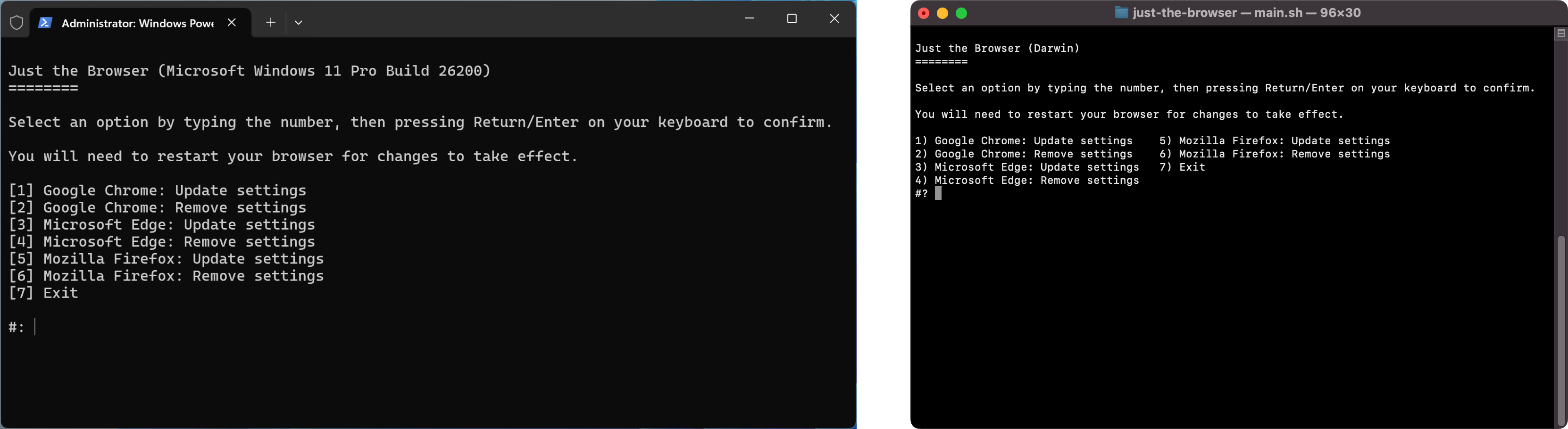
Install script
The setup script can install the configuration files in a few clicks. You can also follow the manual guides for Google Chrome, Microsoft Edge, Firefox, and Brave. If you don't like running scripts with administrator/root access, or the script does not work, use the guides instead.
Windows: Search for "Windows PowerShell" in the Start Menu, right-click it, and select the "Run as administrator" option. Next, copy the below command, paste it into the window (Ctrl+V), and press the Enter/Return key:
& ([scriptblock]::Create((irm "https://raw.githubusercontent.com/corbindavenport/just-the-browser/main/main.ps1")))
If you are on older versions of Windows, you may need to run this command first:
[Net.ServicePointManager]::SecurityProtocol=[Net.SecurityProtocolType]::Tls12
Mac and Linux: Search for the Terminal in your applications list and open it. Next, copy the below command, paste it into the window (Ctrl+V or Cmd+V), and press the Enter/Return key:
/bin/bash -c "$(curl -fsSL https://raw.githubusercontent.com/corbindavenport/just-the-browser/main/main.sh)"
Documentation and config files
See the Google Chrome, Microsoft Edge, Mozilla Firefox, and Brave documentation pages for manual installation instructions, and explanations for each setting. The browser directories also contain the configuration files, which are either JSON files, Windows Registry .reg files for Windows, or Profile Manager .mobileconfig files for macOS.
Website
This repository also includes the static site generator for justthebrowser.com, built with Eleventy and Simple.css. The icons are from Bootstrap Icons.
With Node.js and NPM installed, you can test the site like this:
npm install
npx @11ty/eleventy --serve
The site is compiled and deployed with the eleventy_build.yml GitHub Action.
Subscribe to updates
You can subscribe to the RSS/Atom releases feed to know when the configuration files, documentation, and scripts are updated:
https://github.com/corbindavenport/just-the-browser/releases.atom
This feed can be used with Feedly, Inoreader, The Old Reader, Feedbin, or any other reader tool. You can also subscribe to new releases with your GitHub account by clicking the Watch button at the top of the page, then selecting Custom > New releases.
Explore related projects
freeCodeCamp/freeCodeCamp
freeCodeCamp.org's open-source codebase and curriculum. Learn math, programming, and computer science for free.
458,826 starsdonnemartin/system-design-primer
Learn how to design large-scale systems. Prep for the system design interview. Includes Anki flashcards.
377,475 starsreact/react
The library for web and native user interfaces.
252,467 starsvuejs/vue
This is the repo for Vue 2. For Vue 3, go to https://github.com/vuejs/core
212,625 stars