
conormkelly/reamo has 51 GitHub stars and 3 forks. GitHot measured 0 stars in 24 hours and 0 in 7 days. Last checked 2026-11-16 03:16 UTC. Last push 2026-11-04.
What you can do
- Recording workflow — Scrap bad takes, retake from the same spot, A/B compare takes, auto-punch, tap tempo
- Touch instruments — Drum pads, scrollable piano, diatonic chord pads with strum and voice leading. Low-latency MIDI over WebSocket
- Mix monitoring — Stream REAPER's master output to your phone for quick mix checks, no plugin required
- FX control — Browse, add, tweak FX parameters and presets from your device
Measured star growth
- in 24h
- 0
- in 7 days
- 0
- in 15 days
- Collecting history
- in 1 month
- Collecting history
Net star changes over overlapping periods, not daily totals. Missing measurements are left blank. Stars measure attention, not software quality.
About
Phone/tablet remote control for REAPER DAW — mixer, timeline, recording, MIDI instruments, audio streaming. Runs in any browser via WebSocket.
Web & AppsREADME.md
OriginalREAmo
A wireless, zero-config all-in-one control surface for REAPER.
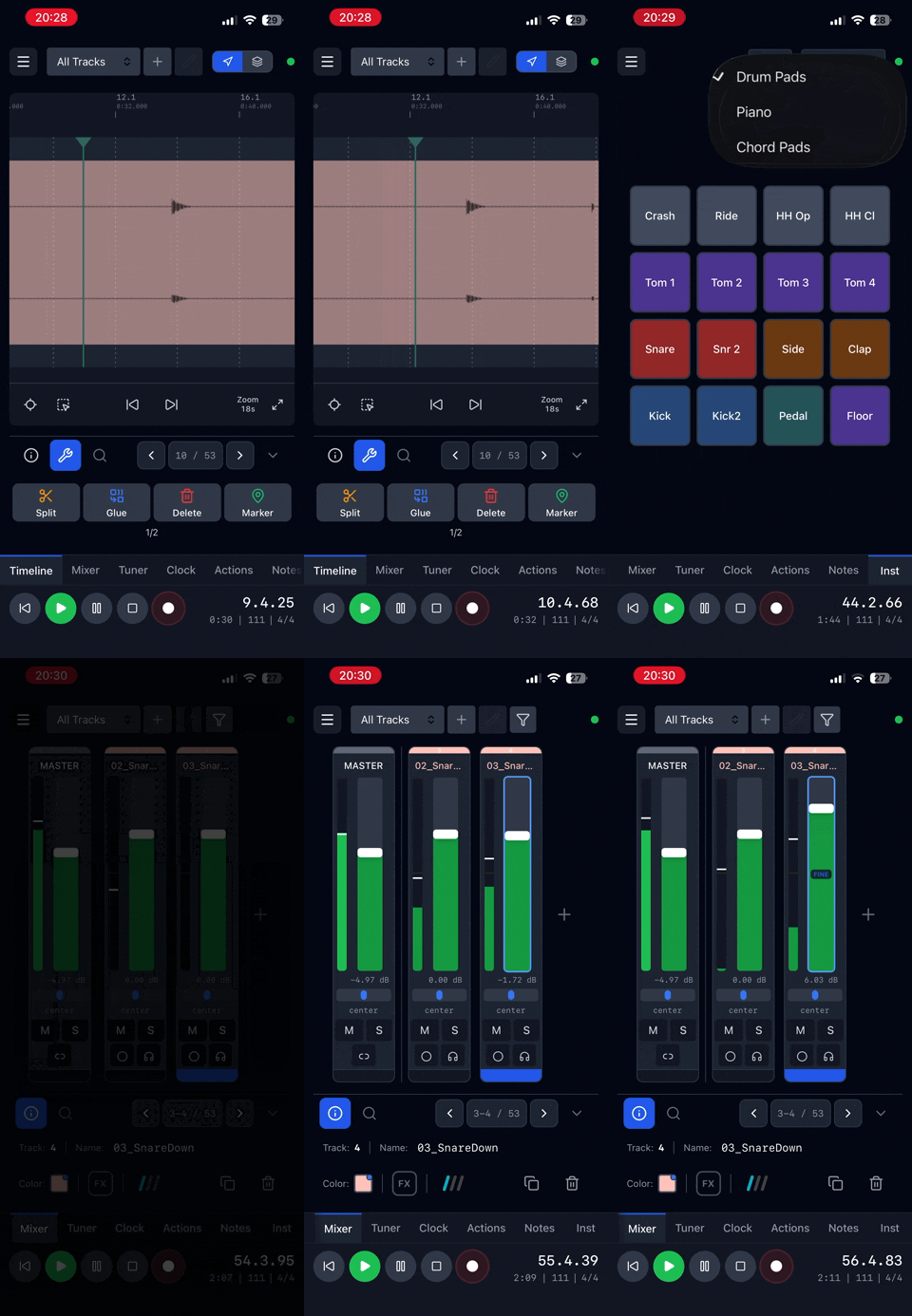
Transport, mixer, timeline, tuner, instruments, notes — all from your phone or tablet. Supports WiFi and USB.
Quick Start
- Download the latest release from Releases
- Run
Install_REAmo.luain REAPER (Actions > Run ReaScript) - Restart REAPER
- Extensions > REAmo > Show Connection QR Code... — scan it with your phone
- Add to Home Screen for a native app feel
That's it.
What You Get
| View | |
|---|---|
| Timeline | Waveforms, regions, markers, pinch-to-zoom, item selection |
| Mixer | Faders, meters, pan, mute/solo/arm, routing, FX, track details |
| Clock | Big transport controls, fully customizable layout |
| Tuner | Select a track, play a note, tune up |
| Actions | Custom button grid — trigger any REAPER action, MIDI CC / PC |
| Instruments | Drum pads, piano keyboard, chord pads using MIDI |
| Notes | Edit project notes from your device |
Highlights
- Recording workflow — Scrap bad takes, retake from the same spot, A/B compare takes, auto-punch, tap tempo
- Touch instruments — Drum pads, scrollable piano, diatonic chord pads with strum and voice leading. Low-latency MIDI over WebSocket
- Mix monitoring — Stream REAPER's master output to your phone for quick mix checks, no plugin required
- FX control — Browse, add, tweak FX parameters and presets from your device
- Track routing — Sends, receives, and hardware outputs with level/pan control
- Custom toolbar — Configurable buttons for any REAPER action, SWS extension, or MIDI CC/PC command
- Works everywhere — Responsive on iPhone, iPad, Android, tablets. Remembers layout per device
Coming Soon
- Playlists — Arrange regions into playlists for rehearsal and performance
Requirements
REAPER 6.0 or later, on macOS, Windows or Linux. On REAPER 6.0, the FX browser can't list your installed plugins.
Installation
Automatic (Recommended)
- Download the latest
REAmo-vX.X.zipfrom Releases - Extract the ZIP file
- In REAPER, run Actions > ReaScript: Run ReaScript... (Action ID: 41060)
- Select
Install_REAmo.luafrom the extracted folder - Restart REAPER
- (Optional) Preferences > Media — uncheck Set media items offline when application is not active. If enabled, REAPER takes media offline when you switch to another app, which prevents waveforms from loading on your device.
Uninstall
Run Uninstall_REAmo.lua using the same Run ReaScript action.
Manual installation
Copy these files from the ZIP to your REAPER resource path (Options > Show REAPER resource path):
| File in ZIP | Copy to |
|---|---|
reaper_reamo.dylib / .dll / .so |
UserPlugins/ |
reamo/ (entire folder) |
reaper_www_root/reamo/ |
Restart REAPER.
Versions before 0.8.1 used reaper_www_root/web/. If you copy the files manually rather than running the installer, delete that folder if it's REAmo's (its index.html title is REAmo).
Connecting
Scan the QR code: Extensions > REAmo > Show Connection QR Code....
Advanced connection options
REAmo runs an HTTP server on your computer (default port 9224).
- Same computer:
http://localhost:9224/ - Other device:
http://YOUR-IP:9224/(shown in QR code dialog) - Change port: Extensions > REAmo > Change Server Port. Phones then need the new address: re-add home-screen apps, and settings saved on phones (toolbars, layout, sync offset, view options) start fresh, as they're tied to the address.
- USB tethering: Connect phone via USB for lowest latency. REAmo detects USB interfaces automatically.
- Tailscale/VPN: Add your hostname in Extensions > REAmo > Allowed Hosts
Reporting a Problem
REAmo keeps a log in REAPER's resource folder, under Logs/reamo.log; Extensions > REAmo > Open Log Folder opens it. Each log file is at most 1 MB and REAmo keeps four, so the logs never use more than 4 MB on disk. Normally the log records connections, errors and warnings, with no project names, notes or other project content.
If something goes wrong, turn on Extensions > REAmo > Debug Logging, make the problem happen again, and attach reamo.log to your issue. Debug logging records much more detail, including project and track names, and switches off when REAPER restarts.
For Developers
Zig extension (WebSocket server) + React 19 / TypeScript / Zustand / Tailwind CSS 4 frontend.
make install    # dependencies, git hooks, Playwright's Chromium
make check      # lint, typecheck and every test
make            # list every target
See DEVELOPMENT.md for the toolchain and architecture, and extension/API.md for the WebSocket API.
Testing against real REAPER
The live-REAPER harness runs the extension inside a headless REAPER in Docker and drives it as the web UI does, with REAPER as the judge of what's correct.
make harness                         # every scenario, on the pinned REAPER
make harness SCENARIOS="smoke"       # a subset
make release-check                   # everything on the oldest supported REAPER (6.0) and the pinned newest
A release needs make release-check to pass.
Contributing
REAmo v1 is in maintenance mode: bug fixes are welcome, new features are planned for a later version. Please open an issue to discuss a change before sending a pull request. See CONTRIBUTING.md.
License
MIT