
congde/emotional_chat
congde/emotional_chat has 204 GitHub stars and 120 forks. GitHot measured 0 stars in 24 hours. Last checked 2026-11-16 20:34 UTC. Last push 2026-07-31.
Measured star growth
- in 24h
- 0
- in 7 days
- Update delayed
- in 15 days
- Update delayed
- in 1 month
- Update delayed
Net star changes over overlapping periods, not daily totals. Missing measurements are left blank. Stars measure attention, not software quality.
About
一个面向情感支持场景的开源 AI 对话应用。项目由 FastAPI 后端与 React 前端组成,集成情绪与意图识别、长期记忆、RAG 知识库、Agent 技能、流式响应和自动评估,并可连接智谱 GLM、通义千问、OpenAI 等兼容 OpenAI API 的模型服务。
Developer ToolsREADME.en.md
OriginalXinyu · Emotional Support Chatbot
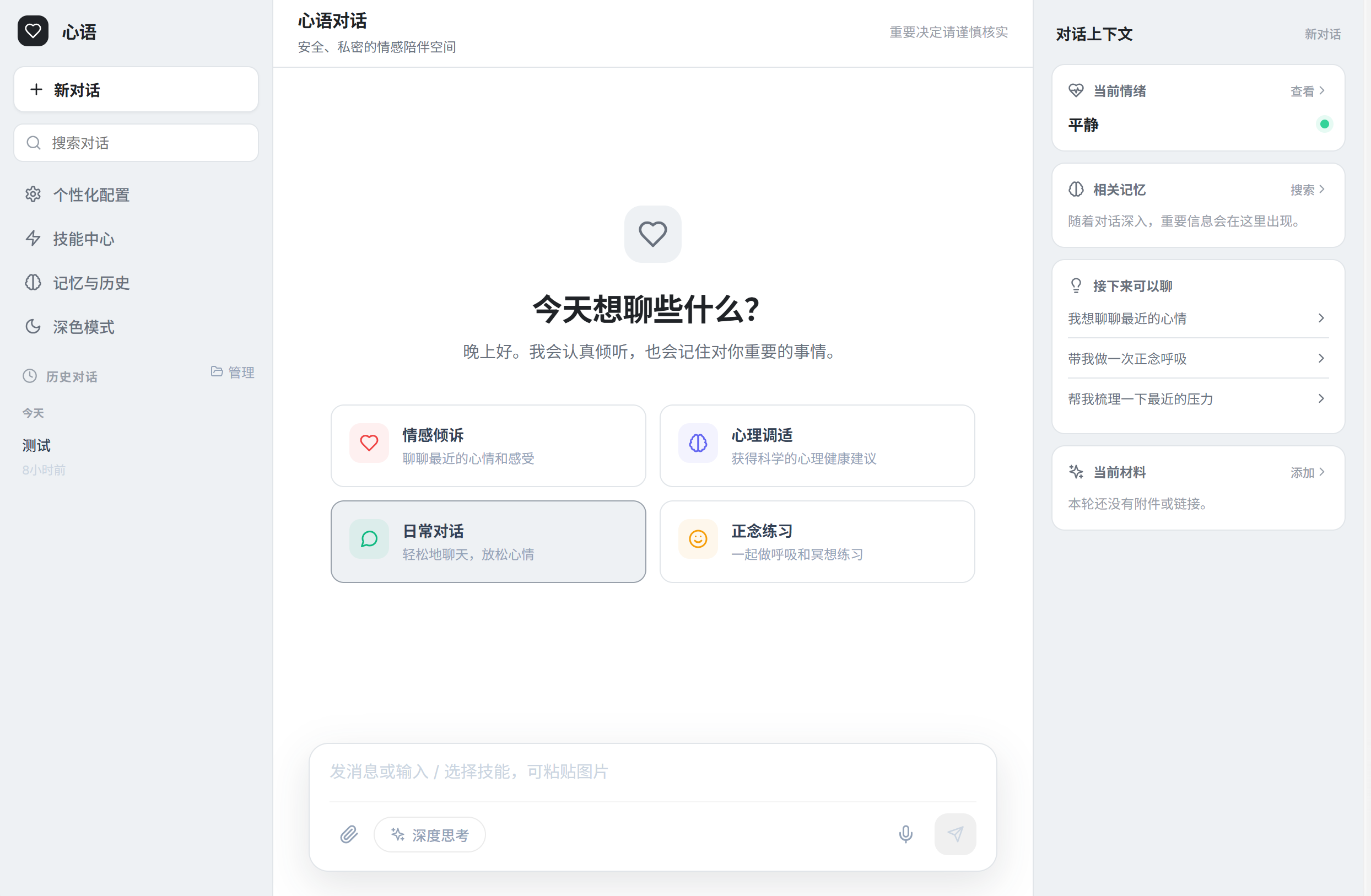
An open-source AI conversation application for emotional-support scenarios. It combines a FastAPI backend and a React frontend with emotion and intent recognition, long-term memory, RAG, agent skills, streaming responses, and automated evaluation. It works with OpenAI-compatible model providers, including Zhipu GLM, Alibaba Cloud Qwen, and OpenAI.
[!IMPORTANT] This project is intended for technical research and emotional support. It does not provide medical diagnoses or professional therapy. If someone is in immediate danger or at risk of self-harm, contact local emergency services, a crisis hotline, or a trusted person immediately.
Highlights
- Emotion and intent understanding, including safety policies for crisis-related language.
- Contextual conversations based on the current turn, conversation history, semantic memory, and user profiles.
- A ChromaDB-powered RAG knowledge base for mental-health resources, self-help exercises, and organizational policies.
- Task planning, tool use, reflection, plugins, and a Runtime + Skills agent architecture.
- File and image attachments, audio processing, and streaming chat.
- User feedback, automated evaluation, A/B tests, performance metrics, and emotion trends.
- A React 18 interface with Markdown, themes, typewriter effects, and avatar customization.
Tech stack
| Layer | Technologies |
|---|---|
| Frontend | React 18, Axios, styled-components, react-markdown |
| API | Python 3.10+, FastAPI, Uvicorn, Pydantic v1 |
| AI | OpenAI-compatible APIs, LangChain, Runtime + Skills |
| Data | MySQL / SQLite, ChromaDB, optional Redis |
| Operations | Docker Compose, Nginx, Prometheus, Grafana |
Quick start
1. Prerequisites
- Python 3.10 or 3.11 for the best compatibility
- Node.js 18+ and npm
- An API key for an OpenAI-compatible model provider
- MySQL 8 (optional; SQLite can be used locally)
git clone https://github.com/congde/emotional_chat.git
cd emotional_chat
2. Configure the backend
Copy the example configuration:
# macOS / Linux
cp config.env.example config.env

# Windows PowerShell
Copy-Item config.env.example config.env
Set at least these values:
LLM_API_KEY=your_api_key
LLM_BASE_URL=https://open.bigmodel.cn/api/paas/v4/
DEFAULT_MODEL=glm-5.1
For example, to use Qwen through DashScope:
LLM_BASE_URL=https://dashscope.aliyuncs.com/compatible-mode/v1
DEFAULT_MODEL=qwen-plus
To use SQLite instead of a local MySQL server:
USE_SQLITE=1
SQLITE_PATH=./data/emotional_chat_local.db
See config.env.example for every option. Never commit a config.env file containing real credentials.
3. Start the backend
python -m venv .venv

# macOS / Linux
source .venv/bin/activate

# Windows PowerShell
.venv\Scripts\Activate.ps1

pip install -r requirements.txt
python run_backend.py
The launcher checks dependencies, initializes the local knowledge base, and serves the API at http://localhost:8000.
- OpenAPI UI: http://localhost:8000/docs
- Health check: http://localhost:8000/health
4. Start the frontend
In another terminal:
cd frontend
npm install
npm start
Open http://localhost:3000. If the backend is not available on local port 8000, create frontend/.env.local:
REACT_APP_API_URL=http://your-backend-host:8000
Common commands
On systems with GNU Make installed:
make help          # List available commands
make install       # Install Python dependencies
make run           # Start the backend and initialize the knowledge base
make rag-init      # Initialize the RAG knowledge base
make db-upgrade    # Apply database migrations
make db-check      # Check the database connection
Run the test suites with:
pytest
cd frontend && npm test
Docker deployment
The repository includes a Compose stack for the backend, MySQL, Redis, Nginx, and observability services:
cp config.env.example config.env
docker compose up -d --build
docker compose ps
The Compose file does not build the React development server. For production, run npm run build and serve the generated static files through Nginx or another static host. Replace all example passwords, restrict CORS, configure HTTPS, and enable observability services according to the host's capacity. See the production deployment guide for details (currently in Chinese).
Architecture
React Web
   │ HTTP / SSE
   ▼
FastAPI routers
   ▼
Chat / Emotion / Intent / Memory / Agent services
   ├── OpenAI-compatible LLM
   ├── ChromaDB knowledge & semantic memory
   ├── MySQL or SQLite persistence
   └── Redis cache (optional)
Key directories:
backend/          FastAPI app, routers, services, and core modules
  agent/          Agent core and tool calling
  runtime/        Runtime + Skills conversation runtime
  modules/        Intent, RAG, LLM, and multimodal modules
  routers/        HTTP and SSE APIs
  services/       Chat, memory, context, and personalization services
frontend/         React web client
knowledge_base/   Built-in knowledge resources
docs/             Architecture, deployment, and feature documentation
test_*.py         Backend test and evaluation scripts
Further reading
- API reference
- Agent architecture
- Memory architecture
- RAG implementation
- Windows setup
- macOS setup
- Release history
Most detailed documentation is currently written in Chinese.
Contributing
Issues and pull requests are welcome. Keep changes focused, run the relevant tests, and update affected documentation. Python code follows the repository's Black and Ruff configuration.
Contact
Questions and suggestions are welcome through any of the following channels:
- Submit a GitHub Issue
- Email the maintainer at [email protected]
- WeChat:
jx-yuancongde
License
Licensed under the MIT License.