
coding-by-feng/ai-agent-session-center
coding-by-feng/ai-agent-session-center has 96 GitHub stars and 0 forks. GitHot measured 0 stars in 24 hours and +1 in 7 days. Last checked 2026-11-15 16:27 UTC. Last push 2026-11-13.
What you can do
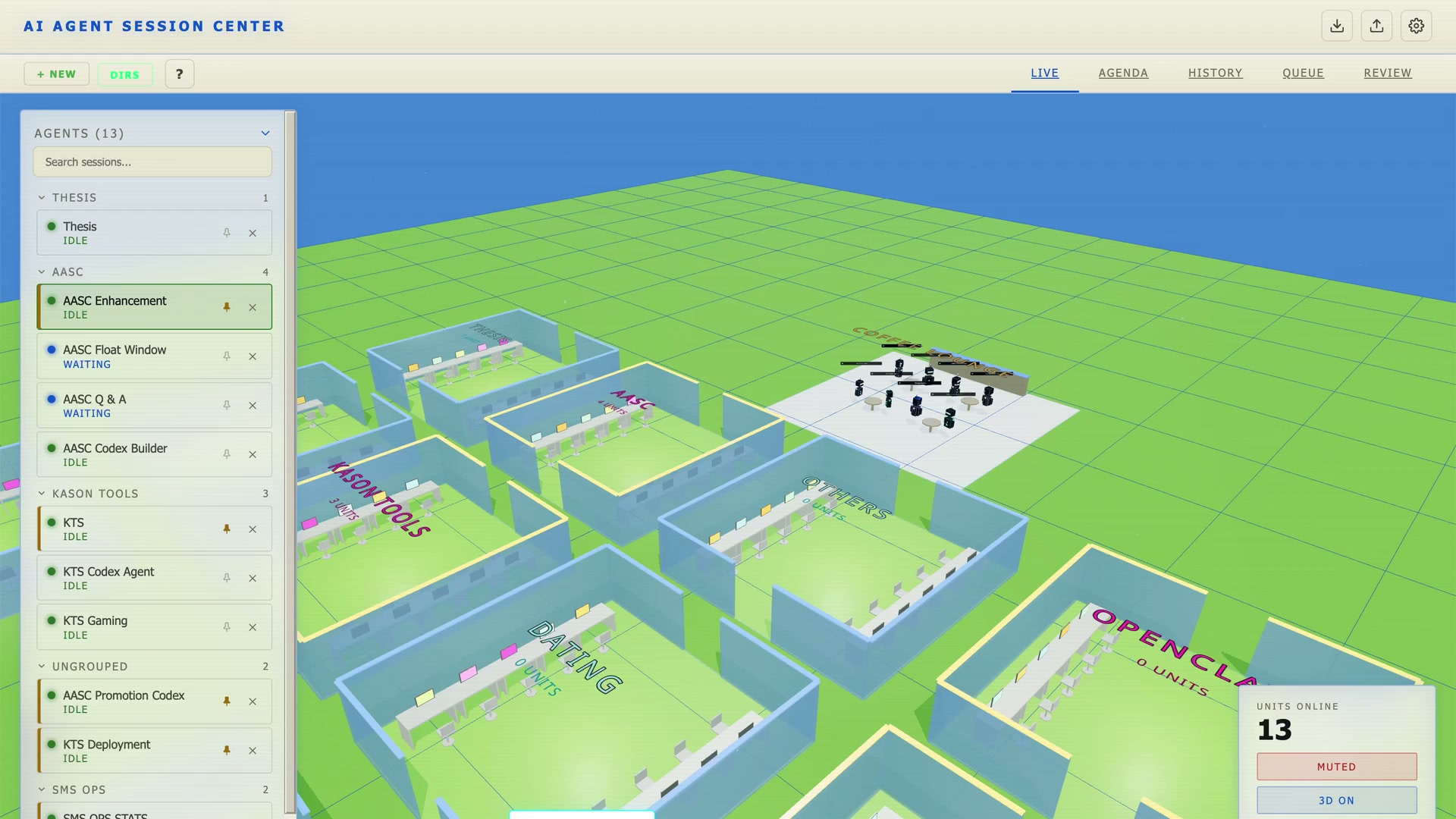
- Know which agent needs you — working / waiting / approval / input / idle states with sound alerts; rooms, pins, labels.
- Live terminals — server-owned xterm.js terminals shared by browser, desktop app and phone; resume, fork, clone, pop-out windows.
- Prompt queue — once / loop / scheduled prompts, chains, quiet hours; sent when the session goes idle.
- Auto-resume — on overload, 5xx, rate-limit or network errors, sends "continue" for you (3 tries / 30 min, with back-off).
Measured star growth
- in 24h
- 0
- in 7 days
- +1
- in 15 days
- Update delayed
- in 1 month
- Update delayed
Net star changes over overlapping periods, not daily totals. Missing measurements are left blank. Stars measure attention, not software quality.
About
Real-time dashboard for Claude Code and Codex AI coding agents: live terminals, status alerts, prompt queues, and workspace resume. Desktop app or browser, with an optional 3D view.
Developer ToolsREADME.md
OriginalAI Agent Session Center
One dashboard for all your Claude Code and Codex sessions — see which agent needs you, work in live terminals, queue the next prompt, and pick your workspace back up after a restart.



▶ Try the demo in your browser — no install → aasc.work/demo
Install
Desktop app (macOS, Apple Silicon)
Download
AI.Agent.Session.Center-<version>-arm64.dmgfrom the latest release and drag the app into Applications.The app is not notarized by Apple, so macOS says it is "damaged and can't be opened". It isn't damaged — click Cancel (not Move to Trash), then clear the download quarantine flag in Terminal:
xattr -cr "/Applications/AI Agent Session Center.app"Then open the app normally. (Or double-click Open App (Start Here).command in the DMG, which does the same.) You need to repeat this after installing each new version.
Follow the setup wizard and set a password — it keeps other devices on your network out.
From source (any OS with Node.js 22.12+)
git clone https://github.com/coding-by-feng/ai-agent-session-center.git
cd ai-agent-session-center
npm install
npm rebuild better-sqlite3 node-pty   # rebuild native modules for your Node
npm run build
npm start                             # opens http://localhost:3333
Requirements: Claude Code and/or Codex CLI 0.130+ (Codex hooks are opt-in), and jq (brew install jq) so events match the right terminal.
First run
Start the dashboard (it registers its hooks), then run claude or codex in any terminal — the session appears on LIVE. Click it to open its terminal, project, conversation, notes and queue.
Features
- Know which agent needs you — working / waiting / approval / input / idle states with sound alerts; rooms, pins, labels.
- Live terminals — server-owned xterm.js terminals shared by browser, desktop app and phone; resume, fork, clone, pop-out windows.
- Prompt queue — once / loop / scheduled prompts, chains, quiet hours; sent when the session goes idle.
- Auto-resume — on overload, 5xx, rate-limit or network errors, sends "continue" for you (3 tries / 30 min, with back-off).
- Workspace restore — layout, rooms and sessions come back after a restart.
- Project browser & transcript — file tree, fuzzy find, Markdown/TeX/PDF/image viewers, full conversation search, history.
- Ask about a selection — explain or translate highlighted text in a floating AI session.
- Resources — catalogue of your skills, commands, rules, agents, MCP servers and memory (secrets masked; host only).
- Themes & 3D — ten themes, tunable sounds, rebindable shortcuts, optional 3D cyberdrome.
📺 58-second intro · 12-minute walkthrough
How it works
Claude Code / Codex → hook script (background, never blocks the CLI)
  → /tmp/claude-session-center/queue.jsonl
  → server (match event to session → state machine) → WebSocket → dashboard
What it changes on your machine: hook entries in ~/.claude/settings.json (and ~/.codex/config.toml if enabled), hook scripts in ~/.claude/hooks/, the terminal tab title, and <project>/.claude/last-session-id. Hooks are re-registered every time the server starts. Your data lives in data/ (source) or ~/Library/Application Support/ai-agent-session-center/ (desktop app).
Phone and LAN access
Other devices can open http://<your-address>:3333, but only with a password (otherwise refused). Sessions are host-only until you share them, one device drives a session at a time, and it's plain HTTP — use a trusted network or VPN. Anyone with the password can run terminals on this machine, so treat it like SSH access.
Commands
npm run dev              # hot reload (:3332) + backend (:3333)
npm start                # start the server (after npm run build)
npm start -- --port 4444 # use another port
npm run set-password     # set the dashboard password
npm run uninstall-hooks  # remove hooks from the CLI configs
npm run reset            # remove hooks AND delete history/settings (backed up first)
npm test                 # Vitest
npm run typecheck:all    # type-check client and server
npm run electron:build   # build the desktop installer
Troubleshooting
| Problem | Fix |
|---|---|
| macOS: "damaged and can't be opened" | xattr -cr "/Applications/AI Agent Session Center.app" (see Install) |
| Sessions don't appear | grep dashboard-hook ~/.claude/settings.json, then npm run install-hooks; make sure jq is installed |
| "compiled against a different Node.js version" | npm rebuild better-sqlite3 node-pty |
| Port 3333 in use | The server kills whatever holds it; to run a second copy use --port 4444 |
Known limitations
- Session matching is heuristic — two sessions in one directory can occasionally cross-link.
- Loops, schedules and auto-resume run in the dashboard, so they pause when no window is open.
- The macOS app is unsigned with no auto-update; the Windows hook is less tested.
Contributing
Run npm test, npm run lint and npm run typecheck:all before a PR, and use conventional commits (feat:, fix: …). Per-feature docs live in docs/feature/.