
codevibe-technology/ai-bot-access
codevibe-technology/ai-bot-access has 6 GitHub stars and 5 forks. GitHot measured 0 stars in 24 hours. Last checked 2026-11-15 17:10 UTC. Last push 2026-11-11.
Measured star growth
- in 24h
- 0
- in 7 days
- Collecting history
- in 15 days
- Collecting history
- in 1 month
- Collecting history
Net star changes over overlapping periods, not daily totals. Missing measurements are left blank. Stars measure attention, not software quality.
About
Can AI crawlers, search engines and link-preview bots (GPTBot, ClaudeBot, PerplexityBot, Googlebot, LinkedInBot and more) really read your site? robots.txt plus a real request per bot, share-preview check, bot IP verification and access-log reports.
AIREADME.md
Original
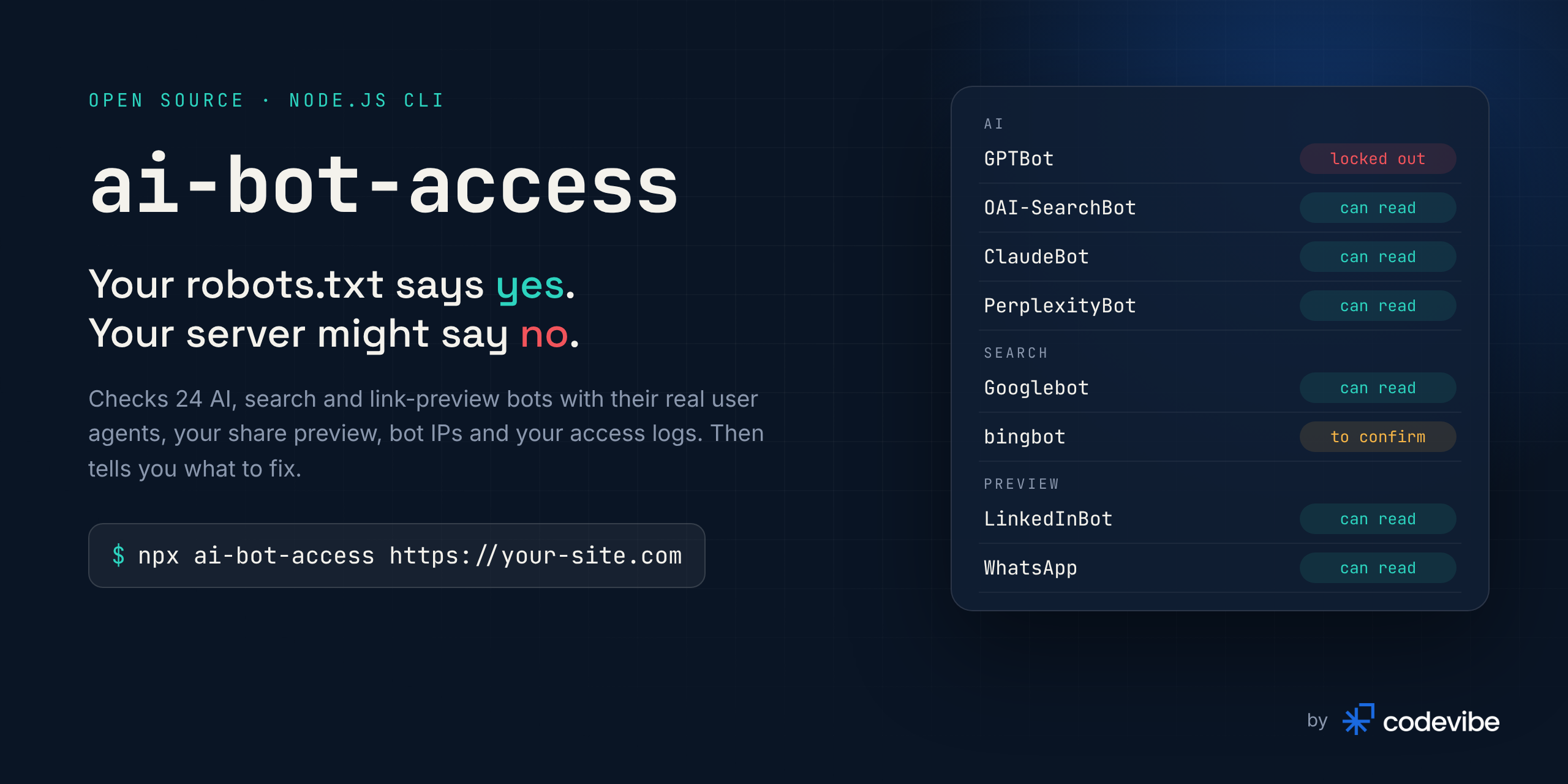




Can ChatGPT, Claude, Google and LinkedIn actually read your site?
One command checks 24 AI, search and link-preview bots against your robots.txt and your real server response.
Plus your share preview, a bot IP verifier and an access-log report.

▶ Watch the full 95-second video with sound
Quick start · Why · What it checks · Verify an IP · Logs · CI · API · FAQ
Quick start
npx ai-bot-access https://your-site.com                          # can every bot read this page?
npx ai-bot-access verify 20.171.206.10 --ua "GPTBot/1.4"          # is this request really GPTBot?
npx ai-bot-access logs /var/log/nginx/access.log                 # what did the real bots get?
No install, no API key, no account, zero dependencies. Needs Node.js 18.17 or newer.
Why this exists
AI assistants now answer questions that used to send people to search results, and links travel through LinkedIn, WhatsApp and Slack previews. If the bots behind them cannot read your pages, you are not in those answers and your links share as bare URLs. Nothing tells you.
Most people check this by reading their robots.txt. That is only half the story. Hosting providers, CDNs and firewalls increasingly block bots by user agent: a 403, a 429 rate limit, or a "verify you are human" page. robots.txt still says Allow, every online checker says you are fine, and the bot is locked out anyway.
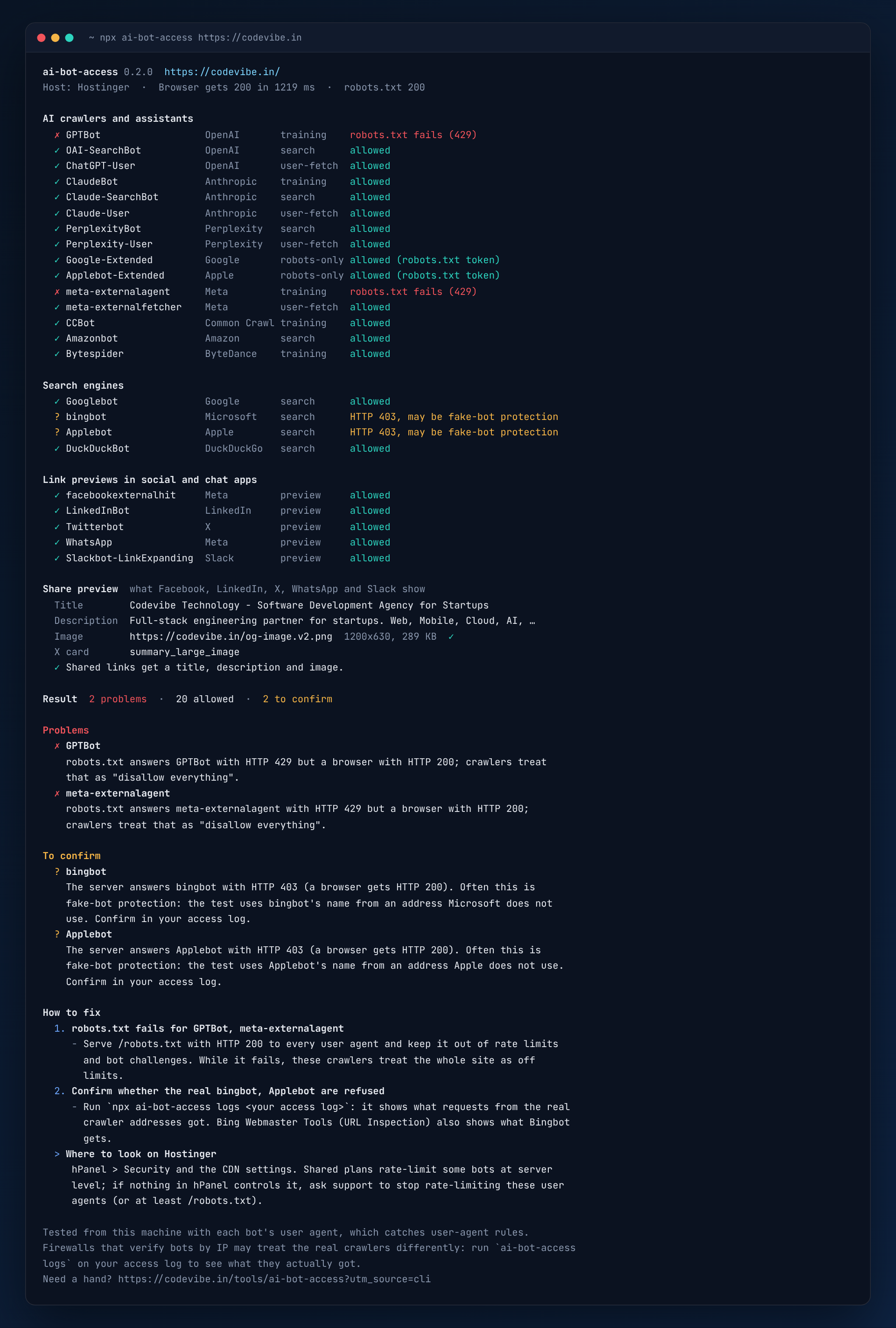
We found exactly this on our own site, codevibe.in. Our robots.txt allowed every AI crawler. Our shared host answered every request that identified as GPTBot with HTTP 429, including the request for robots.txt itself. A crawler that cannot fetch robots.txt treats the whole site as disallowed. The screenshot above is the real output.
ai-bot-access makes that second check easy: it asks for your page the way each bot does and compares the answer with what a normal browser gets. Then it tells you what to change, on the host or CDN it detects.
What it checks
For every bot, two things:
| Check | How | |
|---|---|---|
| 1 | robots.txt rules | Fetches robots.txt with that bot's user agent and applies RFC 9309: exact token groups, * fallback, longest-match rules, * and $ wildcards |
| 2 | What the server really does | Requests the page with the bot's documented user agent and compares it with a browser baseline: status code, challenge pages, redirects, noindex and noai directives |
And once per page:
| Check | Why it matters | |
|---|---|---|
| 3 | Share preview | og:title, og:description, og:image (downloaded: status, type, size, dimensions) and twitter:card. Link-preview bots that get a page without og:image while a browser's copy has one are flagged. |
| 4 | Your host or CDN | Recognised from response headers (Cloudflare, Vercel, Netlify, Hostinger, Akamai, Fastly, CloudFront, Sucuri, WP Engine, Kinsta, SiteGround, Shopify, Wix, Squarespace), so the fixes point at the right settings page. |
Supported bots
--bots ai, --bots search or --bots social runs one group. npx ai-bot-access --list prints the table below.
AI crawlers and assistants (15)
| Bot | Operator | Used for | Follows robots.txt | IP verifiable |
|---|---|---|---|---|
GPTBot |
OpenAI | Model training | ✅ | ✅ |
OAI-SearchBot |
OpenAI | ChatGPT search | ✅ | ✅ |
ChatGPT-User |
OpenAI | Fetching a page a user asked about | Not always | ✅ |
ClaudeBot |
Anthropic | Model training | ✅ | ✅ |
Claude-SearchBot |
Anthropic | Claude search | ✅ | ✅ |
Claude-User |
Anthropic | Fetching a page a user asked about | ✅ | ✅ |
PerplexityBot |
Perplexity | Perplexity search | ✅ | ✅ |
Perplexity-User |
Perplexity | Fetching a page a user asked about | No | ✅ |
Google-Extended |
Gemini training control (robots.txt token only) | ✅ | - | |
Applebot-Extended |
Apple | Apple Intelligence training control (robots.txt token only) | ✅ | - |
meta-externalagent |
Meta | Model training and indexing | ✅ | No list |
meta-externalfetcher |
Meta | Fetching a page a user asked about | Not always | No list |
CCBot |
Common Crawl | Open web dataset used for training | ✅ | ✅ |
Amazonbot |
Amazon | Alexa and search | ✅ | ✅ |
Bytespider |
ByteDance | Model training | Not always | No list |
Search engines (4)
Their indexes also feed Google AI Overviews, Gemini and Microsoft Copilot answers.
| Bot | Operator | Follows robots.txt | IP verifiable |
|---|---|---|---|
Googlebot (smartphone) |
✅ | ✅ list + DNS | |
bingbot |
Microsoft | ✅ | ✅ list + DNS |
Applebot |
Apple | ✅ | ✅ list + DNS |
DuckDuckBot |
DuckDuckGo | ✅ | ✅ |
Link previews in social and chat apps (5)
They build the title, description and image people see when your link is shared.
| Bot | Operator | Follows robots.txt | IP verifiable |
|---|---|---|---|
facebookexternalhit |
Meta (Facebook, Instagram, Messenger) | Not always | No list |
LinkedInBot |
✅ | No list | |
Twitterbot |
X | ✅ | No list |
WhatsApp |
Meta | No (user-initiated) | No list |
Slackbot-LinkExpanding |
Slack | ✅ | No list |
User agents and IP lists come from each operator's own documentation, linked in src/bots.ts. Google-Extended and Applebot-Extended are robots.txt tokens only (Google and Apple fetch with their normal crawlers), so the tool checks your rules for them without sending a separate request.
Verdicts
| Verdict | Meaning | Usually caused by |
|---|---|---|
🟢 allowed |
robots.txt allows the bot and the page answers it like a browser | Nothing to do |
🟡 blocked-by-robots |
Your robots.txt disallows this bot for this path | A choice you made, or forgot about |
🔴 blocked-by-server |
robots.txt allows it, but the server answers the bot with 4xx/5xx while a browser gets the page | Host, CDN or WAF rule |
🟡 blocked-by-server + to confirm |
A 403 for a bot whose operator publishes its IPs |
Often fake-bot protection, which refuses a crawler's name from addresses the crawler does not use. That is what this test sends, so confirm with your logs |
🔴 challenged |
The bot gets a Cloudflare, DataDome, SiteGround, Imperva or similar challenge page | Bot protection settings |
🔴 robots-unreachable |
robots.txt itself fails for the bot (429, 5xx, timeout). Crawlers then assume everything is disallowed | Host, CDN or WAF rule |
🔴 error |
The page request failed (DNS, TLS, timeout) | Network or server trouble |
The report also flags noindex, none, noai and similar directives aimed at a bot, from X-Robots-Tag headers (including bot-scoped ones like GPTBot: noindex) and robots meta tags. Every problem comes with a How to fix section, and with the place to look on your host or CDN when it recognises one.
Verify a bot IP
Anyone can send User-Agent: GPTBot. Scrapers do it all the time. The reliable check is the source IP: OpenAI, Anthropic, Perplexity, Google, Microsoft, Apple, DuckDuckGo, Common Crawl and Amazon publish the addresses their crawlers use.
npx ai-bot-access verify 20.171.206.10 --ua "Mozilla/5.0 ... GPTBot/1.4 ..."
# ✓ verified  20.171.206.10 is in OpenAI's published GPTBot range 20.171.206.0/24.

npx ai-bot-access verify 1.2.3.4 --bot claudebot
# ✗ spoofed   1.2.3.4 is not in Anthropic's published ClaudeBot addresses: this request only pretends to be ClaudeBot.
Lists are downloaded from the operators when needed. Google, Microsoft, Apple and Amazon also document reverse-DNS verification, used (with forward confirmation) when an address is missing from a list. Meta, LinkedIn, X, ByteDance, WhatsApp and Slack publish nothing to check against: those come back as unverifiable.
Use it in your own server, middleware or firewall rules too: see Use it from code.
Read your access logs
The page check runs from your machine. Your access log shows what the real crawlers got:
npx ai-bot-access logs /var/log/nginx/access.log /var/log/nginx/access.log.1.gz
cat access.log | npx ai-bot-access logs -
For every known bot: hits, share of successful and refused responses (401, 403, 429, 5xx), distinct IPs, real / fake / unverifiable hits (IPs checked against the published lists), and the most requested pages. It also counts visitors sent by AI assistants (referrers from ChatGPT, Perplexity, Claude, Gemini, Copilot and others).
Problems it reports:
- a crawler refused on 20% or more of its requests, counting only requests from addresses that are not impostors
- requests that use a crawler's name from addresses the operator does not use
Reads nginx and Apache "combined" logs and JSON lines (Cloudflare Logpush, Vercel log drains and most custom JSON formats), plain or .gz. --no-verify skips the IP check; --json prints everything.
Usage
npx ai-bot-access <url> [options]
npx ai-bot-access verify <ip> (--ua <user agent> | --bot <id>) [--json]
npx ai-bot-access logs <file...> [--no-verify] [--top <n>] [--json]
| Option | Description |
|---|---|
--bots <list> |
Bot ids, robots tokens, operators or groups (ai, search, social), comma-separated |
--no-preview |
Skip the share-preview check |
--json |
Print the full result as JSON |
--strict |
Also fail (exit 1) on robots.txt blocks and on unconfirmed 403s |
--timeout <ms> |
Per-request timeout, default 15000 |
--delay <ms> |
Pause between requests, default 250, so the check does not trip rate limits itself |
--ua <string> / --bot <id> |
For verify: the request's user agent, or the bot to check against |
--no-verify / --top <n> |
For logs: skip the IP check / pages listed per bot (default 5) |
--list |
Show the supported bots (with --json for machine-readable output) |
--no-color |
Plain output (also respects NO_COLOR) |
Exit codes: 0 no problems · 1 a hidden block was found (check), the IP is spoofed (verify), or a crawler is refused or impersonated (logs) · 2 invalid usage or the site is unreachable.
Use it in CI
Hosting and firewall settings change without warning. A weekly check catches it before it costs you visibility:
# .github/workflows/ai-bot-access.yml
name: AI bot access
on:
  schedule:
    - cron: '0 6 * * 1' # every Monday
  workflow_dispatch:
jobs:
  check:
    runs-on: ubuntu-latest
    steps:
      - uses: actions/setup-node@v4
        with:
          node-version: 22
      - run: npx ai-bot-access https://example.com --no-color
Use it from code
import { checkAiBotAccess } from 'ai-bot-access';

const report = await checkAiBotAccess('https://example.com/pricing', { bots: ['ai', 'search'] });

for (const r of report.results) console.log(r.bot.token, r.verdict, r.reason);
console.log(report.preview?.issues, report.fixes);
Verify crawlers in your own app. ai-bot-access/verify has no Node-only imports, so it works in Next.js middleware and other edge runtimes (reverse DNS is used only where node:dns exists). Lists are cached for 24 hours.
// middleware.ts (Next.js)
import { NextResponse, type NextRequest } from 'next/server';
import { verifyBot } from 'ai-bot-access/verify';

export async function middleware(req: NextRequest) {
  const ua = req.headers.get('user-agent') ?? '';
  const ip = req.headers.get('x-forwarded-for')?.split(',')[0]?.trim();
  if (ip && /bot|crawler|spider/i.test(ua)) {
    const r = await verifyBot(ip, { userAgent: ua });
    if (r.verdict === 'spoofed') return new NextResponse('Forbidden', { status: 403 });
  }
  return NextResponse.next();
}
// Express
import { verifyBot } from 'ai-bot-access/verify';

app.use(async (req, res, next) => {
  const r = await verifyBot(req.ip, { userAgent: req.get('user-agent') ?? '' });
  if (r.verdict === 'spoofed') return res.status(403).end();
  next();
});
verifyBot returns unknown-bot for user agents it does not know, so normal visitors pass straight through. Use createVerifier({ cacheMs, fetch, resolver }) for your own cache settings.
Analyse logs and parse robots.txt:
import { analyzeLogs, parseRobots, isAllowed } from 'ai-bot-access';

const logs = await analyzeLogs(['access.log']);
console.log(logs.bots.map((b) => [b.bot.token, b.hits, b.verification]));

const robots = parseRobots('User-agent: *\nDisallow: /admin\n\nUser-agent: GPTBot\nDisallow: /\n');
isAllowed(robots, 'GPTBot', '/blog');    // { allowed: false, matchedBy: 'token', rule: {...} }
isAllowed(robots, 'ClaudeBot', '/blog'); // { allowed: true,  matchedBy: 'wildcard' }
Full TypeScript types are included.
How it works
- Baseline. Fetch the page and robots.txt with a normal browser user agent, and recognise the host or CDN from the response headers.
- robots.txt per bot. Fetch robots.txt again with each bot's user agent. A
2xxis parsed. A4xxmeans "no robots.txt, everything allowed". A429,5xxor network failure means "assume everything is disallowed", which is how Google and most crawlers behave. - Rules. Pick the bot's group (exact token match, case-insensitive, groups combined,
*fallback) and the most specific rule (longest pattern wins,allowwins a tie). - Page. Fetch the page with the bot's user agent and compare with the baseline: status, challenge pages, redirects, indexing directives, and for link-preview bots whether the
og:imageis still there. - Share preview. Read the Open Graph and Twitter tags from the browser copy and download the image.
- Fixes. Group the problems and point at the host or CDN settings that usually cause them.
Requests run one at a time with a short pause: about 50 requests for a full check, around 30 seconds.
FAQ
My robots.txt allows everything. Why would a bot still be blocked?
robots.txt is a request to well-behaved crawlers. It does not control your server. Shared hosts, CDNs and WAFs often have their own "AI bot" or rate-limit rules keyed on the user agent, and those answer before your site does. That is exactly the gap this tool checks.
Is blocking AI bots bad?
Not necessarily. Blocking training crawlers like GPTBot or CCBot is a legitimate choice. But blocking search and user-fetch bots (OAI-SearchBot, Claude-SearchBot, PerplexityBot, ChatGPT-User) usually keeps you out of AI answers and citations, and blocking link-preview bots makes your shared links look broken. The point is that it should be your decision, not an accident.
Can I trust a result run from my laptop?
It catches blocks based on the user agent, which is how most hosting and WAF bot rules work. Firewalls that verify bots by IP address (for example Cloudflare's verified bot list) may treat the real crawler differently, in both directions: they may let the real one through (that is why a 403 for a verifiable bot is marked to confirm), or block it while letting this test through. ai-bot-access logs on your access log settles it.
Will running it get my IP rate-limited?
It sends roughly 50 requests, one at a time with a 250 ms pause. Raise --delay if your site is sensitive, or check one group at a time with --bots.
A bot is missing or its user agent changed.
Please open an issue or pull request with a link to the operator's documentation. The bot list is a single file: src/bots.ts.
Limits
- The page check tests from your machine, not from the bots' own networks (see the FAQ). The logs report covers the real crawlers.
- One URL per run. Rules can differ by path, so check your key templates: home, a blog post, a product page.
- Does not render JavaScript. Most AI crawlers and preview bots do not either, so this matches what they see.
- Meta, LinkedIn, X, ByteDance, WhatsApp and Slack publish no IP lists, so their requests cannot be verified.
Contributing
Contributions are welcome, especially bot list updates. See CONTRIBUTING.md.
git clone https://github.com/codevibe-technology/ai-bot-access.git
cd ai-bot-access
npm install
npm test        # robots.txt, IP verification, logs, share preview, and a local server that simulates each kind of block
npm run build
node dist/cli.js https://example.com
License

Built and maintained by Codevibe, a software development agency in Gurugram, India.
We build web apps, mobile apps and AI products for startups, and we wrote this after finding our own site locked out of GPTBot.
Website · Blog · [email protected]