
codekidX/storage-chooser
codekidX/storage-chooser has 712 GitHub stars and 154 forks. GitHot measured 0 stars in 24 hours. Last checked 2026-11-15 19:23 UTC. Last push 2022-03-21.
Measured star growth
- in 24h
- 0
- in 7 days
- Collecting history
- in 15 days
- Collecting history
- in 1 month
- Collecting history
Net star changes over overlapping periods, not daily totals. Missing measurements are left blank. Stars measure attention, not software quality.
About
Lets user choose files in internal or external storage with just few lines of code.
AIREADME.md
OriginalStorage Chooser !News

Documentation |
Version |
|---|---|
 |
 |
A pretty and simple directory chooser and file picker library for 4.4+ devices. This library was created to be included in OpenGApps App. There are too many storage chooser out there but this one is too materially :stuck_out_tongue: . Easy to implement and does not take a lot of your valueable time in setting-up all the other necessary things that every developer seeks, like
- saving path to sharedPreference
- event when path is selected and act upon that path
- and much more.
There are also some really nice features that I thought would come in handy:
- You show a quick overview of the storages present and their memory available before choosing so that users know which storage to choose.
- you can choose between sheet and sleek layouts.
- Inline create folder view (not another dialog to handle)
- Full localization. I mean literally every strings can be localized to your desired language.
- Memory thresholding - a restriction or a toast that it shows when user's memory is less than your defined memory of operations.
- and more will be added soon.
Installation
Add this to your root build.gradle file under repositories:
allprojects {
	repositories {
		maven { url "https://jitpack.io" }
	}
}
Add this to your app level build.gradle as dependency:
com.github.codekidX:storage-chooser:2.0.4.4
Add this to your gradle.properties file:
android.enableJetifier=true
android.useAndroidX=true
Android 10 News
You can currently use this library on Android 10 devices by adding android:requestLegacyExternalStorage="true" to your AndroidManifest.xml.
The release of 3.0 was to happen by December 2019 but was put to hold in light of new situations and re-evaluation of what is more important to this library, features? stability? future-ready?.
There is an implementation of SAF going on in inline-3.0 branch and would surface in this release as a breaking change.
Notes
In order to save state between orientation, storage-chooser requires you to add this to AndroidManifest.xml activity tag
Before you implement this library here are some notes that you can follow to avoid errors.
android:configChanges="orientation|screenSize"
Confirm:
- You have asked for Runtime Permission from the user in the past to avoid read errors.
- Permissions with "READ_EXTERNAL_STORAGE" and "WRITE_EXTERNAL_STORAGE" is enough for this library to work.
- This library follows same color scheme as that of the parent app to maintain the aesthetic of the parent app. See the color scheme section below
Implementation
Simple Type
- Let's you toggle between internal/external root directory.
// Initialize Builder
StorageChooser chooser = new StorageChooser.Builder()
.withActivity(MainActivity.this)
.withFragmentManager(getFragmentManager())
.withMemoryBar(true)
.build();

// Show dialog whenever you want by
chooser.show();

// get path that the user has chosen
chooser.setOnSelectListener(new StorageChooser.OnSelectListener() {
    @Override
    public void onSelect(String path) {
        Log.e("SELECTED_PATH", path);
    }
});
OUTPUT: /storage/emulated/0
Pre-defined Type
- Let's you append a specific path to the root of internal or external directory.
// --- ADD --
.withPredefinedPath(STATIC_PATH)
OUTPUT: /storage/emulated/0/Downloads/CodekidLabs
Custom Type
- Let's your user choose custom directory/file.
Directory Chooser
// --- ADD ---
.allowCustomPath(true)
.setType(StorageChooser.DIRECTORY_CHOOSER)
File Picker
// --- ADD ---
.allowCustomPath(true)
.setType(StorageChooser.FILE_PICKER)
Save directly to preference
// --- ADD ---
.actionSave(true)
.withPreference(sharedPreferences)
Get path from preference
String path = sharedPreferences.getString(DiskUtil.SC_PREFERENCE_KEY,"");
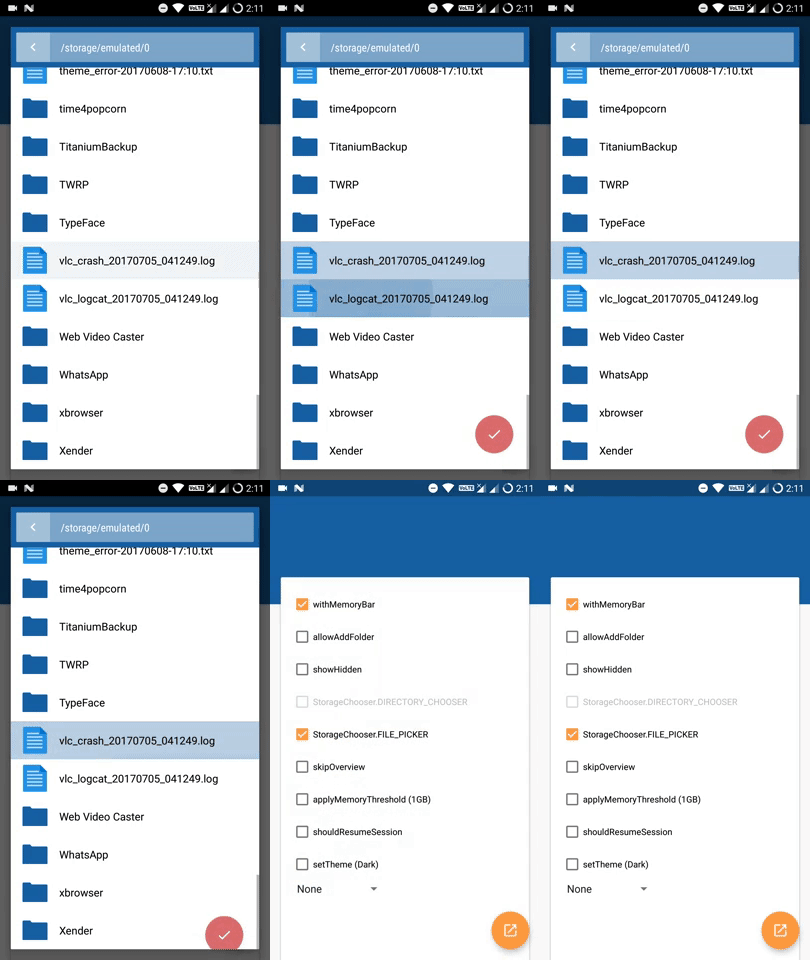
(2.0+) Multiselect
It's already in there you don't need to write any special code for it. Just make sure your type of chooser is of type FILE_PICKER.
builder.setType(StorageChooser.FILE_PICKER);
More information
License
This project is licensed with the Mozilla Public License v2.
In practice, you can use this library as-is, with a notification of it being used. If you make any changes, you are required to publish your changes under a compatible license.
Contributing
Branch status:
Production |
Development |
|---|---|
| master | inline-3.0 |
You can contribute to this library by creating a pull request.