
cmprmsd/cinelog
cmprmsd/cinelog has 44 GitHub stars and 5 forks. GitHot measured 0 stars in 24 hours. Last checked 2026-11-15 00:00 UTC. Last push 2026-11-09.
What you can do
- Exactly one recording per shell. Each tmux, screen or zellij pane, each ssh login and each terminal tab gets its own cast. cinelog decides who owns the terminal from the PTY itself, never from inherited environment variables. While a multiplexer client runs, the outer recording pauses, so nothing is recorded twice.
- Exact command boundaries. Commands are marked in-band with a per-recording nonce. The recorder strips and timestamps these markers, so a command can only land in the cast of the shell that ran it (PROTOCOL.md).
- Fast search over commands and their rendered output (SQLite FTS5 trigram), including sessions that are still running. Use cinelog search with fzf in the terminal, or the search page in the browser.
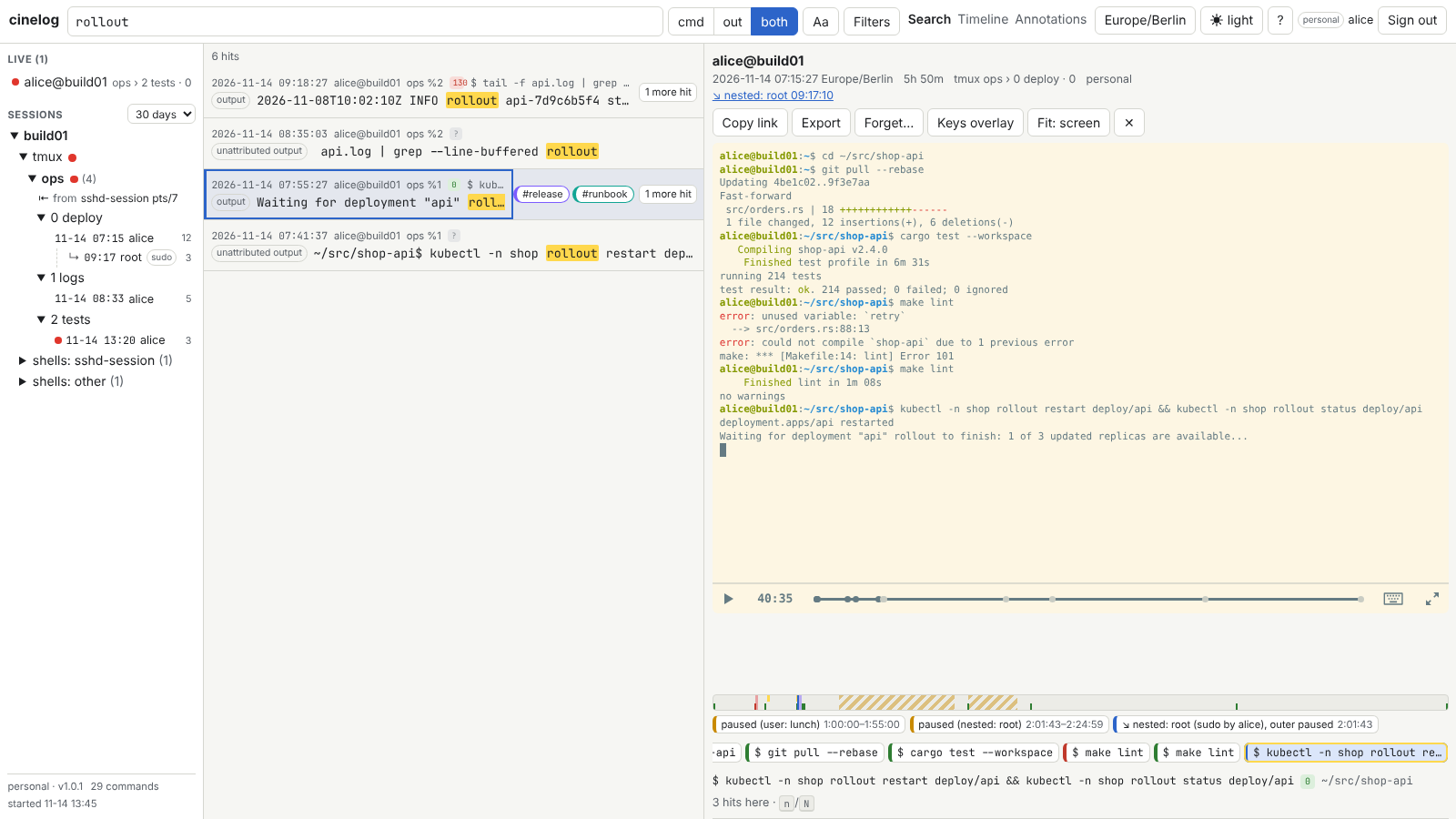
- Web UI: search with a split player and chapters per command, a timeline across panes and users, live view, annotations and tags (with an overview of all annotations and a tag filter for search), and .cast/.txt/.html export. It runs on your LAN over TLS, with a one-time token and an HttpOnly cookie.
Measured star growth
- in 24h
- 0
- in 7 days
- Collecting history
- in 15 days
- Collecting history
- in 1 month
- Collecting history
Net star changes over overlapping periods, not daily totals. Missing measurements are left blank. Stars measure attention, not software quality.
About
Records every interactive zsh session exactly once and lets you search, replay and watch them live in a web UI. One static Rust binary plus a zim module.
Developer ToolsREADME.md
Originalcinelog
cinelog records every interactive zsh session exactly once, as an asciicast v3 file. Each command gets an exact marker with the typed text, its expansion, the working directory and the exit status. A built-in HTTPS server indexes the recordings and lets you search commands and their output in milliseconds. It also replays any session at the moment a hit happened, watches running shells live, and draws a timeline of everything that ran.
It is one static binary (cinelog) and a thin zim module
(cinelog.plugin.zsh). It does not need asciinema, Python or a separate viewer.
Features
- Exactly one recording per shell. Each tmux, screen or zellij pane, each ssh login and each terminal tab gets its own cast. cinelog decides who owns the terminal from the PTY itself, never from inherited environment variables. While a multiplexer client runs, the outer recording pauses, so nothing is recorded twice.
- Exact command boundaries. Commands are marked in-band with a per-recording nonce. The recorder strips and timestamps these markers, so a command can only land in the cast of the shell that ran it (PROTOCOL.md).
- Fast search over commands and their rendered output (SQLite FTS5 trigram), including
sessions that are still running. Use
cinelog searchwith fzf in the terminal, or the search page in the browser. - Web UI: search with a split player and chapters per command, a timeline across panes
and users, live view, annotations and tags (with an overview of all annotations and a tag
filter for search), and
.cast/.txt/.htmlexport. It runs on your LAN over TLS, with a one-time token and an HttpOnly cookie. - Team recording for root shells.
sudo -i,sudo -s,suand root logins are recorded below/root/logs/<member>/. A system unit serves them, and each member has their own token. - Never in the way. If recording cannot start, the shell starts unrecorded with a
single warning. Non-interactive shells (
zsh -i -c, VS Code environment probes) are never recorded. - Old recordings stay readable. Casts from the old plugin are imported read-only, with their command boundaries reconstructed from the old banners.
Contents
- Install
- Team (root) recording
- Daily use
- Web UI
- Configuration
- Upgrading and uninstalling
- Building from source
- Behaviour notes
- Documentation
Install
Requirements: Linux on x86_64 or aarch64, zsh with zim,
and curl or wget. Optional: fzf for interactive search, and systemd for the
server unit. Without systemd, recorded shells start the server themselves.
Add the module to
~/.zimrc, together with the download hook:zmodule cmprmsd/cinelog --on-pull 'zsh shell/fetch.zsh'If the line named the module by its full URL before,
zimfw updatenow stops with "The git URL does not match". Runzimfw reinstallonce and answery.Run
zimfw install.shell/fetch.zshdownloads the release binary for your architecture to<module>/bin/cinelogand checks it against the checksum committed in this repository (shell/checksums/v<VERSION>.sha256). Only then does it replace the previous binary. Without network access it builds the binary withcargo build --release --lockedinstead.Recommended, for the fastest start: make this the first line of
~/.zshrc, above any instant prompt:[[ -r ${ZIM_HOME:-~/.zim}/modules/cinelog/shell/early.zsh ]] && source ${ZIM_HOME:-~/.zim}/modules/cinelog/shell/early.zshWithout this line the module still works, but the start costs one extra partial
.zshrcrun.Open a new terminal and run
cinelog installonce. Until you do, the MOTD sayscinelog: web UI not set up yet - run: cinelog install. Before the install,cinelogin a shell with the module loaded runs<module>/bin/cinelog. The install:- creates the directories with private modes;
- writes a commented
~/.config/cinelog/config.toml; - links
~/.local/bin/cinelog; - installs and starts the user unit
cinelog.service; - ends with the web UI address,
https://<host>:<10000 + your uid>, and the web login token, shown once. The recording of the terminal pauses around the token, so it never lands in a cast.
The server creates its certificate on its first start. Then
cinelog tls show(orcinelog doctor) prints the fingerprint to compare on the login page.If you used the old plugin, see docs/MIGRATING.md first.
The first line of the MOTD shows the session, its cast file and, once the server runs, the session's web address.
cinelog doctorchecks the whole setup.
zimfw update keeps the module and the binary in step. After a new binary has been
verified, install --refresh points the symlink at it and restarts your server.
Checksum trust. The checksum file is the trust anchor, and it has the same trust as the
plugin code you already run. The release workflow commits it to main after the tag, so:
- A module that tracks
main(the default) verifies against the committed file. - A module pinned with
--tag, or to a commit, never gets that commit. The release's ownSHA256SUMScomes from the same server as the binary, sofetch.zshdoes not trust it on its own and builds the pinned source with cargo instead. To use the release binary, copyshell/checksums/v<VERSION>.sha256frommaininto the checkout, or runcinelog-fetch --trust-release-sums.
See shell/checksums/README.md.
As root, fetch.zsh follows stricter rules:
- It trusts only root-owned paths that are not group- or world-writable.
- It ignores
PATH,TMPDIRandCINELOG_FETCH_BASE_URLfrom the environment. - It never builds with cargo.
- Shells only fetch a missing binary in the background for non-root users.
Root normally gets its binary from install --team (below).
Team (root) recording
sudo ~/.zim/modules/cinelog/bin/cinelog install --team --system-zshrc
This installs:
- a root-owned copy of the binary (
/usr/local/bin/cinelog) and of the plugin; - a guarded block in
/etc/zsh/zshrc; - the hardened system unit
cinelog-team.service(team web server on port 10000); - the first named token, for you.
From then on, root shells (sudo -s, sudo -i, su, root logins on the console or over
ssh) are recorded below /root/logs/<member>/, without a zim setup for root. Bash root
shells are not covered.
Before that, a root zsh that loads your module (through your .zimrc) starts no team
recording. Root never runs a binary that a user owns, and cinelog-fetch refuses to work in your
module as root. Instead the root shell prints the install command above with the module's
real path.
The install prints your member token once, as its last lines, with the recording paused
around it. That covers the recording of a root shell and your own recording around sudo.
- Always call the module's binary by its full path under sudo. sudo's
secure_pathmakes a barecinelogthe installed team binary, which may be older. - Add members with
sudo cinelog token new <name>and remove them withsudo cinelog token revoke <name>. Revoking also ends that member's web sessions. - Each member runs the
cinelog token team-login --url … --fingerprint …line thatinstallprints once. After that,cinelog search --teamsearches the team history from their own shell. - Give the team server a host name of its own (
server.hostnamesin/etc/cinelog/team.toml). Browsers share cookies across ports, and a separate name keeps the team cookie away from personal servers on the same host (SECURITY.md).
Team recording is a convenience, not an audit control. cinelog pause, the kill switch
/etc/cinelog/disable, record.nested = "ignore" and commands that start with a space all
stay allowed. Every pause or skip leaves a visible mark in the timeline.
Daily use
| Command | What it does |
|---|---|
cinelog search [-a] [TERM] |
Searches commands (and with -a also their output) in fzf. The preview shows the command and its output. Enter prints the web link, and opens it on a local desktop. --print and --json skip fzf |
cinelog search --cwd . TERM |
Only commands run in this directory and below. Also takes --user, --host, --since 2d, --until, --exit fail, --pane %3 |
cinelog search --tag ops TERM |
Only commands and output an annotation tagged ops is attached to (a note on the command, or a marked time span). Repeat --tag or separate with commas: one annotation must carry all of them. Result lines show a command's tags as [db,ops] (tags in --json) |
cinelog search --team TERM |
Searches the team server's history over HTTPS (after cinelog token team-login) |
cinelog show <id> |
Prints one command with its output (<uuid>:<seq>), or a whole session |
cinelog link [--json] |
Prints the session uuid, cast path and web URL of the current shell |
cinelog pause [--reason TEXT], cinelog resume |
Pauses and resumes the recording, leaving a visible pause marker. resume also continues a recording that stopped on a full disk |
cinelog forget <uuid>[:<seq>] |
Removes a session or command from the index, and masks it in playback and export. The cast on disk is not changed |
cinelog status, cinelog import --report |
Indexer state; per-file results of the legacy import (numbers only) |
cinelog index --once | --rebuild |
Indexes once, or rebuilds the index from the casts. Annotations live in meta.db and are kept |
cinelog token new|list|revoke, cinelog tls show|regen |
Web login tokens; the certificate's fingerprint, names and expiry |
cinelog meta export|import FILE |
Annotations, tags and the forget list as JSON Lines. A copy is also written every night |
cinelog compress --now|--dry-run |
Compresses finished casts older than retention.compress_after_days with zstd. Reads stay transparent, and legacy casts are never compressed |
cinelog archive-legacy --to DIR [--dry-run] |
Writes zstd copies of the old plugin's casts to DIR, keeping their layout. The originals are not changed; delete them yourself once you have checked the copies |
cinelog doctor [--json] |
Checks the binary, plugin, units, server, certificate, DB location, terminal detection and version skew |
In a recorded shell:
- MOTD and banners. The MOTD starts with
cinelog: session <id> → <cast>. Every command gets right-alignedBegin [...]/End [...]banners. Both can be switched off in[shell].csclears the screen and prints the MOTD again. - Unrecorded commands. A command that starts with a space gets no command entry. Its output is still recorded, and the timeline shows an "unrecorded command" mark.
- Keystrokes are recorded, except:
- at password-like prompts: echo off in canonical mode, or a prompt ending in a colon
after
password,passphrase,passcode,PINortoken(alsoPasswort,Kennwort); - while the recording is paused.
- at password-like prompts: echo off in canonical mode, or a prompt ending in a colon
after
- Switching recording off.
touch ~/.config/cinelog/disablestops recording new shells. Root uses/etc/cinelog/disable.
Casts are written to ~/logs/<YYYY-MM>/<host>_<time>_<id>.cast with mode 0600. Team casts go
to /root/logs/<member>/<YYYY-MM>/.
Web UI
cinelog link prints the URL of the current session. The personal server listens on
https://<host>:<10000+uid>/ and the team server on port 10000. Sign in with the token that
install printed, or create a new one with cinelog token new. Before you type the token,
compare the fingerprint on the login page with the one cinelog tls show prints on the
server's host (for the team server, install --team printed it too).
| Light | Dark | |
|---|---|---|
| Search: hits in commands and output, the session at the hit, chapters per command |  |
 |
| Session: pause and nested-session bands, the command strip, annotations with tags |  |
 |
| Timeline: one row per pane or shell, coloured by exit status, pauses hatched, idle time collapsed |  |
 |
| Annotations: every note of the server, newest first, with its command or time span; filter by tag, author, text and time |  |
 |
| Live: a running shell, read-only; a late joiner sees the current screen |  |
 |
Keyboard: everything works without a mouse (?) |
 |
 |
| Login: token once, then an HttpOnly session cookie; the certificate fingerprint to compare |  |
 |
The screenshots show a synthetic demo data set. pnpm -C web docs:shots regenerates them
(web/e2e/docs/).
Keys:
| Key | Action |
|---|---|
/ |
Search |
j / k, Enter, o |
Move through results, open one, open it in a new tab |
n / N |
Next or previous hit in the open session |
[ / ] |
Previous or next command |
Space, , / . |
Play or pause; step back or forward 5 s |
w |
Fit the whole terminal into the window, or fill the width and scroll |
t |
Timeline |
A |
Annotations overview |
l |
Switch between the recording and the live view |
a |
Annotate |
e |
Export |
? |
All shortcuts |
The theme follows the system. The header toggle switches between auto, light and dark. Times are shown in your local zone, and a UTC toggle switches them.
The certificate is self-signed and valid for 825 days. It is regenerated when the host
name or the stable addresses change, or when it is about to expire. doctor and the login
page then show the new fingerprint. It covers:
- the host names and
server.hostnames; - the stable local addresses.
Temporary IPv6 addresses and the addresses of virtual interfaces (docker, bridges,
WireGuard, VPNs …) are left out, so the fingerprint does not change on every restart. The
server still answers on those addresses. To put one into the certificate, list it in
server.hostnames. To use your own certificate, set server.tls_cert and server.tls_key.
Sessions are bound to the browser's address and User-Agent. They expire after 12 h idle or 7 days, whichever comes first. The API is documented in docs/API.md.
Configuration
~/.config/cinelog/config.toml is personal; /etc/cinelog/team.toml is for the team.
Every key is optional. cinelog install writes a commented template with all defaults.
The most useful keys:
| Key | Default | |
|---|---|---|
paths.logs |
~/logs |
Where casts go. Team: set only in /etc/cinelog/team.toml (default /root/logs), never taken from $HOME; install --team adapts the unit's BindPaths |
record.input |
true |
Record keystrokes (subject to the password rules above) |
record.input_suppress |
["password-prompt", "prompt-heuristic", "paused", "terminal-responses"] |
Add "relay" to drop all keystrokes while sudo, ssh and the like run in the foreground |
record.nested |
"pause" |
What your recording does while a nested sudo recording runs: pause, record (copies root content into your personal cast) or ignore |
record.mirror_cmdline |
true |
Show the foreground command in the recorder's command line (tmux automatic-rename) |
record.rotate_mb, record.rotate_days |
512, 7 |
Continue long sessions in a new part. The UI shows one session |
shell.motd, shell.banners, shell.title, shell.title_link |
true, true, true, false |
Prompt-side extras; title_link puts the session URL into the window title |
server.autostart |
"auto" |
auto (systemd unit, else started by the recorder), systemd, shell or off |
server.bind |
["0.0.0.0:auto", "[::]:auto"] |
auto is 10000 (team) or 10000 + uid (personal); the chosen port is kept |
server.hostnames |
[] |
Extra names for the certificate and the Host check |
index.output, index.gap_output |
true, true |
Index command output, and output outside commands |
index.redact |
[] |
Optional regexes masked at index time. Off by default; nothing is redacted |
retention.compress_after_days |
14 |
zstd compression of finished casts |
A broken config makes new shells start unrecorded, with one warning, until it is fixed.
cinelog doctor shows the error.
Upgrading and uninstalling
- Personal:
zimfw update. The new binary is verified and swapped in by rename. Running recorders keep their old executable until their shell exits. - Team:
sudo ~/.zim/modules/cinelog/bin/cinelog install --team --upgrade. This copies the verified binary, refreshes the plugin copy and restarts the team server. - Version skew between the plugin, your binary, the team binary and the servers is
allowed within 1.x. The MOTD and
cinelog doctorreport it and print the exact upgrade command (docs/STABILITY.md). - Uninstall:
cinelog install --uninstall(andsudo … install --team --uninstall) removes the units, symlinks and the system zshrc block. Then remove thezmoduleline. Casts and databases stay where they are.
Coming from the old Python/asciinema plugin, or from a 0.x pre-release: see docs/MIGRATING.md.
Building from source
pnpm -C web install --frozen-lockfile && pnpm -C web build   # the web UI (optional)
cargo build --release --locked                                # target/release/cinelog
- The binary embeds
web/distwhen it exists. Without it, the binary serves a short page that explains how to build the UI; the API still works. CINELOG_WEB_DIST=<dir>embeds another build. It is read at build time, and a relative path is taken from the repository root (not from the current directory).- Tests:
cargo test --workspace;pnpm check,pnpm lintandpnpm testinweb/;pnpm -C web e2eagainst a mock server;CINELOG_E2E_BIN=../target/debug/cinelog pnpm -C web e2e:realagainst a real server (the path is relative toweb/). - The integration tests in
tests/itdrive real zsh and tmux instances, each on a private tmux socket. The tests that need root are listed in docs/MANUAL-TESTS.md.
Behaviour notes
- tmux and terminal integration. The recorder takes the place of the shell process.
- It follows the shell's working directory, so
#{pane_current_path}and "open a new tab here" keep working. - It mirrors the foreground command into its own command line, so tmux automatic-rename
shows
vimorsleeprather thancinelog.ps -o commstill showscinelog.
- It follows the shell's working directory, so
- Login shells. The outer shell execs into the recorder while it reads
.zshrc. The recorded inner shell is not a login shell, so.zlogindoes not run. Move its content to.zshrc. Exported variables can also go to.zprofile, which the outer login shell reads before the exec. - powerlevel10k instant prompt above the module works. Sourcing
shell/early.zshat the top of.zshrcis still the recommended setup. - Failure never blocks a shell. If recording cannot start (a full or unwritable log
directory, a broken config, a missing binary), the shell starts unrecorded. It prints one
cinelog: not recordingwarning and writes the reason to~/.local/state/cinelog/rec.log. - Forgetting is not erasing.
forgetremoves rows from the index and masks playback and export. It never rewrites a cast: root and the cast's owner can still read the file. There is no automatic secret redaction (SECURITY.md). histandhereare gone. Usecinelog searchandcinelog search --cwd .(this directory and below). The old per-folder history in~/.zsh_history.d/is left alone.
Documentation
| Document | |
|---|---|
| docs/MIGRATING.md | From the old plugin, or from 0.10–0.13, to 1.0; rollback |
| docs/SECURITY.md | Threat model, what is recorded, who can read it, the web server's defences, residual risks |
| docs/STABILITY.md | What stays stable across 1.x, and the version-skew policy |
| docs/PROTOCOL.md | The marker protocol, the cast format and the shell ⇄ binary interface |
| docs/API.md | The web API (v1) |
| docs/MANUAL-TESTS.md | The manual test matrix for a release |
License and credits
GPL-3.0-or-later. Thanks to Marcin ku1ik for the asciinema suite, whose cast format and player cinelog builds on.