
citerus/dddsample-core
citerus/dddsample-core has 5,296 GitHub stars and 1,493 forks. GitHot measured 0 stars in 24 hours. Last checked 2026-11-07 13:47 UTC. Last push 2025-06-02.
This is the new home of the original DDD Sample app (previously hosted at sf.net)..
Measured star growth
- in 24h
- 0
- in 7 days
- Collecting history
- in 15 days
- Collecting history
- in 1 month
- Collecting history
Net star changes over overlapping periods, not daily totals. Missing measurements are left blank. Stars measure attention, not software quality.
README.md
OriginalDDDSample

This is the new home of the original DDD Sample app hosted at SourceForge.
Our intention is to move everything from SourceForge to GitHub in due time while starting upgrading both the technical aspects as well as the DDD aspects of the DDD Sample.
This project is a joint effort by Eric Evans' company Domain Language and the Swedish software consulting company Citerus.
The application uses Spring Boot. To start it go to the root directory and type mvn spring-boot:run or run the main method of the Application class from your IDE.
Then open http://localhost:8080/dddsample in your browser (and make sure that no firewall is blocking the communication and that Javascript for localhost is not blocked).
Discussion group: https://groups.google.com/forum/#!forum/dddsample
Development blog: https://citerus.github.io/dddsample-core/
Trello board: https://trello.com/b/PTDFRyxd
How to build
Using Maven (we recommend using the included Maven wrapper), run this command to compile and run all the tests:
./mvnw verify
If you want to compile without running the tests, run the following command:
./mvnw compile
For Windows users, use the included mvnw.cmd file instead, without the ./ but using the same arguments.
Use this command to generate the site's documentation
./mvnw site:run
The site can then be accessed at http://localhost:8080.
How to run
To start the app using the included application server and in-process HSQL database, run this command:
./mvnw spring-boot:run
For Windows users, use the included mvnw.cmd file instead, without the ./ but using the same arguments.
Entity relationships
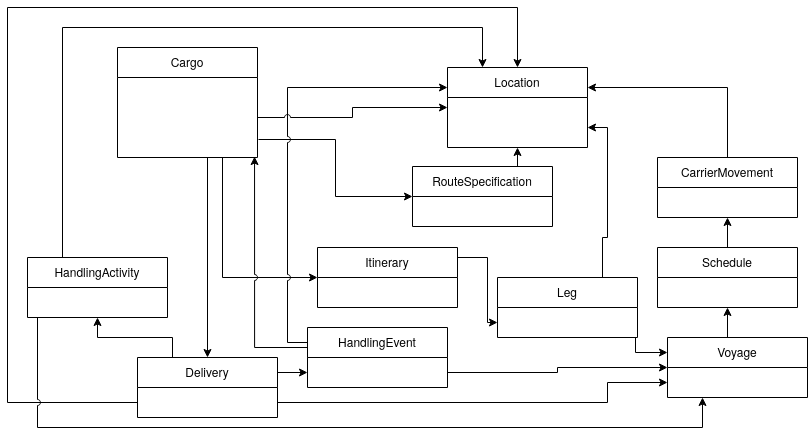
The diagram was created with diagrams.net (formerly draw.io).
Using the HandlingReport REST API
The HandlingReport API has one endpoint that takes a JSON request body:
POST /dddsample/handlingReport
You can use cURL to send the request using an JSON file for the body:
curl --data-binary "@/path/to/project/src/test/resources/sampleHandlingReport.json" \
-H 'Content-Type: application/json;charset=UTF-8' \
http://localhost:8080/dddsample/handlingReport
See the api-docs.yaml file for a complete API definition.
Explore related projects
codecrafters-io/build-your-own-x
Master programming by recreating your favorite technologies from scratch.
560,715 starspublic-apis/public-apis
A collective list of free APIs
496,954 starsmorluto/rea
Reverse engineer anything with agents, from app behavior down to native binaries.
440,341 starsopenclaw/openclaw
The AI that really does things. Any OS. Any Platform. The lobster way. 🦞
394,125 stars